文章目录
QT_QFontDialog类字体对话框
QFontDialog 是 Qt 框架中用于让用户选择字体(包括字体族、大小、样式等)的标准对话框组件,继承自 QDialog,属于 Qt Widgets 模块。
功能与使用方式
静态方法快速调用
最常用的是 QFontDialog::getFont(),它会弹出一个模态对话框,用户选择后返回一个 QFont 对象和一个布尔值(表示是否点击"确定")。
实例化自定义对话框
也可以创建 QFontDialog 对象,通过 exec() 或 open() 显示,并连接 currentFontChanged 信号实现实时预览。
支持选项配置
可通过 FontDialogOption 枚举控制对话框行为,例如:
- DontUseNativeDialog:强制使用 Qt 自绘界面而非系统原生对话框。
- NoButtons:隐藏"确定"和"取消"按钮,适合嵌入自定义界面。
- ScalableFonts:仅显示可缩放字体。
代码示例
cpp
#include <QFontDialog>
#include <QFont>

bool ok;
QFont font = QFontDialog::getFont(&ok, QFont("Arial", 12), this, "选择字体");
if (ok) {
    // 用户点击了"确定",font 包含所选字体
    myLabel->setFont(font);
} else {
    // 用户点击了"取消"
}
使用案例
dialog.h
cpp
#ifndef DIALOG_H
#define DIALOG_H

#include <QDialog>
#include <QPushButton>
#include <QFontDialog>
#include <QGridLayout>
#include <QLineEdit>

class Dialog : public QDialog
{
    Q_OBJECT

public:
    Dialog(QWidget *parent = nullptr);
    ~Dialog();
private:
    QGridLayout *glayout;
    QPushButton *fontbutton;
    QLineEdit *fontlineedit;
private slots:
    void displayFontFunc();
};
#endif // DIALOG_H
dialog.cpp
cpp
#include "dialog.h"

Dialog::Dialog(QWidget *parent)
    : QDialog(parent)
{
    setWindowTitle(u8"字体对话框测试");
    glayout = new QGridLayout(this);

    fontbutton = new QPushButton(u8"调用字体对话框");

    fontlineedit = new QLineEdit;

    fontlineedit->setText(u8"天王盖地虎");

    glayout->addWidget(fontbutton, 0, 0);
    glayout->addWidget(fontlineedit, 0, 1);
    connect(fontbutton, SIGNAL(clicked()), this, SLOT(displayFontFunc()));

}
Dialog::~Dialog()
{
}

void Dialog::displayFontFunc(){
    bool isbool;
    QFont font = QFontDialog::getFont(&isbool);

    if (isbool) {
        fontlineedit->setFont(font);
    }
}
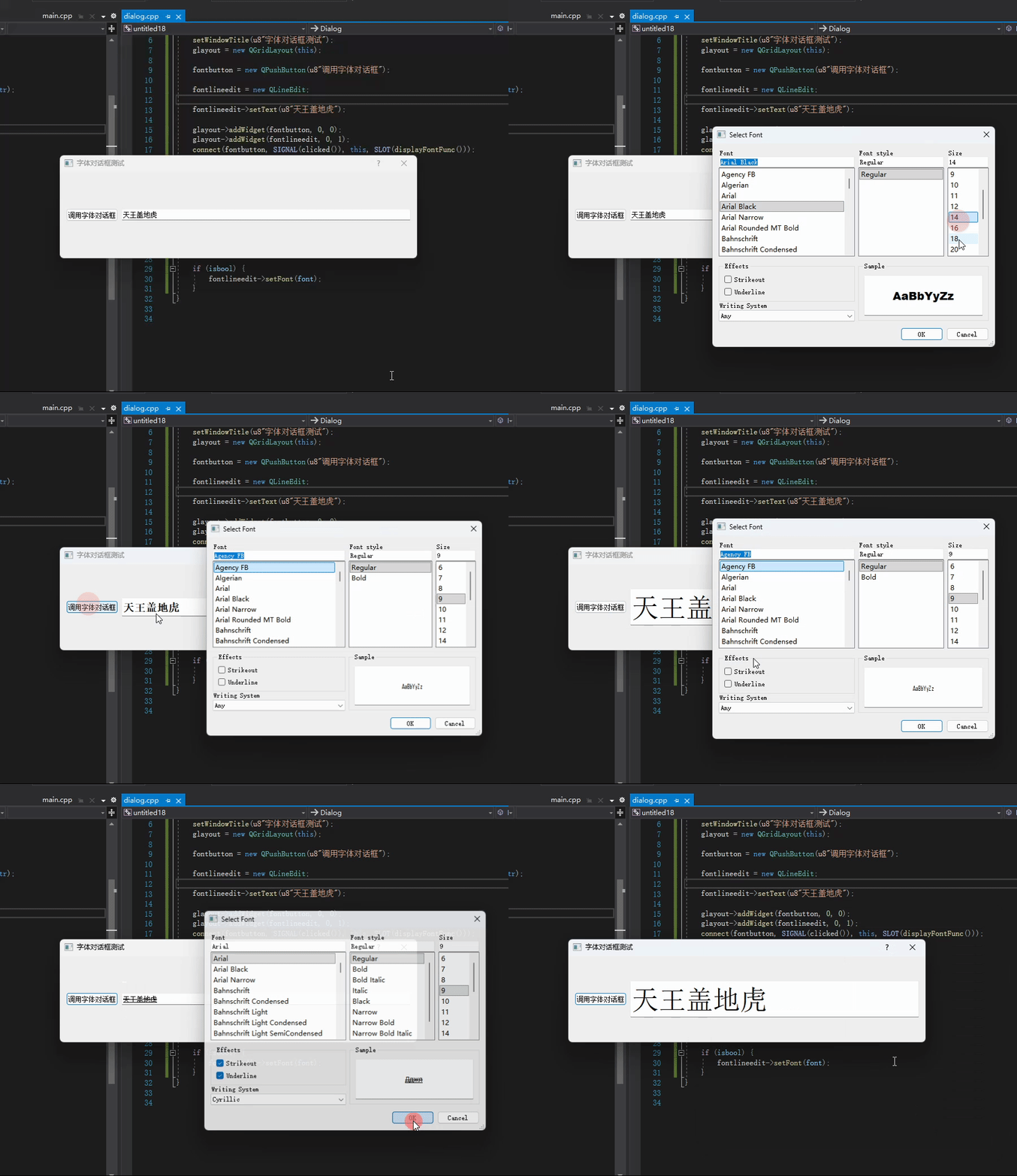
效果: