彻底修复步骤(请严格按顺序执行)
第一步:彻底清理所有冲突库
打开文件夹 C:\Users\san\Documents\Arduino\libraries\,删除以下所有文件夹(如果存在):
ESPAsyncWebServerESP_Async_WebServerAsyncTCP
⚠️ 必须删干净再往下走,否则 IDE 缓存会继续引用旧库。
第二步:安装完全兼容的新版组合
Arduino IDE → 项目 → 加载库 → 从URL添加库...,依次粘贴以下两个地址并确定:
https://github.com/mathieucarbou/AsyncTCP/archive/refs/heads/main.zip

https://github.com/mathieucarbou/ESPAsyncWebServer/archive/refs/heads/main.zip
💡 关键点 :
mathieucarbou维护的这两个库是配套发布 的,专门针对 ESP32 Arduino Core v3.x / IDF 5.1+ 重写了底层锁机制,不再访问pxCurrentTCB,且 API 与原版 me-no-dev 100% 兼容,你的业务代码无需任何修改。
第三步:验证库唯一性
安装完成后,再次打开 C:\Users\san\Documents\Arduino\libraries\,确认只有以下两个文件夹:
AsyncTCP-main(或AsyncTCP)ESPAsyncWebServer-main(或ESPAsyncWebServer)
如果还有其他同名文件夹,继续删除。
第四步:重新编译
关闭并重新打开 Arduino IDE(清除编译器缓存),然后点击编译。
方法二:如果库管理器里找不到卸载选项
说明索引已损坏,需要手动清理缓存:
彻底删除库文件夹:
打开 C:\Users\san\Documents\Arduino\libraries\,删除所有包含 Async 或 ESPAsync 的文件夹
清除 IDE 库索引缓存:
打开文件夹 C:\Users\san\AppData\Local\Arduino15\,删除文件:
library_index.json
library_index.json.gz
(删除后 IDE 会在下次打开时自动重建索引)
重启 Arduino IDE
重新通过 从URL添加库... 安装上述两个 ZIP
添加库文件
项目-导入库-添加.ZIP库,直接输入链接
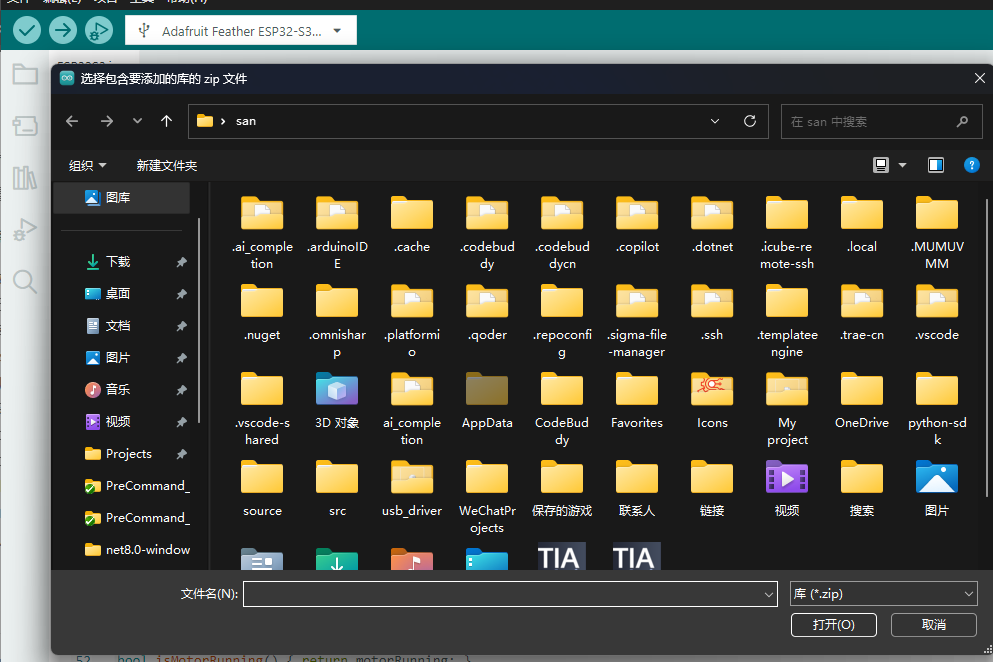
文件名:https://github.com/mathieucarbou/AsyncTCP/archive/refs/heads/main.zip
文件名:https://github.com/mathieucarbou/ESPAsyncWebServer/archive/refs/heads/main.zip完整代码
#include <dummy.h>

/*
 * ESP32-S3 Motor Controller + WS2812B Status LED
 * 硬件: ESP32-S3, GPIO48=WS2812B, UART1(TX=4,RX=5)→电机驱动板
 * 功能: WiFi AP/STA + WebSocket 遥控 + 心跳安全停止 + RGB状态指示
 */

#include <map>
#include <Arduino.h>
#include <WiFi.h>
#include <ESPAsyncWebServer.h>
#include <Adafruit_NeoPixel.h>

// ==================== CONFIG ====================
const char* WIFI_SSID     = "Xiaomi_806";
const char* WIFI_PASSWORD = "123123123";
const String VALID_CMDS   = "FBLR+-S";

#define UART1_TX_PIN      4
#define UART1_RX_PIN      5
#define SERIAL_BUF_SIZE   256
#define HEARTBEAT_INTERVAL_MS 400
#define HEARTBEAT_TIMEOUT_MS  1000
#define STOP_CMD          'S'

#define RGB_LED_PIN       48
#define RGB_LED_COUNT     1

// ==================== RGB LED ====================
Adafruit_NeoPixel rgbLed(RGB_LED_COUNT, RGB_LED_PIN, NEO_GRB + NEO_KHZ800);

#define LED_RED()    do { rgbLed.setPixelColor(0, 255, 0, 0);   rgbLed.show(); } while(0)
#define LED_GREEN()  do { rgbLed.setPixelColor(0, 0, 255, 0);   rgbLed.show(); } while(0)
#define LED_BLUE()   do { rgbLed.setPixelColor(0, 0, 0, 255);   rgbLed.show(); } while(0)
#define LED_YELLOW() do { rgbLed.setPixelColor(0, 255, 255, 0); rgbLed.show(); } while(0)
#define LED_OFF()    do { rgbLed.clear(); rgbLed.show(); } while(0)

// ==================== MOTOR CTRL ====================
struct ClientState {
    unsigned long lastHeartbeat;
    bool isControlling;
};

static std::map<uint32_t, ClientState> clientStates;
static bool motorRunning = false;

void motorInit() {
    Serial1.begin(115200, SERIAL_8N1, UART1_RX_PIN, UART1_TX_PIN);
}

bool isMotorRunning() { return motorRunning; }
void setMotorRunning(bool running) { motorRunning = running; }

bool hasActiveController() {
    unsigned long now = millis();
    for (const auto& p : clientStates)
        if (p.second.isControlling && (now - p.second.lastHeartbeat <= HEARTBEAT_TIMEOUT_MS))
            return true;
    return false;
}

void clearAllControllers() {
    for (auto& p : clientStates) p.second.isControlling = false;
}

void registerClient(uint32_t id) { clientStates[id] = {millis(), false}; }

void unregisterClient(uint32_t id, bool& wasControlling) {
    auto it = clientStates.find(id);
    wasControlling = false;
    if (it != clientStates.end()) {
        wasControlling = it->second.isControlling;
        clientStates.erase(it);
    }
}

void refreshHeartbeat(uint32_t id) {
    auto it = clientStates.find(id);
    if (it != clientStates.end()) it->second.lastHeartbeat = millis();
}

void markAsController(uint32_t id) {
    auto it = clientStates.find(id);
    if (it != clientStates.end()) {
        it->second.isControlling = true;
        it->second.lastHeartbeat = millis();
    }
}

void unmarkController(uint32_t id) {
    auto it = clientStates.find(id);
    if (it != clientStates.end()) it->second.isControlling = false;
}

bool checkControllerTimeout() {
    unsigned long now = millis();
    for (const auto& p : clientStates)
        if (p.second.isControlling && (now - p.second.lastHeartbeat > HEARTBEAT_TIMEOUT_MS))
            return true;
    return false;
}

// ==================== WEBSOCKET ====================
static AsyncWebSocket ws("/ws");

void wsBroadcastText(const String& msg) { ws.textAll(msg); }

void safeStop(const char* reason) {
    if (motorRunning) {
        Serial1.write(STOP_CMD);
        motorRunning = false;
        Serial.printf("[⚠️ SAFE STOP] %s -> '%c'\n", reason, STOP_CMD);
        wsBroadcastText(String("[SAFE] ") + reason);
        LED_RED();
    }
}

static void onWsEvent(AsyncWebSocket* server, AsyncWebSocketClient* client,
                      AwsEventType type, void* arg, uint8_t* data, size_t len) {
    uint32_t id = client->id();

    if (type == WS_EVT_CONNECT) {
        Serial.printf("[WS] #%u connected\n", id);
        registerClient(id);
        client->text(("IP: " + WiFi.localIP().toString()).c_str());
        client->text("Connected to Motor Ctrl");
    }
    else if (type == WS_EVT_DISCONNECT) {
        Serial.printf("[WS] #%u disconnected\n", id);
        bool wasControlling = false;
        unregisterClient(id, wasControlling);
        if (wasControlling && !hasActiveController())
            safeStop("Controller Disconnected");
    }
    else if (type == WS_EVT_DATA) {
        String msg = String((char*)data).substring(0, len);
        msg.trim();
        if (msg == "H" || msg == "heartbeat") { refreshHeartbeat(id); return; }

        for (unsigned int i = 0; i < msg.length(); i++) {
            char c = msg.charAt(i);
            if (VALID_CMDS.indexOf(c) != -1) {
                Serial1.write(c);
                if (c == STOP_CMD) {
                    unmarkController(id);
                    if (!hasActiveController()) setMotorRunning(false);
                } else if (c == 'F' || c == 'B' || c == 'L' || c == 'R') {
                    setMotorRunning(true);
                    markAsController(id);
                }
            }
        }
    }
}

// ==================== WEB PAGE ====================
const char INDEX_HTML[] PROGMEM = R"rawliteral(
<!DOCTYPE html><html><head><meta charset="utf-8">
<meta name="viewport" content="width=device-width,initial-scale=1,user-scalable=no">
<title>Motor Ctrl</title>
<style>
  body{font-family:sans-serif;text-align:center;padding:20px;background:#222;color:#fff;margin:0;
       -webkit-user-select:none;user-select:none;}
  .btn-grid{display:grid;grid-template-columns:repeat(3,1fr);gap:10px;max-width:300px;margin:20px auto}
  button{padding:20px;font-size:24px;border:none;border-radius:8px;cursor:pointer;background:#444;color:#fff;
         touch-action:none;}
  button.active{background:#0a0 !important;}
  #status{margin-top:10px;color:#aaa;font-size:14px}
  #uart-log{width:90%;max-width:500px;height:180px;margin:15px auto;background:#111;color:#0f0;
            font-family:'Consolas',monospace;font-size:13px;padding:10px;box-sizing:border-box;
            overflow-y:auto;border-radius:6px;text-align:left;white-space:pre-wrap;word-break:break-all;
            border:1px solid #333;}
</style></head><body>
<h2>🎮 Motor Control</h2>
<div class="btn-grid">
  <div></div><button data-cmd="F">F</button><div></div>
  <button data-cmd="L">L</button><button data-cmd="S">S</button><button data-cmd="R">R</button>
  <div></div><button data-cmd="B">B</button><div></div>
</div>
<div style="margin-top:15px">
  <button onclick="send('+')">Speed +</button>
  <button onclick="send('-')">Speed -</button>
</div>
<p id="status">Connecting...</p>
<div id="uart-log">// 等待串口数据...</div>
<script>
let ws,logBox=document.getElementById('uart-log'),isFirstMsg=true,activeCmd=null,isTouch=false,hbTimer=null;
function connect(){
  ws=new WebSocket(`ws://${location.host}/ws`);
  ws.onopen=()=>{document.getElementById('status').innerText='✅ Connected';startHB();};
  ws.onclose=()=>{document.getElementById('status').innerText='❌ Disconnected';stopHB();setTimeout(connect,2000);};
  ws.onerror=()=>ws.close();
  ws.onmessage=(e)=>{
    if(isFirstMsg){logBox.innerHTML='';isFirstMsg=false;}
    const t=new Date().toLocaleTimeString('zh-CN',{hour12:false});
    const l=document.createElement('div');l.textContent=`[${t}] ${e.data}`;
    if(e.data.startsWith('[SAFE]'))l.style.color='#f44';
    logBox.appendChild(l);logBox.scrollTop=logBox.scrollHeight;
    while(logBox.childElementCount>200)logBox.removeChild(logBox.firstChild);
  };
}
function startHB(){stopHB();hbTimer=setInterval(()=>{if(ws&&ws.readyState===1)ws.send('H');},500);}
function stopHB(){if(hbTimer){clearInterval(hbTimer);hbTimer=null;}}
function send(c){if(ws&&ws.readyState===1)ws.send(c);}
function pressBtn(b,c){if(activeCmd===c)return;activeCmd=c;b.classList.add('active');send(c);}
function releaseBtn(b){b.classList.remove('active');if(activeCmd&&activeCmd!=='S')send('S');activeCmd=null;}
document.querySelectorAll('button[data-cmd]').forEach(b=>{
  const c=b.dataset.cmd;
  b.addEventListener('touchstart',e=>{e.preventDefault();isTouch=true;pressBtn(b,c);},{passive:false});
  b.addEventListener('touchend',e=>{e.preventDefault();releaseBtn(b);});
  b.addEventListener('touchcancel',e=>{e.preventDefault();releaseBtn(b);});
  b.addEventListener('mousedown',e=>{if(!isTouch)pressBtn(b,c);});
  b.addEventListener('mouseup',()=>{if(!isTouch)releaseBtn(b);});
  b.addEventListener('mouseleave',()=>{if(!isTouch&&activeCmd)releaseBtn(b);});
});
document.addEventListener('touchend',()=>{
  if(activeCmd&&activeCmd!=='S'){const a=document.querySelector('button.active');if(a)releaseBtn(a);else{send('S');activeCmd=null;}}
});
document.addEventListener('touchstart',()=>{},{passive:true});
setTimeout(()=>{isTouch=false;},300);
connect();
</script></body></html>
)rawliteral";

// ==================== SETUP & LOOP ====================
AsyncWebServer server(80);

void setup() {
    Serial.begin(115200);

    // RGB LED 初始化
    rgbLed.begin();
    rgbLed.setBrightness(80);
    LED_BLUE();  // 🔵 启动中

    motorInit();

    WiFi.begin(WIFI_SSID, WIFI_PASSWORD);
    Serial.print("Connecting WiFi");
    while (WiFi.status() != WL_CONNECTED) { delay(500); Serial.print("."); }
    Serial.printf("\n✅ IP: %s\n", WiFi.localIP().toString().c_str());
    LED_GREEN();  // 🟢 WiFi 已连接

    ws.onEvent(onWsEvent);
    server.addHandler(&ws);
    server.on("/", HTTP_GET, [](AsyncWebServerRequest* req) {
        req->send(200, "text/html", INDEX_HTML);
    });
    server.begin();
    Serial.println("🚀 Server Started");
}

void loop() {
    ws.cleanupClients();

    // 心跳超时 → 安全停止
    if (checkControllerTimeout() && isMotorRunning()) {
        safeStop("Controller Heartbeat Timeout");
        clearAllControllers();
    }

    // LED 跟随电机状态(非阻塞)
    static bool lastMotor = false;
    bool curMotor = isMotorRunning();
    if (curMotor != lastMotor) {
        if (curMotor) LED_YELLOW();  // 🟡 电机运行
        else          LED_GREEN();   // 🟢 待机
        lastMotor = curMotor;
    }

    // 串口回传
    static char buf[SERIAL_BUF_SIZE];
    if (Serial1.available()) {
        size_t len = Serial1.readBytesUntil('\n', buf, SERIAL_BUF_SIZE - 1);
        buf[len] = '\0';
        String msg = String(buf); msg.trim();
        if (msg.length() > 0) wsBroadcastText(msg);
    }
    delay(1);
}