CLI系列文章:
本文继续汇总介绍3个项目,并附带部分实战(失败)案例。
后面有时间再排查一下吧。
Jira-cli
Jira系统Web页面卡顿不流畅问题由来已久。开源(GitHub,5.9K Star,402 Fork)项目jira-cli,把最常用的Jira操作都实现成命令行,带交互式TUI界面,也支持脚本化输出。支持:Jira Cloud、Jira Server、Jira Data Center。
实战
GitHub Releases下载预编译二进制,
bash
brew install ankitpokhrel/jira-cli/jira-cli
# docker
ghcr.io/ankitpokhrel/jira-cli:latest
bash
# 交互式初始化配置:Jira服务器地址、用户名和API token
jira init
# 列出当前sprint的issue
jira sprint list
# 用表格格式显示
jira sprint list --table
# 交互式搜索(支持 JQL)
jira issue list -q "assignee = currentUser() AND status != Done"
# 查看 issue 详情(渲染 Markdown 格式描述)
jira issue view PROJ-123
# 创建 issue
jira issue create -t "修复登录页面空指针" -T Bug
# 改变 issue 状态
jira issue move PROJ-123 "In Progress"
# 添加评论
jira issue comment add PROJ-123 "已复现,正在排查"
列表视图支持交互模式,在终端里上下键浏览,回车直接打开详情,还可快捷键触发状态变更或赋值操作。
输出也可以切到 JSON 或 CSV 格式,方便接入脚本做批处理:比如把某个 epic 下的所有 issue 导出来统计进度,或者把特定过滤条件的 issue 批量改标签。
xiaohongshu-cli
开源(GitHub,2.4K Star,245 Fork)小红书CLI工具。
功能特性
- 认证:自动提取浏览器Cookie,
browser-assisted二维码扫码登录,状态检查,用户信息 - 搜索:按关键词搜索笔记、用户、话题
- 阅读:笔记详情、评论、子评论、用户主页
- 发现:推荐Feed、按分类浏览热门
- 社交:关注/取关、收藏夹
- 互动:点赞、收藏、评论、回复、删除
- 创作者:发布图文笔记、我的笔记列表、删除
- 通知:未读数、@、点赞、新关注
- 反风控:macOS Chrome指纹一致性、session级浏览器身份持久化、高斯抖动延迟、验证码自动冷却、指数退避重试
- 结构化输出:
--yaml、--json,非TTY默认输出YAML - 稳定envelope:参见SCHEMA.md
实战
支持多种安装方式:
- 基于uv安装:
uv tool install xiaohongshu-cli - 基于pipx安装:
pipx install xiaohongshu-cli - 基于源码安装:
bash
git clone git@github.com:jackwener/xiaohongshu-cli.git
cd xiaohongshu-cli
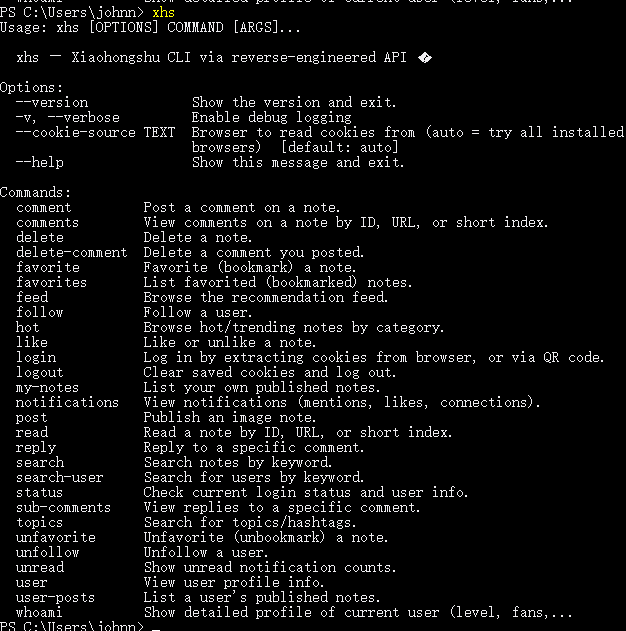
uv sync安装成功后,可执行命令xhs:
执行xhs login命令:

执行xhs login --qrcode命令还是报错:

分析:camoufox是一个浏览器自动化库,camoufox在启动时需要加载一个浏览器扩展,但它的核心配置文件manifest.json没有找到,因此无法正常工作。
执行命令pip install -U camoufox[geoip]安装camoufox。
执行命令camoufox remove清理损坏的文件,执行命令camoufox fetch重新下载核心文件,又遇到新问题:

真要命。
其他命令行示例:
bash
# 认证
xhs status	# 检查登录状态
xhs whoami	# 查看用户资料
xhs logout	# 清除缓存Cookie
# 搜索
xhs search "美食"	# 搜索笔记
xhs search "旅行" --sort popular	# 排序:general, popular, latest
xhs search-user "用户名"	# 搜索用户
xhs topics "美食"	# 搜索话题
# 阅读
xhs read 1	# 阅读最近一次列表里的第1条笔记
xhs read <note_id>	# 阅读笔记,仅走API
xhs read "https://...?xsec_token=..."	# 粘贴网页 URL 直接阅读(使用 URL token)
xhs comments 1	# 查看最近一次列表里的第 1 条笔记评论
xhs comments "<url>"	# 查看评论 --- 粘贴 URL 以缓存/复用 xsec_token
xhs comments "<url>" --all	# 获取全部评论(自动翻页)
xhs comments "<url>" --all --json	# 全部评论,JSON 格式
xhs comments <note_id> --xsec-token T	# 用 note_id + 显式 xsec_token
xhs comments <note_id>	# 如果之前访问过 URL,会复用缓存 token
xhs sub-comments <note_id> <cmt_id>	# 查看评论的回复
xhs user <user_id>	# 用户主页
xhs user-posts <user_id>	# 用户发布的笔记
# 发现
xhs feed	# 推荐 Feed
xhs hot -c food	# 热门笔记(按分类)
xhs hot -c travel	# 分类: fashion, food, cosmetics, movie, career, love, home, gaming, travel, fitness
# 社交
xhs favorites	# 我的收藏(自动识别当前用户)
xhs favorites <user_id>	# 其他用户的收藏
xhs likes	# 我的点赞(自动识别当前用户)
xhs likes <user_id>	# 其他用户的点赞
xhs follow <user_id>	# 关注
xhs unfollow <user_id>	# 取消关注
# 互动
xhs like 1	# 给最近一次列表里的第 1 条笔记点赞
xhs like <note_id>	# 点赞
xhs like <note_id> --undo	# 取消点赞
xhs favorite 1	# 收藏最近一次列表里的第 1 条笔记
xhs favorite <note_id>	# 收藏
xhs unfavorite 1	# 取消收藏最近一次列表里的第 1 条笔记
xhs unfavorite <note_id>	# 取消收藏
xhs comment 1 -c "好棒!"	# 给最近一次列表里的第 1 条笔记发评论
xhs comment <note_id> -c "好棒!"	# 发评论
xhs reply 1 --comment-id X -c "谢谢"	# 给最近一次列表里的第 1 条笔记回复评论
xhs reply <note_id> --comment-id X -c "谢谢"	# 回复评论
xhs delete-comment <note_id> <cmt_id>	# 删除自己的评论

# 创作者
xhs my-notes	# 我的笔记列表
xhs post --title "标题" --body "正文" --images img.jpg	# 发布笔记
xhs delete <note_id>	# 删除笔记
xhs delete <note_id> -y	# 跳过确认
# 通知
xhs unread	# 未读数
xhs notifications	# 评论和 @ 通知
xhs notifications --type likes	# 赞和收藏通知
xhs notifications --type connections	# 新增关注通知
boss-cli
开源(GitHub,873 Star,109 Fork)BOSS直聘CLI工具。
功能特性
- 认证:自动提取浏览器Cookie(10+浏览器),二维码扫码登录,
--cookie-source指定浏览器 - 搜索:按关键词搜索职位,支持城市/薪资/经验/学历/行业/规模/融资阶段/职位类型筛选
- 推荐:基于求职期望的个性化推荐
- 详情:查看职位详情,编号导航
- 导出:CSV/JSON导出
- 历史:查看浏览历史
- 个人:查看个人资料
- 投递:查看已投递职位列表
- 面试:查看面试邀请
- 沟通:查看沟通过的Boss列表
- 打招呼:向Boss打招呼/投递,支持批量操作,内置1.5s防风控延迟
- 城市:40+城市支持
- Agent友好:结构化输出
envelope,Rich输出走stderr - 招聘方模式:查看职位、候选人管理、聊天记录、导出候选人数据(CSV/JSON)
实战
基于Python的uv安装:uv tool install kabi-boss-cli。
以Windows系统为例,会在C:\Users\<user>\.local\bin目录下写入boss.exe文件。uv工具会检测uv安装的工具是否能直接使用,如果之前未执行过uv tool update-shell命令,即没有将C:\Users\<user>\.local\bin目录添加为系统环境变量,则无法直接执行boss命令。执行此命令后,需重启终端重试。
在终端输入boss命令
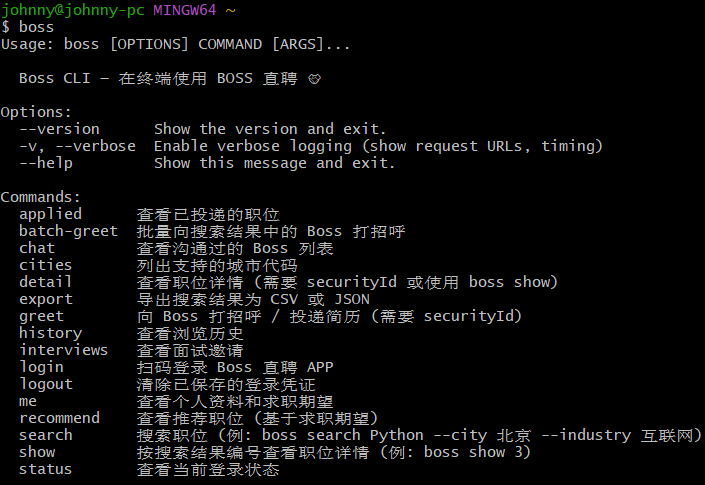
执行boss login发起登录,自动从浏览器提取Cookie,支持Chrome、Safari、Firefox等10多种浏览器,也可扫码登录。Cookie过期重新boss login就行。

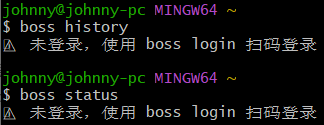
此处遇到的问题是:明明使用BOSS直聘App端扫码登陆,确认成功。执行命令boss status输出异常:
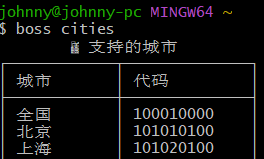
未登录情况下,支持执行部分命令,如boss cities,目前仅此一个(分析,未一一尝试):
Chrome浏览器已登录成功,执行命令boss login --cookie-source chrome依旧失败:
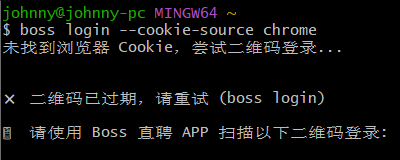
README里写的boss logout && boss login试过还是不行。
一言难尽。
搜索功能:boss search "Python" --city 上海 --salary 20-30K --exp 3-5年,一行命令把所有筛选条件加上。支持40多个城市,薪资、经验、学历、行业、公司规模、融资阶段都能筛。结果分页浏览,boss show 3直接看第3条详情。
批量打招呼:boss batch-greet "golang" --city 上海 -n 10一次性给10个Boss发招呼,内置1.5秒间隔防止限流。
支持雇主端:boss recruiter search "Java" --city 上海可搜候选人,boss recruiter resume <id>看简历,boss recruiter inbox收消息,boss recruiter reply <id> "感谢关注"直接回复。
所有输出都支持--json格式,统一返回结构化数据。可把它接进AI Agent工作流,让Claude或GPT协助筛选职位、分析JD、批量投递。
找工作模式
bash
# 搜索 & 详情
boss search "golang" --city 杭州	# 按城市搜索
boss search "AI" --industry 互联网 --scale 1000-9999人	# 行业+规模
boss search "数据" --stage 已上市 --salary 30-50K	# 融资+薪资
boss show 3	# 按编号查看详情
boss detail <securityId> --json	# 指定ID查看JSON envelope
boss export "Python" -n 50 -o jobs.csv	# 导出CSV
# 推荐 & 历史
boss recommend	# 个性化推荐
boss history	# 浏览历史
# 个人中心
boss me --json	# 个人资料(JSON)
boss applied	# 已投递
boss interviews	# 面试邀请
boss chat	# 沟通列表
# 打招呼
boss greet <securityId> --json	# 单个打招呼
boss batch-greet "golang" -n 10	# 批量打招呼
boss batch-greet "golang" --dry-run	# 预览
# 工具
boss cities	# 城市列表
boss -v search "Python"	# 详细日志
招聘方模式
bash
# 搜索 & 推荐
boss recruiter search "golang" --city 深圳 --exp 3-5年
boss recruiter recommend --job <encryptJobId>	# 按岗位查看推荐牛人
boss recruiter recommend -p 2	# 翻页
# 沟通
boss recruiter greet <encryptGeekId>	# 向候选人打招呼
boss recruiter batch-view "Python" -n 10	# 批量查看 (触发被查看通知)
boss recruiter inbox -p 1	# 查看候选人消息
boss recruiter reply <friendId> "您好..."	# 回复候选人
# 沟通页操作
boss recruiter request-resume <friendId>	# 求简历
boss recruiter exchange-phone <friendId>	# 换电话
boss recruiter exchange-wechat <friendId>	# 换微信
boss recruiter invite-interview <id> --job <id>	# 约面试
boss recruiter mark-unsuitable <id> --job <id>	# 不合适
# 简历
boss recruiter resume <encryptGeekId>	# 终端查看简历
boss recruiter resume-download <id> --job <id>	# 下载简历为Markdown
# 职位管理
boss recruiter jobs	# 查看招聘职位
boss recruiter job-close <encryptJobId>	# 关闭职位
boss recruiter job-reopen <encryptJobId>	# 重新开启
# 导出
boss recruiter labels	# 查看标签
boss recruiter export -o candidates.csv	# 导出候选人
作者还做了一套CLI矩阵:小红书、B站、Twitter、Discord、Telegram、Reddit 都有对应的命令行工具。完整的社媒自动化工具链。