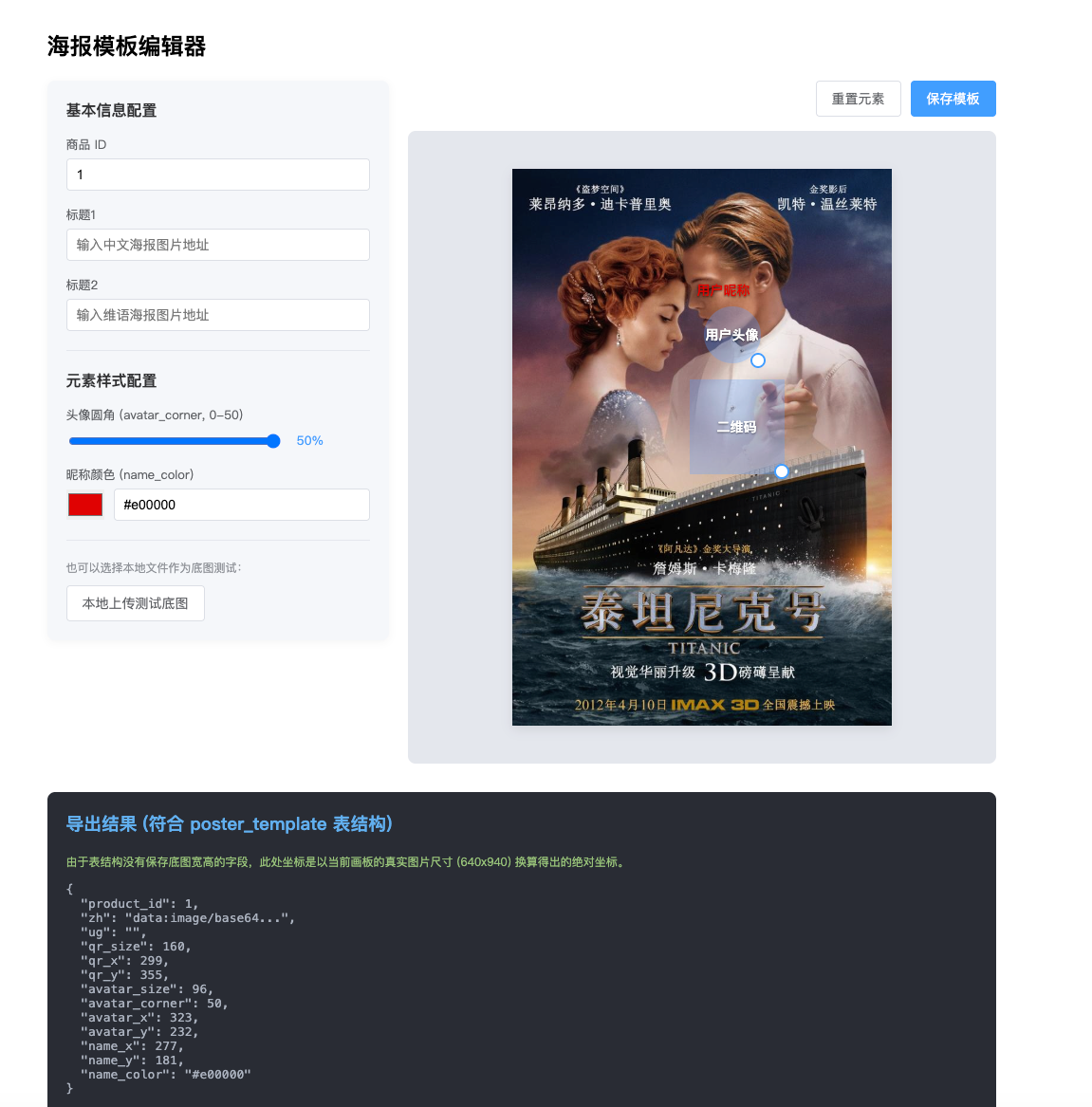
<!DOCTYPE html>
<html lang="zh-CN">
<head>
  <meta charset="UTF-8">
  <meta name="viewport" content="width=device-width, initial-scale=1.0">
  <title>海报模板编辑器 (原生 JS 版)</title>
  <style>
    body {
      margin: 0;
      padding: 0;
      background-color: #fff;
    }
    .poster-template-container {
      max-width: 1000px;
      margin: 0 auto;
      padding: 20px;
      font-family: sans-serif;
    }

    .main-layout {
      display: flex;
      gap: 20px;
      align-items: flex-start;
    }

    .config-panel {
      flex: 0 0 320px;
      background: #f5f7fa;
      padding: 20px;
      border-radius: 8px;
      box-shadow: 0 2px 8px rgba(0,0,0,0.05);
    }

    .config-panel h3 {
      margin-top: 0;
      margin-bottom: 16px;
      font-size: 16px;
      color: #303133;
    }

    .form-group {
      margin-bottom: 16px;
    }
    .form-group label {
      display: block;
      font-size: 13px;
      color: #606266;
      margin-bottom: 6px;
    }
    .form-group input[type="text"],
    .form-group input[type="number"] {
      width: 100%;
      padding: 8px 10px;
      border: 1px solid #dcdfe6;
      border-radius: 4px;
      box-sizing: border-box;
      font-size: 14px;
    }
    .form-group input[type="range"] {
      width: 70%;
      vertical-align: middle;
    }
    .form-group span {
      font-size: 13px;
      margin-left: 10px;
      color: #409eff;
    }

    .color-picker-wrap {
      display: flex;
      align-items: center;
      gap: 10px;
    }
    .color-picker-wrap input[type="color"] {
      width: 40px;
      height: 32px;
      padding: 0;
      border: none;
      cursor: pointer;
    }
    .color-text {
      flex: 1;
    }

    .form-divider {
      height: 1px;
      background: #e4e7ed;
      margin: 20px 0;
    }

    .upload-section {
      margin-top: 10px;
    }
    .tip-text {
      display: block;
      font-size: 12px;
      color: #909399;
      margin-bottom: 10px;
    }

    .workspace-panel {
      flex: 1;
      min-width: 0;
    }

    .actions {
      display: flex;
      justify-content: flex-end;
      margin-bottom: 15px;
    }

    .upload-btn, button {
      padding: 8px 16px;
      background: #fff;
      border: 1px solid #dcdfe6;
      border-radius: 4px;
      cursor: pointer;
      font-size: 14px;
      color: #606266;
      display: inline-block;
    }

    .upload-btn:hover, button:hover {
      color: #409eff;
      border-color: #c6e2ff;
      background-color: #ecf5ff;
    }

    .primary-btn {
      background: #409eff;
      color: white;
      border-color: #409eff;
      margin-left: 10px;
    }
    .primary-btn:hover {
      background: #66b1ff;
      color: white;
    }

    .empty-state {
      text-align: center;
      padding: 100px 0;
      background: #fafafa;
      border: 2px dashed #dcdfe6;
      border-radius: 8px;
      color: #909399;
      font-size: 14px;
    }

    .editor-workspace {
      display: none; /* 默认隐藏,有图片时显示 */
      justify-content: center;
      background: #e4e7ed;
      padding: 40px 20px;
      border-radius: 8px;
      overflow: hidden;
    }

    .canvas-container {
      position: relative;
      background-size: cover;
      background-position: center;
      background-repeat: no-repeat;
      box-shadow: 0 4px 12px rgba(0,0,0,0.1);
      background-color: #fff;
      margin: 0 auto;
    }

    .draggable-element {
      position: absolute;
      background: rgba(64, 158, 255, 0.3);
      border: 1px solid transparent;
      cursor: move;
      user-select: none;
      display: flex;
      align-items: center;
      justify-content: center;
      box-sizing: border-box;
    }

    .draggable-element.active {
      border: 2px dashed #409eff;
      background: rgba(64, 158, 255, 0.5);
      z-index: 10;
    }

    .draggable-element.text-element {
      background: transparent !important;
      border: 1px dashed transparent;
    }
    .draggable-element.text-element.active {
      border: 1px dashed #409eff;
    }

    .element-content {
      pointer-events: none;
      width: 100%;
      height: 100%;
      display: flex;
      align-items: center;
      justify-content: center;
    }
    .label {
      font-size: 14px;
      font-weight: bold;
      text-shadow: 0 1px 2px rgba(0,0,0,0.5);
      white-space: nowrap;
    }

    .resize-handle {
      position: absolute;
      right: -6px;
      bottom: -6px;
      width: 12px;
      height: 12px;
      background: #fff;
      border: 2px solid #409eff;
      border-radius: 50%;
      cursor: se-resize;
      z-index: 20;
    }

    .preview-section {
      display: none;
      margin-top: 30px;
      padding: 20px;
      background: #282c34;
      border-radius: 8px;
      color: #abb2bf;
    }

    .preview-section h3 {
      margin-top: 0;
      color: #61afef;
    }
    .preview-section .tip {
      font-size: 12px;
      color: #98c379;
    }
    .preview-section pre {
      font-size: 13px;
      white-space: pre-wrap;
      word-wrap: break-word;
    }
  </style>
</head>
<body>

<div class="poster-template-container">
  <h2>海报模板编辑器</h2>

  <div class="main-layout">
    <!-- 左侧:属性配置表单 -->
    <div class="config-panel">
      <h3>基本信息配置</h3>

      <div class="form-group">
        <label>商品 ID</label>
        <input type="number" id="input-product-id" placeholder="请输入商品ID" value="1" />
      </div>

      <div class="form-group">
        <label>标题1</label>
        <input type="text" id="input-zh-url" placeholder="输入中文海报图片地址" />
      </div>

      <div class="form-group">
        <label>标题2</label>
        <input type="text" id="input-ug-url" placeholder="输入维语海报图片地址" />
      </div>

      <div class="form-divider"></div>
      <h3>元素样式配置</h3>

      <div class="form-group">
        <label>头像圆角 (avatar_corner, 0-50)</label>
        <input type="range" id="input-avatar-corner" min="0" max="50" value="50" />
        <span id="text-avatar-corner">50%</span>
      </div>

      <div class="form-group">
        <label>昵称颜色 (name_color)</label>
        <div class="color-picker-wrap">
          <input type="color" id="input-name-color" value="#ffffff" />
          <input type="text" id="text-name-color" class="color-text" value="#ffffff" />
        </div>
      </div>

      <div class="form-divider"></div>

      <div class="upload-section">
        <label class="tip-text">也可以选择本地文件作为底图测试:</label>
        <label for="bg-upload" class="upload-btn">本地上传测试底图</label>
        <input id="bg-upload" type="file" accept="image/*" hidden />
      </div>
    </div>

    <!-- 右侧:画板预览 -->
    <div class="workspace-panel">
      <div class="actions" id="actions-panel" style="display: none;">
        <button id="btn-reset">重置元素</button>
        <button id="btn-save" class="primary-btn">保存模板</button>
      </div>

      <div class="editor-workspace" id="workspace">
        <!-- 实际画板容器 -->
        <div class="canvas-container" id="canvas-container">

          <!-- 头像 -->
          <div class="draggable-element" id="el-avatar" data-key="avatar">
            <div class="element-content"><span class="label" style="color: #fff;">用户头像</span></div>
            <div class="resize-handle"></div>
          </div>

          <!-- 二维码 -->
          <div class="draggable-element" id="el-qrCode" data-key="qrCode">
            <div class="element-content"><span class="label" style="color: #fff;">二维码</span></div>
            <div class="resize-handle"></div>
          </div>

          <!-- 昵称 -->
          <div class="draggable-element text-element" id="el-name" data-key="name">
            <div class="element-content"><span class="label" id="label-name" style="color: #ffffff;">用户昵称</span></div>
          </div>

        </div>
      </div>

      <div id="empty-state" class="empty-state">
        请在左侧输入中文底图 URL,或上传一张本地图片开始编辑
      </div>
    </div>
  </div>

  <!-- 预览与代码输出区 -->
  <div class="preview-section" id="preview-section">
    <h3>导出结果 (符合 poster_template 表结构)</h3>
    <p class="tip">由于表结构没有保存底图宽高的字段,此处坐标是以当前画板的真实图片尺寸 (<span id="real-size">0x0</span>) 换算得出的绝对坐标。</p>
    <pre id="output-json"></pre>
  </div>
</div>

<script>
// --- 状态数据 ---
const state = {
  bgImage: null,
  baseSize: { width: 0, height: 0 },
  canvasStyle: { width: 300, height: 500 },
  activeElement: null
};

// 初始默认元素配置
const defaultElements = {
  avatar: { x: 50, y: 50, w: 60, h: 60, shape: 'circle' },
  qrCode: { x: 100, y: 300, w: 100, h: 100, shape: 'square' },
  name: { x: 50, y: 120, w: 100, h: 30, shape: 'square', isText: true }
};

// 当前工作的元素配置 (深拷贝)
let elements = JSON.parse(JSON.stringify(defaultElements));

// --- DOM 节点获取 ---
const dom = {
  productId: document.getElementById('input-product-id'),
  zhUrl: document.getElementById('input-zh-url'),
  ugUrl: document.getElementById('input-ug-url'),
  avatarCorner: document.getElementById('input-avatar-corner'),
  avatarCornerText: document.getElementById('text-avatar-corner'),
  nameColor: document.getElementById('input-name-color'),
  nameColorText: document.getElementById('text-name-color'),
  bgUpload: document.getElementById('bg-upload'),

  workspace: document.getElementById('workspace'),
  canvasContainer: document.getElementById('canvas-container'),
  emptyState: document.getElementById('empty-state'),
  actionsPanel: document.getElementById('actions-panel'),

  elAvatar: document.getElementById('el-avatar'),
  elQrCode: document.getElementById('el-qrCode'),
  elName: document.getElementById('el-name'),
  labelName: document.getElementById('label-name'),

  btnReset: document.getElementById('btn-reset'),
  btnSave: document.getElementById('btn-save'),

  previewSection: document.getElementById('preview-section'),
  realSizeText: document.getElementById('real-size'),
  outputJson: document.getElementById('output-json')
};

// --- 初始化绑定与渲染 ---
function init() {
  bindEvents();
  renderElements();
}

function getScaleRatio() {
  if (state.baseSize.width === 0) return 1;
  return state.canvasStyle.width / state.baseSize.width;
}

// 将 DOM 样式更新到最新状态
function renderElements() {
  const els = {
    avatar: dom.elAvatar,
    qrCode: dom.elQrCode,
    name: dom.elName
  };

  for (const key in els) {
    const data = elements[key];
    const node = els[key];

    node.style.left = data.x + 'px';
    node.style.top = data.y + 'px';
    node.style.width = data.w + 'px';
    node.style.height = data.h + 'px';

    if (key === 'avatar') {
      node.style.borderRadius = dom.avatarCorner.value + '%';
    }

    if (key === 'name') {
      const color = dom.nameColor.value;
      node.style.color = color;
      dom.labelName.style.color = color;
    }

    if (state.activeElement === key) {
      node.classList.add('active');
    } else {
      node.classList.remove('active');
    }
  }

  updateJSON();
}

// --- 生成与更新 JSON ---
function updateJSON() {
  if (!state.bgImage || state.baseSize.width === 0) {
    dom.previewSection.style.display = 'none';
    return;
  }

  dom.previewSection.style.display = 'block';
  dom.realSizeText.innerText = `${state.baseSize.width}x${state.baseSize.height}`;

  const ratio = getScaleRatio();
  const getRealVal = (val) => Math.round(val / ratio);

  let bgStr = state.bgImage;
  if (bgStr.length > 1000) {
    bgStr = 'data:image/base64...'; // 截断演示
  }

  const outputConfig = {
    product_id: parseInt(dom.productId.value) || 1,
    zh: dom.zhUrl.value || bgStr,
    ug: dom.ugUrl.value,
    qr_size: getRealVal(elements.qrCode.w),
    qr_x: getRealVal(elements.qrCode.x),
    qr_y: getRealVal(elements.qrCode.y),
    avatar_size: getRealVal(elements.avatar.w),
    avatar_corner: parseInt(dom.avatarCorner.value) || 0,
    avatar_x: getRealVal(elements.avatar.x),
    avatar_y: getRealVal(elements.avatar.y),
    name_x: getRealVal(elements.name.x),
    name_y: getRealVal(elements.name.y),
    name_color: dom.nameColor.value
  };

  dom.outputJson.innerText = JSON.stringify(outputConfig, null, 2);
  return outputConfig;
}

// --- 图片加载逻辑 ---
function loadBgImage(url) {
  state.bgImage = url;
  const img = new Image();
  img.crossOrigin = 'anonymous';
  img.onload = () => {
    state.baseSize.width = img.width;
    state.baseSize.height = img.height;

    // 计算适应画板的尺寸
    const maxWidth = dom.workspace.clientWidth || 400;
    const displayWidth = Math.min(maxWidth, 400);
    const displayHeight = (img.height / img.width) * displayWidth;

    state.canvasStyle.width = displayWidth;
    state.canvasStyle.height = displayHeight;

    dom.canvasContainer.style.width = displayWidth + 'px';
    dom.canvasContainer.style.height = displayHeight + 'px';
    dom.canvasContainer.style.backgroundImage = `url(${url})`;

    // 切换显示状态
    dom.emptyState.style.display = 'none';
    dom.workspace.style.display = 'flex';
    dom.actionsPanel.style.display = 'flex';

    resetElementsData();
  };
  img.src = url;
}

function resetElementsData() {
  elements = JSON.parse(JSON.stringify(defaultElements));
  state.activeElement = null;
  renderElements();
}

// --- 拖拽与缩放逻辑 ---
let isDragging = false;
let isResizing = false;
let currentKey = null;
let startPos = { x: 0, y: 0 };
let startElem = { x: 0, y: 0, w: 0, h: 0 };

function handleMouseDown(e) {
  // 判断是点中了元素,还是手柄
  const target = e.target;
  const elementNode = target.closest('.draggable-element');

  if (!elementNode) {
    // 点中了空白处
    state.activeElement = null;
    renderElements();
    return;
  }

  e.stopPropagation();
  currentKey = elementNode.getAttribute('data-key');
  state.activeElement = currentKey;

  startPos = { x: e.clientX, y: e.clientY };
  startElem = { ...elements[currentKey] };

  if (target.classList.contains('resize-handle')) {
    isResizing = true;
  } else {
    isDragging = true;
  }

  renderElements();
}

function handleMouseMove(e) {
  if (!currentKey) return;

  const deltaX = e.clientX - startPos.x;
  const deltaY = e.clientY - startPos.y;
  const elem = elements[currentKey];

  if (isDragging) {
    let newX = startElem.x + deltaX;
    let newY = startElem.y + deltaY;

    // 边界限制
    newX = Math.max(0, Math.min(newX, state.canvasStyle.width - elem.w));
    newY = Math.max(0, Math.min(newY, state.canvasStyle.height - elem.h));

    elem.x = newX;
    elem.y = newY;
    renderElements();

  } else if (isResizing) {
    let newW = startElem.w + deltaX;
    let newH = startElem.h + deltaY;

    newW = Math.max(30, newW);
    newH = Math.max(30, newH);

    newW = Math.min(newW, state.canvasStyle.width - elem.x);
    newH = Math.min(newH, state.canvasStyle.height - elem.y);

    // 保持正方形
    const size = Math.max(newW, newH);
    if (elem.x + size <= state.canvasStyle.width && elem.y + size <= state.canvasStyle.height) {
      elem.w = size;
      elem.h = size;
      renderElements();
    }
  }
}

function handleMouseUp() {
  isDragging = false;
  isResizing = false;
}

// --- 事件绑定 ---
function bindEvents() {
  // 左侧表单事件
  dom.zhUrl.addEventListener('input', (e) => {
    if (e.target.value) {
      loadBgImage(e.target.value);
    } else {
      // 清空
      dom.emptyState.style.display = 'block';
      dom.workspace.style.display = 'none';
      dom.actionsPanel.style.display = 'none';
      dom.previewSection.style.display = 'none';
      state.bgImage = null;
    }
    updateJSON();
  });

  dom.ugUrl.addEventListener('input', updateJSON);
  dom.productId.addEventListener('input', updateJSON);

  dom.avatarCorner.addEventListener('input', (e) => {
    dom.avatarCornerText.innerText = e.target.value + '%';
    renderElements();
  });

  dom.nameColor.addEventListener('input', (e) => {
    dom.nameColorText.value = e.target.value;
    renderElements();
  });
  dom.nameColorText.addEventListener('input', (e) => {
    dom.nameColor.value = e.target.value;
    renderElements();
  });

  dom.bgUpload.addEventListener('change', (e) => {
    const file = e.target.files[0];
    if (!file) return;
    const reader = new FileReader();
    reader.onload = (event) => {
      dom.zhUrl.value = ''; // 清空手动输入的URL
      loadBgImage(event.target.result);
    };
    reader.readAsDataURL(file);
  });

  // 按钮事件
  dom.btnReset.addEventListener('click', resetElementsData);
  dom.btnSave.addEventListener('click', () => {
    const data = updateJSON();
    console.log('保存的数据:', data);
    alert('模板数据已生成,请查看下方 JSON 结果!');
  });

  // 画板拖拽事件
  document.addEventListener('mousedown', handleMouseDown);
  document.addEventListener('mousemove', handleMouseMove);
  document.addEventListener('mouseup', handleMouseUp);
}

// 启动
init();
</script>

</body>
</html>