你手里有一份50页的行业报告,老板说下班前给他要点总结。
或者你下载了一篇20页的英文论文,导师明天要讨论。
再或者你有一份30页的合同,想知道里面有没有坑。
你当然可以硬啃。但如果你能让AI先读完,然后你直接问它呢?
今天我们来部署两样东西:一个负责把PDF拆碎读懂(MinerU),一个负责回答你的问题(复用第10篇的Dify)。两个一接,就是你的私有PDF智能助手。
为什么不用ChatGPT(或者是其他软件)直接传PDF?
能用,但有几个问题:
第一,文件大小限制。免费版ChatGPT传PDF有大小和页数限制,大文件传不上去。
第二,隐私。合同、财务报告、客户资料,你确定要传到其它的服务器?他们拿你的数据训练模型怎么办(其实也不用担心,毕竟互联网没有秘密,大家懂的都懂)?
第三,解析质量。ChatGPT对PDF里的表格、公式、图文混排的处理经常出错------表格变成乱码,公式丢失,图片被忽略。
MinerU就是来解决第三个问题的。上海AI Lab开源的文档解析工具,专门干一件事:把PDF精准转成结构化的Markdown。表格是表格,公式是公式,图片是图片,不乱。
认识MinerU
MinerU做的事情看着简单------PDF转Markdown------但背后的技术不简单。它要识别PDF的版面结构(标题、正文、页眉页脚、分栏)、提取表格(合并单元格、跨页表格)、识别公式(LaTeX)、分离图片和文字。
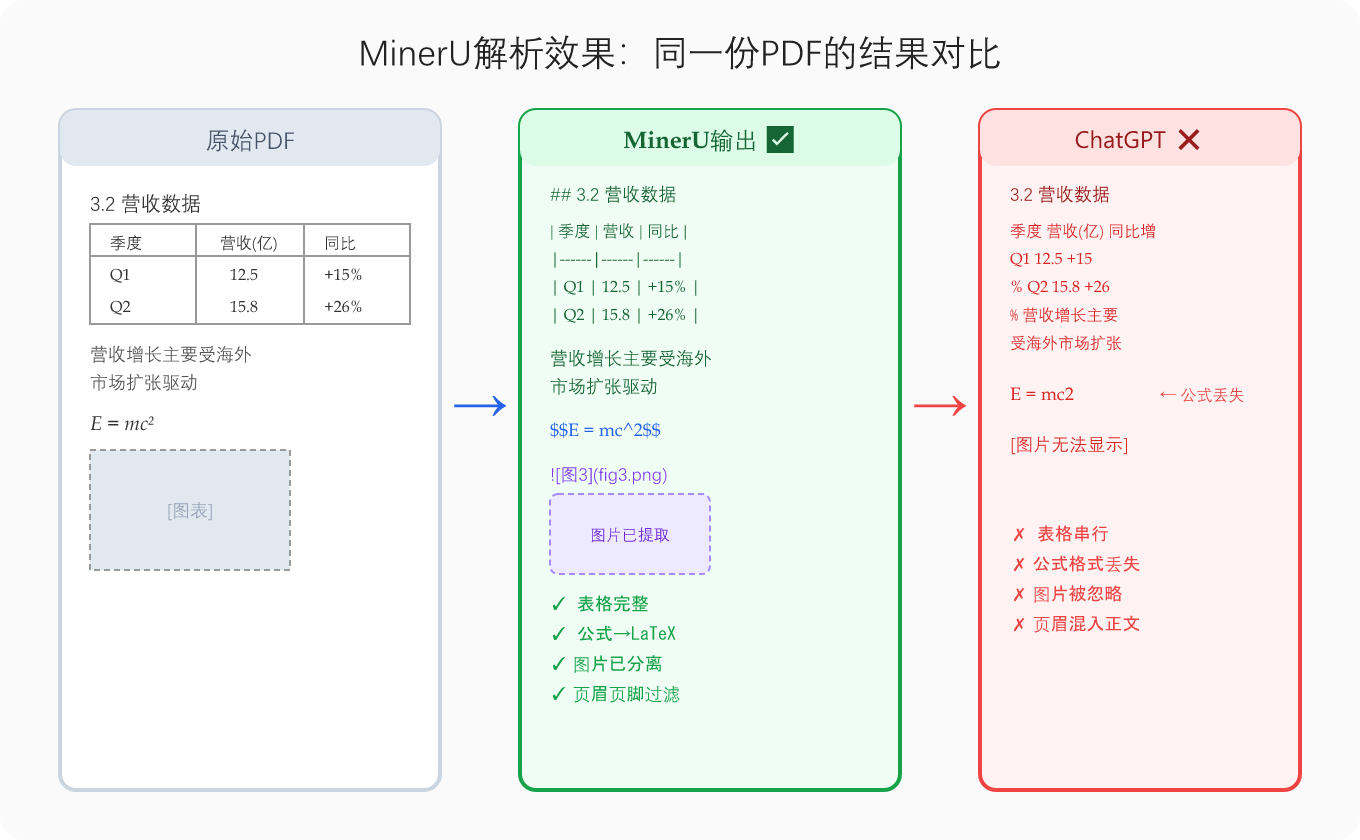
转出来的Markdown长这样:
markdown
## 3.2 营收数据
| 季度 | 营收(亿元) | 同比增长 |
|------|-------------|---------|
| Q1 | 12.5 | +15% |
| Q2 | 15.8 | +26% |
营收增长主要受海外市场扩张驱动(见图3)。
表格还是表格,公式还是公式。不是一坨乱七八糟的纯文本。
部署MinerU
MinerU是Python包,用Docker封装最省心。
注意: MinerU原名Magic-PDF,pip包名从
magic-pdf改为了mineru。如果你用最新版,把Dockerfile里的pip install "magic-pdf[full]"换成pip install mineru[full],对应的Python import路径也变了(magic_pdf→mineru)。本文代码基于magic-pdf版本编写,两个版本的API略有差异,部署前建议看一下官方文档确认。
创建项目目录:
bash
mkdir -p /home/mineru-pdf
cd /home/mineru-pdf
Dockerfile:
dockerfile
FROM python:3.11-slim

RUN apt-get update && apt-get install -y \
    libgl1 libglib2.0-0 libgomp1 \
    && rm -rf /var/lib/apt/lists/*

RUN pip install "magic-pdf[full]" flask

WORKDIR /app
COPY app.py .

EXPOSE 5002
CMD ["python", "app.py"]
python
from flask import Flask, request, send_file, jsonify
import os
import tempfile
from magic_pdf.pipe.UNIPipe import UNIPipe
from magic_pdf.rw.DiskReaderWriter import DiskReaderWriter
import json

app = Flask(__name__)

@app.route('/parse', methods=['POST'])
def parse_pdf():
    if 'file' not in request.files:
        return jsonify({'error': 'No file'}), 400

    file = request.files['file']

    with tempfile.TemporaryDirectory() as tmpdir:
        pdf_path = os.path.join(tmpdir, 'input.pdf')
        file.save(pdf_path)

        # 读取PDF
        with open(pdf_path, 'rb') as f:
            pdf_bytes = f.read()

        # 解析
        image_writer = DiskReaderWriter(tmpdir)
        pipe = UNIPipe(pdf_bytes, {"_pdf_type": "", "model_list": []}, image_writer)
        pipe.pipe_classify()
        pipe.pipe_analyze()
        pipe.pipe_parse()

        # 导出Markdown
        content_list = pipe.pipe_mk_uni_format(tmpdir, drop_mode="none")

        # 拼接Markdown文本
        md_content = ""
        for item in content_list:
            md_content += item.get("text", "") + "\n\n"

        return jsonify({
            'markdown': md_content,
            'pages': len(content_list)
        })

if __name__ == '__main__':
    app.run(host='0.0.0.0', port=5002)
docker-compose.yml:
yaml
services:
  mineru:
    build: .
    ports:
      - "5002:5002"
    restart: always
    volumes:
      - mineru-models:/root/.cache  # 缓存模型文件,避免重启重新下载
      - /home/mineru-pdf/web:/app/web  # 只挂载前端页面,不覆盖app.py

volumes:
  mineru-models:
启动:
bash
docker compose up -d --build第一次启动时会自动下载模型文件(大概1-2GB),需要几分钟。构建镜像本身不含模型,模型在首次调用时从网络拉取并缓存到容器里。跑起来后测试:
bash
curl -X POST -F "file=@test.pdf" http://localhost:5002/parse返回JSON,里面是解析后的Markdown文本。
加个网页前端
和第12篇一样的套路------写个HTML页面,拖PDF进去,显示解析结果。
html
<!DOCTYPE html>
<html lang="zh-CN">
<head>
    <meta charset="UTF-8">
    <meta name="viewport" content="width=device-width, initial-scale=1.0">
    <title>PDF智能解析</title>
    <style>
        * { margin: 0; padding: 0; box-sizing: border-box; }
        body { font-family: system-ui, sans-serif; background: #f5f5f5; padding: 20px; }
        .container { max-width: 800px; margin: 0 auto; }
        h1 { text-align: center; margin-bottom: 20px; }
        .upload-area {
            border: 2px dashed #ccc; border-radius: 12px; padding: 40px;
            text-align: center; background: white; cursor: pointer;
            transition: border-color 0.3s;
        }
        .upload-area:hover { border-color: #2563eb; }
        input[type="file"] { display: none; }
        .btn {
            display: block; width: 100%; padding: 12px; margin-top: 16px;
            background: #2563eb; color: white; border: none; border-radius: 8px;
            font-size: 16px; cursor: pointer;
        }
        .btn:disabled { background: #999; }
        .loading { text-align: center; padding: 20px; color: #666; }
        .result {
            margin-top: 20px; background: white; border-radius: 12px;
            padding: 24px; white-space: pre-wrap; line-height: 1.8;
            max-height: 600px; overflow-y: auto;
        }
        .result h2 { margin: 16px 0 8px; }
        .actions { margin-top: 16px; display: flex; gap: 10px; }
        .actions a { flex: 1; text-align: center; text-decoration: none; }
    </style>
</head>
<body>
    <div class="container">
        <h1>PDF智能解析</h1>
        <div class="upload-area" onclick="document.getElementById('fileInput').click()">
            <p>点击或拖拽PDF文件到这里</p>
            <input type="file" id="fileInput" accept=".pdf">
        </div>
        <div class="loading" id="loading" style="display:none;">解析中,PDF越大等待越久...</div>
        <div class="result" id="result" style="display:none;"></div>
        <div class="actions" id="actions" style="display:none;">
            <a class="btn" id="copyBtn" href="#">复制全文</a>
            <a class="btn" id="downloadBtn" href="#" download="parsed.md">下载Markdown</a>
        </div>
    </div>
    <script>
        let mdContent = '';
        document.getElementById('fileInput').addEventListener('change', async (e) => {
            const file = e.target.files[0];
            if (!file) return;

            document.getElementById('loading').style.display = 'block';
            document.getElementById('result').style.display = 'none';
            document.getElementById('actions').style.display = 'none';

            const formData = new FormData();
            formData.append('file', file);

            try {
                const res = await fetch('/api/parse', { method: 'POST', body: formData });
                const data = await res.json();
                mdContent = data.markdown;
                document.getElementById('result').textContent = mdContent;
                document.getElementById('result').style.display = 'block';
                document.getElementById('actions').style.display = 'flex';

                // 下载链接
                const blob = new Blob([mdContent], { type: 'text/markdown' });
                document.getElementById('downloadBtn').href = URL.createObjectURL(blob);
            } catch (err) {
                alert('解析失败:' + err.message);
            } finally {
                document.getElementById('loading').style.display = 'none';
            }
        });

        document.getElementById('copyBtn').addEventListener('click', (e) => {
            e.preventDefault();
            navigator.clipboard.writeText(mdContent);
            e.target.textContent = '已复制!';
            setTimeout(() => e.target.textContent = '复制全文', 2000);
        });
    </script>
</body>
</html>
把这个HTML放到 /home/mineru-pdf/web/index.html。
Nginx反代
bash
nano /etc/nginx/conf.d/pdf.conf
nginx
server {
    listen 80;
    server_name pdf.你的域名.com;

    client_max_body_size 100M;  # PDF可能很大

    location / {
        root /home/mineru-pdf/web;
        index index.html;
    }

    location /api/parse {
        proxy_pass http://127.0.0.1:5002/parse;
        proxy_set_header Host $host;
        proxy_set_header X-Real-IP $remote_addr;
        proxy_read_timeout 300s;  # 大PDF解析慢,超时调长
    }
}
bash
nginx -t && nginx -s reload
certbot --nginx -d pdf.你的域名.com
实测效果
我传了三份PDF测试:
测试1:20页学术论文(英文,含公式和图表)
解析结果:正文准确,公式正确转成了LaTeX,图表被提取为图片,参考文献完整。之前用ChatGPT传同一篇PDF,公式全丢了,表格变成乱码。MinerU完胜。
测试2:15页财报(中文,含大量表格)
解析结果:所有表格都正确转成了Markdown表格格式,合并单元格处理正确。文字部分无乱码。页眉页脚被正确过滤掉了。
测试3:30页合同(扫描版PDF)
解析结果:部分丢失。MinerU对文字版PDF效果极好,但纯扫描件(图片格式)需要先OCR。MinerU支持接入OCR(需额外配置PaddleOCR),但默认模式不处理扫描件。这是个限制,用的时候注意。
进阶:接Dify做PDF智能问答
光解析出来Markdown还不够------你想要的是问AI关于PDF的问题。
这时候第10篇部署的Dify就派上用场了:
- 用MinerU把PDF解析成Markdown
- 把Markdown上传到Dify知识库
- 在Dify里创建一个聊天助手,关联这个知识库
- 直接问Dify:"这份报告里Q2的营收是多少?"------AI从解析内容里找到答案回复你
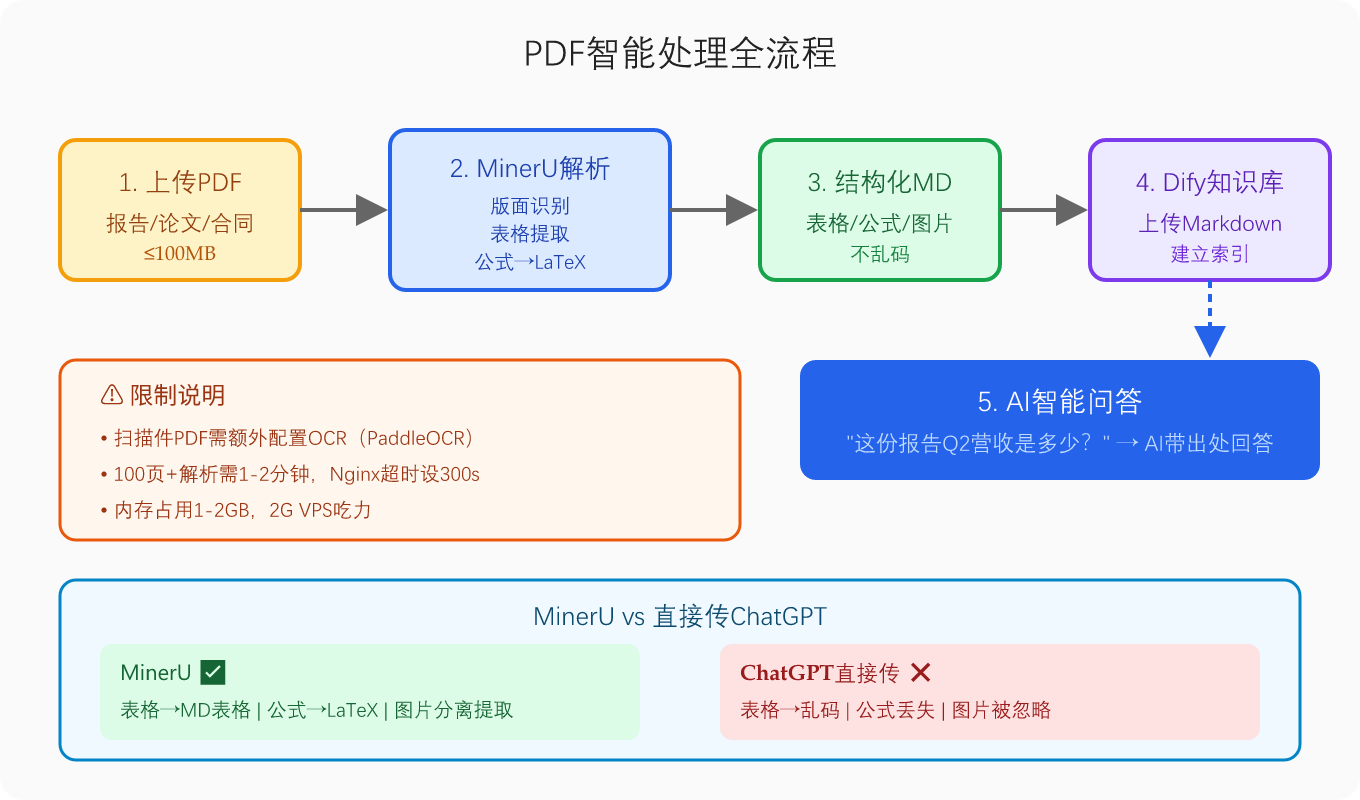
流程就是:PDF → MinerU解析 → Markdown → Dify知识库 → AI问答
你可以把这个流程自动化------在MinerU的Flask API里加一个路由,解析完自动调Dify API上传到知识库。用户上传PDF后,直接就能在Dify里问问题了。
限制和注意
扫描件PDF: 需要额外配置OCR。如果你的PDF是扫描的(不是文字版),在MinerU里开启OCR模式(需要安装PaddleOCR)。
大文件: 100页以上的PDF解析可能要1-2分钟,确保Nginx超时设够长。
内存: MinerU处理大PDF时内存占用较高(1-2GB),2G内存的VPS可能吃力。
解析精度: 复杂版面(多栏、嵌套表格、脚注密集)偶尔会出错。90%以上的常规PDF没问题,特别复杂的排版需要人工检查。
到这一步,咱们的VPS上又多一个PDF解析工具了(VPS已经不够用了)。上传PDF,拿到结构化Markdown,再喂给Dify做问答。论文、合同、报告------都不用自己硬啃了。
整套链路全是自己的:MinerU解析、Dify问答、API中转站管模型、VPS跑服务。数据不出你的服务器。