以前在github搭建过一个个人主页。链接:

现在修改下,改为一个工具页面,左侧是菜单,点击菜单在右侧显示页面。index.html改为如下:
html
<!DOCTYPE html>
<html lang="zh-CN">
<head>
    <meta charset="UTF-8">
    <meta name="viewport" content="width=device-width, initial-scale=1.0">
    <title>Xuange2026 的个人主页</title>
    <style>
        * {
            margin: 0;
            padding: 0;
            box-sizing: border-box;
        }

        body {
            font-family: -apple-system, BlinkMacSystemFont, "Segoe UI", Roboto, "Helvetica Neue", Arial, sans-serif;
            height: 100vh;
            display: flex;
            background: #f5f5f5;
        }

        /* 左侧菜单 */
        .sidebar {
            width: 200px;
            background: #2c3e50;
            color: white;
            display: flex;
            flex-direction: column;
            overflow-y: auto;
            box-shadow: 2px 0 8px rgba(0,0,0,0.1);
        }

        .sidebar h2 {
            padding: 20px 16px 10px;
            font-size: 18px;
            font-weight: 500;
            border-bottom: 1px solid rgba(255,255,255,0.2);
            margin-bottom: 10px;
            text-align: center;
        }

        .menu-list {
            list-style: none;
            flex: 1;
            padding: 0 8px;
        }

        .menu-item {
            padding: 12px 16px;
            margin: 4px 0;
            border-radius: 6px;
            cursor: pointer;
            transition: background 0.2s;
            color: #ecf0f1;
            font-size: 15px;
            word-break: break-all;
        }

        .menu-item:hover {
            background: rgba(255,255,255,0.15);
        }

        .menu-item.active {
            background: #3498db;
            color: white;
            font-weight: 500;
        }

        /* 右侧内容区 */
        .content {
            flex: 1;
            position: relative;
            background: white;
        }

        .iframe-container {
            position: absolute;
            top: 0;
            left: 0;
            width: 100%;
            height: 100%;
            border: none;
            display: none;
        }

        .iframe-container.active {
            display: block;
        }

        .placeholder {
            display: flex;
            align-items: center;
            justify-content: center;
            height: 100%;
            color: #95a5a6;
            font-size: 20px;
        }

        .placeholder.hidden {
            display: none;
        }

        /* 秘密小圆点 */
        .secret-trigger{
            position:fixed;
            bottom:6px;
            right:6px;
            width:14px;
            height:14px;
            background:#eeeeee;
            border-radius:50%;
            z-index:9998;
            cursor:pointer;
        }
        .secret-trigger:hover{
            background:#cccccc;
        }

        /* 全屏遮罩层,用来加载独立love.html */
        .love-layer{
            position:fixed;
            inset:0;
            z-index:9999;
            display:none;
        }
        .love-layer.show{
            display:block;
        }
        .love-layer iframe{
            width:100%;
            height:100%;
            border:none;
        }
        .love-close{
            position:fixed;
            top:12px;
            right:12px;
            z-index:10001;
            background:rgba(255,255,255,0.35);
            border:1px solid #d44e6c;
            color:#d44e6c;
            padding:4px 10px;
            border-radius:8px;
            cursor:pointer;
            font-size:13px;
        }
        .love-close:hover{
            background:rgba(255,255,255,0.7);
        }
    </style>
</head>
<body>
    <div class="secret-trigger" id="secretBtn" title="秘密入口"></div>

    <div class="sidebar">
        <h2>常用工具</h2>
        <ul class="menu-list" id="menuList"></ul>
    </div>

    <div class="content" id="contentArea">
        <div class="placeholder" id="placeholder">👈 点击左侧菜单打开页面</div>
    </div>

    <!-- 全屏层:iframe加载独立love.html -->
    <div class="love-layer" id="loveLayer">
        <button class="love-close" id="closeLove">← 返回工具页</button>
        <iframe src="love.html"></iframe>
    </div>

    <script>
        (function() {
            const menuItems = [
                { name: 'JSON格式化', url: 'https://www.sojson.com/' },
                { name: '百度', url: 'https://www.baidu.com/' },
                { name: '必应', url: 'https://www.bing.com/' },
                { name: '时间戳转换', url: 'https://tool.lu/timestamp/' },
                {name: '博客', url: 'https://blog.csdn.net/u012116089?type=blog'}
            ];

            const menuList = document.getElementById('menuList');
            const contentArea = document.getElementById('contentArea');
            const placeholder = document.getElementById('placeholder');
            const secretBtn = document.getElementById("secretBtn");
            const loveLayer = document.getElementById("loveLayer");
            const closeLove = document.getElementById("closeLove");

            const iframeCache = {};
            let currentActiveIndex = -1;

            //打开全屏层(只是显示,不跳转页面,主页面状态全部保留)
            function openLove(){
                loveLayer.classList.add("show");
            }
            function closeLoveFunc(){
                loveLayer.classList.remove("show");
            }

            secretBtn.addEventListener("click", openLove);
            closeLove.addEventListener("click", closeLoveFunc);

            function renderMenu() {
                menuItems.forEach((item, index) => {
                    const li = document.createElement('li');
                    li.className = 'menu-item';
                    li.textContent = item.name;
                    li.dataset.index = index;
                    li.addEventListener('click', () => switchToMenu(index));
                    menuList.appendChild(li);
                });
            }

            function switchToMenu(index) {
                if (currentActiveIndex === index) return;
                const allItems = menuList.querySelectorAll('.menu-item');
                allItems.forEach(item => item.classList.remove('active'));
                allItems[index].classList.add('active');
                placeholder.classList.add('hidden');

                if (currentActiveIndex !== -1) {
                    const prevIframe = iframeCache[currentActiveIndex];
                    if (prevIframe) prevIframe.classList.remove('active');
                }
                if (!iframeCache[index]) {
                    createIframe(index);
                }
                iframeCache[index].classList.add('active');
                currentActiveIndex = index;
            }

            function createIframe(index) {
                const iframe = document.createElement('iframe');
                iframe.className = 'iframe-container';
                iframe.src = menuItems[index].url;
                iframe.setAttribute('sandbox', 'allow-same-origin allow-scripts allow-popups allow-forms');
                contentArea.appendChild(iframe);
                iframeCache[index] = iframe;
            }

            renderMenu();
        })();
    </script>
</body>
</html>
还有一个love.html, 代码略。
然后上传到github的个人主页。步骤略。
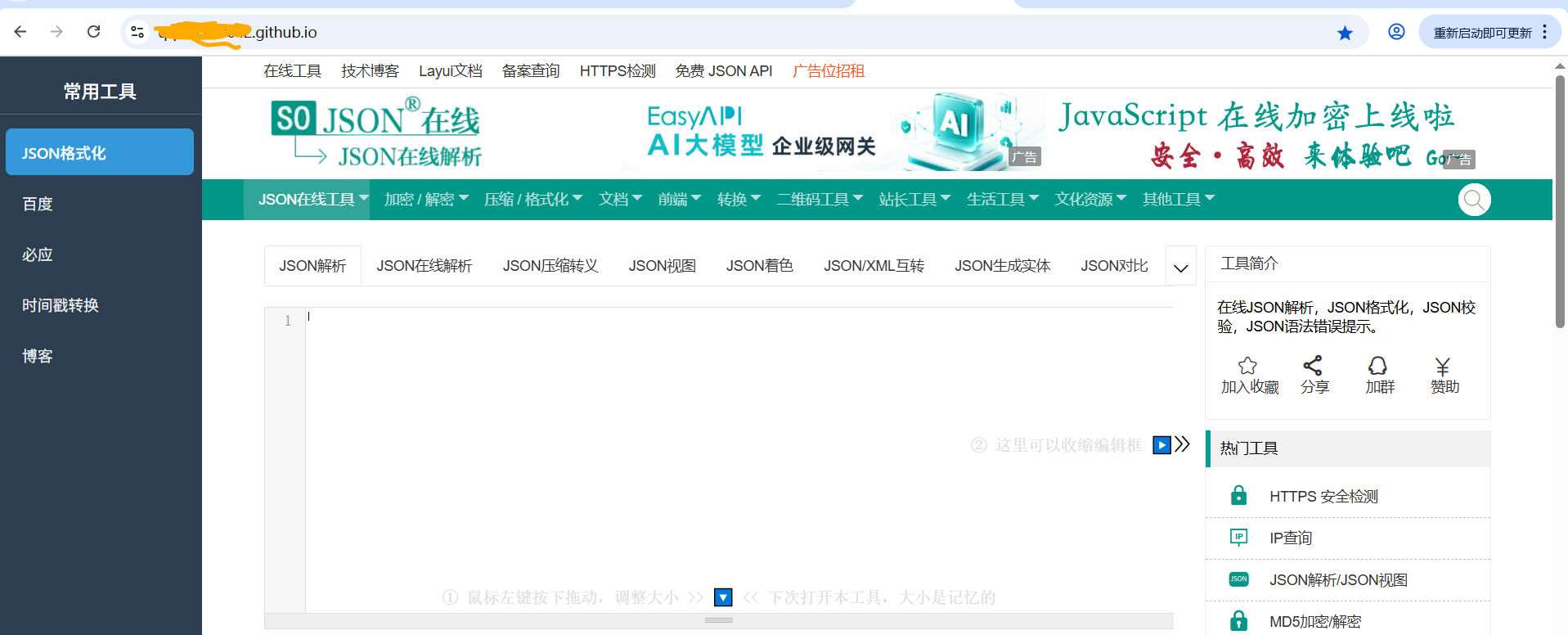
网页打开效果:
ok.