Bubble 的 loading 和 typing:AI 回复生成中的交互处理
前言
前面已经梳理了 Bubble 的样式体系、variant 扩展和消息操作区。
接下来可以继续看一个更贴近 AI 对话体验的部分:
loading和typing。
在普通组件里,loading 可能只是一个加载动画。但在 AI 对话产品里,消息生成过程会更复杂:
- 用户发送问题后,AI 还没开始返回内容
- AI 正在思考
- AI 开始逐字输出
- AI 回复生成完成
- AI 回复失败
这些过程都需要通过前端交互表达出来。
在 Bubble 组件里,loading 和 typing 就是处理"消息生成中"体验的两个关键能力。
这篇文章主要梳理:
loading和typing分别是什么- 它们在源码里怎么实现
- 两者有什么区别
- 后续如果做 Agent 产品定制,可以从哪里改
loading 和 typing 的区别
先用最简单的话区分:
txt
loading:内容还没出来,先显示加载状态。
typing:内容已经有了,但用打字机效果逐步显示。
举个例子。
用户刚问完问题:
txt
用户:帮我分析一下 Bubble 组件。AI 还没返回内容时,可以显示:
txt
AI:...这个就是 loading。
当 AI 已经有一段内容,需要逐字显示:
txt
AI:我正在分析 Bubble 组件...这个就是 typing。
所以两者的重点不同:
| 状态 | 说明 | 页面表现 |
|---|---|---|
loading |
还没有正式内容 | 显示加载动画 |
typing |
已经有内容,逐步展示 | 打字机效果 |
在 Bubble 里,loading 的优先级更高。
如图即使content有内容但是因为显示loading,依旧是...

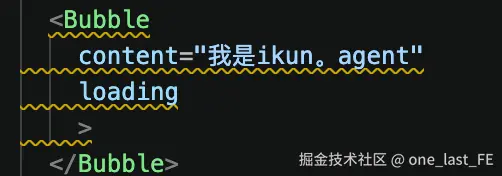
也就是说:
txt
如果 loading = true,就显示 loading。
否则才显示 content / typing。
interface.ts 里的定义
先看 src/bubble/interface.ts。
和这部分相关的 props 有:
ts
loading?: boolean;
typing?: AvoidValidation<TypingOption | boolean>;
loadingRender?: () => VNode;
onTypingComplete?: VoidFunction;
分别表示:
| prop | 作用 |
|---|---|
loading |
是否显示加载状态 |
typing |
是否开启打字机效果,或者传入打字机配置 |
loadingRender |
自定义 loading 内容 |
onTypingComplete |
打字机结束后的回调 |
其中 typing 对应的配置类型是:
ts
export interface TypingOption {
  step?: number;
  interval?: number;
  suffix?: VNode | string;
}
这几个字段可以这样理解:
| 字段 | 说明 | 默认值 |
|---|---|---|
step |
每次输出几个字符 | 1 |
interval |
每次输出间隔多少毫秒 | 50 |
suffix |
打字时后面跟随的内容 | null |
例如:
vue
<Bubble
  content="我正在分析你的项目结构。"
  :typing="{ step: 1, interval: 50 }"
/>
表示每 50ms 输出 1 个字符。
Bubble.vue 中的 loading 逻辑
在 src/bubble/Bubble.vue 中,内容区域通过 contentNode 计算出来:
tsx
const contentNode = computed<VNode>(() => {
  if (loading) {
    if (slots.loading) {
      return slots.loading();
    }
    return loadingRender ? loadingRender() : <Loading prefixCls={prefixCls} />;
  } else {
    return (
      <>
        {mergedContent.value}
        {isTyping.value && toValue(typingSuffix)}
      </>
    );
  }
});
这段逻辑很清楚:
txt
如果 loading 为 true:
  优先使用 loading slot
  否则使用 loadingRender
  否则使用默认 Loading 组件

如果 loading 为 false:
  显示消息内容
  如果正在 typing,就追加 typingSuffix
所以 loading 有三个层级:
| 优先级 | 来源 |
|---|---|
| 1 | loading slot |
| 2 | loadingRender prop |
| 3 | 默认 Loading 组件 |
这和前面 header/footer 的设计类似:
txt
slot 优先,prop 次之,默认实现兜底。默认 Loading 组件
默认 loading 在:
txt
src/bubble/loading.vue代码大致是:
tsx
defineRender(() => {
  return (
    <span class={`${prefixCls}-dot`}>
      <i class={`${prefixCls}-dot-item`} />
      <i class={`${prefixCls}-dot-item`} />
      <i class={`${prefixCls}-dot-item`} />
    </span>
  );
});
它渲染的是三个小圆点。
也就是常见的:
txt
...动画样式在 src/bubble/style/index.ts 里。
其中有一个关键帧动画:
ts
const loadingMove = new Keyframes('loadingMove', {
  '0%': {
    transform: 'translateY(0)',
  },
  '10%': {
    transform: 'translateY(4px)',
  },
  '20%': {
    transform: 'translateY(0)',
  },
  '30%': {
    transform: 'translateY(-4px)',
  },
  '40%': {
    transform: 'translateY(0)',
  },
});
后面会作用到:
ts
[`& ${componentCls}-dot`]: {
  ...
  '&-item': {
    animationName: loadingMove,
    animationDuration: '2s',
    animationIterationCount: 'infinite',
  },
},
所以默认 loading 的实现链路是:
txt
Bubble.vue 判断 loading
-> 渲染 Loading 组件
-> Loading 组件输出 dot class
-> style/index.ts 给 dot class 加动画
-> 页面显示三个跳动小点
typing 配置解析:useTypingConfig
typing 的第一步处理在:
txt
src/bubble/hooks/useTypingConfig.ts核心代码是:
ts
function useTypingConfig(typing: MaybeRefOrGetter<BubbleProps['typing']>) {
  const typingEnabled = computed(() => {
    if (!toValue(typing)) {
      return false;
    }
    return true;
  });

  const baseConfig: Required<TypingOption> = {
    step: 1,
    interval: 50,
    suffix: null,
  };

  const config = computed(() => {
    const typingRaw = toValue(typing);
    return {
      ...baseConfig,
      ...(typeof typingRaw === 'object' ? typingRaw : {})
    }
  });

  return [
    typingEnabled,
    computed(() => config.value.step),
    computed(() => config.value.interval),
    computed(() => config.value.suffix)
  ] as const;
}
这个 hook 只做一件事:
把外部传进来的
typing解析成统一配置。
比如外部传:
vue
<Bubble typing />此时 typing 是 true,会使用默认配置:
ts
{
  step: 1,
  interval: 50,
  suffix: null,
}
如果外部传:
vue
<Bubble :typing="{ step: 2, interval: 30 }" />就会合并成:
ts
{
  step: 2,
  interval: 30,
  suffix: null,
}
所以 useTypingConfig 的输入输出可以理解成:
txt
输入:
typing prop

输出:
typingEnabled
typingStep
typingInterval
typingSuffix
它不负责真正打字,只负责整理配置。
typing 效果实现:useTypedEffect
真正实现打字机效果的是:
txt
src/bubble/hooks/useTypedEffect.ts它的输入是:
ts
const useTypedEffect = (
  content: Ref<BubbleContentType>,
  typingEnabled: Ref<boolean>,
  typingStep: Ref<number>,
  typingInterval: Ref<number>,
)
可以理解成:
txt
输入:
完整内容 content
是否启用 typing
每次输出几个字符
输出间隔
它的输出是:
ts
[
  typedContent,
  isTyping
]
也就是:
txt
typedContent:当前应该显示出来的内容
isTyping:现在是否还在打字
比如完整内容是:
txt
我正在分析 Bubble 组件一开始 typedContent 可能是:
txt
我过一会儿变成:
txt
我正再过一会儿:
txt
我正在最后才变成完整内容。
为什么 typing 只对字符串生效
在 useTypedEffect.ts 里有:
ts
function isString(str: any): str is string {
  return typeof str === 'string';
}
然后:
ts
const mergedTypingEnabled = computed(() => typingEnabled.value && isString(content.value));这说明:
txt
只有 content 是字符串时,typing 才真正启用。原因也很好理解。
打字机效果本质是:
ts
content.value.slice(0, typingIndex)也就是截取字符串。
如果 content 是一个 Vue 节点、对象、数字,直接 slice 就不合适。
所以这里做了保护:
txt
typing 只处理 string。
非 string 内容直接完整展示。
这也是组件库里比较稳妥的设计。
typingIndex 是什么
在 useTypedEffect.ts 里有:
ts
const [typingIndex, setTypingIndex] = useState<number>(1);typingIndex 可以理解成:
当前已经显示到第几个字符。
比如:
txt
content = 我正在分析
typingIndex = 1
typedContent = 我

typingIndex = 2
typedContent = 我正

typingIndex = 3
typedContent = 我正在
最后:
txt
typingIndex >= content.length就说明打字完成了。
定时推进 typingIndex
真正让文字逐步增加的是这一段:
ts
watch([typingIndex, typingEnabled, content], () => {
  if (mergedTypingEnabled.value && isString(content.value) && unref(typingIndex) < content.value.length) {
    const id = setTimeout(() => {
      setTypingIndex(unref(typingIndex) + typingStep.value);
    }, typingInterval.value);

    onWatcherCleanup(() => {
      clearTimeout(id);
    });
  }
}, { immediate: true });
人话版:
txt
监听 typingIndex、typingEnabled、content。

如果 typing 开启,并且内容是字符串,并且还没显示完:
  等待 typingInterval 毫秒
  把 typingIndex 增加 typingStep
比如:
txt
typingStep = 1
typingInterval = 50
意思就是:
txt
每 50ms 多显示 1 个字符。如果:
txt
typingStep = 2
typingInterval = 30
意思就是:
txt
每 30ms 多显示 2 个字符。onWatcherCleanup 的作用是清理旧的定时器,避免内容变化或组件更新时定时器混乱。
这里可以先理解成:
每次重新监听时,把上一次没用完的定时器清掉。
typedContent 是怎么生成的
最后有:
ts
const mergedTypingContent = computed(() =>
  mergedTypingEnabled.value && isString(content.value)
    ? content.value.slice(0, unref(typingIndex))
    : content.value
);
这就是打字机效果的核心。
如果 typing 启用,并且内容是字符串:
txt
只显示 content 的前 typingIndex 个字符。否则:
txt
直接显示完整 content。比如:
ts
content = 'Bubble 组件分析';
typingIndex = 3;
那么:
ts
typedContent = content.slice(0, 3);结果是:
txt
Bob注意这里如果是中文:
ts
content = '正在分析';
typingIndex = 2;
结果是:
txt
正在isTyping 是怎么判断的
useTypedEffect 最后返回:
ts
return [
  mergedTypingContent,
  computed(() => mergedTypingEnabled.value && isString(content.value) && unref(typingIndex) < content.value.length)
];
第二个返回值就是 isTyping。
它为 true 的条件是:
txt
typing 开启
content 是字符串
typingIndex 还没到内容末尾
也就是说:
txt
还没显示完整内容时,isTyping = true。
显示完后,isTyping = false。
Bubble.vue 中如何使用 typedContent
回到 Bubble.vue。
前面通过 hooks 得到:
ts
const [typingEnabled, typingStep, typingInterval, typingSuffix] = useTypingConfig(() => typing);

const [typedContent, isTyping] = useTypedEffect(
  content,
  typingEnabled,
  typingStep,
  typingInterval,
);
然后 mergedContent 使用的是 typedContent:
ts
const mergedContent = computed(() => {
  if (slots.message) {
    return slots.message({ content: typedContent.value as any });
  }
  return messageRender ? messageRender(typedContent.value as any) : typedContent.value;
});
所以真正渲染出来的不是原始完整内容,而是:
txt
typedContent这就是为什么页面上能看到逐字输出。
typingSuffix 是什么
在 contentNode 里:
tsx
return (
  <>
    {mergedContent.value}
    {isTyping.value && toValue(typingSuffix)}
  </>
);
如果正在 typing,就会在内容后面追加 typingSuffix。
比如外部传:
vue
<Bubble
  content="我正在分析 Bubble"
  :typing="{ suffix: '|' }"
/>
那么打字过程中可能显示:
txt
我正在|如果不传 suffix,默认是:
ts
suffix: null不过组件里还有另一种光标效果。
在 Bubble.vue 的 class 中:
ts
{
  [`${prefixCls}-typing`]:
    isTyping.value && !loading && !messageRender && !slots.message && !typingSuffix.value,
}
这表示:
txt
如果正在 typing,
并且不是 loading,
并且没有自定义 messageRender,
并且没有 message slot,
并且没有 typingSuffix,
就给根节点加 ant-bubble-typing class。
然后样式里会通过伪元素加一个闪烁光标:
ts
[`&${componentCls}-typing ${componentCls}-content:last-child::after`]: {
  content: '"|"',
  animationName: cursorBlink,
  ...
}
所以 Bubble 有两种 typing 光标方式:
| 方式 | 来源 |
|---|---|
typing.suffix |
外部传入,自定义后缀 |
CSS ::after |
没有 suffix 时,默认显示闪烁光标 |
onTypingComplete 什么时候触发
Bubble.vue 中有:
ts
watchEffect(() => {
  if (!isTyping.value && !loading) {
    if (!triggerTypingCompleteRef.value) {
      triggerTypingCompleteRef.value = true;
      onTypingComplete?.();
    }
  } else {
    triggerTypingCompleteRef.value = false;
  }
});
这段逻辑的意思是:
txt
如果当前不再 typing,并且也不是 loading:
  触发 onTypingComplete

如果又进入 typing 或 loading:
  重置触发标记
triggerTypingCompleteRef 是为了避免重复触发。
也就是说:
txt
一次 typing 完成,只触发一次 onTypingComplete。这个回调可以用于:
- 自动滚动到底部
- 显示操作按钮
- 通知父组件生成完成
- 做一些 UI 状态切换
loading 和 typing 的优先级
结合源码,可以总结出优先级:
txt
loading 优先级高于 typing。因为 contentNode 先判断:
ts
if (loading) {
  return loadingNode;
} else {
  return content + typingSuffix;
}
所以即使同时传了:
vue
<Bubble
  loading
  typing
  content="我正在分析"
/>
页面也会优先显示 loading,而不是 typing 内容。
这也是合理的:
txt
loading 表示内容还没准备好。
typing 表示内容已经有了,只是在逐步展示。
总结
loading 和 typing 是 Bubble 中非常重要的消息生成态能力。
它们的区别是:
txt
loading:还没有内容,显示加载状态。
typing:已有内容,逐步显示内容。
源码上的职责分工是:
txt
Bubble.vue:
  判断 loading 和 typing 的渲染优先级

loading.vue:
  提供默认 loading 小圆点

useTypingConfig:
  解析 typing 配置

useTypedEffect:
  实现打字机效果

style/index.ts:
  提供 loading 动画和 typing 光标样式