项目摘要
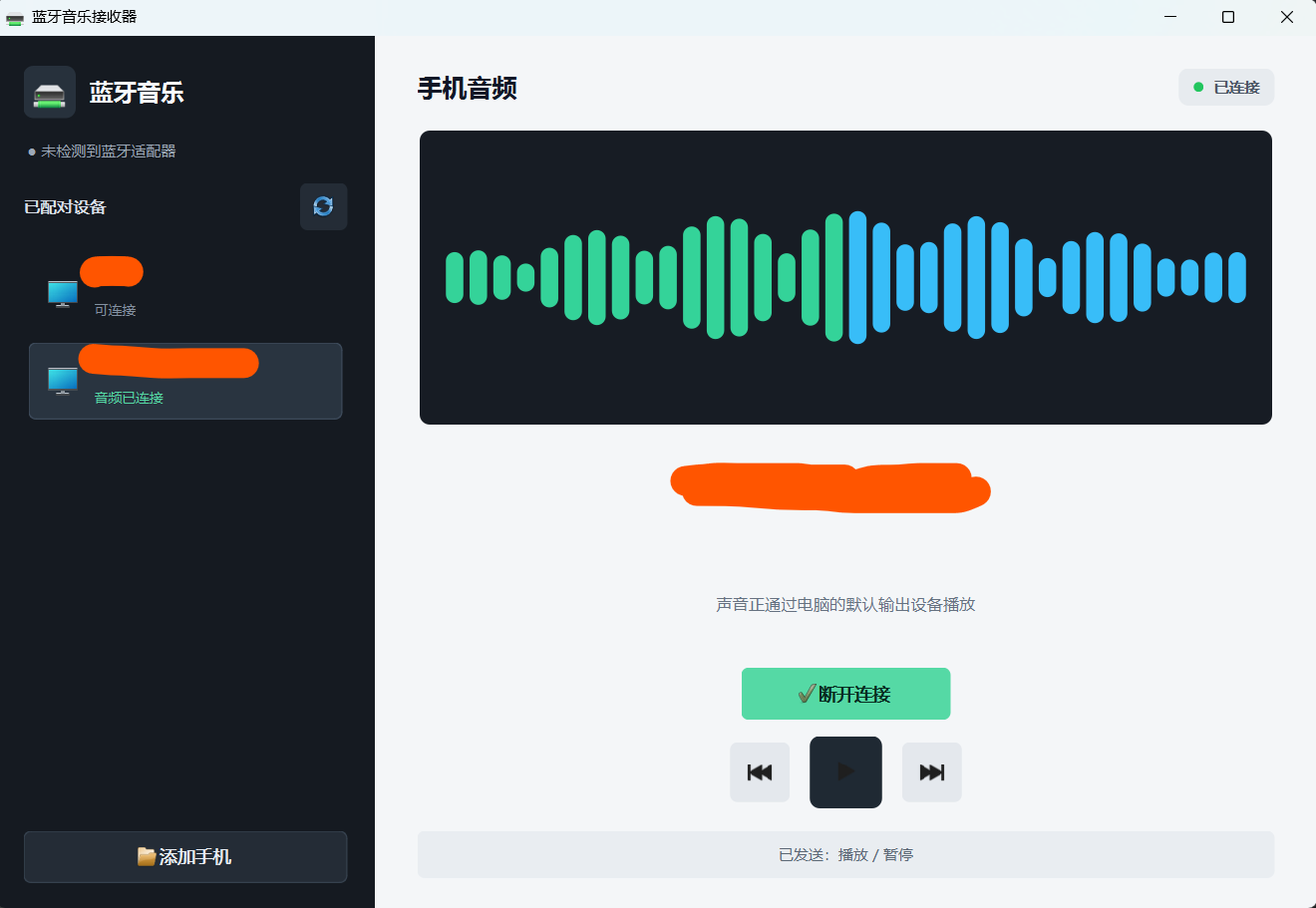
这是一个基于 Qt 6 Widgets、使用 qmake 构建的 Windows 蓝牙音乐接收器。程序将电脑作为 A2DP Sink,使已配对手机的音频通过电脑默认扬声器播放,并提供上一首、播放/暂停、下一首控制。
代码结构
main.cpp:初始化 Qt 应用并显示主窗口。
mainwindow.cpp:实现设备列表、连接状态、播放器控制和界面样式。
audiobridgeclient.cpp:通过 QProcess 与 Windows 音频桥接程序通信。
signalvisualizer.cpp:绘制音频波形动画。
Program.cs:调用 Windows AudioPlaybackConnection API,实现 A2DP 音频连接。
BluetoothMusicReceiver.pro:qmake 工程配置,同时构建 Qt 主程序和自包含桥接程序。
运行流程
Qt 程序启动 BluetoothAudioBridge.exe。
桥接程序查询支持音频接收的已配对蓝牙设备。
双方通过标准输入输出交换逐行 JSON 消息。
用户选择手机后,桥接程序调用 StartAsync() 和 OpenAsync() 建立 A2DP 连接。
手机音频由 Windows 蓝牙栈解码并输出到电脑默认音频设备。
媒体按钮发送 Windows 标准媒体键,由系统尝试通过 AVRCP 转发给手机。
使用说明
先通过"添加手机"进入 Windows 蓝牙设置完成配对,再刷新设备列表并点击"连接手机音频"。连接成功后即可在手机上播放音乐,并使用界面中的媒体控制按钮。
程序要求 Windows 10 2004 或更高版本。上一首、暂停等控制是否有效,取决于手机播放器和蓝牙驱动是否支持 AVRCP。完整构建说明见 README.md。
cpp
#include "mainwindow.h"

#include "signalvisualizer.h"

#include <QBluetoothLocalDevice>
#include <QFrame>
#include <QHBoxLayout>
#include <QLabel>
#include <QListWidget>
#include <QProcess>
#include <QPushButton>
#include <QStackedWidget>
#include <QStyle>
#include <QTimer>
#include <QVBoxLayout>

namespace {

QPushButton *makeIconButton(QWidget *owner,
                            QStyle::StandardPixmap icon,
                            const QString &toolTip,
                            int extent = 38)
{
    auto *button = new QPushButton(owner);
    button->setProperty("role", "icon");
    button->setIcon(owner->style()->standardIcon(icon));
    button->setIconSize(QSize(extent > 44 ? 25 : 19, extent > 44 ? 25 : 19));
    button->setToolTip(toolTip);
    button->setAccessibleName(toolTip);
    button->setFixedSize(extent, extent);
    return button;
}

} // namespace

MainWindow::MainWindow(QWidget *parent)
    : QMainWindow(parent)
    , m_bridge(new AudioBridgeClient(this))
    , m_localDevice(new QBluetoothLocalDevice(this))
{
    setupUi();
    applyStyles();
    updateBluetoothAdapter();

    connect(m_bridge, &AudioBridgeClient::devicesChanged,
            this, &MainWindow::updateDevices);
    connect(m_bridge, &AudioBridgeClient::stateChanged,
            this, &MainWindow::updateBridgeState);
    connect(m_bridge, &AudioBridgeClient::connectedDeviceChanged,
            this, &MainWindow::updateConnectedDevice);
    connect(m_bridge, &AudioBridgeClient::errorOccurred,
            this, &MainWindow::showBridgeError);

    connect(m_localDevice, &QBluetoothLocalDevice::hostModeStateChanged,
            this, [this] { updateBluetoothAdapter(); });

    m_bridge->start();
}

MainWindow::~MainWindow() = default;

void MainWindow::setupUi()
{
    setWindowTitle(tr("蓝牙音乐接收器"));
    setMinimumSize(880, 600);
    resize(1060, 700);

    auto *root = new QWidget(this);
    root->setObjectName("appRoot");
    setCentralWidget(root);

    auto *rootLayout = new QHBoxLayout(root);
    rootLayout->setContentsMargins(0, 0, 0, 0);
    rootLayout->setSpacing(0);

    auto *sidebar = new QFrame(root);
    sidebar->setObjectName("sidebar");
    sidebar->setFixedWidth(304);
    auto *sidebarLayout = new QVBoxLayout(sidebar);
    sidebarLayout->setContentsMargins(22, 24, 22, 20);
    sidebarLayout->setSpacing(16);

    auto *brandRow = new QHBoxLayout;
    brandRow->setSpacing(11);
    auto *brandIcon = new QLabel(sidebar);
    brandIcon->setObjectName("brandIcon");
    brandIcon->setPixmap(style()->standardIcon(QStyle::SP_DriveNetIcon).pixmap(28, 28));
    brandIcon->setAlignment(Qt::AlignCenter);
    brandIcon->setFixedSize(42, 42);
    auto *brandText = new QLabel(tr("蓝牙音乐"), sidebar);
    brandText->setObjectName("brandText");
    brandRow->addWidget(brandIcon);
    brandRow->addWidget(brandText, 1);
    sidebarLayout->addLayout(brandRow);

    m_adapterStatus = new QLabel(sidebar);
    m_adapterStatus->setObjectName("adapterStatus");
    sidebarLayout->addWidget(m_adapterStatus);

    auto *deviceHeader = new QHBoxLayout;
    auto *deviceLabel = new QLabel(tr("已配对设备"), sidebar);
    deviceLabel->setObjectName("sectionLabel");
    m_refreshButton = makeIconButton(sidebar, QStyle::SP_BrowserReload, tr("刷新设备"));
    deviceHeader->addWidget(deviceLabel);
    deviceHeader->addStretch();
    deviceHeader->addWidget(m_refreshButton);
    sidebarLayout->addLayout(deviceHeader);

    m_deviceStack = new QStackedWidget(sidebar);
    m_deviceList = new QListWidget(m_deviceStack);
    m_deviceList->setObjectName("deviceList");
    m_deviceList->setHorizontalScrollBarPolicy(Qt::ScrollBarAlwaysOff);
    m_deviceList->setSpacing(4);
    m_deviceStack->addWidget(m_deviceList);

    auto *emptyPage = new QWidget(m_deviceStack);
    auto *emptyLayout = new QVBoxLayout(emptyPage);
    emptyLayout->setContentsMargins(12, 20, 12, 20);
    auto *emptyIcon = new QLabel(emptyPage);
    emptyIcon->setPixmap(style()->standardIcon(QStyle::SP_ComputerIcon).pixmap(40, 40));
    emptyIcon->setAlignment(Qt::AlignCenter);
    auto *emptyTitle = new QLabel(tr("暂无手机"), emptyPage);
    emptyTitle->setObjectName("emptyTitle");
    emptyTitle->setAlignment(Qt::AlignCenter);
    auto *emptyHint = new QLabel(tr("在 Windows 中完成配对后刷新"), emptyPage);
    emptyHint->setObjectName("emptyHint");
    emptyHint->setAlignment(Qt::AlignCenter);
    emptyHint->setWordWrap(true);
    emptyLayout->addStretch();
    emptyLayout->addWidget(emptyIcon);
    emptyLayout->addWidget(emptyTitle);
    emptyLayout->addWidget(emptyHint);
    emptyLayout->addStretch();
    m_deviceStack->addWidget(emptyPage);
    m_deviceStack->setCurrentIndex(1);
    sidebarLayout->addWidget(m_deviceStack, 1);

    m_addDeviceButton = new QPushButton(tr("添加手机"), sidebar);
    m_addDeviceButton->setObjectName("addDeviceButton");
    m_addDeviceButton->setIcon(style()->standardIcon(QStyle::SP_DialogOpenButton));
    m_addDeviceButton->setMinimumHeight(42);
    sidebarLayout->addWidget(m_addDeviceButton);
    rootLayout->addWidget(sidebar);

    auto *content = new QWidget(root);
    content->setObjectName("content");
    auto *contentLayout = new QVBoxLayout(content);
    contentLayout->setContentsMargins(34, 26, 34, 24);
    contentLayout->setSpacing(18);

    auto *topRow = new QHBoxLayout;
    auto *pageTitle = new QLabel(tr("手机音频"), content);
    pageTitle->setObjectName("pageTitle");
    auto *statusPanel = new QWidget(content);
    statusPanel->setObjectName("statusPanel");
    auto *statusLayout = new QHBoxLayout(statusPanel);
    statusLayout->setContentsMargins(12, 7, 12, 7);
    statusLayout->setSpacing(8);
    m_statusDot = new QLabel(statusPanel);
    m_statusDot->setObjectName("statusDot");
    m_statusDot->setFixedSize(8, 8);
    m_statusText = new QLabel(tr("正在启动"), statusPanel);
    m_statusText->setObjectName("statusText");
    statusLayout->addWidget(m_statusDot);
    statusLayout->addWidget(m_statusText);
    topRow->addWidget(pageTitle);
    topRow->addStretch();
    topRow->addWidget(statusPanel);
    contentLayout->addLayout(topRow);

    auto *centerRow = new QHBoxLayout;
    centerRow->addStretch();
    auto *player = new QWidget(content);
    player->setObjectName("player");
    player->setMaximumWidth(690);
    auto *playerLayout = new QVBoxLayout(player);
    playerLayout->setContentsMargins(0, 0, 0, 0);
    playerLayout->setSpacing(13);

    m_visualizer = new SignalVisualizer(player);
    m_visualizer->setMinimumHeight(190);
    m_visualizer->setMaximumHeight(240);
    playerLayout->addWidget(m_visualizer, 1);

    m_deviceTitle = new QLabel(tr("选择一台手机"), player);
    m_deviceTitle->setObjectName("deviceTitle");
    m_deviceTitle->setAlignment(Qt::AlignCenter);
    m_deviceTitle->setWordWrap(true);
    playerLayout->addWidget(m_deviceTitle);

    m_deviceSubtitle = new QLabel(tr("等待可用的蓝牙音频设备"), player);
    m_deviceSubtitle->setObjectName("deviceSubtitle");
    m_deviceSubtitle->setAlignment(Qt::AlignCenter);
    m_deviceSubtitle->setWordWrap(true);
    playerLayout->addWidget(m_deviceSubtitle);

    auto *connectRow = new QHBoxLayout;
    connectRow->addStretch();
    m_connectButton = new QPushButton(tr("连接手机音频"), player);
    m_connectButton->setObjectName("connectButton");
    m_connectButton->setIcon(style()->standardIcon(QStyle::SP_DialogApplyButton));
    m_connectButton->setMinimumSize(168, 42);
    m_connectButton->setEnabled(false);
    connectRow->addWidget(m_connectButton);
    connectRow->addStretch();
    playerLayout->addLayout(connectRow);

    auto *controls = new QHBoxLayout;
    controls->setSpacing(16);
    controls->addStretch();
    m_previousButton = makeIconButton(player, QStyle::SP_MediaSkipBackward, tr("上一首"), 48);
    m_playPauseButton = makeIconButton(player, QStyle::SP_MediaPlay, tr("播放或暂停"), 58);
    m_playPauseButton->setObjectName("playPauseButton");
    m_nextButton = makeIconButton(player, QStyle::SP_MediaSkipForward, tr("下一首"), 48);
    controls->addWidget(m_previousButton);
    controls->addWidget(m_playPauseButton);
    controls->addWidget(m_nextButton);
    controls->addStretch();
    playerLayout->addLayout(controls);

    centerRow->addWidget(player, 1);
    centerRow->addStretch();
    contentLayout->addLayout(centerRow, 1);

    m_messageLabel = new QLabel(tr("正在初始化蓝牙音频服务"), content);
    m_messageLabel->setObjectName("messageLabel");
    m_messageLabel->setAlignment(Qt::AlignCenter);
    m_messageLabel->setWordWrap(true);
    m_messageLabel->setMinimumHeight(38);
    contentLayout->addWidget(m_messageLabel);

    rootLayout->addWidget(content, 1);

    setControlsEnabled(false);

    connect(m_refreshButton, &QPushButton::clicked, m_bridge, &AudioBridgeClient::refresh);
    connect(m_addDeviceButton, &QPushButton::clicked, this, &MainWindow::openBluetoothSettings);
    connect(m_deviceList, &QListWidget::currentItemChanged,
            this, [this](QListWidgetItem *, QListWidgetItem *) { updateSelection(); });
    connect(m_connectButton, &QPushButton::clicked, this, &MainWindow::toggleConnection);
    connect(m_previousButton, &QPushButton::clicked, this, &MainWindow::sendPrevious);
    connect(m_playPauseButton, &QPushButton::clicked, this, &MainWindow::sendPlayPause);
    connect(m_nextButton, &QPushButton::clicked, this, &MainWindow::sendNext);
}

void MainWindow::applyStyles()
{
    setStyleSheet(QStringLiteral(R"(
        QWidget {
            color: #1b2430;
            font-family: "Microsoft YaHei UI", "Segoe UI";
            font-size: 14px;
        }
        QWidget#appRoot, QWidget#content {
            background: #f4f6f8;
        }
        QFrame#sidebar {
            background: #151a21;
            border: none;
        }
        QLabel#brandIcon {
            background: #27313c;
            border-radius: 8px;
        }
        QLabel#brandText {
            color: #f8fafc;
            font-size: 19px;
            font-weight: 700;
        }
        QLabel#adapterStatus {
            color: #9ca8b7;
            font-size: 12px;
            padding: 2px 0;
        }
        QLabel#sectionLabel {
            color: #d8dee7;
            font-size: 13px;
            font-weight: 600;
        }
        QLabel#emptyTitle {
            color: #e5eaf0;
            font-size: 15px;
            font-weight: 600;
            padding-top: 8px;
        }
        QLabel#emptyHint {
            color: #8491a1;
            font-size: 12px;
        }
        QListWidget#deviceList {
            background: transparent;
            border: none;
            outline: none;
        }
        QListWidget#deviceList::item {
            border: 1px solid transparent;
            border-radius: 6px;
            padding: 0;
        }
        QListWidget#deviceList::item:hover {
            background: #202731;
        }
        QListWidget#deviceList::item:selected {
            background: #293440;
            border-color: #3d4b5b;
        }
        QPushButton {
            border: none;
            border-radius: 6px;
            padding: 8px 14px;
            font-weight: 600;
        }
        QPushButton[role="icon"] {
            background: #e4e8ed;
            padding: 0;
        }
        QFrame#sidebar QPushButton[role="icon"] {
            background: #242c36;
        }
        QPushButton[role="icon"]:hover {
            background: #d8dee5;
        }
        QFrame#sidebar QPushButton[role="icon"]:hover {
            background: #303b47;
        }
        QPushButton[role="icon"]:pressed {
            background: #cbd2da;
        }
        QPushButton[role="icon"]:disabled {
            background: #e9ecef;
            opacity: 0.45;
        }
        QPushButton#playPauseButton {
            background: #1f2933;
            border-radius: 8px;
        }
        QPushButton#playPauseButton:hover {
            background: #2d3945;
        }
        QPushButton#addDeviceButton {
            color: #e7edf4;
            background: #242c36;
            border: 1px solid #35414e;
        }
        QPushButton#addDeviceButton:hover {
            background: #2d3742;
        }
        QLabel#pageTitle {
            color: #111827;
            font-size: 20px;
            font-weight: 700;
        }
        QWidget#statusPanel {
            background: #e7ebef;
            border-radius: 8px;
        }
        QLabel#statusText {
            color: #4b5563;
            font-size: 12px;
            font-weight: 600;
        }
        QLabel#statusDot {
            background: #8793a2;
            border-radius: 4px;
        }
        QLabel#statusDot[kind="ready"] {
            background: #38bdf8;
        }
        QLabel#statusDot[kind="busy"] {
            background: #f59e0b;
        }
        QLabel#statusDot[kind="connected"] {
            background: #22c55e;
        }
        QLabel#statusDot[kind="error"] {
            background: #ef4444;
        }
        QLabel#deviceTitle {
            color: #101820;
            font-size: 25px;
            font-weight: 700;
        }
        QLabel#deviceSubtitle {
            color: #667281;
            font-size: 13px;
        }
        QPushButton#connectButton {
            color: #072b20;
            background: #55d9a5;
        }
        QPushButton#connectButton:hover {
            background: #3fc990;
        }
        QPushButton#connectButton:pressed {
            background: #32b982;
        }
        QPushButton#connectButton:disabled {
            color: #8b949e;
            background: #e0e4e8;
        }
        QLabel#messageLabel {
            color: #5c6875;
            background: #e9edf1;
            border-radius: 6px;
            padding: 8px 12px;
            font-size: 12px;
        }
    )"));
}

void MainWindow::updateBluetoothAdapter()
{
    if (!m_localDevice->isValid()) {
        m_adapterStatus->setText(tr("● 未检测到蓝牙适配器"));
        return;
    }

    if (m_localDevice->hostMode() == QBluetoothLocalDevice::HostPoweredOff)
        m_adapterStatus->setText(tr("● 蓝牙已关闭"));
    else
        m_adapterStatus->setText(tr("● 蓝牙适配器已开启"));
}

void MainWindow::updateDevices(const QVector<AudioBridgeClient::Device> &devices)
{
    const QString previousSelection = selectedDeviceId();
    m_devices = devices;
    m_deviceList->clear();

    for (const AudioBridgeClient::Device &device : devices) {
        auto *item = new QListWidgetItem(m_deviceList);
        item->setData(Qt::UserRole, device.id);
        item->setSizeHint(QSize(0, 62));

        auto *row = new QWidget(m_deviceList);
        row->setAttribute(Qt::WA_TransparentForMouseEvents);
        auto *rowLayout = new QHBoxLayout(row);
        rowLayout->setContentsMargins(10, 5, 8, 5);
        rowLayout->setSpacing(10);

        auto *icon = new QLabel(row);
        icon->setPixmap(style()->standardIcon(QStyle::SP_ComputerIcon).pixmap(27, 27));
        icon->setFixedSize(32, 32);
        icon->setAlignment(Qt::AlignCenter);

        auto *labels = new QVBoxLayout;
        labels->setSpacing(1);
        auto *name = new QLabel(device.name, row);
        name->setStyleSheet("color:#f1f5f9;font-weight:600;background:transparent;");
        name->setTextInteractionFlags(Qt::NoTextInteraction);
        auto *state = new QLabel(device.connected ? tr("音频已连接") : tr("可连接"), row);
        state->setStyleSheet(device.connected
            ? "color:#55d9a5;font-size:11px;background:transparent;"
            : "color:#8491a1;font-size:11px;background:transparent;");
        labels->addWidget(name);
        labels->addWidget(state);

        rowLayout->addWidget(icon);
        rowLayout->addLayout(labels, 1);
        m_deviceList->setItemWidget(item, row);
    }

    m_deviceStack->setCurrentIndex(devices.isEmpty() ? 1 : 0);
    if (devices.isEmpty()) {
        updateSelection();
        return;
    }

    QString targetId = m_bridge->connectedDeviceId();
    if (targetId.isEmpty())
        targetId = previousSelection;

    for (int index = 0; index < m_deviceList->count(); ++index) {
        QListWidgetItem *item = m_deviceList->item(index);
        if (item->data(Qt::UserRole).toString() == targetId) {
            m_deviceList->setCurrentItem(item);
            return;
        }
    }

    m_deviceList->setCurrentRow(0);
}

void MainWindow::updateBridgeState(AudioBridgeClient::State state, const QString &message)
{
    QString statusText;
    QString kind;

    switch (state) {
    case AudioBridgeClient::State::Starting:
        statusText = tr("正在启动");
        kind = "busy";
        break;
    case AudioBridgeClient::State::Scanning:
        statusText = tr("正在刷新");
        kind = "busy";
        break;
    case AudioBridgeClient::State::Connecting:
        statusText = tr("正在连接");
        kind = "busy";
        break;
    case AudioBridgeClient::State::Connected:
        statusText = tr("已连接");
        kind = "connected";
        break;
    case AudioBridgeClient::State::Error:
        statusText = tr("需要处理");
        kind = "error";
        break;
    case AudioBridgeClient::State::Ready:
        statusText = tr("等待连接");
        kind = "ready";
        break;
    case AudioBridgeClient::State::Stopped:
        statusText = tr("已停止");
        kind = "error";
        break;
    }

    setStatus(statusText, kind);
    m_messageLabel->setText(message);
    m_refreshButton->setEnabled(state != AudioBridgeClient::State::Scanning
                                && state != AudioBridgeClient::State::Starting);
    m_visualizer->setActive(state == AudioBridgeClient::State::Connected);
    setControlsEnabled(state == AudioBridgeClient::State::Connected);
    updateSelection();

    if (state == AudioBridgeClient::State::Connecting)
        m_connectButton->setEnabled(false);
}

void MainWindow::updateConnectedDevice(const QString &deviceId)
{
    QVector<AudioBridgeClient::Device> updatedDevices = m_devices;
    for (AudioBridgeClient::Device &device : updatedDevices)
        device.connected = !deviceId.isEmpty() && device.id == deviceId;
    updateDevices(updatedDevices);

    if (!deviceId.isEmpty()) {
        for (int index = 0; index < m_deviceList->count(); ++index) {
            QListWidgetItem *item = m_deviceList->item(index);
            if (item->data(Qt::UserRole).toString() == deviceId) {
                m_deviceList->setCurrentItem(item);
                break;
            }
        }
    }

    updateSelection();
}

void MainWindow::updateSelection()
{
    const QString selectedId = selectedDeviceId();
    if (selectedId.isEmpty()) {
        m_deviceTitle->setText(tr("选择一台手机"));
        m_deviceSubtitle->setText(tr("等待可用的蓝牙音频设备"));
        m_connectButton->setText(tr("连接手机音频"));
        m_connectButton->setEnabled(false);
        return;
    }

    const QString connectedId = m_bridge->connectedDeviceId();
    const bool isConnected = !connectedId.isEmpty() && selectedId == connectedId;
    m_deviceTitle->setText(deviceName(selectedId));

    if (isConnected) {
        m_deviceSubtitle->setText(tr("声音正通过电脑的默认输出设备播放"));
        m_connectButton->setText(tr("断开连接"));
    } else if (!connectedId.isEmpty()) {
        m_deviceSubtitle->setText(tr("连接此手机将切换当前音频来源"));
        m_connectButton->setText(tr("切换到此手机"));
    } else {
        m_deviceSubtitle->setText(tr("已配对,可建立蓝牙音频连接"));
        m_connectButton->setText(tr("连接手机音频"));
    }

    const bool busy = m_bridge->state() == AudioBridgeClient::State::Connecting
        || m_bridge->state() == AudioBridgeClient::State::Starting;
    m_connectButton->setEnabled(!busy);
}

void MainWindow::toggleConnection()
{
    const QString selectedId = selectedDeviceId();
    if (selectedId.isEmpty())
        return;

    if (selectedId == m_bridge->connectedDeviceId())
        m_bridge->disconnectDevice();
    else
        m_bridge->connectDevice(selectedId);
}

void MainWindow::openBluetoothSettings()
{
    QProcess::startDetached(QStringLiteral("explorer.exe"),
                            {QStringLiteral("ms-settings:bluetooth")});
    QTimer::singleShot(4000, m_bridge, &AudioBridgeClient::refresh);
}

void MainWindow::sendPrevious()
{
    m_bridge->sendMediaCommand(QStringLiteral("previous"));
    m_messageLabel->setText(tr("已发送:上一首"));
}

void MainWindow::sendPlayPause()
{
    m_bridge->sendMediaCommand(QStringLiteral("playPause"));
    m_messageLabel->setText(tr("已发送:播放 / 暂停"));
}

void MainWindow::sendNext()
{
    m_bridge->sendMediaCommand(QStringLiteral("next"));
    m_messageLabel->setText(tr("已发送:下一首"));
}

void MainWindow::showBridgeError(const QString &message)
{
    m_messageLabel->setText(message);
    setStatus(tr("需要处理"), QStringLiteral("error"));
}

void MainWindow::setStatus(const QString &text, const QString &kind)
{
    m_statusText->setText(text);
    m_statusDot->setProperty("kind", kind);
    m_statusDot->style()->unpolish(m_statusDot);
    m_statusDot->style()->polish(m_statusDot);
}

void MainWindow::setControlsEnabled(bool enabled)
{
    m_previousButton->setEnabled(enabled);
    m_playPauseButton->setEnabled(enabled);
    m_nextButton->setEnabled(enabled);
}

QString MainWindow::selectedDeviceId() const
{
    const QListWidgetItem *item = m_deviceList->currentItem();
    return item ? item->data(Qt::UserRole).toString() : QString();
}

QString MainWindow::deviceName(const QString &deviceId) const
{
    for (const AudioBridgeClient::Device &device : m_devices) {
        if (device.id == deviceId)
            return device.name;
    }
    return tr("蓝牙手机");
}