引言
做项目最怕"万事开头难"。本篇从零搭建一个随手账本App,涵盖 Stage 模型工程结构、数据模型定义、项目基础配置。后面9篇将逐篇增加功能,最终形成一个完整可用的 App。
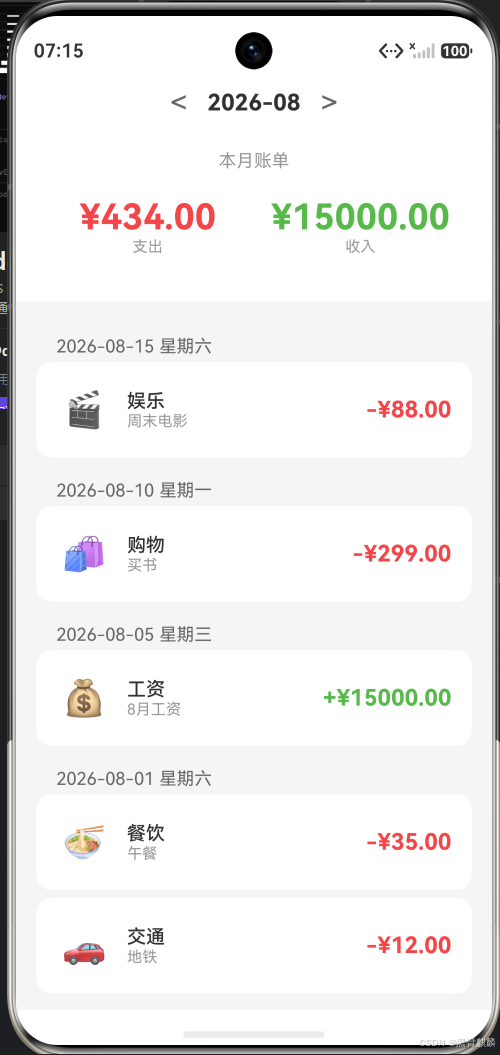
运行效果(API 23 模拟器):
一、项目创建与结构
1.1 创建工程
用 DevEco Studio 创建 Empty Ability 工程:
- 项目名称:EasyAccount
- 包名:com.example.easyaccount
- API版本:API 11+
- 语言:ArkTS
1.2 工程结构
EasyAccount/
├── entry/
│   └── src/main/
│       ├── ets/
│       │   ├── entryability/
│       │   ├── pages/           # 页面
│       │   ├── model/           # 数据模型
│       │   ├── store/           # 状态管理
│       │   └── components/      # 可复用组件
│       ├── resources/
│       └── module.json5
└── build-profile.json5
二、数据模型定义
2.1 账单条目模型
typescript
// model/BillItem.ts
export enum BillType {
  EXPENSE = 'expense',   // 支出
  INCOME = 'income'      // 收入
}

export enum BillCategory {
  FOOD = '餐饮',
  TRANSPORT = '交通',
  SHOPPING = '购物',
  ENTERTAINMENT = '娱乐',
  HOUSING = '住房',
  SALARY = '工资',
  OTHER = '其他'
}

export interface BillItem {
  id: string;                // 唯一ID
  type: BillType;            // 收支类型
  category: BillCategory;    // 分类
  amount: number;            // 金额
  note: string;              // 备注
  date: string;              // 日期 (YYYY-MM-DD)
  createTime: number;        // 创建时间戳
}
注意 :ArkTS 不支持
Omit<T, K>等工具类型(仅支持 Partial、Required、Readonly、Record),也不支持对象展开{...obj}和解构声明const [a, b] = ...。因此新增账单的入参单独定义一个接口,避免Omit<BillItem, 'id' | 'createTime'>这种在 ArkTS 中无法编译的写法:
typescript
// model/BillItem.ts(续)
// 新增账单时的入参(id / createTime 由 BillStore 内部生成)
export interface BillItemInput {
  type: BillType;
  category: BillCategory;
  amount: number;
  note: string;
  date: string;
}
2.2 数据存储服务
typescript
// store/BillStore.ts
import { BillItem, BillItemInput, BillType, BillCategory } from '../model/BillItem';

// 模拟数据生成(substr 已废弃,使用 substring)
function generateId(): string {
  return Date.now().toString(36) + Math.random().toString(36).substring(2, 7);
}

export class BillStore {
  private bills: BillItem[] = [];

  constructor() {
    // 初始化示例数据
    this.bills = [
      {
        id: generateId(),
        type: BillType.EXPENSE,
        category: BillCategory.FOOD,
        amount: 35,
        note: '午餐',
        date: '2026-08-01',
        createTime: Date.now()
      },
      {
        id: generateId(),
        type: BillType.EXPENSE,
        category: BillCategory.TRANSPORT,
        amount: 12,
        note: '地铁',
        date: '2026-08-01',
        createTime: Date.now()
      },
      {
        id: generateId(),
        type: BillType.INCOME,
        category: BillCategory.SALARY,
        amount: 15000,
        note: '8月工资',
        date: '2026-08-05',
        createTime: Date.now()
      }
    ];
  }

  getAll(): BillItem[] {
    return [...this.bills];
  }

  add(bill: BillItemInput): BillItem {
    // ArkTS 不支持对象展开,逐字段构造
    const newBill: BillItem = {
      type: bill.type,
      category: bill.category,
      amount: bill.amount,
      note: bill.note,
      date: bill.date,
      id: generateId(),
      createTime: Date.now()
    };
    this.bills.unshift(newBill);
    return newBill;
  }

  update(id: string, updates: Partial<BillItem>): boolean {
    const idx = this.bills.findIndex(b => b.id === id);
    if (idx === -1) return false;
    // ArkTS 不支持对象展开合并,改为逐字段判断更新
    if (updates.type !== undefined) {
      this.bills[idx].type = updates.type;
    }
    if (updates.category !== undefined) {
      this.bills[idx].category = updates.category;
    }
    if (updates.amount !== undefined) {
      this.bills[idx].amount = updates.amount;
    }
    if (updates.note !== undefined) {
      this.bills[idx].note = updates.note;
    }
    if (updates.date !== undefined) {
      this.bills[idx].date = updates.date;
    }
    return true;
  }

  delete(id: string): boolean {
    const idx = this.bills.findIndex(b => b.id === id);
    if (idx === -1) return false;
    this.bills.splice(idx, 1);
    return true;
  }
}

// 导出全局单例
export const billStore = new BillStore();
三、主页面骨架
typescript
// pages/HomePage.ets
import { BillItem, BillType, BillCategory } from '../model/BillItem';
import { billStore } from '../store/BillStore';

@Entry
@Component
struct HomePage {
  @State bills: BillItem[] = billStore.getAll();
  @State totalExpense: number = 0;
  @State totalIncome: number = 0;

  aboutToAppear() {
    this.calculateTotals();
  }

  calculateTotals() {
    this.totalExpense = this.bills
      .filter(b => b.type === BillType.EXPENSE)
      .reduce((sum, b) => sum + b.amount, 0);
    this.totalIncome = this.bills
      .filter(b => b.type === BillType.INCOME)
      .reduce((sum, b) => sum + b.amount, 0);
  }

  build() {
    Column() {
      // 顶部汇总区
      this.HeaderSection()
      // 账单列表
      this.BillList()
    }
    .width('100%')
    .height('100%')
    .backgroundColor('#F5F5F5')
  }

  @Builder
  HeaderSection() {
    Column() {
      Text('本月账单')
        .fontSize(14)
        .fontColor('#999')
      Row() {
        Column() {
          Text(`¥${this.totalExpense.toFixed(2)}`)
            .fontSize(28)
            .fontColor('#FF4444')
          Text('支出').fontSize(12).fontColor('#999')
        }.layoutWeight(1)
        Column() {
          Text(`¥${this.totalIncome.toFixed(2)}`)
            .fontSize(28)
            .fontColor('#44BB44')
          Text('收入').fontSize(12).fontColor('#999')
        }.layoutWeight(1)
      }
      .width('100%')
      .padding(20)
    }
    .width('100%')
    .backgroundColor(Color.White)
    .padding({ top: 40, bottom: 16 })
  }

  @Builder
  BillList() {
    List() {
      ForEach(this.bills, (item: BillItem) => {
        ListItem() {
          this.BillCard(item)
        }
      })
    }
    .width('100%')
    .layoutWeight(1)
    .padding(16)
  }

  @Builder
  BillCard(item: BillItem) {
    Row() {
      // 分类图标
      Text(this.getCategoryEmoji(item.category))
        .fontSize(28)
        .padding(8)

      Column() {
        Text(item.category).fontSize(16)
        Text(item.note).fontSize(12).fontColor('#999')
      }
      .alignItems(HorizontalAlign.Start)
      .layoutWeight(1)
      .padding({ left: 12 })

      Text(`${item.type === BillType.EXPENSE ? '-' : '+'}¥${item.amount.toFixed(2)}`)
        .fontSize(18)
        .fontColor(item.type === BillType.EXPENSE ? '#FF4444' : '#44BB44')
    }
    .width('100%')
    .padding(16)
    .backgroundColor(Color.White)
    .borderRadius(12)
    .margin({ bottom: 8 })
  }

  getCategoryEmoji(category: BillCategory): string {
    const map: Record<string, string> = {
      '餐饮': '🍜', '交通': '🚗', '购物': '🛍️',
      '娱乐': '🎬', '住房': '🏠', '工资': '💰', '其他': '📌'
    };
    return map[category] || '📌';
  }
}
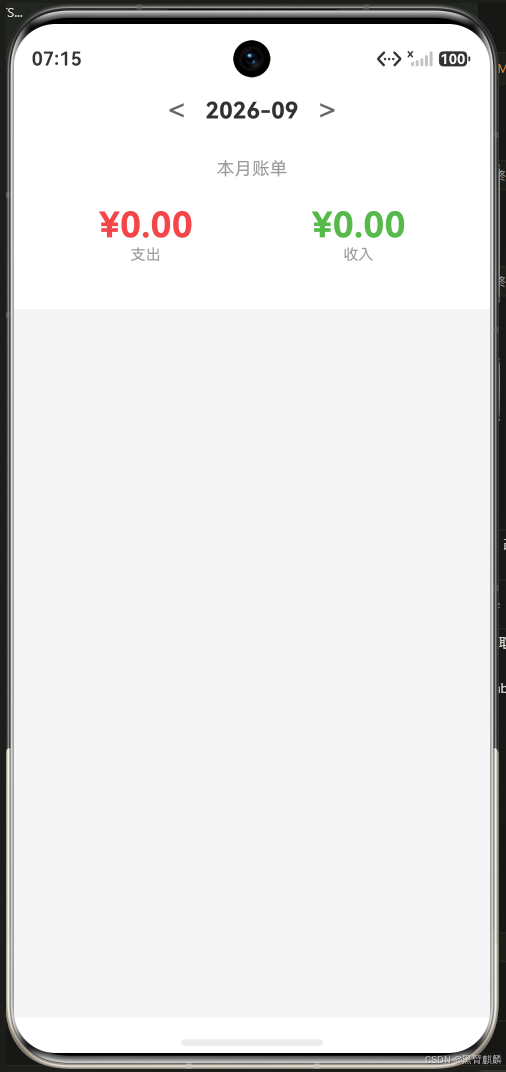
模拟器实际运行效果------切换到没有账单的 9 月,支出/收入归零,列表为空:
四、项目基础配置
4.1 应用图标与名称
在 module.json5 中配置:
json
{
  "module": {
    "name": "entry",
    "type": "entry",
    "description": "随手账本",
    "abilities": [{
      "name": "EntryAbility",
      "label": "随手账本",
      "icon": "$media:icon"
    }]
  }
}
4.2 页面路由配置
json
// 在 resources/base/profile/main_pages.json
{
  "src": [
    "pages/HomePage"
  ]
}
总结
本篇完成了随手账本项目的三大基础设施:
- 工程结构:按 model/store/components/pages 分层
- 数据模型:BillItem 接口 + BillStore 数据服务
- 主页面:顶部收支汇总 + 账单列表
后面9篇将在这个基础上逐步完善------新增、编辑、删除、搜索、持久化、导出、主题切换......敬请关注。