ArcGIS JS 基础教程(30):体元系列 - 体元切片 VoxelSlice
零、写在前面
📌 本系列教程完整目录 :ArcGIS JS 系列基础教程(100个项目常用热门功能)
💡 在线示例 :完整可运行的 HTML 示例,无需任何环境配置,可直接在浏览器中打开体验
🗂️ 专栏导航 :收藏 + 关注,专栏文章第一时间送达
❤️ 一键三连:点赞 + 评论 + 收藏
一、功能介绍
VoxelSlice(体元切片)沿一个无限平面裁剪体数据体积,得到一个可渲染的凸壳(convex shell)。它常用于:
- 把庞大的三维体数据"切开",只展示某一截面(如某一高度层、某一经度面)的标量场,方便观察内部结构;
- 定义感兴趣区域(Area of Interest),屏蔽与当前分析无关的体素。
参考:VoxelSlice API | VoxelVolumeStyle API | 官方示例 Create area of interest for VoxelLayer
⚠️ 关键概念 :
VoxelSlice的point是体素空间坐标 (基于VoxelVolume.sizeInVoxels的索引[x, y, z]),不是经纬度等地理坐标 。这正是它区别于普通Slice分析工具的地方。
二、功能实现
2.1 创建并添加切片
切片由 VoxelSlice 构造,最终装入 VoxelVolumeStyle.slices 这个 Collection 集合中:
javascript
const VoxelSlice = await $arcgis.import("@arcgis/core/layers/voxel/VoxelSlice.js");

voxelLayer.when(() => {
    const vol = voxelLayer.getVolume(null);   // VoxelVolume(只读元信息)
    const volSize = vol.sizeInVoxels;          // 体素空间尺寸 [x, y, z]

    const volumeStyle = voxelLayer.getVolumeStyle(null); // VoxelVolumeStyle
    voxelLayer.enableSlices = true;            // 启用切片可视化

    // 水平切片:位于中间高度
    const hSlice = new VoxelSlice({
        orientation: 0,
        tilt: 0,
        point: [0, 0, Math.floor(volSize[2] / 2)]
    });
    volumeStyle.slices.add(hSlice);            // 添加进集合即可渲染
});
2.2 切片的三个核心属性
| 属性 | 类型 | 说明 |
|---|---|---|
orientation |
number |
切片平面的方向角(单位:度) |
tilt |
number |
切片平面的倾斜角(单位:度) |
point |
[number,number,number] |
切片平面经过的一个点,以 sizeInVoxels 体素空间坐标 [x, y, z] 指定 |
此外还有 enabled(是否启用,默认 true)与 label(标签文本)。
2.3 管理集合(增删改)
slices 是一个 Collection<VoxelSlice>,支持标准集合操作:
javascript
// 新增
volumeStyle.slices.add(new VoxelSlice({ orientation: 270, tilt: 90, point: [midX, 0, 0] }));

// 移除最末
volumeStyle.slices.removeAt(volumeStyle.slices.length - 1);

// 实时修改已有切片(无需重新加载)
const s = volumeStyle.slices.getItemAt(0);
s.orientation = 45;   // 立即生效
s.tilt = 30;
s.point = [128, 64, 89];
也可整体替换:
volumeStyle.slices = [sliceA, sliceB];
三、功能应用
| 应用场景 | 实现要点 |
|---|---|
| 单一高度层展示 | orientation:0, tilt:0, point:[0,0,z],z 取中间体素索引 |
| 东西向剖面 | orientation:270, tilt:90, point:[midX,0,0] |
| 感兴趣区域裁剪 | 将 point 设在关注体素附近,组合多个切片 |
| 交互式探查 | 滑块绑定 getItemAt(i).orientation/tilt/point 实时更新 |
四、核心代码
📦 完整代码 已保存至
sample/lesson32_voxel_slice.html,可直接在浏览器打开。
html
<!DOCTYPE html>
<html lang="zh-CN">
<head>
    <meta charset="UTF-8">
    <meta name="viewport" content="width=device-width, initial-scale=1.0">
    <title>第32课:VoxelSlice 体元切片</title>
    <link rel="stylesheet" href="https://js.arcgis.com/5.0/esri/themes/light/main.css">
    <script type="module" src="https://js.arcgis.com/5.0/"></script>
    <style>
        * { margin: 0; padding: 0; box-sizing: border-box; }
        body { font-family: "Microsoft YaHei", sans-serif; }
        #mapContainer { width: 100vw; height: 100vh; }
        .page-title {
            position: absolute; top: 20px; left: 50%; transform: translateX(-50%);
            background: rgba(255,255,255,0.95); padding: 10px 24px; border-radius: 6px;
            font-size: 18px; font-weight: bold; z-index: 100;
            box-shadow: 0 2px 8px rgba(0,0,0,0.15);
        }
        .control-panel {
            position: absolute; top: 80px; right: 20px;
            background: rgba(255,255,255,0.95); padding: 16px; border-radius: 8px;
            box-shadow: 0 2px 12px rgba(0,0,0,0.15);
            z-index: 100; min-width: 320px;
        }
        .control-panel h3 { margin: 0 0 8px 0; font-size: 14px; color: #333; }
        .section { margin-bottom: 12px; padding-bottom: 10px; border-bottom: 1px solid #eee; }
        .section:last-child { border-bottom: none; margin-bottom: 0; }
        .btn-row { display: flex; gap: 8px; flex-wrap: wrap; margin-top: 6px; }
        .btn-row button {
            flex: 1; min-width: 60px; padding: 6px 0;
            border: 1px solid #d9d9d9; border-radius: 4px;
            background: white; cursor: pointer; font-size: 12px;
        }
        .btn-row button:hover { border-color: #1890ff; color: #1890ff; }
        .btn-row button.on { background: #1890ff; color: white; border-color: #1890ff; }
        .slider-row { margin-top: 8px; font-size: 12px; color: #333; }
        .slider-row label { display: flex; justify-content: space-between; margin-bottom: 2px; }
        .slider-row .v { color: #1890ff; font-weight: bold; }
        .slider-row input[type=range] { width: 100%; }
        .info-card {
            margin-top: 10px; padding: 10px 12px;
            background: #f0f5ff; border-radius: 6px;
            border-left: 3px solid #1890ff; font-size: 12px; line-height: 1.6;
        }
        .info-card .val { font-weight: bold; color: #1890ff; }
        .status-text {
            position: absolute; bottom: 20px; left: 50%; transform: translateX(-50%);
            background: rgba(0,0,0,0.7); color: white; padding: 8px 20px;
            border-radius: 20px; font-size: 13px; z-index: 100; pointer-events: none;
            white-space: nowrap;
        }
    </style>
</head>
<body>
<h1 class="page-title">第32课:VoxelSlice 体元切片</h1>

<div class="control-panel">
    <div class="section">
        <h3>➕ 添加切片(VoxelSlice)</h3>
        <div class="btn-row">
            <button id="btnAddH">水平切片</button>
            <button id="btnAddV">垂直切片</button>
            <button id="btnRemove">移除最末</button>
        </div>
    </div>
    <div class="section">
        <h3>🎯 选中切片</h3>
        <div class="btn-row">
            <button id="btnPrev">上一个</button>
            <button id="btnNext">下一个</button>
            <button id="btnEnable" class="on">切片已启用</button>
        </div>
    </div>
    <div class="section">
        <h3>⚙️ 切片参数(选中项)</h3>
        <div class="slider-row">
            <label>方向 orientation<span class="v" id="valOri">0°</span></label>
            <input type="range" id="rngOri" min="0" max="360" value="0">
        </div>
        <div class="slider-row">
            <label>倾斜 tilt<span class="v" id="valTilt">0°</span></label>
            <input type="range" id="rngTilt" min="0" max="180" value="0">
        </div>
        <div class="slider-row">
            <label>位置 point.x<span class="v" id="valPos">0</span></label>
            <input type="range" id="rngPos" min="0" max="100" value="0">
        </div>
    </div>
    <div class="info-card">
        <div>体素尺寸:<span class="val" id="volSize">加载中...</span></div>
        <div>切片数量:<span class="val" id="sliceCount">0</span></div>
        <div>选中索引:<span class="val" id="activeIdx">-</span></div>
    </div>
</div>

<div class="status-text" id="statusText">VoxelSlice | 沿无限平面裁剪体数据</div>

<div id="mapContainer"></div>

<script type="module">
    const Map = await $arcgis.import("@arcgis/core/Map.js");
    const SceneView = await $arcgis.import("@arcgis/core/views/SceneView.js");
    const VoxelLayer = await $arcgis.import("@arcgis/core/layers/VoxelLayer.js");
    const VoxelSlice = await $arcgis.import("@arcgis/core/layers/voxel/VoxelSlice.js");
    const getTianditu = await $arcgis.import("https://openlayers.vip/examples/resources/tianditu.js");

    const vecLayers = getTianditu.default({ type: "vec_w" });
    const map = new Map({ basemap: { baseLayers: [vecLayers.base, vecLayers.anno] } });

    const view = new SceneView({
        container: "mapContainer", map: map,
        viewingMode: "local",
        camera: { position: { longitude: -70, latitude: 18, z: 800000 }, heading: 0, tilt: 60 }
    });
    window.view = view;

    const voxelLayer = new VoxelLayer({
        url: "https://gs3d.geosceneonline.cn/server/rest/services/Hosted/VoxelPM10/SceneServer"
    });
    map.add(voxelLayer);

    let volumeStyle = null;   // VoxelVolumeStyle
    let volSize = null;       // sizeInVoxels: [x, y, z]
    let activeIndex = 0;      // 当前选中的切片索引

    view.when(() => {
        voxelLayer.when(() => {
            const vol = voxelLayer.getVolume(null); // VoxelVolume(只读元信息)
            volSize = vol.sizeInVoxels;             // 体素空间尺寸
            document.getElementById("volSize").textContent = volSize.join(" × ");

            // 样式集合:切片通过 VoxelVolumeStyle.slices 管理
            volumeStyle = voxelLayer.getVolumeStyle(null);
            voxelLayer.enableSlices = true;         // 启用切片可视化

            // 默认添加一条水平切片(位于中间高度)
            addSlice({ orientation: 0, tilt: 0, point: [0, 0, Math.floor(volSize[2] / 2)] });
            // 再添加一条垂直切片(东西向,位于中间经度)
            addSlice({ orientation: 270, tilt: 90, point: [Math.floor(volSize[0] / 2), 0, 0] });

            view.goTo(voxelLayer.fullExtent, { duration: 2000 });
        }).catch(err => {
            document.getElementById("statusText").textContent = "加载失败";
            console.error(err);
        });
    });

    // 在体素空间内添加切片;point 坐标为 [x, y, z](体素索引,非地理坐标)
    function addSlice(props) {
        const slice = new VoxelSlice(props);
        volumeStyle.slices.add(slice);
        activeIndex = volumeStyle.slices.length - 1;
        syncControlsToActive();
        updateInfo();
    }

    function updateInfo() {
        document.getElementById("sliceCount").textContent = volumeStyle.slices.length;
        document.getElementById("activeIdx").textContent =
            volumeStyle.slices.length ? activeIndex : "-";
    }

    // 将选中切片的属性同步到滑块显示
    function syncControlsToActive() {
        if (!volumeStyle.slices.length) return;
        const s = volumeStyle.slices.getItemAt(activeIndex);
        document.getElementById("rngOri").value = s.orientation;
        document.getElementById("rngTilt").value = s.tilt;
        document.getElementById("rngPos").value = s.point[0];
        document.getElementById("valOri").textContent = s.orientation + "°";
        document.getElementById("valTilt").textContent = s.tilt + "°";
        document.getElementById("valPos").textContent = s.point[0];
        updateInfo();
    }

    document.getElementById("btnAddH").addEventListener("click", function () {
        if (!volSize) return;
        addSlice({ orientation: 0, tilt: 0, point: [0, 0, Math.floor(volSize[2] / 2)] });
        document.getElementById("statusText").textContent = "已添加水平切片";
    });

    document.getElementById("btnAddV").addEventListener("click", function () {
        if (!volSize) return;
        addSlice({ orientation: 270, tilt: 90, point: [Math.floor(volSize[0] / 2), 0, 0] });
        document.getElementById("statusText").textContent = "已添加垂直切片";
    });

    document.getElementById("btnRemove").addEventListener("click", function () {
        const n = volumeStyle.slices.length;
        if (n === 0) return;
        volumeStyle.slices.removeAt(n - 1);          // 移除最末切片
        if (activeIndex >= volumeStyle.slices.length) {
            activeIndex = Math.max(0, volumeStyle.slices.length - 1);
        }
        syncControlsToActive();
        document.getElementById("statusText").textContent = "已移除最末切片";
    });

    document.getElementById("btnPrev").addEventListener("click", function () {
        if (volumeStyle.slices.length === 0) return;
        activeIndex = (activeIndex - 1 + volumeStyle.slices.length) % volumeStyle.slices.length;
        syncControlsToActive();
    });

    document.getElementById("btnNext").addEventListener("click", function () {
        if (volumeStyle.slices.length === 0) return;
        activeIndex = (activeIndex + 1) % volumeStyle.slices.length;
        syncControlsToActive();
    });

    document.getElementById("btnEnable").addEventListener("click", function () {
        voxelLayer.enableSlices = !voxelLayer.enableSlices;
        this.classList.toggle("on", voxelLayer.enableSlices);
        this.textContent = voxelLayer.enableSlices ? "切片已启用" : "切片已禁用";
    });

    // 实时修改选中切片的属性:方向
    document.getElementById("rngOri").addEventListener("input", function () {
        if (!volumeStyle.slices.length) return;
        const s = volumeStyle.slices.getItemAt(activeIndex);
        s.orientation = Number(this.value);
        document.getElementById("valOri").textContent = this.value + "°";
    });

    document.getElementById("rngTilt").addEventListener("input", function () {
        if (!volumeStyle.slices.length) return;
        const s = volumeStyle.slices.getItemAt(activeIndex);
        s.tilt = Number(this.value);
        document.getElementById("valTilt").textContent = this.value + "°";
    });

    // 移动选中切片在 x 轴上的位置(体素空间)
    document.getElementById("rngPos").addEventListener("input", function () {
        if (!volumeStyle.slices.length) return;
        const s = volumeStyle.slices.getItemAt(activeIndex);
        const p = s.point.slice();
        p[0] = Number(this.value) * Math.floor(volSize[0] / 100);
        s.point = p;
        document.getElementById("valPos").textContent = p[0];
    });
</script>
</body>
</html>
五、在线示例
🔗 在线体验 :https://southjor.github.io/arcgis-examples/lessons/lesson32.html
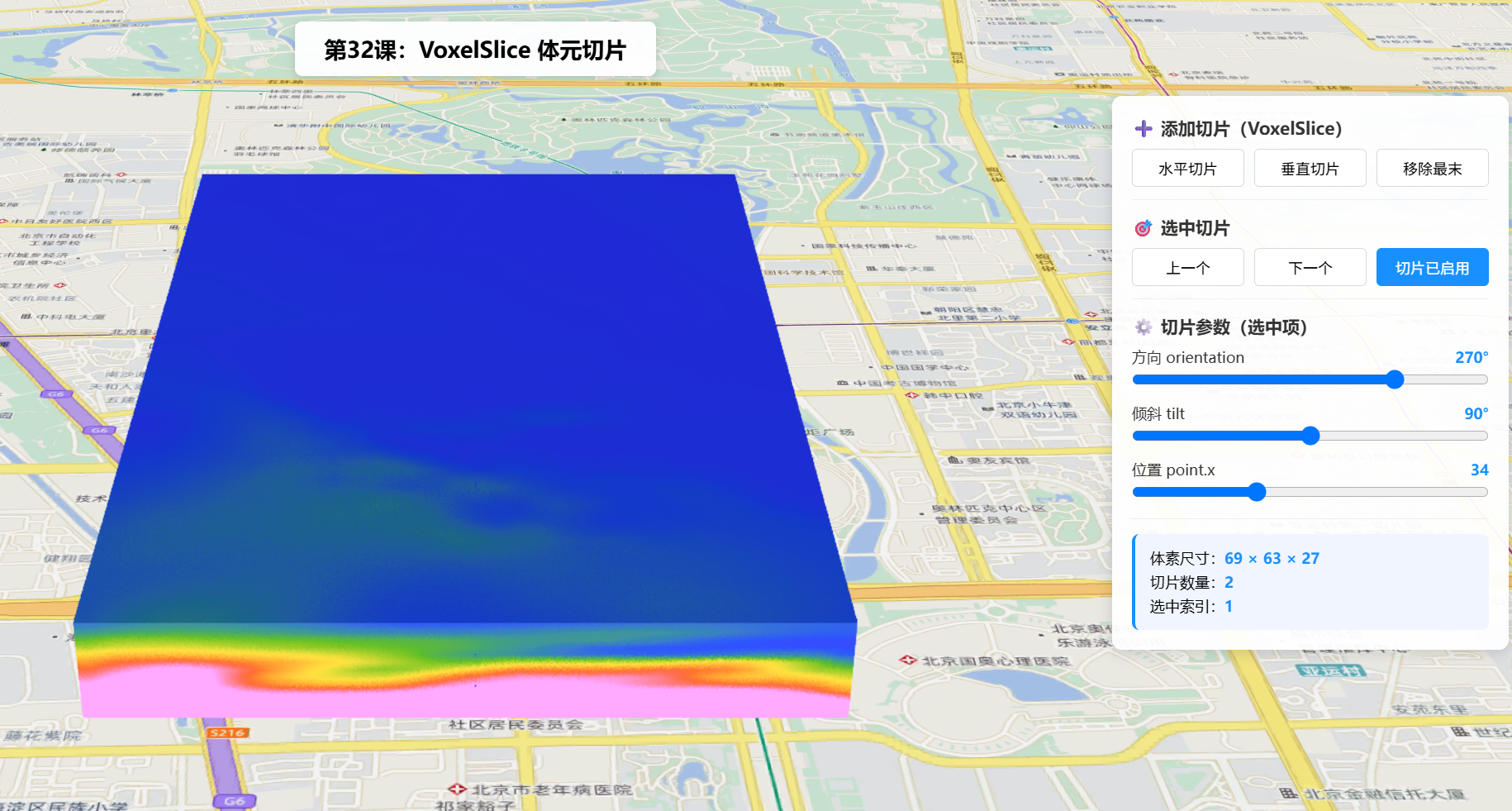
操作说明:
- 场景加载后默认添加一条水平切片与一条垂直切片。
- 点击
水平切片/垂直切片可追加切片,移除最末删除最后一条。- 通过
上一个/下一个选择切片,拖动滑块实时改变其orientation/tilt/point.x,观察截面变化。切片已启用切换voxelLayer.enableSlices,可整体开关切片渲染。
六、关键 API 说明
| API | 说明 |
|---|---|
new VoxelSlice(properties) |
构造单个切片,point 为体素空间 坐标 [x,y,z] |
voxelLayer.getVolume(null) |
返回 VoxelVolume(只读元信息,含 sizeInVoxels) |
voxelLayer.getVolumeStyle(null) |
返回 VoxelVolumeStyle,其 slices 为 Collection<VoxelSlice> |
volumeStyle.slices.add(slice) |
向集合添加切片并立即渲染 |
volumeStyle.slices.removeAt(i) / getItemAt(i) |
集合删除 / 读取,修改属性实时生效 |
voxelLayer.enableSlices |
是否启用切片可视化(默认 true) |
参考链接: VoxelSlice | VoxelVolumeStyle | 官方示例
七、系列导航
💡 小贴士 :
VoxelSlice的point是体素索引 而非地理坐标------先用getVolume(null).sizeInVoxels拿到体素尺寸,再以[x,y,z]取其中点,就能稳定切在体积中心。另外,切片在renderMode: "volume"下也有效,不局限于surfaces模式。