Rust+Slint 实现圆形变色按钮源码分享
- 一、效果展示
- 二、源码分享
- 三、实现原理
-
- 1、组件架构设计
-
- [1.1 、分层结构](#1.1 、分层结构)
- [1.2 、属性系统](#1.2 、属性系统)
- 2、水波纹效果实现
-
- [2.1 、动态尺寸计算](#2.1 、动态尺寸计算)
- [2.2、 位置跟踪机制](#2.2、 位置跟踪机制)
- [2.3、 渐变颜色设计](#2.3、 渐变颜色设计)
- [3、 交互逻辑实现](#3、 交互逻辑实现)
-
- [3.1 鼠标事件处理](#3.1 鼠标事件处理)
- [3.2 、悬停状态检测](#3.2 、悬停状态检测)
- 4、动画与过渡效果
-
- [4.1 、缓动函数配置](#4.1 、缓动函数配置)
- [4.2、 视觉细节优化](#4.2、 视觉细节优化)
- [5、 Rust 后端集成](#5、 Rust 后端集成)
-
- [5.1 、模块包含机制](#5.1 、模块包含机制)
- [5.2、 窗口创建流程](#5.2、 窗口创建流程)
- [6、 构建系统配置](#6、 构建系统配置)
-
- [6.1、 构建脚本](#6.1、 构建脚本)
- [6.2 、依赖管理](#6.2 、依赖管理)
- 7、设计模式总结
-
- [7.1 、响应式设计](#7.1 、响应式设计)
- [7.2、 性能优化](#7.2、 性能优化)
- [7.3、 可扩展性](#7.3、 可扩展性)
- 8、技术亮点
一、效果展示
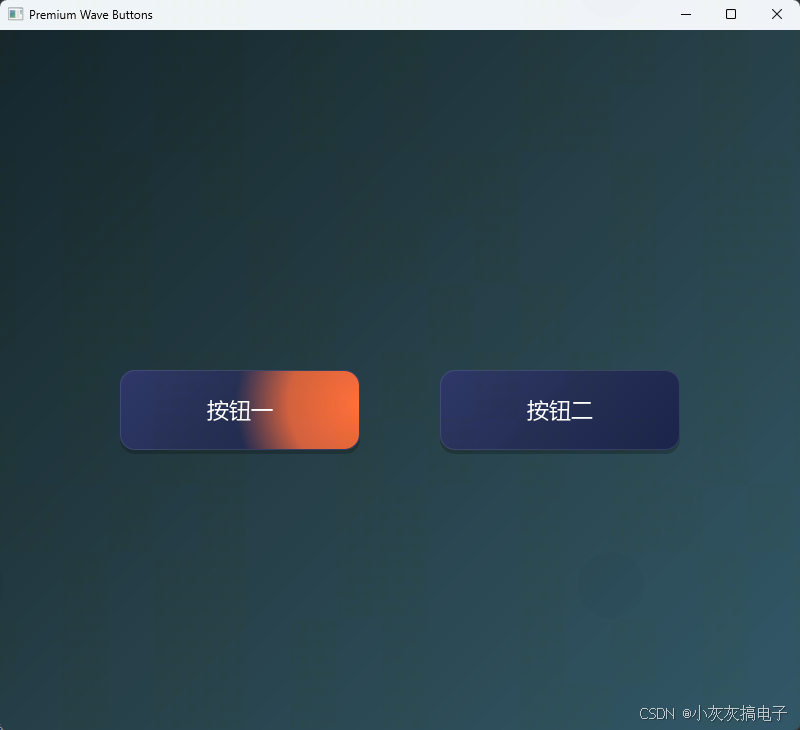
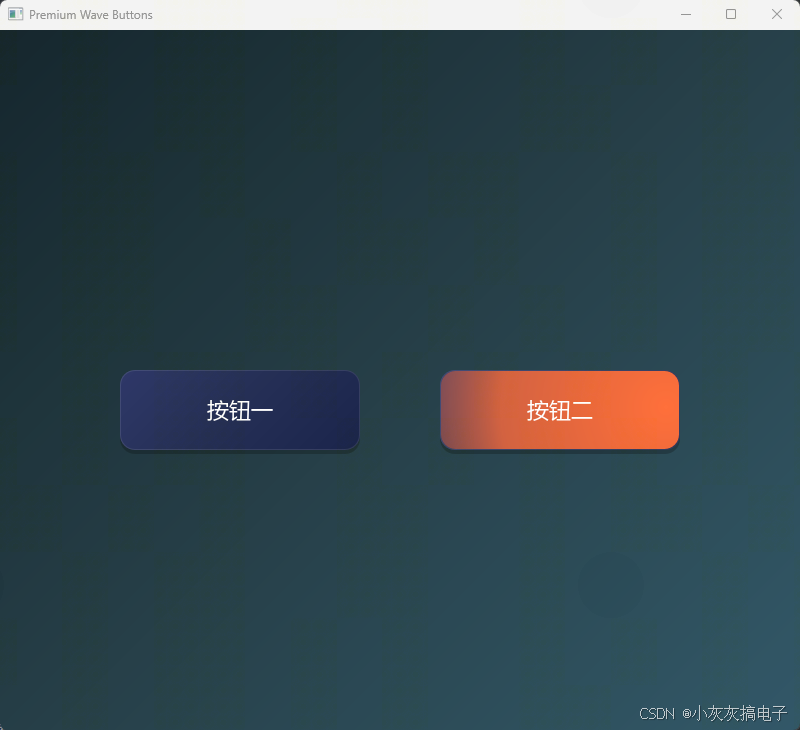
二、源码分享
1、工程结构
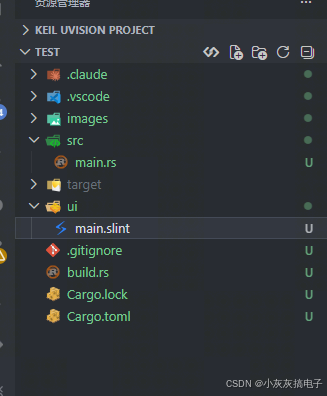
2、main.rs
rust
slint::include_modules!();

fn main() -> Result<(), slint::PlatformError> {
    let main_window = MainWindow::new()?;
    main_window.run()
}3、build.rs
rust
fn main() {
    // 编译 Slint UI
    slint_build::compile("ui/main.slint").unwrap();
}
4、main.slint
rust
// 高端水波纹扩散按钮组件
component WaveButton {
    in property <string> text;
    in property <color> background-color: rgb(30, 40, 80);
    in property <color> ripple-color: #ff6b35;
    in property <color> font-color: #ffffff;
    in property <length> border-radius: 15px;
    in property <length> font-size: 22px;

    // 记录鼠标离开时的位置
    in-out property <length> exit-x: 0px;
    in-out property <length> exit-y: 0px;

    width: 240px;
    height: 80px;

    // 阴影层
    Rectangle {
        width: root.width;
        height: root.height;
        border-radius: root.border-radius;
        background: #00000040;
        y: 4px;
    }

    // 主容器 - 圆角裁剪
    Rectangle {
        width: root.width;
        height: root.height;
        border-radius: root.border-radius;
        clip: true;

        // 渐变背景
        background: @linear-gradient(135deg,
            rgb(40, 50, 100) 0%,
            rgb(30, 40, 80) 50%,
            rgb(20, 30, 70) 100%);

        // 边框高光效果
        border-width: 1px;
        border-color: #ffffff1a;

        // 水波纹圆形 - 跟随鼠标位置
        ripple-circle := Rectangle {
            width: touch-area.has-hover ? parent.width * 3  : 0px;
            height: touch-area.has-hover ? parent.width * 3  : 0px;
            // 当悬停时跟随鼠标,离开时使用记录的位置
            x: touch-area.has-hover ? touch-area.mouse-x - self.width / 2 : root.exit-x - self.width / 2;
            y: touch-area.has-hover ? touch-area.mouse-y - self.height / 2 : root.exit-y - self.height / 2;
            border-radius: self.width / 2;
            background: @radial-gradient(circle, #ff6b35 0%, #ff6b35cc 40%, #ff6b3500 70%);

            // 平滑动画
            animate width, height { duration: 600ms; easing: cubic-bezier(0.4, 0, 0.2, 1); }
        }

        // 文字层
        Text {
            width: parent.width;
            height: parent.height;
            text: root.text;
            color: root.font-color;
            font-size: root.font-size;
            horizontal-alignment: center;
            vertical-alignment: center;
        }
    }

    // 鼠标交互区域
    touch-area := TouchArea {
        width: root.width;
        height: root.height;

        pointer-event(event) => {
            if(event.kind == PointerEventKind.move)
            {
                root.exit-x = self.mouse-x;
                root.exit-y = self.mouse-y;
            }
        }
    }
}

// 主窗口
export component MainWindow inherits Window {
    preferred-width: 800px;
    preferred-height: 700px;
    title: "Premium Wave Buttons";

    // 深色渐变背景
    background: @linear-gradient(135deg, #0f2027 0%, #203a43 50%, #2c5364 100%);

    // 垂直布局实现居中
    VerticalLayout {
        alignment: center;


        // 间距
        Rectangle {
            height: 60px;
        }

        // 水平布局放置两个按钮
        HorizontalLayout {
            alignment: center;
            spacing: 80px;

            WaveButton {
                text: "按钮一";
            }

            WaveButton {
                text: "按钮二";
            }
        }
    }
}
5、Cargo.toml
rust
[package]
name = "sokoban"
version = "0.1.0"
edition = "2024"

[dependencies]
slint = "1.16.1"

[build-dependencies]
slint-build = "1.16.1"
三、实现原理
本文实现的圆形变色按钮基于 Rust + Slint 框架,通过声明式 UI 语法和响应式属性系统,实现了具有水波纹扩散效果的高交互性按钮组件。以下是详细的技术实现原理:
1、组件架构设计
1.1 、分层结构
按钮采用三层视觉结构:
- 阴影层:最底层的半透明黑色矩形,提供立体感和深度
- 主容器层:带有圆角裁剪和渐变背景的矩形,承载水波纹效果
- 文字层:显示按钮文本,始终位于最上层
1.2 、属性系统
组件通过 Slint 的属性系统实现数据绑定和响应式更新:
in property:输入属性,外部可配置(如文本、颜色、尺寸)in-out property:双向属性,内部状态管理(如鼠标离开位置)
2、水波纹效果实现
2.1 、动态尺寸计算
rust
ripple-circle := Rectangle {
    width: touch-area.has-hover ? parent.width * 3 : 0px;
    height: touch-area.has-hover ? parent.width * 3 : 0px;
}- 悬停时:水波纹圆形直径扩大到父容器宽度的3倍
- 非悬停时:尺寸为0,实现平滑消失效果
2.2、 位置跟踪机制
rust
x: touch-area.has-hover ? touch-area.mouse-x - self.width / 2 : root.exit-x - self.width / 2;
y: touch-area.has-hover ? touch-area.mouse-y - self.height / 2 : root.exit-y - self.height / 2;- 悬停状态 :实时跟随鼠标位置,
mouse-x/mouse-y提供精确坐标 - 离开状态 :使用记录的
exit-x/exit-y位置,避免突然跳回原点
2.3、 渐变颜色设计
rust
background: @radial-gradient(circle, #ff6b35 0%, #ff6b35cc 40%, #ff6b3500 70%);- 中心点:纯色
#ff6b35(橙色) - 40%位置:带透明度
cc(80%不透明度) - 70%位置:完全透明
00,实现自然淡出效果
3、 交互逻辑实现
3.1 鼠标事件处理
rust
touch-area := TouchArea {
    pointer-event(event) => {
        if(event.kind == PointerEventKind.move) {
            root.exit-x = self.mouse-x;
            root.exit-y = self.mouse-y;
        }
    }
}- 实时记录:鼠标移动时持续更新离开位置
- 平滑过渡:确保鼠标离开时水波纹从最后位置开始消失,而非瞬间重置
3.2 、悬停状态检测
touch-area.has-hover:内置悬停状态属性- 自动管理状态切换,无需手动跟踪鼠标进入/离开事件
4、动画与过渡效果
4.1 、缓动函数配置
rust
animate width, height { duration: 600ms; easing: cubic-bezier(0.4, 0, 0.2, 1); }- 持续时间:600毫秒,提供足够明显的动画效果
- 缓动曲线 :
cubic-bezier(0.4, 0, 0.2, 1)实现先加速后减速的自然运动 - 同步动画:宽度和高度同时变化,保持圆形比例
4.2、 视觉细节优化
- 边框高光 :
border-color: #ffffff1a添加轻微白色边框增强质感 - 渐变背景:135度线性渐变创建深度感
- 圆角统一 :所有层使用相同的
border-radius确保视觉一致性
5、 Rust 后端集成
5.1 、模块包含机制
rust
slint::include_modules!();- 编译时:
build.rs将.slint文件编译为 Rust 代码 - 运行时:
include_modules!宏引入生成的 UI 模块
5.2、 窗口创建流程
rust
fn main() -> Result<(), slint::PlatformError> {
    let main_window = MainWindow::new()?;
    main_window.run()
}- 创建主窗口实例
- 运行事件循环
- 错误处理:返回
PlatformError类型结果
6、 构建系统配置
6.1、 构建脚本
rust
// build.rs
slint_build::compile("ui/main.slint").unwrap();- 预处理:将声明式 UI 编译为 Rust 结构体
- 错误处理:使用
unwrap简化示例,生产环境应处理错误
6.2 、依赖管理
toml
[dependencies]
slint = "1.16.1"

[build-dependencies]
slint-build = "1.16.1"- 运行时依赖:
slint提供 UI 框架 - 构建时依赖:
slint-build处理 UI 编译
7、设计模式总结
7.1 、响应式设计
- 属性绑定:UI 自动响应属性变化
- 状态驱动:悬停状态触发视觉反馈
- 声明式语法:描述"是什么"而非"如何做"
7.2、 性能优化
- 裁剪优化 :
clip: true限制渲染区域 - 动画优化:硬件加速的 CSS 样式动画
- 事件优化:最小化事件处理逻辑
7.3、 可扩展性
- 参数化设计:所有视觉属性均可外部配置
- 组件化 :
WaveButton可作为独立组件复用 - 布局灵活:支持嵌套在任意布局容器中
8、技术亮点
- 零运行时成本:Slint 编译时生成高效 Rust 代码
- 类型安全:Rust 编译器保证 UI 逻辑的正确性
- 跨平台:同一代码库支持 Windows、macOS、Linux
- 内存安全:Rust 所有权系统避免内存错误

图:实现原理架构图 - 展示了组件分层、事件流和数据绑定关系