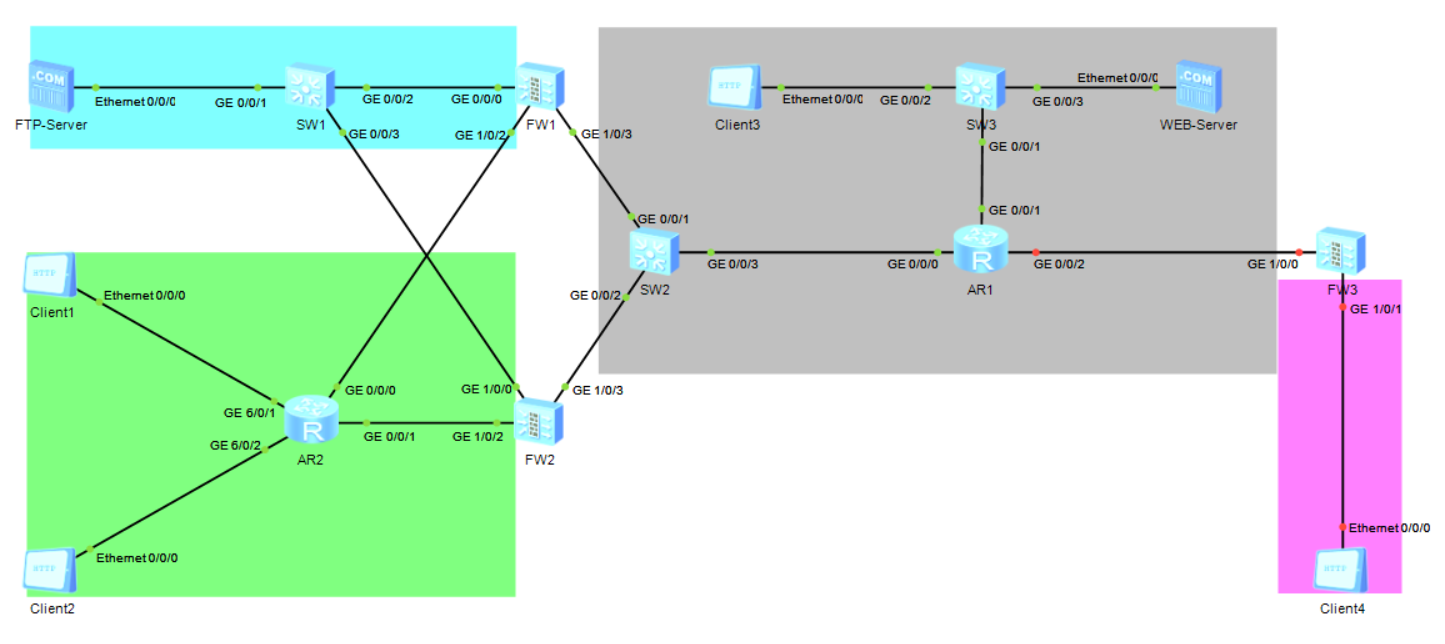
实验说明:FW1/FW2 双机热备 HRP,总部 <-> 分部 IPSec VPN,NAT 上网,FTP 服务器静态映射;
nn代表机位号,实验自行替换;接口完全匹配拓扑图。 安全域规划:
- Trust:总部内网 AR2、SW1 方向
- Untrust:互联网方向(SW2、AR1)
- DMZ:FTP‑Server 服务器区域
一、基础接口与安全区域配置
FW1(主墙)
sysname FW1
# 接口配置
interface GigabitEthernet 0/0/0
 portswitch
 port link‑type trunk
 port trunk allow‑pass all
# 外网VRRP组1 10.nn.3.0/24
interface GigabitEthernet 1/0/3
 ip address 10.nn.3.2 255.255.255.0
 vrrp vrid 1 virtual‑ip 10.nn.3.1
 vrrp vrid 1 priority 120
 vrrp vrid 1 preempt-mode timer delay 20
# DMZ区域接口
interface GigabitEthernet 1/0/2
 ip address 172.16.nn.2 255.255.255.0
 vrrp vrid 2 virtual‑ip 172.16.nn.254
 vrrp vrid 2 priority 120
 vrrp vrid 2 preempt‑mode timer delay 20
# Trust接口
interface GigabitEthernet 0/0/2
 ip address 192.168.nn.2 255.255.255.0
# 心跳聚合口Eth‑Trunk0
interface Eth‑Trunk 0
 mode lacp‑static
 port GigabitEthernet 0/0/3
 port GigabitEthernet 1/0/0
# 接口加入安全区域
firewall zone trust
 add interface GigabitEthernet 0/0/2
firewall zone untrust
 add interface GigabitEthernet 1/0/3
firewall zone dmz
 add interface GigabitEthernet 1/0/2
# 双机热备心跳
hrp interface Eth‑Trunk 0 remote 192.168.nn.3
hrp enable
hrp role master
FW2(备墙)
sysname FW2
interface GigabitEthernet 0/0/0
 portswitch
 port link‑type trunk
 port trunk allow‑pass all
interface GigabitEthernet 1/0/3
 ip address 10.nn.3.3 255.255.255.0
 vrrp vrid 1 virtual‑ip 10.nn.3.1
interface GigabitEthernet 1/0/2
 ip address 172.16.nn.3 255.255.255.0
 vrrp vrid 2 virtual‑ip 172.16.nn.254
interface GigabitEthernet 0/0/1
 ip address 192.168.nn.3 255.255.255.0
interface Eth‑Trunk 0
 mode lacp‑static
 port GigabitEthernet 0/0/3
 port GigabitEthernet 1/0/0
# 安全域
firewall zone trust
 add interface GigabitEthernet 0/0/1
firewall zone untrust
 add interface GigabitEthernet 1/0/3
firewall zone dmz
 add interface GigabitEthernet 1/0/2
# HRP
hrp interface Eth‑Trunk 0 remote 192.168.nn.2
hrp enable
hrp role standby
HRP 开启后,主墙配置会自动同步到备墙,后续 NAT、安全策略、IPSec 只需要在 FW1 配置。
FW3(分部出口防火墙)
sysname FW3
# 对接AR1互联网
interface GigabitEthernet 1/0/0
 ip address 10.nn.4.2 255.255.255.0
# 分部内网Client4
interface GigabitEthernet 1/0/1
 ip address 192.168.2.nn.1 255.255.255.0
# 安全域
firewall zone untrust
 add‑interface GigabitEthernet 1/0/0
firewall zone trust
 add‑interface GigabitEthernet 1/0/1
# 默认路由访问互联网
ip route‑static 0.0.0.0 0.0.0.0 10.nn.4.1
AR2(总部内网路由器)
sysname AR2
interface GigabitEthernet 0/0/0
 ip address 192.168.nn.10 255.255.255.0
interface GigabitEthernet 6/0/1
 ip address 192.168.nn.1 255.255.255.0
interface GigabitEthernet 6/0/2
 ip address 192.168.nn.65 255.255.255.0
# OSPF
ospf 1 router‑id 2.2.2.2
 area 0
  network 192.168.nn.0 0.0.0.255
  network 192.168.nn.64 0.0.0.63
  network 192.168.nn.0 0.0.0.255
AR1(互联网路由器)
sysname AR1
interface GigabitEthernet 0/0/0
 ip address 10.nn.3.10 255.255.255.0
interface GigabitEthernet 0/0/3
 ip address 10.nn.4.1 255.255.255.0
interface GigabitEthernet 0/0/2
 ip address 10.nn.5.1 255.255.255.0
# NAT地址池回程路由,指向FW1外网VRRP虚拟地址
ip route‑static 202.nn.0.0 255.255.255.248 10.nn.3.1
SW1 SW2 SW3 交换机
交换机只做二层透传,接口全部 trunk 允许所有 VLAN,不需要 IP。
sysname SW1
vlan batch all
interface GigabitEthernet 0/0/1
 port link‑type trunk
 port trunk allow‑pass all
interface GigabitEthernet 0/0/2
 port link‑type trunk
 port trunk allow‑pass all
interface GigabitEthernet 0/0/3
 port link‑type trunk
 port trunk allow‑pass all

sysname SW2
vlan batch all
interface GigabitEthernet 0/0/1
 port link‑type trunk
 port trunk allow‑pass all
interface GigabitEthernet 0/0/2
 port link‑type trunk
 port trunk allow‑pass all
interface GigabitEthernet 0/0/3
 port link‑type trunk
 port trunk allow‑pass all

sysname SW3
vlan batch all
interface GigabitEthernet 0/0/1
 port link‑type trunk
 port trunk allow‑pass all
interface GigabitEthernet 0/0/2
 port link‑type trunk
 port trunk allow‑pass all
interface GigabitEthernet 0/0/3
 port link‑type trunk
 port trunk allow‑pass all
二、路由配置(FW1 上配置,HRP 自动同步 FW2)
# 总部FW配置默认路由指向互联网AR1
ip route‑static 0.0.0.0 0.0.0.0 10.nn.3.10
# 将默认路由重分发进入OSPF,内网访问外网
ospf 1 router‑id 1.1.1.1
 import‑route static type 2
 area 0
  network 192.168.nn.0 0.0.0.255
三、NAT 策略(FW1 配置,HRP 同步 FW2)
1. 总部访问分部 VPN 流量,不做 NAT
nat policy
 rule name no‑nat‑to‑branch
  source‑address 192.168.nn.0 0.0.0.255
  destination‑address 192.168.2.nn.0 0.0.0.255
  action no‑nat
2. 总部内网上网源 NAT,地址池 202.nn.0.1‑202.nn.0.3
nat address‑group nat_pool 202.nn.0.1 202.nn.0.3
nat policy
 rule name nat‑internet
  source‑address 192.168.nn.0 0.0.0.255
  destination‑address any
  action nat address‑group nat_pool
3. FTP 服务器一对一静态 NAT 映射
FTP 服务器真实地址:172.16.nn.10,公网地址202.nn.0.3
nat static global 202.nn.0.3 inside 172.16.nn.10 netmask 255.255.255.255FW3 NAT 配置
# 分部访问总部流量不NAT
nat policy
 rule no‑nat‑to‑hq
  source‑address 192.168.2.nn.0 0.0.0.255
  destination‑address 192.168.nn.0 0.0.0.255
  action no‑nat
# 分部上网easy‑ip,使用出接口地址
nat policy
 rule nat‑internet‑branch
  source‑address 192.168.2.nn.0 0.0.0.255
  destination‑address any
  action nat easy‑ip
四、安全策略(FW1 配置,HRP 同步 FW2)
放行 OSPF、IKE、ESP 业务流量
security‑policy
 rule name permit‑ospf
  source‑zone trust
  destination‑zone local
  protocol ospf
  action permit
 rule name permit‑ike‑esp
  source‑zone untrust
  destination‑zone local
  protocol udp destination‑port 500
  protocol udp destination‑port 4500
  protocol esp
  action permit
# 总部trust访问untrust互联网
 rule name trust‑to‑untrust
  source‑zone trust
  destination‑zone untrust
  action permit
# trust访问DMZ FTP服务器
 rule name trust‑to‑dmz
  source‑zone trust
  destination‑zone dmz
  action permit
# untrust访问DMZ FTP
 rule name untrust‑to‑dmz‑ftp
  source‑zone untrust
  destination‑zone dmz
  service ftp
  action permit
# VPN隧道业务放行总部<->分部
 rule name ipsec‑traffic
  source‑zone trust
  destination‑zone untrust
  source‑address 192.168.nn.0 0.0.0.255
  destination‑address 192.168.2.nn.0 0.0.0.255
  action permit
FW3 安全策略
security‑policy
 rule name permit‑ike‑esp
  source‑zone untrust
  destination‑zone local
  protocol udp destination‑port 500
  protocol udp destination‑port 4500
  protocol esp
  action permit
 rule name trust‑to‑untrust
  source‑zone trust
  destination‑zone untrust
  action permit
 rule name ipsec‑traffic
  source‑zone trust
  destination‑zone untrust
  source‑address 192.168.2.nn.0 0.0.0.255
  destination‑address 192.168.nn.0 0.0.0.255
  action permit
五、IPSec VPN 配置
FW1(总部)
# 感兴趣流
acl number 3000
 rule permit ip source 192.168.nn.0 0.0.0.255 destination 192.168.2.nn.0 0.0.0.255
# IKE提议
ike proposal 10
 encryption‑algorithm aes‑256
 authentication‑algorithm sha2‑256
 dh group14
# IKE对等体
ike peer branch pre‑shared‑key simple Huawei@123
 ike‑proposal 10
 remote‑ip 10.nn.4.2
# IPSec策略
ipsec proposal tran1
 esp encryption‑algorithm aes‑256
 esp authentication‑algorithm sha2‑256
ipsec policy map1 10 isakmp
 security‑acl 3000
 proposal tran1
 remote‑peer 10.nn.4.2
 ike‑peer branch
# 绑定外网接口
interface GigabitEthernet 1/0/3
 ipsec policy map1
FW3(分部)
acl number 3000
 rule permit ip source 192.168.2.nn.0 0.0.0.255 destination 192.168.nn.0 0.0.0.255
ike proposal 10
 encryption‑algorithm aes‑256
 authentication‑algorithm sha2‑256
 dh group14
ike peer hq pre‑shared‑key simple Huawei@123
 ike‑proposal 10
 remote‑ip 10.nn.3.1
ipsec proposal tran1
 esp encryption‑algorithm aes‑256
 esp authentication‑algorithm sha2‑256
ipsec policy map1 10 isakmp
 security‑acl 3000
 proposal tran1
 remote‑peer 10.nn.3.1
 ike‑peer hq
interface GigabitEthernet 1/0/0
 ipsec policy map1
六、验证命令
# 1.查看VRRP
display vrrp
# 2.查看双机热备状态
display hrp state verbose
# 3.查看IKE/IPSec SA
display ike sa
display ipsec sa
# 4.查看NAT会话表
display firewall session table
# 5.查看OSPF邻居
display ospf peer brief
七、业务测试清单(任务验证)
- 总部 client1 ping 分部 client4,IPSec 隧道建立
- 总部 client2 访问 web‑server,访问互联网
- 分部 client4 访问 client3 互联网业务,FW3 查看 NAT 会话
- client1 访问 FTP 服务器内网地址
- client4 访问 FTP 公网地址 202.nn.0.3
- Internet client3 访问 FTP 公网地址 202.nn.0.3
注意:
nn替换为你的机位号;- HRP 双机热备,所有业务配置仅需要在 FW1 输入,FW2 自动同步;
- FTP 需要放行 ftp 服务,防火墙开启 ftp ALG
firewall alg ftp enable;- 静态 NAT,内网访问公网地址需要开启目的 NAT 回环,否则内网用公网 IP 访问 FTP 不通,FW1 增加:
nat static enable