🚀 前端转 Agent 开发 · 第三节:LangChain 提示词模板
📅 学习日期:2026-09-07(Day 03) 🧑💻 学习者:一名前端开发工程师 🎯 今日目标:搞懂 LangChain 的三大提示词模板 ------ PromptTemplate / FewShotPromptTemplate / ChatPromptTemplate
📖 写在前面
第一天我们裸调了 OpenAI 兼容 API 🤙,今天正式进入框架世界 ------ LangChain。
先解决一个前端式灵魂拷问:为什么要用框架?不就是把第一天的代码包一层吗?
用 React 举例子 🤔:裸写 DOM 也能做页面,但 React 给你组件化、状态管理、生态。LangChain 之于大模型调用,就是这层关系 ------ 它把「提示词、模型、输出解析、链式调用」都标准化了。
今天的学习路线:

用前端思维先建立映射,后面看代码会非常丝滑:
| 前端世界 🌍 | LangChain 世界 🦜 |
|---|---|
模板字符串 你好${name} |
PromptTemplate.from_template() |
| React 组件的 props | format({name, gender}) |
Vue/React 的 <slot/> 插槽 |
MessagesPlaceholder("history") |
| 中间件管道 / RxJS pipe | `chain = template |
| 封装好的请求层(axios 封装) | Tongyi / ChatOpenAI 模型类 |
🧩 第一种:PromptTemplate(通用提示词模板)
适用场景:zero-shot ------ 不给示例,直接下指令,一次到位。
💻 示例代码
python
from langchain_community.llms.tongyi import Tongyi
from langchain_core.prompts import PromptTemplate

# 🧩 第一步:定义模板,{name} {gender} 就是可以挖空填变量的"插槽"
prompts_template = PromptTemplate.from_template(
    "我的邻居姓{name},刚生了{gender},帮忙给起个名字,简单回答"
)

# 📝 方式一:format 手动填空,得到纯字符串
prompts_text = prompts_template.format(name='哈哈哈', gender='男')

model = Tongyi(model="qwen-max", api_key=key)  # 🔑 api-key 走环境变量更安全

# 写法一:正常调用(模板已经 format 成字符串了)
# res = model.invoke(input=prompts_text)
# print(res)

# ⛓️ 写法二:链式调用(推荐!模板和模型用管道符串起来)
chain = prompts_template | model
res = chain.invoke(input={"name": "哈哈哈", "gender": "男"})
print(res)
🖼️ 链式调用流程图

前端视角看 chain = prompts_template | model:
😲 这不就是
promise.then()或者 RxJS 的pipe()吗?!上游的输出是下游的输入,一管道捅到底。LangChain 里这个能力来自 Runnable 接口 ,所有组件都实现了它,所以都能用|串起来。
🤔 灵魂拷问:为什么不直接拼字符串?
python
# 直接 f-string 不香吗?
prompt = f"我的邻居姓王,刚生了男,帮忙给起个名字,简单回答"
我第一反应也是这样 🙃,但认真想了下,用 PromptTemplate 有两个硬核理由:
- 🏭 工程化:模板集中管理、可复用、可测试。大型项目里提示词散落在各个 f-string 里 = 灾难现场,跟"组件里硬编码文案"一样难维护。
- ⛓️ 链式调用 :只有
PromptTemplate这种 Runnable 对象才能用|接到模型上,纯字符串不行。这是为后续的 Chain、Agent 铺路。
💡 第二种:FewShotPromptTemplate(少样本模板)
适用场景:few-shot ------ 先给模型看几个"例题",再让它做"考题"。上节课接口文档问答里我们手动拼 examples,这次框架直接给你封装好了 🎁
💻 示例代码
python
from langchain_community.llms.tongyi import Tongyi
from langchain_core.prompts import FewShotPromptTemplate, PromptTemplate

# 📐 单条示例长什么样(也是一个小模板)
example_template = PromptTemplate.from_template("单词:{str},结果:{l}")

# 📚 示例数据:同一个词翻译成 4 种语言
examples = [
    {"str": "你好", "l": "hello"},        # 英语
    {"str": "你好", "l": "Bonjour"},      # 法语
    {"str": "你好", "l": "Здравствуй"},   # 俄语
    {"str": "你好", "l": "你好"},         # 中文
]

# 🎁 把前缀 + 示例集 + 后缀组装成完整 Few-shot 模板
prompts_templates = FewShotPromptTemplate(
    example_prompt=example_template,
    examples=examples,
    suffix="现在告诉我{word}翻译为{yy}是什么?",   # 📝 真正的"考题"
    prefix="按要求翻译单词,如以下示例:",          # 🎭 开场白
    input_variables=["word", "yy"]
)

# ⛓️ 模板本身也是 Runnable,可以直接 invoke 再转字符串
prompts = prompts_templates.invoke(input={"word": "上午好", "yy": "西班牙语"}).to_string()

model = Tongyi(model="qwen-max", api_key=key)
print(model.invoke(input=prompts))
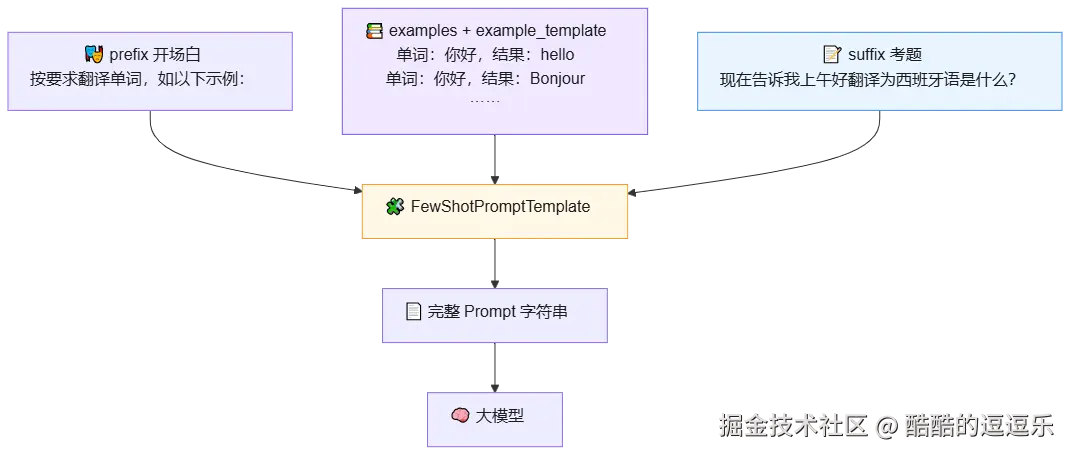
🖼️ 组装结构图
🧠 我的代码理解
对着代码啃了半天,总结下来就是三块积木 🧱:
- 📚
example_template+examples→ 共同组成「例如」部分,相当于第一节课里手动拼的那段问答历史 - 📝
suffix→ 「我想要 」部分,input_variables负责把变量动态填进去 - 🎭
prefix→ 开场定调,告诉模型"照着下面的例子干活"
💡 对比第一节课:当时我们手写 for 循环把 examples 塞进 messages,现在
FewShotPromptTemplate一行配置搞定。框架的意义就是把脏活封装掉 🧹
💬 第三种:ChatPromptTemplate(对话模板)
适用场景:多轮对话、需要注入任意数量历史消息的场景。这是三种模板里最贴近 Agent 实战的一个 🔥
💻 示例代码
python
# from langchain_community.chat_models.tongyi import ChatTongyi  # 😴 旧写法,见下方说明
from langchain_core.prompts import ChatPromptTemplate, MessagesPlaceholder
from langchain_openai import ChatOpenAI

# 💬 三段式:system 人设 + history 插槽 + human 当前问题
chat_prompt = ChatPromptTemplate.from_messages(
    [
        ("system", "你是一个起名专家,会根据出生年月日来起名字,要求最多4个字,风格文艺"),
        MessagesPlaceholder("history"),  # 🕳️ 插槽!历史消息从这里注入
        ("human", "出生日期2026-5-26,请帮我起一个名字")
    ]
)

# 📜 历史会话(数量不限,动态传入)
message = [
    ("human", "2024-10-12"),
    ("ai", "子轩"),
    ("human", "2024-1-12"),
    ("ai", "璋宇"),
]

key = ""  # 🔑 api-key
# 🌐 base_url 必须指定!原因见下方"为什么要换包"
model = ChatOpenAI(model="qwen-max", api_key=key,
                   base_url="https://dashscope.aliyuncs.com/compatible-mode/v1")
# model = ChatTongyi(model="qwen-max", api_key=key)  # 备选:社区包写法

chain = chat_prompt | model  # ⛓️ 又见面了,管道符

res = chain.invoke({"history": message})
print(res.content)  # 📤 注意 chat 模型取 .content
🖼️ 消息组装结构图
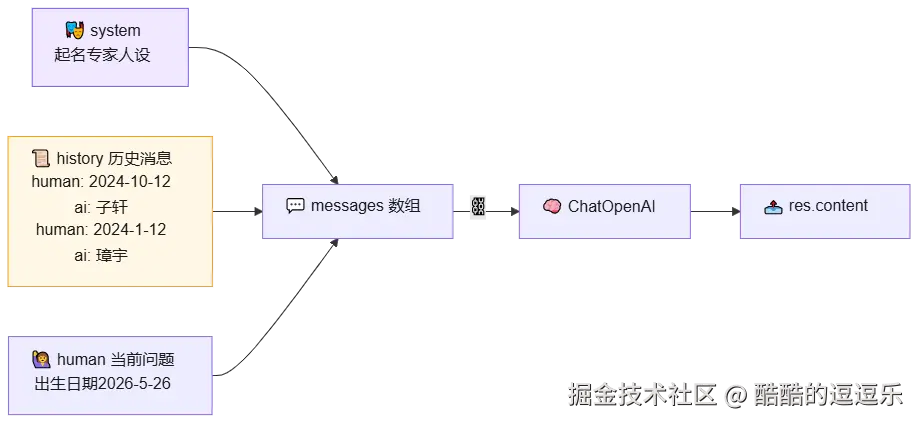
😲 前端狂喜:MessagesPlaceholder 就是插槽!
看到 MessagesPlaceholder("history") 的瞬间我悟了 ------ 这不就是 Vue 的 <slot name="history"/> 吗?!
模板里挖一个具名坑位 🕳️,调用时
invoke({"history": message})往坑里塞任意长度的内容。历史消息可以是 2 条也可以是 200 条,模板本身完全不用改。跟前端"组件不变、内容由插槽注入"是同一个设计哲学 ✨
📦 为什么要换包?社区包停止维护了!
注意上面代码里构建模型的包变了:langchain_community → langchain_openai。
- 🪦 langchain 的社区大包
langchain_community已经在 2026 年 5 月停止维护了,官方建议迁移到各个独立的细分包 - 🌐 换成
ChatOpenAI后多了一个base_url参数,原因是:ChatOpenAI默认请求 OpenAI 官方https://api.openai.com/v1 - 🔑 我的 key 是阿里云百炼的,必须指定兼容端点,否则请求就飘到 OpenAI 去了(然后报 401,钱都没地方扣 🤣)
💡 跟第一节裸调 API 时传
base_url是同一个道理 ------ OpenAI 协议已成事实标准 ,各家模型厂商都提供兼容端点,换个base_url就能无缝切换供应商。前端版理解:axios不换,换baseURL而已 😎
📝 今日勘误(自己踩过的坑)
| ❌ 原笔记写法 | ✅ 正确写法 | 说明 |
|---|---|---|
key = "" //api-key |
key = "" # api-key |
又双叒用 JS 注释了,Python 是 # 😅 |
model="qwen3.8-27b" |
以官方文档为准(如 qwen-max、qwen-plus) |
模型名要去百炼控制台核对 |
print(res)(chat 模型) |
print(res.content) |
Chat 模型返回的是消息对象,内容在 .content 里 |
🧠 补充:普通
Tongyi(LLM)直接print(res)就行,但ChatOpenAI(Chat 模型)要取.content。两类模型返回结构不一样,别搞混。
🗺️ 明日计划
- 📤 学习 OutputParser(输出解析器),让模型返回结构化 JSON,方便前端直接渲染
- ⛓️ 深入 Runnable 接口:
|背后的运行机制、RunnableParallel并行链 - 🧠 尝试给 ChatPromptTemplate 接上 Memory(记忆),让对话真正连续起来
- 🔧 用三大模板重构第一节的"接口文档问答",看看代码能省多少
🎯 今日总结
📌 一句话 :三大模板 = 三种"组装 Prompt 的姿势" ------ PromptTemplate 管填空 (zero-shot),FewShotPromptTemplate 管举例 (few-shot),ChatPromptTemplate 管对话 (多轮 + 历史插槽);而
|管道符把它们和模型串成流水线。
markdown
   🧩 填空  +  💡 举例  +  💬 对话  +  ⛓️ 管道
        =  有模有样的 LangChain 开发 🦜
第三天,从"裸调 API"升级到"框架化思维" ✅ 距离真正的 Agent,又近了一步...... 🌱