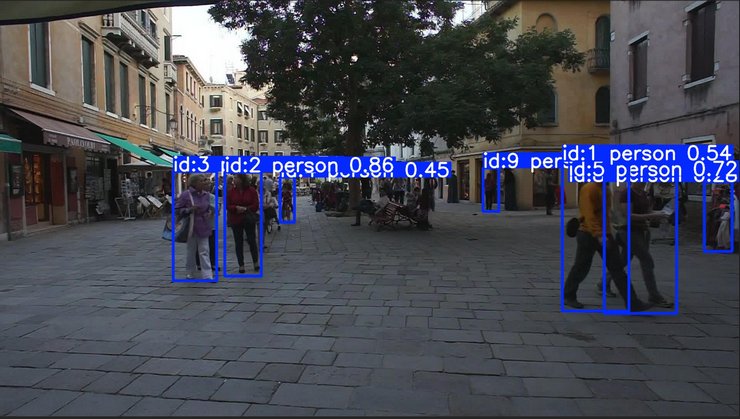
YOLO26 Track并不是一个独立训练出来的YOLO26网络 。Track的核心价值就是让目标拥有跨帧持续存在的身份ID。
Ultralytics跟踪器(tracker)的输出结果与标准目标检测一致,但增加了目标ID信息。
要使用YOLO26 Track需使用已训练的Detect, Segment, Pose, or OBB模型。
Ultralytics YOLO内置了六个跟踪器。要启用其中一个跟踪器,只需将其YAML配置文件传递给跟踪器参数即可:BoT-SORT、ByteTrack、OC-SORT、Deep OC-SORT、FastTracker、TrackTrack。若未指定,默认使用TrackTrack(tracktrack.yaml)。
跟踪模式model.track与预测模式(model.predict)共享一些属性,如conf、iou、show等。也可以修改跟踪配置文件,只需从ultralytics/cfg/trackers目录中复制一个跟踪器配置文件(例如custom_tracker.yaml),然后根据你的需要修改所有配置(tracker_type除外)。
跟踪器配置文件支持的参数描述见:https://docs.ultralytics.com/modes/track ,每个算法在共享参数的基础上都提供了额外的调节选项。
启用重识别(Re-Identification):默认情况下,ReID功能处于禁用状态,以最大程度地减少系统开销。你可以通过在跟踪器配置文件中设置'with_reid: True'来启用它。ReID仅支持跟踪功能。
跟踪模式不会训练跟踪器,也不需要特定于跟踪器的数据集。使用相应任务的标准数据集格式训练检测、分割、姿态或OBB模型,然后使用生成的模型通过"model.track()"进行跟踪。所选跟踪器会在推理时将模型的预测结果与帧关联起来。
测试代码如下:
python
def _get_images(dir):
	# supported image formats
	img_formats = (".bmp", ".jpeg", ".jpg", ".png", ".webp")
	images = []

	for file in os.listdir(dir):
		if os.path.isfile(os.path.join(dir, file)):
			# print(file)
			_, extension = os.path.splitext(file)
			for format in img_formats:
				if format == extension.lower():
					images.append(file)
					break

	return images

def predict_track(model_name, yaml, device, verbose, dir_images, dir_result):
	model = YOLO(model_name)

	os.makedirs(dir_result, exist_ok=True)

	images = _get_images(dir_images)
	for image in images:
		results = model.track(dir_images + "/" + image, persist=True, tracker=yaml, verbose=verbose, device=device)

		annotated_frame = results[0].plot() # returns the drawn detection bounding box, category, confidence score, track ID, and other information
		cv2.imshow("YOLO26 Tracking", annotated_frame)
		if cv2.waitKey(1) & 0xFF == ord("q"):
			break

		cv2.imwrite(dir_result + "/" + image, annotated_frame)
命令如下:

结果如下: