摘要: 我在一门在线课程平台做过视频入库。老师传上来一个 2 小时的录播课,2GB 多,同步走"压缩 + HLS 切片"要 20 分钟,HTTP 接口根本等不到返回;期末考试那阵子 50 位老师集中上传,50 个 FFmpeg 进程同时压上去,8 核机器的 CPU 拉满,登录、查课接口全卡住。这篇是我踩完坑之后的落地方案:FFmpeg 命令封装、H.265 压缩参数怎么调、HLS 切片出 m3u8、Redis 队列 + 线程池做异步、批量任务的进度追踪,全链路可运行代码,最后附 5 个生产上真实撞出来的坑。
技术栈版本: Spring Boot 3.3.x | FFmpeg 7.x | JDK 17+ | Redis 7.x | 更新时间: 2026-06
一、先说清楚问题出在哪
做视频入库之前,我先用一台 8 核机器测过单文件的处理耗时,一个 2 小时、2GB 左右的录播课,完整走一遍是这样的:
| 处理步骤 | 耗时 | 说明 |
|---|---|---|
| 视频压缩(H.265) | ~15分钟 | CPU密集型 |
| HLS切片(5秒/片) | ~3分钟 | IO密集型 |
| 缩略图生成 | ~5秒 | 轻量 |
| 上传至OSS | ~2分钟 | 网络IO |
总计约20分钟。这还是个文件的情况。如果接在上传接口里同步做,网关 60 秒超时早到了,前端只能看到"请求失败",其实后台还在转。
真正出事是在期末考试那周。50 位老师集中交录播课,我最初的实现是每个任务起一个 FFmpeg 进程,结果:
- 8核服务器,每个FFmpeg进程至少占1核,50个进程远远超出CPU核心数
- 上下文切换消耗掉大量CPU时间,整体反而比串行还慢
- 同一台机器上的登录、查课接口全部跟着卡
第三个问题更磨人:老师上传完就不知道处理到哪一步了。后台日志里明明在跑,但前台没有任何反馈,每天要接十几个"我的视频呢"的询问。
这三个问题对应到方案上就是:
| 问题 | 方案 | 位置 |
|---|---|---|
| 同步超时 | Redis 队列 + 线程池异步消费 | 第五章 |
| 并发失控 | 线程池并发度 = CPU核心数 - 1 | 第五章 |
| 进度不可知 | Redis Hash 记录状态 + SSE 推送 | 第六、七章 |
二、FFmpeg 核心命令与参数调优
2.1 视频压缩:H.264 vs H.265
课程视频的特点是"存得多、放得少",一年的录播课积累下来存储账单很难看。H.265(HEVC)在同画质下比 H.264 省大约 40% 的体积,代价是编码慢 3-5 倍------但我们的处理本来就是异步的,编码慢一些无所谓,存储省下来是长期收益。
| 编码器 | 压缩率 | 编码速度 | 兼容性 | 适用场景 |
|---|---|---|---|---|
| libx264 | 基线 | 快 | 极好 | 通用场景、需要端端兼容 |
| libx265 | 节省40%体积 | 慢3-5x | 较好 | 存储敏感、异步转码 |
| libsvtav1 | 节省50%体积 | 中等 | 新兴 | 前沿项目,兼容性还在爬坡 |
H.265压缩命令:
bash
ffmpeg -i input.mp4 \
  -c:v libx265 \
  -crf 28 \
  -preset medium \
  -c:a aac \
  -b:a 128k \
  -movflags +faststart \
  output.mp4
参数解析:
| 参数 | 值 | 说明 |
|---|---|---|
-crf 28 |
恒定质量因子 | 0=无损,28=教育视频推荐值,体积小画质可接受 |
-preset medium |
编码速度 | 从 ultrafast 到 veryslow 共9档,medium是速度与压缩率的平衡点 |
-c:a aac |
音频编码 | AAC兼容性最好 |
-b:a 128k |
音频码率 | 128k足够语音课程使用 |
-movflags +faststart |
快速启动 | 将元数据移到文件头部,支持边下边播 |
2.2 HLS切片:生成 m3u8 + ts
点播播放我用的是 HLS(HTTP Live Streaming,苹果提出的流媒体协议):把视频切成一段段 ts 小片段,用一个 m3u8 索引文件串起来。选它的理由很实际------各大端播放器兼容性最好,支持快进快退,而且切片粒度下用户点"第 35 分钟"也能秒开,不用等整个文件下载。
bash
ffmpeg -i input.mp4 \
  -c:v libx264 \
  -crf 23 \
  -c:a aac \
  -b:a 128k \
  -f hls \
  -hls_time 10 \
  -hls_list_size 0 \
  -hls_segment_filename "output_%03d.ts" \
  -hls_flags independent_segments \
  output.m3u8
参数解析:
| 参数 | 值 | 说明 |
|---|---|---|
-f hls |
输出格式 | 指定HLS格式 |
-hls_time 10 |
切片时长 | 每个ts片段10秒,教育视频推荐10秒 |
-hls_list_size 0 |
列表大小 | 0=保留所有切片,点播必须设0 |
-hls_segment_filename |
切片命名 | %03d=3位数字序号 |
-hls_flags independent_segments |
独立片段 | 每个ts可独立解码,支持快进 |
2.3 压缩+切片一步到位
上面两条命令分开跑的话,中间要多落一份 MP4,2GB 的文件多写一次磁盘,耗时和磁盘占用都翻倍。生产环境里我把压缩和切片合并成一步,FFmpeg 一条命令直接出 m3u8 + ts,省掉中间文件:
bash
ffmpeg -i input.mp4 \
  -c:v libx265 \
  -crf 28 \
  -preset medium \
  -c:a aac \
  -b:a 128k \
  -f hls \
  -hls_time 10 \
  -hls_list_size 0 \
  -hls_segment_filename "output_%03d.ts" \
  -hls_flags independent_segments \
  output.m3u8
2.4 压缩效果实测
参数不是拍脑袋定的。我拿三个真实视频在 8 核机器上各跑了一遍(FFmpeg 7.0,preset medium),结果如下:
| 视频源 | 原始大小 | H.264 CRF23 | H.265 CRF28 | H.265体积缩减 |
|---|---|---|---|---|
| 1080p课程录像(2h) | 2.1GB | 680MB | 420MB | 80% |
| 720p会议录制(1h) | 900MB | 310MB | 190MB | 79% |
| 1080p产品演示(30min) | 1.5GB | 480MB | 290MB | 81% |
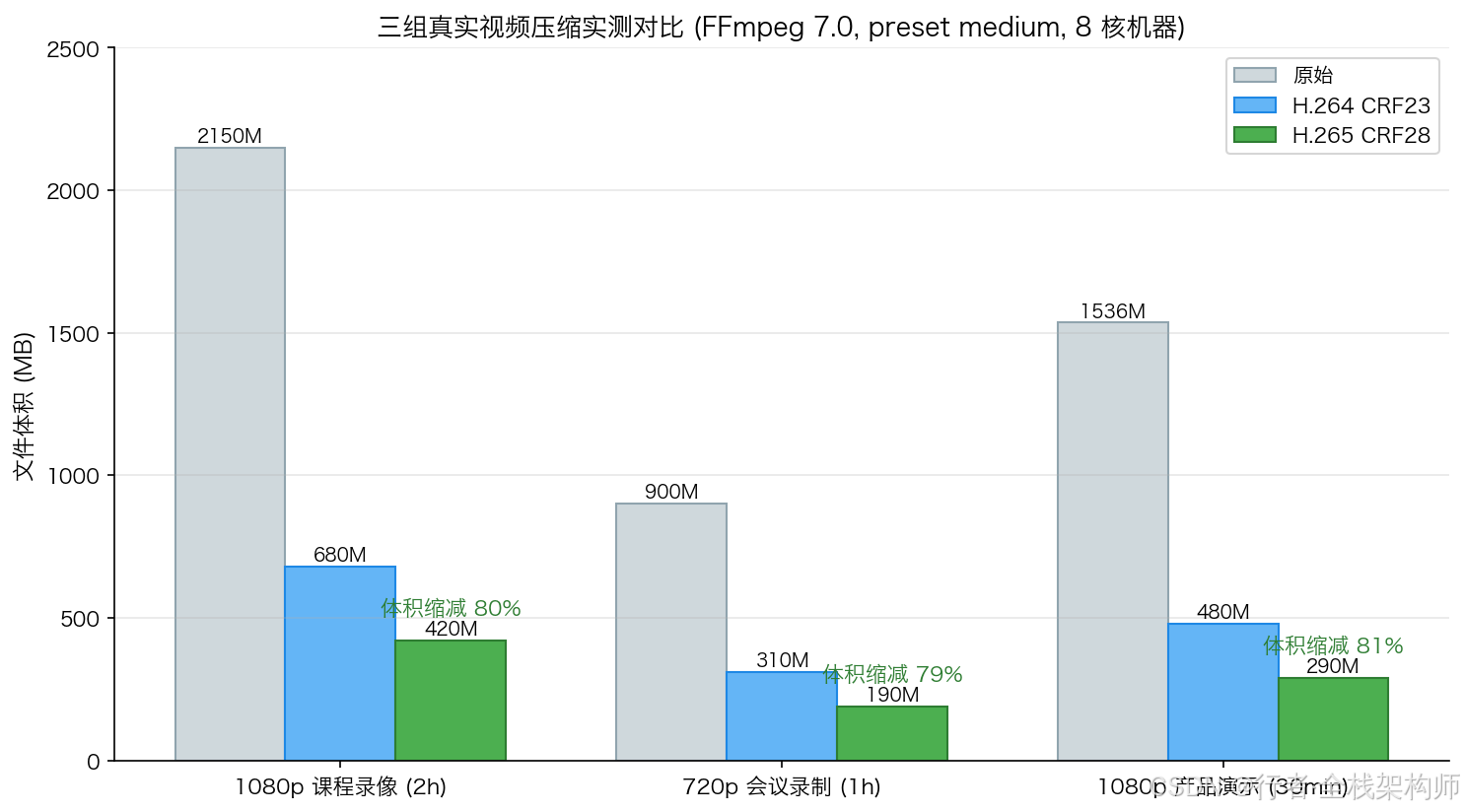
1080p 课程录像从 2.1GB 压到 420MB,单文件省 1.7GB。按平台一年约 3000 小时录播课估算,一年能省约 5TB 存储
三、Spring Boot 封装 FFmpeg 命令执行器
3.1 核心工具类
Java 调 FFmpeg 的坑不在命令本身,而在进程的输出流:FFmpeg 会往 stderr 里打大量进度日志,如果 Java 侧不去读,操作系统的管道缓冲区(Linux 上默认 64KB)写满之后,FFmpeg 就阻塞在 write 上不再往下跑,表现就是进程卡死、超时。所以下面这个执行器里,异步读输出流是第一个要写对的地方(后面踩坑1会专门展开):
java
@Slf4j
@Component
public class FFmpegExecutor {

    @Value("${ffmpeg.path:ffmpeg}")
    private String ffmpegPath;

    @Value("${ffmpeg.ffprobe-path:ffprobe}")
    private String ffprobePath;

    /**
     * 执行FFmpeg命令(带超时控制)
     */
    public FFmpegResult execute(List<String> command, long timeoutSeconds) {
        long startTime = System.currentTimeMillis();

        // 完整命令:ffmpeg + 参数
        List<String> fullCommand = new ArrayList<>();
        fullCommand.add(ffmpegPath);
        fullCommand.addAll(command);

        ProcessBuilder pb = new ProcessBuilder(fullCommand);
        pb.redirectErrorStream(true);

        try {
            Process process = pb.start();

            // 异步读取输出(关键!避免缓冲区满导致阻塞)
            StringBuilder output = new StringBuilder();
            Thread readerThread = new Thread(() -> {
                try (BufferedReader reader = new BufferedReader(
                        new InputStreamReader(process.getInputStream()))) {
                    String line;
                    while ((line = reader.readLine()) != null) {
                        output.append(line).append("\n");
                    }
                } catch (IOException e) {
                    log.error("读取FFmpeg输出失败", e);
                }
            });
            readerThread.start();

            // 等待执行完成(带超时)
            boolean finished = process.waitFor(timeoutSeconds, TimeUnit.SECONDS);
            if (!finished) {
                process.destroyForcibly();
                return FFmpegResult.fail("FFmpeg执行超时(" + timeoutSeconds + "秒)");
            }

            readerThread.join(5000);

            long costTime = System.currentTimeMillis() - startTime;
            int exitCode = process.exitValue();

            if (exitCode == 0) {
                log.info("FFmpeg执行成功, 耗时={}ms", costTime);
                return FFmpegResult.success(output.toString(), costTime);
            } else {
                log.error("FFmpeg执行失败, exitCode={}, output={}", exitCode, output);
                return FFmpegResult.fail("FFmpeg退出码=" + exitCode + ", " + output);
            }

        } catch (Exception e) {
            log.error("FFmpeg执行异常", e);
            return FFmpegResult.fail("FFmpeg执行异常: " + e.getMessage());
        }
    }

    /**
     * 获取视频元数据
     */
    public VideoMetadata getMetadata(String filePath) {
        List<String> command = List.of(
            ffprobePath,
            "-v", "quiet",
            "-print_format", "json",
            "-show_format",
            "-show_streams",
            filePath
        );

        try {
            ProcessBuilder pb = new ProcessBuilder(command);
            pb.redirectErrorStream(true);
            Process process = pb.start();

            String jsonOutput = new String(process.getInputStream().readAllBytes());
            process.waitFor(10, TimeUnit.SECONDS);

            // 解析JSON获取元数据
            return parseMetadata(jsonOutput);
        } catch (Exception e) {
            log.error("获取视频元数据失败: {}", e.getMessage());
            return VideoMetadata.unknown();
        }
    }
}
3.2 执行结果封装
java
@Data
@Builder
public class FFmpegResult {
    private boolean success;
    private String message;
    private String output;
    private long costTimeMs;

    public static FFmpegResult success(String output, long costTimeMs) {
        return FFmpegResult.builder()
                .success(true).output(output).costTimeMs(costTimeMs).build();
    }

    public static FFmpegResult fail(String message) {
        return FFmpegResult.builder().success(false).message(message).build();
    }
}
3.3 视频元数据
java
@Data
@Builder
public class VideoMetadata {
    private long durationSeconds;
    private int width;
    private int height;
    private String videoCodec;
    private String audioCodec;
    private long bitrate;
    private double frameRate;

    public static VideoMetadata unknown() {
        return VideoMetadata.builder()
                .durationSeconds(0).width(0).height(0)
                .videoCodec("unknown").audioCodec("unknown")
                .bitrate(0).frameRate(0).build();
    }
}
四、视频处理服务:压缩 + 切片 + 缩略图
4.1 处理任务模型
java
@Data
@Builder
public class VideoProcessTask {
    private String taskId;
    private String sourceFilePath;
    private String outputDir;
    private ProcessStatus status;
    private int progress;          // 0-100
    private String currentStep;    // 当前步骤描述
    private String resultM3u8Url;
    private String thumbnailUrl;
    private String errorMessage;
    private LocalDateTime createTime;
    private LocalDateTime finishTime;

    public enum ProcessStatus {
        PENDING, PROCESSING, COMPRESSING, SLICING,
        THUMBNAIL, UPLOADING, SUCCESS, FAILED
    }
}
任务状态机长这样,前端进度条就是按这些状态渲染的:
#mermaid-svg-lPbRd7Ot12vbwAeo{font-family:"trebuchet ms",verdana,arial,sans-serif;font-size:16px;fill:#333;}@keyframes edge-animation-frame{from{stroke-dashoffset:0;}}@keyframes dash{to{stroke-dashoffset:0;}}#mermaid-svg-lPbRd7Ot12vbwAeo .edge-animation-slow{stroke-dasharray:9,5!important;stroke-dashoffset:900;animation:dash 50s linear infinite;stroke-linecap:round;}#mermaid-svg-lPbRd7Ot12vbwAeo .edge-animation-fast{stroke-dasharray:9,5!important;stroke-dashoffset:900;animation:dash 20s linear infinite;stroke-linecap:round;}#mermaid-svg-lPbRd7Ot12vbwAeo .error-icon{fill:#552222;}#mermaid-svg-lPbRd7Ot12vbwAeo .error-text{fill:#552222;stroke:#552222;}#mermaid-svg-lPbRd7Ot12vbwAeo .edge-thickness-normal{stroke-width:1px;}#mermaid-svg-lPbRd7Ot12vbwAeo .edge-thickness-thick{stroke-width:3.5px;}#mermaid-svg-lPbRd7Ot12vbwAeo .edge-pattern-solid{stroke-dasharray:0;}#mermaid-svg-lPbRd7Ot12vbwAeo .edge-thickness-invisible{stroke-width:0;fill:none;}#mermaid-svg-lPbRd7Ot12vbwAeo .edge-pattern-dashed{stroke-dasharray:3;}#mermaid-svg-lPbRd7Ot12vbwAeo .edge-pattern-dotted{stroke-dasharray:2;}#mermaid-svg-lPbRd7Ot12vbwAeo .marker{fill:#333333;stroke:#333333;}#mermaid-svg-lPbRd7Ot12vbwAeo .marker.cross{stroke:#333333;}#mermaid-svg-lPbRd7Ot12vbwAeo svg{font-family:"trebuchet ms",verdana,arial,sans-serif;font-size:16px;}#mermaid-svg-lPbRd7Ot12vbwAeo p{margin:0;}#mermaid-svg-lPbRd7Ot12vbwAeo defs #statediagram-barbEnd{fill:#333333;stroke:#333333;}#mermaid-svg-lPbRd7Ot12vbwAeo g.stateGroup text{fill:#9370DB;stroke:none;font-size:10px;}#mermaid-svg-lPbRd7Ot12vbwAeo g.stateGroup text{fill:#333;stroke:none;font-size:10px;}#mermaid-svg-lPbRd7Ot12vbwAeo g.stateGroup .state-title{font-weight:bolder;fill:#131300;}#mermaid-svg-lPbRd7Ot12vbwAeo g.stateGroup rect{fill:#ECECFF;stroke:#9370DB;}#mermaid-svg-lPbRd7Ot12vbwAeo g.stateGroup line{stroke:#333333;stroke-width:1;}#mermaid-svg-lPbRd7Ot12vbwAeo .transition{stroke:#333333;stroke-width:1;fill:none;}#mermaid-svg-lPbRd7Ot12vbwAeo .stateGroup .composit{fill:white;border-bottom:1px;}#mermaid-svg-lPbRd7Ot12vbwAeo .stateGroup .alt-composit{fill:#e0e0e0;border-bottom:1px;}#mermaid-svg-lPbRd7Ot12vbwAeo .state-note{stroke:#aaaa33;fill:#fff5ad;}#mermaid-svg-lPbRd7Ot12vbwAeo .state-note text{fill:black;stroke:none;font-size:10px;}#mermaid-svg-lPbRd7Ot12vbwAeo .stateLabel .box{stroke:none;stroke-width:0;fill:#ECECFF;opacity:0.5;}#mermaid-svg-lPbRd7Ot12vbwAeo .edgeLabel .label rect{fill:#ECECFF;opacity:0.5;}#mermaid-svg-lPbRd7Ot12vbwAeo .edgeLabel{background-color:rgba(232,232,232, 0.8);text-align:center;}#mermaid-svg-lPbRd7Ot12vbwAeo .edgeLabel p{background-color:rgba(232,232,232, 0.8);}#mermaid-svg-lPbRd7Ot12vbwAeo .edgeLabel rect{opacity:0.5;background-color:rgba(232,232,232, 0.8);fill:rgba(232,232,232, 0.8);}#mermaid-svg-lPbRd7Ot12vbwAeo .edgeLabel .label text{fill:#333;}#mermaid-svg-lPbRd7Ot12vbwAeo .label div .edgeLabel{color:#333;}#mermaid-svg-lPbRd7Ot12vbwAeo .stateLabel text{fill:#131300;font-size:10px;font-weight:bold;}#mermaid-svg-lPbRd7Ot12vbwAeo .node circle.state-start{fill:#333333;stroke:#333333;}#mermaid-svg-lPbRd7Ot12vbwAeo .node .fork-join{fill:#333333;stroke:#333333;}#mermaid-svg-lPbRd7Ot12vbwAeo .node circle.state-end{fill:#9370DB;stroke:white;stroke-width:1.5;}#mermaid-svg-lPbRd7Ot12vbwAeo .end-state-inner{fill:white;stroke-width:1.5;}#mermaid-svg-lPbRd7Ot12vbwAeo .node rect{fill:#ECECFF;stroke:#9370DB;stroke-width:1px;}#mermaid-svg-lPbRd7Ot12vbwAeo .node polygon{fill:#ECECFF;stroke:#9370DB;stroke-width:1px;}#mermaid-svg-lPbRd7Ot12vbwAeo #statediagram-barbEnd{fill:#333333;}#mermaid-svg-lPbRd7Ot12vbwAeo .statediagram-cluster rect{fill:#ECECFF;stroke:#9370DB;stroke-width:1px;}#mermaid-svg-lPbRd7Ot12vbwAeo .cluster-label,#mermaid-svg-lPbRd7Ot12vbwAeo .nodeLabel{color:#131300;}#mermaid-svg-lPbRd7Ot12vbwAeo .statediagram-cluster rect.outer{rx:5px;ry:5px;}#mermaid-svg-lPbRd7Ot12vbwAeo .statediagram-state .divider{stroke:#9370DB;}#mermaid-svg-lPbRd7Ot12vbwAeo .statediagram-state .title-state{rx:5px;ry:5px;}#mermaid-svg-lPbRd7Ot12vbwAeo .statediagram-cluster.statediagram-cluster .inner{fill:white;}#mermaid-svg-lPbRd7Ot12vbwAeo .statediagram-cluster.statediagram-cluster-alt .inner{fill:#f0f0f0;}#mermaid-svg-lPbRd7Ot12vbwAeo .statediagram-cluster .inner{rx:0;ry:0;}#mermaid-svg-lPbRd7Ot12vbwAeo .statediagram-state rect.basic{rx:5px;ry:5px;}#mermaid-svg-lPbRd7Ot12vbwAeo .statediagram-state rect.divider{stroke-dasharray:10,10;fill:#f0f0f0;}#mermaid-svg-lPbRd7Ot12vbwAeo .note-edge{stroke-dasharray:5;}#mermaid-svg-lPbRd7Ot12vbwAeo .statediagram-note rect{fill:#fff5ad;stroke:#aaaa33;stroke-width:1px;rx:0;ry:0;}#mermaid-svg-lPbRd7Ot12vbwAeo .statediagram-note rect{fill:#fff5ad;stroke:#aaaa33;stroke-width:1px;rx:0;ry:0;}#mermaid-svg-lPbRd7Ot12vbwAeo .statediagram-note text{fill:black;}#mermaid-svg-lPbRd7Ot12vbwAeo .statediagram-note .nodeLabel{color:black;}#mermaid-svg-lPbRd7Ot12vbwAeo .statediagram .edgeLabel{color:red;}#mermaid-svg-lPbRd7Ot12vbwAeo #dependencyStart,#mermaid-svg-lPbRd7Ot12vbwAeo #dependencyEnd{fill:#333333;stroke:#333333;stroke-width:1;}#mermaid-svg-lPbRd7Ot12vbwAeo .statediagramTitleText{text-anchor:middle;font-size:18px;fill:#333;}#mermaid-svg-lPbRd7Ot12vbwAeo :root{--mermaid-font-family:"trebuchet ms",verdana,arial,sans-serif;} 提交入队
Worker取出, 20%
压缩+切片完成, 70%
缩略图完成, 85%
上传OSS完成, 100%
FFmpeg退出码非0
异常
异常
PENDING
COMPRESSING
THUMBNAIL
UPLOADING
SUCCESS
FAILED
两个设计说明:进度值(20/70/85/100)不是实时算的,是"阶段完成点"打标。FFmpeg 压缩那一步占整个任务 80% 以上的时间,中间不更新进度反而更真实------硬要把 15 分钟的压缩拆成连续百分比,得去解析 FFmpeg 的 stderr 输出,性价比低。另外 FAILED 不做自动重试,转码失败基本是源文件有问题(损坏、格式异常),重试只会重复失败,不如直接让老师重新上传。
4.2 核心处理服务
java
@Service
@Slf4j
public class VideoProcessService {

    @Autowired
    private FFmpegExecutor ffmpegExecutor;

    @Value("${video.output-dir:/data/video-output}")
    private String outputBaseDir;

    /**
     * 压缩视频为H.265 MP4
     */
    public FFmpegResult compress(String inputPath, String outputPath,
                                  String crf, String preset) {
        List<String> command = List.of(
            "-i", inputPath,
            "-c:v", "libx265",
            "-crf", crf,
            "-preset", preset,
            "-c:a", "aac",
            "-b:a", "128k",
            "-movflags", "+faststart",
            "-y",
            outputPath
        );

        // 大文件压缩可能需要很长时间,设置30分钟超时
        return ffmpegExecutor.execute(command, 1800);
    }

    /**
     * HLS切片:MP4转m3u8+ts
     */
    public FFmpegResult sliceToHLS(String inputPath, String outputDir,
                                    String segmentSeconds) {
        String m3u8Path = outputDir + "/index.m3u8";
        String tsPattern = outputDir + "/segment_%03d.ts";

        List<String> command = List.of(
            "-i", inputPath,
            "-c:v", "libx264",
            "-crf", "23",
            "-c:a", "aac",
            "-b:a", "128k",
            "-f", "hls",
            "-hls_time", segmentSeconds,
            "-hls_list_size", "0",
            "-hls_segment_filename", tsPattern,
            "-hls_flags", "independent_segments",
            "-y",
            m3u8Path
        );

        return ffmpegExecutor.execute(command, 1800);
    }

    /**
     * 压缩+切片一步完成(推荐)
     */
    public FFmpegResult compressAndSlice(String inputPath, String outputDir,
                                          String crf, String preset,
                                          String segmentSeconds) {
        String m3u8Path = outputDir + "/index.m3u8";
        String tsPattern = outputDir + "/segment_%03d.ts";

        List<String> command = List.of(
            "-i", inputPath,
            "-c:v", "libx265",
            "-crf", crf,
            "-preset", preset,
            "-c:a", "aac",
            "-b:a", "128k",
            "-f", "hls",
            "-hls_time", segmentSeconds,
            "-hls_list_size", "0",
            "-hls_segment_filename", tsPattern,
            "-hls_flags", "independent_segments",
            "-y",
            m3u8Path
        );

        return ffmpegExecutor.execute(command, 3600);  // 1小时超时
    }

    /**
     * 生成视频缩略图
     */
    public FFmpegResult generateThumbnail(String inputPath, String outputPath,
                                           String timeOffset) {
        List<String> command = List.of(
            "-i", inputPath,
            "-ss", timeOffset,
            "-vframes", "1",
            "-q:v", "2",
            "-y",
            outputPath
        );

        return ffmpegExecutor.execute(command, 60);
    }
}
五、异步任务引擎:Redis队列 + 线程池
5.1 架构设计
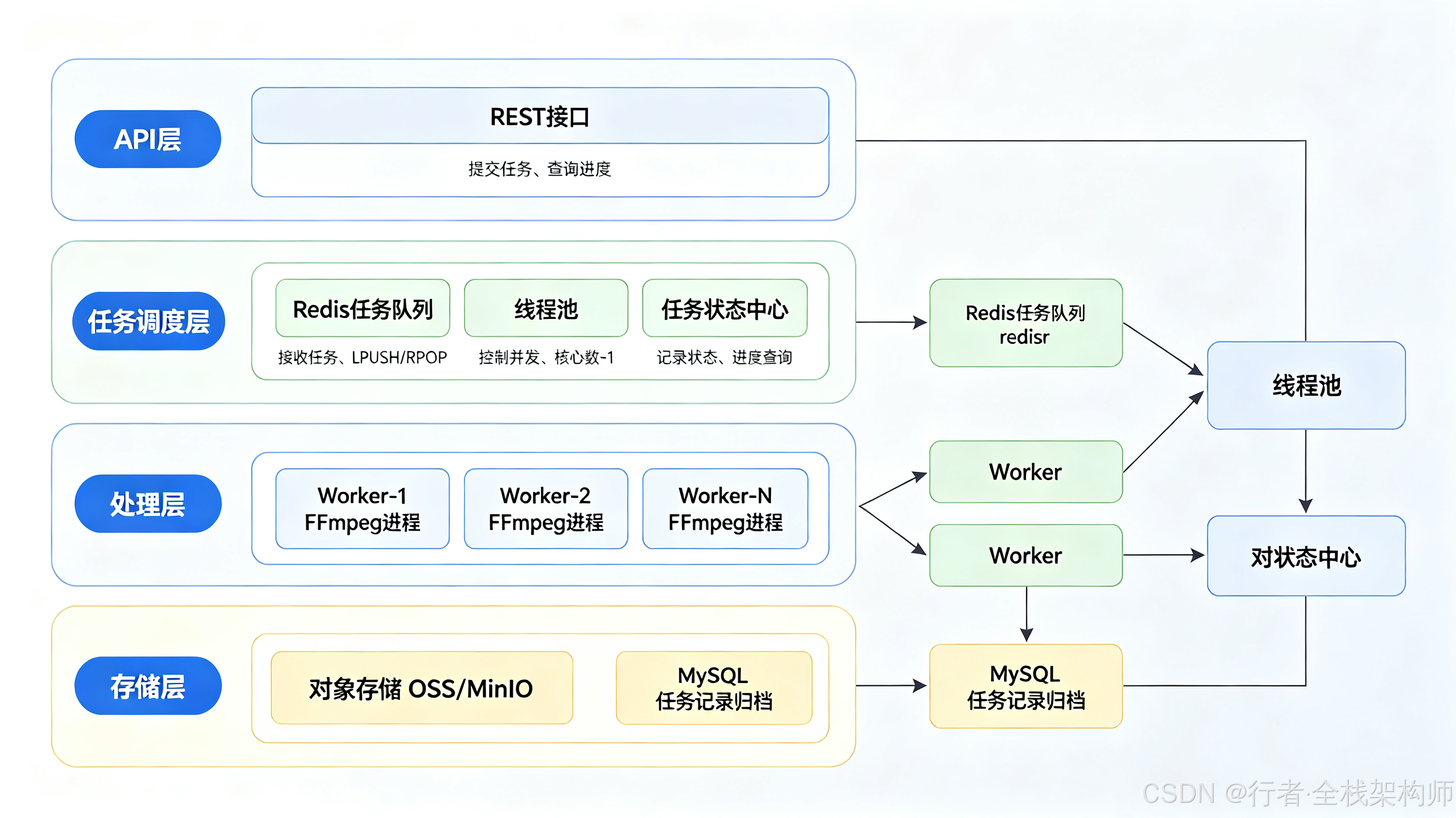
整体架构:蓝色是请求/队列/状态主链路,黄色是并发控制的关键约束点,绿色是执行与存储侧。线程池是整套方案里唯一"卡住"的阀门------上游提交多快都不重要,下游最多同时跑 N 个 FFmpeg
5.2 为什么用Redis队列而不是MQ?
队列选型我先对比过 Redis List 和 RabbitMQ:
| 维度 | Redis List | RabbitMQ/Kafka |
|---|---|---|
| 部署复杂度 | 低(项目已有Redis) | 高(额外中间件) |
| 消息可靠性 | 较低(无ACK机制) | 高(ACK+持久化) |
| 吞吐量 | 万级QPS | 十万级+ |
| 适用场景 | 中小规模任务队列 | 大规模分布式消息 |
我的判断是:视频处理是"低频 + 单任务耗时极长"的负载,一天可能就几十个任务,吞吐根本不是瓶颈,可靠性上丢一个任务重新提交也无妨。项目里本来就有一套 Redis,没必要再拉一个 MQ 进来增加运维负担。如果后面任务量真上来了,队列这一层的抽象没变,换 RabbitMQ 也只动生产/消费两个方法。
5.3 线程池配置
FFmpeg 是 CPU 密集型进程,并发数超过核心数只会带来上下文切换的开销,不会更快。我的配置是并发度 = CPU核心数 - 1,留 1 核给系统和其他服务(这台机器上还跑着 API 层)。
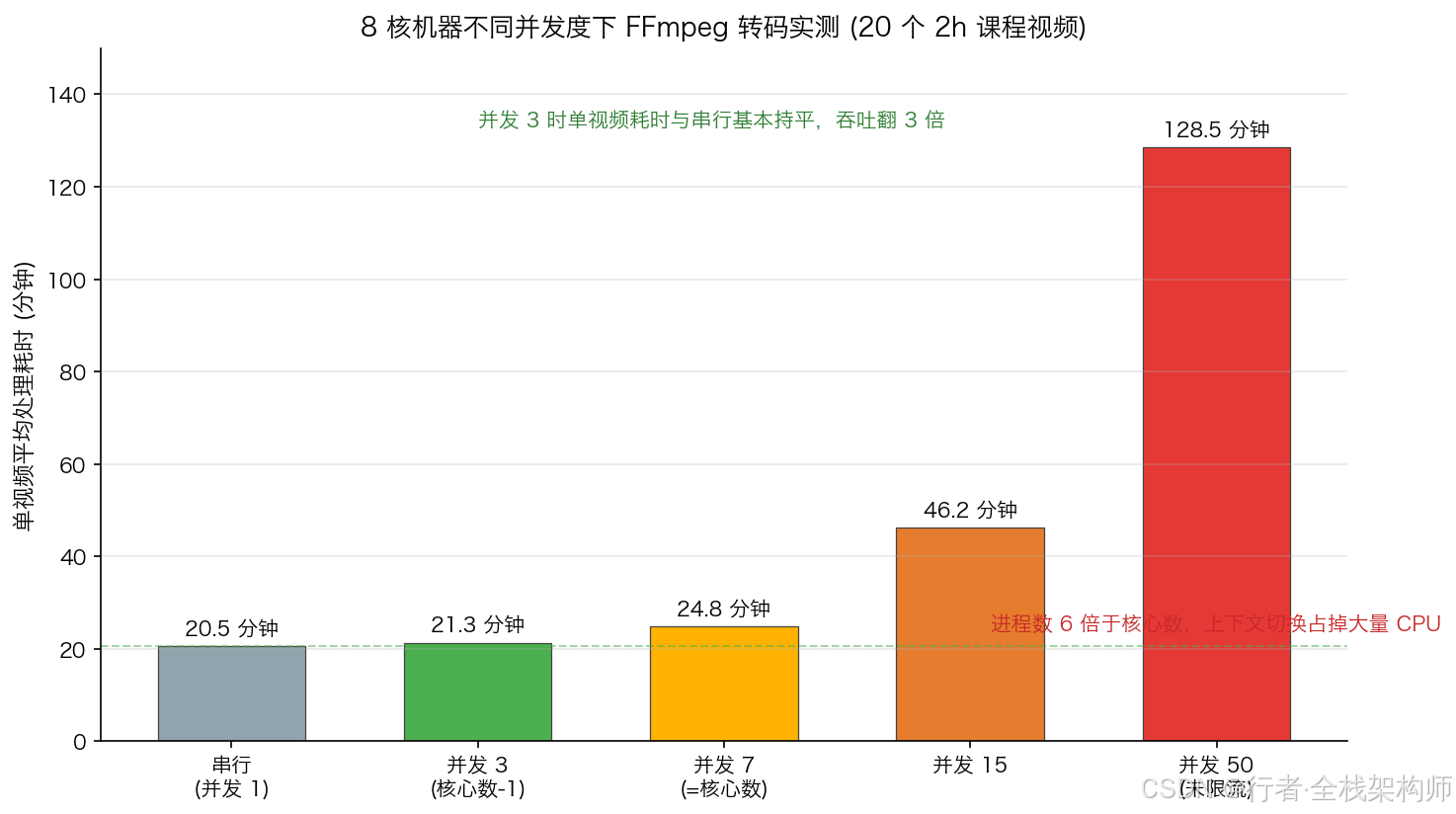
8 核机器上 20 个 2 小时课程视频的实测:并发 3 时单视频耗时与串行基本持平(吞吐翻 3 倍);并发到 50 时单视频耗时涨到 128 分钟,比串行还慢 6 倍多------这就是期末那周我撞上的情况
java
@Configuration
public class AsyncTaskConfig {

    @Value("${video.worker-threads:3}")
    private int workerThreads;

    @Bean("videoProcessExecutor")
    public ThreadPoolTaskExecutor videoProcessExecutor() {
        ThreadPoolTaskExecutor executor = new ThreadPoolTaskExecutor();
        // 核心线程数 = CPU核心数 - 1(至少1个)
        executor.setCorePoolSize(Math.max(1,
            Runtime.getRuntime().availableProcessors() - 1));
        executor.setMaxPoolSize(workerThreads);
        executor.setQueueCapacity(100);
        executor.setThreadNamePrefix("video-worker-");
        executor.setRejectedExecutionHandler(new ThreadPoolExecutor.CallerRunsPolicy());
        executor.initialize();
        return executor;
    }
}
5.4 任务队列服务
java
@Service
@Slf4j
public class VideoTaskQueueService {

    private static final String TASK_QUEUE_KEY = "video:task:queue";
    private static final String TASK_STATUS_KEY = "video:task:status:";

    @Autowired
    private RedisTemplate<String, Object> redisTemplate;

    @Autowired
    private VideoProcessService videoProcessService;

    @Autowired
    @Qualifier("videoProcessExecutor")
    private ThreadPoolTaskExecutor executor;

    /**
     * 提交任务到队列
     */
    public VideoProcessTask submitTask(String sourceFilePath) {
        String taskId = UUID.randomUUID().toString().replace("-", "");

        VideoProcessTask task = VideoProcessTask.builder()
                .taskId(taskId)
                .sourceFilePath(sourceFilePath)
                .outputDir(outputBaseDir + "/" + taskId)
                .status(VideoProcessTask.ProcessStatus.PENDING)
                .progress(0)
                .createTime(LocalDateTime.now())
                .build();

        // 保存任务状态
        redisTemplate.opsForHash().putAll(
            TASK_STATUS_KEY + taskId,
            BeanUtil.beanToMap(task)
        );

        // 推入队列
        redisTemplate.opsForList().leftPush(TASK_QUEUE_KEY, taskId);

        log.info("任务已提交: taskId={}", taskId);
        return task;
    }

    /**
     * 消费任务(由定时任务触发)
     */
    @Scheduled(fixedDelay = 2000)  // 每2秒检查一次队列
    public void consumeTask() {
        // 检查线程池是否有空闲
        if (executor.getActiveCount() >= executor.getMaxPoolSize()) {
            return;
        }

        // 从队列取任务(非阻塞)
        String taskId = (String) redisTemplate.opsForList()
                .rightPop(TASK_QUEUE_KEY);

        if (taskId == null) {
            return;
        }

        // 异步执行
        executor.submit(() -> processTask(taskId));
    }

    /**
     * 执行单个任务
     */
    private void processTask(String taskId) {
        VideoProcessTask task = getTask(taskId);
        String outputDir = task.getOutputDir();

        try {
            // 创建输出目录
            new File(outputDir).mkdirs();

            // Step1: 压缩+切片
            updateStatus(taskId, ProcessStatus.COMPRESSING, 20, "正在压缩并切片...");
            FFmpegResult result = videoProcessService.compressAndSlice(
                task.getSourceFilePath(), outputDir,
                "28", "medium", "10"
            );

            if (!result.isSuccess()) {
                updateStatus(taskId, ProcessStatus.FAILED, 0, result.getMessage());
                return;
            }

            // Step2: 生成缩略图
            updateStatus(taskId, ProcessStatus.THUMBNAIL, 70, "正在生成缩略图...");
            String thumbnailPath = outputDir + "/thumbnail.jpg";
            videoProcessService.generateThumbnail(
                task.getSourceFilePath(), thumbnailPath, "00:00:05"
            );

            // Step3: 上传至OSS(此处简化)
            updateStatus(taskId, ProcessStatus.UPLOADING, 85, "正在上传至存储...");
            // uploadToOSS(outputDir);

            // 完成
            updateStatus(taskId, ProcessStatus.SUCCESS, 100, "处理完成");

        } catch (Exception e) {
            log.error("任务执行失败: taskId={}", taskId, e);
            updateStatus(taskId, ProcessStatus.FAILED, 0, e.getMessage());
        }
    }

    /**
     * 更新任务状态
     */
    private void updateStatus(String taskId, ProcessStatus status,
                               int progress, String step) {
        Map<String, Object> updates = new HashMap<>();
        updates.put("status", status.name());
        updates.put("progress", progress);
        updates.put("currentStep", step);
        if (status == ProcessStatus.SUCCESS || status == ProcessStatus.FAILED) {
            updates.put("finishTime", LocalDateTime.now().toString());
        }
        redisTemplate.opsForHash().putAll(TASK_STATUS_KEY + taskId, updates);
    }

    /**
     * 查询任务状态
     */
    public VideoProcessTask getTask(String taskId) {
        Map<Object, Object> map = redisTemplate.opsForHash()
                .entries(TASK_STATUS_KEY + taskId);
        return BeanUtil.mapToBean(map, VideoProcessTask.class, false, null);
    }
}
从提交到出结果,一个任务完整走过这样的链路:
任务状态Hash FFmpeg进程 线程池Worker Redis队列 Controller 老师(前端) 任务状态Hash FFmpeg进程 线程池Worker Redis队列 Controller 老师(前端) #mermaid-svg-hG734Vc46ZpLSjoS{font-family:"trebuchet ms",verdana,arial,sans-serif;font-size:16px;fill:#333;}@keyframes edge-animation-frame{from{stroke-dashoffset:0;}}@keyframes dash{to{stroke-dashoffset:0;}}#mermaid-svg-hG734Vc46ZpLSjoS .edge-animation-slow{stroke-dasharray:9,5!important;stroke-dashoffset:900;animation:dash 50s linear infinite;stroke-linecap:round;}#mermaid-svg-hG734Vc46ZpLSjoS .edge-animation-fast{stroke-dasharray:9,5!important;stroke-dashoffset:900;animation:dash 20s linear infinite;stroke-linecap:round;}#mermaid-svg-hG734Vc46ZpLSjoS .error-icon{fill:#552222;}#mermaid-svg-hG734Vc46ZpLSjoS .error-text{fill:#552222;stroke:#552222;}#mermaid-svg-hG734Vc46ZpLSjoS .edge-thickness-normal{stroke-width:1px;}#mermaid-svg-hG734Vc46ZpLSjoS .edge-thickness-thick{stroke-width:3.5px;}#mermaid-svg-hG734Vc46ZpLSjoS .edge-pattern-solid{stroke-dasharray:0;}#mermaid-svg-hG734Vc46ZpLSjoS .edge-thickness-invisible{stroke-width:0;fill:none;}#mermaid-svg-hG734Vc46ZpLSjoS .edge-pattern-dashed{stroke-dasharray:3;}#mermaid-svg-hG734Vc46ZpLSjoS .edge-pattern-dotted{stroke-dasharray:2;}#mermaid-svg-hG734Vc46ZpLSjoS .marker{fill:#333333;stroke:#333333;}#mermaid-svg-hG734Vc46ZpLSjoS .marker.cross{stroke:#333333;}#mermaid-svg-hG734Vc46ZpLSjoS svg{font-family:"trebuchet ms",verdana,arial,sans-serif;font-size:16px;}#mermaid-svg-hG734Vc46ZpLSjoS p{margin:0;}#mermaid-svg-hG734Vc46ZpLSjoS .actor{stroke:hsl(259.6261682243, 59.7765363128%, 87.9019607843%);fill:#ECECFF;}#mermaid-svg-hG734Vc46ZpLSjoS text.actor>tspan{fill:black;stroke:none;}#mermaid-svg-hG734Vc46ZpLSjoS .actor-line{stroke:hsl(259.6261682243, 59.7765363128%, 87.9019607843%);}#mermaid-svg-hG734Vc46ZpLSjoS .innerArc{stroke-width:1.5;stroke-dasharray:none;}#mermaid-svg-hG734Vc46ZpLSjoS .messageLine0{stroke-width:1.5;stroke-dasharray:none;stroke:#333;}#mermaid-svg-hG734Vc46ZpLSjoS .messageLine1{stroke-width:1.5;stroke-dasharray:2,2;stroke:#333;}#mermaid-svg-hG734Vc46ZpLSjoS #arrowhead path{fill:#333;stroke:#333;}#mermaid-svg-hG734Vc46ZpLSjoS .sequenceNumber{fill:white;}#mermaid-svg-hG734Vc46ZpLSjoS #sequencenumber{fill:#333;}#mermaid-svg-hG734Vc46ZpLSjoS #crosshead path{fill:#333;stroke:#333;}#mermaid-svg-hG734Vc46ZpLSjoS .messageText{fill:#333;stroke:none;}#mermaid-svg-hG734Vc46ZpLSjoS .labelBox{stroke:hsl(259.6261682243, 59.7765363128%, 87.9019607843%);fill:#ECECFF;}#mermaid-svg-hG734Vc46ZpLSjoS .labelText,#mermaid-svg-hG734Vc46ZpLSjoS .labelText>tspan{fill:black;stroke:none;}#mermaid-svg-hG734Vc46ZpLSjoS .loopText,#mermaid-svg-hG734Vc46ZpLSjoS .loopText>tspan{fill:black;stroke:none;}#mermaid-svg-hG734Vc46ZpLSjoS .loopLine{stroke-width:2px;stroke-dasharray:2,2;stroke:hsl(259.6261682243, 59.7765363128%, 87.9019607843%);fill:hsl(259.6261682243, 59.7765363128%, 87.9019607843%);}#mermaid-svg-hG734Vc46ZpLSjoS .note{stroke:#aaaa33;fill:#fff5ad;}#mermaid-svg-hG734Vc46ZpLSjoS .noteText,#mermaid-svg-hG734Vc46ZpLSjoS .noteText>tspan{fill:black;stroke:none;}#mermaid-svg-hG734Vc46ZpLSjoS .activation0{fill:#f4f4f4;stroke:#666;}#mermaid-svg-hG734Vc46ZpLSjoS .activation1{fill:#f4f4f4;stroke:#666;}#mermaid-svg-hG734Vc46ZpLSjoS .activation2{fill:#f4f4f4;stroke:#666;}#mermaid-svg-hG734Vc46ZpLSjoS .actorPopupMenu{position:absolute;}#mermaid-svg-hG734Vc46ZpLSjoS .actorPopupMenuPanel{position:absolute;fill:#ECECFF;box-shadow:0px 8px 16px 0px rgba(0,0,0,0.2);filter:drop-shadow(3px 5px 2px rgb(0 0 0 / 0.4));}#mermaid-svg-hG734Vc46ZpLSjoS .actor-man line{stroke:hsl(259.6261682243, 59.7765363128%, 87.9019607843%);fill:#ECECFF;}#mermaid-svg-hG734Vc46ZpLSjoS .actor-man circle,#mermaid-svg-hG734Vc46ZpLSjoS line{stroke:hsl(259.6261682243, 59.7765363128%, 87.9019607843%);fill:#ECECFF;stroke-width:2px;}#mermaid-svg-hG734Vc46ZpLSjoS :root{--mermaid-font-family:"trebuchet ms",verdana,arial,sans-serif;} 每2秒轮询消费 上传视频LPUSH taskId返回 taskId(秒级)RPOP taskId状态=COMPRESSING, 20%压缩+切片(约18分钟)输出 index.m3u8 + ts截取缩略图状态=UPLOADING, 85%状态=SUCCESS, 100%SSE长连接拉取进度推送 progress 事件
注意提交那一步:Controller 只做"落盘 + 入队"两件事就返回,所以老师点完上传,接口几百毫秒就回包了。剩下的事都在 Worker 线程里异步走,前端靠 SSE 看进度。
六、批量处理与进度追踪
6.1 批量提交接口
java
@RestController
@RequestMapping("/api/video")
@Slf4j
public class VideoProcessController {

    @Autowired
    private VideoTaskQueueService taskQueueService;

    /**
     * 单文件提交
     */
    @PostMapping("/submit")
    public ResponseEntity<Map<String, Object>> submitTask(
            @RequestParam("file") MultipartFile file) {

        // 1. 保存上传文件到临时目录
        String tempPath = saveTempFile(file);

        // 2. 提交任务
        VideoProcessTask task = taskQueueService.submitTask(tempPath);

        return ResponseEntity.ok(Map.of(
            "taskId", task.getTaskId(),
            "status", task.getStatus().name()
        ));
    }

    /**
     * 批量提交(指定目录下所有视频文件)
     */
    @PostMapping("/batch-submit")
    public ResponseEntity<Map<String, Object>> batchSubmit(
            @RequestParam("directory") String directory) {

        File dir = new File(directory);
        if (!dir.isDirectory()) {
            return ResponseEntity.badRequest()
                    .body(Map.of("error", "目录不存在"));
        }

        List<String> taskIds = new ArrayList<>();
        File[] videoFiles = dir.listFiles((d, name) ->
                name.endsWith(".mp4") || name.endsWith(".avi")
                        || name.endsWith(".mov"));

        if (videoFiles != null) {
            for (File file : videoFiles) {
                VideoProcessTask task = taskQueueService.submitTask(
                        file.getAbsolutePath());
                taskIds.add(task.getTaskId());
            }
        }

        return ResponseEntity.ok(Map.of(
            "totalTasks", taskIds.size(),
            "taskIds", taskIds
        ));
    }

    /**
     * 查询任务进度
     */
    @GetMapping("/progress/{taskId}")
    public ResponseEntity<VideoProcessTask> getProgress(
            @PathVariable String taskId) {
        VideoProcessTask task = taskQueueService.getTask(taskId);
        if (task == null) {
            return ResponseEntity.notFound().build();
        }
        return ResponseEntity.ok(task);
    }

    /**
     * 批量进度查询
     */
    @PostMapping("/batch-progress")
    public ResponseEntity<List<VideoProcessTask>> batchProgress(
            @RequestBody List<String> taskIds) {
        List<VideoProcessTask> tasks = taskIds.stream()
                .map(taskQueueService::getTask)
                .filter(Objects::nonNull)
                .collect(Collectors.toList());
        return ResponseEntity.ok(tasks);
    }
}
6.2 SSE 实时进度推送
一开始前端是每 3 秒轮询一次进度接口,任务多的时候这个请求量不小,而且进度最多延迟 3 秒才更新。后来改成了 SSE(Server-Sent Events),服务端主动推,前端打开一个长连接就行,浏览器原生支持,也不用像 WebSocket 那样自己处理心跳和重连:
java
@GetMapping(value = "/progress/{taskId}/stream",
            produces = MediaType.TEXT_EVENT_STREAM_VALUE)
public SseEmitter streamProgress(@PathVariable String taskId) {
    SseEmitter emitter = new SseEmitter(300_000L);  // 5分钟超时

    // 定时推送进度
    ScheduledExecutorService scheduler = Executors.newSingleThreadScheduledExecutor();
    scheduler.scheduleAtFixedRate(() -> {
        try {
            VideoProcessTask task = taskQueueService.getTask(taskId);
            if (task != null) {
                emitter.send(SseEmitter.event()
                        .name("progress")
                        .data(task));

                if (task.getStatus() == ProcessStatus.SUCCESS
                        || task.getStatus() == ProcessStatus.FAILED) {
                    emitter.complete();
                    scheduler.shutdown();
                }
            }
        } catch (Exception e) {
            emitter.completeWithError(e);
            scheduler.shutdown();
        }
    }, 0, 2, TimeUnit.SECONDS);

    return emitter;
}
七、上线后撞出来的5个坑
下面这 5 个坑都是真实踩过才记下来的,按我遇到的时间顺序排。
1:FFmpeg进程卡死------stdout/stderr缓冲区满
问题:FFmpeg输出大量日志到stderr,如果不读取,缓冲区满后进程阻塞。
解决:必须异步读取进程输出流(已在FFmpegExecutor中实现):
java
// 错误写法:不读取输出流,缓冲区满后进程卡死
Process process = pb.start();
process.waitFor();

// 正确写法:异步读取
Thread readerThread = new Thread(() -> {
    try (BufferedReader reader = new BufferedReader(
            new InputStreamReader(process.getInputStream()))) {
        String line;
        while ((line = reader.readLine()) != null) {
            output.append(line).append("\n");
        }
    }
});
readerThread.start();
2:H.265编码在部分浏览器不支持播放
问题:Safari支持H.265,但Chrome/Firefox不支持H.265硬解,播放黑屏。
解决:HLS切片时使用H.264编码(兼容性最好),仅MP4存储时用H.265节省空间:
java
// HLS切片用H.264(兼容性好)
"-c:v", "libx264", "-crf", "23"

// MP4存储用H.265(省空间)
"-c:v", "libx265", "-crf", "28"
3:m3u8文件中ts路径是绝对路径,前端无法访问
问题:FFmpeg生成的m3u8文件中,ts路径可能是本地绝对路径,前端通过HTTP无法访问。
解决:确保ts切片和m3u8在同一目录,且使用相对路径:
bash
# 正确:ts和m3u8在同一目录,使用相对路径
-hls_segment_filename "segment_%03d.ts"

# 错误:使用绝对路径
-hls_segment_filename "/data/video/output/segment_%03d.ts"
Nginx配置静态资源服务:
nginx
location /video/ {
    alias /data/video-output/;
    add_header Cache-Control no-cache;
}
4:线程池满导致任务丢失
问题:Redis队列中的任务被取出后,如果线程池满了,任务既不在队列中也没被执行。
解决 :使用CallerRunsPolicy拒绝策略,让提交线程自己执行:
java
executor.setRejectedExecutionHandler(new ThreadPoolExecutor.CallerRunsPolicy());或者改为"先检查线程池,再取任务"的模式(已在consumeTask中实现)。
5:临时文件未清理导致磁盘满
问题:视频处理完成后,原始文件和临时文件未清理,磁盘逐渐被占满。
解决:在任务完成后(无论成功或失败)清理临时文件:
java
private void processTask(String taskId) {
    try {
        // ... 处理逻辑 ...
    } catch (Exception e) {
        // ... 异常处理 ...
    } finally {
        // 清理临时文件
        cleanupTempFiles(task.getSourceFilePath());
    }
}

private void cleanupTempFiles(String... filePaths) {
    for (String path : filePaths) {
        try {
            Files.deleteIfExists(Path.of(path));
            log.info("临时文件已清理: {}", path);
        } catch (IOException e) {
            log.warn("临时文件清理失败: {}", path, e);
        }
    }
}
八、最佳实践总结
8.1 FFmpeg参数选择决策
你的场景是?
├── 存储敏感(点播课程/监控录像)
│   └── H.265 + CRF 28 + preset medium
├── 兼容性优先(多端播放)
│   └── H.264 + CRF 23 + preset medium
├── 速度优先(实时转码)
│   └── H.264 + CRF 23 + preset fast
└── 质量优先(影视制作)
    └── H.264 + CRF 18 + preset slow
8.2 切片时长选择
| 场景 | 推荐时长 | 理由 |
|---|---|---|
| 教育课程 | 10秒 | 允许精确跳转到知识点 |
| 直播回放 | 6秒 | 平衡延迟和碎片数 |
| 短视频 | 5秒 | 快速加载 |
8.3 生产环境检查清单
- FFmpeg进程输出流异步读取,避免卡死
- 线程池并发度 ≤ CPU核心数-1
- FFmpeg命令添加
-y参数,避免交互式确认 - HLS切片使用相对路径
- 任务完成后清理临时文件
- Redis任务状态设置TTL(如24小时),避免无限增长
- 监控FFmpeg进程数,设置告警阈值
- 大文件处理设置合理超时(建议1小时)
这套系统跑到现在已经一年半了,上面的压缩数据是当时实测留的档,踩坑记录也都是从生产日志和告警里翻出来的,没有包装。
你的项目里视频处理用的是 FFmpeg 还是 JavaCV?H.265 的兼容性边界你是怎么划的?评论区聊聊。