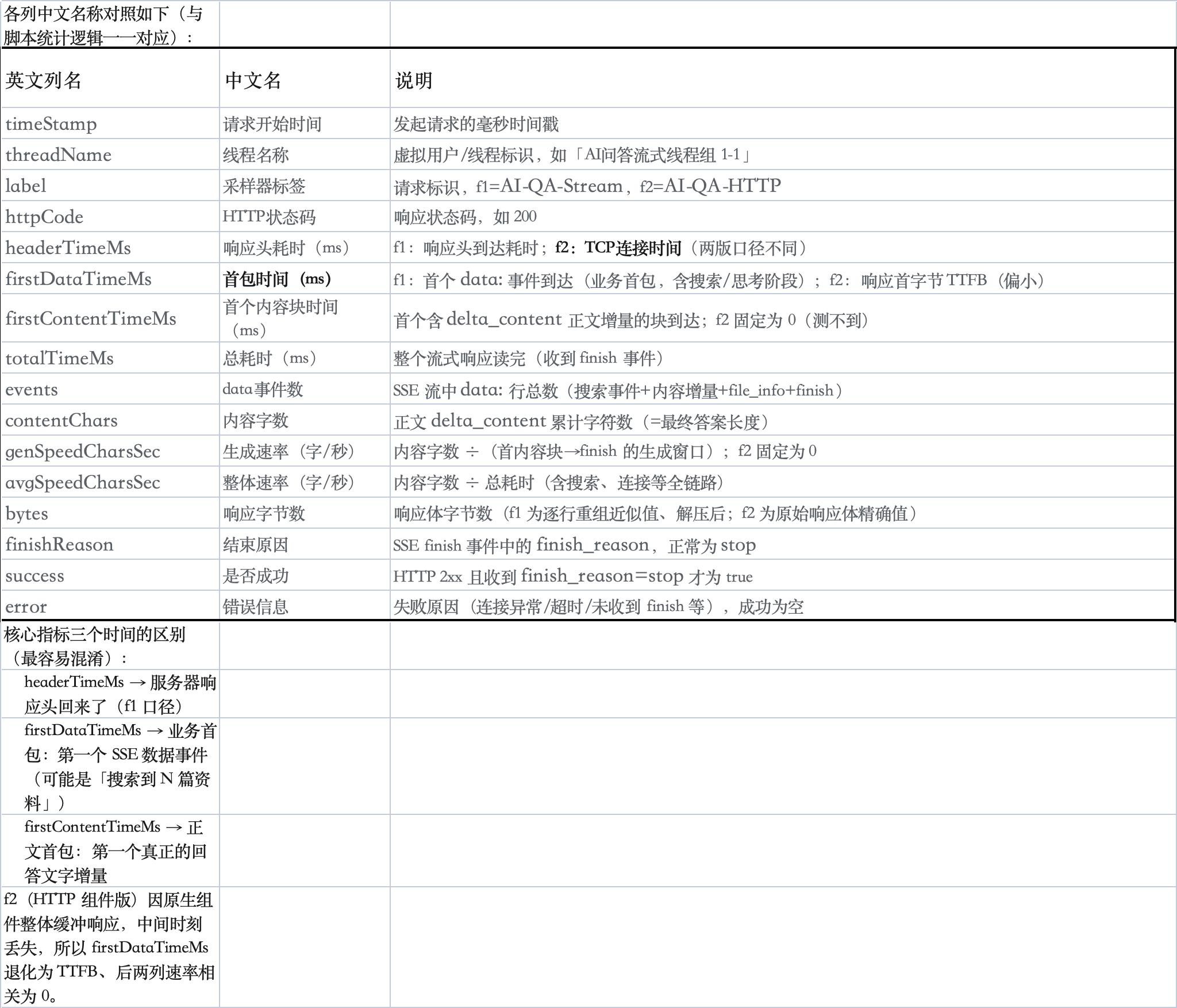
Jmeter5.2.1版本流式请求压测脚本
1、流式请求完整脚本
请求写在脚本中,并统计首包、生成速率等数据
xml
<?xml version="1.0" encoding="UTF-8"?>
<jmeterTestPlan version="1.2" properties="5.0" jmeter="5.2.1">
  <hashTree>
    <TestPlan guiclass="TestPlanGui" testclass="TestPlan" testname="乐享AI问答流式压测(首包/速率统计)" enabled="true">
      <stringProp name="TestPlan.comments">JMeter 5.2.1 乐享AI问答(/cgi-bin/v1/ai/qa)流式压测。query从CSV逐行读取(QUERY_CSV默认./query_data.csv, 变量QUERY, EOF循环复用; 若需跑完即停在GUI关闭Recycle并勾选Stop thread)。使用前: 1)AUTH_HEADER填 Bearer access_token 2)X_STAFF_ID填真实员工ID 3)REQUEST_BODY中targets.id填真实团队ID(压测默认new_session=true使各虚拟用户会话隔离)。统计: 首包=首个data事件(业务首包,即latency列), firstContentTime=首个内容块, 生成速率=内容字数/内容生成窗口, 整体速率=内容字数/总耗时; 明细缓存在内存, 由tearDown线程组在测试结束时一次性写入RESULT_CSV(明细+#汇总)。jtl的latency列即业务首包。</stringProp>
      <boolProp name="TestPlan.functional_mode">false</boolProp>
      <boolProp name="TestPlan.tearDown_on_shutdown">true</boolProp>
      <boolProp name="TestPlan.serialize_threadgroups">true</boolProp>
      <elementProp name="TestPlan.user_defined_variables" elementType="Arguments" guiclass="ArgumentsPanel" testclass="Arguments" testname="用户定义的变量" enabled="true">
        <collectionProp name="Arguments.arguments"/>
      </elementProp>
      <stringProp name="TestPlan.user_define_classpath"></stringProp>
    </TestPlan>
    <hashTree>
      <Arguments guiclass="ArgumentsPanel" testclass="Arguments" testname="用户定义变量(先改这里)" enabled="true">
        <collectionProp name="Arguments.arguments">
          <elementProp name="QA_URL" elementType="Argument">
            <stringProp name="Argument.name">QA_URL</stringProp>
            <stringProp name="Argument.value">http://127.0.0.1:18081/cgi-bin/v1/ai/qa</stringProp>
            <stringProp name="Argument.metadata">=</stringProp>
          </elementProp>
          <elementProp name="AUTH_HEADER" elementType="Argument">
            <stringProp name="Argument.name">AUTH_HEADER</stringProp>
            <stringProp name="Argument.value">${__P(AUTH_HEADER,)}</stringProp>
            <stringProp name="Argument.metadata">=</stringProp>
          </elementProp>
          <elementProp name="X_STAFF_ID" elementType="Argument">
            <stringProp name="Argument.name">X_STAFF_ID</stringProp>
            <stringProp name="Argument.value">${__P(X_STAFF_ID,12345)}</stringProp>
            <stringProp name="Argument.metadata">=</stringProp>
          </elementProp>
          <elementProp name="CONNECT_TIMEOUT_MS" elementType="Argument">
            <stringProp name="Argument.name">CONNECT_TIMEOUT_MS</stringProp>
            <stringProp name="Argument.value">${__P(CONNECT_TIMEOUT_MS,10000)}</stringProp>
            <stringProp name="Argument.metadata">=</stringProp>
          </elementProp>
          <elementProp name="SOCKET_TIMEOUT_MS" elementType="Argument">
            <stringProp name="Argument.name">SOCKET_TIMEOUT_MS</stringProp>
            <stringProp name="Argument.value">${__P(SOCKET_TIMEOUT_MS,60000)}</stringProp>
            <stringProp name="Argument.metadata">=</stringProp>
          </elementProp>
          <elementProp name="REQUEST_BODY" elementType="Argument">
            <stringProp name="Argument.name">REQUEST_BODY</stringProp>
            <stringProp name="Argument.value">{"query": "${QUERY}", "stream": true, "anonymous_staff_id": "", "skip_faq": false, "new_session": true, "session_id": "", "qa_mode": "reasoning", "max_chars": 200, "language": "", "targets": [{"type": "team", "id": "74d76195adxxxxxxd49239d56e44f"}]}</stringProp>
            <stringProp name="Argument.metadata">=</stringProp>
          </elementProp>
          <elementProp name="RESULT_CSV" elementType="Argument">
            <stringProp name="Argument.name">RESULT_CSV</stringProp>
            <stringProp name="Argument.value">${__P(RESULT_CSV,./qa_stream_results.csv)}</stringProp>
            <stringProp name="Argument.metadata">=</stringProp>
          </elementProp>
        </collectionProp>
      </Arguments>
      <hashTree/>
      <ThreadGroup guiclass="ThreadGroupGui" testclass="ThreadGroup" testname="AI问答流式线程组" enabled="true">
        <stringProp name="ThreadGroup.on_sample_error">continue</stringProp>
        <elementProp name="ThreadGroup.main_controller" elementType="LoopController" guiclass="LoopControlPanel" testclass="LoopController" testname="循环控制器" enabled="true">
          <boolProp name="LoopController.continue_forever">false</boolProp>
          <stringProp name="LoopController.loops">1</stringProp>
        </elementProp>
        <stringProp name="ThreadGroup.num_threads">5</stringProp>
        <stringProp name="ThreadGroup.ramp_time">1</stringProp>
        <boolProp name="ThreadGroup.scheduler">false</boolProp>
        <stringProp name="ThreadGroup.duration"></stringProp>
        <stringProp name="ThreadGroup.delay"></stringProp>
        <boolProp name="ThreadGroup.same_user_on_next_iteration">true</boolProp>
      </ThreadGroup>
      <hashTree>
        <CSVDataSet guiclass="TestBeanGUI" testclass="CSVDataSet" testname="问题数据集(query_data.csv)" enabled="true">
          <stringProp name="filename">${__P(QUERY_CSV,./query_data.csv)}</stringProp>
          <stringProp name="fileEncoding">UTF-8</stringProp>
          <stringProp name="variableNames">QUERY</stringProp>
          <boolProp name="ignoreFirstLine">false</boolProp>
          <stringProp name="delimiter">,</stringProp>
          <boolProp name="quotedData">false</boolProp>
          <boolProp name="recycle">true</boolProp>
          <boolProp name="stopThread">false</boolProp>
          <stringProp name="shareMode">shareMode.all</stringProp>
        </CSVDataSet>
        <hashTree/>
        <JSR223Sampler guiclass="TestBeanGUI" testclass="JSR223Sampler" testname="AI问答流式请求" enabled="true">
          <stringProp name="cacheKey">true</stringProp>
          <stringProp name="filename"></stringProp>
          <stringProp name="parameters"></stringProp>
          <stringProp name="scriptLanguage">groovy</stringProp>
          <stringProp name="script">import org.apache.http.client.config.RequestConfig
import org.apache.http.client.methods.HttpPost
import org.apache.http.entity.StringEntity
import org.apache.http.impl.client.HttpClients
import groovy.json.JsonSlurper

// ================= 变量读取 =================
def urlStr         = vars.get("QA_URL")
def reqBody        = vars.get("REQUEST_BODY")
def queryVal       = vars.get("QUERY")   // CSV数据集当前行的query
if (queryVal != null) {
    // JsonOutput.toJson会转义引号/反斜杠/换行且结果自带双引号, 因此替换的是带引号的占位符
    def esc = groovy.json.JsonOutput.toJson(queryVal)
    reqBody = reqBody.replace('"${QUERY}"', esc)
}
def authHeader     = vars.get("AUTH_HEADER")
def staffId        = vars.get("X_STAFF_ID")
def connectTimeout = (vars.get("CONNECT_TIMEOUT_MS") ?: "10000").toInteger()
def socketTimeout  = (vars.get("SOCKET_TIMEOUT_MS") ?: "60000").toInteger()

def sample = SampleResult
def f3 = { v -> String.format(java.util.Locale.ROOT, "%.3f", ((Number) v).doubleValue()) }   // 统一保留三位小数

double headerTime       = -1.0d  // 响应头到达耗时(ms)
double firstDataTime    = -1.0d  // 首包: 首个data事件(ms)
double firstContentTime = -1.0d  // 首个内容块到达(ms)
double lastChunkTime    = 0.0d   // 最后一个data事件(ms)
double totalTime        = 0.0d
int  eventCount       = 0     // data事件数
int  contentChars     = 0     // 内容累计字数
String finishReason   = ""
boolean isStop        = false
String respCode       = ""
String errMsg         = ""
def startTime         = System.currentTimeMillis()
def t0                = System.nanoTime()
def fullContent       = new StringBuilder()
def rawText           = new StringBuilder()
def parser            = new JsonSlurper()

def client = HttpClients.custom()
        .setDefaultRequestConfig(RequestConfig.custom()
                .setConnectTimeout(connectTimeout)
                .setSocketTimeout(socketTimeout)
                .setConnectionRequestTimeout(connectTimeout)
                .build())
        .build()

try {
    def post = new HttpPost(urlStr)
    post.setHeader("Content-Type", "application/json; charset=utf-8")
    post.setHeader("Accept", "text/event-stream")
    if (authHeader) post.setHeader("Authorization", authHeader)
    if (staffId) post.setHeader("x-staff-id", staffId)
    post.setEntity(new StringEntity(reqBody, "UTF-8"))

    def response = client.execute(post)
    headerTime = (System.nanoTime() - t0) / 1000000.0d
    respCode = String.valueOf(response.getStatusLine().getStatusCode())
    sample.setResponseMessage(response.getStatusLine().getReasonPhrase())

    def entity = response.getEntity()
    if (entity != null) {
        def reader = new BufferedReader(new InputStreamReader(entity.getContent(), "UTF-8"))
        String line
        while ((line = reader.readLine()) != null) {
            rawText.append(line).append("\n")
            if (line.startsWith("data:")) {
                double now = (System.nanoTime() - t0) / 1000000.0d
                if (firstDataTime < 0.0d) firstDataTime = now   // 业务首包
                eventCount++
                lastChunkTime = now
                def payload = line.substring(5).trim()
                if (payload.startsWith("{")) {
                    try {
                        def json = parser.parseText(payload)
                        def delta = (json.get("delta_content") ?: "").toString()
                        if (!delta.isEmpty()) {
                            if (firstContentTime < 0.0d) firstContentTime = now   // 首个内容块
                            contentChars += delta.length()
                        }
                        def content = (json.get("content") ?: "").toString()
                        if (!content.isEmpty()) {   // finish事件带全量content
                            fullContent.setLength(0)
                            fullContent.append(content)
                        }
                        def fr = (json.get("finish_reason") ?: "").toString()
                        if (!fr.isEmpty()) finishReason = fr
                        def stopFlag = json.get("is_stop")
                        if (stopFlag != null && stopFlag.toString() == "true") isStop = true
                    } catch (Exception ignore) {
                        // 跳过无法解析的data行
                    }
                }
            }
        }
        reader.close()
    }
    totalTime = (System.nanoTime() - t0) / 1000000.0d
} catch (Exception e) {
    errMsg = e.getMessage() ?: e.toString()
    totalTime = (System.nanoTime() - t0) / 1000000.0d
} finally {
    try { client.close() } catch (Exception ignore) {}
}

def ok = respCode.startsWith("2") && isStop && errMsg.isEmpty()
if (!ok && errMsg.isEmpty()) errMsg = "未收到finish事件(finishReason=" + finishReason + ", httpCode=" + respCode + ")"

// ================= 速率统计 =================
double genWindow = (firstContentTime > 0.0d && lastChunkTime > firstContentTime) ? (lastChunkTime - firstContentTime) : 0.0d
double genSpeed = (contentChars > 0 && genWindow > 0.0d) ? (contentChars * 1000.0d / genWindow) : 0.0d   // 内容生成窗口内 字/秒
double avgSpeed = (contentChars > 0 && totalTime > 0.0d) ? (contentChars * 1000.0d / totalTime) : 0.0d   // 整体均值 字/秒

// ================= 填充 JMeter 采样结果 =================
sample.setResponseCode(respCode.isEmpty() ? "0" : respCode)
sample.setSuccessful(ok)
sample.setDataType(SampleResult.TEXT)
sample.setResponseMessage(errMsg.isEmpty() ? (finishReason.isEmpty() ? "OK" : finishReason) : errMsg)
def fc = fullContent.toString()
def preview = fc.length() > 300 ? fc.substring(0, 300) + "\n...(截断)" : fc
sample.setResponseData(preview + "\n\n===== 流式指标 =====\n响应头耗时=" + f3(headerTime) + "ms\n首包时间(首个data)=" + f3(firstDataTime) + "ms\n首内容时间=" + f3(firstContentTime) + "ms\n总耗时=" + f3(totalTime) + "ms\ndata事件数=" + eventCount + "\n内容字数=" + contentChars + "\n生成速率=" + f3(genSpeed) + "字/秒\n整体速率=" + f3(avgSpeed) + "字/秒\nfinish_reason=" + finishReason, "UTF-8")
sample.setConnectTime(headerTime > 0.0d ? (long) headerTime : 0L)
sample.setLatency((long) (firstDataTime > 0.0d ? firstDataTime : (headerTime > 0.0d ? headerTime : totalTime)))
sample.setSentBytes(reqBody.getBytes("UTF-8").length)

// ================= 统计缓存到内存(props), 由tearDown线程组一次性写入CSV =================
def bytesTotal = rawText.toString().getBytes("UTF-8").length
def csvRow = startTime + "," + Thread.currentThread().getName() + ",\"AI-QA-Stream\"," + (respCode.isEmpty() ? "0" : respCode) + "," + f3(headerTime) + "," + f3(firstDataTime) + "," + f3(firstContentTime) + "," + f3(totalTime) + "," + eventCount + "," + contentChars + "," + f3(genSpeed) + "," + f3(avgSpeed) + "," + bytesTotal + "," + finishReason + "," + ok + ",\"" + (errMsg == null ? "" : errMsg.replace("\"", "'")) + "\""
synchronized (props) {
    def rows = props.get("QA_ROWS")
    if (rows == null) { rows = new StringBuilder(); props.put("QA_ROWS", rows) }
    rows.append(csvRow).append("\n")
    def st = props.get("QA_STATS")
    if (st == null) {
        st = new HashMap()
        st.put("count", 0L); st.put("okCount", 0L); st.put("fpSum", 0.0d); st.put("fpMax", 0.0d)
        st.put("totalSum", 0.0d); st.put("speedSum", 0.0d); st.put("speedN", 0L); st.put("firstTs", 0L); st.put("lastEndTs", 0.0d)
        st.put("fpList", new ArrayList())
        props.put("QA_STATS", st)
    }
    st.count = st.count + 1L
    if (ok) st.okCount = st.okCount + 1L
    if (firstDataTime > 0.0d) {
        st.fpSum = st.fpSum + firstDataTime
        if (firstDataTime > st.fpMax) st.fpMax = firstDataTime
        st.fpList.add(firstDataTime)
    }
    st.totalSum = st.totalSum + totalTime
    if (genSpeed > 0.0d) { st.speedSum = st.speedSum + genSpeed; st.speedN = st.speedN + 1L }
    if (st.firstTs == 0L || startTime < st.firstTs) st.firstTs = startTime
    double endTs = startTime + totalTime   // 该请求结束时刻
    if (endTs > st.lastEndTs) st.lastEndTs = endTs
    props.put("QA_STATS", st)
}

// 供后续元件使用
vars.put("FIRST_PACKET_TIME", String.valueOf(firstDataTime))
vars.put("FIRST_CONTENT_TIME", String.valueOf(firstContentTime))
vars.put("TOTAL_TIME", String.valueOf(totalTime))
vars.put("GEN_SPEED", String.valueOf(genSpeed))
</stringProp>
        </JSR223Sampler>
        <hashTree/>
        <ResultCollector guiclass="ViewResultsFullVisualizer" testclass="ResultCollector" testname="查看结果树" enabled="true">
          <boolProp name="ResultCollector.error_logging">false</boolProp>
          <objProp>
            <name>saveConfig</name>
            <value class="SampleSaveConfiguration">
              <time>true</time>
              <latency>true</latency>
              <timestamp>true</timestamp>
              <success>true</success>
              <label>true</label>
              <code>true</code>
              <message>true</message>
              <threadName>true</threadName>
              <dataType>true</dataType>
              <encoding>false</encoding>
              <assertions>true</assertions>
              <subresults>true</subresults>
              <responseData>false</responseData>
              <samplerData>false</samplerData>
              <xml>false</xml>
              <fieldNames>true</fieldNames>
              <responseHeaders>false</responseHeaders>
              <requestHeaders>false</requestHeaders>
              <responseDataOnError>false</responseDataOnError>
              <saveAssertionResultsFailureMessage>true</saveAssertionResultsFailureMessage>
              <assertionsResultsToSave>0</assertionsResultsToSave>
              <bytes>true</bytes>
              <sentBytes>true</sentBytes>
              <url>true</url>
              <threadCounts>true</threadCounts>
              <idleTime>true</idleTime>
              <connectTime>true</connectTime>
            </value>
          </objProp>
          <stringProp name="filename"></stringProp>
        </ResultCollector>
        <hashTree/>
        <ResultCollector guiclass="SimpleDataWriter" testclass="ResultCollector" testname="保存统计信息(qa_stream_results.jtl)" enabled="true">
          <boolProp name="ResultCollector.error_logging">false</boolProp>
          <objProp>
            <name>saveConfig</name>
            <value class="SampleSaveConfiguration">
              <time>true</time>
              <latency>true</latency>
              <timestamp>true</timestamp>
              <success>true</success>
              <label>true</label>
              <code>true</code>
              <message>true</message>
              <threadName>true</threadName>
              <dataType>true</dataType>
              <encoding>false</encoding>
              <assertions>true</assertions>
              <subresults>true</subresults>
              <responseData>false</responseData>
              <samplerData>false</samplerData>
              <xml>false</xml>
              <fieldNames>true</fieldNames>
              <responseHeaders>false</responseHeaders>
              <requestHeaders>false</requestHeaders>
              <responseDataOnError>false</responseDataOnError>
              <saveAssertionResultsFailureMessage>true</saveAssertionResultsFailureMessage>
              <assertionsResultsToSave>0</assertionsResultsToSave>
              <bytes>true</bytes>
              <sentBytes>true</sentBytes>
              <url>true</url>
              <threadCounts>true</threadCounts>
              <idleTime>true</idleTime>
              <connectTime>true</connectTime>
            </value>
          </objProp>
          <stringProp name="filename">/Users/zhihua/trae_projects/qa_stream_results.jtl</stringProp>
        </ResultCollector>
        <hashTree/>
        <ResultCollector guiclass="StatVisualizer" testclass="ResultCollector" testname="聚合报告" enabled="true">
          <boolProp name="ResultCollector.error_logging">false</boolProp>
          <objProp>
            <name>saveConfig</name>
            <value class="SampleSaveConfiguration">
              <time>true</time>
              <latency>true</latency>
              <timestamp>true</timestamp>
              <success>true</success>
              <label>true</label>
              <code>true</code>
              <message>true</message>
              <threadName>true</threadName>
              <dataType>true</dataType>
              <encoding>false</encoding>
              <assertions>true</assertions>
              <subresults>true</subresults>
              <responseData>false</responseData>
              <samplerData>false</samplerData>
              <xml>false</xml>
              <fieldNames>true</fieldNames>
              <responseHeaders>false</responseHeaders>
              <requestHeaders>false</requestHeaders>
              <responseDataOnError>false</responseDataOnError>
              <saveAssertionResultsFailureMessage>true</saveAssertionResultsFailureMessage>
              <assertionsResultsToSave>0</assertionsResultsToSave>
              <bytes>true</bytes>
              <sentBytes>true</sentBytes>
              <url>true</url>
              <threadCounts>true</threadCounts>
              <idleTime>true</idleTime>
              <connectTime>true</connectTime>
            </value>
          </objProp>
          <stringProp name="filename"></stringProp>
        </ResultCollector>
        <hashTree/>
      </hashTree>
      <PostThreadGroup guiclass="PostThreadGroupGui" testclass="PostThreadGroup" testname="tearDown统计落盘" enabled="true">
        <stringProp name="ThreadGroup.on_sample_error">continue</stringProp>
        <elementProp name="ThreadGroup.main_controller" elementType="LoopController" guiclass="LoopControlPanel" testclass="LoopController" testname="循环控制器" enabled="true">
          <boolProp name="LoopController.continue_forever">false</boolProp>
          <stringProp name="LoopController.loops">1</stringProp>
        </elementProp>
        <stringProp name="ThreadGroup.num_threads">1</stringProp>
        <stringProp name="ThreadGroup.ramp_time">1</stringProp>
        <boolProp name="ThreadGroup.scheduler">false</boolProp>
        <stringProp name="ThreadGroup.duration"></stringProp>
        <stringProp name="ThreadGroup.delay"></stringProp>
        <boolProp name="ThreadGroup.same_user_on_next_iteration">true</boolProp>
      </PostThreadGroup>
      <hashTree>
        <JSR223Sampler guiclass="TestBeanGUI" testclass="JSR223Sampler" testname="一次性写入统计数据" enabled="true">
          <stringProp name="cacheKey">true</stringProp>
          <stringProp name="filename"></stringProp>
          <stringProp name="parameters"></stringProp>
          <stringProp name="scriptLanguage">groovy</stringProp>
          <stringProp name="script">// 测试结束时一次性写入统计CSV(明细 + #开头的汇总行)
def f3 = { v -> String.format(java.util.Locale.ROOT, "%.3f", ((Number) v).doubleValue()) }   // 统一保留三位小数
def csvPath = vars.get("RESULT_CSV") ?: "./qa_stream_results.csv"
def rows = props.get("QA_ROWS")
def st = props.get("QA_STATS")
def sb = new StringBuilder()
sb.append("timeStamp,threadName,label,httpCode,headerTimeMs,firstDataTimeMs,firstContentTimeMs,totalTimeMs,events,contentChars,genSpeedCharsSec,avgSpeedCharsSec,bytes,finishReason,success,error\n")
if (rows != null) sb.append(rows.toString())
if (st != null && st.count > 0L) {
    long n = st.count
    def fp = new ArrayList(st.fpList)
    Collections.sort(fp)
    double p95 = fp.isEmpty() ? 0.0d : ((Number) fp.get((int) Math.ceil(fp.size() * 0.95d) - 1)).doubleValue()
    double wallSec = (st.lastEndTs - st.firstTs) / 1000.0d   // 墙钟=首个请求开始→最后一个请求结束
    sb.append("\n# ===== 汇总 =====\n")
    sb.append("# 请求数=").append(n).append(", 成功=").append(st.okCount).append(", 成功率=").append(f3(st.okCount * 100.0d / n)).append("%\n")
    sb.append("# 首包(首个data)均值=").append(f3(st.fpSum / n)).append("ms, 最大=").append(f3(st.fpMax)).append("ms, P95=").append(f3(p95)).append("ms\n")
    sb.append("# 总耗时均值=").append(f3(st.totalSum / n)).append("ms\n")
    if (st.speedN > 0L) sb.append("# 生成速率均值=").append(f3(st.speedSum / st.speedN)).append("字/秒\n")
    if (wallSec > 0.0d) sb.append("# 吞吐=").append(f3(n / wallSec)).append("请求/秒 (墙钟:首个请求开始→最后请求结束, 含失败请求)\n")
}
new File(csvPath).setText(sb.toString(), "UTF-8")
// 清理缓存, 避免同一JVM内再次运行时叠加旧数据
props.remove("QA_ROWS")
props.remove("QA_STATS")</stringProp>
        </JSR223Sampler>
        <hashTree/>
      </hashTree>
    </hashTree>
  </hashTree>
</jmeterTestPlan>
2、Http请求组件版
使用Jmeter http请求组件,部分数据无法统计,并且首包偏小,非真实首包。
xml
<?xml version="1.0" encoding="UTF-8"?>
<jmeterTestPlan version="1.2" properties="5.0" jmeter="5.2.1">
  <hashTree>
    <TestPlan guiclass="TestPlanGui" testclass="TestPlan" testname="乐享AI问答流式压测-HTTP组件版(首包/速率统计)" enabled="true">
      <stringProp name="TestPlan.comments">JMeter 5.2.1 乐享AI问答(/cgi-bin/v1/ai/qa)流式压测: query从CSV逐行读取(QUERY_CSV默认./query_data.csv, 变量QUERY, EOF循环复用), body经__evalVar解析。请求由原生HTTP Request组件发送, JSR223后置处理器解析SSE; 明细缓存在内存, 由tearDown线程组在测试结束时一次性写入RESULT_CSV(明细+#汇总)。口径说明: firstDataTimeMs=latency(JMeter响应首字节,非首个data事件,偏小), firstContentTimeMs/genSpeedCharsSec固定为0(原生组件无法测量), avgSpeedCharsSec=内容字数/总耗时整体均值。使用前: AUTH_HEADER填 Bearer access_token, X_STAFF_ID填真实ID, REQUEST_BODY中targets.id填真实团队ID。</stringProp>
      <boolProp name="TestPlan.functional_mode">false</boolProp>
      <boolProp name="TestPlan.tearDown_on_shutdown">true</boolProp>
      <boolProp name="TestPlan.serialize_threadgroups">true</boolProp>
      <elementProp name="TestPlan.user_defined_variables" elementType="Arguments" guiclass="ArgumentsPanel" testclass="Arguments" testname="用户定义的变量" enabled="true">
        <collectionProp name="Arguments.arguments"/>
      </elementProp>
      <stringProp name="TestPlan.user_define_classpath"></stringProp>
    </TestPlan>
    <hashTree>
      <Arguments guiclass="ArgumentsPanel" testclass="Arguments" testname="用户定义变量(先改这里)" enabled="true">
        <collectionProp name="Arguments.arguments">
          <elementProp name="AUTH_HEADER" elementType="Argument">
            <stringProp name="Argument.name">AUTH_HEADER</stringProp>
            <stringProp name="Argument.value">${__P(AUTH_HEADER,)}</stringProp>
            <stringProp name="Argument.metadata">=</stringProp>
          </elementProp>
          <elementProp name="X_STAFF_ID" elementType="Argument">
            <stringProp name="Argument.name">X_STAFF_ID</stringProp>
            <stringProp name="Argument.value">${__P(X_STAFF_ID,12345)}</stringProp>
            <stringProp name="Argument.metadata">=</stringProp>
          </elementProp>
          <elementProp name="REQUEST_BODY" elementType="Argument">
            <stringProp name="Argument.name">REQUEST_BODY</stringProp>
            <stringProp name="Argument.value">{"query": "${QUERY}", "stream": true, "anonymous_staff_id": "", "skip_faq": false, "new_session": true, "session_id": "", "qa_mode": "reasoning", "max_chars": 200, "language": "", "targets": [{"type": "team", "id": "74d76195adxxxxxxd49239d56e44f"}]}</stringProp>
            <stringProp name="Argument.metadata">=</stringProp>
          </elementProp>
          <elementProp name="RESULT_CSV" elementType="Argument">
            <stringProp name="Argument.name">RESULT_CSV</stringProp>
            <stringProp name="Argument.value">${__P(RESULT_CSV,./qa_stream_http_results.csv)}</stringProp>
            <stringProp name="Argument.metadata">=</stringProp>
          </elementProp>
        </collectionProp>
      </Arguments>
      <hashTree/>
      <ThreadGroup guiclass="ThreadGroupGui" testclass="ThreadGroup" testname="AI问答流式线程组" enabled="true">
        <stringProp name="ThreadGroup.on_sample_error">continue</stringProp>
        <elementProp name="ThreadGroup.main_controller" elementType="LoopController" guiclass="LoopControlPanel" testclass="LoopController" testname="循环控制器" enabled="true">
          <boolProp name="LoopController.continue_forever">false</boolProp>
          <stringProp name="LoopController.loops">1</stringProp>
        </elementProp>
        <stringProp name="ThreadGroup.num_threads">5</stringProp>
        <stringProp name="ThreadGroup.ramp_time">5</stringProp>
        <boolProp name="ThreadGroup.scheduler">false</boolProp>
        <stringProp name="ThreadGroup.duration"></stringProp>
        <stringProp name="ThreadGroup.delay"></stringProp>
        <boolProp name="ThreadGroup.same_user_on_next_iteration">true</boolProp>
      </ThreadGroup>
      <hashTree>
        <CSVDataSet guiclass="TestBeanGUI" testclass="CSVDataSet" testname="问题数据集(query_data.csv)" enabled="true">
          <stringProp name="filename">${__P(QUERY_CSV,./query_data.csv)}</stringProp>
          <stringProp name="fileEncoding">UTF-8</stringProp>
          <stringProp name="variableNames">QUERY</stringProp>
          <boolProp name="ignoreFirstLine">false</boolProp>
          <stringProp name="delimiter">,</stringProp>
          <boolProp name="quotedData">false</boolProp>
          <boolProp name="recycle">true</boolProp>
          <boolProp name="stopThread">false</boolProp>
          <stringProp name="shareMode">shareMode.all</stringProp>
        </CSVDataSet>
        <hashTree/>
        <HTTPSamplerProxy guiclass="HttpTestSampleGui" testclass="HTTPSamplerProxy" testname="AI问答流式请求" enabled="true">
          <boolProp name="HTTPSampler.postBodyRaw">true</boolProp>
          <elementProp name="HTTPsampler.Arguments" elementType="Arguments">
            <collectionProp name="Arguments.arguments">
              <elementProp name="" elementType="HTTPArgument">
                <boolProp name="HTTPArgument.always_encode">false</boolProp>
                <stringProp name="Argument.value">${__evalVar(REQUEST_BODY)}</stringProp>
                <stringProp name="Argument.metadata">=</stringProp>
              </elementProp>
            </collectionProp>
          </elementProp>
          <stringProp name="HTTPSampler.domain">127.0.0.1</stringProp>
          <stringProp name="HTTPSampler.port">18081</stringProp>
          <stringProp name="HTTPSampler.protocol">http</stringProp>
          <stringProp name="HTTPSampler.contentEncoding">UTF-8</stringProp>
          <stringProp name="HTTPSampler.path">/cgi-bin/v1/ai/qa</stringProp>
          <stringProp name="HTTPSampler.method">POST</stringProp>
          <boolProp name="HTTPSampler.follow_redirects">true</boolProp>
          <boolProp name="HTTPSampler.auto_redirects">false</boolProp>
          <boolProp name="HTTPSampler.use_keepalive">true</boolProp>
          <boolProp name="HTTPSampler.DO_MULTIPART_POST">false</boolProp>
          <stringProp name="HTTPSampler.embedded_url_re"></stringProp>
          <stringProp name="HTTPSampler.connect_timeout">${__P(CONNECT_TIMEOUT_MS,10000)}</stringProp>
          <stringProp name="HTTPSampler.response_timeout">${__P(SOCKET_TIMEOUT_MS,60000)}</stringProp>
        </HTTPSamplerProxy>
        <hashTree>
          <HeaderManager guiclass="HeaderPanel" testclass="HeaderManager" testname="HTTP信息头管理器" enabled="true">
            <collectionProp name="HeaderManager.headers">
              <elementProp name="" elementType="Header">
                <stringProp name="Header.name">Content-Type</stringProp>
                <stringProp name="Header.value">application/json; charset=utf-8</stringProp>
              </elementProp>
              <elementProp name="" elementType="Header">
                <stringProp name="Header.name">Accept</stringProp>
                <stringProp name="Header.value">text/event-stream</stringProp>
              </elementProp>
              <elementProp name="" elementType="Header">
                <stringProp name="Header.name">Authorization</stringProp>
                <stringProp name="Header.value">${AUTH_HEADER}</stringProp>
              </elementProp>
              <elementProp name="" elementType="Header">
                <stringProp name="Header.name">x-staff-id</stringProp>
                <stringProp name="Header.value">${X_STAFF_ID}</stringProp>
              </elementProp>
            </collectionProp>
          </HeaderManager>
          <hashTree/>
          <JSR223PostProcessor guiclass="TestBeanGUI" testclass="JSR223PostProcessor" testname="SSE指标统计并写CSV" enabled="true">
            <stringProp name="cacheKey">true</stringProp>
            <stringProp name="filename"></stringProp>
            <stringProp name="parameters"></stringProp>
            <stringProp name="scriptLanguage">groovy</stringProp>
            <stringProp name="script">import groovy.json.JsonSlurper

// 基于原生HTTP采样器结果统计SSE指标并追加写入CSV
def sample = prev   // JSR223后置处理器中没有SampleResult绑定, 上一个采样器的结果是prev
def rawBytes = sample.getResponseData() ?: new byte[0]
def content = new String(rawBytes, "UTF-8")   // 显式UTF-8解码: 响应头无charset时JMeter默认按ISO-8859-1解码,会导致中文乱码且字数偏大约3倍
def parser = new JsonSlurper()
def f3 = { v -> String.format(java.util.Locale.ROOT, "%.3f", ((Number) v).doubleValue()) }   // 统一保留三位小数

int eventCount = 0
int contentChars = 0
String finishReason = ""
boolean isStop = false
def fullContent = new StringBuilder()

content.eachLine { ln ->
    if (ln.startsWith("data:")) {
        eventCount++
        def payload = ln.substring(5).trim()
        if (payload.startsWith("{")) {
            try {
                def json = parser.parseText(payload)
                def delta = (json.get("delta_content") ?: "").toString()
                contentChars += delta.length()
                def c = (json.get("content") ?: "").toString()
                if (!c.isEmpty()) {
                    fullContent.setLength(0)
                    fullContent.append(c)
                }
                def fr = (json.get("finish_reason") ?: "").toString()
                if (!fr.isEmpty()) finishReason = fr
                def stopFlag = json.get("is_stop")
                if (stopFlag != null && stopFlag.toString() == "true") isStop = true
            } catch (Exception ignore) {
                // 跳过无法解析的data行
            }
        }
    }
}

// ================= 时间口径(原生组件可测范围) =================
long headerTimeMs  = sample.getConnectTime()   // TCP连接时间
long firstPacketMs = sample.getLatency()       // 响应首字节(≈首包, JMeter口径, 非首个data事件)
long totalTimeMs   = sample.getTime()          // 完整读取耗时
double avgSpeed = (contentChars > 0 && totalTimeMs > 0) ? (contentChars * 1000.0d / totalTimeMs) : 0.0d   // 整体均值 字/秒

// ================= 判定 =================
def httpOk = sample.getResponseCode().startsWith("2")
def ok = httpOk && isStop
def errMsg = ""
if (!httpOk) errMsg = (sample.getResponseMessage() ?: ("HTTP " + sample.getResponseCode()))
else if (!isStop) errMsg = "未收到finish事件(finishReason=" + finishReason + ")"
sample.setSuccessful(ok)   // 让jtl/聚合报告的Error%反映流未完成比例
sample.setResponseMessage(errMsg.isEmpty() ? (finishReason.isEmpty() ? "OK" : finishReason) : errMsg)

// 在响应内容后追加指标(字节数直接取进入时的原始响应体, 不受追加文本影响)
long respBytes = rawBytes.length
sample.setResponseData(content + "\n\n===== 流式指标(HTTP组件口径) =====\n首包(响应首字节)=" + firstPacketMs + "ms\n总耗时=" + totalTimeMs + "ms\ndata事件数=" + eventCount + "\n内容字数=" + contentChars + "\n整体速率=" + f3(avgSpeed) + "字/秒\nfinish_reason=" + finishReason, "UTF-8")

// ================= 统计缓存到内存(props), 由tearDown线程组一次性写入CSV =================
def csvRow = sample.getTimeStamp() + "," + Thread.currentThread().getName() + ",\"AI-QA-HTTP\"," + sample.getResponseCode() + "," + headerTimeMs + "," + firstPacketMs + "," + 0L + "," + totalTimeMs + "," + eventCount + "," + contentChars + "," + 0L + "," + f3(avgSpeed) + "," + respBytes + "," + finishReason + "," + ok + ",\"" + errMsg.replace("\"", "'") + "\""
synchronized (props) {
    def rows = props.get("QA_HTTP_ROWS")
    if (rows == null) { rows = new StringBuilder(); props.put("QA_HTTP_ROWS", rows) }
    rows.append(csvRow).append("\n")
    def st = props.get("QA_HTTP_STATS")
    if (st == null) {
        st = new HashMap()
        st.put("count", 0L); st.put("okCount", 0L); st.put("fpSum", 0L); st.put("fpMax", 0L)
        st.put("totalSum", 0L); st.put("speedSum", 0.0d); st.put("speedN", 0L); st.put("firstTs", 0L); st.put("lastEndTs", 0.0d)
        st.put("fpList", new ArrayList())
        props.put("QA_HTTP_STATS", st)
    }
    st.count = st.count + 1L
    if (ok) st.okCount = st.okCount + 1L
    if (firstPacketMs > 0L) {
        st.fpSum = st.fpSum + firstPacketMs
        if (firstPacketMs > st.fpMax) st.fpMax = firstPacketMs
        st.fpList.add(firstPacketMs)
    }
    st.totalSum = st.totalSum + totalTimeMs
    if (avgSpeed > 0.0d) { st.speedSum = st.speedSum + avgSpeed; st.speedN = st.speedN + 1L }
    long ts = sample.getTimeStamp()
    if (st.firstTs == 0L || ts < st.firstTs) st.firstTs = ts
    double endTs = ts + totalTimeMs   // 该请求结束时刻
    if (endTs > st.lastEndTs) st.lastEndTs = endTs
    props.put("QA_HTTP_STATS", st)
}

// 供后续元件使用
vars.put("FIRST_PACKET_TIME", String.valueOf(firstPacketMs))
vars.put("TOTAL_TIME", String.valueOf(totalTimeMs))
vars.put("GEN_SPEED", String.valueOf(avgSpeed))
</stringProp>
          </JSR223PostProcessor>
          <hashTree/>
        </hashTree>
        <ResultCollector guiclass="ViewResultsFullVisualizer" testclass="ResultCollector" testname="查看结果树" enabled="true">
          <boolProp name="ResultCollector.error_logging">false</boolProp>
          <objProp>
            <name>saveConfig</name>
            <value class="SampleSaveConfiguration">
              <time>true</time>
              <latency>true</latency>
              <timestamp>true</timestamp>
              <success>true</success>
              <label>true</label>
              <code>true</code>
              <message>true</message>
              <threadName>true</threadName>
              <dataType>true</dataType>
              <encoding>false</encoding>
              <assertions>true</assertions>
              <subresults>true</subresults>
              <responseData>false</responseData>
              <samplerData>false</samplerData>
              <xml>false</xml>
              <fieldNames>true</fieldNames>
              <responseHeaders>false</responseHeaders>
              <requestHeaders>false</requestHeaders>
              <responseDataOnError>false</responseDataOnError>
              <saveAssertionResultsFailureMessage>true</saveAssertionResultsFailureMessage>
              <assertionsResultsToSave>0</assertionsResultsToSave>
              <bytes>true</bytes>
              <sentBytes>true</sentBytes>
              <url>true</url>
              <threadCounts>true</threadCounts>
              <idleTime>true</idleTime>
              <connectTime>true</connectTime>
            </value>
          </objProp>
          <stringProp name="filename"></stringProp>
        </ResultCollector>
        <hashTree/>
        <ResultCollector guiclass="SimpleDataWriter" testclass="ResultCollector" testname="保存统计信息(qa_stream_http_results.jtl)" enabled="true">
          <boolProp name="ResultCollector.error_logging">false</boolProp>
          <objProp>
            <name>saveConfig</name>
            <value class="SampleSaveConfiguration">
              <time>true</time>
              <latency>true</latency>
              <timestamp>true</timestamp>
              <success>true</success>
              <label>true</label>
              <code>true</code>
              <message>true</message>
              <threadName>true</threadName>
              <dataType>true</dataType>
              <encoding>false</encoding>
              <assertions>true</assertions>
              <subresults>true</subresults>
              <responseData>false</responseData>
              <samplerData>false</samplerData>
              <xml>false</xml>
              <fieldNames>true</fieldNames>
              <responseHeaders>false</responseHeaders>
              <requestHeaders>false</requestHeaders>
              <responseDataOnError>false</responseDataOnError>
              <saveAssertionResultsFailureMessage>true</saveAssertionResultsFailureMessage>
              <assertionsResultsToSave>0</assertionsResultsToSave>
              <bytes>true</bytes>
              <sentBytes>true</sentBytes>
              <url>true</url>
              <threadCounts>true</threadCounts>
              <idleTime>true</idleTime>
              <connectTime>true</connectTime>
            </value>
          </objProp>
          <stringProp name="filename">qa_stream_http_results.jtl</stringProp>
        </ResultCollector>
        <hashTree/>
        <ResultCollector guiclass="StatVisualizer" testclass="ResultCollector" testname="聚合报告" enabled="true">
          <boolProp name="ResultCollector.error_logging">false</boolProp>
          <objProp>
            <name>saveConfig</name>
            <value class="SampleSaveConfiguration">
              <time>true</time>
              <latency>true</latency>
              <timestamp>true</timestamp>
              <success>true</success>
              <label>true</label>
              <code>true</code>
              <message>true</message>
              <threadName>true</threadName>
              <dataType>true</dataType>
              <encoding>false</encoding>
              <assertions>true</assertions>
              <subresults>true</subresults>
              <responseData>false</responseData>
              <samplerData>false</samplerData>
              <xml>false</xml>
              <fieldNames>true</fieldNames>
              <responseHeaders>false</responseHeaders>
              <requestHeaders>false</requestHeaders>
              <responseDataOnError>false</responseDataOnError>
              <saveAssertionResultsFailureMessage>true</saveAssertionResultsFailureMessage>
              <assertionsResultsToSave>0</assertionsResultsToSave>
              <bytes>true</bytes>
              <sentBytes>true</sentBytes>
              <url>true</url>
              <threadCounts>true</threadCounts>
              <idleTime>true</idleTime>
              <connectTime>true</connectTime>
            </value>
          </objProp>
          <stringProp name="filename"></stringProp>
        </ResultCollector>
        <hashTree/>
      </hashTree>
      <PostThreadGroup guiclass="PostThreadGroupGui" testclass="PostThreadGroup" testname="tearDown统计落盘" enabled="true">
        <stringProp name="ThreadGroup.on_sample_error">continue</stringProp>
        <elementProp name="ThreadGroup.main_controller" elementType="LoopController" guiclass="LoopControlPanel" testclass="LoopController" testname="循环控制器" enabled="true">
          <boolProp name="LoopController.continue_forever">false</boolProp>
          <stringProp name="LoopController.loops">1</stringProp>
        </elementProp>
        <stringProp name="ThreadGroup.num_threads">1</stringProp>
        <stringProp name="ThreadGroup.ramp_time">1</stringProp>
        <boolProp name="ThreadGroup.scheduler">false</boolProp>
        <stringProp name="ThreadGroup.duration"></stringProp>
        <stringProp name="ThreadGroup.delay"></stringProp>
        <boolProp name="ThreadGroup.same_user_on_next_iteration">true</boolProp>
      </PostThreadGroup>
      <hashTree>
        <JSR223Sampler guiclass="TestBeanGUI" testclass="JSR223Sampler" testname="一次性写入统计数据" enabled="true">
          <stringProp name="cacheKey">true</stringProp>
          <stringProp name="filename"></stringProp>
          <stringProp name="parameters"></stringProp>
          <stringProp name="scriptLanguage">groovy</stringProp>
          <stringProp name="script">// 测试结束时一次性写入统计CSV(明细 + #开头的汇总行)
def f3 = { v -> String.format(java.util.Locale.ROOT, "%.3f", ((Number) v).doubleValue()) }   // 统一保留三位小数
def csvPath = vars.get("RESULT_CSV") ?: "./qa_stream_http_results.csv"
def rows = props.get("QA_HTTP_ROWS")
def st = props.get("QA_HTTP_STATS")
def sb = new StringBuilder()
sb.append("timeStamp,threadName,label,httpCode,headerTimeMs,firstDataTimeMs,firstContentTimeMs,totalTimeMs,events,contentChars,genSpeedCharsSec,avgSpeedCharsSec,bytes,finishReason,success,error\n")
if (rows != null) sb.append(rows.toString())
if (st != null && st.count > 0L) {
    long n = st.count
    def fp = new ArrayList(st.fpList)
    Collections.sort(fp)
    long p95 = fp.isEmpty() ? 0L : (Long) fp.get((int) Math.ceil(fp.size() * 0.95d) - 1)
    double wallSec = (st.lastEndTs - st.firstTs) / 1000.0d   // 墙钟=首个请求开始→最后一个请求结束
    sb.append("\n# ===== 汇总 =====\n")
    sb.append("# 请求数=").append(n).append(", 成功=").append(st.okCount).append(", 成功率=").append(f3(st.okCount * 100.0d / n)).append("%\n")
    sb.append("# 首包(响应首字节)均值=").append(f3(st.fpSum / n)).append("ms, 最大=").append(st.fpMax).append("ms, P95=").append(p95).append("ms\n")
    sb.append("# 总耗时均值=").append(f3(st.totalSum / n)).append("ms\n")
    if (st.speedN > 0L) sb.append("# 整体速率均值=").append(f3(st.speedSum / st.speedN)).append("字/秒\n")
    if (wallSec > 0.0d) sb.append("# 吞吐=").append(f3(n / wallSec)).append("请求/秒 (墙钟:首个请求开始→最后请求结束, 含失败请求)\n")
}
new File(csvPath).setText(sb.toString(), "UTF-8")
// 清理缓存, 避免同一JVM内再次运行时叠加旧数据
props.remove("QA_HTTP_ROWS")
props.remove("QA_HTTP_STATS")</stringProp>
        </JSR223Sampler>
        <hashTree/>
      </hashTree>
    </hashTree>
  </hashTree>
</jmeterTestPlan>
统计数据:解释说明