Web特效04------GPUvs CPU,为什么图形计算要交给GPU,什么是"并行计算"
CPU 和 GPU,都是电脑里做计算的芯片,但分工完全不同。CPU 擅长处理"一件事一件事来"的复杂逻辑,天生适合串行任务;而图形渲染的本质,是要同时给成千上万个像素、顶点做同样的计算------这种"重复的小任务,数量巨大"的场景,恰恰是 GPU 的强项,靠的是"并行计算":同一时刻,让成千上万个计算单元一起干活,而不是排队一个一个来。这也是为什么一提到图形渲染、three.js、WebGL,总绕不开 GPU。这篇就从"CPU 和 GPU 到底有什么区别"讲起,把"并行计算"这个核心概念讲清楚,搞懂图形计算为什么非 GPU 不可。
一、为什么图形计算最后都绕不开 GPU
1. 一个容易想反的问题:CPU 明明更"聪明",为什么图形偏偏要交给 GPU
很多人对 CPU 和 GPU 的第一印象是:CPU 是电脑的"大脑",什么都能算,应该更强;GPU 只是个"配角",专门用来打游戏、画图。但只要一牵扯到图形渲染------不管是网页里的一个 three.js 场景,还是一款 3A 游戏------从底层到上层的技术方案,无一例外都会把这部分计算甩给 GPU 去做。
这不是因为 CPU"不够聪明",而是因为图形计算这类任务的"脾气",和 CPU 擅长的东西根本不是一回事。要搞懂这一点,得先看看图形计算到底要算多少东西。
2. 算一笔账:一帧画面,到底要重复计算多少次
回忆一下第一篇里讲过的:屏幕由一个个像素组成,分辨率越高,像素越多。渲染一帧画面,原则上每一个像素都要单独算一次"这里该显示什么颜色"------这笔账算下来,数字相当夸张:
| 分辨率 | 像素总数 | 60fps 下,每秒像素计算次数 |
|---|---|---|
| 1280×720(720p) | 约 92 万 | 约 5530 万次/秒 |
| 1920×1080(1080p) | 约 207 万 | 约 1.24 亿次/秒 |
| 3840×2160(4K) | 约 829 万 | 约 4.98 亿次/秒 |
这还只是"每个像素该是什么颜色"这一项。真实的 3D 场景里,一个稍微复杂点的模型可能有成千上万个顶点,每一个顶点在每一帧都要做一次坐标变换(第八篇讲过的那些矩阵运算)------顶点计算和像素计算加在一起,一秒钟要重复执行的次数,是以"亿"为单位的。
这就是问题的核心:图形渲染不是"算一道很难的题",而是"要把一道很简单的题,原样重复算几亿遍"。
3. 这些计算有一个共同特点:简单、重复、互不干扰
再仔细看一眼上面那笔账,会发现这些计算有几个共同点:
- 单次计算很简单:算一个像素的颜色,或者算一个顶点的新坐标,涉及的运算本身并不复杂。
- 数量极其庞大:动辄上亿次。
- 彼此互不依赖:计算像素 A 的颜色,完全不需要知道像素 B 算出来的结果是什么;顶点之间的变换也是各算各的。
#mermaid-svg-MfydLovBk3aCKIQb{font-family:"trebuchet ms",verdana,arial,sans-serif;font-size:16px;fill:#333;}@keyframes edge-animation-frame{from{stroke-dashoffset:0;}}@keyframes dash{to{stroke-dashoffset:0;}}#mermaid-svg-MfydLovBk3aCKIQb .edge-animation-slow{stroke-dasharray:9,5!important;stroke-dashoffset:900;animation:dash 50s linear infinite;stroke-linecap:round;}#mermaid-svg-MfydLovBk3aCKIQb .edge-animation-fast{stroke-dasharray:9,5!important;stroke-dashoffset:900;animation:dash 20s linear infinite;stroke-linecap:round;}#mermaid-svg-MfydLovBk3aCKIQb .error-icon{fill:#552222;}#mermaid-svg-MfydLovBk3aCKIQb .error-text{fill:#552222;stroke:#552222;}#mermaid-svg-MfydLovBk3aCKIQb .edge-thickness-normal{stroke-width:1px;}#mermaid-svg-MfydLovBk3aCKIQb .edge-thickness-thick{stroke-width:3.5px;}#mermaid-svg-MfydLovBk3aCKIQb .edge-pattern-solid{stroke-dasharray:0;}#mermaid-svg-MfydLovBk3aCKIQb .edge-thickness-invisible{stroke-width:0;fill:none;}#mermaid-svg-MfydLovBk3aCKIQb .edge-pattern-dashed{stroke-dasharray:3;}#mermaid-svg-MfydLovBk3aCKIQb .edge-pattern-dotted{stroke-dasharray:2;}#mermaid-svg-MfydLovBk3aCKIQb .marker{fill:#333333;stroke:#333333;}#mermaid-svg-MfydLovBk3aCKIQb .marker.cross{stroke:#333333;}#mermaid-svg-MfydLovBk3aCKIQb svg{font-family:"trebuchet ms",verdana,arial,sans-serif;font-size:16px;}#mermaid-svg-MfydLovBk3aCKIQb p{margin:0;}#mermaid-svg-MfydLovBk3aCKIQb .label{font-family:"trebuchet ms",verdana,arial,sans-serif;color:#333;}#mermaid-svg-MfydLovBk3aCKIQb .cluster-label text{fill:#333;}#mermaid-svg-MfydLovBk3aCKIQb .cluster-label span{color:#333;}#mermaid-svg-MfydLovBk3aCKIQb .cluster-label span p{background-color:transparent;}#mermaid-svg-MfydLovBk3aCKIQb .label text,#mermaid-svg-MfydLovBk3aCKIQb span{fill:#333;color:#333;}#mermaid-svg-MfydLovBk3aCKIQb .node rect,#mermaid-svg-MfydLovBk3aCKIQb .node circle,#mermaid-svg-MfydLovBk3aCKIQb .node ellipse,#mermaid-svg-MfydLovBk3aCKIQb .node polygon,#mermaid-svg-MfydLovBk3aCKIQb .node path{fill:#ECECFF;stroke:#9370DB;stroke-width:1px;}#mermaid-svg-MfydLovBk3aCKIQb .rough-node .label text,#mermaid-svg-MfydLovBk3aCKIQb .node .label text,#mermaid-svg-MfydLovBk3aCKIQb .image-shape .label,#mermaid-svg-MfydLovBk3aCKIQb .icon-shape .label{text-anchor:middle;}#mermaid-svg-MfydLovBk3aCKIQb .node .katex path{fill:#000;stroke:#000;stroke-width:1px;}#mermaid-svg-MfydLovBk3aCKIQb .rough-node .label,#mermaid-svg-MfydLovBk3aCKIQb .node .label,#mermaid-svg-MfydLovBk3aCKIQb .image-shape .label,#mermaid-svg-MfydLovBk3aCKIQb .icon-shape .label{text-align:center;}#mermaid-svg-MfydLovBk3aCKIQb .node.clickable{cursor:pointer;}#mermaid-svg-MfydLovBk3aCKIQb .root .anchor path{fill:#333333!important;stroke-width:0;stroke:#333333;}#mermaid-svg-MfydLovBk3aCKIQb .arrowheadPath{fill:#333333;}#mermaid-svg-MfydLovBk3aCKIQb .edgePath .path{stroke:#333333;stroke-width:2.0px;}#mermaid-svg-MfydLovBk3aCKIQb .flowchart-link{stroke:#333333;fill:none;}#mermaid-svg-MfydLovBk3aCKIQb .edgeLabel{background-color:rgba(232,232,232, 0.8);text-align:center;}#mermaid-svg-MfydLovBk3aCKIQb .edgeLabel p{background-color:rgba(232,232,232, 0.8);}#mermaid-svg-MfydLovBk3aCKIQb .edgeLabel rect{opacity:0.5;background-color:rgba(232,232,232, 0.8);fill:rgba(232,232,232, 0.8);}#mermaid-svg-MfydLovBk3aCKIQb .labelBkg{background-color:rgba(232, 232, 232, 0.5);}#mermaid-svg-MfydLovBk3aCKIQb .cluster rect{fill:#ffffde;stroke:#aaaa33;stroke-width:1px;}#mermaid-svg-MfydLovBk3aCKIQb .cluster text{fill:#333;}#mermaid-svg-MfydLovBk3aCKIQb .cluster span{color:#333;}#mermaid-svg-MfydLovBk3aCKIQb div.mermaidTooltip{position:absolute;text-align:center;max-width:200px;padding:2px;font-family:"trebuchet ms",verdana,arial,sans-serif;font-size:12px;background:hsl(80, 100%, 96.2745098039%);border:1px solid #aaaa33;border-radius:2px;pointer-events:none;z-index:100;}#mermaid-svg-MfydLovBk3aCKIQb .flowchartTitleText{text-anchor:middle;font-size:18px;fill:#333;}#mermaid-svg-MfydLovBk3aCKIQb rect.text{fill:none;stroke-width:0;}#mermaid-svg-MfydLovBk3aCKIQb .icon-shape,#mermaid-svg-MfydLovBk3aCKIQb .image-shape{background-color:rgba(232,232,232, 0.8);text-align:center;}#mermaid-svg-MfydLovBk3aCKIQb .icon-shape p,#mermaid-svg-MfydLovBk3aCKIQb .image-shape p{background-color:rgba(232,232,232, 0.8);padding:2px;}#mermaid-svg-MfydLovBk3aCKIQb .icon-shape .label rect,#mermaid-svg-MfydLovBk3aCKIQb .image-shape .label rect{opacity:0.5;background-color:rgba(232,232,232, 0.8);fill:rgba(232,232,232, 0.8);}#mermaid-svg-MfydLovBk3aCKIQb .label-icon{display:inline-block;height:1em;overflow:visible;vertical-align:-0.125em;}#mermaid-svg-MfydLovBk3aCKIQb .node .label-icon path{fill:currentColor;stroke:revert;stroke-width:revert;}#mermaid-svg-MfydLovBk3aCKIQb :root{--mermaid-font-family:"trebuchet ms",verdana,arial,sans-serif;} 一帧画面
顶点变换
(每个顶点独立计算)
像素着色
(每个像素独立计算)
合成输出
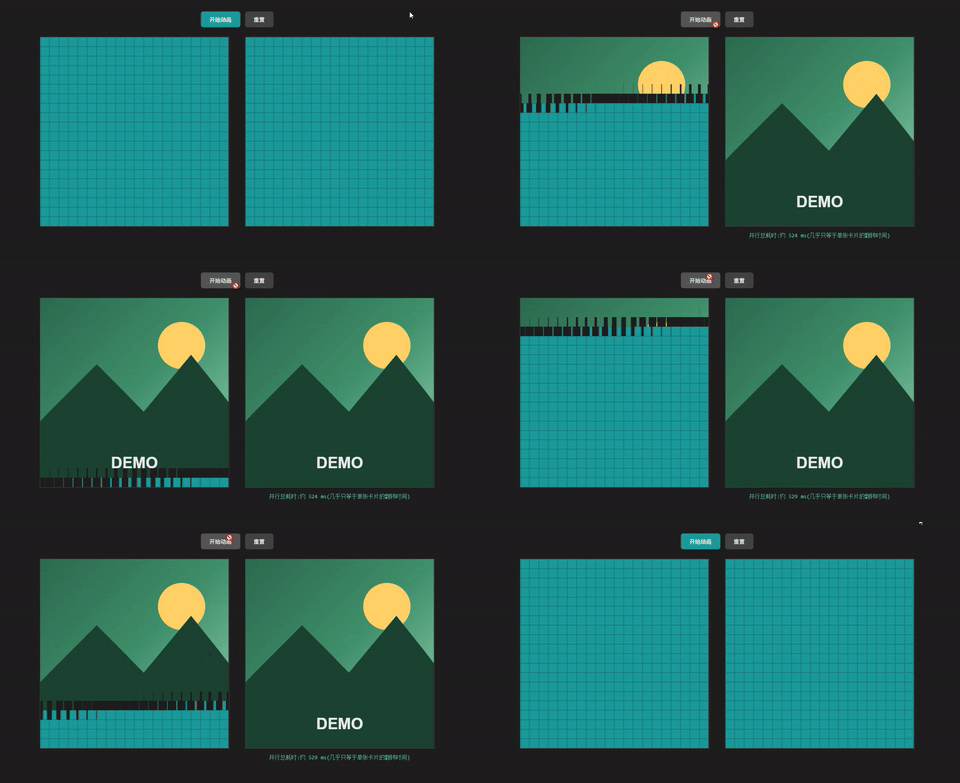
"简单、重复、互不依赖"这九个字,恰恰是 GPU 这类芯片天生就是为它量身打造的------而 CPU 的设计初衷,原本是奔着完全相反的方向去的:处理复杂、有先后逻辑、彼此互相依赖的任务。下一节我们就具体看看,CPU 到底是怎么"想问题"的,为什么它面对图形计算这种任务反而会"水土不服"。
这里来贴上demo的完整代码:
javascript
<!DOCTYPE html>
<html lang="zh-CN">
<head>
<meta charset="UTF-8">
<title>串行 vs 并行:翻卡片demo</title>
<style>
  * { box-sizing: border-box; }
  body {
    font-family: -apple-system, "Microsoft YaHei", sans-serif;
    background: #1e1e1e;
    color: #ddd;
    display: flex;
    flex-direction: column;
    align-items: center;
    padding: 30px 20px;
  }
  h1 { font-size: 18px; font-weight: 500; margin-bottom: 4px; }
  p.desc { color: #999; font-size: 13px; margin-top: 0; margin-bottom: 24px; text-align: center; max-width: 600px; }

  .controls { margin-bottom: 24px; display: flex; gap: 12px; }
  button {
    background: #1b9b9c;
    color: #fff;
    border: none;
    padding: 10px 22px;
    border-radius: 6px;
    font-size: 14px;
    cursor: pointer;
  }
  button:disabled { background: #555; cursor: not-allowed; }
  button.secondary { background: #444; }

  .panels {
    display: flex;
    gap: 40px;
    flex-wrap: wrap;
    justify-content: center;
  }
  .panel {
    display: flex;
    flex-direction: column;
    align-items: center;
  }
  .panel h2 {
    font-size: 15px;
    font-weight: 500;
    margin: 0 0 4px;
  }
  .panel .sub {
    font-size: 12px;
    color: #999;
    margin: 0 0 12px;
  }
  .grid {
    display: grid;
    border: 1px solid #444;
  }
  .card {
    width: 100%;
    height: 100%;
    position: relative;
    overflow: hidden;
  }
  .card-inner {
    position: absolute;
    inset: 0;
    transform: scaleX(1);
    transition: transform 0.25s ease;
  }
  .card.squeeze .card-inner {
    transform: scaleX(0);
  }
  .face {
    position: absolute;
    inset: 0;
  }
  .face-back {
    background: #1b9b9c;
    border: 0.5px solid #16807f;
    opacity: 1;
  }
  .face-front {
    background-repeat: no-repeat;
    opacity: 0;
  }
  .card.revealed .face-back {
    opacity: 0;
  }
  .card.revealed .face-front {
    opacity: 1;
  }

  .timer {
    margin-top: 14px;
    font-family: "Consolas", monospace;
    font-size: 14px;
    color: #5DCAA5;
    min-height: 20px;
  }
</style>
</head>
<body>

<div class="controls">
  <button id="startBtn">开始动画</button>
  <button id="resetBtn" class="secondary">重置</button>
</div>

<div class="panels">
  <div class="panel">
    <div class="grid" id="gridSerial"></div>
    <div class="timer" id="timerSerial"></div>
  </div>

  <div class="panel">
    <div class="grid" id="gridParallel"></div>
    <div class="timer" id="timerParallel"></div>
  </div>
</div>

<script>
  const GRID_SIZE = 20;       // 20 x 20
  const IMAGE_PX = 480;       // 生成的占位图边长(像素)
  const CELL_PX = IMAGE_PX / GRID_SIZE;
  const FLIP_DURATION = 500;      // 单个格子翻转动画时长(ms),需和 CSS transition 一致
  const SERIAL_DELAY_PER_CARD = 12; // 串行:每张卡片之间的启动间隔(ms)

  // ---------- 1. 用 canvas 生成一张占位图,作为翻转后显示的内容 ----------
  function generatePlaceholderImage() {
    const canvas = document.createElement('canvas');
    canvas.width = IMAGE_PX;
    canvas.height = IMAGE_PX;
    const ctx = canvas.getContext('2d');

    // 背景渐变
    const grad = ctx.createLinearGradient(0, 0, IMAGE_PX, IMAGE_PX);
    grad.addColorStop(0, '#2d6a4f');
    grad.addColorStop(0.5, '#40916c');
    grad.addColorStop(1, '#95d5b2');
    ctx.fillStyle = grad;
    ctx.fillRect(0, 0, IMAGE_PX, IMAGE_PX);

    // 太阳
    ctx.beginPath();
    ctx.arc(IMAGE_PX * 0.75, IMAGE_PX * 0.25, 60, 0, Math.PI * 2);
    ctx.fillStyle = '#ffd166';
    ctx.fill();

    // 山
    ctx.beginPath();
    ctx.moveTo(0, IMAGE_PX * 0.65);
    ctx.lineTo(IMAGE_PX * 0.3, IMAGE_PX * 0.35);
    ctx.lineTo(IMAGE_PX * 0.55, IMAGE_PX * 0.6);
    ctx.lineTo(IMAGE_PX * 0.8, IMAGE_PX * 0.3);
    ctx.lineTo(IMAGE_PX, IMAGE_PX * 0.55);
    ctx.lineTo(IMAGE_PX, IMAGE_PX);
    ctx.lineTo(0, IMAGE_PX);
    ctx.closePath();
    ctx.fillStyle = '#1b4332';
    ctx.fill();

    // 文字
    ctx.fillStyle = 'rgba(255,255,255,0.9)';
    ctx.font = 'bold 40px sans-serif';
    ctx.textAlign = 'center';
    ctx.fillText('DEMO', IMAGE_PX / 2, IMAGE_PX * 0.9);

    return canvas.toDataURL();
  }

  const imageDataUrl = generatePlaceholderImage();

  // ---------- 2. 构建一个 20x20 的翻卡片网格 ----------
  function buildGrid(containerId) {
    const container = document.getElementById(containerId);
    container.style.width = IMAGE_PX + 'px';
    container.style.height = IMAGE_PX + 'px';
    container.style.gridTemplateColumns = `repeat(${GRID_SIZE}, 1fr)`;
    container.style.gridTemplateRows = `repeat(${GRID_SIZE}, 1fr)`;

    const cards = [];

    for (let row = 0; row < GRID_SIZE; row++) {
      for (let col = 0; col < GRID_SIZE; col++) {
        const card = document.createElement('div');
        card.className = 'card';

        const inner = document.createElement('div');
        inner.className = 'card-inner';

        const back = document.createElement('div');
        back.className = 'face face-back';

        const front = document.createElement('div');
        front.className = 'face face-front';
        front.style.backgroundImage = `url(${imageDataUrl})`;
        front.style.backgroundSize = `${IMAGE_PX}px ${IMAGE_PX}px`;
        front.style.backgroundPosition = `-${col * CELL_PX}px -${row * CELL_PX}px`;

        inner.appendChild(back);
        inner.appendChild(front);
        card.appendChild(inner);
        container.appendChild(card);

        cards.push(card);
      }
    }
    return cards; // 按 row-major(从左上角开始,一行行)顺序排列
  }

  const serialCards = buildGrid('gridSerial');
  const parallelCards = buildGrid('gridParallel');

  const startBtn = document.getElementById('startBtn');
  const resetBtn = document.getElementById('resetBtn');
  const timerSerial = document.getElementById('timerSerial');
  const timerParallel = document.getElementById('timerParallel');

  const HALF_DURATION = FLIP_DURATION / 2;

  function resetAll() {
    [...serialCards, ...parallelCards].forEach(c => {
      c.classList.remove('squeeze', 'revealed');
    });
    timerSerial.textContent = '';
    timerParallel.textContent = '';
    startBtn.disabled = false;
  }

  // 平面(2D)翻转:先横向挤压到0宽度,在"看不见"的那一刻切换正反面内容,再展开回原宽度
  function flipCard(card, delay) {
    setTimeout(() => {
      card.classList.add('squeeze');
      setTimeout(() => {
        card.classList.add('revealed');
        card.classList.remove('squeeze');
      }, HALF_DURATION);
    }, delay);
  }

  function playAnimation() {
    resetAll();
    startBtn.disabled = true;

    const t0 = performance.now();

    // ---- 并行:所有卡片同时翻 ----
    parallelCards.forEach(card => flipCard(card, 0));
    setTimeout(() => {
      const elapsed = Math.round(performance.now() - t0);
      timerParallel.textContent = `并行总耗时:约 ${elapsed} ms(几乎只等于单张卡片的翻转时间)`;
    }, FLIP_DURATION + 20);

    // ---- 串行:一张接一张翻 ----
    serialCards.forEach((card, i) => {
      flipCard(card, i * SERIAL_DELAY_PER_CARD);
    });
    const lastDelay = (serialCards.length - 1) * SERIAL_DELAY_PER_CARD;
    setTimeout(() => {
      const elapsed = Math.round(performance.now() - t0);
      timerSerial.textContent = `串行总耗时:约 ${elapsed} ms(卡片数量越多,耗时越长)`;
      startBtn.disabled = false;
    }, lastDelay + FLIP_DURATION + 20);
  }

  startBtn.addEventListener('click', playAnimation);
  resetBtn.addEventListener('click', resetAll);
</script>

</body>
</html>
二、CPU 是怎么工作的:擅长"排队处理复杂事"
1. 一个类比:CPU 像一位"全能项目经理"
想象一个只有 4~8 名员工的小团队,但每个员工都极其全能------既能处理复杂的多步骤任务,还能随时根据情况调整顺序、跳过某些步骤、提前判断接下来大概率要做什么。这就是 CPU 的工作方式:核心数量少,但每个核心都异常"聪明"。
这种"聪明"具体体现在三件事上:分支预测(branch prediction)、乱序执行(out-of-order execution)、大容量缓存(cache)。接下来一个一个拆开看。
2. 分支预测:提前猜"接下来要走哪条路"
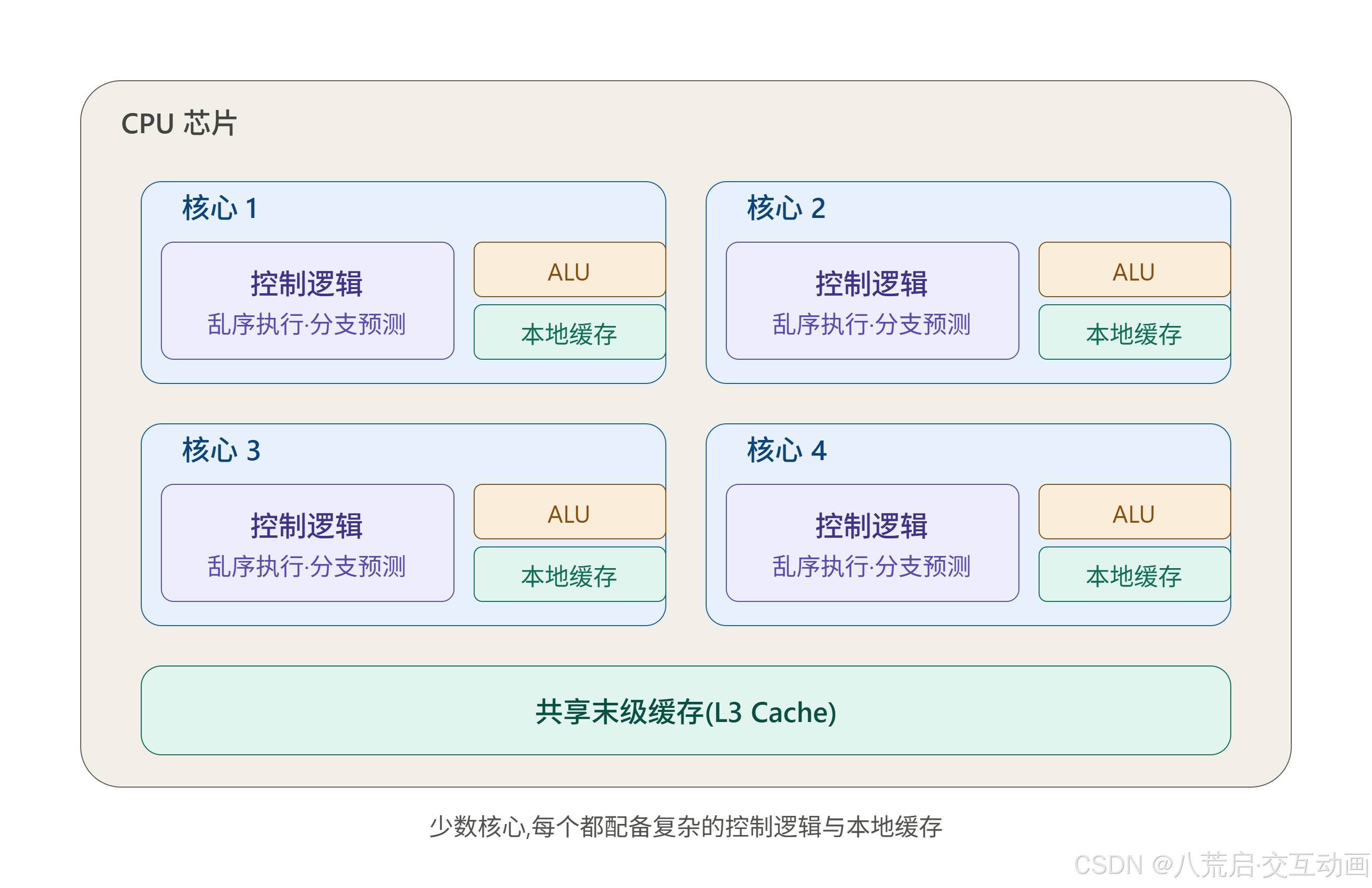
程序里到处都是 if...else 这样的判断分支。CPU 不会傻等条件判断出结果才往下走,而是会根据历史执行规律提前猜接下来更可能走哪条分支,先把后续指令取过来、开始算------猜对了就是白捡的速度,猜错了就撤销重来。这套机制需要大量额外的电路和逻辑来维护"猜测历史",这也是 CPU 核心为什么这么"重"的原因之一。
3. 乱序执行:谁先准备好谁先算
CPU 拿到的指令是按顺序排列的,但不一定按顺序执行。如果指令 A 要等内存数据读回来,而指令 B 不依赖这个数据、随时能算,CPU 会让 B 先算,A 晚点再补上------只要最终结果和"顺序执行"一致就行。这需要 CPU 内部维护一张"指令依赖关系表",实时调度,同样非常"烧硬件资源"。
4. 大缓存:尽量别让核心"等米下锅"
CPU 花了大量晶体管面积在多级缓存(L1/L2/L3 cache)上,目的是让这几个"聪明"的核心尽量不用去等待相对缓慢的内存------数据提前搬到离核心更近的地方。
| 对比项 | CPU 的设计取向 |
|---|---|
| 核心数量 | 少(常见 4~16 个) |
| 单核复杂度 | 高(分支预测、乱序执行、大缓存) |
| 擅长任务 | 逻辑复杂、步骤强依赖、需要频繁决策的任务 |
| 打个比方 | 少数几个"全能项目经理",能处理复杂多变的工作,但人数有限 |
这套设计思路的核心目标是把"一件事"尽快算完------不管这件事本身多复杂、多曲折。这跟图形渲染"简单的事,重复算几亿遍"的需求,方向完全相反。
这也是为什么,当任务变成"几亿个互不相关的简单计算"时,CPU 这套为"复杂单任务"量身定做的设计,反而成了包袱------每个核心身上那些用来"猜""调度""缓存"的复杂电路,在这种场景里根本用不上,却还占着芯片面积。GPU 会用完全相反的思路来解决这个问题,下一节就来看看它是怎么设计的。
三、GPU 是怎么工作的:擅长"同时处理海量简单事"
1. 一个类比:GPU 像"数量庞大的流水线工人"
如果说 CPU 是一个只有几名"全能项目经理"的小团队,那 GPU 就是一条拉满了几千名工人的流水线------每个工人只会做一件极简单的事(比如"拧一颗螺丝"),不需要判断、不需要临场决策,只要给他们同一份指令,他们就能同时、各自对着手里的零件动手。
这正好对应上一节算过的那笔账:图形渲染要做的,恰恰是"同一件简单的事,重复几亿遍",而不是"一件复杂的事,认真算一次"。
2. 核心设计:砍掉"聪明",换取"数量"
GPU 的核心(在 Nvidia 的说法里叫 CUDA Core,在概念上可以理解成一个简化版的计算单元)砍掉了 CPU 核心里那些占地方的部件:
- 没有复杂的分支预测器
- 没有乱序执行调度逻辑
- 本地缓存容量也小得多
省下来的芯片面积,全部拿去堆数量------一块消费级显卡动辄集成几千个这样的简单核心,而一颗桌面 CPU 常见也就 4~16 个核心。
| 对比项 | CPU | GPU |
|---|---|---|
| 核心数量 | 少(4~16 个) | 极多(几千个) |
| 单核复杂度 | 高(分支预测/乱序执行/大缓存) | 低(结构简单、高度重复) |
| 单核算力 | 强 | 弱 |
| 擅长任务 | 复杂逻辑、强依赖的串行任务 | 简单、互不依赖、数量巨大的任务 |
这不是"GPU 比 CPU 差",而是两种完全不同的取舍:CPU 把晶体管花在"让一件事尽快算完"上,GPU 把晶体管花在"让很多件事同时开始算"上。
3. SIMT:同一条指令,喂给一大片核心
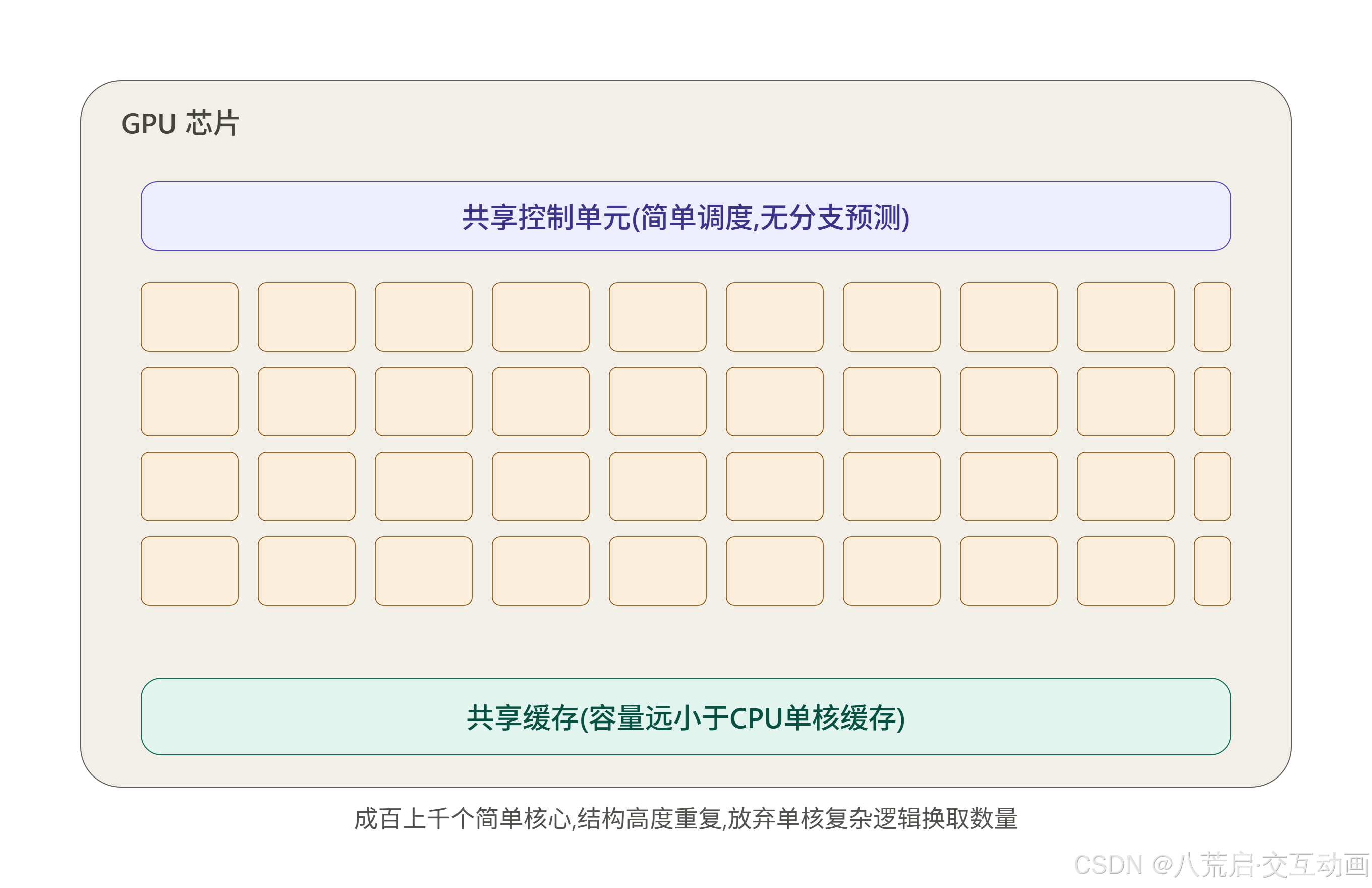
GPU 能这么"傻快",还依赖一个关键设计------SIMT(Single Instruction, Multiple Threads,单指令多线程) 。简单说就是:GPU 不会给每个核心单独下达指令,而是把一批核心(通常是 32 个一组)绑在一起,同一时刻,让它们执行完全相同的一条指令,只是各自处理不同的数据。
回到渲染场景:给每个像素上色,用的是同一套着色逻辑(shader),不同的只是每个像素的坐标和颜色数据------这跟 SIMT "同一指令、不同数据"的模式严丝合缝。
#mermaid-svg-zxAXdKhXAStMUbIP{font-family:"trebuchet ms",verdana,arial,sans-serif;font-size:16px;fill:#333;}@keyframes edge-animation-frame{from{stroke-dashoffset:0;}}@keyframes dash{to{stroke-dashoffset:0;}}#mermaid-svg-zxAXdKhXAStMUbIP .edge-animation-slow{stroke-dasharray:9,5!important;stroke-dashoffset:900;animation:dash 50s linear infinite;stroke-linecap:round;}#mermaid-svg-zxAXdKhXAStMUbIP .edge-animation-fast{stroke-dasharray:9,5!important;stroke-dashoffset:900;animation:dash 20s linear infinite;stroke-linecap:round;}#mermaid-svg-zxAXdKhXAStMUbIP .error-icon{fill:#552222;}#mermaid-svg-zxAXdKhXAStMUbIP .error-text{fill:#552222;stroke:#552222;}#mermaid-svg-zxAXdKhXAStMUbIP .edge-thickness-normal{stroke-width:1px;}#mermaid-svg-zxAXdKhXAStMUbIP .edge-thickness-thick{stroke-width:3.5px;}#mermaid-svg-zxAXdKhXAStMUbIP .edge-pattern-solid{stroke-dasharray:0;}#mermaid-svg-zxAXdKhXAStMUbIP .edge-thickness-invisible{stroke-width:0;fill:none;}#mermaid-svg-zxAXdKhXAStMUbIP .edge-pattern-dashed{stroke-dasharray:3;}#mermaid-svg-zxAXdKhXAStMUbIP .edge-pattern-dotted{stroke-dasharray:2;}#mermaid-svg-zxAXdKhXAStMUbIP .marker{fill:#333333;stroke:#333333;}#mermaid-svg-zxAXdKhXAStMUbIP .marker.cross{stroke:#333333;}#mermaid-svg-zxAXdKhXAStMUbIP svg{font-family:"trebuchet ms",verdana,arial,sans-serif;font-size:16px;}#mermaid-svg-zxAXdKhXAStMUbIP p{margin:0;}#mermaid-svg-zxAXdKhXAStMUbIP .label{font-family:"trebuchet ms",verdana,arial,sans-serif;color:#333;}#mermaid-svg-zxAXdKhXAStMUbIP .cluster-label text{fill:#333;}#mermaid-svg-zxAXdKhXAStMUbIP .cluster-label span{color:#333;}#mermaid-svg-zxAXdKhXAStMUbIP .cluster-label span p{background-color:transparent;}#mermaid-svg-zxAXdKhXAStMUbIP .label text,#mermaid-svg-zxAXdKhXAStMUbIP span{fill:#333;color:#333;}#mermaid-svg-zxAXdKhXAStMUbIP .node rect,#mermaid-svg-zxAXdKhXAStMUbIP .node circle,#mermaid-svg-zxAXdKhXAStMUbIP .node ellipse,#mermaid-svg-zxAXdKhXAStMUbIP .node polygon,#mermaid-svg-zxAXdKhXAStMUbIP .node path{fill:#ECECFF;stroke:#9370DB;stroke-width:1px;}#mermaid-svg-zxAXdKhXAStMUbIP .rough-node .label text,#mermaid-svg-zxAXdKhXAStMUbIP .node .label text,#mermaid-svg-zxAXdKhXAStMUbIP .image-shape .label,#mermaid-svg-zxAXdKhXAStMUbIP .icon-shape .label{text-anchor:middle;}#mermaid-svg-zxAXdKhXAStMUbIP .node .katex path{fill:#000;stroke:#000;stroke-width:1px;}#mermaid-svg-zxAXdKhXAStMUbIP .rough-node .label,#mermaid-svg-zxAXdKhXAStMUbIP .node .label,#mermaid-svg-zxAXdKhXAStMUbIP .image-shape .label,#mermaid-svg-zxAXdKhXAStMUbIP .icon-shape .label{text-align:center;}#mermaid-svg-zxAXdKhXAStMUbIP .node.clickable{cursor:pointer;}#mermaid-svg-zxAXdKhXAStMUbIP .root .anchor path{fill:#333333!important;stroke-width:0;stroke:#333333;}#mermaid-svg-zxAXdKhXAStMUbIP .arrowheadPath{fill:#333333;}#mermaid-svg-zxAXdKhXAStMUbIP .edgePath .path{stroke:#333333;stroke-width:2.0px;}#mermaid-svg-zxAXdKhXAStMUbIP .flowchart-link{stroke:#333333;fill:none;}#mermaid-svg-zxAXdKhXAStMUbIP .edgeLabel{background-color:rgba(232,232,232, 0.8);text-align:center;}#mermaid-svg-zxAXdKhXAStMUbIP .edgeLabel p{background-color:rgba(232,232,232, 0.8);}#mermaid-svg-zxAXdKhXAStMUbIP .edgeLabel rect{opacity:0.5;background-color:rgba(232,232,232, 0.8);fill:rgba(232,232,232, 0.8);}#mermaid-svg-zxAXdKhXAStMUbIP .labelBkg{background-color:rgba(232, 232, 232, 0.5);}#mermaid-svg-zxAXdKhXAStMUbIP .cluster rect{fill:#ffffde;stroke:#aaaa33;stroke-width:1px;}#mermaid-svg-zxAXdKhXAStMUbIP .cluster text{fill:#333;}#mermaid-svg-zxAXdKhXAStMUbIP .cluster span{color:#333;}#mermaid-svg-zxAXdKhXAStMUbIP div.mermaidTooltip{position:absolute;text-align:center;max-width:200px;padding:2px;font-family:"trebuchet ms",verdana,arial,sans-serif;font-size:12px;background:hsl(80, 100%, 96.2745098039%);border:1px solid #aaaa33;border-radius:2px;pointer-events:none;z-index:100;}#mermaid-svg-zxAXdKhXAStMUbIP .flowchartTitleText{text-anchor:middle;font-size:18px;fill:#333;}#mermaid-svg-zxAXdKhXAStMUbIP rect.text{fill:none;stroke-width:0;}#mermaid-svg-zxAXdKhXAStMUbIP .icon-shape,#mermaid-svg-zxAXdKhXAStMUbIP .image-shape{background-color:rgba(232,232,232, 0.8);text-align:center;}#mermaid-svg-zxAXdKhXAStMUbIP .icon-shape p,#mermaid-svg-zxAXdKhXAStMUbIP .image-shape p{background-color:rgba(232,232,232, 0.8);padding:2px;}#mermaid-svg-zxAXdKhXAStMUbIP .icon-shape .label rect,#mermaid-svg-zxAXdKhXAStMUbIP .image-shape .label rect{opacity:0.5;background-color:rgba(232,232,232, 0.8);fill:rgba(232,232,232, 0.8);}#mermaid-svg-zxAXdKhXAStMUbIP .label-icon{display:inline-block;height:1em;overflow:visible;vertical-align:-0.125em;}#mermaid-svg-zxAXdKhXAStMUbIP .node .label-icon path{fill:currentColor;stroke:revert;stroke-width:revert;}#mermaid-svg-zxAXdKhXAStMUbIP :root{--mermaid-font-family:"trebuchet ms",verdana,arial,sans-serif;} 一条指令:
计算像素颜色
核心1
处理像素(0,0)
核心2
处理像素(0,1)
核心3
处理像素(0,2)
......
(同时进行)
这种"一条指令、成千上万份数据、同时处理"的模式,就是下一节要专门拆开讲的核心概念------并行计算(Parallel Computing)。
四、什么是"并行计算":一个类比讲清楚
1. 类比:8 个盘子,一个人洗 vs 八个人一起洗
假设有 8 个脏盘子要洗:
- 串行(Serial):只有 1 个人洗,一个洗完再洗下一个,洗完 8 个盘子要花 8 份时间。
- 并行(Parallel):找来 8 个人,每人分到 1 个盘子,同时动手,几乎只要 1 份时间就能全部洗完。
这就是并行计算的核心思想:把一个大任务拆成很多个互不依赖的小任务,同时交给多个"工人"(计算单元)一起处理,而不是排队一个一个来。
2. 串行 vs 并行,差的不是"谁更快",而是"怎么分工"
需要澄清一个容易搞混的点:并行计算并不是说单个"工人"变快了------每个人洗一个盘子的速度可能完全一样。真正的提速来自同时开工的人数。这也解释了第二、三节里 CPU 和 GPU 的差异:CPU 选择"少数几个洗盘子特别快、还会顺便把厨房收拾好的人",GPU 选择"几千个只会洗盘子、别的什么都不做的人"------当面对"洗 8 个盘子"这种任务时,后者靠人数碾压前者。
3. 不是所有任务都能"叫来一堆人一起干"
回头看第一节总结过的三个特点------简单、重复、彼此互不依赖------这正是判断一个任务"能不能并行"的标准:
- 如果 8 个盘子里,后一个必须等前一个洗完才能开始洗(比如要用同一块抹布,还得排队),那就没法真正并行,人再多也只能排队。
- 图形渲染里的像素上色、顶点变换之所以是并行计算的经典场景,正是因为每个像素、每个顶点的计算互不依赖------算像素 A 完全不需要等像素 B 的结果。
这也是为什么"并行计算"不是万能钥匙:它只对"可以拆成大量独立小任务"的场景有效。至于哪些任务天生适合拆、哪些拆了也白拆,涉及到"任务之间到底有没有依赖关系"这个更深的问题------这个话题留到后面专门聊 GPU 编程模型的时候再展开。
4. 回到最初的问题:图形计算为什么非 GPU 不可
到这里,整篇文章的逻辑可以串起来了:
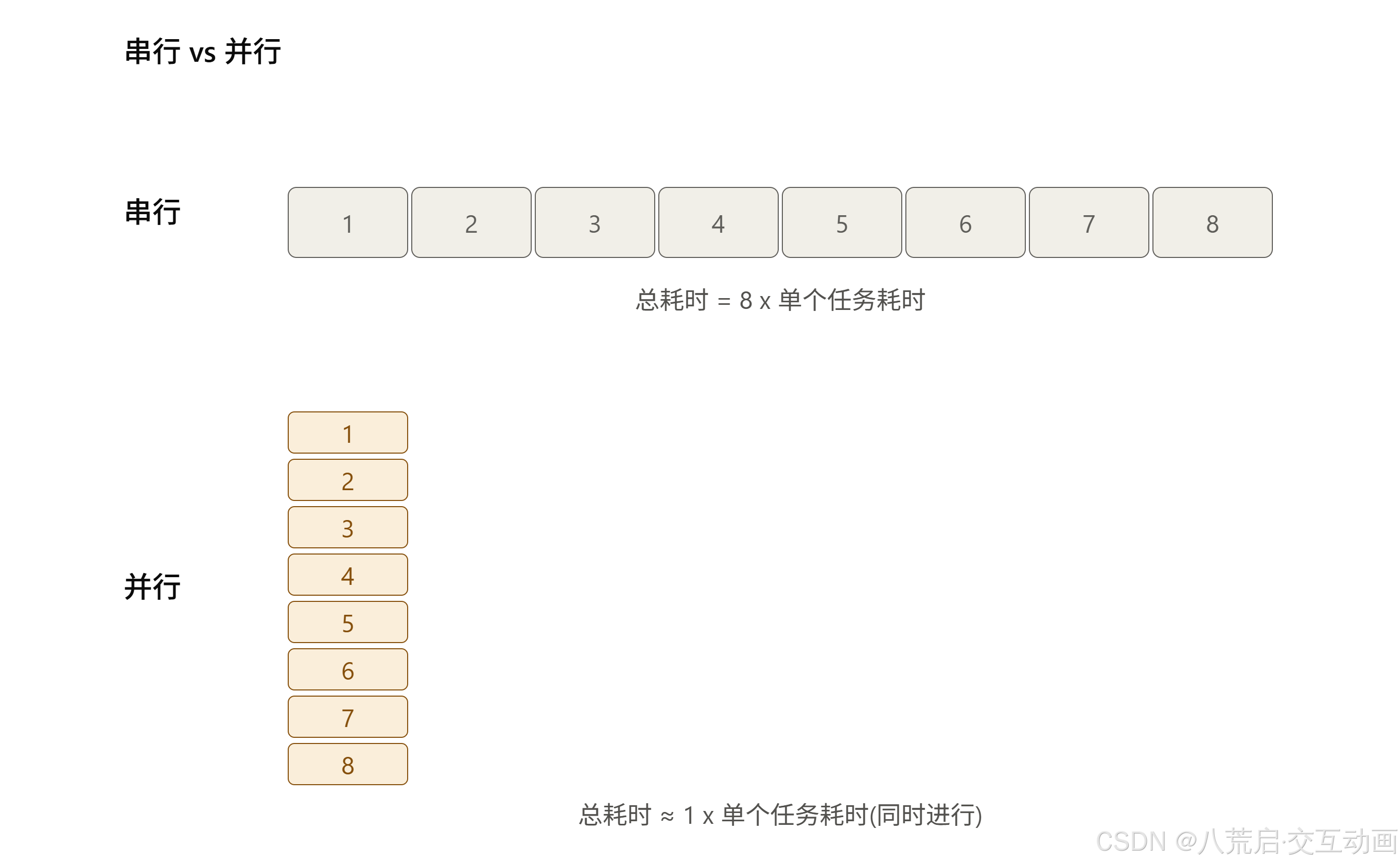
- 渲染一帧画面,本质是"简单的事,重复算几亿遍"(第一节)。
- CPU 的设计是为"复杂但数量少的任务"量身定做的,核心少而"聪明"(第二节)。
- GPU 反其道而行之,用几千个简单核心,靠 SIMT"一条指令、同时喂给一大片核心"(第三节)。
- 而这一整套 GPU 的设计,本质上就是在硬件层面把"并行计算"这件事做到极致(第四节)。
这就是为什么一牵扯到图形渲染、three.js、WebGL,大家总说"这活儿得交给 GPU"------不是 GPU 比 CPU 聪明,而是它天生就是为"人多力量大"这种任务打造的。
五、图形渲染为什么天生适合并行:像素、顶点的计算特点
1. 一个专业说法:数据并行(Data Parallelism)
前面用"洗盘子"讲清楚了并行计算的基本思路,现在给它一个更准确的名字------图形渲染用到的这种并行,专业上叫数据并行(Data Parallelism):同一套计算逻辑(比如同一个 shader 程序),被同时应用在大量不同的数据上,数据与数据之间彼此独立。
对应到渲染里,"同一套逻辑"就是顶点着色器(vertex shader)或片元着色器(fragment shader)里写的那段代码,"大量不同的数据"就是成千上万个顶点或像素。
2. 顶点计算:每个顶点只认自己的坐标和一份共用的变换矩阵
回忆第八篇讲过的坐标变换:每个顶点要经过一套矩阵运算,从模型空间一路变换到屏幕空间。这个运算长这样(简化版 GLSL 顶点着色器):
glsl
attribute vec3 aPosition;   // 每个顶点各自不同的输入
uniform mat4 uMVPMatrix;    // 所有顶点共用同一份矩阵

void main() {
  gl_Position = uMVPMatrix * vec4(aPosition, 1.0);
}关键在于:aPosition 是每个顶点各自独有的数据,uMVPMatrix 是所有顶点共用的同一份矩阵------顶点 A 的变换结果,完全不需要用到顶点 B 的任何信息 。这正是"数据并行"的教科书场景:同一段代码(main 函数),灌进去几千份不同的 aPosition,互不干扰,可以全部同时算。
3. 像素(片元)计算:同样各算各的
片元着色器也是一样的逻辑,决定每个像素最终显示的颜色:
glsl
uniform sampler2D uTexture;
varying vec2 vUv;

void main() {
  gl_FragColor = texture2D(uTexture, vUv);
}
像素 A 采样贴图用的坐标 vUv,和像素 B 的 vUv 毫无关系,两者的计算结果谁也不依赖谁。这也是为什么第一节里那张"每秒几亿次像素计算"的账,理论上可以被拆成几亿份完全独立的小任务,分给 GPU 上的几千个核心同时处理。
| 计算类型 | 各自独有的输入 | 共用的输入 | 是否依赖其他顶点/像素 |
|---|---|---|---|
| 顶点变换 | 顶点坐标 | 变换矩阵 | 否 |
| 像素着色 | 屏幕坐标/插值属性 | 贴图、光照参数 | 否(标准情况) |
4. 例外:不是所有效果都能"完全不管邻居"
不过,"完全独立"是标准情况,不是绝对规则。有一类效果天生需要读取周围像素的数据才能算出当前像素的结果------比如高斯模糊(需要采样一圈邻居像素做加权平均)、屏幕空间的环境光遮蔽(SSAO)、某些后处理特效。
这类效果并不是不能并行,而是每个像素的计算,变成了"依赖一小片邻居数据",而不是"完全不依赖任何人"。GPU 依然可以并行处理,只是需要额外考虑:邻居像素的数据要不要提前缓存、会不会被同时读写、边界像素(图像边缘)该怎么处理------这些细节留到后面专门讲后处理管线的时候再展开。
5. 小结:为什么"非 GPU 不可"这句话到这里才算讲透
串起前五节:图形渲染要重复算几亿次简单计算(一),而这些计算里绝大多数彼此独立、互不依赖(五)------这正是数据并行的理想场景,也正是 GPU 用几千个简单核心(三)靠 SIMT(三)去啃的那类任务,而不是 CPU 那套为"复杂但少量"任务设计的架构(二)所擅长的。
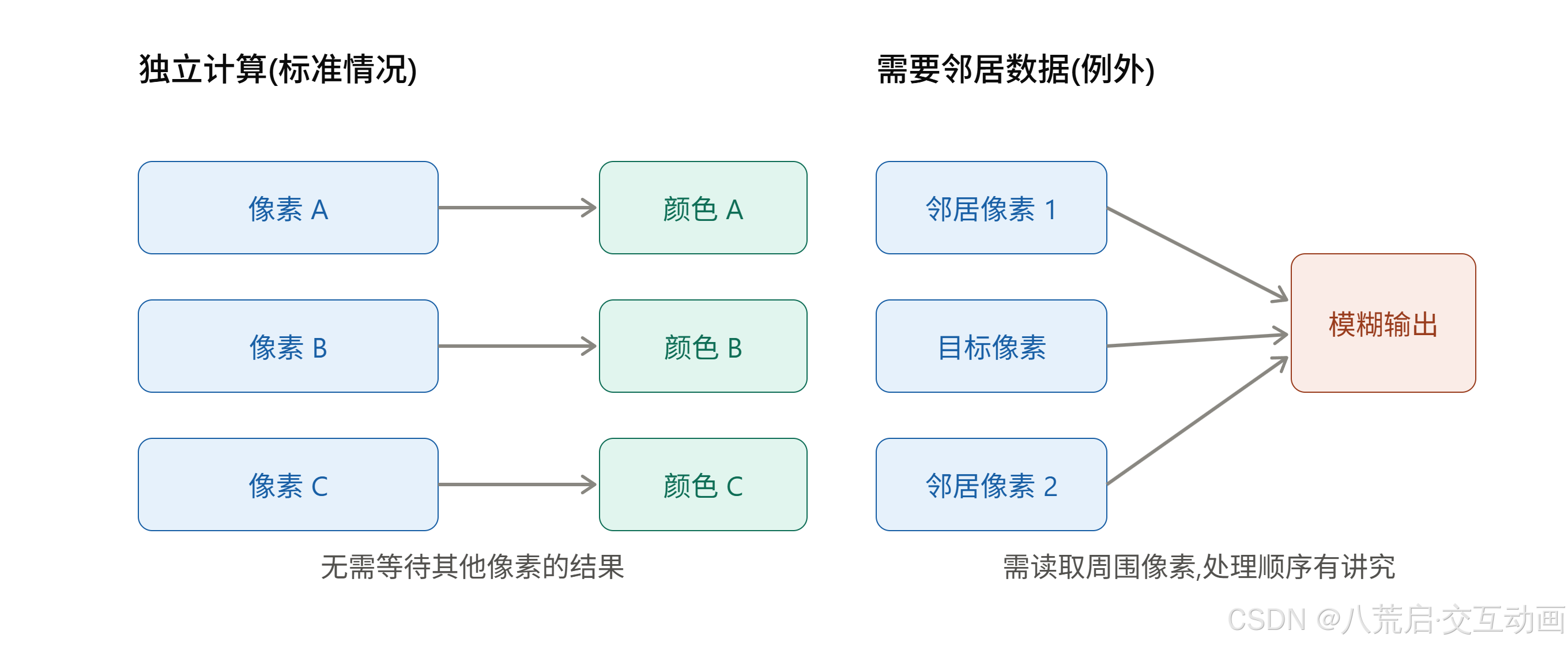
到这里,"图形计算为什么非 GPU 不可"这个问题,已经从直觉判断变成了可以逐层拆解、说清楚原理的答案。
六、小结:CPU 和 GPU,到底该怎么分工
1. 先说结论:不是"选一个",而是"各司其职"
把前面五节串起来,答案已经很明确:GPU 不是要取代 CPU,两者做的根本不是同一类事。
- CPU 负责"逻辑复杂、强依赖、数量少"的工作------比如动画的时间轴调度、状态管理、用户交互事件的响应、业务逻辑判断。
- GPU 负责"简单、重复、海量、互不依赖"的工作------比如每一帧几百万像素的着色、几万个顶点的坐标变换。
一套健康的交互动画,是 CPU 在"指挥",GPU 在"干活"。
| 环节 | 谁负责 | 为什么 |
|---|---|---|
| 动画时间轴、缓动函数计算 | CPU | 逻辑判断为主,数据量不大 |
| DOM/场景图更新、状态管理 | CPU | 强依赖、分支多 |
| 像素着色、顶点变换、合成 | GPU | 海量、独立、重复 |
2. 实战里绕不开的问题:客户端不一定有 GPU
理论上"能交给 GPU 就交给 GPU",但落到实际项目里,情况没这么理想:
- 老旧办公电脑、部分虚拟机、某些精简驱动的环境,可能根本没有可用的独立/集成 GPU 加速通道。
- 浏览器里,WebGL 上下文的创建也可能因为驱动黑名单、权限限制而失败。
这意味着交互动画不能把"一定有 GPU"当成前提,而要有一套检测 + 降级的策略。
#mermaid-svg-SwWa0o4YfowF4aS9{font-family:"trebuchet ms",verdana,arial,sans-serif;font-size:16px;fill:#333;}@keyframes edge-animation-frame{from{stroke-dashoffset:0;}}@keyframes dash{to{stroke-dashoffset:0;}}#mermaid-svg-SwWa0o4YfowF4aS9 .edge-animation-slow{stroke-dasharray:9,5!important;stroke-dashoffset:900;animation:dash 50s linear infinite;stroke-linecap:round;}#mermaid-svg-SwWa0o4YfowF4aS9 .edge-animation-fast{stroke-dasharray:9,5!important;stroke-dashoffset:900;animation:dash 20s linear infinite;stroke-linecap:round;}#mermaid-svg-SwWa0o4YfowF4aS9 .error-icon{fill:#552222;}#mermaid-svg-SwWa0o4YfowF4aS9 .error-text{fill:#552222;stroke:#552222;}#mermaid-svg-SwWa0o4YfowF4aS9 .edge-thickness-normal{stroke-width:1px;}#mermaid-svg-SwWa0o4YfowF4aS9 .edge-thickness-thick{stroke-width:3.5px;}#mermaid-svg-SwWa0o4YfowF4aS9 .edge-pattern-solid{stroke-dasharray:0;}#mermaid-svg-SwWa0o4YfowF4aS9 .edge-thickness-invisible{stroke-width:0;fill:none;}#mermaid-svg-SwWa0o4YfowF4aS9 .edge-pattern-dashed{stroke-dasharray:3;}#mermaid-svg-SwWa0o4YfowF4aS9 .edge-pattern-dotted{stroke-dasharray:2;}#mermaid-svg-SwWa0o4YfowF4aS9 .marker{fill:#333333;stroke:#333333;}#mermaid-svg-SwWa0o4YfowF4aS9 .marker.cross{stroke:#333333;}#mermaid-svg-SwWa0o4YfowF4aS9 svg{font-family:"trebuchet ms",verdana,arial,sans-serif;font-size:16px;}#mermaid-svg-SwWa0o4YfowF4aS9 p{margin:0;}#mermaid-svg-SwWa0o4YfowF4aS9 .label{font-family:"trebuchet ms",verdana,arial,sans-serif;color:#333;}#mermaid-svg-SwWa0o4YfowF4aS9 .cluster-label text{fill:#333;}#mermaid-svg-SwWa0o4YfowF4aS9 .cluster-label span{color:#333;}#mermaid-svg-SwWa0o4YfowF4aS9 .cluster-label span p{background-color:transparent;}#mermaid-svg-SwWa0o4YfowF4aS9 .label text,#mermaid-svg-SwWa0o4YfowF4aS9 span{fill:#333;color:#333;}#mermaid-svg-SwWa0o4YfowF4aS9 .node rect,#mermaid-svg-SwWa0o4YfowF4aS9 .node circle,#mermaid-svg-SwWa0o4YfowF4aS9 .node ellipse,#mermaid-svg-SwWa0o4YfowF4aS9 .node polygon,#mermaid-svg-SwWa0o4YfowF4aS9 .node path{fill:#ECECFF;stroke:#9370DB;stroke-width:1px;}#mermaid-svg-SwWa0o4YfowF4aS9 .rough-node .label text,#mermaid-svg-SwWa0o4YfowF4aS9 .node .label text,#mermaid-svg-SwWa0o4YfowF4aS9 .image-shape .label,#mermaid-svg-SwWa0o4YfowF4aS9 .icon-shape .label{text-anchor:middle;}#mermaid-svg-SwWa0o4YfowF4aS9 .node .katex path{fill:#000;stroke:#000;stroke-width:1px;}#mermaid-svg-SwWa0o4YfowF4aS9 .rough-node .label,#mermaid-svg-SwWa0o4YfowF4aS9 .node .label,#mermaid-svg-SwWa0o4YfowF4aS9 .image-shape .label,#mermaid-svg-SwWa0o4YfowF4aS9 .icon-shape .label{text-align:center;}#mermaid-svg-SwWa0o4YfowF4aS9 .node.clickable{cursor:pointer;}#mermaid-svg-SwWa0o4YfowF4aS9 .root .anchor path{fill:#333333!important;stroke-width:0;stroke:#333333;}#mermaid-svg-SwWa0o4YfowF4aS9 .arrowheadPath{fill:#333333;}#mermaid-svg-SwWa0o4YfowF4aS9 .edgePath .path{stroke:#333333;stroke-width:2.0px;}#mermaid-svg-SwWa0o4YfowF4aS9 .flowchart-link{stroke:#333333;fill:none;}#mermaid-svg-SwWa0o4YfowF4aS9 .edgeLabel{background-color:rgba(232,232,232, 0.8);text-align:center;}#mermaid-svg-SwWa0o4YfowF4aS9 .edgeLabel p{background-color:rgba(232,232,232, 0.8);}#mermaid-svg-SwWa0o4YfowF4aS9 .edgeLabel rect{opacity:0.5;background-color:rgba(232,232,232, 0.8);fill:rgba(232,232,232, 0.8);}#mermaid-svg-SwWa0o4YfowF4aS9 .labelBkg{background-color:rgba(232, 232, 232, 0.5);}#mermaid-svg-SwWa0o4YfowF4aS9 .cluster rect{fill:#ffffde;stroke:#aaaa33;stroke-width:1px;}#mermaid-svg-SwWa0o4YfowF4aS9 .cluster text{fill:#333;}#mermaid-svg-SwWa0o4YfowF4aS9 .cluster span{color:#333;}#mermaid-svg-SwWa0o4YfowF4aS9 div.mermaidTooltip{position:absolute;text-align:center;max-width:200px;padding:2px;font-family:"trebuchet ms",verdana,arial,sans-serif;font-size:12px;background:hsl(80, 100%, 96.2745098039%);border:1px solid #aaaa33;border-radius:2px;pointer-events:none;z-index:100;}#mermaid-svg-SwWa0o4YfowF4aS9 .flowchartTitleText{text-anchor:middle;font-size:18px;fill:#333;}#mermaid-svg-SwWa0o4YfowF4aS9 rect.text{fill:none;stroke-width:0;}#mermaid-svg-SwWa0o4YfowF4aS9 .icon-shape,#mermaid-svg-SwWa0o4YfowF4aS9 .image-shape{background-color:rgba(232,232,232, 0.8);text-align:center;}#mermaid-svg-SwWa0o4YfowF4aS9 .icon-shape p,#mermaid-svg-SwWa0o4YfowF4aS9 .image-shape p{background-color:rgba(232,232,232, 0.8);padding:2px;}#mermaid-svg-SwWa0o4YfowF4aS9 .icon-shape .label rect,#mermaid-svg-SwWa0o4YfowF4aS9 .image-shape .label rect{opacity:0.5;background-color:rgba(232,232,232, 0.8);fill:rgba(232,232,232, 0.8);}#mermaid-svg-SwWa0o4YfowF4aS9 .label-icon{display:inline-block;height:1em;overflow:visible;vertical-align:-0.125em;}#mermaid-svg-SwWa0o4YfowF4aS9 .node .label-icon path{fill:currentColor;stroke:revert;stroke-width:revert;}#mermaid-svg-SwWa0o4YfowF4aS9 :root{--mermaid-font-family:"trebuchet ms",verdana,arial,sans-serif;} 成功
失败
是
否
页面/动画启动
尝试获取
WebGL 上下文
GPU 加速路径
WebGL/three.js 渲染
是否只需要
简单的位移/透明度动画
CSS transform/opacity
(浏览器合成层加速)
降级到 Canvas 2D
纯 CPU 软件渲染
正常渲染
3. 检测与降级,具体怎么落地
一个基础的能力检测,通常长这样:
javascript
function detectGPUSupport() {
  const canvas = document.createElement('canvas');
  const gl = canvas.getContext('webgl2') || canvas.getContext('webgl');
  return !!gl;
}

if (detectGPUSupport()) {
  // 走 WebGL / three.js 渲染路径
} else {
  // 降级:Canvas 2D,或者干脆简化动画效果
}
这里有个容易被忽略的细节:就算浏览器支持 WebGL,也不代表背后一定有真正的硬件 GPU 在跑------软件模拟的 WebGL(比如 SwiftShader 这类纯软件光栅化器)同样能创建出上下文,但性能跟硬件加速完全是两个量级。真要判断"有没有吃到硬件红利",往往需要结合帧率实测、或者读取
WEBGL_debug_renderer_info拿到渲染器名称做进一步判断。
4. 一条经验法则
实战中比较稳妥的做法是:
- 优先尝试用上 GPU ------WebGL/three.js 做复杂 3D 效果,或者至少用
transform/opacity这类能触发浏览器合成层、走硬件加速的 CSS 属性做基础动画。 - 做好检测,预留退路------一旦检测不到可用的硬件加速,自动切到 Canvas 2D 或者更简化的动画方案,而不是直接白屏或报错。
- 降级不等于砍掉体验------很多时候简化版动画(减少粒子数量、降低分辨率、关闭部分特效)依然能让交互感觉流畅,比死等 GPU 更实际。
这也是这篇"CPU vs GPU"系列想传达的核心态度:搞懂底层原理是为了在实战里做出正确的取舍,而不是教条地"能用 GPU 就一定要用 GPU"。
七、关于八荒启
八荒启是一家专注于交互体验产品与解决方案的品牌,持续探索交互技术在教育教学、产品展示、过程模拟、操作训练和数据可视化等场景中的应用。
我们不仅分享技术实现,也持续创作和沉淀交互动画、数字作品、开发教程、项目案例与行业解决方案,希望通过交互技术,让复杂事物变得更加容易理解、探索、操作和创造。
八荒启,专为交互动画而生
让复杂事物可探索、可操作、可反馈
如果你正在寻找交互作品、学习相关技术,或者希望把一个想法转化为可实际操作的交互项目,欢迎访问八荒启官网了解更多案例与服务。
- 官方网站:https://bahuangqi.com
- 主要内容:交互动画、3D 可视化、教育互动、仿真模拟与技术教程
- 定制服务:可通过官网提交需求或联系人工客服进行评估
感谢阅读。如果本文对你有所帮助,欢迎点赞、收藏和关注,我们会继续分享更多交互作品与项目实践。