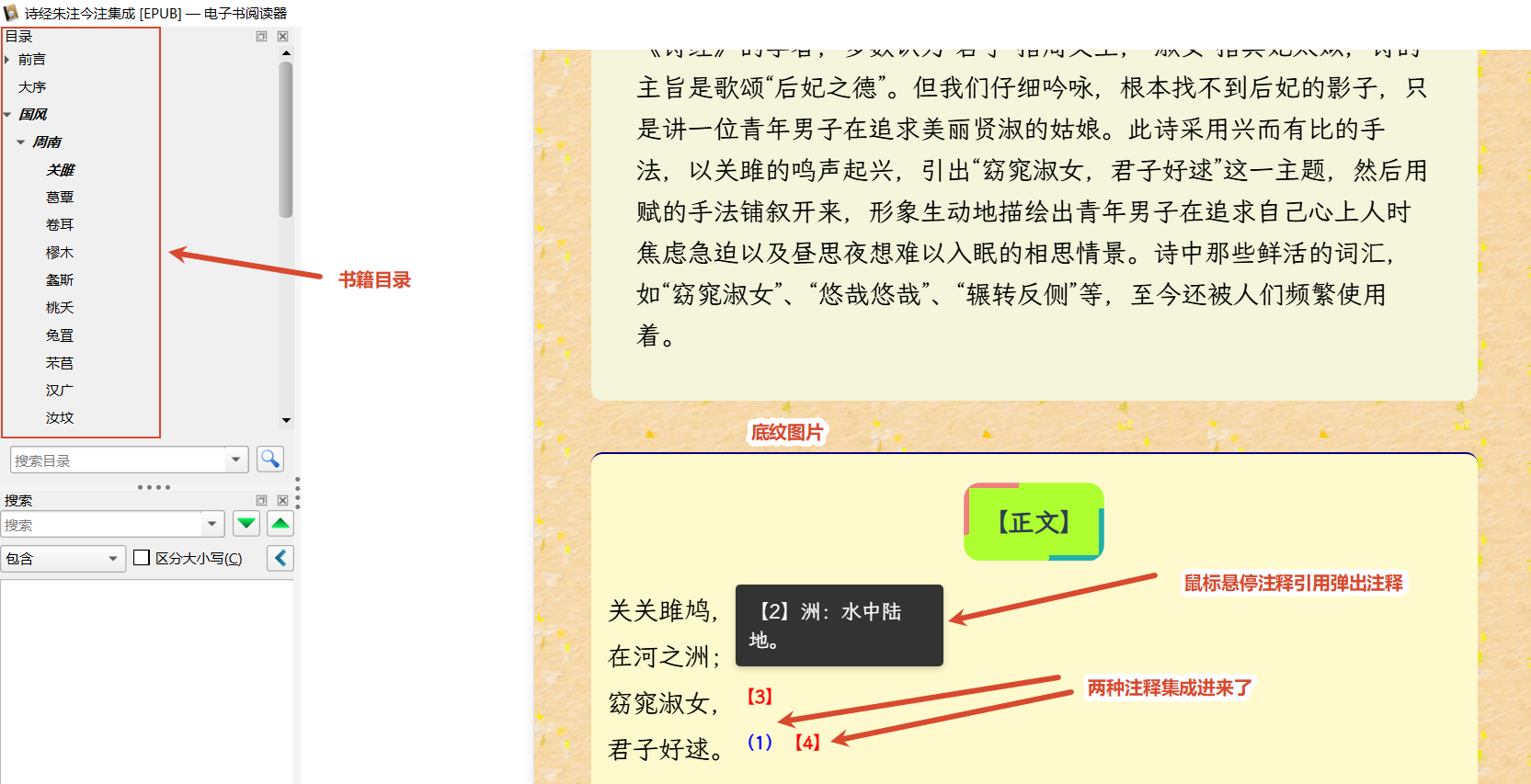
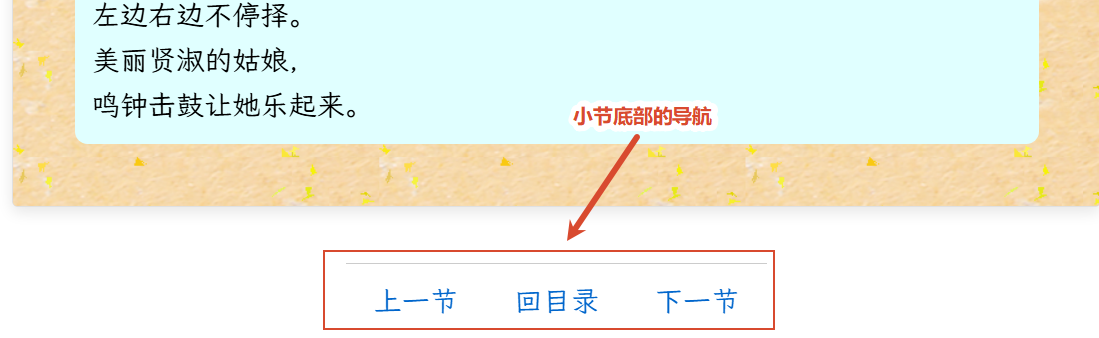
中文古籍,阅读的时候总是有注释才比较好,而一本古籍的注释往往不止一种,例如《诗经》,不但有朱熹的集注,还有现代的一些注释,如果能够集成到一本电子书中阅读,比分散到多本书中阅读自然会更方便。本文就以将《诗经朱熹集注》与《诗经全本全注全译》两本电子书的注释集成为例,演示一下这个过程。
一、导出电子书中的网页文件并合并
可以使用Sigil或者Calibre Editor等类似软件将电子书中的网页文件全部导出,CSS和脚本、图片等资源暂时可以不管。由于一本电子书往往有不止一个网页文件,为了提高处理效率,可以将所有网页文件合并为一个,这样,处理完这个合并文件,就处理完了整本书。
注意,导出的网页文件使用UTF-8无BOM编码最为方便,如果导出文件不是UTF-8编码,可以用codeTransmit进行批量转换,也可以用下面的Python程序处理:
python
#!/usr/bin/env python3
# -*- coding: utf-8 -*-
"""
将 input 文件夹下所有文本类型的文件转换为 UTF-8 编码并覆盖保存。

用法:
    python to_utf8.py                # 处理当前目录下的 input 文件夹
    python to_utf8.py -d 文件夹路径   # 处理指定文件夹
    python to_utf8.py -n             # 只预览,不实际写入

特性:
- chardet自动探测原文件编码;
- 支持递归子文件夹(可通过 --no-recursive 关闭);
- 已经是 UTF-8 的文件跳过(--force 可强制重写);
- 写入时统一使用 UTF-8(无 BOM),换行符保留原样。
"""

from pathlib import Path
import chardet


# ---------------------------------------------------------------------------
# 文本类型扩展名(按需增减)
# ---------------------------------------------------------------------------
TEXT_EXTS = {
    '.txt', '.text', '.md', '.markdown', '.rst',
    '.html', '.htm', '.xhtml', '.xml', '.xhtml',
    '.css', '.js', '.json', '.csv', '.tsv',
    '.py', '.java', '.c', '.cpp', '.h', '.hpp',
    '.ini', '.cfg', '.conf', '.log',
    '.yaml', '.yml', '.toml',
    '.srt', '.ass', '.vtt',
    '.tex', '.bib',
    '.sql', '.sh', '.bat', '.ps1',
    '.shtml', '.php', '.jsp', '.asp', '.aspx',
    '.svg',
}

# ---------------------------------------------------------------------------
# 编码探测
# ---------------------------------------------------------------------------

def detect_encoding(raw: bytes):
    """
    用 chardet 探测编码,需要确保已经: pip install chardet。
    返回 (encoding, confident)。
    """
    # 最多探测前200_000个字符。注意字符串切片会自动夹紧到合法边界,不会引发非法索引错误
    result = chardet.detect(raw[:200_000])
    enc = result.get('encoding')
    conf = result.get('confidence', 0)

    # chardet 对空/极短/纯二进制可能返回 None
    if not enc:
        # 空文件:按 UTF-8 处理即可
        if len(raw) == 0:
            return 'utf-8', True
        # 其它情况兜底
        return 'utf-8', False

    return enc, conf >= 0.7


def is_utf8_no_bom(raw: bytes):
    """判断 raw 是否为无 BOM 的 UTF-8 编码。"""
    if raw.startswith(b'\xef\xbb\xbf'):
        return False
    try:
        raw.decode('utf-8')
        return True
    except UnicodeDecodeError:
        return False


# ---------------------------------------------------------------------------
# 转换
# ---------------------------------------------------------------------------

def convert_file(path: Path, force=False, dry_run=False):
    """
    将单个文件转为 UTF-8(无 BOM)并覆盖保存。
    返回状态字符串:
      'converted'  成功转换
      'already'    已经是 UTF-8(跳过)
      'skipped'    非文本类型
      'error'      读写出错
    """
    if path.suffix.lower() not in TEXT_EXTS:
        return 'skipped'

    try:
        raw = path.read_bytes()
    except OSError as e:
        print(f"  [!] 读取失败:{e}")
        return 'error'

    # 已经是无 BOM UTF-8 且不强制重写 → 跳过
    if not force and is_utf8_no_bom(raw):
        return 'already'

    # 探测编码
    enc, confident = detect_encoding(raw)

    # 解码
    try:
        text = raw.decode(enc)
    except UnicodeDecodeError as e:
        print(f"  [!] 解码失败({enc}):{e}")
        # 最后兜底:用 errors='replace' 强行解码,避免丢文件
        text = raw.decode(enc, errors='replace')

    # 去掉 BOM(如果有)
    if text and text[0] == '\ufeff':
        text = text[1:]

    # 编码为 UTF-8(无 BOM)
    out = text.encode('utf-8')

    # 如果和原内容完全一致,就不写(避免无意义修改时间)
    if out == raw:
        return 'already'

    if dry_run:
        print(f"  [DRY] {path}  原编码={enc}  → UTF-8")
        return 'converted'

    try:
        path.write_bytes(out)
    except OSError as e:
        print(f"  [!] 写入失败:{e}")
        return 'error'

    flag = '' if confident else ' (低置信度)'
    print(f"  [OK] {path}  {enc}{flag} → UTF-8")
    return 'converted'


# ---------------------------------------------------------------------------
# 主流程
# ---------------------------------------------------------------------------

def process_dir(folder: Path, recursive=True, force=False, dry_run=False):
    """
    将文件夹下的所有文本类型的文件全部转换为UTF-8无BOM编码,默认递归处理子文件夹,
    不强制重写已是目标编码的文件,非目标编码文件直接写入转换后的结果
    :param folder: 源文件夹路径
    :param recursive: 是否递归处理子文件夹
    :param force: 如果已经是UTF-8无BOM编码,是否强制重写
    :param dry_run: 是否只预览,不实际写入转换后的字符串
    """
    if not folder.is_dir():
        print(f"错误:{folder} 不是有效的文件夹。")
        return

    # 收集文件,rglob会递归,iterdir不递归
    if recursive:
        files = [p for p in folder.rglob('*') if p.is_file()]
    else:
        files = [p for p in folder.iterdir() if p.is_file()]

    # 按扩展名过滤
    files = [p for p in files if p.suffix.lower() in TEXT_EXTS]
    files.sort()

    print(f"文件夹:{folder}")
    print(f"找到 {len(files)} 个文本类型文件\n")

    stats = {'converted': 0, 'already': 0, 'skipped': 0, 'error': 0}
    for i, p in enumerate(files, 1):
        rel = p.relative_to(folder)
        print(f"[{i}/{len(files)}] {rel}")
        s = convert_file(p, force=force, dry_run=dry_run)
        stats[s] += 1

    print(f"\n完成:转换 {stats['converted']},"
          f"已是 UTF-8 {stats['already']},"
          f"跳过 {stats['skipped']},"
          f"错误 {stats['error']}")


if __name__ == '__main__':
    path = r'path\to\input'
    folder = Path(path)
    process_dir(folder)
将文件夹下的所有网页文件合并为HTML 5可以使用如下网页脚本:
python
from bs4 import BeautifulSoup
from pathlib import Path
import os
from bs4 import XMLParsedAsHTMLWarning
import warnings

# 程序中使用lxml解析器,而非python自带的html.parser。需要先安装lxml,并用下面一行
# 避免出现用lxml解析xhtml时出现的以HTML规范解析XML文件的警告
warnings.filterwarnings("ignore", category=XMLParsedAsHTMLWarning)
HTML_EXTENSIONS = ('.html', '.xhtml', '.htm')
MERGED_HTML_NAME = 'output.html'

input_path = r'path\to\input'
folder = Path(input_path)
has_head = False
# 合并文件按HTML 5 规范编写
merged = BeautifulSoup('<!DOCTYPE html>\n<html><body></body></html>', 'lxml')
html_tag = merged.find('html')
new_body = merged.find('body')
files = []
for name in sorted(os.listdir(input_path)):
    path = os.path.join(folder, name)
    if os.path.isfile(path) and name.lower().endswith(HTML_EXTENSIONS):
        # 排除合并文件本身
        if name.lower() == MERGED_HTML_NAME:
            continue
        files.append(path)
for file in files:
    print(f'处理{file}')
    with open(file, 'r', encoding='utf-8')as f:
        content = f.read()
        soup = BeautifulSoup(content, features='lxml')
        if not has_head:
            # 复制 head(使用第一个文件的 head)
            first_head = soup.find('head')
            if first_head is not None:
                # 使用 copy.deepcopy 保证不共享引用
                import copy

                new_head = copy.deepcopy(first_head)
                html_tag.insert(0, new_head)
            else:
                html_tag.insert(0, merged.new_tag('head'))
            has_head = True

        body = soup.find('body')
        article = merged.new_tag('article')
        if body is not None:
            # 将 body 的所有子节点移动到 article 中
            for child in list(body.contents):
                article.append(child.extract())
        new_body.append(article)


# 输出
with open(f'{input_path}\\{MERGED_HTML_NAME}', 'w', encoding='utf-8') as f:
    f.write(str(merged))
二、在文本处理软件中对合并网页文件的结构进行改造
大部分EPUB电子书的网页文件缺少清晰规范的结构,并且合并后的网页文件中的锚点的href以及id也需要修改以消除冲突,这时可以利用文本处理软件的正则表达式引擎进行替换操作。在我用过的文本处理软件(包括但不限于EmEditor、EditPlus、Notepad++、Notepad4、Geany、Kate、VScode)中,EmEditor的正则表达式引擎是功能最强大的,可惜这个软件要收费。功能跟它差不多的是Calibre Editor,也可以将合并文件导入其中进行处理。
一般来说,对于锚点元素的href属性,其值包含文件名及文件中的id的,类似
href="part0004.xhtml#note_4"
这种,可以直接替换成下面这个样子:
href="#zhu_part0004_note_4"
查找:href="part(.+?).xhtml#note_(.+?)",替换为:href="#zhu_part\1_note_\2。其中zhu为自定的书籍的标志,避免与其他书籍中的id冲突,part和note不用通配符是为了尽量避免选择到无需处理的字符串。此外,对于a标签,为了避免制作EPUB文件后在Calibre阅读器中打开时href属性被重写可能导致的问题,最好将href复制出一个自定义的data-href属性------查找:href="#(.+?)",替换为:data-href="\1" href="#\1"。id也做类似的处理。只是id的前缀要从href中借,所以替换id时查找内容还要包括href,类似于:href="#(.+?)note_(.+?)" id="(.+?)",替换为:href="#\1note_\2" id="\1\3",如果源文件中href属性和id属性的书写位置不同,查找的字符串要根据实际情况修改。
另一个要做的处理就是将文件中性质相同的内容包含在一个块元素中(如果本来不是如此的话),这也可以根据实际情况利用正则表达式在合适的位置添加开始与结束标签实现。以本文的诗经为例,最终目标是将两个文件分别处理成许多section,每个section为一个章节,对于每一首诗构成的章节,处理成div.summry包裹综述,div.orig包裹原文,div.notes包裹注释,div.yw包裹译文,如下:
《诗经朱熹集注·葛覃》
html
<section>
<h3 class="sec-title">葛覃</h3>
<div class="summary">
<div class="maoxu">《诗序》:《葛覃》,......。</div>
</div>
<div class="orig"><h4>【正文】</h4>
<p class="kindle-cn-poem-left">葛之覃兮,<br/>施于中谷;<br/>
  维叶萋萋。<br/>黄鸟于飞,<br/>
  集于灌木,<br/>其鸣喈喈。<a class="noteref" href="#zhu_part0004_note_4" id="zhu_part0004_noteBack_4">[1]</a><br/></p>
......
</div>
<div class="zhu-yun">朱熹云:此诗后妃所自作,......</div>
<hr/>
<div class="notes">
<p class="note" id="zhu_part0004_note_4"><a href="#zhu_part0004_noteBack_4">[1]</a>赋也。葛,草名,蔓生,可为絺绤者。覃,延。施,移也。中谷,谷中也。萋萋,盛貌。黄鸟,鹂也。灌木,丛木也。喈喈,和声之远闻也。〇赋者,敷陈其事而直言之者也。盖后妃既成絺绤,而赋其事,追叙初夏之时,葛叶方盛,而有黄鸟鸣于其上也。后凡言赋者放此。</p>
......
</div>
</section>
《诗经全本全注全译·葛覃》
html
<section>
<h3 class="sec-title">葛覃</h3>
<div class="modern-summary"><h4>【题解】</h4>这是......。</div>
<div class="orig"><h4>【原文】</h4>葛之覃兮<a class="noteref" href="#part0007_filepos62517" id="part0007_filepos61457">【1】</a>,<br/> 施于中谷<a class="noteref" href="#part0007_filepos62660" id="part0007_filepos61559">【2】</a>,<br/> 维叶萋萋<a class="noteref" href="#part0007_filepos62788" id="part0007_filepos61661">【3】</a>。......</div>
<div class="yw"><h4>【译文】</h4>葛草长长壮蔓藤,<br/> 一直蔓延山谷中,<br/> 叶子碧绿又茂盛。<br/> 黄鸟翩翩在飞翔,<br/> 落在灌木树丛上,<br/> 鸣叫声声像歌唱。<br class="calibre2"/>葛草长长壮蔓藤,<br/> 一直蔓延山谷中,<br/> 叶子浓密又茂盛。<br/> 收割回来煮一煮,<br/> 剥成细线织葛布,<br/> 穿上葛衣真舒服。<br class="calibre2"/>回去告诉我师姆,<br/> 我要告假看父母。<br/> 先把内衣洗干净,<br/> 再洗外衣成楚楚。<br/> 洗与不洗整理好,<br/> 回家问候我父母。</div>
<div class="notes"><h4>【注释】</h4>
<p class="note" id="part0007_filepos62517"><a href="#part0007_filepos61457">【1】</a>葛:藤本植物,茎的纤维可织成葛布。覃:蔓延。</p>
......</div>
</section>
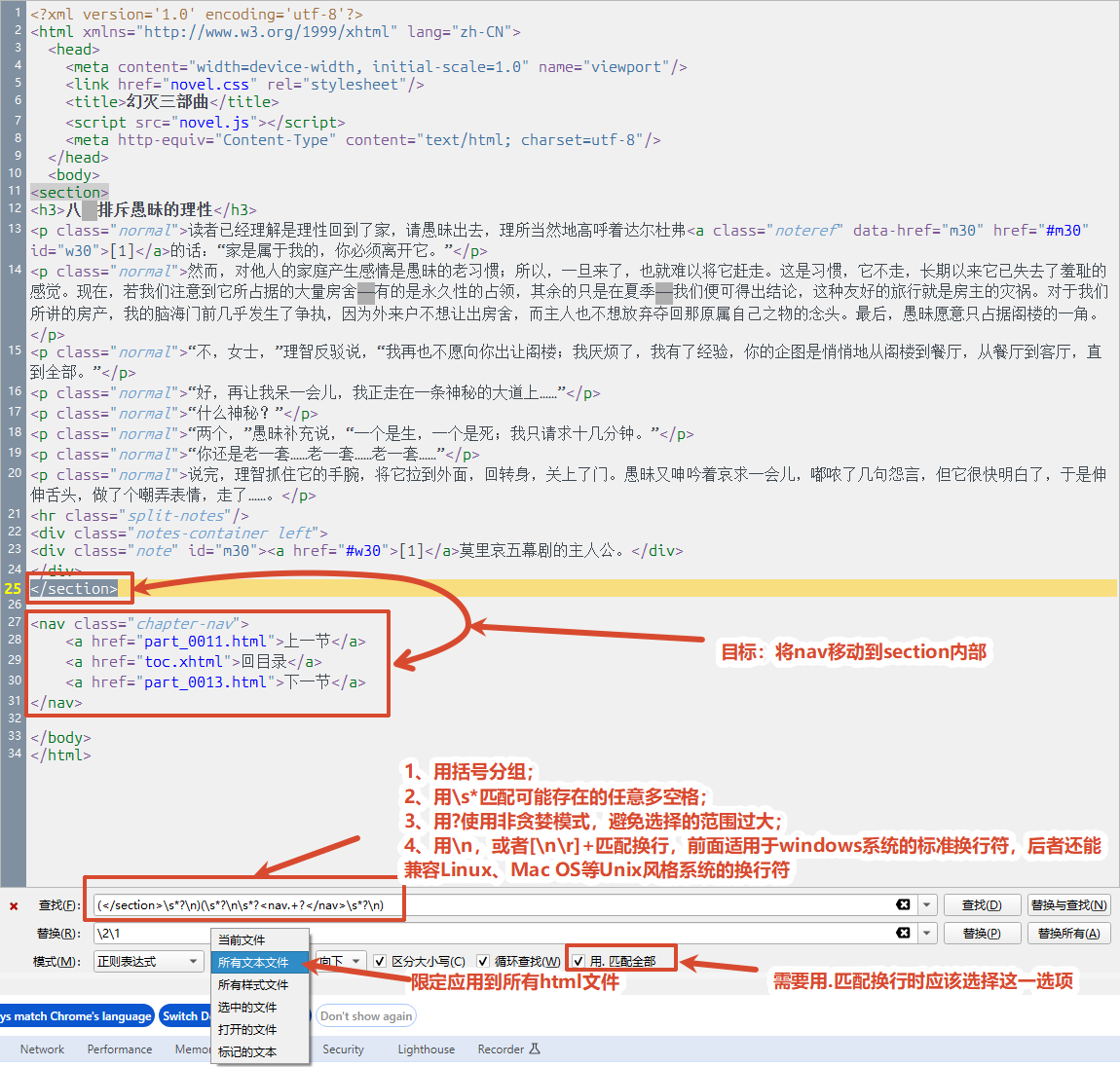
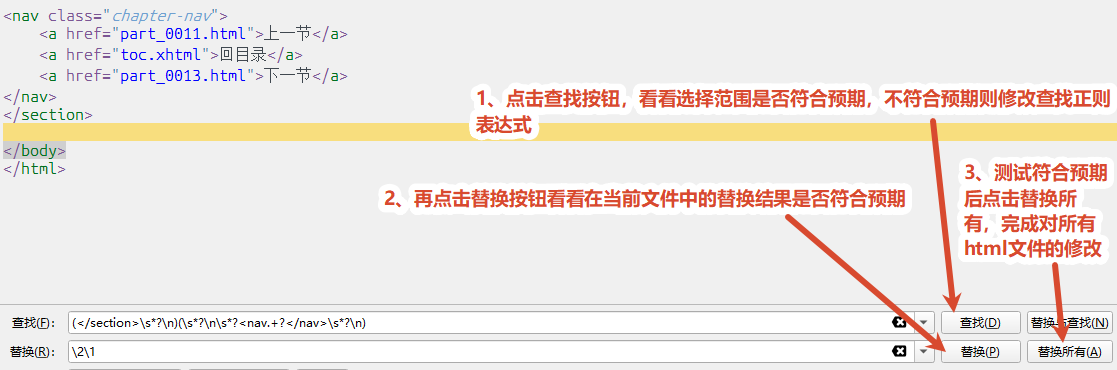
下面是在Calibre编辑器中利用其查找替换功能使用正则表达式修改HTML文件结构的一个例子:
点击替换后,可以看到导航栏已经移动到section里面去了:
三、处理注释的合并
尽管同为诗经的注释,两本书在标题以及内容方面其实存在细微的版本差异,所以,在合并的时候比较标题及原文时,只能用模糊比较,不能完全按字符串相等来查找。下面这个合并程序不能通用,但是其中的匹配算法和整体编程思路还是能够通用的,甚至修改一下标签名和属性名,在第二步中参考这个程序来进行处理,迁移到处理其它书籍上也不难:
python
"""
合并 file1 与 file2(含 h3.sec-title 的 section):

2.1 file1.div.zhu-yun + file2.div.modern-summary → file1.div.summary
2.2 file2.div.orig 中的 a.noteref → 插入 file1.div.orig 对应句子(行号+文本)
2.3 file2 中 a.noteref 的 href 指向的 p.note → 加入 file1.div.notes
2.4 file2 中 div.yw 加入 file1 的 section
"""

import re
import copy
from pathlib import Path

from bs4 import BeautifulSoup, NavigableString, Tag


TITLE_MATCH_MIN = 0.55
LINE_MATCH_MIN = 0.5
LINE_WINDOW = 8
OUTPUT_NAME = 'merg_notes.html'


# ---------------------------------------------------------------------------
# 工具
# ---------------------------------------------------------------------------

def _has_class(tag, cls):
    return isinstance(tag, Tag) and cls in (tag.get('class') or [])


def _normalize(text):
    """去掉文本中某些特殊字符后进行模糊比较"""
    text = re.sub(r'[\s\u3000]+', '', text)
    text = re.sub(r'[,。;:、!?()《》〈〉""''\[\][],.!?;:()<>"\']+', '', text)
    return text

def _normalize_more_blured(text):
    """去空白 + 去标点 + 去括号 + 去数字,比 _normalize 更模糊。
    如果 _normalize(text) 不能取得预期结果,试着用这个函数代替
    """
    text = re.sub(r'[\s\u3000]+', '', text)
    # 去掉各种括号
    text = re.sub(r'[\[\][]【】〖〗〔〕()()《》〈〉{}{}]', '', text)
    # 去掉常见标点
    text = re.sub(
        r'[,。;:、!?,.!?;:---...·"\'\-\u2014]+',
        '', text
    )
    # 去掉阿拉伯数字(注释序号)
    text = re.sub(r'[0-90-9]+', '', text)
    return text

def _similarity(a, b):
    """比较两个字符串的相似度"""
    a, b = _normalize(a), _normalize(b)
    if not a or not b:
        return 0.0
    la, lb = len(a), len(b)
    if la * lb > 4_000_000:
        sa, sb = set(a), set(b)
        return len(sa & sb) / max(len(sa), len(sb))
    dp = [[0] * (lb + 1) for _ in range(la + 1)]
    for i in range(1, la + 1):
        for j in range(1, lb + 1):
            dp[i][j] = (dp[i-1][j-1] + 1) if a[i-1] == b[j-1] \
                else max(dp[i-1][j], dp[i][j-1])
    return 2.0 * dp[la][lb] / (la + lb)


def read_html(path):
    with open(path, 'rb') as f:
        raw = f.read()
    enc = 'utf-8-sig' if raw.startswith(b'\xef\xbb\xbf') else 'utf-8'
    return BeautifulSoup(raw.decode(enc, errors='replace'), 'lxml')


def write_html(soup, path):
    with open(path, 'w', encoding='utf-8') as f:
        f.write(str(soup))


# ---------------------------------------------------------------------------
# 关键:扁平化 div.orig,按 <br> 连续拆行(<p> 视为透明)
# ---------------------------------------------------------------------------

def _walk_flat(root, results):
    """
    递归遍历 root,按文档顺序收集所有节点。
    - <br> 记录为 ('br', tag)
    - <p>/<h4>/<div>/<section>/<blockquote>/<span>/<small>/<sup> 等透明容器:
      不记录自身,直接递归其内容
    - 其它元素(<a>、<img> 等):记录为 ('tag', tag),不展开
    - 文本节点记录为 ('text', str)
    """
    for child in root.children:
        if isinstance(child, NavigableString):
            if not str(child).strip():
                continue
            results.append(('text', child))
        elif isinstance(child, Tag):
            if child.name == 'br':
                results.append(('br', child))
            elif child.name in ('p', 'h4', 'div', 'section',
                                'blockquote', 'span', 'small', 'sup'):
                # 透明容器:不记录自身,只展开
                _walk_flat(child, results)
            else:
                # 行内元素:记录自身,不展开(避免把 <a> 里的文本拆出来)
                results.append(('tag', child))


def collect_lines(div_orig):
    """
    把 div.orig 拆成 [{'line_no': N, 'text': str, 'br': <br>|None,
                       'members': [节点列表], 'container': Tag}, ...]。

    规则:
      - 文档顺序扫描;遇到 <br> 结束当前行,开启新行;
      - <p>、<h4> 等容器透明(不换行,内容并入当前行);
      - 最后一行若没有 <br> 结尾也算一行。

    'br' 是"本行结尾的 <br>"(若本行无 br,则为 None)。
    'container' 是本行最后一个有效节点的父容器(用于无 br 时 append)。
    """
    flat = []
    _walk_flat(div_orig, flat)
    # flat = _walk_flat_by_punctuation(div_orig)
    lines = []
    current_members = []

    def _flush(br_tag):
        if not current_members:
            # 连续 <br> 或开头就是 <br>,产生一个空行,也记录(保持行号对齐)
            lines.append({
                'line_no': len(lines) + 1,
                'text': '',
                'br': br_tag,
                'members': [],
                'container': div_orig,
            })
            return
        text = ''.join(
            n.get_text() if isinstance(n, Tag) else str(n)
            for _, n in current_members
        ).strip()
        # container 取最后一个成员的父节点
        last_node = current_members[-1][1]
        container = last_node.parent if last_node.parent is not None else div_orig
        lines.append({
            'line_no': len(lines) + 1,
            'text': text,
            'br': br_tag,
            'members': [n for _, n in current_members],
            'container': container,
        })


    for kind, node in flat:
        if kind == 'br':
            _flush(node)
            current_members = []
        else:
            current_members.append((kind, node))

    if current_members:
        _flush(None)

    return lines


# ---------------------------------------------------------------------------
# a.noteref 收集 / 行匹配 / 插入
# ---------------------------------------------------------------------------

def collect_f2_note_lines(sec2):
    """从 file2.div.orig 收集每行的 a.noteref:"""
    div_orig = sec2.find('div', class_='orig')
    if div_orig is None:
        return []
    lines = collect_lines(div_orig)
    for ln in lines:
        notes = []
        for node in ln['members']:
            if isinstance(node, Tag):
                if node.name == 'a' and _has_class(node, 'noteref'):
                    notes.append(node)
                else:
                    notes += node.find_all('a', class_='noteref')
        ln['notes'] = notes
    return lines


def collect_f1_lines(sec1):
    div_orig = sec1.find('div', class_='orig')
    if div_orig is None:
        return []
    return collect_lines(div_orig)


def match_line(f2_line, f1_lines):
    target_no = f2_line['line_no']
    target_text = f2_line['text']
    by_no = {l['line_no']: l for l in f1_lines}

    cand = by_no.get(target_no)
    if cand is not None and _similarity(cand['text'], target_text) >= LINE_MATCH_MIN:
        return cand

    best, best_score = None, 0.0
    for l in f1_lines:
        if abs(l['line_no'] - target_no) > LINE_WINDOW:
            continue
        sc = _similarity(l['text'], target_text)
        if sc > best_score:
            best_score, best = sc, l
    if best is not None and best_score >= LINE_MATCH_MIN:
        return best

    for l in f1_lines:
        sc = _similarity(l['text'], target_text)
        if sc > best_score:
            best_score, best = sc, l
    if best is not None and best_score >= 0.6:
        return best
    return None


def insert_note_at_line_end(f1_line, new_a):
    """
    把 new_a 插到该行末尾:
      - 若行末有 <br>:插在 <br> 之前;
      - 否则:append 到 container(即该行最后一个成员的父节点)。
    """
    br = f1_line.get('br')
    if br is not None and br.parent is not None:
        br.insert_before(new_a)
    else:
        f1_line['container'].append(new_a)


def migrate_noterefs(sec1, sec2):
    """2.2:迁移 a.noteref。返回 (数量, href 列表)。"""
    f2_lines = collect_f2_note_lines(sec2)
    f1_lines = collect_f1_lines(sec1)
    if not f1_lines:
        return 0, []

    moved = 0
    hrefs = []
    for f2 in f2_lines:
        if not f2['notes']:
            continue
        f1 = match_line(f2, f1_lines)
        if f1 is None:
            continue
        for a in f2['notes']:
            new_a = copy.deepcopy(a)
            insert_note_at_line_end(f1, new_a)
            hrefs.append(a.get('href', ''))
            moved += 1
    return moved, hrefs


# ---------------------------------------------------------------------------
# 2.3 p.note 迁移
# ---------------------------------------------------------------------------

def migrate_notes(sec1, sec2, hrefs):
    div_notes = sec1.find('div', class_='notes')
    if div_notes is None:
        return 0

    moved = 0
    seen = set()
    for href in hrefs:
        if not href or not href.startswith('#'):
            continue
        tid = href[1:]
        if tid in seen:
            continue
        seen.add(tid)

        target = sec2.find(id=tid)
        if target is None:
            # 兜底:在整个 soup2 里找(可能不在当前 section)
            continue
        div_notes.append(copy.deepcopy(target))
        moved += 1
    return moved


# ---------------------------------------------------------------------------
# 2.1 summary 迁移
# ---------------------------------------------------------------------------

def migrate_into_summary(sec1, sec2):
    div_summary = sec1.find('div', class_='summary')
    if div_summary is None:
        return 0
    moved = 0
    zy = sec1.find('div', class_='zhu-yun')
    if zy is not None:
        div_summary.append(zy.extract())
        moved += 1
    ms = sec2.find('div', class_='modern-summary')
    if ms is not None:
        div_summary.append(copy.deepcopy(ms))
        moved += 1
    return moved

# ---------------------------------------------------------------------------
# 2.1 summary 迁移
# ---------------------------------------------------------------------------

def migrate_into_yiwen(sec1, sec2):
    moved = 0
    yw = sec2.find('div', class_='yw')
    if yw is not None:
        sec1.append(copy.deepcopy(yw))
        moved += 1
    return moved


# ---------------------------------------------------------------------------
# section 匹配
# ---------------------------------------------------------------------------

def collect_titled_sections(soup,tag_name='h3', attrs={'class':'sec-title'}):
    out = []
    for sec in soup.find_all('section'):
        h3 = sec.find(tag_name, attrs=attrs)
        if h3 is None:
            continue
        out.append((len(out) + 1, h3.get_text(strip=True), sec))
    return out


def match_sections(s1, s2):
    used2 = set()
    pairs = []

    # 精确标题
    exact = {}
    for idx, t, s in s2:
        exact.setdefault(t, []).append((idx, s))

    pending1 = []
    for idx, t, s in s1:
        if exact.get(t):
            j, s2_ = exact[t].pop(0)
            used2.add(j)
            pairs.append((s, s2_, f'exact:{t}'))
        else:
            pending1.append((idx, t, s))

    # 模糊标题
    p2 = [(i, t, s) for (i, t, s) in s2 if i not in used2]
    still1 = []
    for idx1, t1, s1_ in pending1:
        best, score, bj = None, 0.0, None
        for idx2, t2, s2_ in p2:
            sc = _similarity(t1, t2)
            if sc > score:
                score, best, bj = sc, s2_, idx2
        if best is not None and score >= TITLE_MATCH_MIN:
            used2.add(bj)
            p2 = [(i, t, s) for (i, t, s) in p2 if i != bj]
            pairs.append((s1_, best, f'fuzzy({score:.2f}):{t1}'))
        else:
            still1.append((idx1, t1, s1_))

    # 序号对齐
    p2 = [(i, t, s) for (i, t, s) in s2 if i not in used2]
    m2 = {i: s for (i, t, s) in p2}
    for idx1, t1, s1_ in still1:
        if idx1 in m2:
            s2_ = m2.pop(idx1)
            pairs.append((s1_, s2_, f'seq:{idx1}'))
    return pairs


# ---------------------------------------------------------------------------
# 主流程
# ---------------------------------------------------------------------------

def process_pair(sec1, sec2):
    st = {'summary': 0, 'noteref': 0, 'note': 0, 'yw': 0}
    st['summary'] = migrate_into_summary(sec1, sec2)
    n, hrefs = migrate_noterefs(sec1, sec2)
    st['noteref'] = n
    st['note'] = migrate_notes(sec1, sec2, hrefs)
    st['yw'] = migrate_into_yiwen(sec1, sec2)
    return st


def merge(file1_path, file2_path, output_path=None):
    soup1 = read_html(file1_path)
    soup2 = read_html(file2_path)

    s1 = collect_titled_sections(soup1)
    s2 = collect_titled_sections(soup2)
    print(f"file1 含 h3.sec-title 的 section:{len(s1)}")
    print(f"file2 含 h3.sec-title 的 section:{len(s2)}")

    pairs = match_sections(s1, s2)
    print(f"匹配 {len(pairs)} 对\n")

    total = {'summary': 0, 'noteref': 0, 'note': 0, 'yw':0}
    for sec1, sec2, reason in pairs:
        h3 = sec1.find('h3', class_='sec-title')
        title = h3.get_text(strip=True) if h3 else '?'
        st = process_pair(sec1, sec2)
        for k in total:
            total[k] += st[k]
        print(f"  「{title}」 [{reason}]  "
              f"summary+={st['summary']} noteref+={st['noteref']}"
              f" note+={st['note']} yw+={st['yw']}")

    print(f"\n总计:{total}")

    out = Path(output_path) if output_path else \
        Path(__file__).resolve().parent / OUTPUT_NAME
    write_html(soup1, out)
    print(f"输出:{out}")


def main():
    file1 = r'E:\work\诗经\诗经朱熹集注.html'
    file2 = r'E:\work\诗经\诗经全本全注全译.html'
    merge(file1, file2)


if __name__ == "__main__":
    main()
四、拆分小节并添加导航
上面的合并文件实际上已经可以用于重新制作EPUB了,但一个文件太大的话阅读器处理起来比较慢,因此,可以考虑将每个section拆分为一个单独文件,并在每个文件底部添加到上一节、下一节及目录的导航。下面的脚本就可以完成这一任务:
python
import os
import re
from bs4 import BeautifulSoup


def process_html(input_file, output_dir='output'):
    """
    将 HTML 文件按 section 拆分为多个文件:
    - 保留 head 结构
    - 每个文件只包含一个 section
    - 底部添加导航条
    - 每个文件内的注释编号文本重新从 1 开始
    - 生成 toc.xhtml 目录页
    """
    os.makedirs(output_dir, exist_ok=True)

    with open(input_file, 'r', encoding='utf-8') as f:
        content = f.read()

    soup = BeautifulSoup(content, 'html.parser')
    head = soup.find('head')
    body = soup.find('body')

    sections = body.find_all('section', recursive=False)

    toc_entries = []

    for idx, section in enumerate(sections, start=1):
        filename = f"part_{idx:04d}.html"

        # 提取标题(用于目录)
        title_tag = section.find(['h1', 'h2', 'h3'])
        title = title_tag.get_text(strip=True) if title_tag else f"第 {idx} 节"
        toc_entries.append((idx, title))

        # 复制 section,避免修改原树影响后续
        section_copy = BeautifulSoup(str(section), 'html.parser')

        # 重新编号注释
        renumber_notes(section_copy)

        # 导航条
        prev_file = f"part_{idx - 1:04d}.html" if idx > 1 else None
        next_file = f"part_{idx + 1:04d}.html" if idx < total else None
        nav_html = build_nav(prev_file, next_file)

        # 构建 HTML
        new_html = build_html(head, section_copy, nav_html)
        output_path = os.path.join(output_dir, filename)
        with open(output_path, 'w', encoding='utf-8') as f:
            f.write(new_html)

        if idx % 50 == 0 or idx == total:
            print(f"已处理 {idx}/{total}")

    build_toc(head, toc_entries, output_dir)
    print(f"\n完成!共生成 {total} 个内容文件 + 1 个目录文件")
    print(f"输出目录: {output_dir}")


def renumber_notes(section):
    """
    将 section 内的注释编号文本重新从 1 开始。

    策略:
    1. 收集所有 a.noteref(正文中的引用),按出现顺序建立 原编号文本 -> 新编号 的映射。
    2. 正文中的 a.noteref 的显示文本改为 [新编号]。
    3. 注释区(div.notes-container 或 div.notes)中的 div.note 里的 <a>,
       根据其 href 指向的目标(如 #w1)找到对应的原编号,
       将显示文本改为 [新编号]。
    """
    # 1. 收集正文中的 noteref
    noterefs = section.find_all('a', class_='noteref')
    if not noterefs:
        return

    # 映射:原编号文本 -> 新编号
    # 原编号文本从 a.noteref 的显示文本中提取,如 "[1]" -> "1"
    old_to_new = {}
    # 映射:ref 的 id(如 w1)-> 新编号(用于注释区反向查找)
    ref_id_to_new = {}

    new_num = 1
    for ref in noterefs:
        # 提取原编号
        old_text = ref.get_text(strip=True)
        m = re.search(r'\[(\d+)\]', old_text)
        if not m:
            continue
        old_num = m.group(1)

        # 记录映射
        if old_num not in old_to_new:
            old_to_new[old_num] = new_num
            new_num += 1

        # 记录 ref 的 id -> 新编号
        ref_id = ref.get('id')
        if ref_id:
            ref_id_to_new[ref_id] = old_to_new[old_num]

        # 修改正文引用的显示文本
        ref.string = f'[{old_to_new[old_num]}]'

    # 2. 处理注释区
    # 注释区可能位于 section 内,也可能位于 section 外(文档末尾)
    # 这里在拆分后的 section 中只处理 section 内的;若注释在 section 外,需要单独处理
    notes_containers = section.find_all('div', class_='notes-container')
    for container in notes_containers:
        for note in container.find_all('div', class_='note'):
            a = note.find('a')
            if not a:
                continue
            href = a.get('href', '')
            if not href.startswith('#'):
                continue
            target_id = href[1:]  # 去掉 #
            if target_id in ref_id_to_new:
                a.string = f'[{ref_id_to_new[target_id]}]'


def build_nav(prev_file, next_file):
    """构建底部导航条"""
    prev_link = f'<a href="{prev_file}">上一节</a>' if prev_file else '<span class="disabled">上一节</span>'
    next_link = f'<a href="{next_file}">下一节</a>' if next_file else '<span class="disabled">下一节</span>'
    return f'''
<nav class="chapter-nav">
    {prev_link}
    <a href="toc.xhtml">回目录</a>
    {next_link}
</nav>
'''


def build_html(head, section, nav_html):
    """构建单个 HTML 文件"""
    head_str = str(head) if head else '<head><meta charset="UTF-8"></head>'
    return f'''<!DOCTYPE html>
<html lang="zh-CN">
{head_str}
<body>
{str(section)}
{nav_html}
</body>
</html>'''


def build_toc(head, toc_entries, output_dir):
    """生成目录页"""
    book_title = '诗经朱注今注集成'
    items = '\n'.join(
        f'<li><a href="part_{idx:04d}.html">{title}</a></li>'
        for idx, title in toc_entries
    )
    head_str = str(head) if head else '<head><meta charset="UTF-8"><title>目录</title></head>'
    toc_html = f'''<?xml version='1.0' encoding='utf-8'?>
<html xmlns="http://www.w3.org/1999/xhtml" lang="zh">
{head_str}
<body>
<h1>{book_title}</h1>
<ul class="toc-list">
{items}
</ul>
</body>
</html>'''
    with open(os.path.join(output_dir, 'toc.xhtml'), 'w', encoding='utf-8') as f:
        f.write(toc_html)


if __name__ == '__main__':
    input_file = r'E:\work\诗经\诗经朱注今注集成.html'
    output_folder = r'F:\temp\output'
    process_html(input_file, output_folder)
五、重新制作成EPUB
可以用Sigil或者Calibre Editor将第四步拆分处的文件重新打包成EPUB,并使其具有鼠标悬停注释引用时自动弹出注释内容、注释引用与注释内容能够相符链接的功能。应该将原来的电子书中的CSS、图片等资源放进新电子书下的相同路径下(或者放进新路径然后使用编辑器的查找替换功能修改HTML文件中的路径),在原来的CSS之外增加下面的CSS:
css
/* Body 样式 - 使用 Grid 居中 */

body {
	/* 水平和垂直居中 */
	display: grid;
	place-items: center;
	font-family: "霞鹜文楷红楼梦", "微软雅黑", "宋体", "SimSun", "STSong", serif, system-ui;
	font-size: 18px;
	line-height: 1.6;
}

/* 内容容器 - 固定宽度 21cm(A4纸宽度) */
#content,
section {
	width: 21cm;
	/* 精确宽度 */
	max-width: 100%;
	/* 响应式:在小屏幕上不超过 100% */
	background-image: url('./golden_noise.png');
	background-repeat: repeat;
	padding: 1cm;
	/* 页边距 */
	box-shadow: 0 4px 12px rgba(0, 0, 0, 0.1);
	border-radius: 4px;
	border: 1px solid #e0e0e0;

}

/* 标题 - 居中 */
h1,
h2,
h3,
h4,
h5,
h6 {
	text-align: center;
	color: #2c3e50;
	font-weight: 600;
	margin: 0.5em auto;
	width: fit-content;
}

h1 {
	border-bottom: 5px solid #e7ee3c;
}

h2,
h3 {
	border-bottom: 3px solid #3366ff;
}

.right {
	text-align: right;
	margin-right: 2em;
}

.center {
	text-align: center;
}

.letter {
	background-color: beige;
	border-radius: 1em;
	padding: 0.5em;
	width: 80%;
	font-weight: bold;
	margin: 0 auto;
}

/* 段落 - 左对齐 */
p {
	text-align: left;
	font-size: 1em;
	margin-bottom: 0.5em;
	/* 首行缩进 */
	text-indent: 2em;
	line-height: 1.8;
	margin: 0;
}

.split-notes {
	height: 5px;
	background: linear-gradient(to right, #ff0000, #00ff00, #0000ff);
}

.chapter-nav {
	display: flex;
	justify-content: space-around;
	align-items: center;
	border-top: 1px solid #ccc;
	font-size: 1em;
	margin-top: 2em;
}

.chapter-nav a {
	text-decoration: none;
	color: #0066cc;
	padding: 0.5em 1em;
}

.chapter-nav a:hover {
	text-decoration: underline;
}

.chapter-nav .disabled {
	color: #999;
	padding: 0.5em 1em;
}

</style>

/* 首段特殊样式 */
p:first-of-type {
	margin-top: 0.5em;
}


/************************注释框*********************************/
.noteref {
	/* 为伪元素提供定位基准 */
	position: relative;
	/* 可选:将光标改为手形,提示可交互 */
	cursor: pointer;
	/* 确保伪元素定位正确 */
	display: inline-block;
	margin: 0;
	padding: 0;
	text-indent: 0;
	text-align: left;
	font-size: small;
	/*不要使用transform: translateY(-50%);调整显示位置,
	* 会引起元素建立局部堆叠,渲染时发生穿透显示的情况。
	*/
	vertical-align: top;
	font-weight: bold;
	color: red;
	text-decoration: none;
}

.noteref::after {
	/* 读取data-note属性的值作为内容 */
	content: attr(data-note);
	position: absolute;
	top: var(--note-top);
	left: var(--note-left);
	background-color: #333;
	color: white;
	padding: 0.618em;
	border-radius: 4px;
	line-height: 1.4;
	font-size: 14px;
	white-space: pre-wrap;
	width: var(--note-width);
	z-index: 1000;
	/* 初始完全透明 */
	opacity: 0;
	/* 初始隐藏,不占空间 */
	visibility: hidden;
	/* 添加淡入淡出效果 */
	transition: opacity 0.2s ease, visibility 0.2s ease;
	/* 防止提示框干扰鼠标事件 */
	pointer-events: none;
	box-shadow: 0 2px 5px rgba(0, 0, 0, 0.2);
	overflow-wrap: break-word;
	max-width: 20em;
	word-break: break-word;
	font-weight: normal;
}

/* 鼠标悬停时显示提示框 */
.noteref:hover::after {
	opacity: 1;
	visibility: visible;
}

/**********************本书专用CSS******************/
div {
	margin: 0.5em;
	border-radius: 10px;
	padding: 0.618em;
	margin-top: 2em;
}

.orig {
	background-color: LemonChiffon;
}

.orig p {
	text-indent: 0;
	margin-top: 1em;
}

.orig a[data-href^="zhu_"] {
	color: blue;
}

.notes {
	background-color: Aquamarine;
}

.summary {
	background-color: Beige;
	border-top: 2px solid Navy;
}

.zhu-yun {
	background-color: GreenYellow;
	border-top: 2px solid hotpink;
}

.yw {
	background-color: LightCyan;
}

rt {
	color: red;
	font-size: 0.6em;
}

h4 {
	width: fit-content;
	padding: 0.5em;
	background-color: GreenYellow;
	border-radius: 0.618em;
	box-sizing: border-box;
	border: 5px solid transparent;
	/* 上、右、下、左 四条边的"切分" */
	border-image: linear-gradient(135deg,
			LightCoral 0% 25%,
			/* 左上角一段有色 */
			transparent 25% 75%,
			LightSeaGreen 75% 100%
			/* 右下角一段有色 */
		) 1;
	clip-path: inset(0 round 0.618em);
}
准备并导入这个CSS中用到的背景图片golden_noise.png,放到这个CSS文件相同路径下(或者放到其它路径并修改这个CSS文件中的url),在EPUB中插入如下JavaScript脚本并在页面文件中导入它:
javascript
/*********************显示注释相关,配合CSS使用***********************/
function displayNote() {
	/* 方案一:使用伪元素显示注释 */
	const noteRefs = document.querySelectorAll('.noteref');
	// 获取内容容器元素,无专门的容器时用document.body作为容器
	const contentDiv = document.getElementById('content') || document.querySelector('section');
	const container = contentDiv ? contentDiv : document.body;
	Array.from(noteRefs).forEach(noteRef => {

		noteRef.addEventListener('mouseenter', function() {
			const noteId = this.getAttribute('data-href');
			const noteEl = document.getElementById(noteId);
			if (!noteEl) {
				console.warn(`注释找不到id: ${noteId}`);
				return;
			}

			let noteText = noteEl.textContent.trim();
			// note = note.replace(/\[\d+\]/, "").trim();  // 替换掉注释内容前面的序号,可选
			noteText = noteText.replace(/(\[\d+\])[\r\n\s]+/, "$1 "); // 替换掉序号与注释内容之间过多的空白(可选)

			// 向CSS传递注释文本
			this.setAttribute('data-note', noteText);

			// 创建临时隐藏元素,用来测量提示框渲染尺寸(性能影响有限)
			const measurer = document.createElement('div');
			// 与盒模型尺寸相关的样式须与CSS文件中的定义一致
			measurer.style.cssText = `
					position:fixed;
					visibility:hidden;
					pointer-events:none;
					box-sizing:border-box;
					padding:8px 12px;
					border-radius:4px;
					font-size:14px;
					line-height:1.4;
					white-space:pre-wrap;
					max-width:20em;
					word-break: break-word;
				`;
			measurer.textContent = noteText;
			document.body.appendChild(measurer);

			const tipRect = measurer.getBoundingClientRect();
			const tipW = tipRect.width;
			const tipH = tipRect.height;

			// 在删除measurer前读取noteref和内容容器的视口矩形,避免页面布局再次变脏增加一次重排
			const noterefRect = this.getBoundingClientRect();
			const contentRect = container.getBoundingClientRect();

			measurer.remove();

			const gap = 5;
			let tipViewportTop, tipViewportLeft;

			// 垂直规则:优先放在noteref上方
			if (noterefRect.top >= tipH + gap) {
				tipViewportTop = noterefRect.top - tipH - gap; // 上方留出间隙
			} else {
				tipViewportTop = noterefRect.bottom + gap;
			}

			// 水平规则:基准left=noterefRect.left;右侧溢出左移;最小left=gap
			tipViewportLeft = noterefRect.left;
			const rightLimit = Math.min(Math.floor(contentRect.left + contentRect.width),
				window.innerWidth) - 30;
			if (tipViewportLeft + tipW > rightLimit) {
				tipViewportLeft = rightLimit - tipW - gap;
			}
			if (tipViewportLeft < gap) {
				tipViewportLeft = gap;
			}

			// 伪元素是absolute,相对于noteref。把【视口坐标】转为【相对于noteref的偏移量】
			const relTop = tipViewportTop - noterefRect.top;
			const relLeft = tipViewportLeft - noterefRect.left;

			// 设置CSS变量给noteref,供给::after使用
			this.style.setProperty('--note-top', `${relTop}px`);
			this.style.setProperty('--note-left', `${relLeft}px`);
			this.style.setProperty('--note-width', `${tipW}px`);
		});
	});
}

// 据AI说这样调用文档加载完成后才执行的函数比较健壮,可以应付各种EPUB阅读器
function whenDOMReady(callback) {
    if (document.readyState === 'loading') {
        document.addEventListener('DOMContentLoaded', callback, { once: true });
    } else {
        // "interactive" 或 "complete" 都说明 DOM 已就绪
        callback();
    }
}

whenDOMReady(displayNote);
注意在EPUB编辑器(推荐使用Calibre编辑器)检查有关CSS、图片和JS的url的正确性,如有错误使用编辑器的查找替换功能将其更正。不要使用第四步生成的目录文件,用EPUB编辑器的目录功能自动从大标题生成目录并插入到书籍中,注意目录文件名与HTML文件底部导航中的文件名是否一致,如不一致,使用编辑器的查找替换功能将其更正,然后保存。
其中《葛覃》一诗在EPUB中的页面文件如下:
html
<?xml version='1.0' encoding='utf-8'?>
<html xmlns="http://www.w3.org/1999/xhtml" lang="zh-CN">
  <head>
    <title>诗经朱注今注集成</title>
    <link href="novel.css" rel="stylesheet" type="text/css"/>
		<script src="novel.js"></script>

  </head>
  <body>
<section>
<h3 class="sec-title">葛覃</h3>
<div class="summary">
<div class="maoxu">《诗序》:《葛覃》,后妃之本也。后妃在父母家,则志在于女功之事,躬俭节用,服浣濯之衣,尊敬师傅,则可以归安父母,化天下以妇道也。</div>
<div class="zhu-yun">朱熹云:此诗后妃所自作,故无赞美之辞。然于此可以见其已贵而能勤,已富而能俭,已长而敬不弛于师傅,已嫁而孝不衰于父母,是皆德之厚,而人所难也。《小序》以为后妃之本,庶几近之。</div><div class="modern-summary"><h4 id="toc_1">【题解】</h4>这是写已出嫁的女子准备回娘家探望父母的诗。在当时的社会,已婚女子回娘家探亲是件不容易的事,也是一件大事。所以她作了种种准备:采葛煮葛、织成粗细葛布、再做好衣服。征得公婆和师姆的同意,又洗衣、整理衣物,最后才高高兴兴地回去。古代讲"修身、齐家、治国、平天下",把家看得非常重要,家有贤妻,家才兴旺。从诗中看出,这个女子是个能干而又孝顺的媳妇,家庭关系和谐。全诗充满了快乐的气氛,给人以美的享受。《毛诗序》说:"《葛覃》,后妃之本也。后妃在父母家,则志在于女功之事,躬俭节用,服浣濯之衣,尊敬师傅,则可以归安父母,化天下以妇道也。"认为此诗也是讲后妃之德的。方玉润《诗经原始》驳斥说:"《小序》以为'后妃之本',《集传》遂以为'后妃所自作',不知何所证据。以致驳之者云:'后处深宫,安得见葛之延于谷中,以及此原野之间鸟鸣丛木景象乎?'"而认为"此亦采自民间,与《关雎》同为房中乐,前咏初昏,此赋归宁耳"。讲得很有道理。</div></div>
<div class="orig"><h4 id="toc_2">【正文】</h4>
<p class="kindle-cn-poem-left">葛之覃兮,<a class="noteref" data-href="part0007_filepos62517" href="#part0007_filepos62517" id="part0007_filepos61457">【1】</a><br/>施于中谷;<a class="noteref" data-href="part0007_filepos62660" href="#part0007_filepos62660" id="part0007_filepos61559">【2】</a><br/>
  维叶萋萋。<a class="noteref" data-href="part0007_filepos62788" href="#part0007_filepos62788" id="part0007_filepos61661">【3】</a><br/>黄鸟于飞,<a class="noteref" data-href="part0007_filepos62910" href="#part0007_filepos62910" id="part0007_filepos61763">【4】</a><br/>
  集于灌木,<a class="noteref" data-href="part0007_filepos63056" href="#part0007_filepos63056" id="part0007_filepos61865">【5】</a><br/>其鸣喈喈。<a class="noteref" data-href="zhu_part0004_note_4" href="#zhu_part0004_note_4" id="zhu_part0004_noteBack_4">(1)</a><a class="noteref" data-href="part0007_filepos63148" href="#part0007_filepos63148" id="part0007_filepos61967">【6】</a><br/></p>
<p class="kindle-cn-poem-left">葛之覃兮,<br/>施于中谷,<br/>
  维叶莫莫。<a class="noteref" data-href="part0007_filepos64310" href="#part0007_filepos64310" id="part0007_filepos63453">【7】</a><br/>是刈是濩,<a class="noteref" data-href="part0007_filepos64414" href="#part0007_filepos64414" id="part0007_filepos63555">【8】</a><br/>
  为絺为绤,<a class="noteref" data-href="part0007_filepos64546" href="#part0007_filepos64546" id="part0007_filepos63657">【9】</a><br/>服之无斁。<a class="noteref" data-href="zhu_part0004_note_5" href="#zhu_part0004_note_5" id="zhu_part0004_noteBack_5">(2)</a><a class="noteref" data-href="part0007_filepos64678" href="#part0007_filepos64678" id="part0007_filepos63759">【10】</a><br/></p>
<p class="kindle-cn-poem-left">言告师氏,<a class="noteref" data-href="part0007_filepos66021" href="#part0007_filepos66021" id="part0007_filepos64955">【11】</a><br/>言告言归。<a class="noteref" data-href="part0007_filepos66174" href="#part0007_filepos66174" id="part0007_filepos65058">【12】</a><br/>
  薄污我私,<a class="noteref" data-href="part0007_filepos66285" href="#part0007_filepos66285" id="part0007_filepos65161">【13】</a><br/>薄浣我衣。<a class="noteref" data-href="part0007_filepos66420" href="#part0007_filepos66420" id="part0007_filepos65264">【14】</a><br/>
  害浣害否,<a class="noteref" data-href="part0007_filepos66539" href="#part0007_filepos66539" id="part0007_filepos65367">【15】</a><br/>归宁父母。<a class="noteref" data-href="zhu_part0004_note_6" href="#zhu_part0004_note_6" id="zhu_part0004_noteBack_6">(3)</a><a class="noteref" data-href="part0007_filepos66629" href="#part0007_filepos66629" id="part0007_filepos65470">【16】</a><br/></p>
</div>
<hr/>
<div class="notes"><h4 id="toc_3">【注释】</h4>
<p class="note" id="zhu_part0004_note_4"><a href="#zhu_part0004_noteBack_4">(1)</a>赋也。葛,草名,蔓生,可为絺绤者。覃,延。施,移也。中谷,谷中也。萋萋,盛貌。黄鸟,鹂也。灌木,丛木也。喈喈,和声之远闻也。〇赋者,敷陈其事而直言之者也。盖后妃既成絺绤,而赋其事,追叙初夏之时,葛叶方盛,而有黄鸟鸣于其上也。后凡言赋者放此。</p>
<p class="note" id="zhu_part0004_note_5"><a href="#zhu_part0004_noteBack_5">(2)</a>赋也。莫莫,茂密貌。刈,斩。濩,煮也。精曰絺,粗曰绤。斁,厌也。〇此言盛夏之时,葛既成矣,于是治以为布,而服之无厌。盖亲执其劳,而知其成之不易,所以心诚爱之,虽极垢弊,而不忍厌弃也。</p>
<p class="note" id="zhu_part0004_note_6"><a href="#zhu_part0004_noteBack_6">(3)</a>赋也。言,辞也。师,女师也。薄,犹少也。污,烦撋之以去其污,犹治乱而曰乱也。浣则濯之而已。私,燕服也。衣,礼服也。害,何也。宁,安也,谓问安也。〇上章既成絺绤之服矣,此章遂告其师氏,使告于君子以将归宁之意。且曰:盍治其私服之污,而浣其礼服之衣乎?何者当浣,而何者可以未浣乎?我将服之以归宁于父母矣。</p>
<p class="note" id="part0007_filepos62517"><a href="#part0007_filepos61457">【1】</a>葛:藤本植物,茎的纤维可织成葛布。覃:蔓延。</p><p class="note" id="part0007_filepos62660"><a href="#part0007_filepos61559">【2】</a><ruby>施<rp>(</rp><rt>yì</rt><rp>)</rp></ruby>:延及。中谷:即"谷中"。</p><p class="note" id="part0007_filepos62788"><a href="#part0007_filepos61661">【3】</a>维:发语词。萋萋:茂盛的样子。</p><p class="note" id="part0007_filepos62910"><a href="#part0007_filepos61763">【4】</a>黄鸟:黄雀,又称黄栗留,身体很小。于:语助词。</p><p class="note" id="part0007_filepos63056"><a href="#part0007_filepos61865">【5】</a>集:聚集。</p><p class="note" id="part0007_filepos63148"><a href="#part0007_filepos61967">【6】</a>喈喈:鸟鸣声。</p><p class="note" id="part0007_filepos64310"><a href="#part0007_filepos63453">【7】</a>莫莫:茂密的样子。</p><p class="note" id="part0007_filepos64414"><a href="#part0007_filepos63555">【8】</a>是:乃。<ruby>刈<rp>(</rp><rt>yì</rt><rp>)</rp></ruby>:割。<ruby>濩<rp>(</rp><rt>huò</rt><rp>)</rp></ruby>:煮。</p><p class="note" id="part0007_filepos64546"><a href="#part0007_filepos63657">【9】</a><ruby>絺<rp>(</rp><rt>chī</rt><rp>)</rp></ruby>:细葛布。<ruby>绤<rp>(</rp><rt>xì</rt><rp>)</rp></ruby>:粗葛布。</p><p class="note" id="part0007_filepos64678"><a href="#part0007_filepos63759">【10】</a>服:穿。无<ruby>斁<rp>(</rp><rt>yì</rt><rp>)</rp></ruby>:不厌倦。</p><p class="note" id="part0007_filepos66021"><a href="#part0007_filepos64955">【11】</a>言:连词,于是。一说发语词。师氏:保姆。一说女师。</p><p class="note" id="part0007_filepos66174"><a href="#part0007_filepos65058">【12】</a>告:告假。归:回娘家。</p><p class="note" id="part0007_filepos66285"><a href="#part0007_filepos65161">【13】</a>薄:句首助词。污:洗去污垢。私:内衣。</p><p class="note" id="part0007_filepos66420"><a href="#part0007_filepos65264">【14】</a><ruby>浣<rp>(</rp><rt>huàn</rt><rp>)</rp></ruby>:洗。衣:指外衣。</p><p class="note" id="part0007_filepos66539"><a href="#part0007_filepos65367">【15】</a>害:何。</p><p class="note" id="part0007_filepos66629"><a href="#part0007_filepos65470">【16】</a>归宁:出嫁女子回娘家探视父母。</p></div>
<div class="yw"><h4 id="toc_4">【译文】</h4>葛草长长壮蔓藤,<br/> 一直蔓延山谷中,<br/> 叶子碧绿又茂盛。<br/> 黄鸟翩翩在飞翔,<br/> 落在灌木树丛上,<br/> 鸣叫声声像歌唱。<br class="calibre2"/>葛草长长壮蔓藤,<br/> 一直蔓延山谷中,<br/> 叶子浓密又茂盛。<br/> 收割回来煮一煮,<br/> 剥成细线织葛布,<br/> 穿上葛衣真舒服。<br class="calibre2"/>回去告诉我师姆,<br/> 我要告假看父母。<br/> 先把内衣洗干净,<br/> 再洗外衣成楚楚。<br/> 洗与不洗整理好,<br/> 回家问候我父母。</div></section>

<nav class="chapter-nav">
    <a href="part_0006.html">上一节</a>
    <a href="toc.xhtml">回目录</a>
    <a href="part_0008.html">下一节</a>
</nav>

</body>
</html>
如果源文件中所有的注释放在一起而不是放在每个section中,先将将注释移动到文件末尾(如果本来不在文件末尾的话),然后使用下面的脚本将对应的注释移动到相应节中再进行第五步的处理:
python
from bs4 import BeautifulSoup
from pathlib import Path


def process_html(html_content):
    """
    处理 HTML:
    1. 将 div.notes.left 中对应的 div.note 移动到包含该 a.noteref 的 section 末尾
    2. 在移动到 section 末尾的注释前,添加一个 hr.split-notes 作为分隔
    3. 如果某个 section 有多个注释,将它们统一放在一个 div.notes.left 中
    """
    soup = BeautifulSoup(html_content, 'html.parser')

    # 1. 找到文档中的注释容器
    notes_container = soup.find('div', class_='notes')
    if notes_container is None:
        print("未找到 div.notes-container")
        return str(soup)

    # 建立 id -> div.note 的映射
    note_map = {}
    for note in notes_container.find_all('div', class_='note'):
        note_id = note.get('id')
        if note_id:
            note_map[note_id] = note

    # 2. 遍历所有 section,处理其中的 a.noteref
    for section in soup.find_all('section'):
        # 收集该 section 中所有 a.noteref
        refs = section.find_all('a', class_='noteref')
        if not refs:
            continue

        # 收集该 section 需要的注释
        section_notes = []
        for ref in refs:
            # 优先使用 data-href,其次 href
            target_id = ref.get('data-href') or (
                ref.get('href', '')[1:] if ref.get('href', '').startswith('#') else None)
            if not target_id:
                continue
            note = note_map.get(target_id)
            if note is None:
                print(f"  警告: 未找到 id='{target_id}' 对应的注释")
                continue
            # 避免重复添加(同一个 note 可能被多个 ref 引用)
            if note not in section_notes:
                section_notes.append(note)

        if not section_notes:
            continue

        # 3. 创建 hr.split-notes 分隔线
        hr = soup.new_tag('hr', **{'class': 'split-notes'})

        # 4. 创建 section 的注释容器
        section_notes_div = soup.new_tag('div', **{'class': 'notes left'})

        # 5. 将注释从原容器移动到新容器
        for note in section_notes:
            note.extract()  # 从原位置移除
            section_notes_div.append(note)

        # 6. 将 hr 和注释容器追加到 section 末尾
        section.append(hr)
        section.append(section_notes_div)

    # 7. 如果原注释容器已经空了,可以删除它(可选)
    if not notes_container.find_all('div', class_='note'):
        notes_container.decompose()
        print("原注释容器已空,已删除")

    return str(soup)


def process_file(input_file, output_file=None):
    """处理单个文件"""
    with open(input_file, 'r', encoding='utf-8') as f:
        content = f.read()

    new_content = process_html(content)

    if output_file is None:
        output_file = input_file

    with open(output_file, 'w', encoding='utf-8') as f:
        f.write(new_content)

    print(f"处理完成: {output_file}")


def process_folder(folder_path, inplace=True, suffix='_notes'):
    """批量处理文件夹下所有 HTML 文件"""
    folder = Path(folder_path)
    total = 0
    modified = 0

    for fp in folder.rglob('*.html'):
        total += 1
        try:
            content = fp.read_text(encoding='utf-8')
            new_content = process_html(content)

            if new_content != content:
                if inplace:
                    fp.write_text(new_content, encoding='utf-8')
                else:
                    out = fp.with_name(fp.stem + suffix + fp.suffix)
                    out.write_text(new_content, encoding='utf-8')
                modified += 1
                print(f"已处理: {fp}")
        except Exception as e:
            print(f"错误: {fp} -> {e}")

    print(f"\n扫描 {total} 个文件,修改 {modified} 个")


if __name__ == '__main__':
    input_file = r'F:\temp\幻灭三部曲_sec.html'
    output_file = 'moved_notes.html'
    process_file(input_file, output_file)
按本文介绍的方法改造后的诗经注释本电子书在Calibre阅读器中的阅读效果如下: