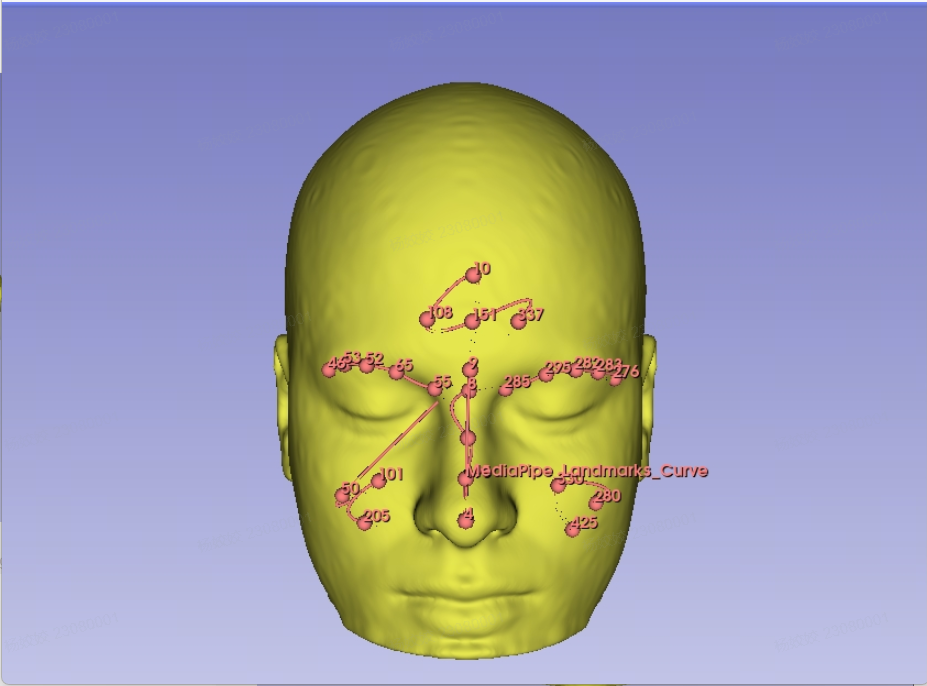
识别MNI脑模板影像的面部3D坐标一直是我想要做的。先说一说方法,后面我再把其对应的Mediapiple 标记的468 点计算出的3D坐标给出来。
(1)准备工作
首先需要一个包含完整人脸的MNI152脑模板T1w影像。注意:MNI152 标准模板默认会裁剪掉面部区域,需要选择未裁剪的版本,否则 MediaPipe 无法检测到完整的 468 个面部关键点。可以去官网下载,也可以从我的博客路径下下载:
- 官网:https://blog.csdn.net/learner_jj/article/details/152075001?spm=1001.2014.3001.5502
- 离线资源:https://download.csdn.net/download/learner_jj/93204384?spm=1001.2014.3001.5503
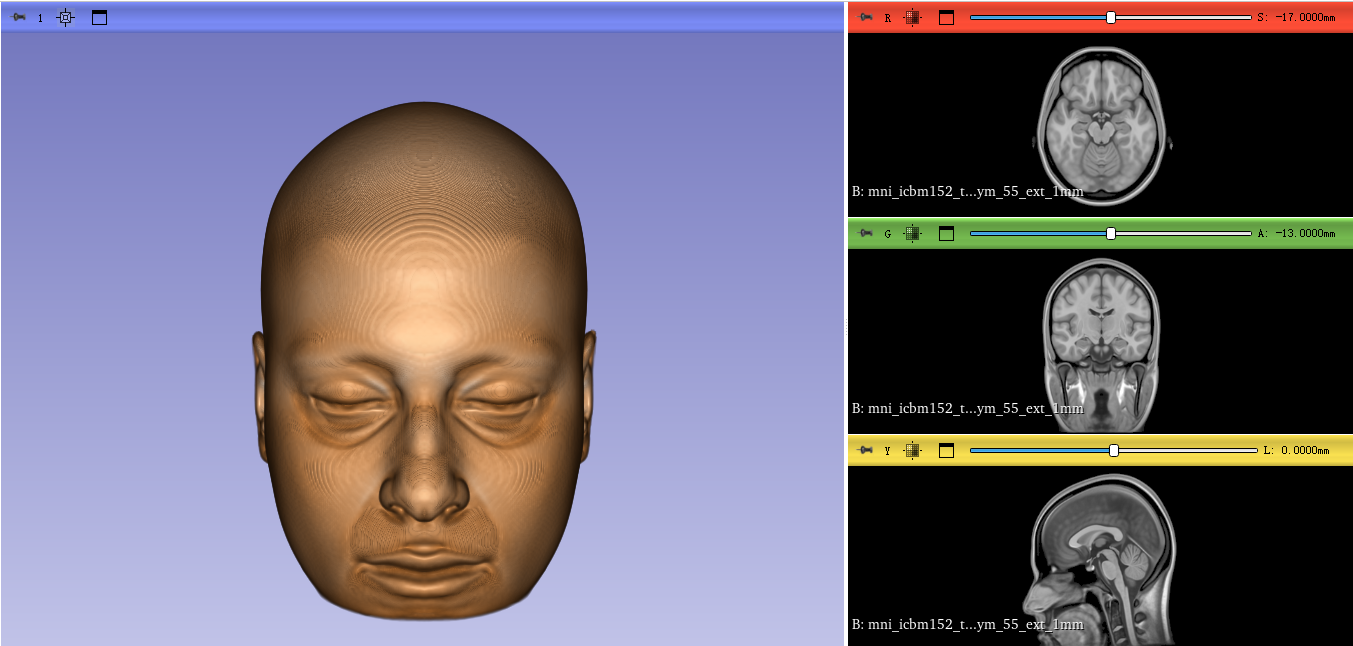
建议优先从官网下载 ,因为我的离线版本做了平移校正(将 MNI 影像的AC移到了0点),与官网原始坐标存在偏移,直接混用会导致坐标不一致。
然后要准备3D slicer 和Mediapiple 。这样接下来就可以开始干活了。
(2)制作MNI152的表面mesh模型
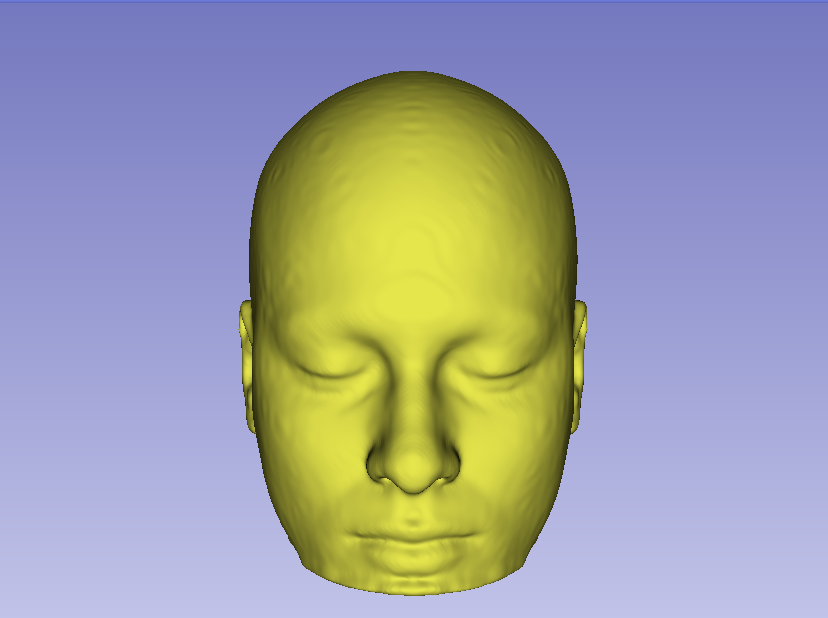
用3D slicer 加载MNI152脑模板影像并基于segment Editor模块做成表面mesh 模型,并导出保存为RAS坐标系的obj文件。
(3)截图并保存视场相机参数
1)调整好模型显示的的视角、放大比例等为开始准备截图并保存视场相机参数作准备
为了截取的2D图可以被mediapiple识别,我们需要截取一张不错的2D图,为了好看我把3D cube、axis都隐藏了,还做了适当放大。而且要保持正视图。这样更好帮助检测出面部特征点。
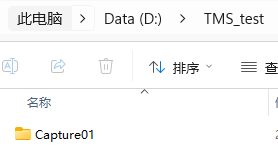
2)在PC机本地准备好存储图片和文件的路径
如D:\TMS_test
在里面建立文件夹Capture01,用作存储截图文件,并把上一步生成的mni的头模型文件拷贝到这个路径下
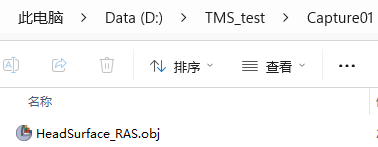
3)准备保存脚本并运行
准备脚本代码Save3DViewState.py,然后将其放置在D:\TMS_test\Save3DViewState.py
bash
import os
import json
import datetime

import slicer
import vtk


# ============================================================
# Get first 3D View
# ============================================================

def get_first_3d_view():

    layout_manager = slicer.app.layoutManager()

    three_d_widget = layout_manager.threeDWidget(0)

    if three_d_widget is None:
        raise RuntimeError(
            "No 3D View found."
        )

    return three_d_widget.threeDView()


# ============================================================
# Capture RGB image
# ============================================================

def capture_rgb(render_window, output_path):

    window_to_image = vtk.vtkWindowToImageFilter()

    window_to_image.SetInput(
        render_window
    )

    # RGB image
    window_to_image.SetInputBufferTypeToRGB()

    # Capture front buffer
    window_to_image.ReadFrontBufferOn()

    # No scaling
    window_to_image.SetScale(
        1,
        1
    )

    window_to_image.Update()

    image = (
        window_to_image.GetOutput()
    )

    dimensions = (
        image.GetDimensions()
    )

    writer = vtk.vtkPNGWriter()

    writer.SetFileName(
        output_path
    )

    writer.SetInputData(
        image
    )

    writer.Write()

    return dimensions


# ============================================================
# Get Camera State
# ============================================================

def get_camera_state(camera):

    parallel_projection = bool(
        camera.GetParallelProjection()
    )

    position = list(
        camera.GetPosition()
    )

    focal_point = list(
        camera.GetFocalPoint()
    )

    view_up = list(
        camera.GetViewUp()
    )

    clipping_range = list(
        camera.GetClippingRange()
    )

    return {

        "projection":
            "parallel"
            if parallel_projection
            else "perspective",

        "parallel_projection":
            parallel_projection,

        "position":
            position,

        "focal_point":
            focal_point,

        "view_up":
            view_up,

        "parallel_scale":
            float(
                camera.GetParallelScale()
            ),

        "view_angle":
            float(
                camera.GetViewAngle()
            ),

        "clipping_range":
            clipping_range,

        "distance":
            float(
                camera.GetDistance()
            ),

        "thickness":
            float(
                camera.GetThickness()
            )
    }


# ============================================================
# Save 3D View State
#
# Output:
#
#   screenshot_*.png
#   camera_*.json
#
# Coordinate systems:
#
#   World : SlicerWorld_RAS
#   Image : ImagePixel_TopLeft
#
# No depth buffer is used.
# ============================================================

def save_3d_view_state(output_dir):

    os.makedirs(
        output_dir,
        exist_ok=True
    )

    print("")
    print("==============================================")
    print(" Slicer 3D View Capture")
    print(" RGB + Camera")
    print("==============================================")

    # --------------------------------------------------------
    # Get 3D View
    # --------------------------------------------------------

    three_d_view = (
        get_first_3d_view()
    )

    render_window = (
        three_d_view.renderWindow()
    )

    renderer = (
        render_window
        .GetRenderers()
        .GetFirstRenderer()
    )

    if renderer is None:
        raise RuntimeError(
            "No renderer found."
        )

    camera = (
        renderer.GetActiveCamera()
    )

    if camera is None:
        raise RuntimeError(
            "No active camera found."
        )

    # --------------------------------------------------------
    # Render once.
    #
    # The screenshot and camera state below are captured
    # from the same RenderWindow state.
    # --------------------------------------------------------

    render_window.Render()

    # --------------------------------------------------------
    # Get actual RenderWindow size
    # --------------------------------------------------------

    window_size = (
        render_window.GetSize()
    )

    image_width = int(
        window_size[0]
    )

    image_height = int(
        window_size[1]
    )

    if (
        image_width <= 0
        or image_height <= 0
    ):
        raise RuntimeError(
            "Invalid RenderWindow size."
        )

    # --------------------------------------------------------
    # Timestamp
    # --------------------------------------------------------

    timestamp = (
        datetime.datetime.now()
        .strftime(
            "%Y%m%d_%H%M%S_%f"
        )
    )

    # --------------------------------------------------------
    # File names
    # --------------------------------------------------------

    screenshot_filename = (
        "screenshot_{}.png".format(
            timestamp
        )
    )

    camera_filename = (
        "camera_{}.json".format(
            timestamp
        )
    )

    screenshot_path = os.path.join(
        output_dir,
        screenshot_filename
    )

    camera_path = os.path.join(
        output_dir,
        camera_filename
    )

    # --------------------------------------------------------
    # Capture RGB
    # --------------------------------------------------------

    rgb_dimensions = capture_rgb(
        render_window,
        screenshot_path
    )

    # --------------------------------------------------------
    # Verify image dimensions
    # --------------------------------------------------------

    if (
        rgb_dimensions[0] != image_width
        or rgb_dimensions[1] != image_height
    ):
        raise RuntimeError(
            "RGB image dimensions do not match "
            "RenderWindow dimensions."
        )

    # --------------------------------------------------------
    # Camera State
    # --------------------------------------------------------

    camera_state = (
        get_camera_state(camera)
    )

    # --------------------------------------------------------
    # Renderer Viewport
    # --------------------------------------------------------

    viewport = list(
        renderer.GetViewport()
    )

    # --------------------------------------------------------
    # Build JSON
    # --------------------------------------------------------

    camera_json = {

        "format":
            "Slicer3DViewCapture",

        "format_version":
            "3.0",

        "timestamp":
            timestamp,

        "coordinate_system": {

            "world":
                "SlicerWorld_RAS",

            "image":
                "ImagePixel_TopLeft"
        },

        "image": {

            "filename":
                screenshot_filename,

            "width":
                image_width,

            "height":
                image_height,

            "channels":
                3,

            "format":
                "PNG",

            "scale_x":
                1,

            "scale_y":
                1,

            "image_is_rescaled":
                False,

            "pixel_origin":
                "top_left",

            "u_direction":
                "right",

            "v_direction":
                "down"
        },

        "render_window": {

            "width":
                image_width,

            "height":
                image_height
        },

        "viewport":
            viewport,

        "camera":
            camera_state,

        "capture": {

            "rgb_scale_x":
                1,

            "rgb_scale_y":
                1,

            "same_render_state":
                True,

            "description":
                "RGB screenshot and camera parameters "
                "captured from the same VTK RenderWindow state."
        }
    }

    # --------------------------------------------------------
    # Write Camera JSON
    # --------------------------------------------------------

    with open(
        camera_path,
        "w",
        encoding="utf-8"
    ) as f:

        json.dump(
            camera_json,
            f,
            indent=4
        )

    # --------------------------------------------------------
    # Output
    # --------------------------------------------------------

    print("")
    print("Slicer 3D View Capture Completed")
    print("")

    print("Screenshot:")
    print(
        "  {}".format(
            screenshot_path
        )
    )

    print("")

    print("Camera JSON:")
    print(
        "  {}".format(
            camera_path
        )
    )

    print("")

    print("Image size:")
    print(
        "  {} x {}".format(
            image_width,
            image_height
        )
    )

    print("")

    print("Projection:")
    print(
        "  {}".format(
            camera_state["projection"]
        )
    )

    print("")

    print("Camera Position:")
    print(
        "  {}".format(
            tuple(
                camera_state["position"]
            )
        )
    )

    print("Camera Focal Point:")
    print(
        "  {}".format(
            tuple(
                camera_state["focal_point"]
            )
        )
    )

    print("Camera View Up:")
    print(
        "  {}".format(
            tuple(
                camera_state["view_up"]
            )
        )
    )

    print("")

    print("Viewport:")
    print(
        "  {}".format(
            tuple(viewport)
        )
    )

    print("")

    print("Coordinate System:")
    print("  World = SlicerWorld_RAS")
    print("  Image = ImagePixel_TopLeft")

    print("")

    print("==============================================")

    return {

        "screenshot":
            screenshot_path,

        "camera":
            camera_path,

        "width":
            image_width,

        "height":
            image_height
    }


# ============================================================
# Restore Camera
# ============================================================

def restore_3d_view_camera(
    camera_json_path
):

    with open(
        camera_json_path,
        "r",
        encoding="utf-8"
    ) as f:

        data = json.load(f)

    # --------------------------------------------------------
    # Verify coordinate systems
    # --------------------------------------------------------

    coordinate_system = (
        data.get(
            "coordinate_system",
            {}
        )
    )

    if (
        coordinate_system.get("world")
        != "SlicerWorld_RAS"
    ):
        raise RuntimeError(
            "Camera JSON world coordinate system "
            "is not SlicerWorld_RAS."
        )

    if (
        coordinate_system.get("image")
        != "ImagePixel_TopLeft"
    ):
        raise RuntimeError(
            "Camera JSON image coordinate system "
            "is not ImagePixel_TopLeft."
        )

    # --------------------------------------------------------
    # Get 3D View
    # --------------------------------------------------------

    three_d_view = (
        get_first_3d_view()
    )

    render_window = (
        three_d_view.renderWindow()
    )

    renderer = (
        render_window
        .GetRenderers()
        .GetFirstRenderer()
    )

    if renderer is None:
        raise RuntimeError(
            "No renderer found."
        )

    camera = (
        renderer.GetActiveCamera()
    )

    if camera is None:
        raise RuntimeError(
            "No active camera found."
        )

    camera_data = (
        data["camera"]
    )

    # --------------------------------------------------------
    # Projection
    # --------------------------------------------------------

    camera.SetParallelProjection(
        bool(
            camera_data[
                "parallel_projection"
            ]
        )
    )

    # --------------------------------------------------------
    # Position
    # --------------------------------------------------------

    camera.SetPosition(
        camera_data[
            "position"
        ]
    )

    # --------------------------------------------------------
    # Focal Point
    # --------------------------------------------------------

    camera.SetFocalPoint(
        camera_data[
            "focal_point"
        ]
    )

    # --------------------------------------------------------
    # View Up
    # --------------------------------------------------------

    camera.SetViewUp(
        camera_data[
            "view_up"
        ]
    )

    # --------------------------------------------------------
    # Parallel Scale
    # --------------------------------------------------------

    camera.SetParallelScale(
        float(
            camera_data[
                "parallel_scale"
            ]
        )
    )

    # --------------------------------------------------------
    # Perspective View Angle
    # --------------------------------------------------------

    camera.SetViewAngle(
        float(
            camera_data[
                "view_angle"
            ]
        )
    )

    # --------------------------------------------------------
    # Clipping Range
    # --------------------------------------------------------

    camera.SetClippingRange(
        camera_data[
            "clipping_range"
        ]
    )

    # --------------------------------------------------------
    # Render
    # --------------------------------------------------------

    render_window.Render()

    print("")
    print("==============================================")
    print(" Camera Restore Completed")
    print("==============================================")
    print("")

    print("Camera JSON:")
    print(
        "  {}".format(
            camera_json_path
        )
    )

    print("")

    print("Projection:")
    print(
        "  {}".format(
            camera_data["projection"]
        )
    )

    print("")

    print("Position:")
    print(
        "  {}".format(
            tuple(
                camera_data["position"]
            )
        )
    )

    print("")

    print("Focal Point:")
    print(
        "  {}".format(
            tuple(
                camera_data["focal_point"]
            )
        )
    )

    print("")

    print("View Up:")
    print(
        "  {}".format(
            tuple(
                camera_data["view_up"]
            )
        )
    )

    print("")
    print("==============================================")
打开3D Slicer 的python窗口,

在窗口中输入
exec(open(r"D:\TMS_Test\Save3DViewState.py", "r").read())
回车后输入
save_3d_view_state(r"D:\TMS_Test\Capture01")
这样就可以把3D窗中当前视图2D图像和相机视场信息保存下来放在D:\TMS_Test\Capture01下。
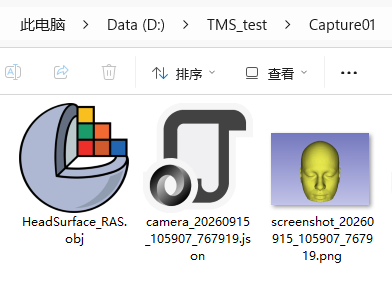
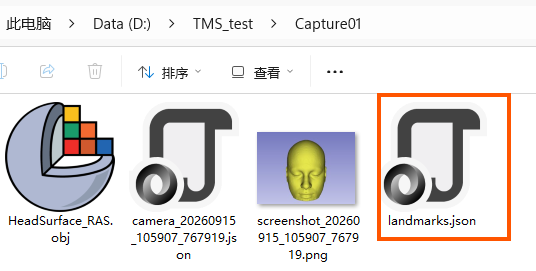
如上图中从左到右分别为脑模板的表面mesh 模型、视图对应的位置状态信息文件和截取的3D显示窗中的2D图。
4)用mediapiple 识别出截取2D图中的面部特征点
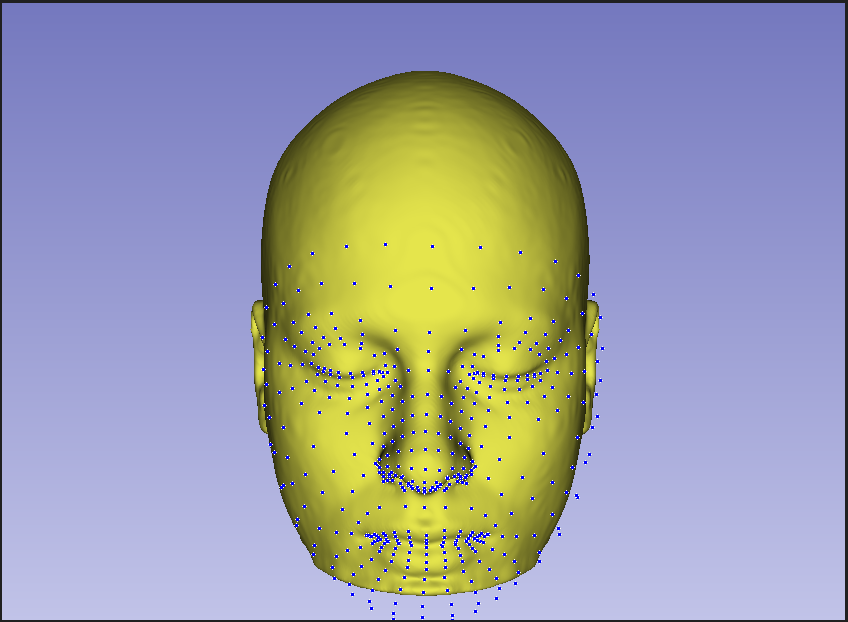
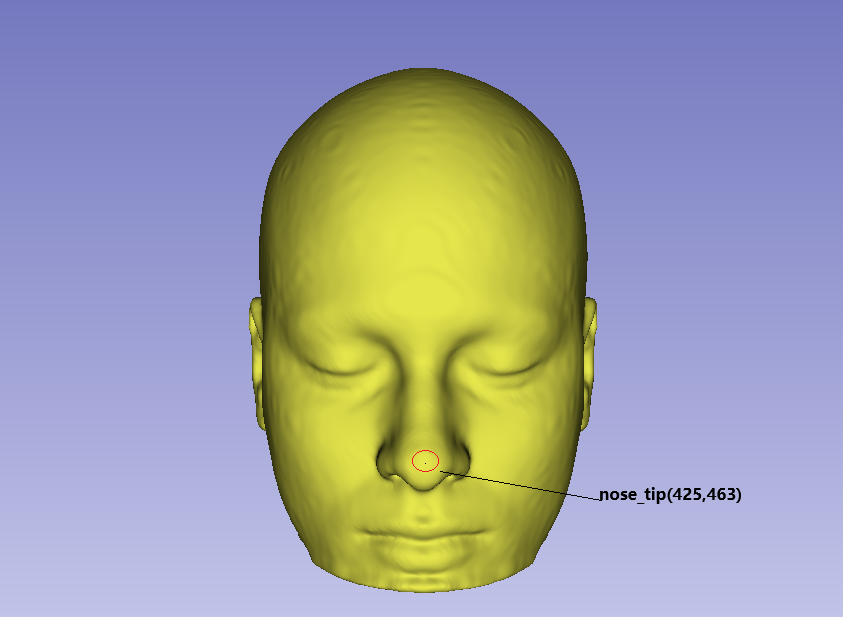
我上图,选取了鼻尖,标记出了鼻尖这个特征点像素坐标,并将这个识别的特征点像素坐标写在landmark.json文件中
landmark.json
bash
{
    "format": "Slicer2DLandmarks",
    "format_version": "1.0",
    "coordinate_system": "ImagePixel_TopLeft",
    "image_filename": "screenshot_20260915_105907_767919.png",
    "image_width": 843,
    "image_height": 617,
    "landmarks": [
        {
            "name": "nose_tip",
            "u": 425,
            "v": 463
        }
    ]
}
json 文档中写命了这个特征点做图像中的坐标位置,写明了截图图像名称、分辨率信息。
5)基于识别的图像中的面部特征点坐标及输入计算特征点对应的3D坐标
基于已知的4个输入如下
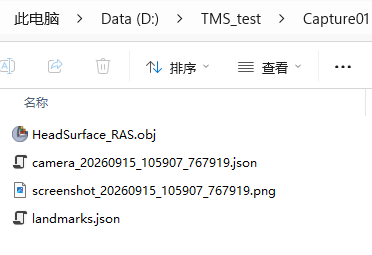
我们需要得到面部特征点对应的3D坐标。准备如下脚本文件:2DTo3DMarkups.py ,放置在D:\TMS_test下
即D:\TMS_test\2DTo3DMarkups.py。
2DTo3DMarkups.py 内容如下:
bash
# -*- coding: utf-8 -*-

import os
import json
import glob
import math

import slicer
import vtk
import qt


# ============================================================
# Configuration
# ============================================================

DATA_DIR = r"D:\TMS_Test\Capture01"

LANDMARKS_JSON = os.path.join(DATA_DIR, "landmarks.json")
HEAD_OBJ = os.path.join(DATA_DIR, "HeadSurface_RAS.obj")


# ============================================================
# Utility
# ============================================================

def load_json(filename):
    with open(filename, "r") as f:
        return json.load(f)


def find_single_file(pattern, description):
    files = glob.glob(os.path.join(DATA_DIR, pattern))

    if len(files) == 0:
        raise RuntimeError(
            "Cannot find {}: {}".format(description, pattern)
        )

    if len(files) > 1:
        print("WARNING: multiple {} files found:".format(description))
        for f in files:
            print("  {}".format(f))

        # Prefer the newest one
        files.sort(key=os.path.getmtime, reverse=True)

    return files[0]


def normalize(v):
    length = math.sqrt(
        v[0] * v[0] +
        v[1] * v[1] +
        v[2] * v[2]
    )

    if length < 1e-12:
        raise RuntimeError("Cannot normalize zero-length vector")

    return (
        v[0] / length,
        v[1] / length,
        v[2] / length
    )


def cross(a, b):
    return (
        a[1] * b[2] - a[2] * b[1],
        a[2] * b[0] - a[0] * b[2],
        a[0] * b[1] - a[1] * b[0]
    )


def dot(a, b):
    return (
        a[0] * b[0] +
        a[1] * b[1] +
        a[2] * b[2]
    )


def sub(a, b):
    return (
        a[0] - b[0],
        a[1] - b[1],
        a[2] - b[2]
    )


def add(a, b):
    return (
        a[0] + b[0],
        a[1] + b[1],
        a[2] + b[2]
    )


def mul(v, s):
    return (
        v[0] * s,
        v[1] * s,
        v[2] * s
    )


# ============================================================
# Load screenshot information
# ============================================================

def load_camera_and_image_info():
    camera_file = find_single_file(
        "camera_*.json",
        "Camera JSON"
    )

    camera_data = load_json(camera_file)

    if camera_data.get("coordinate_system", {}).get("world") != "SlicerWorld_RAS":
        raise RuntimeError(
            "Camera JSON world coordinate system is not SlicerWorld_RAS"
        )

    image_info = camera_data.get("image", {})

    width = int(image_info.get("width", 0))
    height = int(image_info.get("height", 0))

    if width <= 0 or height <= 0:
        raise RuntimeError(
            "Invalid image size in Camera JSON"
        )

    camera = camera_data.get("camera", {})

    return camera_file, camera_data, camera, width, height


# ============================================================
# Camera ray
# ============================================================

def calculate_camera_ray(camera, image_width, image_height, u, v):
    """
    Convert ImagePixel_TopLeft pixel (u,v)
    into a ray in Slicer World RAS.

    Camera JSON contains:
        position
        focal_point
        view_up
        projection
        view_angle
        parallel_scale
    """

    position = tuple(camera["position"])
    focal_point = tuple(camera["focal_point"])
    view_up = tuple(camera["view_up"])

    projection = camera.get("projection", "perspective").lower()

    # Camera forward direction
    forward = normalize(
        sub(focal_point, position)
    )

    # Camera right direction
    right = normalize(
        cross(forward, view_up)
    )

    # Recompute orthogonal up
    up = normalize(
        cross(right, forward)
    )

    # --------------------------------------------------------
    # Image coordinates
    #
    # ImagePixel_TopLeft:
    #
    #       (0,0) ------------------> u
    #         |
    #         |
    #         v
    #
    # Convert pixel center to normalized coordinates.
    # --------------------------------------------------------

    # Pixel center
    x_ndc = ((float(u) + 0.5) / float(image_width)) * 2.0 - 1.0

    y_ndc_top = ((float(v) + 0.5) / float(image_height)) * 2.0 - 1.0

    # Image top -> VTK camera up
    y_ndc = -y_ndc_top

    if projection == "parallel":

        parallel_scale = float(camera["parallel_scale"])

        aspect = float(image_width) / float(image_height)

        half_height = parallel_scale * 0.5
        half_width = half_height * aspect

        offset_right = x_ndc * half_width
        offset_up = y_ndc * half_height

        ray_origin = add(
            add(
                position,
                mul(right, offset_right)
            ),
            mul(up, offset_up)
        )

        ray_direction = forward

    else:
        # ----------------------------------------------------
        # Perspective camera
        # ----------------------------------------------------

        view_angle = float(camera["view_angle"])

        aspect = float(image_width) / float(image_height)

        half_height = math.tan(
            math.radians(view_angle) * 0.5
        )

        half_width = half_height * aspect

        ray_direction = normalize(
            add(
                add(
                    forward,
                    mul(right, x_ndc * half_width)
                ),
                mul(up, y_ndc * half_height)
            )
        )

        ray_origin = position

    return ray_origin, ray_direction


# ============================================================
# Load OBJ
# ============================================================

def load_head_mesh(filename):

    print("")
    print("Loading Head Surface:")
    print("  {}".format(filename))

    reader = vtk.vtkOBJReader()
    reader.SetFileName(filename)
    reader.Update()

    polydata = reader.GetOutput()

    if polydata is None:
        raise RuntimeError("OBJ reader returned None")

    if polydata.GetNumberOfPoints() == 0:
        raise RuntimeError(
            "Head OBJ contains no points"
        )

    if polydata.GetNumberOfCells() == 0:
        raise RuntimeError(
            "Head OBJ contains no cells"
        )

    print("  Points : {}".format(
        polydata.GetNumberOfPoints()
    ))

    print("  Cells  : {}".format(
        polydata.GetNumberOfCells()
    ))

    bounds = polydata.GetBounds()

    print("  Bounds :")
    print("    X = [{:.3f}, {:.3f}]".format(
        bounds[0], bounds[1]
    ))
    print("    Y = [{:.3f}, {:.3f}]".format(
        bounds[2], bounds[3]
    ))
    print("    Z = [{:.3f}, {:.3f}]".format(
        bounds[4], bounds[5]
    ))

    return polydata


# ============================================================
# Ray / mesh intersection
# ============================================================

def ray_mesh_intersection(ray_origin, ray_direction, mesh):
    """
    Intersect ray with the surface mesh.

    vtkOBBTree returns all intersections.
    We select the nearest positive intersection.
    """

    bounds = mesh.GetBounds()

    diagonal = math.sqrt(
        (bounds[1] - bounds[0]) ** 2 +
        (bounds[3] - bounds[2]) ** 2 +
        (bounds[5] - bounds[4]) ** 2
    )

    if diagonal <= 0:
        raise RuntimeError("Invalid mesh bounds")

    # Very large but finite ray length
    ray_length = max(diagonal * 10.0, 1000.0)

    ray_end = add(
        ray_origin,
        mul(ray_direction, ray_length)
    )

    locator = vtk.vtkOBBTree()
    locator.SetDataSet(mesh)
    locator.BuildLocator()

    points = vtk.vtkPoints()
    cell_ids = vtk.vtkIdList()

    result = locator.IntersectWithLine(
        ray_origin,
        ray_end,
        points,
        cell_ids
    )

    if result == 0 or points.GetNumberOfPoints() == 0:
        return None

    intersections = []

    for i in range(points.GetNumberOfPoints()):

        p = points.GetPoint(i)

        vector_from_origin = (
            p[0] - ray_origin[0],
            p[1] - ray_origin[1],
            p[2] - ray_origin[2]
        )

        distance = dot(
            vector_from_origin,
            ray_direction
        )

        # Only accept points in the forward ray direction
        if distance >= 0:
            intersections.append(
                (distance, p)
            )

    if not intersections:
        return None

    # Nearest surface intersection
    intersections.sort(
        key=lambda x: x[0]
    )

    return intersections[0][1]


# ============================================================
# Create Markups Fiducial
# ============================================================

def create_fiducial(name, position):

    # Remove an existing node with the same name
    existing = slicer.util.getFirstNodeByName(name)

    if existing and existing.IsA("vtkMRMLMarkupsFiducialNode"):
        slicer.mrmlScene.RemoveNode(existing)

    markups = slicer.mrmlScene.AddNewNodeByClass(
        "vtkMRMLMarkupsFiducialNode"
    )

    markups.SetName(name)

    index = markups.AddControlPoint(
        position[0],
        position[1],
        position[2]
    )

    markups.SetNthControlPointLabel(
        index,
        name
    )

    return markups


# ============================================================
# Main
# ============================================================

def main():

    print("")
    print("==============================================")
    print(" 2D -> 3D Markups")
    print("==============================================")

    # --------------------------------------------------------
    # 1. Find input files
    # --------------------------------------------------------

    screenshot_file = find_single_file(
        "screenshot_*.png",
        "Screenshot"
    )

    camera_file, camera_data, camera, image_width, image_height = \
        load_camera_and_image_info()

    landmarks = load_json(LANDMARKS_JSON)

    if landmarks.get("coordinate_system") != "ImagePixel_TopLeft":
        raise RuntimeError(
            "Landmarks JSON coordinate system must be "
            "ImagePixel_TopLeft"
        )

    # --------------------------------------------------------
    # 2. Load landmark
    # --------------------------------------------------------

    landmark_list = landmarks.get("landmarks", [])

    if len(landmark_list) == 0:
        raise RuntimeError(
            "No landmarks found in landmarks.json"
        )

    print("")
    print("Input Files:")
    print("  Screenshot:")
    print("    {}".format(screenshot_file))
    print("  Camera:")
    print("    {}".format(camera_file))
    print("  Landmarks:")
    print("    {}".format(LANDMARKS_JSON))
    print("  Head OBJ:")
    print("    {}".format(HEAD_OBJ))

    print("")
    print("Image:")
    print("  {} x {}".format(
        image_width,
        image_height
    ))

    # --------------------------------------------------------
    # 3. Load mesh
    # --------------------------------------------------------

    mesh = load_head_mesh(HEAD_OBJ)

    # --------------------------------------------------------
    # 4. Process landmarks
    # --------------------------------------------------------

    for landmark in landmark_list:

        name = landmark["name"]

        u = float(landmark["u"])
        v = float(landmark["v"])

        # Check image coordinate range
        if u < 0 or u >= image_width:
            raise RuntimeError(
                "Landmark '{}' u={} outside image width {}".format(
                    name, u, image_width
                )
            )

        if v < 0 or v >= image_height:
            raise RuntimeError(
                "Landmark '{}' v={} outside image height {}".format(
                    name, v, image_height
                )
            )

        print("")
        print("----------------------------------------------")
        print("Landmark : {}".format(name))
        print("Image UV : ({:.3f}, {:.3f})".format(u, v))

        # ----------------------------------------------------
        # Camera ray
        # ----------------------------------------------------

        ray_origin, ray_direction = calculate_camera_ray(
            camera,
            image_width,
            image_height,
            u,
            v
        )

        print("")
        print("Ray Origin:")
        print("  ({:.6f}, {:.6f}, {:.6f})".format(
            ray_origin[0],
            ray_origin[1],
            ray_origin[2]
        ))

        print("Ray Direction:")
        print("  ({:.9f}, {:.9f}, {:.9f})".format(
            ray_direction[0],
            ray_direction[1],
            ray_direction[2]
        ))

        # ----------------------------------------------------
        # Ray / Head Surface
        # ----------------------------------------------------

        intersection = ray_mesh_intersection(
            ray_origin,
            ray_direction,
            mesh
        )

        if intersection is None:
            print("")
            print("ERROR:")
            print("  No intersection between camera ray")
            print("  and HeadSurface_RAS.obj")

            continue

        x = float(intersection[0])
        y = float(intersection[1])
        z = float(intersection[2])

        print("")
        print("3D World RAS:")
        print("  X = {:.6f}".format(x))
        print("  Y = {:.6f}".format(y))
        print("  Z = {:.6f}".format(z))

        # ----------------------------------------------------
        # Create Markups
        # ----------------------------------------------------

        markups = create_fiducial(
            name,
            (x, y, z)
        )

        print("")
        print("Markups Fiducial created:")
        print("  {}".format(name))

    print("")
    print("==============================================")
    print(" Completed")
    print("==============================================")
    print("")


# ============================================================
# Execute
# ============================================================

try:
    main()

except Exception as e:

    print("")
    print("==============================================")
    print(" ERROR")
    print("==============================================")

    print(str(e))

    import traceback
    traceback.print_exc()

    print("==============================================")
6)在3D Slicer中运行脚本计算3D坐标并画出3D坐标
》》》加载之前做的mni 脑模板表面mesh模型并恢复视图
注意:先确保MNI头模型mesh在3D Slicer 的显示窗中,不管对模型基于鼠标交互做过什么旋转 平移甚至缩放,在画3D点时模型的显示状态必须回到截图时的状态。
也就是在界面下运行语句:
bash
exec(open(r"D:\TMS_Test\Save3DViewState.py", "r").read())回车后运行
bash
restore_3d_view_camera( r"D:\TMS_Test\Capture01\camera_20260915_105907_767919.json")D:\TMS_Test\Capture01\camera_20260915_103905_699861.json是在截图时保存的相机参数文件。如果截图时的文件明不一样,此处始要更换成实时截图时保存的相机文件。
上面那两句此处运行就是为了3D显示头模型的视场恢复到截图时的那个一致的状态。
》》》在3D 视图中画出目标点
当视图回到截图是的状态时,我们就可以开始在3D窗中画特征点
接着
在3D slicer 的python输入窗口输入
bash
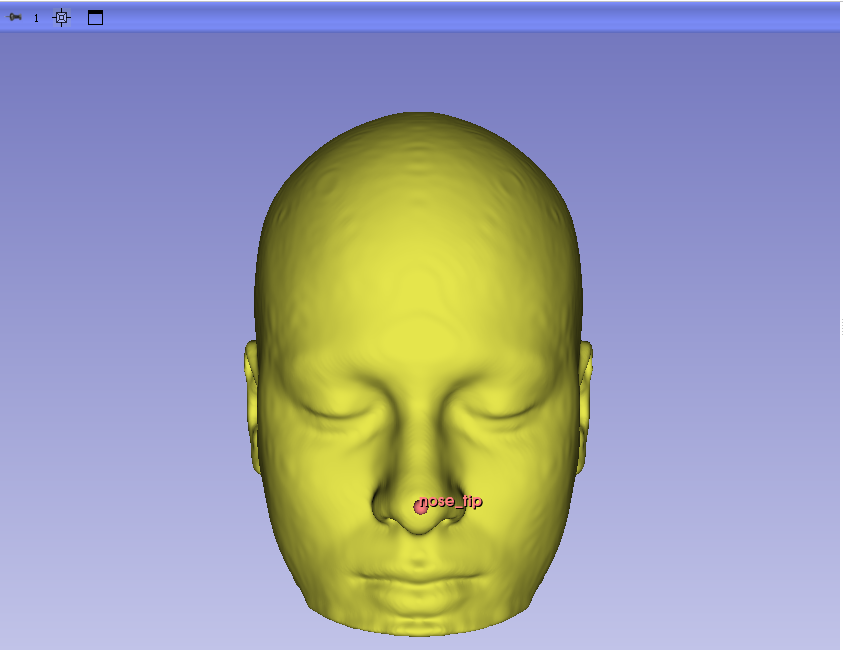
exec(open(r"D:\TMS_Test\2DTo3DMarkups.py", "r").read())回车以后,等待一会儿界面会处理完成,首相会读取预先设定的D:\TMS_test\Capture01路径下输入4个文件,然后处理使得在landmarks.json文件中的鼻尖被画到3D slcier 的3D显示窗中
再看看3D slicer 的python窗口中的输出:
bash
>>> exec(open(r"D:\TMS_Test\2DTo3DMarkups.py", "r").read())

==============================================
 2D -> 3D Markups
==============================================

Input Files:
  Screenshot:
    D:\TMS_Test\Capture01\screenshot_20260915_105907_767919.png
  Camera:
    D:\TMS_Test\Capture01\camera_20260915_105907_767919.json
  Landmarks:
    D:\TMS_Test\Capture01\landmarks.json
  Head OBJ:
    D:\TMS_Test\Capture01\HeadSurface_RAS.obj

Image:
  843 x 617

Loading Head Surface:
  D:\TMS_Test\Capture01\HeadSurface_RAS.obj
  Points : 508014
  Cells  : 1016028
  Bounds :
    X = [-93.897, 93.855]
    Y = [-120.618, 100.609]
    Z = [-148.650, 103.629]

----------------------------------------------
Landmark : nose_tip
Image UV : (425.000, 463.000)

Ray Origin:
  (0.818068, 578.641603, -22.312277)
Ray Direction:
  (-0.003443137, -0.991053394, -0.133421567)

3D World RAS:
  X = -0.842868
  Y = 100.566971
  Z = -86.673561

Markups Fiducial created:
  nose_tip

==============================================
 Completed
==============================================
到此处基于2D图上的特征点完整落到3D窗口中了。这样也得到了面部特征点的3D坐标。.
下面初步看一下随机成果:
我随机看的mediapiple检测出的点图:
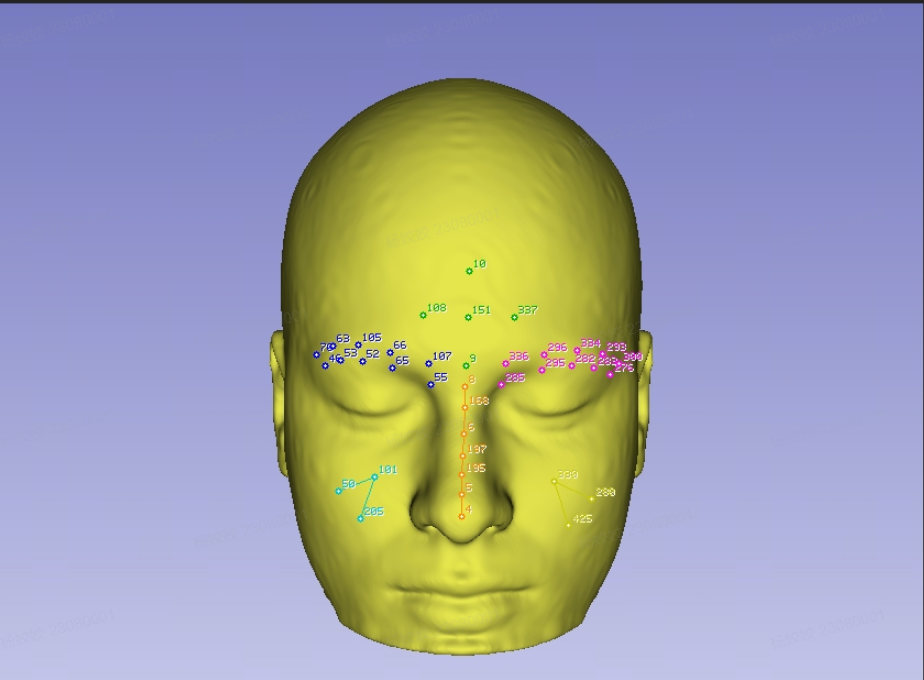
计算得到的标记带点对用的3D坐标图。