在docker里启动 orthancteam/orthanc,用指令
XML
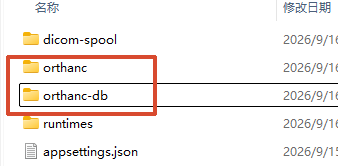
docker run -d --name orthanc -p 4242:4242 -p 8042:8042 -v orthanc-db:/var/lib/orthanc/db -e ORTHANC__AUTHENTICATION_ENABLED=false -e ORTHANC__REMOTE_ACCESS_ALLOWED=true --restart=always orthancteam/orthanc打开 http://localhost:8042 就可以访问。前提条件是需要有 orthanc 和 orthanc-db 两个文件夹
如果访问网址,要加上密码,指令如下:
XML
docker run -d --name orthanc -p 4242:4242 -p 8042:8042 -v orthanc-db:/var/lib/orthanc/db -e ORTHANC_PASSWORD=123456 -e ORTHANC__REMOTE_ACCESS_ALLOWED=true --restart=always orthancteam/orthanc打开 http://localhost:8042 时用用户名为 orthanc、密码为 123456 的账号登录。