关于需求
产品希望导航栏也做沉浸,变成透明,而不是在亮色时会有一个半透明的白色遮罩。
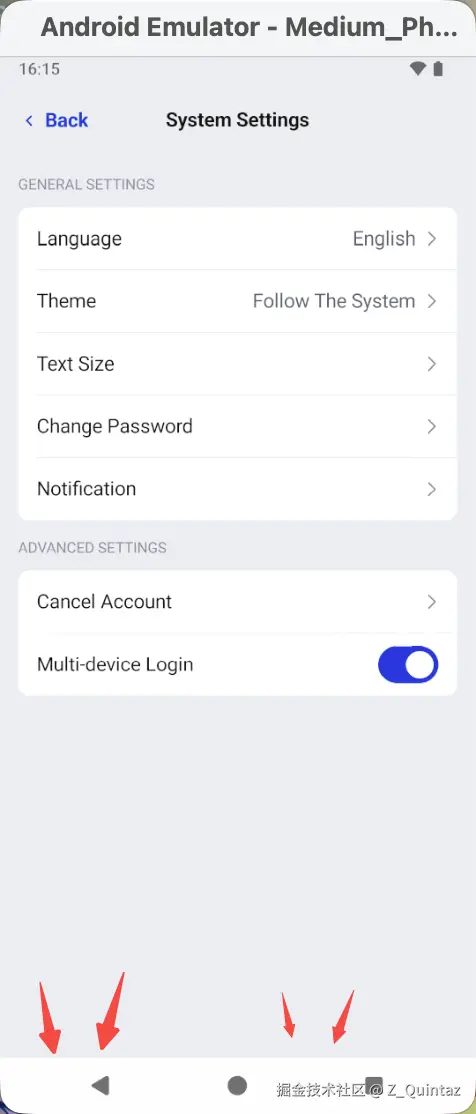
关于代码
ini
lifecycleScope.launch {
    lifecycle.repeatOnLifecycle(Lifecycle.State.STARTED) {
        combine(
            viewModel.appThemeConfig,
            isSystemInDarkTheme()
        ) { appThemeConfig, isDarkTheme ->
            when (appThemeConfig) {
                AppThemeConfig.FOLLOW_SYSTEM -> isDarkTheme
                AppThemeConfig.LIGHT -> false
                AppThemeConfig.DARK -> true
            }
        }.distinctUntilChanged()
            .collect { isDarkTheme ->
                this@MainActivity.isDarkTheme.value = isDarkTheme
                // 设置导航栏和状态栏颜色
                enableEdgeToEdge(
                    statusBarStyle = SystemBarStyle.auto(
                        lightScrim = android.graphics.Color.TRANSPARENT,
                        darkScrim = android.graphics.Color.TRANSPARENT,
                    ) { isDarkTheme },
                    navigationBarStyle = SystemBarStyle.auto(
                        lightScrim = android.graphics.Color.TRANSPARENT,
                        darkScrim = android.graphics.Color.TRANSPARENT,
                    ) { isDarkTheme },
                )

            }
    }
}
通过官方的enableEdgeToEdge方法,设置了状态栏颜色,将导航栏和状态栏都改成了透明的。
但是!!居然没有生效。

关于问题
只能AI了一下,AI告诉我,这个地方设置导航栏透明是没有用的,因为官方考虑到三按钮看不清的问题,添加了强对比的逻辑,那块半透明的白色遮罩就是系统强对比模式下所添加的。
既然如此,按照AI的逻辑,我们添加一下就可以了。

ini
combine(
    viewModel.appThemeConfig,
    isSystemInDarkTheme()
) { appThemeConfig, isDarkTheme ->
    when (appThemeConfig) {
        AppThemeConfig.FOLLOW_SYSTEM -> isDarkTheme
        AppThemeConfig.LIGHT -> false
        AppThemeConfig.DARK -> true
    }
}.distinctUntilChanged()
    .collect { isDarkTheme ->
        this@MainActivity.isDarkTheme.value = isDarkTheme
        // 设置导航栏和状态栏颜色
        enableEdgeToEdge(
            statusBarStyle = SystemBarStyle.auto(
                lightScrim = android.graphics.Color.TRANSPARENT,
                darkScrim = android.graphics.Color.TRANSPARENT,
            ) { isDarkTheme },
            navigationBarStyle = SystemBarStyle.auto(
                lightScrim = android.graphics.Color.TRANSPARENT,
                darkScrim = android.graphics.Color.TRANSPARENT,
            ) { isDarkTheme },
        )
        // 强制系统关闭对比模式
        if (Build.VERSION.SDK_INT >= Build.VERSION_CODES.Q) {
            window.isNavigationBarContrastEnforced = false
        }
    }
但是!!依旧是没有生效!!!

这下不得不看下源码了
scss
public fun ComponentActivity.enableEdgeToEdge(
    statusBarStyle: SystemBarStyle = SystemBarStyle.auto(Color.TRANSPARENT, Color.TRANSPARENT),
    navigationBarStyle: SystemBarStyle = SystemBarStyle.auto(DefaultLightScrim, DefaultDarkScrim),
) {
    val view = window.decorView
    val impl =
        Impl
            ?: (if (Build.VERSION.SDK_INT >= 35) {
                    EdgeToEdgeApi35()
                } else if (Build.VERSION.SDK_INT >= 30) {
                    EdgeToEdgeApi30()
                } else if (Build.VERSION.SDK_INT >= 29) {
                    EdgeToEdgeApi29()
                } else if (Build.VERSION.SDK_INT >= 28) {
                    EdgeToEdgeApi28()
                } else if (Build.VERSION.SDK_INT >= 26) {
                    EdgeToEdgeApi26()
                } else {
                    EdgeToEdgeApi23()
                })
                .also { Impl = it }
    val setup = Runnable {
        impl.setUp(
            statusBarStyle,
            navigationBarStyle,
            window,
            view,
            statusBarStyle.detectDarkMode(view.resources),
            navigationBarStyle.detectDarkMode(view.resources),
        )
    }
    (view as ViewGroup).apply {
        if (!children.any { it.tag is EdgeToEdgeImpl }) {
            // Adds a view to listen to configuration changes.
            addView(
                object : View(view.context) {
                        override fun onConfigurationChanged(newConfig: Configuration) {
                            setup.run()
                        }
                    }
                    .apply {
                        tag = impl
                        visibility = View.GONE
                        setWillNotDraw(true)
                    }
            )
        }
    }
    setup.run()
    impl.adjustLayoutInDisplayCutoutMode(window)
}
简单讲下,这个enableEdgeToEdge根据不同的sdk设置的方法不同,同时添加了个View进行configurationChange的监听(这一步操作妙~啊),然后执行了这个设置方法。
那我们用的sdk35具体做了什么呢?

kotlin
@RequiresApi(35)
private class EdgeToEdgeApi35 : EdgeToEdgeApi30() {

    @Suppress("DEPRECATION")
    @DoNotInline
    override fun setUp(
        statusBarStyle: SystemBarStyle,
        navigationBarStyle: SystemBarStyle,
        window: Window,
        view: View,
        statusBarIsDark: Boolean,
        navigationBarIsDark: Boolean,
    ) {
        WindowCompat.setDecorFitsSystemWindows(window, false)
        window.statusBarColor = Color.TRANSPARENT
        window.navigationBarColor = Color.TRANSPARENT
        val statusBarColor = statusBarStyle.getScrimWithEnforcedContrast(statusBarIsDark)
        val navBarColor = navigationBarStyle.getScrimWithEnforcedContrast(navigationBarIsDark)
        (view as? ViewGroup)?.apply {
            if (
                !children.any {
                    it.tag.run {
                        if (this is List<*> && size == 4 && get(0) is ColorProtection) {
                            forEach { protection ->
                                (protection as? ColorProtection)?.apply {
                                    when (protection.side) {
                                        TOP -> protection.color = statusBarColor
                                        LEFT -> protection.color = navBarColor
                                        RIGHT -> protection.color = navBarColor
                                        BOTTOM -> protection.color = navBarColor
                                    }
                                }
                            }
                            true
                        } else {
                            false
                        }
                    }
                }
            ) {
                // A child view with the tag, a list of 4 ColorProtections, doesn't exist.
                // Let's add the protections if any protection is not transparent.
                if (statusBarColor != Color.TRANSPARENT || navBarColor != Color.TRANSPARENT) {
                    val protections =
                        listOf(
                            ColorProtection(TOP, statusBarColor),
                            ColorProtection(LEFT, navBarColor),
                            ColorProtection(RIGHT, navBarColor),
                            ColorProtection(BOTTOM, navBarColor),
                        )
                    addView(ProtectionLayout(view.context, protections).apply { tag = protections })
                }
            }
        }
        window.isNavigationBarContrastEnforced =
            navigationBarStyle.nightMode == UiModeManager.MODE_NIGHT_AUTO
        WindowInsetsControllerCompat(window, view).run {
            isAppearanceLightStatusBars = !statusBarIsDark
            isAppearanceLightNavigationBars = !navigationBarIsDark
        }
    }
}
也有点长了,简单来说就是设置了状态栏和导航栏的颜色,然后设置了对比模式,设置了状态栏和导航栏文本的颜色。
其中最关键的就是
ini
window.isNavigationBarContrastEnforced =
            navigationBarStyle.nightMode == UiModeManager.MODE_NIGHT_AUTO
它的意思是,我们如果开启了自动亮暗色的模式,就会强制开启导航栏强对比的模式。
关于原因
至此,真相大白,因为添加了亮暗色切换的逻辑,官方怕开启自动切换后,导航栏三按钮看不见的情况,于是又添加了强对比逻辑,在这种自动切换亮暗色的情况下,给你加个半透明的白色遮罩。
而我直接在enableEdgeToEdge之后设置isNavigationBarContrastEnforced = false,肯定是没有用了,因为它会在onConfigurationChanged又设置为true,直接改显然没有照顾到所有情况。

太体贴了,不愧是官方,不愧是官方,但是,我咋改呢,官方的代码我没法直接动。
关于解决
没办法了,现学现用了,它加view监听,我也加view监听。
这边插一下,我特意查询了一下onConfigurationChanged的传递逻辑,总结一下:
- 先Activity,后View
- View之间根据节点排序
那就没问题了,我后加的view,也会后触发onConfigurationChanged
ini
// 设置导航栏和状态栏颜色
enableEdgeToEdge(
    statusBarStyle = SystemBarStyle.auto(
        lightScrim = android.graphics.Color.TRANSPARENT,
        darkScrim = android.graphics.Color.TRANSPARENT,
    ) { isDarkTheme },
    navigationBarStyle = SystemBarStyle.auto(
        lightScrim = android.graphics.Color.TRANSPARENT,
        darkScrim = android.graphics.Color.TRANSPARENT,
    ) { isDarkTheme },
)
// 使用View监听onConfigurationChanged
if (Build.VERSION.SDK_INT >= Build.VERSION_CODES.Q) {
    (window.decorView as ViewGroup).run {
        if (!children.any { it.tag == "force" }) {
            addView( object : View(context) {
                override fun onConfigurationChanged(newConfig: Configuration?) {
                    super.onConfigurationChanged(newConfig)
                    window.isNavigationBarContrastEnforced = false
                }
            }.apply {
                tag = "force"
                visibility = View.GONE
                setWillNotDraw(true)
            })
        }
    }
}
// 直接执行
if (Build.VERSION.SDK_INT >= Build.VERSION_CODES.Q) {
    window.isNavigationBarContrastEnforced = false
}
OK 运行一下看看
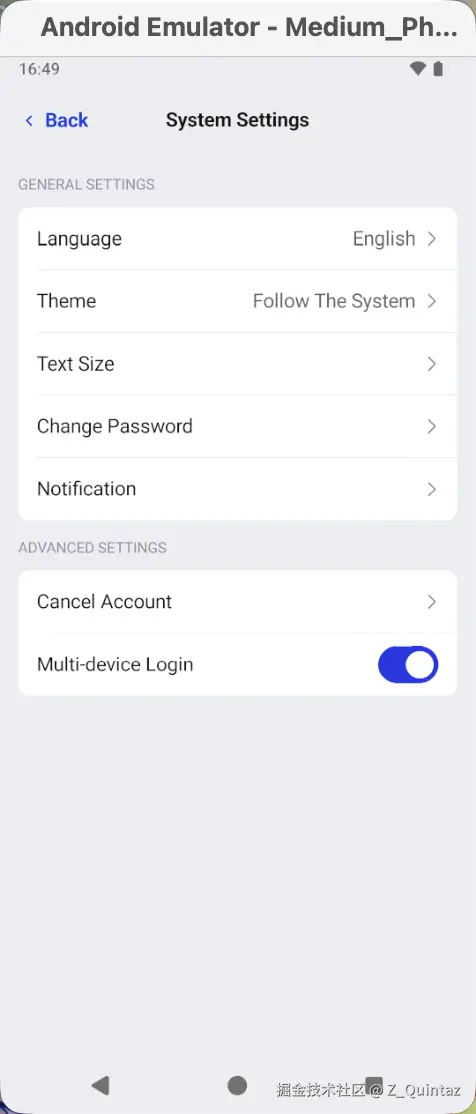
顺利搞定!!