ListView 列表组件中的 delegate(委托)只能放入一个组件,这导致所有的行外观一致,而实际情况我们需要图文混排的列表、个别特殊行要自定义。
DelegateChooser 能解决这个需求,它把若干条 DelegateChoice 攒在一起,按数据取值或行位置挑选一个委托出来。这篇讲最基础的两种挑法:按角色取值匹配、按行索引匹配。
先认识 DelegateChooser
DelegateChooser 本身是一个特殊的组件,专门用在视图需要 delegate 的位置。它内部装着一串 DelegateChoice,每条等于"一个委托 + 一组命中条件"。
DelegateChooser 自己只有两个属性:
- role(角色) ------ 按哪一列的数据来判断。只按列号挑委托时不需要它。
- choices(选择列表) ------ 一串 DelegateChoice。它是默认属性,所以 DelegateChoice 直接写成子项就行,不必显式包进 choices。
DelegateChoice 能写条件的一共三个属性,外加一个委托:
- roleValue(角色取值) ------ 和 role 指的那一列数据比对。
- index(行号) ------ 匹配第几行。它和 row 互为别名,两个都写属于未定义行为,只写一个。
- column(列号) ------ 匹配第几列,只在带列的模型上有意义。
- delegate(委托) ------ 命中之后用哪个组件。
规则也说清楚。看 Qt 源码里那段判定:三个条件之间是与的关系,写了哪个就要求哪个满足,没写的视为不限制。三个都没写的 DelegateChoice 会被直接判定为命中,所以它就是兜底项。挑选时按声明顺序从上往下扫,第一个命中即停止;一条都不命中时,视图拿到的委托是空的,那一行什么都不显示。兜底项通常不能省,原因就在这。
写法上还有个自由度:DelegateChooser 既可以直接写在视图的 delegate: 后面(示例就是这种),也可以先声明成一个带 id 的组件、再在 delegate: 里引用它。后者在同一个 chooser 要被多处复用时省事。
Demo 1 基本用法
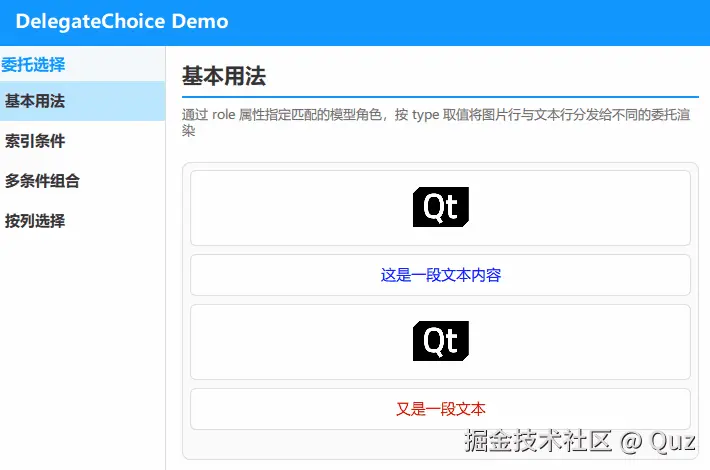
列表四条数据,靠 type 这一列区分:如果是 image 的行渲染成居中图片,如果是 text 的行渲染成一行彩色文字。两种行高度不同,各自在自己的委托里定。
演示代码
qml
import QtQuick
import QtQuick.Controls
import QtQuick.Layouts
import Qt.labs.qmlmodels

FadeInAnimation {
    ColumnLayout {
        anchors.fill: parent
        anchors.margins: 16
        spacing: 12

        // ... 省略标题组件 TitleSeparator ...

        // 内容区:垂直方向填满剩余空间
        Rectangle {
            Layout.fillWidth: true
            Layout.fillHeight: true
            color: "#fafafa"
            radius: 8
            border.color: "#e0e0e0"
            border.width: 1

            ListView {
                anchors.fill: parent
                anchors.margins: 8
                spacing: 8
                clip: true
                ScrollBar.vertical: ScrollBar {}

                model: ListModel {
                    ListElement { type: "image"; source: "qrc:/qt_logo.png" }
                    ListElement { type: "text"; content: "这是一段文本内容"; color: "blue" }
                    ListElement { type: "image"; source: "qrc:/qt_logo.png" }
                    ListElement { type: "text"; content: "又是一段文本"; color: "red" }
                }

                delegate: DelegateChooser {
                    role: "type"

                    DelegateChoice {
                        roleValue: "image"
                        delegate: Rectangle {
                            width: ListView.view.width
                            height: 76
                            color: "white"
                            radius: 6
                            border.color: "#e0e0e0"
                            border.width: 1

                            Image {
                                anchors.centerIn: parent
                                width: 60
                                height: 60
                                source: model.source
                                fillMode: Image.PreserveAspectFit
                            }
                        }
                    }

                    DelegateChoice {
                        roleValue: "text"
                        delegate: Rectangle {
                            width: ListView.view.width
                            height: 42
                            color: "white"
                            radius: 6
                            border.color: "#e0e0e0"
                            border.width: 1

                            Text {
                                anchors.centerIn: parent
                                text: model.content
                                font.pixelSize: 15
                                color: model.color
                            }
                        }
                    }
                }
            }
        }
    }
}
关键逻辑解析
分发逻辑就一句:role 写在 DelegateChooser 上声明"按哪一列判断",每条 DelegateChoice 用自己的 roleValue 声明"取什么值时用我",按声明顺序从上往下扫、第一条命中即生效,所以 roleValue 要和模型里的字面量完全一致。
委托里照旧用 model.xxx 读本行数据,行高由委托自己定------分发只决定用哪份委托,不碰数据怎么读。有个容易想当然的坑:roleValue 只做单值比较,写成数组不会命中任何行,想匹配多个取值就写多条 DelegateChoice。
Demo 2 索引条件
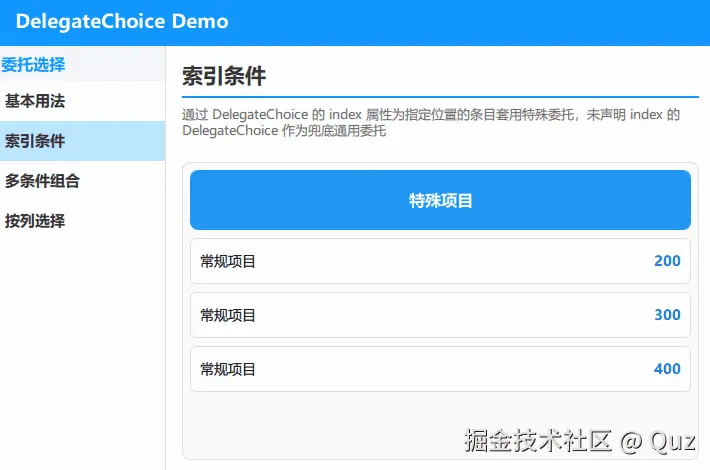
差异不来自数据,而来自位置:列表第 0 项要用特殊样式标出来。DelegateChoice 的 index 正是干这个的,命中指定行号就用它的委托,其余行走后面那条不带条件的兜底委托。
演示代码
qml
import QtQuick
import QtQuick.Controls
import QtQuick.Layouts
import Qt.labs.qmlmodels

FadeInAnimation {
    ColumnLayout {
        anchors.fill: parent
        anchors.margins: 16
        spacing: 12

        // ... 省略标题组件 TitleSeparator ...

        // 内容区:垂直方向填满剩余空间
        Rectangle {
            Layout.fillWidth: true
            Layout.fillHeight: true
            color: "#fafafa"
            radius: 8
            border.color: "#e0e0e0"
            border.width: 1

            ListView {
                anchors.fill: parent
                anchors.margins: 8
                spacing: 8
                clip: true
                ScrollBar.vertical: ScrollBar {}

                model: ListModel {
                    ListElement { value: 100; description: "特殊项目" }
                    ListElement { value: 200; description: "常规项目" }
                    ListElement { value: 300; description: "常规项目" }
                    ListElement { value: 400; description: "常规项目" }
                }

                delegate: DelegateChooser {
                    DelegateChoice {
                        index: 0
                        delegate: Rectangle {
                            width: ListView.view.width
                            height: 60
                            color: "#2196F3"
                            radius: 8

                            Text {
                                anchors.centerIn: parent
                                text: model.description
                                color: "white"
                                font {
                                    bold: true
                                    pixelSize: 16
                                }
                            }
                        }
                    }

                    DelegateChoice {
                        delegate: Rectangle {
                            width: ListView.view.width
                            height: 46
                            color: "white"
                            radius: 6
                            border.color: "#e0e0e0"
                            border.width: 1

                            RowLayout {
                                anchors {
                                    fill: parent
                                    margins: 10
                                }
                                spacing: 10

                                Text {
                                    text: model.description
                                    font.pixelSize: 14
                                    Layout.fillWidth: true
                                }
                                Text {
                                    text: model.value
                                    font {
                                        pixelSize: 14
                                        bold: true
                                    }
                                    color: "#1976D2"
                                }
                            }
                        }
                    }
                }
            }
        }
    }
}
关键逻辑解析
按索引挑选:DelegateChoice { index: 0 } 只对第 0 行生效,渲染成特殊卡片,其余行走最后那条不带任何条件的兜底委托。
关键在于顺序------声明顺序就是优先级,命中即停止,所以特例写前面、兜底写最后;兜底项就是"三个条件一个都没写"的那条,源码里它会被直接判定为命中。
index 只适合"第几行特殊"这类位置需求,真要"最后一行特殊"得先知道行数,不如按角色判断或给那行数据加一个标记字段。
role 的两个细节
模型类型决定"什么时候重新挑委托"
文档里写明:模型如果是 QAbstractItemModel 系(ListModel 就属于这类),角色值变化时 DelegateChooser 会重新评估一次选择。所以把某行的 type 从 text 改成 image,那一行会当场换一份委托。换成 JS 数组这类普通模型,选择只在创建那一行时做一次,之后再改数据不会重挑。
行上只有 modelData 时,role 指的名字会去 modelData 里找
源码里按角色取值失败后会退回读 modelData,如果它是个对象或 map,就按 role 给的名字取字段。也就是说模型写成 [{ type: "image", ... }] 这样的 JS 对象数组时,role: "type" 照样能用。
两种匹配方式对比
| 方式 | 判定依据 | 写在哪 | 典型场景 |
|---|---|---|---|
| 按角色 | 某一列的数据取值 | DelegateChooser { role } 配 DelegateChoice { roleValue } |
图文混排、不同类型的消息、不同控件的设置项 |
| 按索引 | 行号 | DelegateChoice { index } |
首项置顶高亮、某一行特殊样式 |
| 兜底 | 以上都不命中 | 条件全都不写的 DelegateChoice |
常规行的默认样式 |
如何选择看差异从哪来
差异跟着数据走就用角色匹配,数据变了视觉自己跟着变,不用维护行号;差异只跟位置有关(列表头、置顶项),才用索引。
两个条件也能写在同一 DelegateChoice 上,表示"第 N 行里取值等于 X 的那一条",条件叠加,不会变成"或"。
已验证环境:
- Qt 版本:Qt 6.8.2 / Qt 6.11.1
- 操作系统:Windows 11
- GitHub:QML-Minimal-Demos/qml_delegatechoice