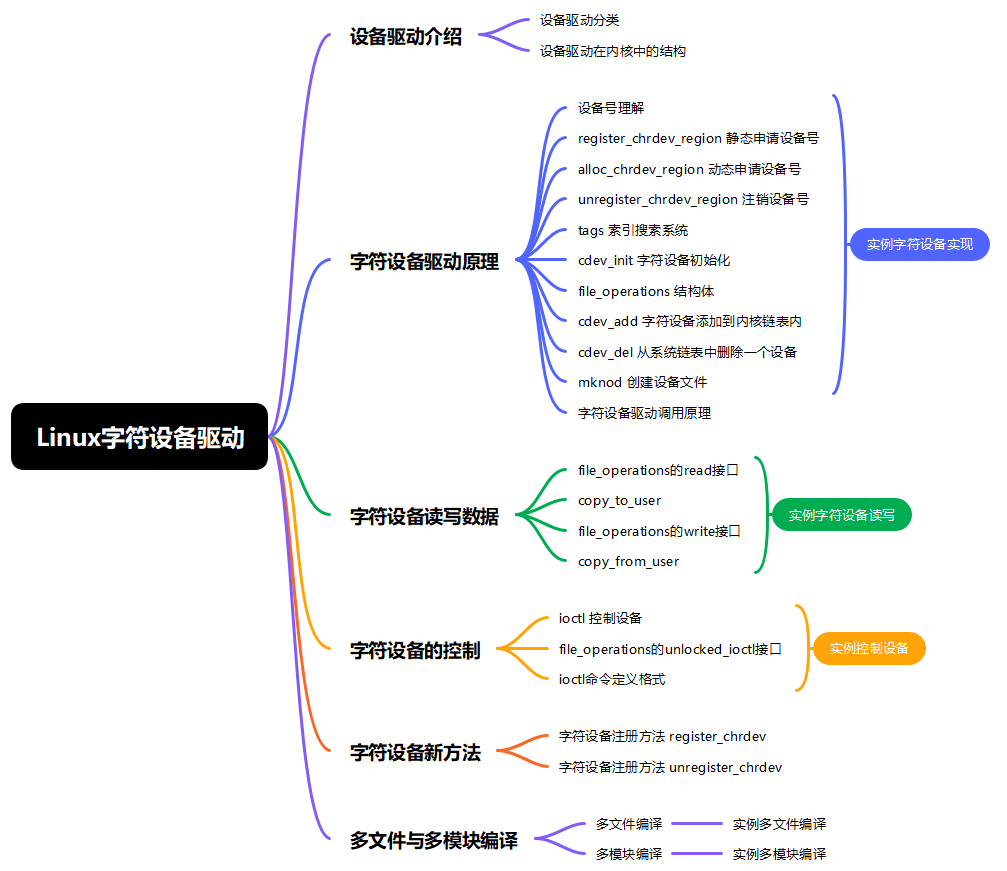
一、设备驱动介绍
1、设备驱动分类
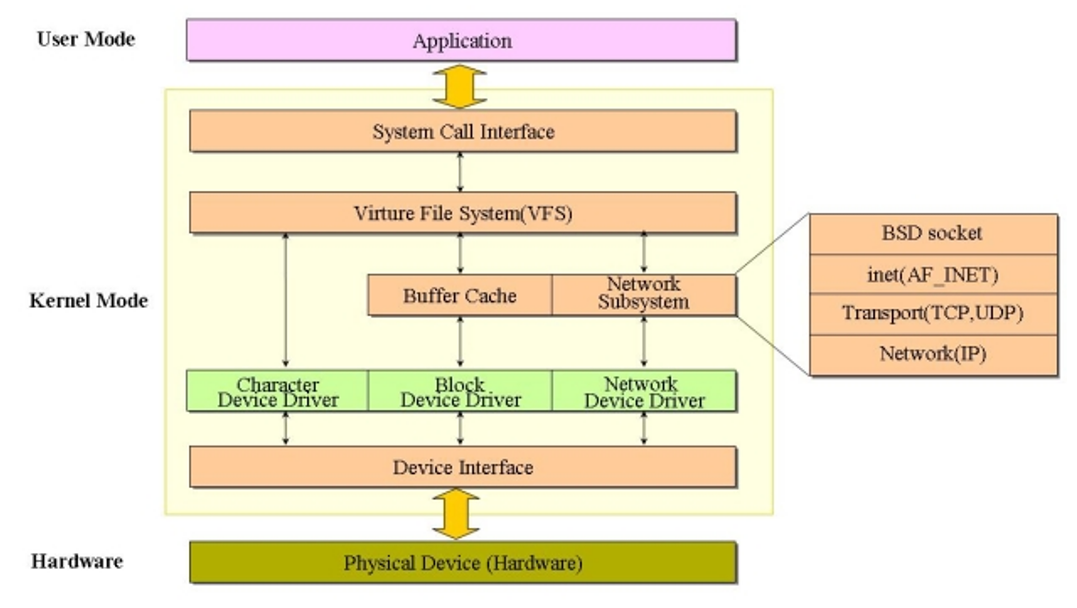
设备驱动可以分为下面三类:字符设备驱动、块设备驱动、网络设备驱动
2、设备驱动在内核中的结构
在内核态中,系统调用接口接收用户态应用的请求,经由虚拟文件系统 VFS 向下调度,VFS 对接 Buffer Cache、网络子系统,同时将不同的硬件操作分发到三类设备驱动:字符设备驱动、块设备驱动、网络设备驱动;其中网络子系统内部又分层实现 BSD socket、inet 地址族、TCP/UDP 传输层、IP 网络层,网络设备驱动承接网络子系统的指令;各类设备驱动统一通过设备接口与底层物理硬件交互,完成用户程序到硬件的读写、网络通信等操作,实现了对不同硬件设备的抽象封装,让上层无需关心具体硬件细节。
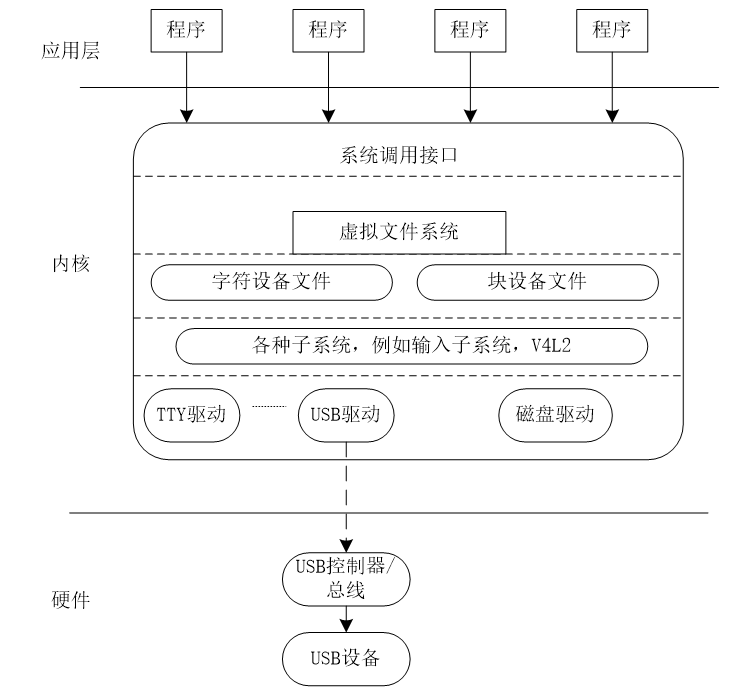
应用层程序通过系统调用接口进入内核,内核内的虚拟文件系统向上提供统一接口,向下抽象出字符设备文件、块设备文件,同时存在输入子系统、V4L2 等各类内核子系统;TTY 驱动、USB 驱动、磁盘驱动等具体设备驱动,依附于内核子系统与设备文件层,承接上层的操作请求,驱动再与硬件层面的控制器、总线交互,最终控制对应物理硬件,完成应用程序对硬件设备的访问,屏蔽硬件细节。
二、字符设备驱动原理
1、设备号理解
- 包括主设备号和次设备号。
- 主设备号: 表示是哪一类的驱动 usb、adc、led、uart、i2c、spi、dma 。
- 通过 cat /proc/devices 显示系统主设备号。
- 字符设备和块设备的设备号是独立的。
- 设备号内核用一个变量来表示 dev_t(u32)来表示一个设备号
- 高20为来表示主设备号,低12为表示次设备号,主设备号:表示范围 0 ~ ( 1M - 1 ),次设备号:表示范围 0 ~ 4095
- 可以使用一个宏函数去生成一个设备号
cpp
#define MINORBITS 20
#define MKDEV(ma,mi) (((ma) << MINORBITS) | (mi))
dev_t devno = MKDEV(500,0)
2、register_chrdev_region 静态申请设备号
cpp
#include<linux/fs.h>
/**
* register_chrdev_region() - register a range of device numbers
* @from: the first in the desired range of device numbers; must include
* the major number.
* @count: the number of consecutive device numbers required
* @name: the name of the device or driver.
*
* Return value is zero on success, a negative error code on failure.
*/
int register_chrdev_region(dev_t from, unsigned count, const char *name)
函数功能:静态申请一个范围内的设备号
函数参数:【form】,从哪一个设备号开始向内核去申请设备号,向内核去申请一个或多个设备号,如果这个设备号内核没有占用,可以申请到,否则申请失败。【count】,表示要申请设备的个数。【name】,要申请设备号的名称。
函数返回值:成功返回0,失败负数
cpp
int ret;
dev_t devno = MKDEV(major,minor);
ret = register_chrdev_region(devno,1,"hello");
if(ret < 0 )
{
printk("fail to get devno\n");
return ret;
}
使用命令去查看申请到的设备号 cat /proc/devices 。
3、alloc_chrdev_region 动态申请设备号
cpp
#include<linux/fs.h>
/**
* alloc_chrdev_region() - register a range of char device numbers
* @dev: output parameter for first assigned number
* @baseminor: first of the requested range of minor numbers
* @count: the number of minor numbers required
* @name: the name of the associated device or driver
*
* Allocates a range of char device numbers. The major number will be
* chosen dynamically, and returned (along with the first minor number)
* in @dev. Returns zero or a negative error code.
*/
int alloc_chrdev_region(dev_t *dev, unsigned baseminor, unsigned count,const char *name)
函数功能:动态申请设备号,随机分配一个设备号,一个可用的设备号
函数参数:【dev】,设备号变量的指针;【baseminor】,次设备号开始于那一个数字;【count】,需要的多少个设备;【name】,要申请设备的名称
函数返回值:成功返回0,失败负数
4、unregister_chrdev_region 注销设备号
cpp
#include<linux/fs.h>
/**
* unregister_chrdev_region() - return a range of device numbers
* @from: the first in the range of numbers to unregister
* @count: the number of device numbers to unregister
*
* This function will unregister a range of @count device numbers,
* starting with @from. The caller should normally be the one who
* allocated those numbers in the first place...
*/
void unregister_chrdev_region(dev_t from, unsigned count)
函数功能:注销设备号
函数参数:【form】,要释放的设备号;【count】,要释放几个设备号
函数返回值:无返回值
5、tags 索引搜索系统
- 在内核源码路径下使用命令生成索引
cpp
make tags- 在内核源码的顶层目录下查找索引
bash
vi -t 函数名/结构体名/变量名
vi -t MKDEV
vi -t unregister_chrdev_region
可以找到函数的定义和结构体定义,可以使用ctrl + ] 进行函数跟踪或查找系统所有定义,使用ctrl + t 返回上一级目录
6、cdev_init 字符设备初始化
cpp
#include<linux/cdev.h>
struct cdev {
    struct kobject kobj;
    struct module *owner;
    const struct file_operations *ops;
    struct list_head list;
    dev_t dev;
    unsigned int count;
};
/**
cdev_init() - initialize a cdev structure
@cdev: the structure to initialize
@fops: the file_operations for this device
Initializes @cdev, remembering @fops, making it ready to add to the
system with cdev_add().
*/
void cdev_init(struct cdev *cdev, const struct file_operations *fops)
函数功能:cdev_init() 初始化一个cdev结构体,把cdev这个结构体和file_operations结构体进行关联
函数参数:【cdev】,要初始化的cdev结构体指针;【fops】,要初始化的file_operations结构体指针
函数返回值:无返回值
cpp
cdev.owner = THIS_MODULE; // 表示的是指向本模块的指针
#define THIS_MODULE (&__this_module)
7、file_operations 结构体
file_operations结构体是字符设备驱动所支持的文件操作
cpp
struct file_operations {
    struct module *owner;
    loff_t (*llseek) (struct file *, loff_t, int);
    ssize_t (*read) (struct file *, char __user *, size_t, loff_t *);
    ssize_t (*write) (struct file *, const char __user *, size_t, loff_t *);
    ssize_t (*aio_read) (struct kiocb *, const struct iovec *, unsigned long, loff_t);
    ssize_t (*aio_write) (struct kiocb *, const struct iovec *, unsigned long, loff_t);
    int (*readdir) (struct file *, void *, filldir_t);
    unsigned int (*poll) (struct file *, struct poll_table_struct *);
    long (*unlocked_ioctl) (struct file *, unsigned int, unsigned long);
    long (*compat_ioctl) (struct file *, unsigned int, unsigned long);
    int (*mmap) (struct file *, struct vm_area_struct *);
    int (*open) (struct inode *, struct file *);
    int (*flush) (struct file *, fl_owner_t id);
    int (*release) (struct inode *, struct file *);
    int (*fsync) (struct file *, loff_t, loff_t, int datasync);
    int (*aio_fsync) (struct kiocb *, int datasync);
    int (*fasync) (int, struct file *, int);
    int (*lock) (struct file *, int, struct file_lock *);
    ssize_t (*sendpage) (struct file *, struct page *, int, size_t, loff_t *, int);
    unsigned long (*get_unmapped_area)(struct file *, unsigned long, unsigned long, unsigned long, unsigned long);
    int (*check_flags)(int);
    int (*flock) (struct file *, int, struct file_lock *);
    ssize_t (*splice_write)(struct pipe_inode_info *, struct file *, loff_t *, size_t, unsigned int);
    ssize_t (*splice_read)(struct file *, loff_t *, struct pipe_inode_info *, size_t, unsigned int);
    int (*setlease)(struct file *, long, struct file_lock **);
    long (*fallocate)(struct file *file, int mode, loff_t offset,loff_t len);
};
cpp
struct cdev cdev;
struct file_operations hello_fops = {
    .owner = THIS_MODULE
};
// 表示的是指向本模块的指针
// cdev.owner = THIS_MODULE
// #define THIS_MODULE (&__this_module)
static void char_reg_setup_cdev (void)
{
int error, devno = MKDEV (hello_major, hello_minor);
cdev_init (&cdev, &hello_fops);
cdev.owner = THIS_MODULE;
cdev.ops = &hello_fops;
error = cdev_add (&cdev, devno , 1);
if (error < 0 )
{
printk (KERN_NOTICE "Error %d adding char_reg_setup_cdev", error);
}
}
8、cdev_add 字符设备添加到内核链表内
cpp
#include<linux/cdev.h>
/**
* cdev_add() - add a char device to the system
* @p: the cdev structure for the device
* @dev: the first device number for which this device is responsible
* @count: the number of consecutive minor numbers corresponding to this
* device
*
* cdev_add() adds the device represented by @p to the system, making it
* live immediately. A negative error code is returned on failure.
*/
int cdev_add(struct cdev *p, dev_t dev, unsigned count)
函数功能:字符设备添加到内核链表内
函数参数:【cdev】,cdev结构体指针;【dev】,设备号;【cout】,设备的个数
函数返回值:成功返回0,失败返回负数
9、cdev_del 从系统链表中删除一个设备
cpp
#include<linux/cdev.h>
/**
* cdev_del() - remove a cdev from the system
* @p: the cdev structure to be removed
*
* cdev_del() removes @p from the system, possibly freeing the structure
* itself.
*/
void cdev_del(struct cdev *p)
函数功能:从系统链表中删除一个字符设备
函数参数:【cdev】,要删除的结构体指针
函数返回值:无返回值
10、mknod 创建设备文件
创建设备文件,把设备号和文件进行关联。

11、实例字符设备实现
字符设备实现,对设备进行打开与关闭操作
cpp
#include <stdio.h>
#include <stdlib.h>
#include <unistd.h>
#include <sys/types.h>
#include <sys/stat.h>
#include <fcntl.h>
int main(int argc, char const *argv[])
{
    int fd = open("/dev/hello", O_RDWR);
    if (fd < 0)
    {
        perror("open");
        exit(-1);
    }
    printf("fd=%d\n", fd);
    close(fd);
    return 0;
}
cpp
#include <linux/init.h>
#include <linux/module.h>
#include <linux/kernel.h>
#include <linux/stat.h>
#include <linux/fs.h>
#include <linux/cdev.h>
MODULE_LICENSE("Dual BSD/GPL");
MODULE_AUTHOR("YShengli");
MODULE_DESCRIPTION("A simple Linux module");
MODULE_VERSION("0.1");
#define HELLO_MAJOR 500
// 创建1个字符设备 cdev
struct cdev hello_cdev;
// 应用程序open打开设备文件时调用
static int hello_open(struct inode *inode, struct file *file)
{
printk(KERN_INFO "Hello open!\n");
return 0;
}
// 应用程序close关闭设备文件时调用
static int hello_release(struct inode *inode, struct file *file)
{
printk(KERN_INFO "Hello release!\n");
return 0;
}
// file_operations 结构体
static struct file_operations hello_fops = {
.owner = THIS_MODULE,
.open = hello_open,
.release = hello_release,
};
// 模块初始化函数
// insmod hello.ko  -> module_init() -> hello_init()
static int __init hello_init(void)
{
printk(KERN_INFO "Hello world!\n");
// 申请1个设备号
int ret = register_chrdev_region(MKDEV(HELLO_MAJOR, 0), 1, "hello");
if (ret < 0) {
printk(KERN_ERR "Failed to register char device region\n");
return ret;
}
// 初始化 cdev
cdev_init(&hello_cdev, &hello_fops);
// 添加 cdev 到系统
ret = cdev_add(&hello_cdev, MKDEV(HELLO_MAJOR, 0), 1);
if (ret < 0) {
printk(KERN_ERR "Failed to add char device\n");
return ret;
}
return 0;
}
// 模块退出函数
// rmmod hello.ko  -> module_exit() -> hello_exit()
static void __exit hello_exit(void)
{
printk(KERN_INFO "Goodbye world!\n");
// 释放设备号
unregister_chrdev_region(MKDEV(HELLO_MAJOR, 0), 1);
// 删除 cdev 从系统
cdev_del(&hello_cdev);
}
module_init(hello_init);
module_exit(hello_exit);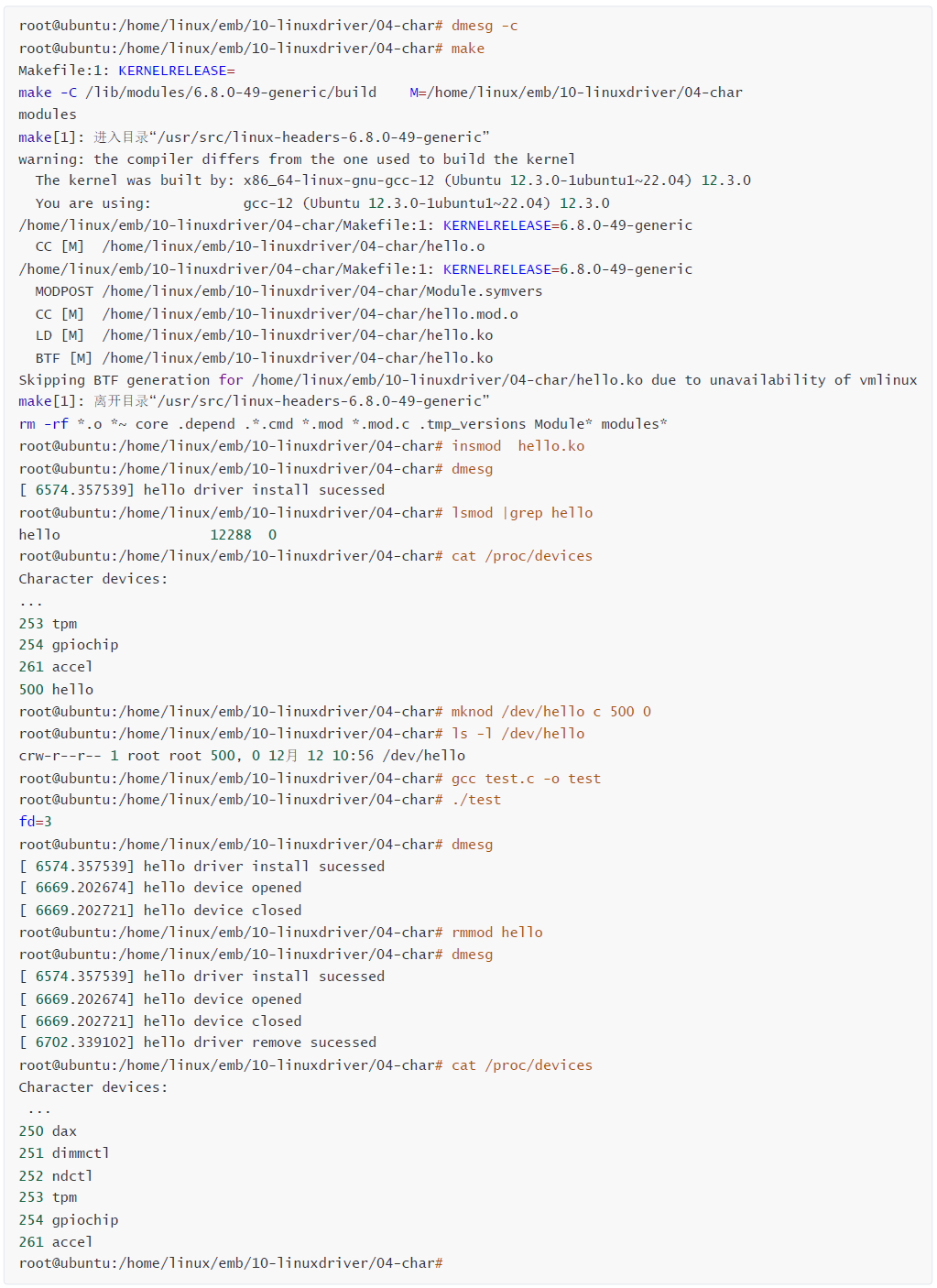
12、字符设备驱动调用原理
驱动模块先通过cdev_init将hello_cdev字符设备结构体与文件操作函数集fops建立关联,再使用cdev_add把该字符设备注册到内核 cdev 链表;执行mknod创建设备节点时,内核会遍历 cdev 链表,依据设备号把 inode 节点的i_cdev指针指向对应的hello_cdev;当用户态程序调用open("/dev/hello")打开设备文件,内核通过设备号找到对应的 inode 结构体,将 file 结构体的f_op指针赋值为驱动的fops,进而执行驱动里的fops->open函数;调用close关闭设备时,则会触发驱动的fops->release函数,完成用户程序到字符设备驱动的完整调用链路。
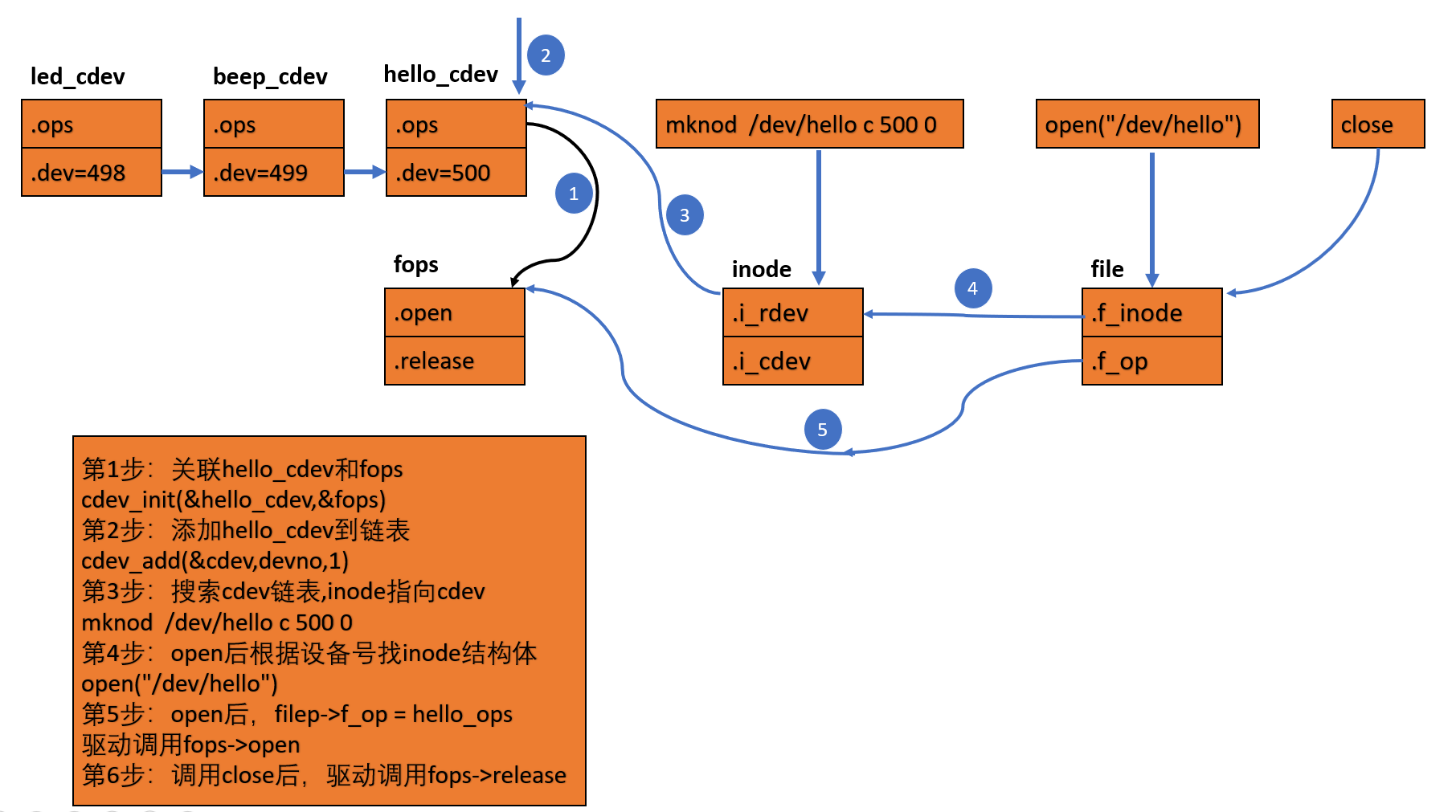
- 在驱动程序中,首先要创建一个cdev结构,
cpp
struct cdev {
    struct kobject kobj;
    struct module *owner;
    const struct file_operations *ops;
    struct list_head list;
    dev_t dev;
    unsigned int count;
};
// 可以手动创建一个cdev结构体加上cdev_init,也可以使用cdev_alloc函数去创建
struct cdev cdev;
cdev_init(&cdev, &fops);
cdev.owner = THIS_MODULE;- 静态创建结构体后有要对结构体进行初始化,使用cdev_init函数进行,cdev_init有两个参数
cpp
void cdev_init(struct cdev *cdev, const struct file_operations *fops)
{
    memset(cdev, 0, sizeof *cdev);
    INIT_LIST_HEAD(&cdev->list);
    kobject_init(&cdev->kobj, &ktype_cdev_default);
    cdev->ops = fops;
}
// 把结构体清除为0,然后赋了一个 cdev->ops 的值,因此cdev->ops 指向ops结构体- 使用cdev_add把设备好加入到cdev组成的链表当中。
cpp
int cdev_add(struct cdev *p, dev_t dev, unsigned count)
{
    p->dev = dev;
    p->count = count;
    return kobj_map(cdev_map, dev, count, NULL, exact_match, exact_lock, p);
}
// 把设备号加入到cdev结构体中.因此cdev结构体中的成员ops指向驱动当中的ops结构体,dev成员是保存的设备号- mknod 时会在内核中创建一个inode的结构体,这里只写inode重要的成员信息
cpp
struct inode {
    dev_t i_rdev; //该成员表示设备文件的inode结构,它包含了真正的设备编号。
    // 该成员表示字符设备的内核的 内部结构。当inode指向一个字符设备文件时,该成员包含了指向struct cdev结构的指针,
    // 其中cdev结构是字符设备结构体。
    struct cdev *i_cdev;
};
// 执行mknod时会对这个结构体进行赋值,怎么赋值的呢?
// 首先会对i_rdev 这个成员赋值,会对成员赋值为相应的设备号。
// 然后对i_cdev这个指针赋值. 这个是通过查询系统的cdev链表实现的,根据主设备号和次设备号找到cdev这个结构体,
// 因此i_cdev= &cdev.- 应用程序调用 open("/dev/hello")这个函数时
cpp
/*
应用程序调用 open("/dev/hello")这个函数时,内核会调用sys_open,继续向下调用
chrdev_open(struct inode * inode, struct file * filp)
内核会在调用open函数时创建struct file 结构体,并且会对file结构体的成员f_op赋值为驱动中的file_operation结构体
(通过设备号可以找到inode结构体,inode结构体中有i_cdev指针,指向系统的cdev的结构体,cdev的成员ops指向驱动的
file_operation成员hello_ops),应用程序调用open,驱动中也会调用file_operation的open函数,故系统正确的调用
应用程序调用open后,对于驱动来说,filep->f_op = hello_ops,最终会调用驱动的open函数
*/
struct file {
    struct path f_path;
    const struct file_operations *f_op;
    spinlock_t f_lock; /* f_ep_links, f_flags, no IRQ */
    atomic_long_t f_count;
    struct inode *f_inode; /* cached value */
};
三、字符设备读写数据
1、file_operations的read接口
cpp
#include<asm/uaccess.h>
ssize_t (*read) (struct file *filep, char __user *to , size_t count , loff_t * off);
函数功能:把驱动中的数据复制到应用程序内
函数参数:【filep】,指向内核创建的file结构体指针;【to】,要向用户空间发送数据的指针,应用程序的地址;__user,表示应用程序的地址;【count】,用户空间要读取的字节数;【off】,文件指针的偏移量
函数返回值:成功返回发送到应用程序的字节数,失败返回负数
2、copy_to_user
cpp
#include<linux/uaccess.h>
extern inline long copy_to_user(void __user *to, const void *from, long n)
{
return __copy_tofrom_user((__force void *)to, from, n, to);
}
函数功能:把驱动中的数据复制到应用程序内
函数参数:【to】,数据的目的,应用程序的地址;【__user】,应用程序的地址;【from】,数据的源,驱动的地址;【n】,数据的大小
函数返回值:成功返回发送到应用程序的字节数,失败返回负数
3、file_operations的write接口
cpp
#include<asm/uaccess.h>
ssize_t (*write) (struct file *, const char __user *from, size_t count, loff_t *off);
函数功能:把应用程序内的数据写入到驱动内
函数参数:【filep】,指向内核创建的file结构体指针;【from】,要接受用户空间发给内核空间数据的指针,应用程序的地址;【count】,用户空间要写的字节数;【off】,文件指针的偏移量
函数返回值:成功写入到驱动的字节数,失败返回负数
4、copy_from_user
cpp
#include<asm/uaccess.h>
extern inline long copy_from_user(void *to, const void __user *from, long n)
{
    return __copy_tofrom_user(to, (__force void *)from, n, from);
}
函数功能:把应用程序中的数据复制到驱动内
函数参数:【to】,数据的目的,驱动中的地址;【from】,数据的源,应用程序的地址;【n】,数据的大小
函数返回值:成功写入到驱动中的字节数,失败返回负数
5、实例字符设备读写
- test.c
cpp
#include <stdio.h>
#include <stdlib.h>
#include <string.h>
#include <sys/types.h>
#include <sys/stat.h>
#include <fcntl.h>
#include <unistd.h>

int main(int argc, char const *argv[])
{
    char buf[128]={0};
    int ret;
    // open -> 驱动调用 -> hello_open()
    int fd = open("/dev/hello", O_RDWR);
    if (fd < 0) {
        perror("open");
        return -1;
    }
    printf("fd = %d\n", fd);


    memset(buf, 'O', sizeof(buf)-1);   // 写入127个字符O
    // 写入设备文件
    // write -> 驱动调用 -> hello_write()
    ret = write(fd, buf, sizeof(buf));
    if (ret < 0) {
        perror("write");
        return -1;
    }
    memset(buf, 0, sizeof(buf)); // 清空buf
    // 读取设备文件
    // read -> 驱动调用 -> hello_read()
    ret = read(fd, buf, sizeof(buf));
    if (ret < 0) {
        perror("read");
        return -1;
    }
    printf("read %d bytes: %s\n", ret, buf);

    // 关闭设备文件
    // close -> 驱动调用 -> hello_release()
    close(fd);
    return 0;
}- hello.c
cpp
#include <linux/init.h>
#include <linux/module.h>
#include <linux/kernel.h>
#include <linux/stat.h>
#include <linux/fs.h>
#include <linux/cdev.h>

MODULE_LICENSE("Dual BSD/GPL");
MODULE_AUTHOR("YShengli");
MODULE_DESCRIPTION("A simple Linux module");
MODULE_VERSION("0.1");

#define HELLO_MAJOR 500

char buf[128]={0};

// 创建1个字符设备 cdev
struct cdev hello_cdev;

 // 应用程序open打开设备文件时调用
static int hello_open(struct inode *inode, struct file *file)
{
    printk(KERN_INFO "Hello open!\n");
    return 0;
}

 // 应用程序close关闭设备文件时调用
static int hello_release(struct inode *inode, struct file *file)
{
    printk(KERN_INFO "Hello release!\n");
    return 0;
}

 // 应用程序read读取设备文件时调用
static ssize_t hello_read(struct file *file, char __user *user_buf, size_t count, loff_t *f_pos)
{
    printk(KERN_INFO "Hello read!\n");
    // 从内核空间复制数据到用户空间
    if (copy_to_user(user_buf,buf, count)) {
        printk(KERN_ERR "Failed to copy to user\n");
        return -EFAULT;
    }
    return count;
}

 // 应用程序write写入设备文件时调用
static ssize_t hello_write(struct file *file, const char __user *user_buf, size_t count, loff_t *f_pos)
{
    printk(KERN_INFO "Hello write!\n");
    // 从用户空间复制数据到内核空间
    if (copy_from_user(buf, user_buf, count)) {
        printk(KERN_ERR "Failed to copy from user\n");
        return -EFAULT;
    }
    return count;
}

// file_operations 结构体
static struct file_operations hello_fops = {
    .owner = THIS_MODULE,
    .open = hello_open,
    .release = hello_release,
    .read = hello_read,
    .write = hello_write,
};

// 模块初始化函数
// insmod hello.ko  -> module_init() -> hello_init()
static int __init hello_init(void)
{
    printk(KERN_INFO "Hello world!\n");
    // 申请1个设备号
    int ret = register_chrdev_region(MKDEV(HELLO_MAJOR, 0), 1, "hello");
    if (ret < 0) {
        printk(KERN_ERR "Failed to register char device region\n");
        return ret;
    }
    // 初始化 cdev
    cdev_init(&hello_cdev, &hello_fops);
    // 添加 cdev 到系统
    ret = cdev_add(&hello_cdev, MKDEV(HELLO_MAJOR, 0), 1);
    if (ret < 0) {
        printk(KERN_ERR "Failed to add char device\n");
        return ret;
    }
    return 0;
}

// 模块退出函数
// rmmod hello.ko  -> module_exit() -> hello_exit()
static void __exit hello_exit(void)
{
    printk(KERN_INFO "Goodbye world!\n");
    // 释放设备号
    unregister_chrdev_region(MKDEV(HELLO_MAJOR, 0), 1);
    // 删除 cdev 从系统
    cdev_del(&hello_cdev);
}

module_init(hello_init);
module_exit(hello_exit);- Makefile
cpp
$(warning KERNELRELEASE=$(KERNELRELEASE))           # 打印提示,打印变量内的值
ifeq ($(KERNELRELEASE),)

#KERNELDIR ?= /home/linux/emb2307/12-linuxsys/myir-imx-linux      #交叉开发内核路径

KERNELDIR ?= /lib/modules/$(shell uname -r)/build   # 本地开发, ubuntu22.04的路径,内核头文件目录

PWD := $(shell pwd)                     # 获取路径

modules:
	$(MAKE) -C $(KERNELDIR) M=$(PWD) modules
	rm -rf *.o *~ core .depend .*.cmd *.mod *.mod.c .tmp_versions Module* modules*
	gcc test.c -o test

modules_install:
	$(MAKE) -C $(KERNELDIR) M=$(PWD) modules_install

clean:
	rm -rf *.o *~ core .depend .*.cmd *.ko *.mod *.mod.c .tmp_versions Module* modules*
	rm -rf test

.PHONY: modules modules_install clean

else
    obj-m := hello.o
endif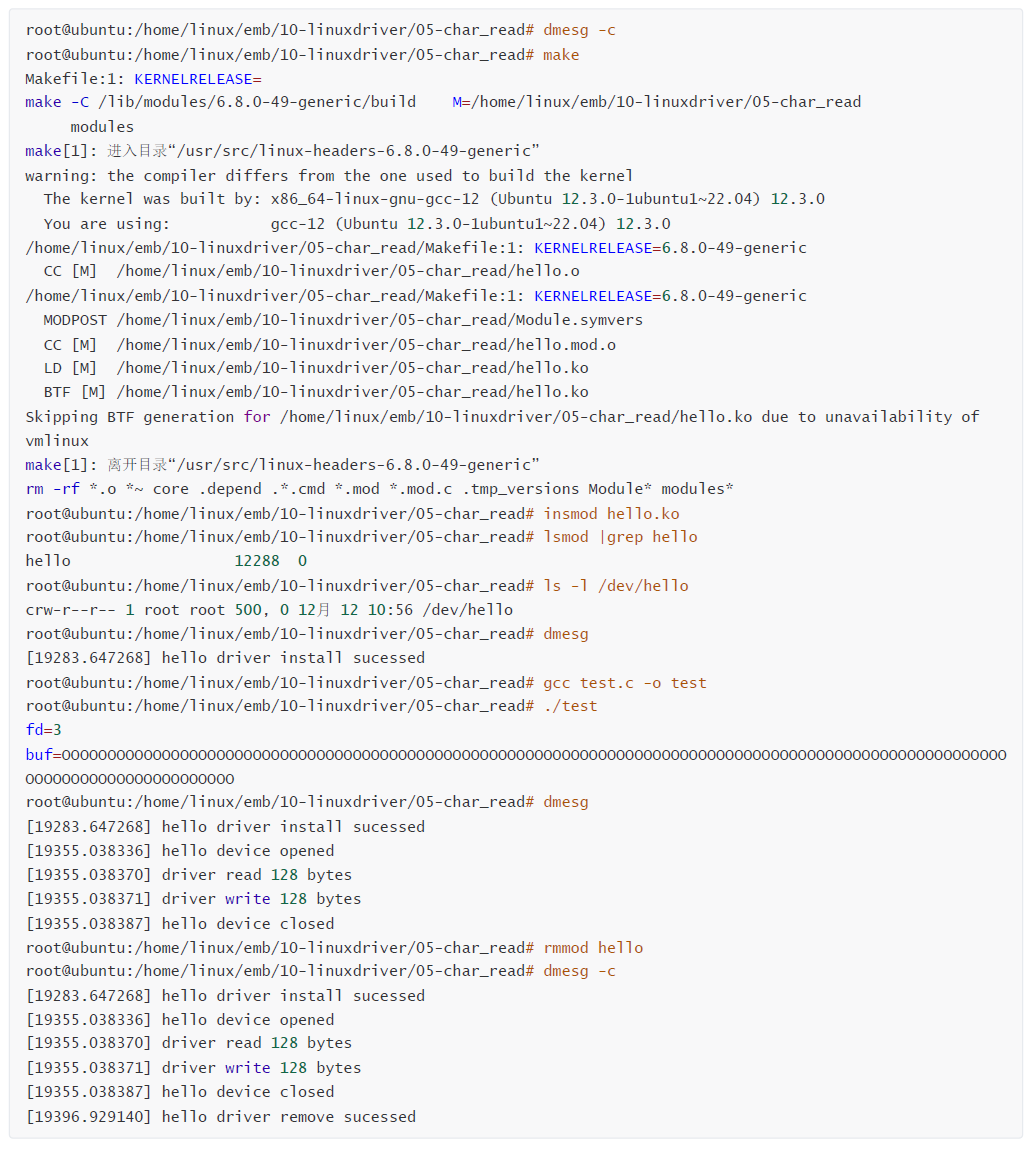
四、字符设备的控制
1、ioctl 控制设备
cpp
#include <sys/ioctl.h>
int ioctl(int fd, unsigned long request, ...);
函数功能:给设备发送控制命令, 是linux的系统调用函数。
函数参数:【fd】,要操作的设备文件描述符;【request】,要发送的命令;... ,可变参数。
函数返回值:成功返回0,失败返回-1。
2、file_operations的unlocked_ioctl接口
cpp
#include<linux/fs.h>
#include<asm/ioctl.h>
long (*unlocked_ioctl) (struct file *file, unsigned int cmd, unsigned long arg);
函数功能:应用程序调用ioctl , 则驱动调用unlocked_ioctl接口函数。
函数参数:【file】,要操作文件file结构体;【cmd】,应用程序发送的命令,就是应用程序的request参数;【arg】, ioctl的第三个参数。
函数返回值:成功返回0,失败返回负的错误码。
3、ioctl命令定义格式
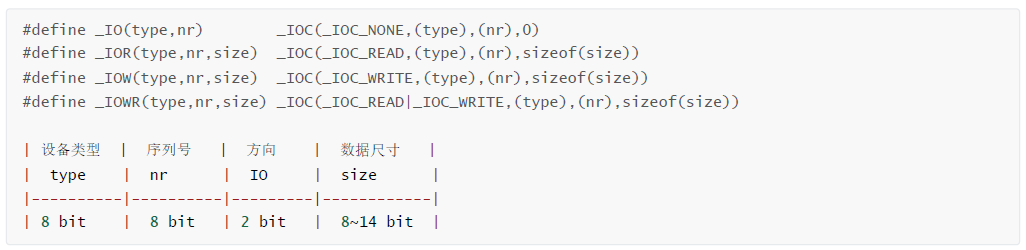
函数功能:驱动中和应用程序中关于ioctl的命令定义格式。
函数参数:【type】,表示类型,是命令的类别(组),这个数的表示范围是0x0 ~ 0xff。【nr】,这一组命令的第几个,led控制的方式, ledon、ledoff;【size】,读写的数据。【IO】,读设备还是写设备,_IO 只控制设备,不读写设备;_IOR读设备,读取1个字节的数据;_IOW写设备,写1个字节的数据;_IOWR读写设备,读写1个字节的数据。
例如,定义1个命令:
cpp
#define LEDON _IO('A',0)
#define LEDOFF _IO('A',1)
#define LEDSET _IOW('A',2,1)
4、实例控制设备
实现对字符设备的控制操作,给设备发送命令
- test.c
cpp
#include <stdio.h>
#include <stdlib.h>
#include <string.h>
#include <sys/types.h>
#include <sys/stat.h>
#include <fcntl.h>
#include <unistd.h>
#include <sys/ioctl.h>

#define  LEDON      _IO('A', 0x00)
#define  LEDOFF     _IO('A', 0x01)
#define  LEDSET     _IO('A', 0x02)


int main(int argc, char const *argv[])
{
    char buf[128]={0};
    int ret;
    // open -> 驱动调用 -> hello_open()
    int fd = open("/dev/hello", O_RDWR);
    if (fd < 0) {
        perror("open");
        return -1;
    }
    printf("fd = %d\n", fd);

    // 控制LED
    // ioctl -> 驱动调用 -> hello_ioctl()
    ret = ioctl(fd, LEDON);
    if (ret < 0) {
        perror("ioctl LEDON");
        return -1;
    }
    printf("LED ON\n");

    // 控制LED
    // ioctl -> 驱动调用 -> hello_ioctl()
    ret = ioctl(fd, LEDOFF);
    if (ret < 0) {
        perror("ioctl LEDOFF");
        return -1;
    }
    printf("LED OFF\n");

    // 控制LED
    // ioctl -> 驱动调用 -> hello_ioctl()
    ret = ioctl(fd, LEDSET, 0x01);
    if (ret < 0) {
        perror("ioctl LEDSET");
        return -1;
    }
    printf("LED SET\n");


    // 关闭设备文件
    // close -> 驱动调用 -> hello_release()
    close(fd);
    return 0;
}- hello.c
cpp
#include <linux/init.h>
#include <linux/module.h>
#include <linux/kernel.h>
#include <linux/stat.h>
#include <linux/fs.h>
#include <linux/cdev.h>

#define LEDON _IO('A', 0x00)
#define LEDOFF _IO('A', 0x01)
#define LEDSET _IO('A', 0x02)

MODULE_LICENSE("Dual BSD/GPL");
MODULE_AUTHOR("YShengli");
MODULE_DESCRIPTION("A simple Linux module");
MODULE_VERSION("0.1");

#define HELLO_MAJOR 500

char buf[128] = {0};

// 创建1个字符设备 cdev
struct cdev hello_cdev;

// 应用程序open打开设备文件时调用
static int hello_open(struct inode *inode, struct file *file)
{
    printk(KERN_INFO "Hello open!\n");
    return 0;
}

// 应用程序close关闭设备文件时调用
static int hello_release(struct inode *inode, struct file *file)
{
    printk(KERN_INFO "Hello release!\n");
    return 0;
}

// 应用程序read读取设备文件时调用
static ssize_t hello_read(struct file *file, char __user *user_buf, size_t count, loff_t *f_pos)
{
    printk(KERN_INFO "Hello read!\n");
    // 从内核空间复制数据到用户空间
    if (copy_to_user(user_buf, buf, count))
    {
        printk(KERN_ERR "Failed to copy to user\n");
        return -EFAULT;
    }
    return count;
}

// 应用程序write写入设备文件时调用
static ssize_t hello_write(struct file *file, const char __user *user_buf, size_t count, loff_t *f_pos)
{
    printk(KERN_INFO "Hello write!\n");
    // 从用户空间复制数据到内核空间
    if (copy_from_user(buf, user_buf, count))
    {
        printk(KERN_ERR "Failed to copy from user\n");
        return -EFAULT;
    }
    return count;
}

static long hello_ioctl(struct file *file, unsigned int cmd, unsigned long arg)
{
    printk(KERN_INFO "Hello ioctl!\n");
    // 根据cmd判断控制LED的哪个操作
    switch (cmd)
    {
    case LEDON:
        printk(KERN_INFO "LED ON\n");
        break;
    case LEDOFF:
        printk(KERN_INFO "LED OFF\n");
        break;
    case LEDSET:
        printk(KERN_INFO "LED SET\n");
        break;
    default:
        printk(KERN_ERR "Invalid ioctl command\n");
        return -EINVAL;
    }
    return 0;
}

// file_operations 结构体
static struct file_operations hello_fops = {
    .owner = THIS_MODULE,
    .open = hello_open,
    .release = hello_release,
    .read = hello_read,
    .write = hello_write,
    .unlocked_ioctl = hello_ioctl,
};

// 模块初始化函数
// insmod hello.ko  -> module_init() -> hello_init()
static int __init hello_init(void)
{
    printk(KERN_INFO "Hello world!\n");
#if 0
    // 申请1个设备号
    int ret = register_chrdev_region(MKDEV(HELLO_MAJOR, 0), 1, "hello");
    if (ret < 0) {
        printk(KERN_ERR "Failed to register char device region\n");
        return ret;
    }
    // 初始化 cdev
    cdev_init(&hello_cdev, &hello_fops);
    // 添加 cdev 到系统
    ret = cdev_add(&hello_cdev, MKDEV(HELLO_MAJOR, 0), 1);
    if (ret < 0) {
        printk(KERN_ERR "Failed to add char device\n");
        return ret;
    }
#else
    // register_chrdev 使用这个函数
    int ret = register_chrdev(HELLO_MAJOR, "hello", &hello_fops);
    if (ret < 0)
    {
        printk(KERN_ERR "Failed to register char device\n");
        return ret;
    }
#endif
    return 0;
}

// 模块退出函数
// rmmod hello.ko  -> module_exit() -> hello_exit()
static void __exit hello_exit(void)
{
    printk(KERN_INFO "Goodbye world!\n");
#if 0
    // 释放设备号
    unregister_chrdev_region(MKDEV(HELLO_MAJOR, 0), 1);
    // 删除 cdev 从系统
    cdev_del(&hello_cdev);
#else
    // 注销字符设备
    unregister_chrdev(HELLO_MAJOR, "hello");
#endif
}

module_init(hello_init);
module_exit(hello_exit);- Makefile
cpp
$(warning KERNELRELEASE=$(KERNELRELEASE))           # 打印提示,打印变量内的值
ifeq ($(KERNELRELEASE),)

#KERNELDIR ?= /home/linux/emb2307/12-linuxsys/myir-imx-linux      #交叉开发内核路径

KERNELDIR ?= /lib/modules/$(shell uname -r)/build   # 本地开发, ubuntu22.04的路径,内核头文件目录

PWD := $(shell pwd)                     # 获取路径

modules:
	$(MAKE) -C $(KERNELDIR) M=$(PWD) modules
	rm -rf *.o *~ core .depend .*.cmd *.mod *.mod.c .tmp_versions Module* modules*
	gcc test.c -o test

modules_install:
	$(MAKE) -C $(KERNELDIR) M=$(PWD) modules_install

clean:
	rm -rf *.o *~ core .depend .*.cmd *.ko *.mod *.mod.c .tmp_versions Module* modules*
	rm -rf test

.PHONY: modules modules_install clean

else
    obj-m := hello.o
endif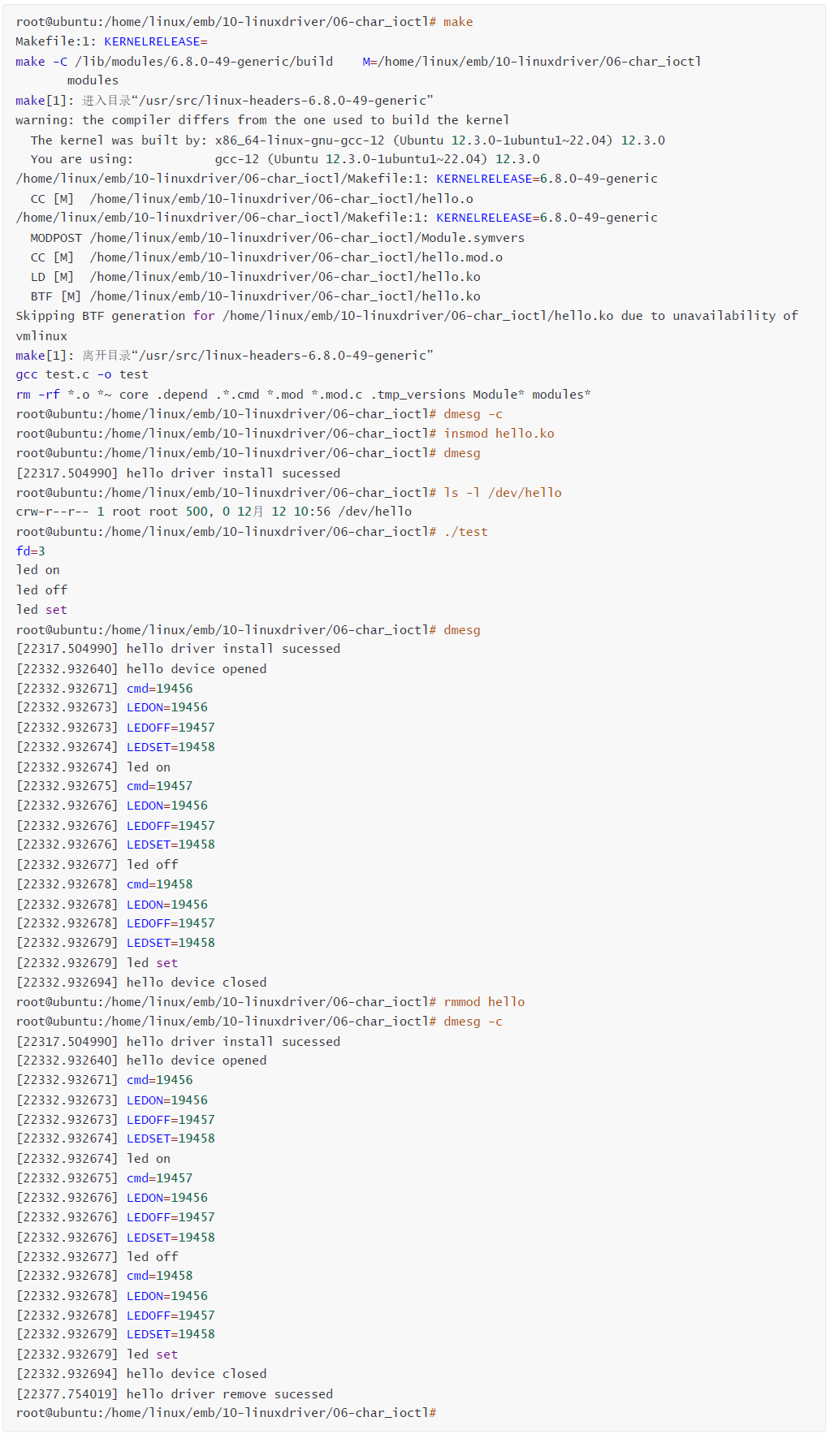
五、字符设备新方法
1、字符设备注册方法 register_chrdev
cpp
#include<linux/fs.h>
static inline int register_chrdev(unsigned int major, const char *name,const struct file_operations *fops)
{
    return __register_chrdev(major, 0, 256, name, fops);
}
函数功能:注册一个字符设备到系统内,register_chrdev = register_chrdev_region + cdev_init + cdev_add。
函数参数:【major】,主设备号;【name】,设备的名称;【fops】,file_operations 结构体指针。
函数返回值:成功返回0,失败返回负的错误码。
2、字符设备注册方法 unregister_chrdev
cpp
#include<linux/fs.h>
static inline void unregister_chrdev(unsigned int major, const char *name)
{
    __unregister_chrdev(major, 0, 256, name);
}
函数功能:从系统中注销一个字符设备,unregister_chrdev = unregister_chrdev_region + cdev_del。
函数参数:【major】,主设备号;【name】,设备的名称。
函数返回值:成功返回0,失败返回负的错误码。
cpp
#include <linux/init.h>
#include <linux/module.h>
#include <linux/kernel.h>
#include <linux/stat.h>
#include <linux/fs.h>
#include <linux/cdev.h>
#define LEDON _IO('A', 0x00)
#define LEDOFF _IO('A', 0x01)
#define LEDSET _IO('A', 0x02)
MODULE_LICENSE("Dual BSD/GPL");
MODULE_AUTHOR("YShengli");
MODULE_DESCRIPTION("A simple Linux module");
MODULE_VERSION("0.1");
#define HELLO_MAJOR 500
char buf[128] = {0};
// 创建1个字符设备 cdev
struct cdev hello_cdev;
extern void display(void);
// 应用程序open打开设备文件时调用
static int hello_open(struct inode *inode, struct file *file)
{
printk(KERN_INFO "Hello open!\n");
return 0;
}
// 应用程序close关闭设备文件时调用
static int hello_release(struct inode *inode, struct file *file)
{
printk(KERN_INFO "Hello release!\n");
return 0;
}
// 应用程序read读取设备文件时调用
static ssize_t hello_read(struct file *file, char __user *user_buf, size_t count, loff_t *f_pos)
{
printk(KERN_INFO "Hello read!\n");
// 从内核空间复制数据到用户空间
if (copy_to_user(user_buf, buf, count))
{
printk(KERN_ERR "Failed to copy to user\n");
return -EFAULT;
}
return count;
}
// 应用程序write写入设备文件时调用
static ssize_t hello_write(struct file *file, const char __user *user_buf, size_t count, loff_t *f_pos)
{
printk(KERN_INFO "Hello write!\n");
// 从用户空间复制数据到内核空间
if (copy_from_user(buf, user_buf, count))
{
printk(KERN_ERR "Failed to copy from user\n");
return -EFAULT;
}
return count;
}
static long hello_ioctl(struct file *file, unsigned int cmd, unsigned long arg)
{
printk(KERN_INFO "Hello ioctl!\n");
// 根据cmd判断控制LED的哪个操作
switch (cmd)
{
case LEDON:
printk(KERN_INFO "LED ON\n");
break;
case LEDOFF:
printk(KERN_INFO "LED OFF\n");
break;
case LEDSET:
printk(KERN_INFO "LED SET\n");
break;
default:
printk(KERN_ERR "Invalid ioctl command\n");
return -EINVAL;
}
return 0;
}
// file_operations 结构体
static struct file_operations hello_fops = {
.owner = THIS_MODULE,
.open = hello_open,
.release = hello_release,
.read = hello_read,
.write = hello_write,
.unlocked_ioctl = hello_ioctl,
};
// 模块初始化函数
// insmod hello.ko -> module_init() -> hello_init()
static int __init hello_init(void)
{
printk(KERN_INFO "Hello world!\n");
#if 0
// 申请1个设备号
int ret = register_chrdev_region(MKDEV(HELLO_MAJOR, 0), 1, "hello");
if (ret < 0) {
printk(KERN_ERR "Failed to register char device region\n");
return ret;
}
// 初始化 cdev
cdev_init(&hello_cdev, &hello_fops);
// 添加 cdev 到系统
ret = cdev_add(&hello_cdev, MKDEV(HELLO_MAJOR, 0), 1);
if (ret < 0) {
printk(KERN_ERR "Failed to add char device\n");
return ret;
}
#else
// register_chrdev 使用这个函数
int ret = register_chrdev(HELLO_MAJOR, "hello", &hello_fops);
if (ret < 0)
{
printk(KERN_ERR "Failed to register char device\n");
return ret;
}
display();
#endif
return 0;
}
// 模块退出函数
// rmmod hello.ko -> module_exit() -> hello_exit()
static void __exit hello_exit(void)
{
printk(KERN_INFO "Goodbye world!\n");
#if 0
// 释放设备号
unregister_chrdev_region(MKDEV(HELLO_MAJOR, 0), 1);
// 删除 cdev 从系统
cdev_del(&hello_cdev);
#else
// 注销字符设备
unregister_chrdev(HELLO_MAJOR, "hello");
#endif
}
module_init(hello_init);
module_exit(hello_exit);
六、多文件与多模块编译
1、多文件编译
在Makefile中修改如下:
bash
obj-m := hello.o
hello-objs := hello1.o hello2.o
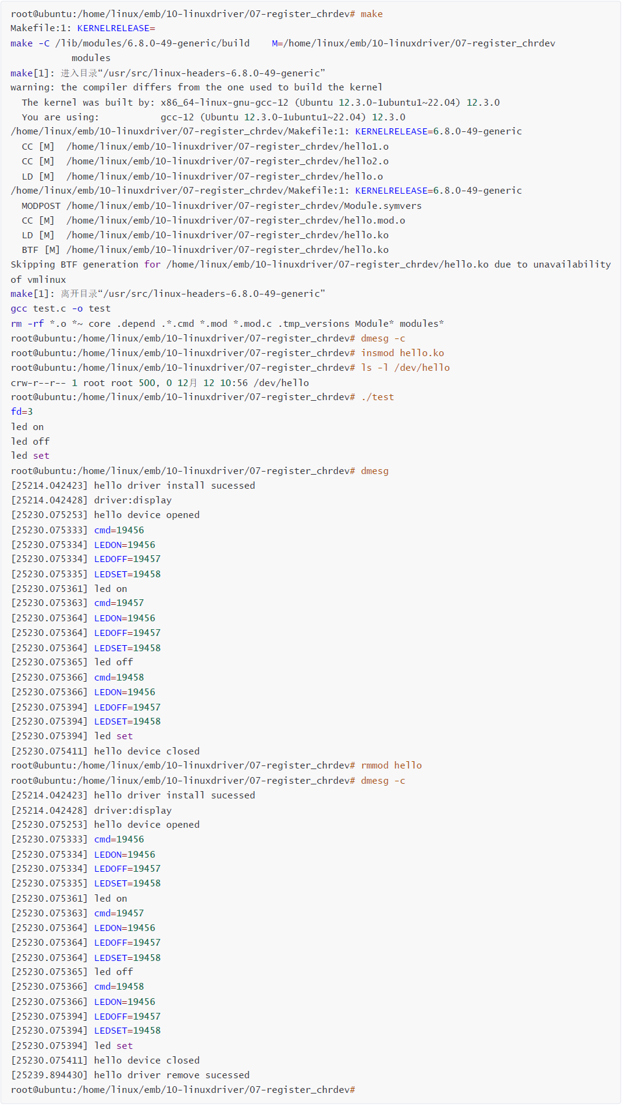
2、实例多文件编译
- 源文件
cpp
07-char_register/Makefile
07-char_register/hello1.c
07-char_register/hello2.c- 源代码
cpp
$(warning KERNELRELEASE=$(KERNELRELEASE))           # 打印提示,打印变量内的值
ifeq ($(KERNELRELEASE),)

#KERNELDIR ?= /home/linux/emb2307/12-linuxsys/myir-imx-linux      #交叉开发内核路径

KERNELDIR ?= /lib/modules/$(shell uname -r)/build   # 本地开发, ubuntu22.04的路径,内核头文件目录

PWD := $(shell pwd)                     # 获取路径

modules:
	$(MAKE) -C $(KERNELDIR) M=$(PWD) modules
	rm -rf *.o *~ core .depend .*.cmd *.mod *.mod.c .tmp_versions Module* modules*
	gcc test.c -o test

modules_install:
	$(MAKE) -C $(KERNELDIR) M=$(PWD) modules_install

clean:
	rm -rf *.o *~ core .depend .*.cmd *.ko *.mod *.mod.c .tmp_versions Module* modules*
	rm -rf test

.PHONY: modules modules_install clean

else
    obj-m := hello.o
	hello-objs := hello1.o hello2.o
endif
hello1.c
cpp
#include <linux/init.h>
#include <linux/module.h>
#include <linux/kernel.h>
#include <linux/stat.h>
#include <linux/fs.h>
#include <linux/cdev.h>

#define LEDON _IO('A', 0x00)
#define LEDOFF _IO('A', 0x01)
#define LEDSET _IO('A', 0x02)

MODULE_LICENSE("Dual BSD/GPL");
MODULE_AUTHOR("YShengli");
MODULE_DESCRIPTION("A simple Linux module");
MODULE_VERSION("0.1");

#define HELLO_MAJOR 500

char buf[128] = {0};

// 创建1个字符设备 cdev
struct cdev hello_cdev;

extern void display(void);

// 应用程序open打开设备文件时调用
static int hello_open(struct inode *inode, struct file *file)
{
    printk(KERN_INFO "Hello open!\n");
    return 0;
}

// 应用程序close关闭设备文件时调用
static int hello_release(struct inode *inode, struct file *file)
{
    printk(KERN_INFO "Hello release!\n");
    return 0;
}

// 应用程序read读取设备文件时调用
static ssize_t hello_read(struct file *file, char __user *user_buf, size_t count, loff_t *f_pos)
{
    printk(KERN_INFO "Hello read!\n");
    // 从内核空间复制数据到用户空间
    if (copy_to_user(user_buf, buf, count))
    {
        printk(KERN_ERR "Failed to copy to user\n");
        return -EFAULT;
    }
    return count;
}

// 应用程序write写入设备文件时调用
static ssize_t hello_write(struct file *file, const char __user *user_buf, size_t count, loff_t *f_pos)
{
    printk(KERN_INFO "Hello write!\n");
    // 从用户空间复制数据到内核空间
    if (copy_from_user(buf, user_buf, count))
    {
        printk(KERN_ERR "Failed to copy from user\n");
        return -EFAULT;
    }
    return count;
}

static long hello_ioctl(struct file *file, unsigned int cmd, unsigned long arg)
{
    printk(KERN_INFO "Hello ioctl!\n");
    // 根据cmd判断控制LED的哪个操作
    switch (cmd)
    {
    case LEDON:
        printk(KERN_INFO "LED ON\n");
        break;
    case LEDOFF:
        printk(KERN_INFO "LED OFF\n");
        break;
    case LEDSET:
        printk(KERN_INFO "LED SET\n");
        break;
    default:
        printk(KERN_ERR "Invalid ioctl command\n");
        return -EINVAL;
    }
    return 0;
}

// file_operations 结构体
static struct file_operations hello_fops = {
    .owner = THIS_MODULE,
    .open = hello_open,
    .release = hello_release,
    .read = hello_read,
    .write = hello_write,
    .unlocked_ioctl = hello_ioctl,
};

// 模块初始化函数
// insmod hello.ko  -> module_init() -> hello_init()
static int __init hello_init(void)
{
    printk(KERN_INFO "Hello world!\n");
#if 0
    // 申请1个设备号
    int ret = register_chrdev_region(MKDEV(HELLO_MAJOR, 0), 1, "hello");
    if (ret < 0) {
        printk(KERN_ERR "Failed to register char device region\n");
        return ret;
    }
    // 初始化 cdev
    cdev_init(&hello_cdev, &hello_fops);
    // 添加 cdev 到系统
    ret = cdev_add(&hello_cdev, MKDEV(HELLO_MAJOR, 0), 1);
    if (ret < 0) {
        printk(KERN_ERR "Failed to add char device\n");
        return ret;
    }
#else
    // register_chrdev 使用这个函数
    int ret = register_chrdev(HELLO_MAJOR, "hello", &hello_fops);
    if (ret < 0)
    {
        printk(KERN_ERR "Failed to register char device\n");
        return ret;
    }
    display();
#endif
    return 0;
}

// 模块退出函数
// rmmod hello.ko  -> module_exit() -> hello_exit()
static void __exit hello_exit(void)
{
    printk(KERN_INFO "Goodbye world!\n");
#if 0
    // 释放设备号
    unregister_chrdev_region(MKDEV(HELLO_MAJOR, 0), 1);
    // 删除 cdev 从系统
    cdev_del(&hello_cdev);
#else
    // 注销字符设备
    unregister_chrdev(HELLO_MAJOR, "hello");
#endif
}

module_init(hello_init);
module_exit(hello_exit);
hello2.c
cpp
#include <linux/module.h>
#include <linux/kernel.h>
#include <linux/init.h>
void display(void)
{
    printk("driver:display\n");
}
3、多模块编译
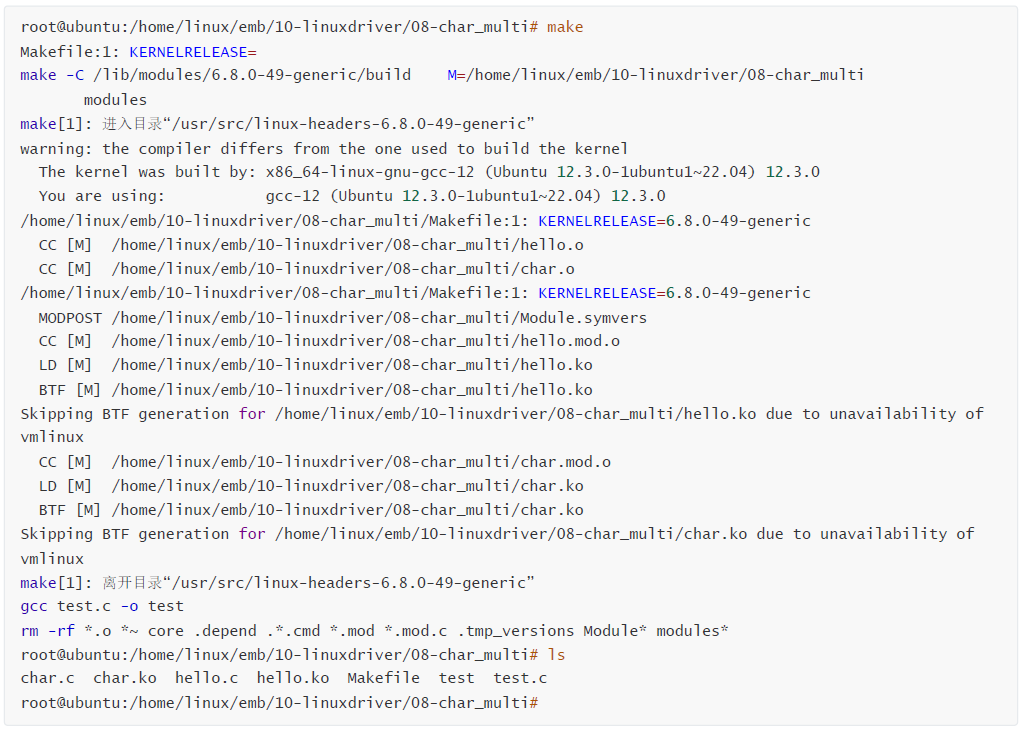
多模块就是多驱动,可以编译出来好几个驱动。
cpp
obj-m += hello.o
obj-m += char.o
4、实例多模块编译
- hello.c
cpp
#include <linux/init.h>
#include <linux/module.h>
#include <linux/kernel.h>
#include <linux/stat.h>
#include <linux/fs.h>
#include <linux/cdev.h>

#define LEDON _IO('A', 0x00)
#define LEDOFF _IO('A', 0x01)
#define LEDSET _IO('A', 0x02)

MODULE_LICENSE("Dual BSD/GPL");
MODULE_AUTHOR("YShengli");
MODULE_DESCRIPTION("A simple Linux module");
MODULE_VERSION("0.1");

#define HELLO_MAJOR 500

char buf[128] = {0};

// 创建1个字符设备 cdev
struct cdev hello_cdev;

// 应用程序open打开设备文件时调用
static int hello_open(struct inode *inode, struct file *file)
{
    printk(KERN_INFO "Hello open!\n");
    return 0;
}

// 应用程序close关闭设备文件时调用
static int hello_release(struct inode *inode, struct file *file)
{
    printk(KERN_INFO "Hello release!\n");
    return 0;
}

// 应用程序read读取设备文件时调用
static ssize_t hello_read(struct file *file, char __user *user_buf, size_t count, loff_t *f_pos)
{
    printk(KERN_INFO "Hello read!\n");
    // 从内核空间复制数据到用户空间
    if (copy_to_user(user_buf, buf, count))
    {
        printk(KERN_ERR "Failed to copy to user\n");
        return -EFAULT;
    }
    return count;
}

// 应用程序write写入设备文件时调用
static ssize_t hello_write(struct file *file, const char __user *user_buf, size_t count, loff_t *f_pos)
{
    printk(KERN_INFO "Hello write!\n");
    // 从用户空间复制数据到内核空间
    if (copy_from_user(buf, user_buf, count))
    {
        printk(KERN_ERR "Failed to copy from user\n");
        return -EFAULT;
    }
    return count;
}

static long hello_ioctl(struct file *file, unsigned int cmd, unsigned long arg)
{
    printk(KERN_INFO "Hello ioctl!\n");
    // 根据cmd判断控制LED的哪个操作
    switch (cmd)
    {
    case LEDON:
        printk(KERN_INFO "LED ON\n");
        break;
    case LEDOFF:
        printk(KERN_INFO "LED OFF\n");
        break;
    case LEDSET:
        printk(KERN_INFO "LED SET\n");
        break;
    default:
        printk(KERN_ERR "Invalid ioctl command\n");
        return -EINVAL;
    }
    return 0;
}

// file_operations 结构体
static struct file_operations hello_fops = {
    .owner = THIS_MODULE,
    .open = hello_open,
    .release = hello_release,
    .read = hello_read,
    .write = hello_write,
    .unlocked_ioctl = hello_ioctl,
};

// 模块初始化函数
// insmod hello.ko  -> module_init() -> hello_init()
static int __init hello_init(void)
{
    printk(KERN_INFO "Hello world!\n");
#if 0
    // 申请1个设备号
    int ret = register_chrdev_region(MKDEV(HELLO_MAJOR, 0), 1, "hello");
    if (ret < 0) {
        printk(KERN_ERR "Failed to register char device region\n");
        return ret;
    }
    // 初始化 cdev
    cdev_init(&hello_cdev, &hello_fops);
    // 添加 cdev 到系统
    ret = cdev_add(&hello_cdev, MKDEV(HELLO_MAJOR, 0), 1);
    if (ret < 0) {
        printk(KERN_ERR "Failed to add char device\n");
        return ret;
    }
#else
    // register_chrdev 使用这个函数
    int ret = register_chrdev(HELLO_MAJOR, "hello", &hello_fops);
    if (ret < 0)
    {
        printk(KERN_ERR "Failed to register char device\n");
        return ret;
    }
#endif
    return 0;
}

// 模块退出函数
// rmmod hello.ko  -> module_exit() -> hello_exit()
static void __exit hello_exit(void)
{
    printk(KERN_INFO "Goodbye world!\n");
#if 0
    // 释放设备号
    unregister_chrdev_region(MKDEV(HELLO_MAJOR, 0), 1);
    // 删除 cdev 从系统
    cdev_del(&hello_cdev);
#else
    // 注销字符设备
    unregister_chrdev(HELLO_MAJOR, "hello");
#endif
}

module_init(hello_init);
module_exit(hello_exit);
再复制一份命名为char.c
cpp
$(warning KERNELRELEASE=$(KERNELRELEASE))           # 打印提示,打印变量内的值
ifeq ($(KERNELRELEASE),)

#KERNELDIR ?= /home/linux/emb2307/12-linuxsys/myir-imx-linux      #交叉开发内核路径

KERNELDIR ?= /lib/modules/$(shell uname -r)/build   # 本地开发, ubuntu22.04的路径,内核头文件目录

PWD := $(shell pwd)                     # 获取路径

modules:
	$(MAKE) -C $(KERNELDIR) M=$(PWD) modules
	rm -rf *.o *~ core .depend .*.cmd *.mod *.mod.c .tmp_versions Module* modules*
	gcc test.c -o test

modules_install:
	$(MAKE) -C $(KERNELDIR) M=$(PWD) modules_install

clean:
	rm -rf *.o *~ core .depend .*.cmd *.ko *.mod *.mod.c .tmp_versions Module* modules*
	rm -rf test

.PHONY: modules modules_install clean

else
    obj-m += hello.o
    obj-m += char.o
endif