最近在将金瓶梅词话HTML版改编成带目录与页眉且支持交叉链接的Word文档过程中,想将其中的批注处理成双行合一格式。书中共有三种批注:眉批、侧批、夹批。HTML代码分别是下面这几种形式:
眉批:
html
<span class="comment top-comment">数语倔强中实含软媚,认真处微带戏谑,非有二十分奇妒,二十分呆胆,二十分灵心利口,不能当机圆活如此。金莲真可人也。</span>侧批:
html
<span class="comment side-comment">一语见血。</span>夹批:
html
<span class="comment pinch-comment">敍述处好不扯淡,在金莲又是绝正经事。</span>直接将HTML源代码拷贝到Word中,然后找DeepSeek生成一个宏进行处理(以眉批为例):
vbnet
Sub ConvertCommentToTwoLinesInOne()
    Dim doc As Document
    Dim regEx As Object
    Dim matches As Object
    Dim m As Object
    Dim rng As Range
    Dim content As String
    Dim startPos As Long
    Dim endPos As Long

    Set doc = ActiveDocument
    Set regEx = CreateObject("VBScript.RegExp")

    ' 设置正则表达式
    regEx.Global = True
    regEx.IgnoreCase = True
    regEx.Pattern = "<span class=""comment top-comment"">(.+?)</span>"

    ' 在文档文本中查找匹配
    Dim docText As String
    docText = doc.Content.Text

    Set matches = regEx.Execute(docText)

    If matches.Count = 0 Then
        MsgBox "未找到匹配的内容。", vbInformation
        Exit Sub
    End If

    ' 从后往前处理,避免位置偏移
    Dim i As Long
    For i = matches.Count - 1 To 0 Step -1
        Set m = matches(i)

        ' 提取标签内的内容
        content = m.SubMatches(0)

        ' 计算标签内内容在文档中的起始位置(相对于文档开头,0-based)
        ' m.FirstIndex 是整个匹配的起始位置
        ' 加上 <span class="comment top-comment"> 的长度
        startPos = m.FirstIndex + Len("<span class=""comment top-comment"">")
        endPos = startPos + Len(content)

        ' Word Range 的 Start/End 是 1-based
        Set rng = doc.Range(Start:=startPos + 1, End:=endPos + 1)

        ' 删除整个匹配(包括 span 标签),只保留内容并设置双行合一
        ' 先把整个匹配替换为纯内容
        Dim fullRng As Range
        Set fullRng = doc.Range(Start:=m.FirstIndex + 1, End:=m.FirstIndex + Len(m.Value) + 1)
        fullRng.Text = content

        ' 重新获取替换后内容的 Range
        Set rng = doc.Range(Start:=m.FirstIndex + 1, End:=m.FirstIndex + Len(content) + 1)

        ' 设置双行合一
        rng.TwoLinesInOne = wdTwoLinesInOneEncloseInBrackets
    Next i

    MsgBox "处理完成,共处理 " & matches.Count & " 处。", vbInformation
End Sub
宏的逻辑和功能似乎没错,但是在我的Word 2016里运行的结果是眉批并没有变成"双行合一"格式。那么该怎么做?
如果先定义一个样式再应用到相关文字中,由于双行合一无法像字体、字号那样直接定义在"样式"中 ,所以也无法直接实现目标。不过,Word的样式有"更新 XXX 以匹配所选内容 "功能(其中的XXX为所选择的样式名),经试验,先在部分文字上应用"双行合一"格式,再在样式列表中选择要应用"双行合一"格式的样式名称,右键点击,选择"更新 XXX 以匹配所选内容"命令,相关样式就会具有"双行合一"格式,如图:
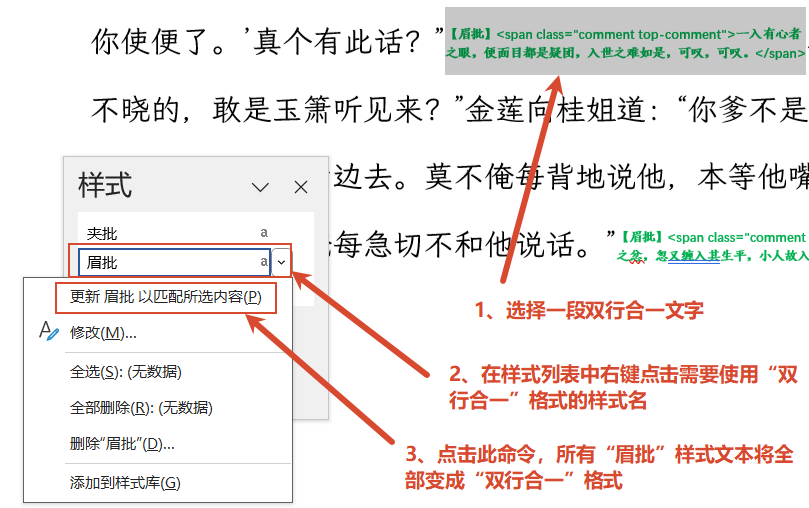
(图一)
所以,如果前面的DeepSeek的宏不起作用,那么实现将该HTML文件中的批注改成双行合一格式最快捷的方法是:
第一步:根据HTML标签的特点,将相关内容应用为对应的样式,例如将侧批内容
<span class="comment side-comment">一语见血。</span>
应用为"侧批"样式,如果相关样式不存在则创建它。完成这一步可以用VBA自动实现(考虑到删除HTML标签用查找替换很容易做到,所以为了简化VBA代码,下面的宏没有像前面的DeepSeek的宏那样删除HTML标签,因此,下面的宏中相关正则表达式中的分组括号也可以不要):
vbnet
Sub ConvertCommentToTwoLinesInOne()
    ''''''''''''''''''''''''''''''''''''''''''''''''''''''''''''''''''''''''''''''''''''
    ' 先执行此宏,将眉批、夹批、侧批内容分别指定对应的样式名
    ' 再在文档中修改相关内容的格式,然后在样式列表中右键点击
    ' 相关样式,选择"更新 样式名 以匹配所选内容"
    ''''''''''''''''''''''''''''''''''''''''''''''''''''''''''''''''''''''''''''''''''''
    Dim doc As Document
    Dim regEx As RegExp
    Dim matches As Object
    Dim match As Object
    Dim tmpStyle As Style
    Dim rng As Range
    Dim docText As String
    Dim i As Long

    Set doc = ActiveDocument
    docText = doc.content.Text
    Set regEx = New RegExp
    regEx.Global = True ' 全局查找
    regEx.IgnoreCase = True ' 忽略大小写

    ' 1、处理眉批
    ' 1.1、设置正则表达式并查找匹配项
    regEx.Pattern = "<span class=""comment top-comment"">(.+?)</span>"
    Set matches = regEx.Execute(docText)
    ' 1.2、准备眉批样式
    Set tmpStyle = Nothing
    On Error Resume Next
    Set tmpStyle = doc.Styles("眉批")
    On Error GoTo 0
    If tmpStyle Is Nothing Then
        ' 如果"眉批"样式不存在,则基于正文样式创建一个字符类型的样式
        Set tmpStyle = doc.Styles.Add(Name:="眉批", Type:=wdStyleTypeCharacter)
    End If
    ' 1.3、从后往前处理匹配项,避免位置偏移,将每个匹配项设置为"眉批"样式。
    On Error Resume Next
    If matches.Count > 0 Then
        For i = matches.Count - 1 To 0 Step -1
            Set match = matches(i)
            Set rng = doc.Range(Start:=match.firstIndex, End:=match.firstIndex + Len(match))
            rng.Style = doc.Styles(tmpStyle)
        Next i
    End If
    On Error GoTo 0

    ' 2、处理侧批
    ' 2.1、设置正则表达式并查找匹配项
    regEx.Global = True
    regEx.IgnoreCase = True
    regEx.Pattern = "<span class=""comment side-comment"">(.+?)</span>"
    Set matches = regEx.Execute(docText)
    ' 2.2、准备侧批样式
    Set tmpStyle = Nothing
    On Error Resume Next
    Set tmpStyle = doc.Styles("侧批")
    On Error GoTo 0
    If tmpStyle Is Nothing Then
        ' 如果"侧批"样式不存在,则基于正文样式创建一个字符类型的样式
        Set tmpStyle = doc.Styles.Add(Name:="侧批", Type:=wdStyleTypeCharacter)
    End If
    ' 2.3、从后往前处理匹配项,避免位置偏移,将每个匹配项设置为"侧批"样式。
    On Error Resume Next
    If matches.Count > 0 Then
        For i = matches.Count - 1 To 0 Step -1
            Set match = matches(i)
            Set rng = doc.Range(Start:=match.firstIndex, End:=match.firstIndex + Len(match))
            rng.Style = doc.Styles(tmpStyle)
        Next i
    End If
    On Error GoTo 0

    ' 3、处理夹批
    ' 3.1、设置正则表达式并查找匹配项
    regEx.Pattern = "<span class=""comment pinch-comment"">(.+?)</span>"
    Set matches = regEx.Execute(docText)
    ' 3.2、准备夹批样式
    Set tmpStyle = Nothing
    On Error Resume Next
    Set tmpStyle = doc.Styles("夹批")
    On Error GoTo 0
    If tmpStyle Is Nothing Then
        ' 如果"夹批"样式不存在,则基于正文样式创建一个字符类型的样式
        Set tmpStyle = doc.Styles.Add(Name:="夹批", Type:=wdStyleTypeCharacter)
    End If
    ' 3.3、从后往前处理匹配项,避免位置偏移,将每个匹配项设置为"夹批"样式。
    On Error Resume Next
    If matches.Count > 0 Then
        For i = matches.Count - 1 To 0 Step -1
            Set match = matches(i)
            Set rng = doc.Range(Start:=match.firstIndex, End:=match.firstIndex + Len(match))
            rng.Style = doc.Styles(tmpStyle)
        Next i
    End If
    On Error GoTo 0


    MsgBox "处理完成!", vbInformation
End Sub
第二步:通过指定样式查找到对应的内容,然后选择这部分内容,应用"双行合一"格式,还可以实施修改文字颜色等操作,如图:
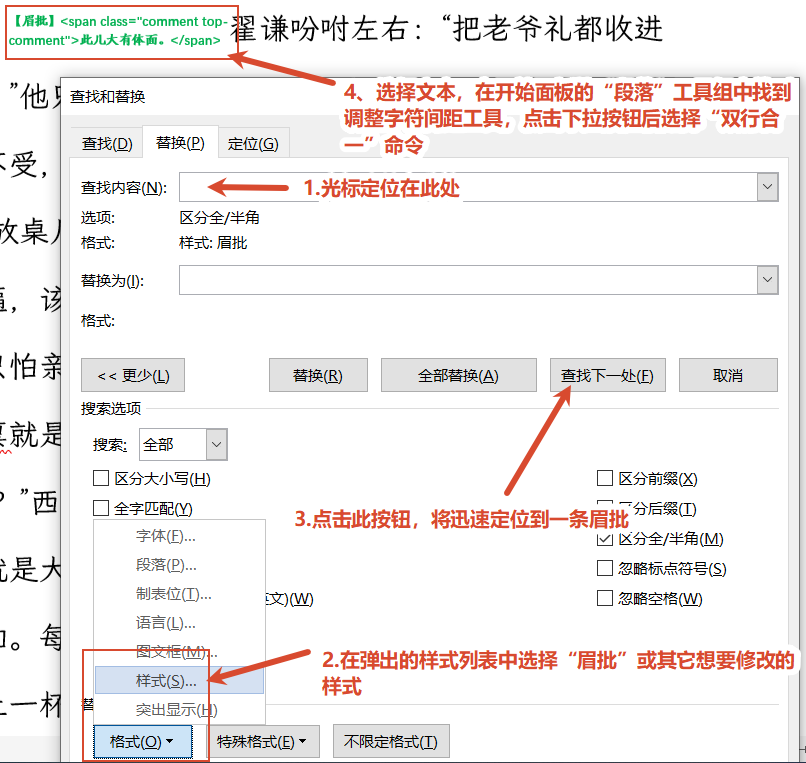
(图二)
说明:图二第4步将"中文版式"工具误写成了"调整字符间距"工具,请注意。
第三步:调出样式列表,更新相关样式,如图一。
通过以上操作,全文批注即都实现了双行夹批式排版。
外一宏:
这个HTML文件中使用下面的标签实现了注音:
<ruby>鳏<rt>guān</rt></ruby>
下面的宏将这种注音在Word文档中也转换为注音:
vbnet
Sub ConvertRubyToPhonetic()
    Dim doc As Document
    Dim regEx As RegExp
    Dim matches, match As Object
    Dim i As Long
    Dim rng As Range, content As String
    Dim phonetic As String

    Application.ScreenUpdating = False
    Set doc = ActiveDocument
    docText = doc.content.Text
    Set regEx = New RegExp
    regEx.Global = True ' 全局查找
    regEx.IgnoreCase = True ' 忽略大小写
    regEx.Pattern = "<ruby>(.+?)<rt>(.+?)</rt></ruby>"
    Set matches = regEx.Execute(docText)

    On Error Resume Next
    If matches.Count > 0 Then
        For i = matches.Count - 1 To 0 Step -1
            Set match = matches(i)
            content = match.SubMatches(0) ' 取文字
            phonetic = match.SubMatches(1) ' 取拼音

            Set rng = doc.Range(Start:=match.FirstIndex, _
                        End:=match.FirstIndex + Len(match.Value))
            rng.Text = content ' 将匹配部分替换为纯内容
            Set rng = doc.Range(Start:=match.FirstIndex, _
                        End:=match.FirstIndex + Len(content)) ' 重建区域
            ' 在区域中使用拼音向导
            rng.PhoneticGuide Text:=phonetic, Alignment:= _
                wdPhoneticGuideAlignmentOneTwoOne, Raise:=13, FontSize:=7
        Next i
    End If
    On Error GoTo 0
    MsgBox "Done!"
    Application.ScreenUpdating = True
End Sub