Art_Pi的蓝牙基础功能 https://blog.csdn.net/s2014201506/article/details/166840939?spm=1001.2014.3001.5501
如果希望使用ART-PI的蓝牙透传通信功能,需要先按照上面的链接教程学会如何驱动AP6212实现最基本的心跳通信实验。在以上教程的功能基础上,我简单为大家介绍一下如何实现手机和开发板的蓝牙双向通信。
在Samples中选择BLE uart sample 这一个实例,它代表着串口透传功能。
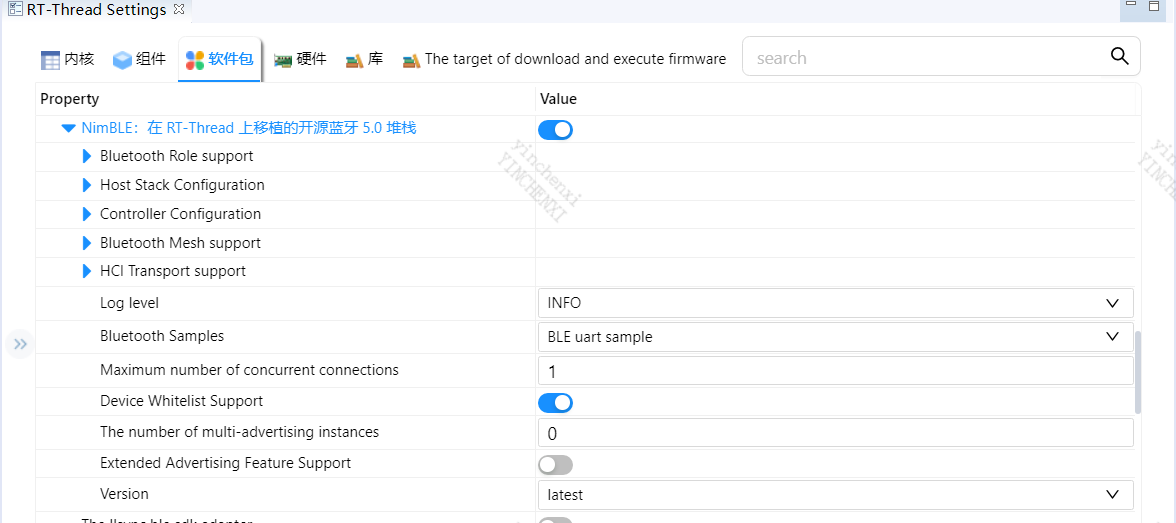
保存配置,生成程序后此时选择编译,编译器提示报错。
错误1:
../packages/NimBLE-latest/apps/bleuart/src/bleuart.c:37:34: fatal error: nimble/ble_hci_trans.h: No such file or directory
它提示这个头文件在项目中找不到,这个文件缺失,解决办法就是屏蔽这个include 。
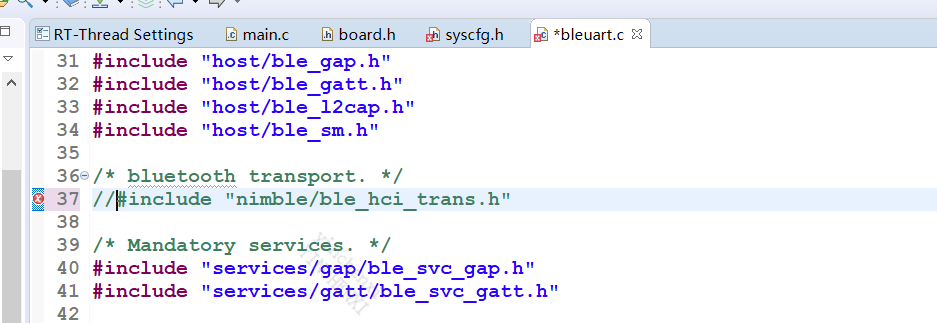
屏蔽后再次编译,此时会暴露更多问题。
此时需要找到以下位置的文件:
packages\NimBLE-latest\nimble\host\services\bleuart\src\bleuart.c
主要修改的是这个文件的内容:
在内部添加以下的内容:
#define MYNEWT_VAL_BLEUART_MAX_INPUT 120
和增加一个函数:
static int
gatt_svr_chr_access_uart_write(uint16_t conn_handle, uint16_t attr_handle,
struct ble_gatt_access_ctxt *ctxt, void *arg)
最终这个文件的内容如下:
cpp
/*
 * Licensed to the Apache Software Foundation (ASF) under one
 * or more contributor license agreements.  See the NOTICE file
 * distributed with this work for additional information
 * regarding copyright ownership.  The ASF licenses this file
 * to you under the Apache License, Version 2.0 (the
 * "License"); you may not use this file except in compliance
 * with the License.  You may obtain a copy of the License at
 *
 *  http://www.apache.org/licenses/LICENSE-2.0
 *
 * Unless required by applicable law or agreed to in writing,
 * software distributed under the License is distributed on an
 * "AS IS" BASIS, WITHOUT WARRANTIES OR CONDITIONS OF ANY
 * KIND, either express or implied.  See the License for the
 * specific language governing permissions and limitations
 * under the License.
 */

#include <assert.h>
#include <stdio.h>
#include <string.h>
#include <stdlib.h>

#include <rtthread.h>

#include "sysinit/sysinit.h"
#include "host/ble_hs.h"
#include "host/ble_uuid.h"
#include "bleuart/bleuart.h"
#include "os/endian.h"
#include "console/console.h"
#define MYNEWT_VAL_BLEUART_MAX_INPUT 120
/* ble uart attr read handle */
uint16_t g_bleuart_attr_read_handle;

/* ble uart attr write handle */
uint16_t g_bleuart_attr_write_handle;

/* Pointer to a console buffer */
char *console_buf;

uint16_t g_console_conn_handle;
/**
 * The vendor specific "bleuart" service consists of one write no-rsp characteristic
 * and one notification only read charateristic
 *     o "write no-rsp": a single-byte characteristic that can be written only
 *       over a non-encrypted connection
 *     o "read": a single-byte characteristic that can always be read only via
 *       notifications
 */

/* {6E400001-B5A3-F393-E0A9-E50E24DCCA9E} */
const ble_uuid128_t gatt_svr_svc_uart_uuid =
    BLE_UUID128_INIT(0x9e, 0xca, 0xdc, 0x24, 0x0e, 0xe5, 0xa9, 0xe0,
                     0x93, 0xf3, 0xa3, 0xb5, 0x01, 0x00, 0x40, 0x6e);

/* {6E400002-B5A3-F393-E0A9-E50E24DCCA9E} */
const ble_uuid128_t gatt_svr_chr_uart_write_uuid =
    BLE_UUID128_INIT(0x9e, 0xca, 0xdc, 0x24, 0x0e, 0xe5, 0xa9, 0xe0,
                     0x93, 0xf3, 0xa3, 0xb5, 0x02, 0x00, 0x40, 0x6e);


/* {6E400003-B5A3-F393-E0A9-E50E24DCCA9E} */
const ble_uuid128_t gatt_svr_chr_uart_read_uuid =
    BLE_UUID128_INIT(0x9e, 0xca, 0xdc, 0x24, 0x0e, 0xe5, 0xa9, 0xe0,
                     0x93, 0xf3, 0xa3, 0xb5, 0x03, 0x00, 0x40, 0x6e);

static int
gatt_svr_chr_access_uart_write(uint16_t conn_handle, uint16_t attr_handle,
                              struct ble_gatt_access_ctxt *ctxt, void *arg);

static const struct ble_gatt_svc_def gatt_svr_svcs[] = {
    {
        /* Service: uart */
        .type = BLE_GATT_SVC_TYPE_PRIMARY,
        .uuid = &gatt_svr_svc_uart_uuid.u,
        .characteristics = (struct ble_gatt_chr_def[]) { {
            .uuid = &gatt_svr_chr_uart_read_uuid.u,
            .val_handle = &g_bleuart_attr_read_handle,
            .access_cb = gatt_svr_chr_access_uart_write,
            .flags = BLE_GATT_CHR_F_NOTIFY,
        }, {
            /* Characteristic: Write */
            .uuid = &gatt_svr_chr_uart_write_uuid.u,
            .access_cb = gatt_svr_chr_access_uart_write,
            .flags = BLE_GATT_CHR_F_WRITE | BLE_GATT_CHR_F_WRITE_NO_RSP,
            .val_handle = &g_bleuart_attr_write_handle,
        }, {
            0, /* No more characteristics in this service */
        } },
    },

    {
        0, /* No more services */
    },
};

static int
gatt_svr_chr_access_uart_write(uint16_t conn_handle, uint16_t attr_handle,
                               struct ble_gatt_access_ctxt *ctxt, void *arg)
{
    struct os_mbuf *om = ctxt->om;

    switch (ctxt->op) {
    case BLE_GATT_ACCESS_OP_WRITE_CHR:
        while (om) {
            /* 打印接收到的数据 */
            rt_kprintf("[BLE RX] len=%d, data=", om->om_len);
            rt_kprintf("%.*s", om->om_len, om->om_data);
            console_write((char *)om->om_data, om->om_len);
            /* 将数据回传给APP */
            bleuart_send_to_phone((char *)om->om_data, om->om_len);
            om = SLIST_NEXT(om, om_next);
        }
        rt_kprintf("\n");
        console_write("\n", 1);
        return 0;
    default:
        assert(0);
        return BLE_ATT_ERR_UNLIKELY;
    }
}

/**
 * bleuart GATT server initialization
 *
 * @param eventq
 * @return 0 on success; non-zero on failure
 */
int
bleuart_gatt_svr_init(void)
{
    int rc;

    rc = ble_gatts_count_cfg(gatt_svr_svcs);
    if (rc != 0) {
        goto err;
    }

    rc = ble_gatts_add_svcs(gatt_svr_svcs);
    if (rc != 0) {
        return rc;
    }

err:
    return rc;
}

/**
 * Reads console and sends data over BLE
 */
static void
bleuart_uart_read(void)
{
    int rc;
    int off;
    int full_line;
    struct os_mbuf *om;

    off = 0;
    while (1) {
        rc = console_read(console_buf + off,
                          MYNEWT_VAL(BLEUART_MAX_INPUT) - off, &full_line);
        if (rc <= 0 && !full_line) {
            continue;
        }
        off += rc;
        if (!full_line) {
            continue;
        }

        om = ble_hs_mbuf_from_flat(console_buf, off);
        if (!om) {
            return;
        }
        ble_gatts_notify_custom(g_console_conn_handle,
                                g_bleuart_attr_read_handle, om);
        off = 0;
        break;
    }
}

/**
 * Sets the global connection handle
 *
 * @param connection handle
 */
void
bleuart_set_conn_handle(uint16_t conn_handle) {
    g_console_conn_handle = conn_handle;
}

/**
 * Send data to phone via BLE Notify
 *
 * @param data   pointer to data to send
 * @param len    length of data
 * @return 0 on success, negative on error
 */
int bleuart_send_to_phone(const char *data, int len)
{
    struct os_mbuf *om;

    if (g_console_conn_handle == 0) {
        rt_kprintf("[BLE TX] No connection!\n");
        return -1;
    }

    if (len > MYNEWT_VAL_BLEUART_MAX_INPUT) {
        len = MYNEWT_VAL_BLEUART_MAX_INPUT;
    }

    om = ble_hs_mbuf_from_flat(data, len);
    if (!om) {
        rt_kprintf("[BLE TX] Mbuf alloc failed!\n");
        return -1;
    }

    ble_gatts_notify_custom(g_console_conn_handle,
                           g_bleuart_attr_read_handle, om);

    rt_kprintf("[BLE TX] Sent %d bytes to phone\n", len);
    return 0;
}

/**
 * MSH command to send test data to phone
 */
static void bleuart_test_tx(int argc, char **argv)
{
    const char *test_data = "Hello from Art-Pi!";

    if (argc > 1) {
        /* Use provided data */
        bleuart_send_to_phone(argv[1], strlen(argv[1]));
    } else {
        /* Send default test message */
        bleuart_send_to_phone(test_data, strlen(test_data));
    }
}
MSH_CMD_EXPORT_ALIAS(bleuart_test_tx, ble_tx, send data to phone via BLE);

/**
 * BLEuart console initialization
 *
 * @param Maximum input
 */
void
bleuart_init(void)
{
    int rc;

    /* Ensure this function only gets called by sysinit. */
    SYSINIT_ASSERT_ACTIVE();

    rc = console_init(bleuart_uart_read);
    SYSINIT_PANIC_ASSERT(rc == 0);

    console_buf = malloc(MYNEWT_VAL(BLEUART_MAX_INPUT));
    SYSINIT_PANIC_ASSERT(console_buf != NULL);
}
调整以下文件内容:packages\NimBLE-latest\porting\npl\rtthread\include\console.h
cpp
/*
 * SPDX-License-Identifier: Apache-2.0
 *
 * Date           Author       Notes
 * 2018-12-29     ChenYong     first implementation
 * 2022-05-20     Jackistang   remove MODLOG_DFLT
 */

#ifndef __CONSOLE_H__
#define __CONSOLE_H__

#include <rtthread.h>

#define console_printf rt_kprintf

#ifdef __cplusplus
extern "C" {
#endif

typedef void (*console_rx_callback_t)(void);

int console_read(char *buf, int size, int *full_line);
int console_init(console_rx_callback_t callback);
int console_write(const char *str, int len);

#ifdef __cplusplus
}
#endif

#endif
packages\NimBLE-latest\porting\npl\rtthread\src\npl_shell.c
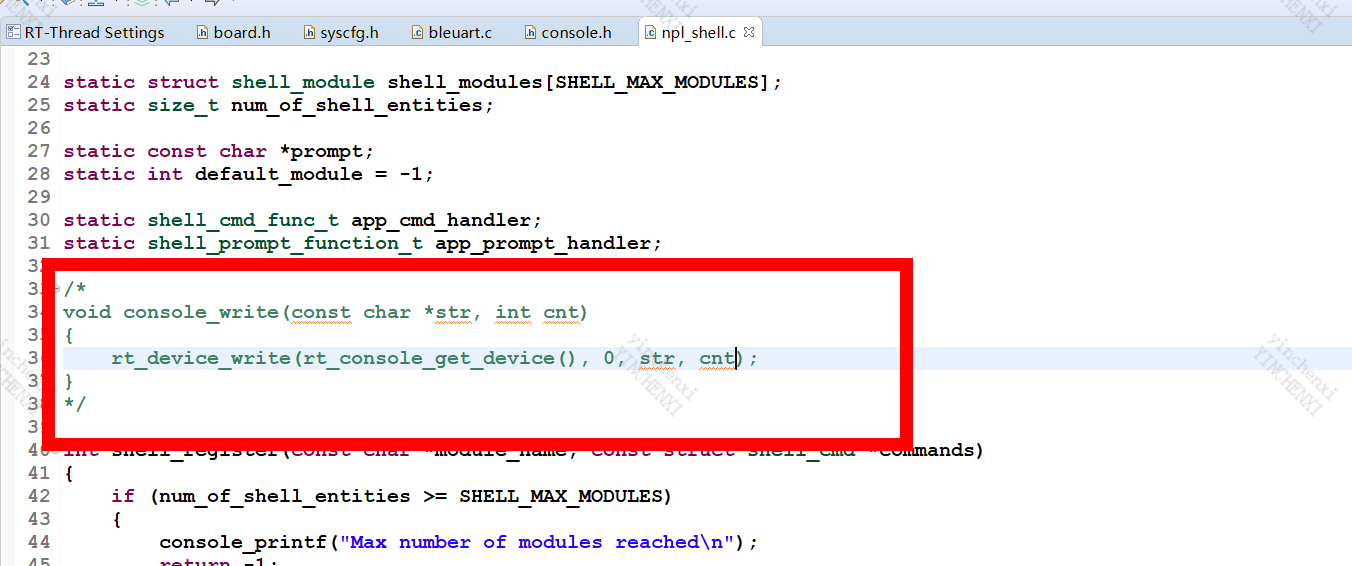 修改\packages\NimBLE-latest\porting\npl\rtthread\src\nimble_port_rtthread.c
cpp
/*
 * SPDX-License-Identifier: Apache-2.0
 *
 * Date           Author       Notes
 * 2018-12-18     ChenYong     first implementation
 * 2021-08-19     WaterFishJ   fix the assert bug
 */


#include <stddef.h>
#include <rtthread.h>
#include <rthw.h>
#include <rtdevice.h>
#include "syscfg/syscfg.h"
#include "nimble/nimble_port.h"
#include "console/console.h"

#if NIMBLE_CFG_CONTROLLER
static rt_thread_t ll_task_h;
#endif

extern void ble_ll_task(void *arg);

/* Console rx callback for bleuart */
static console_rx_callback_t g_console_rx_cb = RT_NULL;
static struct rt_semaphore g_console_rx_sem;

/**
 * Console read - reads characters from console device
 * Returns: number of characters read, 0 if no data, negative on error
 */
int console_read(char *buf, int size, int *full_line)
{
    int ch;
    int read_cnt = 0;
    rt_device_t device;

    *full_line = 0;

    device = rt_device_find(RT_CONSOLE_DEVICE_NAME);
    if (device == RT_NULL)
    {
        return 0;
    }

    if (rt_object_get_type(&device->parent) != RT_Object_Class_Device)
    {
        return 0;
    }

    while (read_cnt < size)
    {
        /* Wait for a short time */
        rt_thread_mdelay(10);

        ch = rt_device_read(device, -1, RT_NULL, 0);
        if (ch < 0)
        {
            if (read_cnt == 0)
            {
                continue;
            }
            break;
        }

        buf[read_cnt++] = (char)ch;

        /* Check for newline */
        if (ch == '\n' || ch == '\r')
        {
            *full_line = 1;
            break;
        }
    }

    return read_cnt;
}

/**
 * Console init - initializes console with rx callback
 */
int console_init(console_rx_callback_t callback)
{
    g_console_rx_cb = callback;

    /* Initialize semaphore for console rx */
    rt_sem_init(&g_console_rx_sem, "console_rx", 0, RT_IPC_FLAG_FIFO);

    return 0;
}

/**
 * Console write - writes string to console
 */
int console_write(const char *str, int len)
{
    rt_device_t device;

    device = rt_device_find(RT_CONSOLE_DEVICE_NAME);
    if (device == RT_NULL)
    {
        return 0;
    }

    if (rt_object_get_type(&device->parent) != RT_Object_Class_Device)
    {
        return 0;
    }

    return rt_device_write(device, 0, str, len);
}

#ifdef RT_DEBUG
RT_WEAK void __aeabi_assert(const char *expr, const char *file, int line)
{
    rt_assert_handler(expr, file, line);
}
#endif

int nimble_port_rtthread_init(void)
{
    nimble_port_init();

#if NIMBLE_CFG_CONTROLLER
    /*
     * Create task where NimBLE LL will run. This one is required as LL has its
     * own event queue and should have highest priority. The task function is
     * provided by NimBLE and in case of FreeRTOS it does not need to be wrapped
     * since it has compatible prototype.
     */
    ll_task_h = rt_thread_create("ll", ble_ll_task, NULL,
                                MYNEWT_VAL(BLE_CTLR_THREAD_STACK_SIZE),
                                MYNEWT_VAL(BLE_CTLR_THREAD_PRIORITY), 10);
    if (ll_task_h != RT_NULL)
        rt_thread_startup(ll_task_h);

#endif

    return 0;
}

void ble_hs_thread_entry(void *parameter)
{
    nimble_port_run();
}

void ble_hs_thread_startup(void)
{
    rt_thread_t tid;

    tid = rt_thread_create("host", ble_hs_thread_entry, NULL,
                           MYNEWT_VAL(BLE_HOST_THREAD_STACK_SIZE),
                           MYNEWT_VAL(BLE_HOST_THREAD_PRIORITY), 10);
    if (tid != RT_NULL)
        rt_thread_startup(tid);
}

INIT_COMPONENT_EXPORT(nimble_port_rtthread_init);
此时编译已经无错误。
下载到板子之后等待系统启动。输入bleuart指令启动协议栈和蓝牙线程。
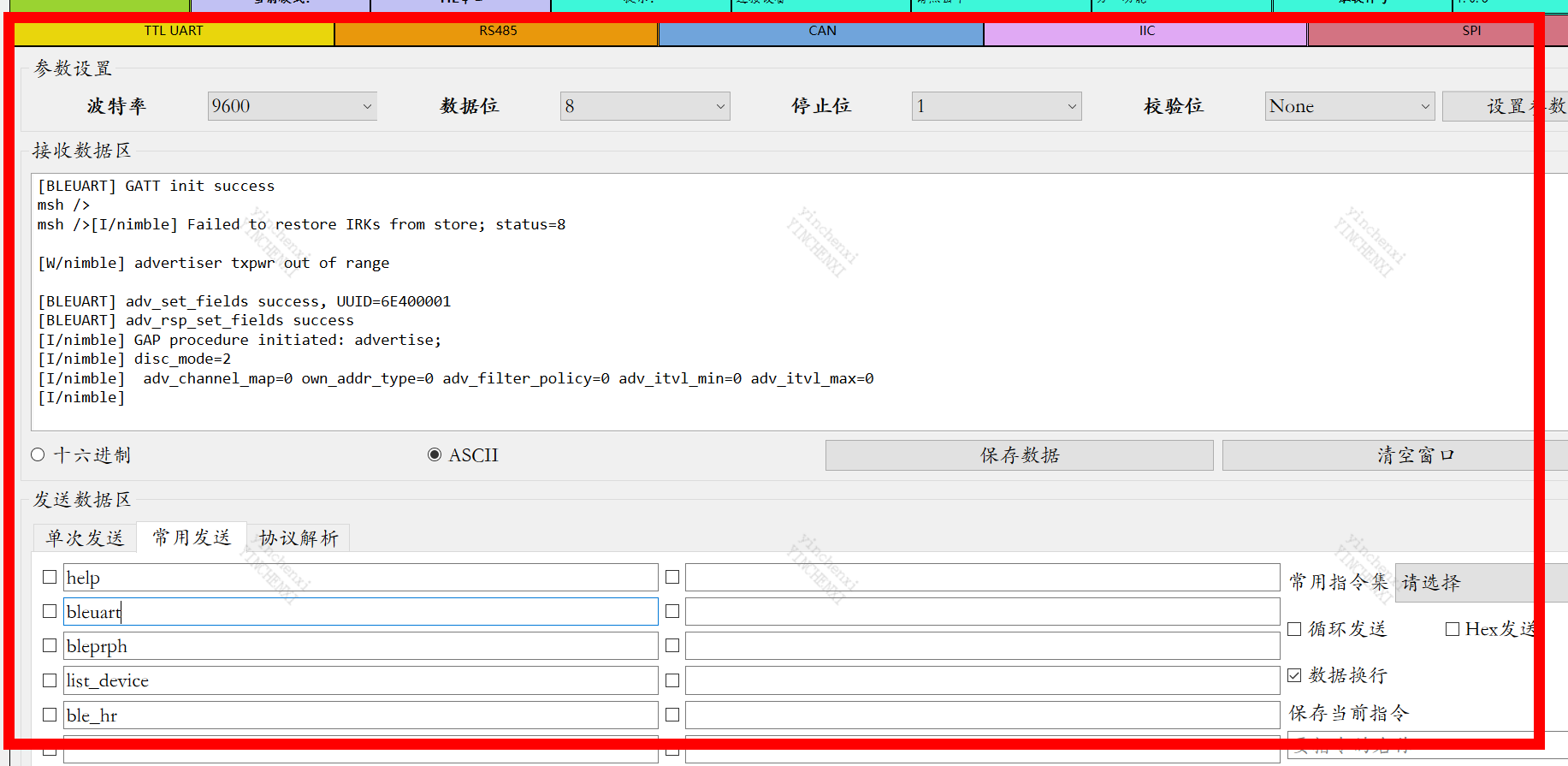
打开手机蓝牙APP软件,连接Mynewt_BLEuart这个蓝牙。
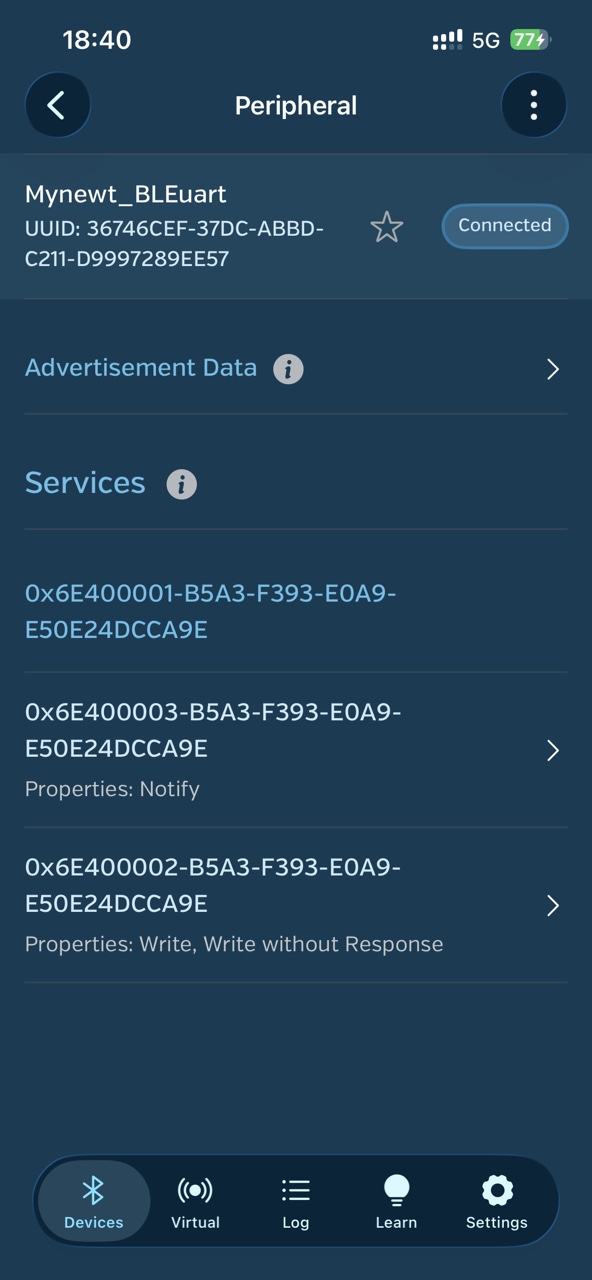
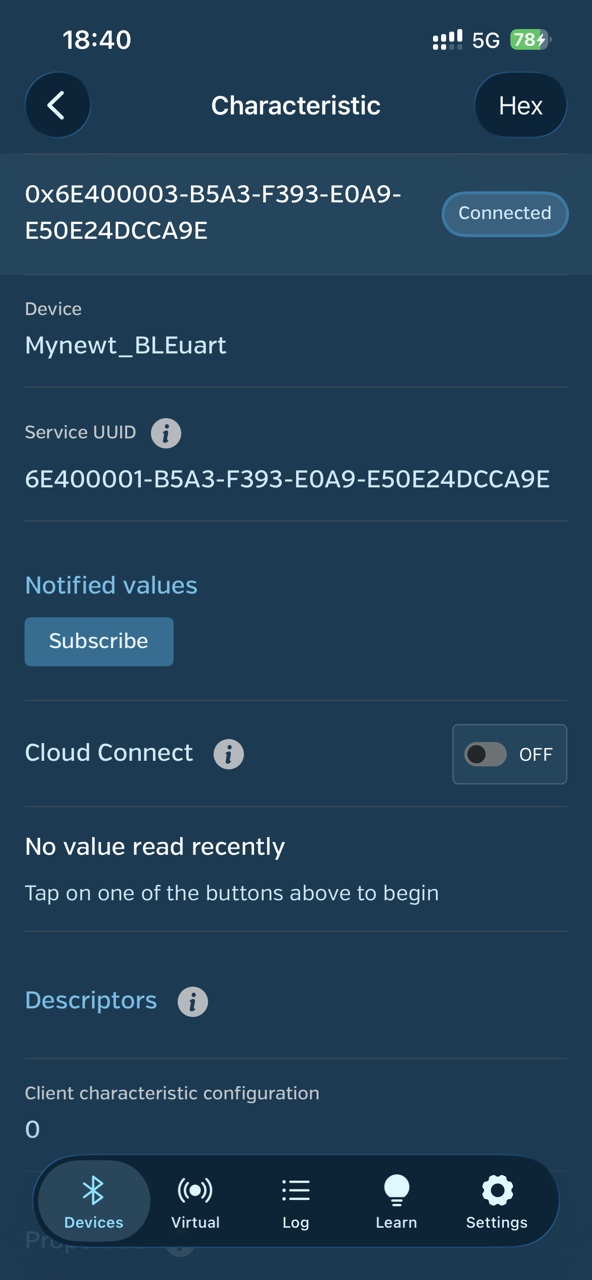
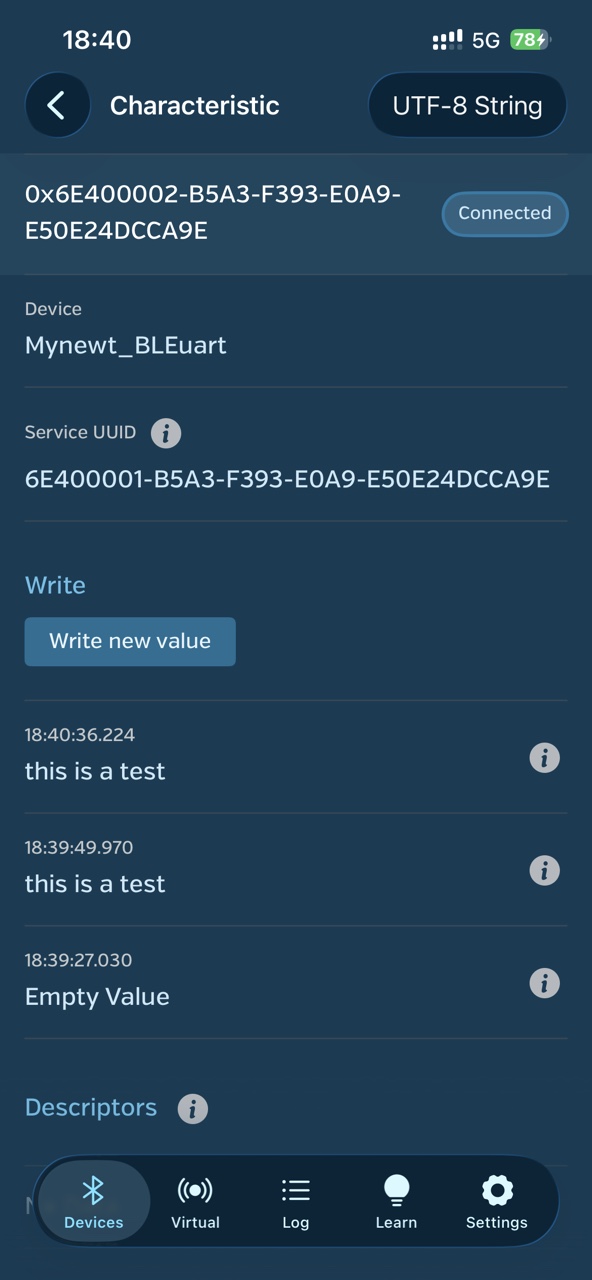
点击 Notify下的Subscribe订阅按钮,然后在回到另一个UUID下Write 下输入数据就可以进行测试了。
在串口上位机显示如下所示:
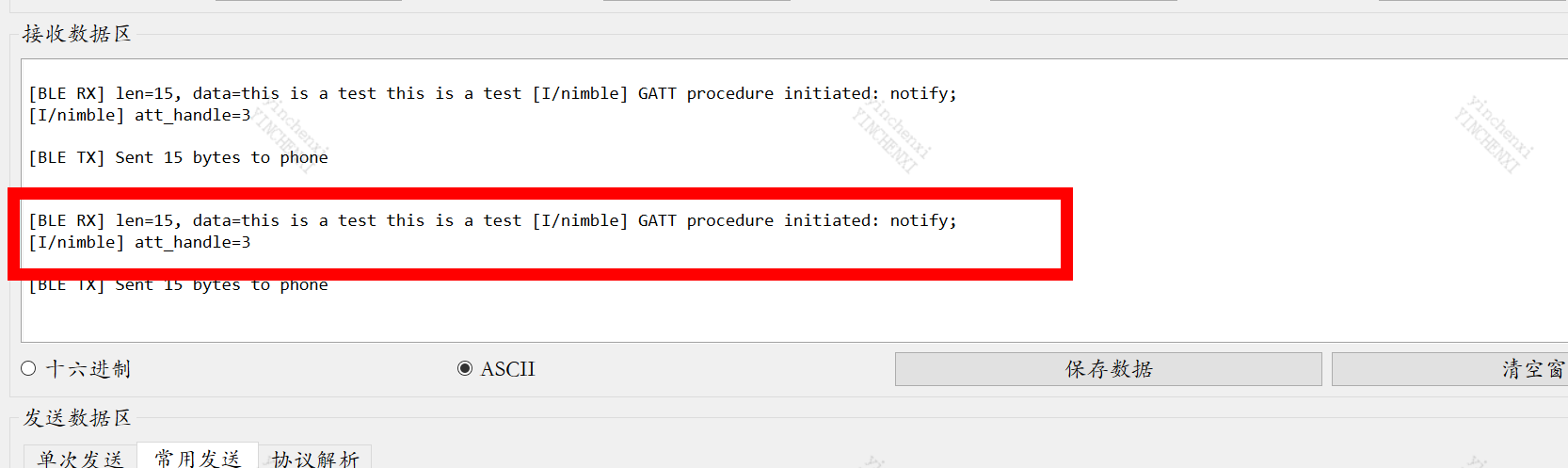
通过以上的步骤就可以完成手机APP和蓝牙通信,进而实现手机和ART-PI板的互相通信。