一.仓库相关命令
bash
git init
git clone <url>
git clone --depth 1 <url>     # 浅克隆,只要最新历史
二.状态与历史
bash
git status
git log
git log --oneline --graph --all
git log -p                    # 带 diff 的历史
git blame <file>              # 逐行看谁改的
git show <commit>
三.暂存 / 提交
bash
git add <file>
git add .
git commit -m "消息"
四.撤销与还原
bash
git restore <file>            # 丢弃工作区改动
git restore --staged <file>   # 取消暂存
git reset --soft HEAD~1       # 撤提交,改动仍在暂存区
git reset --mixed HEAD~1      # 撤提交,改动回工作区
git reset --hard HEAD~1       # 彻底丢弃(危险)
git revert <commit>           # 用新提交抵消某次提交
五.分支
bash
git branch
git branch -a                 # 含远程
git branch <name>
git switch <name>
git switch -c <name>
git merge <branch>
git rebase <branch>
git branch -d <name>          # 删已合并分支
git branch -D <name>          # 强制删除
六.远程
bash
git remote -v
git remote add origin <url>
git fetch
git pull
git pull --rebase
git push
git push -u origin <branch>
git push origin --delete <branch>
七.暂存改动(stash)
bash
git stash
git stash -u                  # 含未跟踪文件
git stash list
git stash pop
git stash apply
git stash drop
八.比较
bash
git diff
git diff --staged
git diff branch1..branch2
git diff HEAD~1 HEAD
九.标签
bash
git tag
git tag v1.0.0
git tag -a v1.0.0 -m "说明"
git push origin v1.0.0
git push origin --tags
十.配置
bash
git config --global user.name "名字"
git config --global user.email "邮箱"
git config --list
git config 用来读写 Git 配置,控制用户信息、默认行为、别名等。
-
三级作用域

优先级:本地 > 全局 > 系统。
-
查看配置
bash
git config --list                 # 全部生效配置
git config --list --show-origin   # 顺便显示来自哪个文件
git config user.name              # 查某一项的最终值
git config --global --list        # 只看全局
git config --local --list         # 只看当前仓库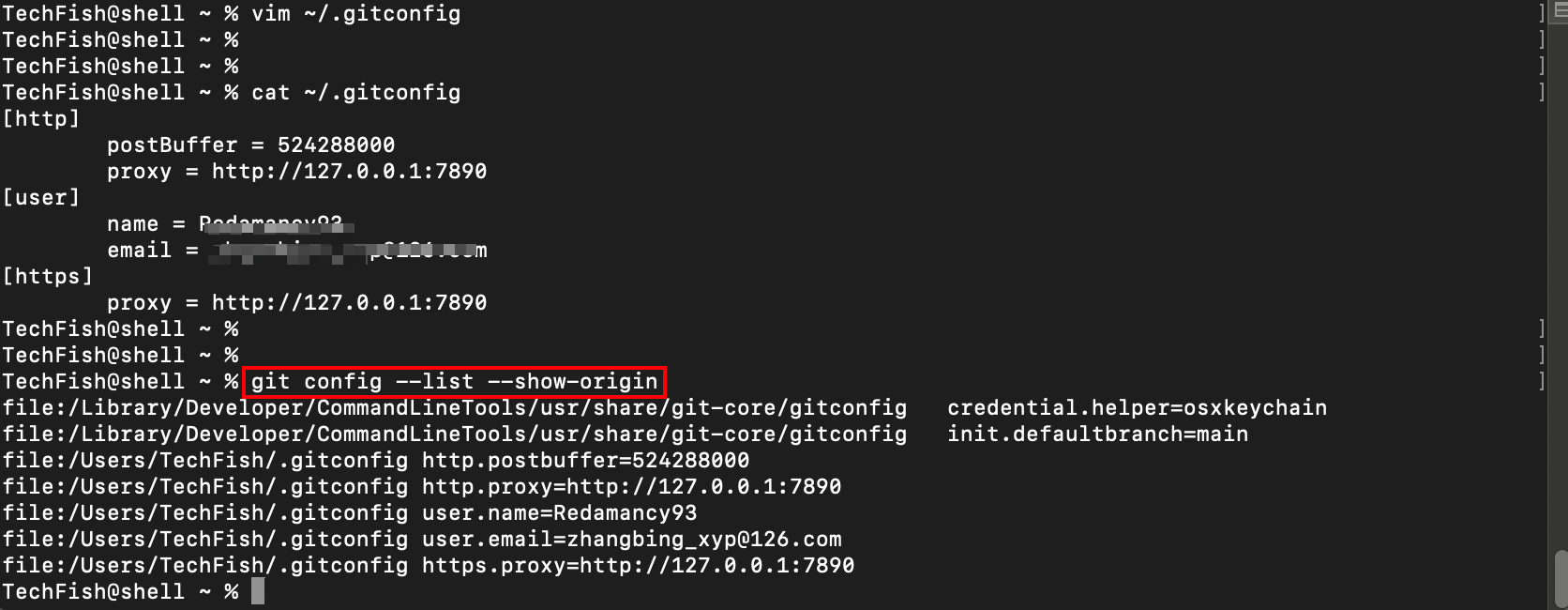
系统级(Command Line Tools 自带)

来自:/Library/Developer/CommandLineTools/usr/share/git-core/gitconfig
全局(~/.gitconfig)
http.postBuffer 524288000(约 500MB) 放大 HTTP 推送缓冲,缓解大仓库 push 失败
http.proxy / https.proxy 127.0.0.1:7890 Git 走本地代理(常见于 Clash 等)
【注】:代理关了或端口变了,git clone/pull/push 会连不上。临时关掉:
git config --global --unset http.proxy
git config --global --unset https.proxy
- 设置 / 删除
bash
# 设置
git config --global user.name "张三"
git config --global user.email "zhangsan@example.com"

# 只对当前仓库生效(覆盖全局)
git config user.email "work@company.com"

# 删除
git config --global --unset user.name
git config --local --unset user.email- 最常用项
bash
# 身份(提交必填)
git config --global user.name "名字"
git config --global user.email "邮箱"

# 默认分支名
git config --global init.defaultBranch main

# 换行符(macOS/Linux 常用)
git config --global core.autocrlf input

# 编辑器
git config --global core.editor "code --wait"- 直接改文件
bash
git config --global --edit # 用编辑器打开 ~/.gitconfig或手动编辑 ~/.gitconfig / 项目里的 .git/config。
- 小提示
1.公司邮箱、私人邮箱可分开:全局用私人,工作仓库用 git config user.email "..." 覆盖。
-
git config 只改配置,不会改已有提交;改名字/邮箱只影响之后的 commit。
-
想确认某次提交用的是谁:git log -1 --format='%an <%ae>'。
十一.清理
bash
git clean -n                  # 预览要删的未跟踪文件
git clean -fd                 # 真正删除(慎用)
十二.日常最短路径
bash
git status
git add .
git commit -m "说明改动原因"
git push