文档撰写功能实现说明
功能定位:类"文思助手"的长文写作 ------ 输入写作需求 → 自动识别意图 → 生成标题目录 → 流式生成正文 → 在线编辑 / 导出 Word。
支持参考资料增强(RAG):上传参考资料后,生成目录与正文时可参考这些资料。
目录
一、技术栈
| 层次 | 技术 | 用途 |
|---|---|---|
| 后端框架 | FastAPI + Uvicorn | HTTP / 流式接口 |
| 数据校验 | Pydantic v2 | 请求/响应模型(ChatCompletionRequest、ComplexMenuParams、GenerateContext...) |
| 大模型调用 | OpenAI SDK(OpenAI 兼容) | 意图识别、目录生成、正文生成(llm_client,模型 setting.llm_api_model) |
| 流式输出 | StreamingResponse(media_type=text/event-stream) |
目录 / 正文逐段返回(注意:内容为裸 JSON 片段,非标准 SSE 帧) |
| 向量库 | Milvus(pymilvus) | 参考资料存储与检索(正文 / 段落 / 目录三类) |
| 向量化 | sentence-transformers(bge 中文模型) | 参考资料切片向量化 |
| 文档解析 | pymupdf / python-docx / 内置文本读取 | txt / md / pdf 解析 |
| 文本切分 | langchain-text-splitters | RecursiveCharacterTextSplitter |
| 日志 | loguru | 运行日志 |
| 前端框架 | Vue 3.4(<script setup>) |
页面与组件 |
| UI 组件 | Element Plus 2.x + @element-plus/icons-vue | 表单、上传、卡片、对话框等 |
| 状态管理 | Pinia | 登录 token(useUserStore) |
| 构建 | Vite 5(已配置 /chat_py_server → 127.0.0.1:5020 代理) |
开发/构建 |
| Markdown 渲染 | marked + DOMPurify | 正文流式渲染与 XSS 清洗 |
| Word 导出 | 原生 Blob(application/msword) |
导出 .doc,无需第三方库 |
| 流式解析 | fetch + ReadableStream | 前端按 JSON 对象边界解析流 |
二、整体架构
#mermaid-svg-yvmt98KMqHE7iHcf{font-family:"trebuchet ms",verdana,arial,sans-serif;font-size:16px;fill:#333;}@keyframes edge-animation-frame{from{stroke-dashoffset:0;}}@keyframes dash{to{stroke-dashoffset:0;}}#mermaid-svg-yvmt98KMqHE7iHcf .edge-animation-slow{stroke-dasharray:9,5!important;stroke-dashoffset:900;animation:dash 50s linear infinite;stroke-linecap:round;}#mermaid-svg-yvmt98KMqHE7iHcf .edge-animation-fast{stroke-dasharray:9,5!important;stroke-dashoffset:900;animation:dash 20s linear infinite;stroke-linecap:round;}#mermaid-svg-yvmt98KMqHE7iHcf .error-icon{fill:#552222;}#mermaid-svg-yvmt98KMqHE7iHcf .error-text{fill:#552222;stroke:#552222;}#mermaid-svg-yvmt98KMqHE7iHcf .edge-thickness-normal{stroke-width:1px;}#mermaid-svg-yvmt98KMqHE7iHcf .edge-thickness-thick{stroke-width:3.5px;}#mermaid-svg-yvmt98KMqHE7iHcf .edge-pattern-solid{stroke-dasharray:0;}#mermaid-svg-yvmt98KMqHE7iHcf .edge-thickness-invisible{stroke-width:0;fill:none;}#mermaid-svg-yvmt98KMqHE7iHcf .edge-pattern-dashed{stroke-dasharray:3;}#mermaid-svg-yvmt98KMqHE7iHcf .edge-pattern-dotted{stroke-dasharray:2;}#mermaid-svg-yvmt98KMqHE7iHcf .marker{fill:#333333;stroke:#333333;}#mermaid-svg-yvmt98KMqHE7iHcf .marker.cross{stroke:#333333;}#mermaid-svg-yvmt98KMqHE7iHcf svg{font-family:"trebuchet ms",verdana,arial,sans-serif;font-size:16px;}#mermaid-svg-yvmt98KMqHE7iHcf p{margin:0;}#mermaid-svg-yvmt98KMqHE7iHcf .label{font-family:"trebuchet ms",verdana,arial,sans-serif;color:#333;}#mermaid-svg-yvmt98KMqHE7iHcf .cluster-label text{fill:#333;}#mermaid-svg-yvmt98KMqHE7iHcf .cluster-label span{color:#333;}#mermaid-svg-yvmt98KMqHE7iHcf .cluster-label span p{background-color:transparent;}#mermaid-svg-yvmt98KMqHE7iHcf .label text,#mermaid-svg-yvmt98KMqHE7iHcf span{fill:#333;color:#333;}#mermaid-svg-yvmt98KMqHE7iHcf .node rect,#mermaid-svg-yvmt98KMqHE7iHcf .node circle,#mermaid-svg-yvmt98KMqHE7iHcf .node ellipse,#mermaid-svg-yvmt98KMqHE7iHcf .node polygon,#mermaid-svg-yvmt98KMqHE7iHcf .node path{fill:#ECECFF;stroke:#9370DB;stroke-width:1px;}#mermaid-svg-yvmt98KMqHE7iHcf .rough-node .label text,#mermaid-svg-yvmt98KMqHE7iHcf .node .label text,#mermaid-svg-yvmt98KMqHE7iHcf .image-shape .label,#mermaid-svg-yvmt98KMqHE7iHcf .icon-shape .label{text-anchor:middle;}#mermaid-svg-yvmt98KMqHE7iHcf .node .katex path{fill:#000;stroke:#000;stroke-width:1px;}#mermaid-svg-yvmt98KMqHE7iHcf .rough-node .label,#mermaid-svg-yvmt98KMqHE7iHcf .node .label,#mermaid-svg-yvmt98KMqHE7iHcf .image-shape .label,#mermaid-svg-yvmt98KMqHE7iHcf .icon-shape .label{text-align:center;}#mermaid-svg-yvmt98KMqHE7iHcf .node.clickable{cursor:pointer;}#mermaid-svg-yvmt98KMqHE7iHcf .root .anchor path{fill:#333333!important;stroke-width:0;stroke:#333333;}#mermaid-svg-yvmt98KMqHE7iHcf .arrowheadPath{fill:#333333;}#mermaid-svg-yvmt98KMqHE7iHcf .edgePath .path{stroke:#333333;stroke-width:2.0px;}#mermaid-svg-yvmt98KMqHE7iHcf .flowchart-link{stroke:#333333;fill:none;}#mermaid-svg-yvmt98KMqHE7iHcf .edgeLabel{background-color:rgba(232,232,232, 0.8);text-align:center;}#mermaid-svg-yvmt98KMqHE7iHcf .edgeLabel p{background-color:rgba(232,232,232, 0.8);}#mermaid-svg-yvmt98KMqHE7iHcf .edgeLabel rect{opacity:0.5;background-color:rgba(232,232,232, 0.8);fill:rgba(232,232,232, 0.8);}#mermaid-svg-yvmt98KMqHE7iHcf .labelBkg{background-color:rgba(232, 232, 232, 0.5);}#mermaid-svg-yvmt98KMqHE7iHcf .cluster rect{fill:#ffffde;stroke:#aaaa33;stroke-width:1px;}#mermaid-svg-yvmt98KMqHE7iHcf .cluster text{fill:#333;}#mermaid-svg-yvmt98KMqHE7iHcf .cluster span{color:#333;}#mermaid-svg-yvmt98KMqHE7iHcf div.mermaidTooltip{position:absolute;text-align:center;max-width:200px;padding:2px;font-family:"trebuchet ms",verdana,arial,sans-serif;font-size:12px;background:hsl(80, 100%, 96.2745098039%);border:1px solid #aaaa33;border-radius:2px;pointer-events:none;z-index:100;}#mermaid-svg-yvmt98KMqHE7iHcf .flowchartTitleText{text-anchor:middle;font-size:18px;fill:#333;}#mermaid-svg-yvmt98KMqHE7iHcf rect.text{fill:none;stroke-width:0;}#mermaid-svg-yvmt98KMqHE7iHcf .icon-shape,#mermaid-svg-yvmt98KMqHE7iHcf .image-shape{background-color:rgba(232,232,232, 0.8);text-align:center;}#mermaid-svg-yvmt98KMqHE7iHcf .icon-shape p,#mermaid-svg-yvmt98KMqHE7iHcf .image-shape p{background-color:rgba(232,232,232, 0.8);padding:2px;}#mermaid-svg-yvmt98KMqHE7iHcf .icon-shape .label rect,#mermaid-svg-yvmt98KMqHE7iHcf .image-shape .label rect{opacity:0.5;background-color:rgba(232,232,232, 0.8);fill:rgba(232,232,232, 0.8);}#mermaid-svg-yvmt98KMqHE7iHcf .label-icon{display:inline-block;height:1em;overflow:visible;vertical-align:-0.125em;}#mermaid-svg-yvmt98KMqHE7iHcf .node .label-icon path{fill:currentColor;stroke:revert;stroke-width:revert;}#mermaid-svg-yvmt98KMqHE7iHcf :root{--mermaid-font-family:"trebuchet ms",verdana,arial,sans-serif;} chat_py_server / FastAPI
chat_py_front / Vue3 + Element Plus
HTTP / 流
DocumentWriting.vue
写作概要 / 大纲 / 正文
documentWriting/OutlineTree.vue
大纲树增删改
api/documentWriting.js
接口封装 + JSON 流解析
document_writing_controller.py
7 个接口
document_writing_service.py
提示词与业务逻辑
document_loader_service.py
解析 + 切片
openai_model.py
get_completion / get_completion_in_stream
大模型
OpenAI 兼容
Milvus
参考资料集合
分层职责:
- Controller :参数校验、文件落盘、组装响应(普通
RestResp/ 流式StreamingResponse); - Service:提示词构造、目录解析(编号 → 层级)、参考资料入库、正文分段调用;
- Model(openai_model):统一的大模型同步/流式调用封装;
- System 服务 :
document_loader_service(文档解析/切片)、milvus_service(集合与数据操作)、embedding_service(向量化)。
三、核心流程
3.1 完整使用链路
Milvus 大模型 后端(controller/service) 前端(DocumentWriting) 用户 Milvus 大模型 后端(controller/service) 前端(DocumentWriting) 用户 #mermaid-svg-qxKofh1pcDtZHaKJ{font-family:"trebuchet ms",verdana,arial,sans-serif;font-size:16px;fill:#333;}@keyframes edge-animation-frame{from{stroke-dashoffset:0;}}@keyframes dash{to{stroke-dashoffset:0;}}#mermaid-svg-qxKofh1pcDtZHaKJ .edge-animation-slow{stroke-dasharray:9,5!important;stroke-dashoffset:900;animation:dash 50s linear infinite;stroke-linecap:round;}#mermaid-svg-qxKofh1pcDtZHaKJ .edge-animation-fast{stroke-dasharray:9,5!important;stroke-dashoffset:900;animation:dash 20s linear infinite;stroke-linecap:round;}#mermaid-svg-qxKofh1pcDtZHaKJ .error-icon{fill:#552222;}#mermaid-svg-qxKofh1pcDtZHaKJ .error-text{fill:#552222;stroke:#552222;}#mermaid-svg-qxKofh1pcDtZHaKJ .edge-thickness-normal{stroke-width:1px;}#mermaid-svg-qxKofh1pcDtZHaKJ .edge-thickness-thick{stroke-width:3.5px;}#mermaid-svg-qxKofh1pcDtZHaKJ .edge-pattern-solid{stroke-dasharray:0;}#mermaid-svg-qxKofh1pcDtZHaKJ .edge-thickness-invisible{stroke-width:0;fill:none;}#mermaid-svg-qxKofh1pcDtZHaKJ .edge-pattern-dashed{stroke-dasharray:3;}#mermaid-svg-qxKofh1pcDtZHaKJ .edge-pattern-dotted{stroke-dasharray:2;}#mermaid-svg-qxKofh1pcDtZHaKJ .marker{fill:#333333;stroke:#333333;}#mermaid-svg-qxKofh1pcDtZHaKJ .marker.cross{stroke:#333333;}#mermaid-svg-qxKofh1pcDtZHaKJ svg{font-family:"trebuchet ms",verdana,arial,sans-serif;font-size:16px;}#mermaid-svg-qxKofh1pcDtZHaKJ p{margin:0;}#mermaid-svg-qxKofh1pcDtZHaKJ .actor{stroke:hsl(259.6261682243, 59.7765363128%, 87.9019607843%);fill:#ECECFF;}#mermaid-svg-qxKofh1pcDtZHaKJ text.actor>tspan{fill:black;stroke:none;}#mermaid-svg-qxKofh1pcDtZHaKJ .actor-line{stroke:hsl(259.6261682243, 59.7765363128%, 87.9019607843%);}#mermaid-svg-qxKofh1pcDtZHaKJ .innerArc{stroke-width:1.5;stroke-dasharray:none;}#mermaid-svg-qxKofh1pcDtZHaKJ .messageLine0{stroke-width:1.5;stroke-dasharray:none;stroke:#333;}#mermaid-svg-qxKofh1pcDtZHaKJ .messageLine1{stroke-width:1.5;stroke-dasharray:2,2;stroke:#333;}#mermaid-svg-qxKofh1pcDtZHaKJ #arrowhead path{fill:#333;stroke:#333;}#mermaid-svg-qxKofh1pcDtZHaKJ .sequenceNumber{fill:white;}#mermaid-svg-qxKofh1pcDtZHaKJ #sequencenumber{fill:#333;}#mermaid-svg-qxKofh1pcDtZHaKJ #crosshead path{fill:#333;stroke:#333;}#mermaid-svg-qxKofh1pcDtZHaKJ .messageText{fill:#333;stroke:none;}#mermaid-svg-qxKofh1pcDtZHaKJ .labelBox{stroke:hsl(259.6261682243, 59.7765363128%, 87.9019607843%);fill:#ECECFF;}#mermaid-svg-qxKofh1pcDtZHaKJ .labelText,#mermaid-svg-qxKofh1pcDtZHaKJ .labelText>tspan{fill:black;stroke:none;}#mermaid-svg-qxKofh1pcDtZHaKJ .loopText,#mermaid-svg-qxKofh1pcDtZHaKJ .loopText>tspan{fill:black;stroke:none;}#mermaid-svg-qxKofh1pcDtZHaKJ .loopLine{stroke-width:2px;stroke-dasharray:2,2;stroke:hsl(259.6261682243, 59.7765363128%, 87.9019607843%);fill:hsl(259.6261682243, 59.7765363128%, 87.9019607843%);}#mermaid-svg-qxKofh1pcDtZHaKJ .note{stroke:#aaaa33;fill:#fff5ad;}#mermaid-svg-qxKofh1pcDtZHaKJ .noteText,#mermaid-svg-qxKofh1pcDtZHaKJ .noteText>tspan{fill:black;stroke:none;}#mermaid-svg-qxKofh1pcDtZHaKJ .activation0{fill:#f4f4f4;stroke:#666;}#mermaid-svg-qxKofh1pcDtZHaKJ .activation1{fill:#f4f4f4;stroke:#666;}#mermaid-svg-qxKofh1pcDtZHaKJ .activation2{fill:#f4f4f4;stroke:#666;}#mermaid-svg-qxKofh1pcDtZHaKJ .actorPopupMenu{position:absolute;}#mermaid-svg-qxKofh1pcDtZHaKJ .actorPopupMenuPanel{position:absolute;fill:#ECECFF;box-shadow:0px 8px 16px 0px rgba(0,0,0,0.2);filter:drop-shadow(3px 5px 2px rgb(0 0 0 / 0.4));}#mermaid-svg-qxKofh1pcDtZHaKJ .actor-man line{stroke:hsl(259.6261682243, 59.7765363128%, 87.9019607843%);fill:#ECECFF;}#mermaid-svg-qxKofh1pcDtZHaKJ .actor-man circle,#mermaid-svg-qxKofh1pcDtZHaKJ line{stroke:hsl(259.6261682243, 59.7765363128%, 87.9019607843%);fill:#ECECFF;stroke-width:2px;}#mermaid-svg-qxKofh1pcDtZHaKJ :root{--mermaid-font-family:"trebuchet ms",verdana,arial,sans-serif;} opt 启用文档检索增强 输入写作需求 → 点击「提交」 POST /writing/intent 意图识别提示词 {主题, 写作关键词, 写作风格, 文章标题} 填充「写作概要」 上传参考资料(txt/pdf/md) POST /writing/add_reference/{rag_index} 解析文本 + 切片 + 生成目录 写入 type=正文/段落/目录 点击「更新目录大纲」 POST /writing/genmenu/complex (stream) (可选) 查询 type=目录 大纲提示词(含参考资料目录/正文) 逐行输出 1. / 1.1 / 1.1.1 逐个 JSON 片段 {data:{depth,text,...},type:answer} 解析并按 depth 建树 + 拼接 menu_str 点击「输出专业长文」 POST /writing/gencontext (stream) 正文提示词(每两章一组,多轮调用) 逐 token 输出 Markdown 正文 逐个 JSON 片段 {data:"...",type:answer} 累加 → marked 渲染 → 可编辑 → 导出 Word / 打印
3.2 三次调用必须共用同一个 rag_index
| 调用 | 作用 |
|---|---|
add_reference/{rag_index} |
把参考资料写入 Milvus 集合 rag_index |
genmenu/complex(sys_rag=true) |
查集合中 type='目录' 的内容,作为大纲参考 |
gencontext |
查集合中 type='正文' 的内容,作为正文参考 |
rag_index 由前端页面实例生成并保持不变(见 六、存储与数据设计)。
四、接口清单
统一前缀:/{SERVER_PREFIX}/policy,其中 SERVER_PREFIX 默认 chat_py_server,因此完整路径为 /chat_py_server/policy/writing/*。
| 方法 | 路径 | 说明 | 入参 | 返回 |
|---|---|---|---|---|
| POST | /writing/add_reference/{rag_index} |
上传参考资料并写入 RAG | multipart/form-data,文件字段 doc_file |
RestResp{data:{insert_count}} |
| DELETE | /writing/remove_reference |
删除某份参考资料 | body:{rag_index, file_name} |
RestResp{data:delete_result} |
| DELETE | /writing/drop_reference_collection/{collection_name} |
删除整个参考资料集合 | path 参数 | RestResp |
| POST | /writing/intent |
文档撰写意图识别 | PromptChatCompletionRequest |
RestResp{data:{title,theme,keywords,style}} |
| POST | /writing/genmenu/simple |
简单生成标题目录 | PromptChatCompletionRequest |
流式 / RestResp |
| POST | /writing/genmenu/complex |
复杂生成目录(支持 RAG) | ComplexMenuParams |
流式:{data:{node_id,depth,text,tag},type:"answer"} |
| POST | /writing/gencontext |
生成正文 | GenerateContext |
流式:{data:"文本片段",type:"answer"} |
4.1 流式返回格式(重要)
三个流式接口返回的是连续拼接的 JSON 对象,不是标准 SSE 帧:
text
{"data":{"node_id":4,"depth":3,"text":"1.2.1 坚持统筹规划","tag":"li"},"type":"answer","url":null}{"data":{...},"type":"answer","url":null}...{"data":"","type":"complete","url":null}- 用
StreamingResponse(media_type="text/event-stream")输出,便于流式传输,但没有data:前缀与空行分帧; - 用
type区分:answer(正常内容)/complete(结束)/fail(失败); - 前端必须用
fetch + ReadableStream并按{}配对解析(详见 5.9)。
五、关键实现步骤与代码
5.1 注册路由(后端)
app/controller/__init__.py:
python
from .document_writing_controller import router as document_writing_router

__all__ = ["chat_router", "doc_router", "auth_router", "document_writing_router"]app.py(同时补充跨域,供前端直连):
python
from fastapi import FastAPI
from fastapi.middleware.cors import CORSMiddleware
from app.controller import chat_router, doc_router, auth_router, document_writing_router


def create_app() -> FastAPI:
    app = FastAPI(title=setting.project_description, version=setting.project_version)
    app.add_middleware(
        CORSMiddleware,
        allow_origins=["*"],
        allow_credentials=False,
        allow_methods=["*"],
        allow_headers=["*"],
    )
    register_api(app)
    return app


def register_api(application: FastAPI):
    application.include_router(chat_router, prefix=f'/{setting.server_prefix}/chat', tags=["chat"])
    application.include_router(doc_router, prefix=f'/{setting.server_prefix}/doc', tags=["doc"])
    application.include_router(auth_router, prefix=f'/{setting.server_prefix}/auth', tags=["auth"])
    # 路径保留 policy(对外契约),业务语义为文档撰写
    application.include_router(document_writing_router, prefix=f'/{setting.server_prefix}/policy', tags=["document-writing"])
5.2 请求 / 响应模型(VO)
app/entity/vo/request_body.py(新增):
python
class ComplexMenuParams(BaseModel):
    sys_rag: bool = False                 # 是否启用参考资料增强
    rag_index: Optional[str] = None       # 参考资料集合名
    title: str = ''
    theme: str = ''
    keywords: str = ''
    style: str = ''
    menu_str: str = ''
    stream: bool = True


class RemoveReference(BaseModel):
    rag_index: str
    file_name: str


class GenerateContext(BaseModel):
    sys_rag: bool = False
    rag_index: Optional[str] = None
    theme: str = ''
    keywords: str = ''
    style: str = ''
    title: str = ''
    menu_str: str = ''
stream: Optional[bool] = Trueapp/entity/vo/response_body.py(新增):
python
class ComplexMenuResponse(BaseModel):
    node_id: int
    depth: int    # 层级:1=章,2=节,3=小节
    text: str     # 例如:1.1 完善数据基础设施建设
    tag: str      # h1 / li
5.3 大模型调用封装
app/model/openai_model.py:
python
def get_completion(request: ChatCompletionRequest) -> str:
    '''同步调用大模型获取完整回答'''
    messages = [{"role": message.role, "content": message.content} for message in request.messages]
    response = llm_client.chat.completions.create(
        model=request.model or setting.llm_api_model,
        messages=messages,
        stream=False)
    return response.choices[0].message.content


def get_completion_in_stream(request: ChatCompletionRequest):
    '''流式调用大模型,产出 StreamDataResp 生成器'''
    messages = [{"role": message.role, "content": message.content} for message in request.messages]
    response = llm_client.chat.completions.create(
        model=request.model or setting.llm_api_model,
        messages=messages,
        stream=True)
    for chunk in response:
        yield StreamDataResp(data=chunk.choices[0].delta.content or '', type=StreamDataRespType.ANSWER.value)
    yield StreamDataResp(data='', type=StreamDataRespType.COMPLETE.value)
5.4 文档解析与切片
app/service/system/document_loader_service.py:
python
def txt_loader(path: str) -> str: ...        # 直接读取文本
def markdown_loader(path: str) -> str: ...   # 直接读取文本
def pdf_loader(path: str) -> str:            # pymupdf 提取文本
    with pymupdf.open(path) as doc:
        return '\n'.join(page.get_text() for page in doc)

def split_text(text: str, chunk_size: int, chunk_overlap: int) -> List[str]:
    splitter = RecursiveCharacterTextSplitter(chunk_size=chunk_size, chunk_overlap=chunk_overlap)
    return splitter.split_text(text)
5.5 参考资料入库(RAG 写入)
app/service/model/document_writing_service.py ------ 一次上传写入三类数据,并自动建集合:
python
def add_document_rag(doc_str: str, file_name: str, rag_index: str) -> int:
    docs = []
    # 1) 完整正文(截断 12000 字符)
    docs.append({'id': IDUtil.get_random_string(12), 'zcbt': file_name,
                 'content': doc_str[:12000], 'type': '正文', 'file_name': file_name})
    # 2) 正文切片(供检索)
    for dl in document_loader_service.split_text(doc_str, setting.chunk_size, setting.chunk_overlap):
        docs.append({'id': IDUtil.get_random_string(12), 'zcbt': file_name,
                     'content': dl, 'type': '段落', 'file_name': file_name})
    # 3) 目录(用大模型从原文总结,供生成大纲时参考)
    req = ChatCompletionRequest(
        messages=[ChatMessage(role='user', content=document_writing_menu_analysis.format(doc_str))],
        model=setting.llm_api_model)
    docs.append({'id': IDUtil.get_random_string(12), 'zcbt': file_name,
                 'content': openai_model.get_completion(req), 'type': '目录', 'file_name': file_name})

    # 4) 集合不存在则创建(id/vector/zcbt/content/type/file_name)
    if milvus_service.check_collection(rag_index) is False:
        schema = CollectionSchema(fields=[
            FieldSchema(name="id", dtype=DataType.VARCHAR, is_primary=True, max_length=256),
            FieldSchema(name="vector", dtype=DataType.FLOAT_VECTOR, dim=embedding_service.embedding_len),
            FieldSchema(name="zcbt", dtype=DataType.VARCHAR, max_length=1024),
            FieldSchema(name="content", dtype=DataType.VARCHAR, max_length=12000),
            FieldSchema(name="type", dtype=DataType.VARCHAR, max_length=64),
            FieldSchema(name="file_name", dtype=DataType.VARCHAR, max_length=1024),
        ])
        milvus_service.create_collection(rag_index, schema)

    milvus_service.batch_save_update(rag_index, docs, embedding_column_name='content')
    return len(docs)
5.6 目录生成(编号行 → 层级)
模型按 1. / 1.1 / 1.1.1 逐行输出,服务端把每行转成带层级的结构化节点:
python
def generate_tag_level(text, node_id):
    match = re.match(r'(\d+(\.\d+)*\.?)(\s*)(.*)', text)
    if not match:
        return None
    number = match.group(1)
    depth = len([item for item in number.split('.') if item.strip() != ''])  # 深度 = 编号段数
    return ComplexMenuResponse(node_id=node_id, depth=depth, text=text, tag='h1' if depth == 1 else 'li')
控制器侧将生成器包成流式响应:
python
generator = document_writing_service.create_complex_menu(business_params, rag_doc_list)
return StreamingResponse(MsgsUtil.wrap_with_response(generator), media_type="text/event-stream")
5.7 正文生成(分段调用 + Markdown 标题)
正文按"每两章一组"拆成多次模型调用,避免单次请求过长:
python
matches = re.findall(r'(\d+\.\s[^\n]+(?:\n\d+\.\d+\s[^\n]+)*)', request.menu_str)
for i in range(0, len(matches), 2):
    target = f'{i + 1}' if i + 1 >= len(matches) else f'{i + 1}和{i + 2}'
    now_menu = matches[i] if i + 1 >= len(matches) else matches[i] + '\n' + matches[i + 1]
    tmp_msg_list.append(ChatMessage(role='user', content=prompt_prefix + document_writing_gen_content_1.format(
target, target, request.theme, request.keywords, request.style, request.title, now_menu)))关键提示词约束(保证前端 Markdown 渲染出标题层级):
python
document_writing_gen_content_1 = """一步步阅读大纲的{}章,请你基于大纲帮我完把{}章完善成文章段落。
要求:
1.文章篇幅不限,字数不少于1000字
2.章节标题必须使用 Markdown 标题语法,并与【当前目录】中的编号保持一致:
   - 一级章节(如:1. 夯实社会大数据发展基础)输出为「# 1. 夯实社会大数据发展基础」
   - 二级小节(如:1.1 完善数据基础设施建设)输出为「## 1.1 完善数据基础设施建设」
   - 三级小节(如:1.1.1 优化算力网络布局)输出为「### 1.1.1 优化算力网络布局」
   - # 与标题文字之间必须有且只有一个空格,且标题必须独占一行
3.除上述标题行外,正文段落一律不要使用 #、##、### 等 Markdown 标题符号
...
【当前目录】
{}"""
同时系统消息再次强调:
python
msg_list = [ChatMessage(
    role='system',
    content='你是文档撰写专家。输出的章节标题必须使用 Markdown 标题语法:一级章节用 #,二级小节用 ##,三级小节用 ###,'
            '# 与标题文字之间保留一个空格且标题独占一行;除标题行外正文段落不要使用标题符号。')]
5.8 控制器(上传 / 删除 / 意图 / 三个流式接口)
python
@router.post('/writing/add_reference/{rag_index}', response_model=RestResp, summary='添加文档参考')
async def add_reference(rag_index: str, doc_file: UploadFile = File(...)):
    upload_dir = _resolve_upload_dir(setting.upload_file_dir)
    os.makedirs(upload_dir, exist_ok=True)
    file_path = os.path.join(upload_dir, doc_file.filename)
    with open(file_path, "wb") as f:
        f.write(await doc_file.read())

    file_type = doc_file.content_type.lower()
    if 'txt' in file_type:
        doc_str = document_loader_service.txt_loader(file_path)
    elif 'md' in file_type:
        doc_str = document_loader_service.markdown_loader(file_path)
    elif 'pdf' in file_type:
        doc_str = document_loader_service.pdf_loader(file_path)
    else:
        return RestResp(status=-1, message=f"不支持文件类型{doc_file.filename.split('.')[-1].lower()}!")

    insert_count = document_writing_service.add_document_rag(doc_str, doc_file.filename, rag_index)
    return RestResp(status=1, message="写入成功!", data={'insert_count': insert_count})


@router.delete('/writing/remove_reference', response_model=RestResp, summary='删除文档参考')
def remove_reference(request: RemoveReference):
    delete_result = milvus_service.delete_by_filter(request.rag_index, filter=f"file_name=='{request.file_name}'")
    return RestResp(status=1, message="删除成功!", data=delete_result)
目录生成(含 RAG 降级保护):
python
@router.post('/writing/genmenu/complex', response_model=RestResp, summary='通过意图复杂生成标题目录')
async def document_writing_gen_menu_complex(business_params: ComplexMenuParams):
    rag_doc_list = []
    if business_params.sys_rag is True and business_params.rag_index:
        try:
            rag_doc_list = document_writing_service.get_menu_rag_docs(business_params)
        except Exception as e:
            logger.warning(f'读取参考资料失败,本次忽略检索增强:{e}')
            rag_doc_list = []

    generator = document_writing_service.create_complex_menu(business_params, rag_doc_list)
    if business_params.stream is False:
        return RestResp(status=1, data=[tag.data for tag in generator if tag.type != 'complete'], message="调用成功!")
    return StreamingResponse(MsgsUtil.wrap_with_response(generator), media_type="text/event-stream")
正文生成:
python
@router.post('/writing/gencontext', response_model=RestResp, summary='生成正文')
async def generate_context(request: GenerateContext):
    full_content_msg_list = document_writing_service.generate_context(request)
    if request.stream is False or request.stream is None:
        final_content = ''
        for content_msg_list in full_content_msg_list:
            new_req = ChatCompletionRequest(messages=content_msg_list, model=setting.llm_api_model)
            final_content += openai_model.get_completion(new_req)
        return RestResp(status=1, data=final_content, message="调用成功!")

    def get_stream_content(msg_lists):
        for content_msg_list in msg_lists:
            new_req = ChatCompletionRequest(messages=content_msg_list, model=setting.llm_api_model, stream=True)
            for value in openai_model.get_completion_in_stream(new_req):
                if value.type != StreamDataRespType.COMPLETE.value:
                    yield value
        yield StreamDataResp(data='', type=StreamDataRespType.COMPLETE.value)

    return StreamingResponse(MsgsUtil.wrap_with_response(get_stream_content(full_content_msg_list)),
                             media_type="text/event-stream")
5.9 前端:接口封装与 JSON 流解析
src/api/documentWriting.js ------ 状态机按 {} 配对解析连续 JSON 片段(兼容跨 chunk 截断):
js
const BASE = `${import.meta.env.VITE_API_BASE || ''}/chat_py_server/policy/writing`

async function readJsonStream(response, onObject) {
  const reader = response.body.getReader()
  const decoder = new TextDecoder('utf-8')
  let buffer = '', depth = 0, inString = false, escape = false, started = false, objText = ''

  const handleChar = (ch) => {
    if (!started) {
      if (ch === '{') { started = true; depth = 1; objText = '{'; inString = false; escape = false }
      return
    }
    objText += ch
    if (inString) {
      if (escape) escape = false
      else if (ch === '\\') escape = true
      else if (ch === '"') inString = false
      return
    }
    if (ch === '"') inString = true
    else if (ch === '{') depth++
    else if (ch === '}') {
      depth--
      if (depth === 0) {
        try { onObject?.(JSON.parse(objText)) } catch (e) { /* 忽略坏片段 */ }
        started = false; objText = ''
      }
    }
  }

  for (;;) {
    const { done, value } = await reader.read()
    if (done) break
    buffer += decoder.decode(value, { stream: true })
    for (let i = 0; i < buffer.length; i++) handleChar(buffer[i])
    buffer = ''
  }
}

export async function streamGenerateMenu(params, { onObject, onDone, onError } = {}) {
  const resp = await fetch(`${BASE}/genmenu/complex`, {
    method: 'POST',
    headers: { 'Content-Type': 'application/json' },
    body: JSON.stringify({ ...params, stream: true }),
  })
  if (!resp.ok) return onError?.(`生成目录失败(${resp.status})`)
  await readJsonStream(resp, onObject)
  onDone?.()
}

export function uploadReference(ragIndex, file) {
  const formData = new FormData()
  formData.append('doc_file', file)          // 字段名必须与后端 File(...) 参数名一致
  return request.post(`${BASE}/add_reference/${ragIndex}`, formData, { timeout: 120000 })
}
5.10 前端:页面关键逻辑
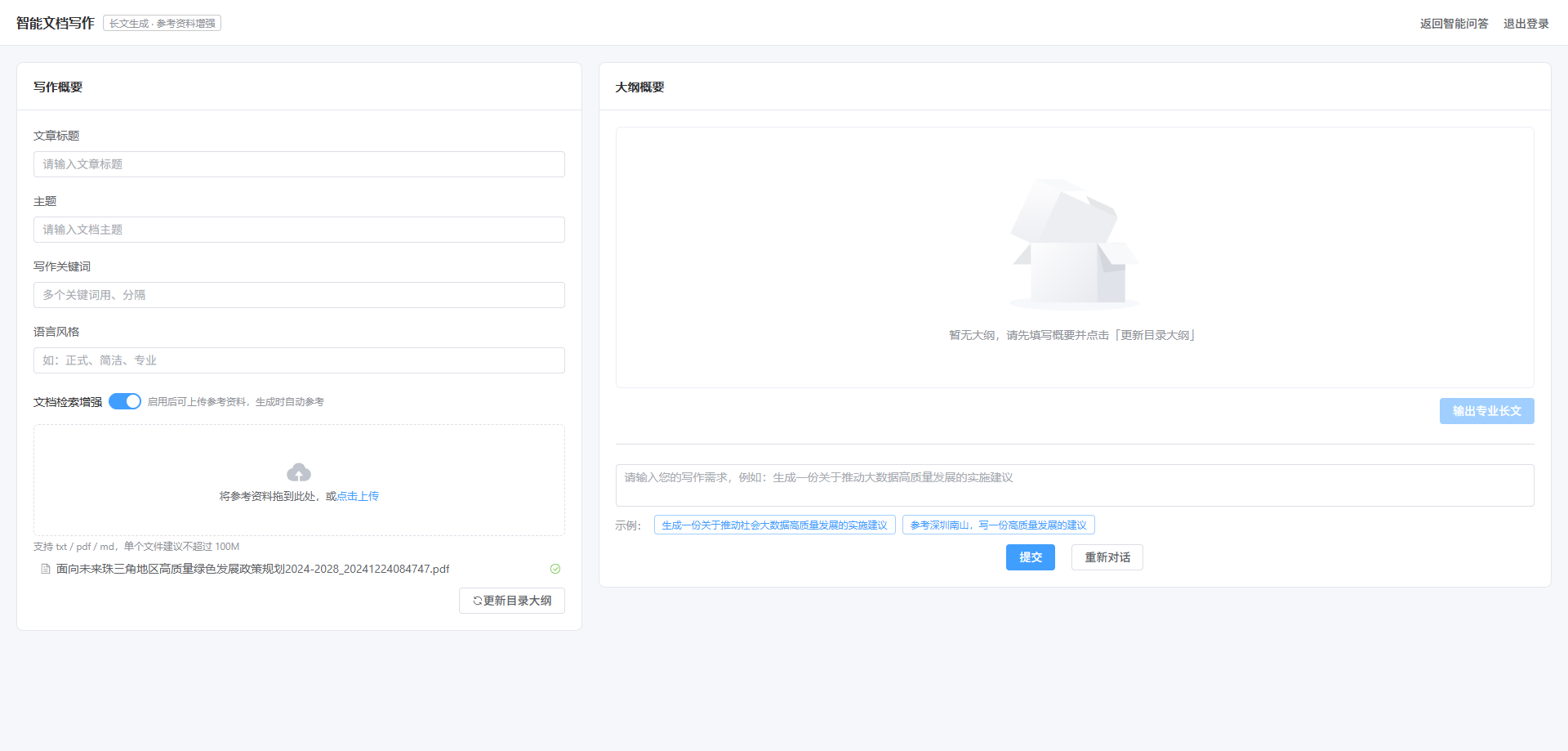
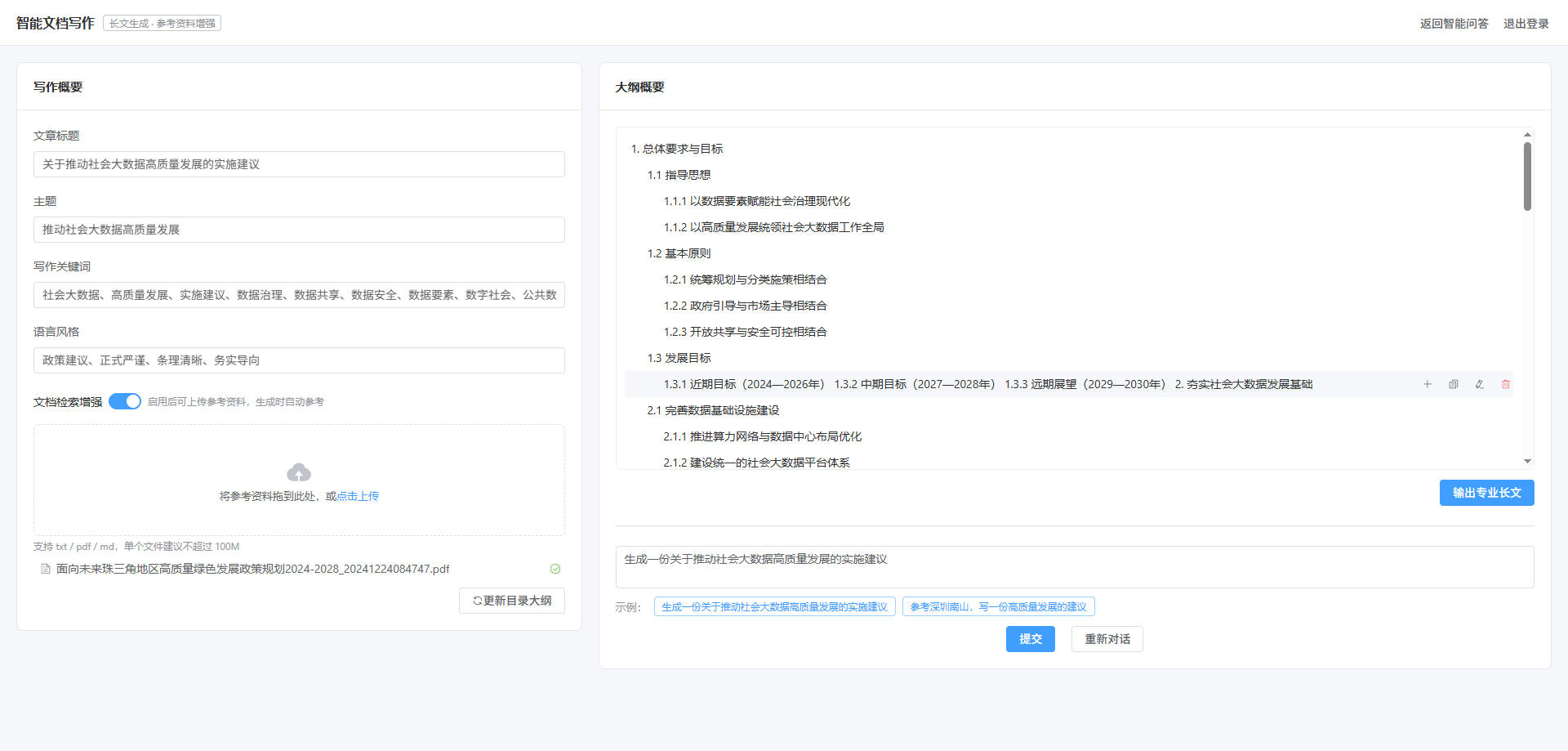
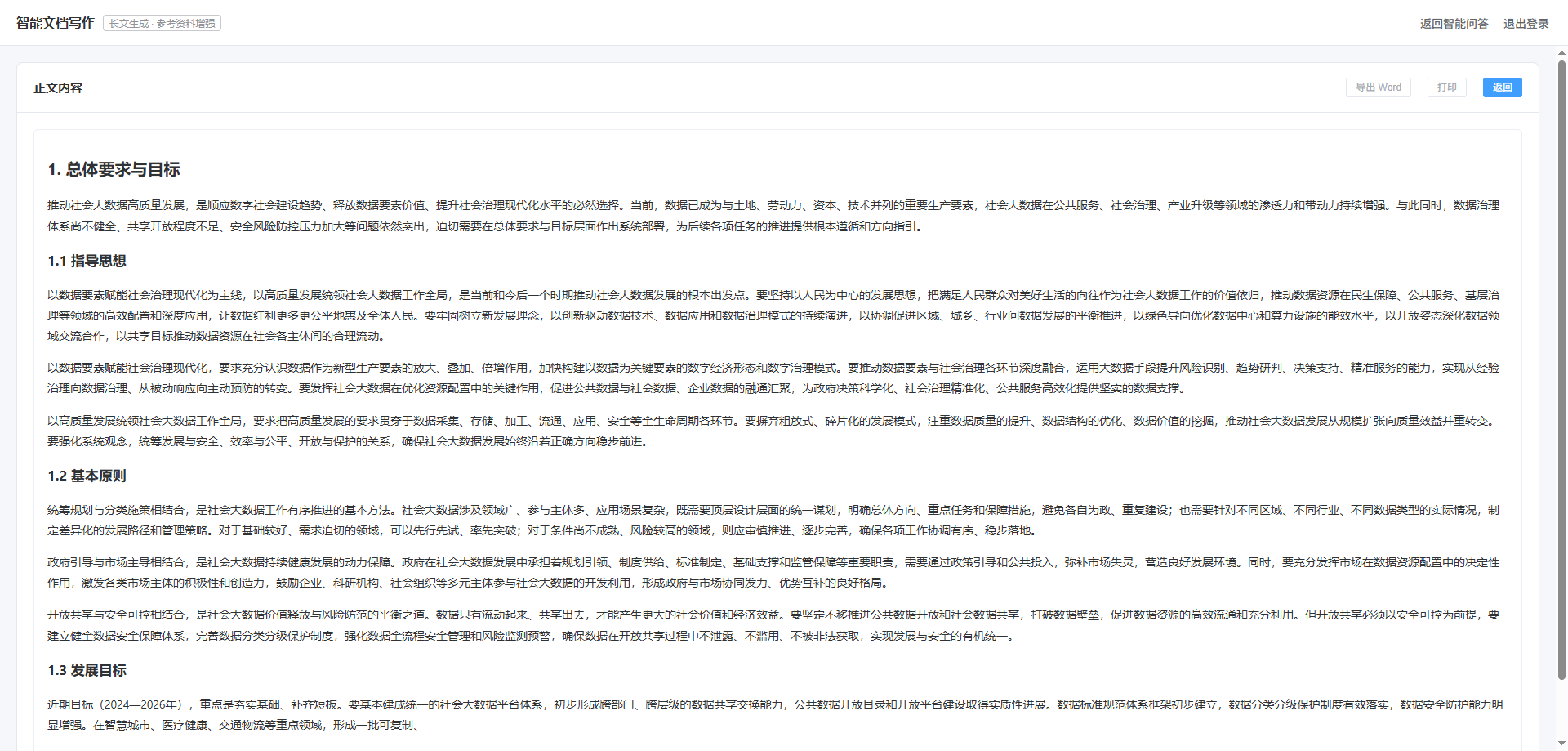
src/views/DocumentWriting.vue
意图识别 → 填充写作概要:
js
async function submitQuestion() {
  const res = await getWritingIntent(question.value.trim())
  const data = res?.data || res || {}
  form.title = data.title || form.title
  form.theme = data.theme || form.theme
  form.keywords = data.keywords || form.keywords
  form.style = data.style || form.style
}目录流式建树(注意外层包装 :payload.data 才是节点):
js
streamGenerateMenu({ sys_rag: sysRag.value, rag_index: ragIndex.value, title: form.title, ... },
  {
    onObject: (payload) => {
      const item = payload?.data ?? payload          // ← 关键:解开 {data:{...},type:"answer"}
      if (payload?.type === 'fail') return ElMessage.error('生成目录失败')
      if (!item || !item.depth) return
      appendNode(item)                                // 按 depth 挂到对应父节点
      menuStr.value += item.text ? item.text + '\n' : ''
    },
    onDone: () => { menuLoading.value = false },
  })
正文流式渲染(marked + DOMPurify):
js
streamGenerateContext(params, {
  onObject: (item) => {
    if (item.type === 'answer' || item.type === 'complete') {
      rawMarkdown.value += item.data || ''
      if (!userEdited.value) contentHtml.value = renderMarkdown(rawMarkdown.value)
    }
  },
  onDone: () => { streaming.value = false },
})

watch(contentHtml, (html) => {
  if (userEdited.value) return                 // 用户一旦手动编辑,停止覆盖,避免光标跳回
  nextTick(() => { if (editorRef.value) editorRef.value.innerHTML = html })
})
正文编辑与导出:
html
<div ref="editorRef" class="doc-editor" contenteditable="true" @input="onEditorInput"></div>
js
function exportWord() {
  const html = `<html><head><meta charset="utf-8"></head><body>${currentHtml()}</body></html>`
  const blob = new Blob(['\ufeff', html], { type: 'application/msword' })
  const url = URL.createObjectURL(blob)
  const link = document.createElement('a')
  link.href = url
  link.download = `${form.title || '文档'}.doc`
  link.click()
  URL.revokeObjectURL(url)
}移动端适配(768px 断点,与 Chat 页一致):
html
<el-row v-else :gutter="20" class="dw-content-row">
  <el-col :xs="24" :sm="24" :md="9" :lg="9">   <!-- 写作概要 -->
  <el-col :xs="24" :sm="24" :md="15" :lg="15"> <!-- 大纲 / 正文 -->
css
@media (max-width: 768px) {
  .dw-main { padding: 12px; }
  .outline-box { min-height: 200px; max-height: 44vh; }
  .doc-editor { min-height: 50vh; padding: 12px; }
  .dw-title-tag { display: none; }              /* 小屏隐藏副标题标签 */
  .outline-row .outline-actions { display: inline-flex; }  /* 无 hover,操作按钮常显 */
  .block-actions .el-button { flex: 1; }
}
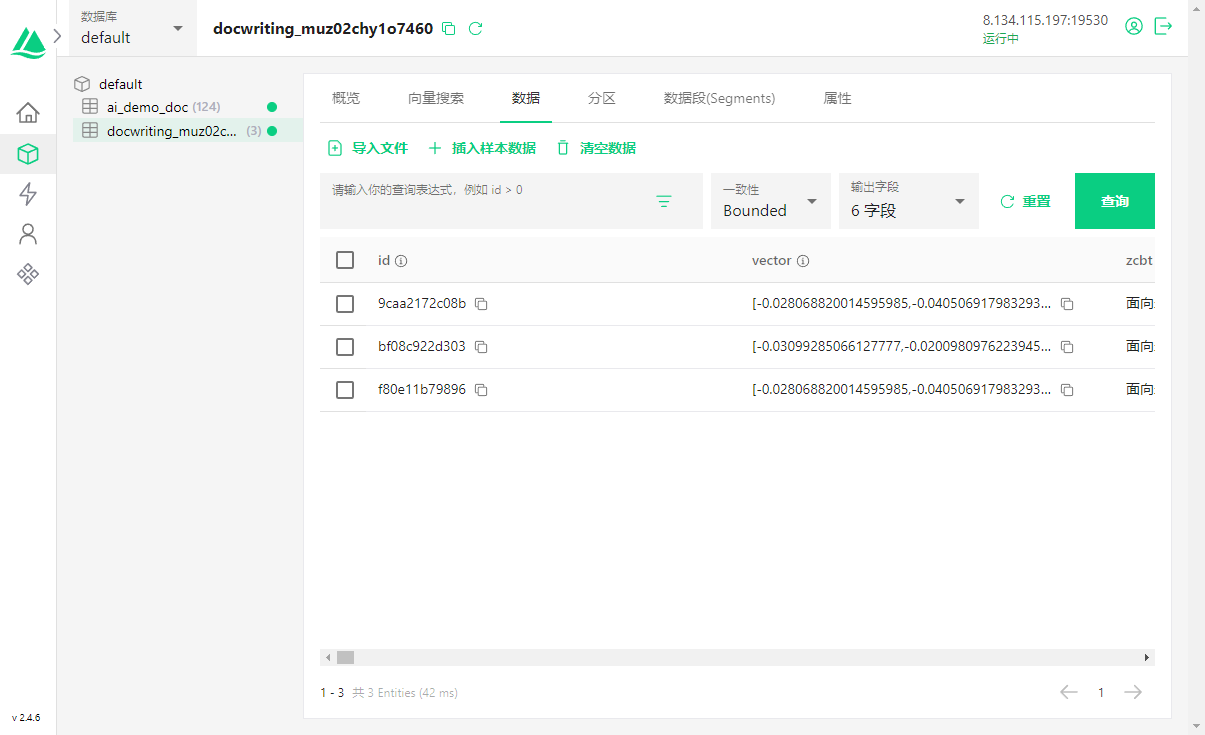
六、存储与数据设计
6.1 Milvus 集合结构(每个 rag_index 一个集合)
| 字段 | 类型 | 说明 |
|---|---|---|
id |
VARCHAR(256) 主键 | 随机 12 位 |
vector |
FLOAT_VECTOR | 由 embedding_service 生成,维度取 embedding_len |
zcbt |
VARCHAR(1024) | 文档标题(当前存文件名) |
content |
VARCHAR(12000) | 正文 / 切片 / 目录内容 |
type |
VARCHAR(64) | 正文 / 段落 / 目录 |
file_name |
VARCHAR(1024) | 原始文件名(删除时按它过滤) |
索引:COSINE + DISKANN(由 milvus_service.create_collection 内部创建并 load)。
6.2 rag_index 的生成与生命周期
前端页面加载时生成一次(本地随机,不依赖其他微服务):
js
onMounted(() => {
  ragIndex.value = 'docwriting_' + Date.now().toString(36) + Math.random().toString(36).slice(2, 8)
})docwriting_前缀 + 时间戳 36 进制 + 6 位随机串,保证大概率唯一;- 同一次写作会话中,上传 / 生成目录 / 生成正文共用它;
- 注意:刷新或重新进入页面会生成新的
rag_index,旧集合不会被再次引用(需通过drop_reference_collection清理)。
七、关键设计与注意事项
- 非标准 SSE :流式接口用
StreamingResponse输出裸 JSON 片段 (无data:前缀、无空行分帧),因为需要 POST + 自定义 body,且原前端就是按 JSON 对象解析。前端必须用状态机按{}配对解析(见 5.9),不能复用聊天接口(标准 SSE)的解析逻辑。 - 目录用编号、正文用 Markdown :目录必须是
1. / 1.1 / 1.1.1(前端靠编号推导层级建树),正文必须是#/##/###(前端 marked 渲染 + 导出 Word 保层级)------两者刻意不同,改动提示词时不要混。 - 上传字段名固定为
doc_file:后端UploadFile = File(...)的参数名即表单字段名,前端不一致会 422。 - RAG 异常降级:集合不存在或查询失败时,目录生成会忽略参考资料继续执行,不整单失败。
- 编辑器选型 :本项目 Vue3 + Element Plus,用原生
contenteditable+marked/dompurify渲染,导出用 Blob,无新增依赖;代价是没有工具栏(表格/图片/字号),如需富文本可换 wangEditor 5 / TipTap。 - 正文分段生成:每两章一次模型调用,段落之间靠统一系统提示与大纲保持一致;如出现前后文风不一致,可改为携带"已生成内容摘要"的方式续写。