上一篇回顾
上一篇的最后部分介绍了A2UI协议的一个demo,由几个Jsonl描述,每段Jsonl有version和component或Data,这不就可以在Flutter渲染了吗?
所以现在观察视觉就来到前端Flutter Web - GenUI
那么还记得文章一里面提到目标是做dashboard吗?(夹带私货赶紧import 第一篇文章)
A2UI 初想:Agent 想画 UI,先得有一块画板自然就会考虑到 Catalog里面可能是我们自定义的组件,就会有新的Catalog JSON, e.g:
"catalogId": "example.com/catalogs/my..."
也意味着假设里面有个叫 mycompentnt 的复杂组件,Web client 里面 必须有它对应的Dart实现啦
(其实正常是不是应该反过来说,我们定义了一个很复杂的组件,在Flutter端(client端)然后让AI帮忙加到原来的Catalog JSON 里面,变成新的:example.com/catalogs/my... )
BTW
再看一眼白名单Catalog,里面没有样式,布局 ....
bash
"Text": {
      "type": "object",
      "allOf": [
        {
          "$ref": "https://a2ui.org/specification/v0_9/common_types.json#/$defs/ComponentCommon"
        },
        {
          "$ref": "#/$defs/CatalogComponentCommon"
        },
        {
          "type": "object",
          "properties": {
            "component": {
              "const": "Text"
            },
            "text": {
              "$ref": "https://a2ui.org/specification/v0_9/common_types.json#/$defs/DynamicString",
              "description": "The text content to display. While simple Markdown formatting is supported (i.e. without HTML, images, or links), utilizing dedicated UI components is generally preferred for a richer and more structured presentation."
            },
            "variant": {
              "type": "string",
              "description": "A hint for the base text style.",
              "enum": ["h1", "h2", "h3", "h4", "h5", "caption", "body"],
              "default": "body"
            }
          },
          "required": ["component", "text"]
        }
      ],
      "unevaluatedProperties": false
    },
GenUI
然后我们用SSE让GenUI对接service ! 不对,能不能不用SSE啊? 我上次用Python + Flask写SSE写出阴影了。
既然GenUI是Flutter这端的,先别管service。
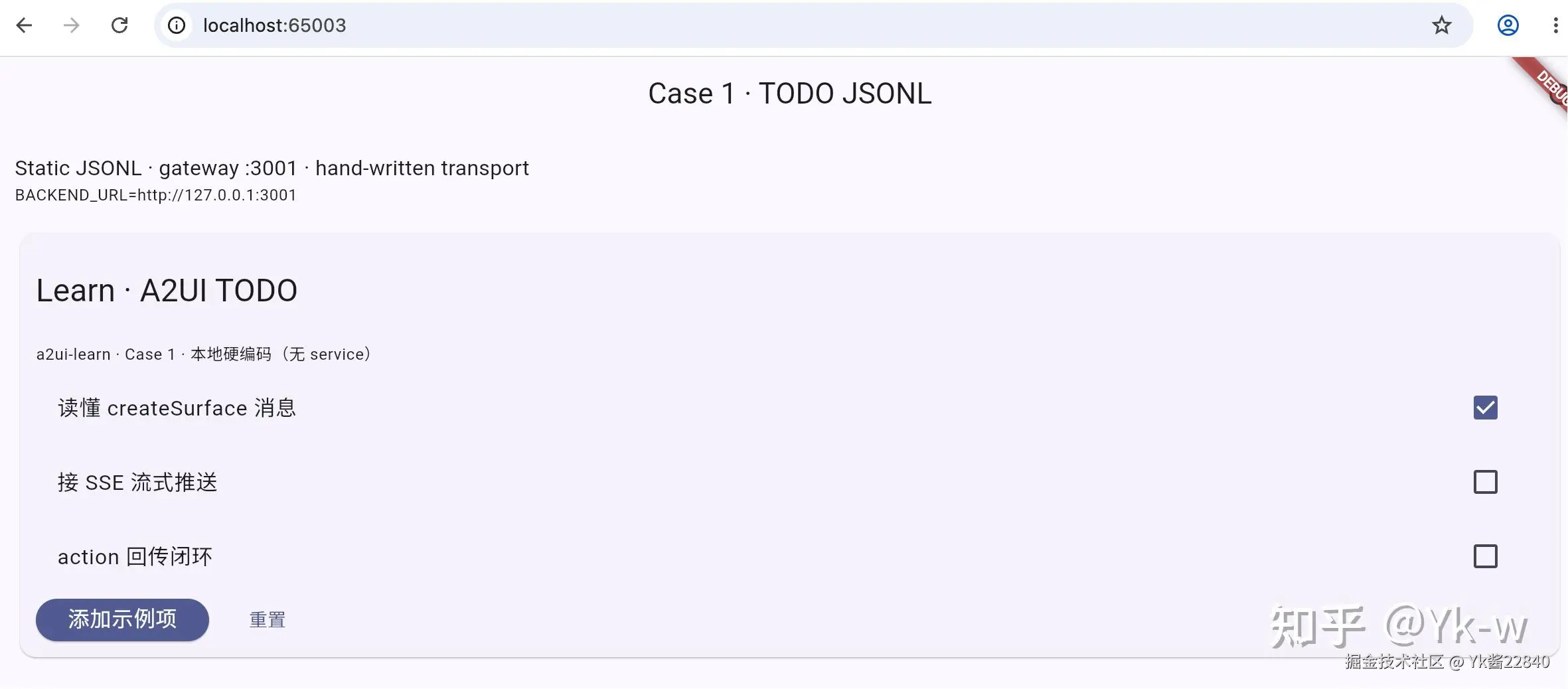
现在要回答一个问题:如何把之前那段Jsonl 渲染出来?
Kimi K3给了我答案!
之前说一个session里面会有多个Surface;session的概念来自各种coding agent。
在A2UI的世界里面这个session叫SurfaceController
结合
A2uiMessage: A message sent from the AI to the UI, instructing it to perform actions likecreateSurface,updateComponents,updateDataModel, ordeleteSurface.
应该就可以把Jsonl里面的components以及data 渲染出来。
初始化SurfaceController
bash
_controller = SurfaceController(
      catalogs: [BasicCatalogItems.asCatalog()],
    );
初始化组件和数据
bash
Future<List<core.A2uiMessage>> _buildLocalMessages() async {
    const surfaceId = 'todo_demo';
    const catalogId =
        'https://a2ui.org/specification/v0_9/basic_catalog.json';

    // 1) createSurface:声明 surface + 绑定 basic catalog
    final createSurface = core.A2uiMessage.fromJson({
      'version': 'v0.9',
      'createSurface': {
        'surfaceId': surfaceId,
        'catalogId': catalogId,
      },
    });

    // 2) updateComponents:root Column → 标题 / 列表 / 操作按钮
    final todos = [
      {'id': 't1', 'text': '读懂 createSurface 消息', 'done': true},
      {'id': 't2', 'text': '接 SSE 流式推送', 'done': false},
      {'id': 't3', 'text': 'action 回传闭环', 'done': false},
    ];
    final itemIds = todos.asMap().keys.map((i) => 'item_$i').toList();
    final components = <Map<String, dynamic>>[
      {
        'id': 'root',
        'component': 'Column',
        'children': ['title', 'subtitle', 'todo_list', 'actions'],
        'justify': 'start',
        'align': 'stretch',
      },
      {
        'id': 'title',
        'component': 'Text',
        'text': '# Learn · A2UI TODO',
        'variant': 'h2',
      },
      {
        'id': 'subtitle',
        'component': 'Text',
        'text': 'a2ui-learn · Case 1 · 本地硬编码(无 service)',
        'variant': 'caption',
      },
      {
        'id': 'todo_list',
        'component': 'Column',
        'children': itemIds,
        'justify': 'start',
        'align': 'stretch',
      },
    ];
    // 每条 todo 一个 CheckBox,value.path 绑定到 dataModel 对应字段
    for (var i = 0; i < todos.length; i++) {
      components.add({
        'id': 'item_$i',
        'component': 'CheckBox',
        'label': todos[i]['text'],
        'value': {'path': '/todos/$i/done'},
      });
    }
    components.addAll([
      {
        'id': 'actions',
        'component': 'Row',
        'children': ['btn_add_wrap', 'btn_reset_wrap'],
        'align': 'center',
      },
      {'id': 'btn_add_label', 'component': 'Text', 'text': '添加示例项'},
      {
        'id': 'btn_add_wrap',
        'component': 'Button',
        'child': 'btn_add_label',
        'variant': 'primary',
        'action': {
          'event': {
            'name': 'todo.add',
            'context': {
              'surfaceId': surfaceId,
              'text': '新待办(action 添加)',
            },
          },
        },
      },
      {'id': 'btn_reset_label', 'component': 'Text', 'text': '重置'},
      {
        'id': 'btn_reset_wrap',
        'component': 'Button',
        'child': 'btn_reset_label',
        'variant': 'borderless',
        'action': {
          'event': {
            'name': 'todo.reset',
            'context': {'surfaceId': surfaceId},
          },
        },
      },
    ]);
    final updateComponents = core.A2uiMessage.fromJson({
      'version': 'v0.9',
      'updateComponents': {
        'surfaceId': surfaceId,
        'components': components,
      },
    });

    // 3) updateDataModel:CheckBox 的 done 状态由这里驱动渲染
    final updateDataModel = core.A2uiMessage.fromJson({
      'version': 'v0.9',
      'updateDataModel': {
        'surfaceId': surfaceId,
        'path': '/',
        'value': {
          'todos': todos
              .map((t) => {
                    'id': t['id'],
                    'text': t['text'],
                    'done': t['done'],
                  })
              .toList(),
        },
      },
    });

    return [createSurface, updateComponents, updateDataModel];
  }
bash
final messages = await _buildLocalMessages();
      for (final msg in messages) {
        _controller.handleMessage(msg);
      }
细节1
为什么 children 这里写 itemIds ?
bash
{
        'id': 'todo_list',
        'component': 'Column',
        'children': itemIds,
        'justify': 'start',
        'align': 'stretch',
      },
因为
bash
    final todos = [
      {'id': 't1', 'text': '读懂 createSurface 消息', 'done': true},
      {'id': 't2', 'text': '接 SSE 流式推送', 'done': false},
      {'id': 't3', 'text': 'action 回传闭环', 'done': false},
    ];
    final itemIds = todos.asMap().keys.map((i) => 'item_$i').toList();
算出来的 itemIds :'item_0', 'item_1', 'item_2'
这里children就是组件名,于是有多少item就for多少次:
bash
    for (var i = 0; i < todos.length; i++) {
      components.add({
        'id': 'item_$i',
        'component': 'CheckBox',
        'label': todos[i]['text'],
        'value': {'path': '/todos/$i/done'},
      });
    }
结论:
components 是一个扁平数组 ,每个组件都是平级的。组件之间的父子关系不是靠嵌套对象,而是靠 children 字段里放 子组件的 id 字符串 来建立引用。 so 才能用 Map<string , dynamic> 。
细节2
还是
bash
    for (var i = 0; i < todos.length; i++) {
      components.add({
        'id': 'item_$i',
        'component': 'CheckBox',
        'label': todos[i]['text'],
        'value': {'path': '/todos/$i/done'},
      });
    }
再看它对应的components
bash
    for (var i = 0; i < todos.length; i++) {
      components.add({
        'id': 'item_$i',
        'component': 'CheckBox',
        'label': todos[i]['text'],
        'value': {'path': '/todos/$i/done'},
      });
    }
数据与组件之间的装配完全是靠顺序对应的!!!有点离谱。
但是在更新的时候其实是用id的,这个后面的文章会讲到
bash
updateComponents: [
  { id: 'item_1', label: '新文案' }   // 只改这一个,不影响 item_0 / item_2
]
细节3
_controller.handleMessage(msg);
收到 createSurface
做的是:注册 surface 'todo_demo'
收到 updateComponents
做的是:创建Element tree
收到 updateDataModel
做的是:更新surface的dataModel
DataModel: A centralized, observable store for all dynamic UI state. Widgets are "bound" to data in this model. When data changes, only the widgets that depend on that specific piece of data are rebuilt.
效果