LNMP包含:
linux、Nginx、Mysql、php
LNMP的工作原理 :
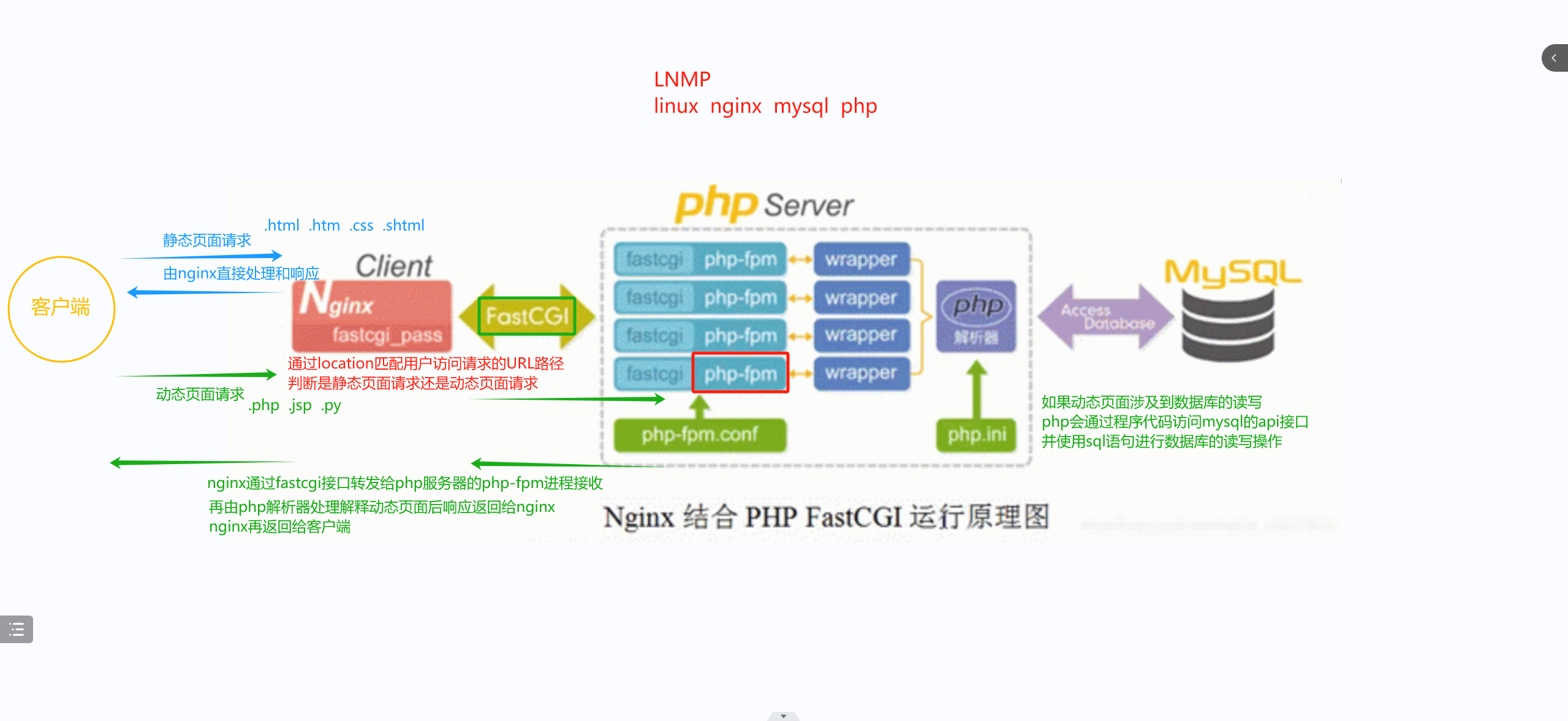
由客户端发送页面请求给Nginx,Nginx会根据location匹配用户访问请求的URL路径判断是静态还是动态,静态的一般是以 .html .htm .css .shtml结尾,动态的一般是以 .php .jsp .py结尾。
如果是静态,由Nginx直接处理和响应。如果是动态,Nginx会通过fastcgi接口转发给php-fpm进程接受,
然后再由php解析器处理解释动态页面后响应返回给Nginx,Nginx再返回给客户端。如果动态页面涉及到数据库的读写,php会通过程序代码访问,mysql的api接口,并使用sql语句进行数据库的速写操作
编译安装:
三台虚拟机,Nginx服务器,Mysql服务器,php服务器。
三台虚拟机系统初始化 :
[root@l1 ~]# systemctl stop firewalld
[root@l1 ~]# setenforce 0
[root@l1 ~]#

[root@l2 ~]# systemctl stop firewalld
[root@l2 ~]# setenforce 0
[root@l2 ~]#

[root@l3 ~]# systemctl stop firewalld
[root@l3 ~]# setenforce 0
[root@l3 ~]#
nginx服务器配置
安装依赖包
[root@l1 ~]# df
文件系统                   1K-块    已用     可用 已用% 挂载点
devtmpfs                  480736       0   480736    0% /dev
tmpfs                     497816       0   497816    0% /dev/shm
tmpfs                     497816   14912   482904    3% /run
tmpfs                     497816       0   497816    0% /sys/fs/cgroup
/dev/mapper/centos-root 38770180 5435772 33334408   15% /
/dev/sda1                1038336  177472   860864   18% /boot
tmpfs                      99564      32    99532    1% /run/user/0
/dev/sr0                 4635056 4635056        0  100% /mnt
[root@l1 ~]# yum -y install pcre-devel zlib-devel openssl-devel gcc gcc-c++ make
//安装依赖包
创建用户
[root@l1 ~]# useradd -M -s /sbin/nologin nginx   //创建用户
[root@l1 ~]# cat /etc/passwd | grep nginx:
nginx:x:1001:1001::/home/nginx:/sbin/nologin
[root@l1 ~]#
上传软件包至/opt目录下并解压

[root@l1 opt]# ls
nginx-1.26.0.tar.gz  rh
[root@l1 opt]# tar xf nginx-1.26.0.tar.gz   //解压
[root@l1 opt]# ls
nginx-1.26.0  nginx-1.26.0.tar.gz  rh
[root@l1 opt]# cd nginx-1.26.0/
[root@l1 nginx-1.26.0]#
编译安装
[root@l1 nginx-1.26.0]#  ./configure --prefix=/usr/local/nginx --user=nginx --group=nginx --with-http_stub_status_module  --with-http_ssl_module

[root@l1 nginx-1.26.0]# make -j4 && make install
设置软链接,可以直接调用nginx命令来进行管理
[root@l1 nginx-1.26.0]# cd /usr/local/nginx/
[root@l1 nginx]# ls sbin/
nginx
[root@l1 nginx]# ln -s /usr/local/nginx/sbin/nginx /usr/local/sbin/    //软连接
[root@l1 nginx]# nginx -t
nginx: the configuration file /usr/local/nginx/conf/nginx.conf syntax is ok
nginx: configuration file /usr/local/nginx/conf/nginx.conf test is successful
[root@l1 nginx]#
添加Nginx系统服务
[root@l1 nginx]# cd /usr/lib/systemd/system
[root@l1 system]# vim nginx.service
[Unit]
Description=nginx
After=network.target

[Service]
Type=forking
PIDFile=/usr/local/nginx/logs/nginx.pid
ExecStart=/usr/local/nginx/sbin/nginx
ExecReload=/bin/kill -s HUP $MAINPID
ExecStop=/bin/kill -s QUIT $MAINPID
PrivateTmp=true

[Install]
WantedBy=multi-user.target

[root@l1 system]# systemctl daemon-reload
[root@l1 system]# systemctl start nginx
[root@l1 system]# systemctl enable nginx
Created symlink from /etc/systemd/system/multi-user.target.wants/nginx.service to /usr/lib/systemd/system/nginx.service.
[root@l1 system]# netstat -lntp | grep nginx
tcp        0      0 0.0.0.0:80              0.0.0.0:*               LISTEN      10947/nginx: master
[root@l1 system]#
配置Nginx支持php解析(7 8 9 的操作是在配置完后面的mysql和php才开始的)
[root@l1 nginx]# cd /usr/local/nginx/
[root@l1 nginx]# cd conf/
[root@l1 conf]# ls
fastcgi.conf            koi-win             scgi_params
fastcgi.conf.default    mime.types          scgi_params.default
fastcgi_params          mime.types.default  uwsgi_params
fastcgi_params.default  nginx.conf          uwsgi_params.default
koi-utf                 nginx.conf.default  win-utf
[root@l1 conf]# vim nginx.conf
[root@l1 conf]# 


[root@l1 conf]# nginx -t
nginx: the configuration file /usr/local/nginx/conf/nginx.conf syntax is ok
nginx: configuration file /usr/local/nginx/conf/nginx.conf test is successful
[root@l1 conf]#
验证php测试页
动态页面
[root@l1 conf]# mkdir -p /var/www/html
[root@l1 conf]# cd /var/www/html/
[root@l1 html]# vim test.php
[root@l1 html]# 
静态页面
[root@l1 html]# cd /usr/local/nginx/html/
[root@l1 html]# ls
50x.html  index.html
[root@l1 html]# rz -E
rz waiting to receive.
[root@l1 html]# vim m.html
[root@l1 html]# ls
50x.html  index.html  m.html  w.jpg
[root@l1 html]# 
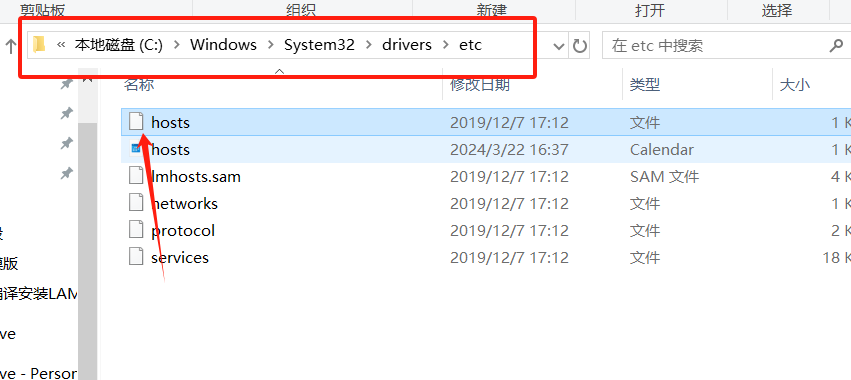



此时动态页面现在是查不到的,静态页面是由Nginx直接处理和响应的,而动态页面是 Nginx通过fastcgi接口转发给php-fpm进程接受,然后再由php解析器处理解释动态页面后响应返回给Nginx,Nginx再返回给客户端的,所以我们要在将动态页面位置也放入到php服务器中
在本服务器中安装NFS
yum安装rbcbind和nfs-utils 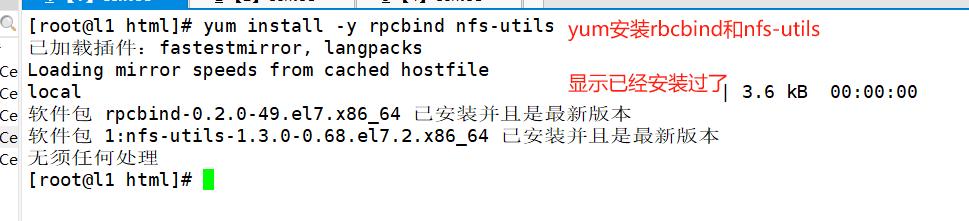
[root@l1 html]# vim /etc/exports
[root@l1 html]# systemctl --now enable rpcbind nfs
Created symlink from /etc/systemd/system/multi-user.target.wants/nfs-server.service to /usr/lib/systemd/system/nfs-server.service.
[root@l1 html]# showmount -e
Export list for l1:
/var/www/html 192.168.18.0/24
[root@l1 html]#
挂载目录
[root@localhost opt]# vim /etc/fstab
php服务器进行操作
能查到我们Nginx服务器共享的目录
[root@localhost ~]# showmount -e 192.168.18.10
Export list for 192.168.18.10:
/var/www/html 192.168.18.0/24
[root@localhost ~]#
挂载目录

[root@localhost ~]# vim /etc/fstab
[root@localhost ~]# mkdir -p /var/www/html
[root@localhost ~]# mount -a
[root@localhost ~]# df -h
文件系统                     容量  已用  可用 已用% 挂载点
devtmpfs                     470M     0  470M    0% /dev
tmpfs                        487M     0  487M    0% /dev/shm
tmpfs                        487M  8.5M  478M    2% /run
tmpfs                        487M     0  487M    0% /sys/fs/cgroup
/dev/mapper/centos-root       37G  5.1G   32G   14% /
/dev/sda1                   1014M  174M  841M   18% /boot
tmpfs                         98M   60K   98M    1% /run/user/0
/dev/sr0                     4.5G  4.5G     0  100% /mnt
192.168.18.10:/var/www/html   37G  5.3G   32G   15% /var/www/html
[root@localhost ~]#

[root@localhost ~]# ls /var/www/html/      //查看目录,显示成功
test.php
[root@localhost ~]# 
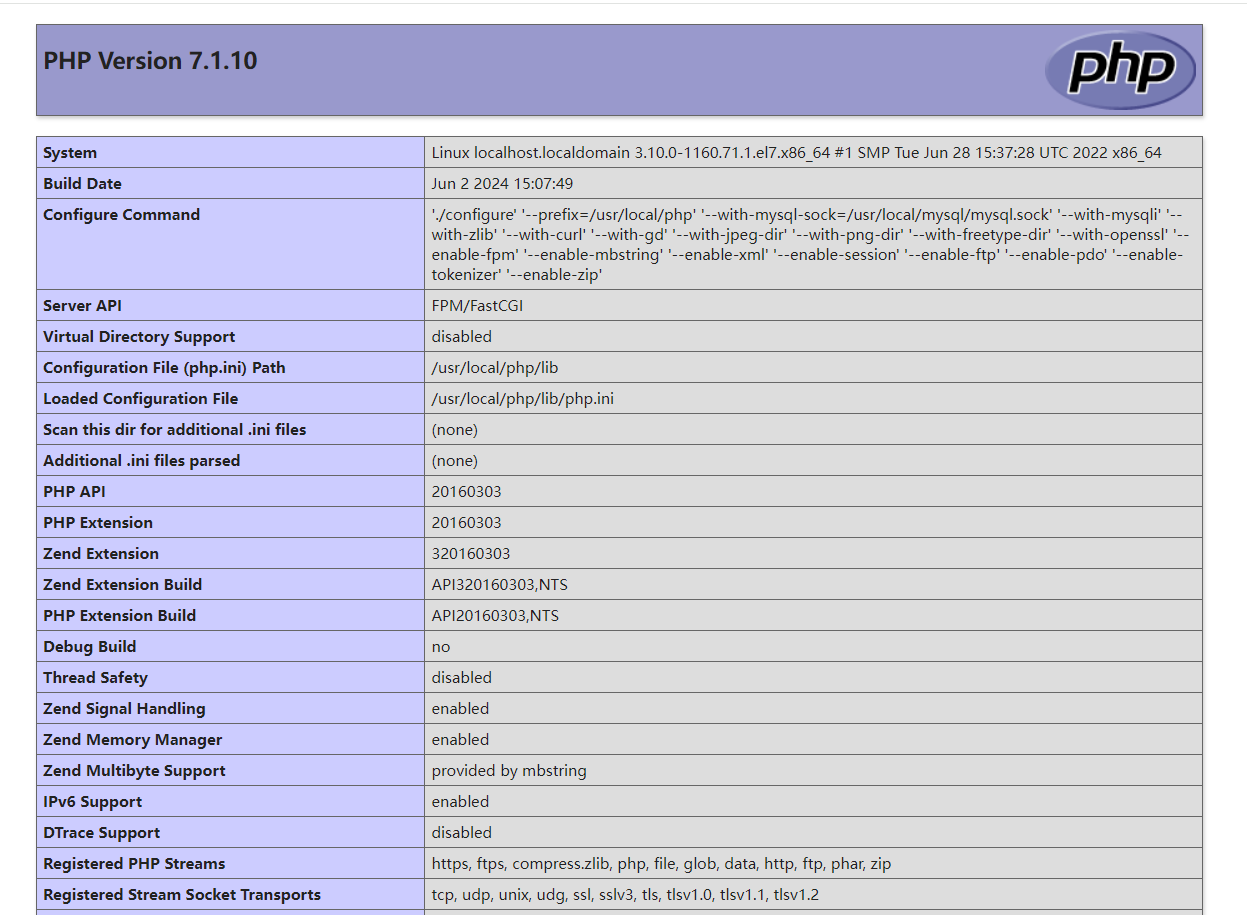
验证mysql测试页
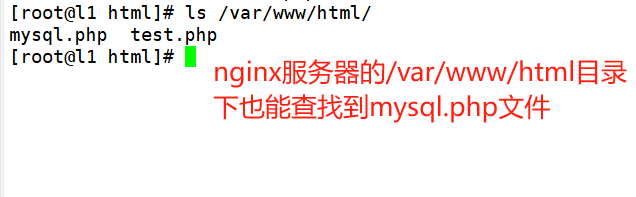
随便在nginx还是php服务器的/var/www/html目录下创建一个mysql.php文件
我这是在php服务器创建的,文件里面的IP地址是mysql服务器的IP地址
[root@localhost php-7.1.10]# cd /var/www/html/
[root@localhost html]# ls
test.php
[root@localhost html]# vim mysql.php
[root@localhost html]#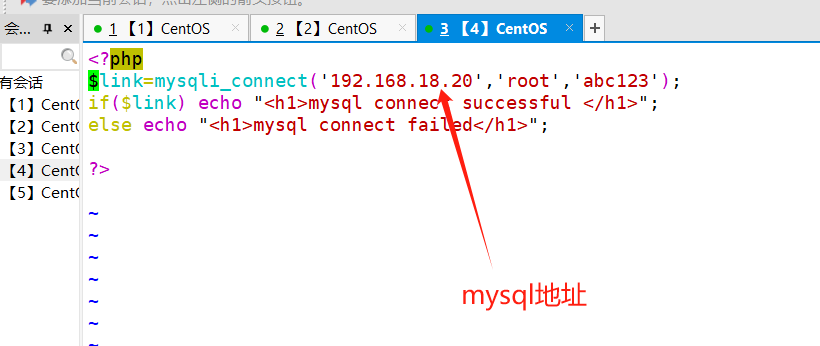
<?php
$link=mysqli_connect('192.168.18.20','root','abc123');
if($link) echo "<h1>mysql connect successful </h1>";
else echo "<h1>mysql connect failed</h1>";

?>


Mysql服务器配置
上传压缩包至/opt目录中并解压
[root@l2 ~]# cd /opt
[root@l2 opt]# ls
abc.txt  cywl  cywl.txt  rh
[root@l2 opt]# rz -E
rz waiting to receive.
[root@l2 opt]# ls
abc.txt  cywl  cywl.txt  mysql-boost-5.7.44.tar.gz  rh
[root@l2 opt]# tar xf mysql-boost-5.7.44.tar.gz  //解压
[root@l2 opt]# ls
abc.txt  cywl  cywl.txt  mysql-5.7.44  mysql-boost-5.7.44.tar.gz  rh
[root@l2 opt]# cd mysql-5.7.44/
安装环境依赖包
[root@l2 mysql-5.7.44]# mount /dev/sr0 /mnt/
mount: /dev/sr0 写保护,将以只读方式挂载
[root@l2 mysql-5.7.44]# df
文件系统                   1K-块    已用     可用 已用% 挂载点
devtmpfs                 1913548       0  1913548    0% /dev
tmpfs                    1930628       0  1930628    0% /dev/shm
tmpfs                    1930628   12528  1918100    1% /run
tmpfs                    1930628       0  1930628    0% /sys/fs/cgroup
/dev/mapper/centos-root 38770180 6265016 32505164   17% /
/dev/sda1                1038336  191100   847236   19% /boot
tmpfs                     386128      12   386116    1% /run/user/42
tmpfs                     386128       0   386128    0% /run/user/0
/dev/sr0                 4635056 4635056        0  100% /mnt
[root@l2 mysql-5.7.44]# yum -y install gcc gcc-c++ ncurses ncurses-devel bison cmake openssl-devel
创建用户
[root@zx3 mysql-5.7.44]# useradd -M -s /sbin/nologin  mysql
[root@zx3 mysql-5.7.44]# cat /etc/passwd | grep mysql:
mysql:x:1001:1001::/home/mysql:/sbin/nologin
[root@zx3 mysql-5.7.44]#
配置软件模块
[root@l2 mysql-5.7.44]# cmake \
> -DCMAKE_INSTALL_PREFIX=/usr/local/mysql \
> -DMYSQL_UNIX_ADDR=/usr/local/mysql/mysql.sock \
> -DSYSCONFDIR=/etc \
> -DSYSTEMD_PID_DIR=/usr/local/mysql \
> -DDEFAULT_CHARSET=utf8  \
> -DDEFAULT_COLLATION=utf8_general_ci \
> -DWITH_EXTRA_CHARSETS=all \
> -DWITH_INNOBASE_STORAGE_ENGINE=1 \
> -DMYSQL_DATADIR=/usr/local/mysql/data \
> -DWITH_BOOST=boost \
> -DWITH_SYSTEMD=1

cmake \
-DCMAKE_INSTALL_PREFIX=/usr/local/mysql \
-DMYSQL_UNIX_ADDR=/usr/local/mysql/mysql.sock \
-DSYSCONFDIR=/etc \
-DSYSTEMD_PID_DIR=/usr/local/mysql \
-DDEFAULT_CHARSET=utf8  \
-DDEFAULT_COLLATION=utf8_general_ci \
-DWITH_EXTRA_CHARSETS=all \
-DWITH_INNOBASE_STORAGE_ENGINE=1 \
-DMYSQL_DATADIR=/usr/local/mysql/data \
-DWITH_BOOST=boost \
-DWITH_SYSTEMD=1
编译安装
[root@l2 mysql-5.7.44]# make -j 4 && make install清除mariadb缓存
[root@l2 mysql-5.7.44]# yum remove -y mariadb*修改mysql配置文件
[root@l2 mysql-5.7.44]# vim /etc/my.cnf

[client]
port = 3306
socket=/usr/local/mysql/mysql.sock

[mysqld]
user = mysql
basedir=/usr/local/mysql
datadir=/usr/local/mysql/data
port = 3306
character-set-server=utf8
pid-file = /usr/local/mysql/mysqld.pid
socket=/usr/local/mysql/mysql.sock
bind-address = 0.0.0.0
skip-name-resolve
max_connections=2048
default-storage-engine=INNODB
max_allowed_packet=16M
server-id = 1

sql_mode=NO_ENGINE_SUBSTITUTION,STRICT_TRANS_TABLES,NO_AUTO_CREATE_USER,NO_AUTO_VALUE_ON_ZERO,NO_ZERO_IN_DATE,NO_ZERO_DATE,ERROR_FOR_DIVISION_BY_ZERO,PIPES_AS_CONCAT,ANSI_QUOTES
更换mysql配置文件和安装目录的属主属组
[root@l2 mysql-5.7.44]# chown mysql:mysql /etc/my.cnf
[root@l2 mysql-5.7.44]# ll /etc/my.cnf
-rw-r--r--. 1 mysql mysql 555 6月   2 13:20 /etc/my.cnf
[root@l2 mysql-5.7.44]# cd /usr/local/
[root@l2 local]# ll
总用量 0
drwxr-xr-x.  2 root root   6 4月  11 2018 bin
drwxr-xr-x.  2 root root   6 4月  11 2018 etc
drwxr-xr-x.  2 root root   6 4月  11 2018 games
drwxr-xr-x.  2 root root   6 4月  11 2018 include
drwxr-xr-x.  2 root root   6 4月  11 2018 lib
drwxr-xr-x.  2 root root   6 4月  11 2018 lib64
drwxr-xr-x.  2 root root   6 4月  11 2018 libexec
drwxr-xr-x. 11 root root 177 6月   2 12:57 mysql
drwxr-xr-x.  2 root root   6 4月  11 2018 sbin
drwxr-xr-x.  5 root root  49 4月  30 23:03 share
drwxr-xr-x.  2 root root   6 4月  11 2018 src
[root@l2 local]# chown -R mysql:mysql mysql/
[root@l2 local]# ll
总用量 0
drwxr-xr-x.  2 root  root    6 4月  11 2018 bin
drwxr-xr-x.  2 root  root    6 4月  11 2018 etc
drwxr-xr-x.  2 root  root    6 4月  11 2018 games
drwxr-xr-x.  2 root  root    6 4月  11 2018 include
drwxr-xr-x.  2 root  root    6 4月  11 2018 lib
drwxr-xr-x.  2 root  root    6 4月  11 2018 lib64
drwxr-xr-x.  2 root  root    6 4月  11 2018 libexec
drwxr-xr-x. 11 mysql mysql 177 6月   2 12:57 mysql
drwxr-xr-x.  2 root  root    6 4月  11 2018 sbin
drwxr-xr-x.  5 root  root   49 4月  30 23:03 share
drwxr-xr-x.  2 root  root    6 4月  11 2018 src
[root@l2 local]#
在环境变量中添加mysql的bin和lib目录
[root@l2 local]# cd mysql/bin/
[root@l2 bin]# pwd
/usr/local/mysql/bin
[root@l2 bin]# ls
innochecksum                mysql_config               mysqlslap
lz4_decompress              mysql_config_editor        mysql_ssl_rsa_setup
myisamchk                   mysqld                     mysqltest
myisam_ftdump               mysqld_pre_systemd         mysqltest_embedded
myisamlog                   mysqldump                  mysql_tzinfo_to_sql
myisampack                  mysqldumpslow              mysql_upgrade
my_print_defaults           mysql_embedded             mysqlxtest
mysql                       mysqlimport                perror
mysqladmin                  mysql_install_db           replace
mysqlbinlog                 mysql_plugin               resolveip
mysqlcheck                  mysqlpump                  resolve_stack_dump
mysql_client_test           mysql_secure_installation  zlib_decompress
mysql_client_test_embedded  mysqlshow
[root@l2 bin]# vim /etc/profile
[root@l2 bin]# source /etc/profile
[root@l2 bin]# echo $PATH
/usr/local/sbin:/usr/local/bin:/usr/sbin:/usr/bin:/root/bin:/usr/local/mysql/bin:/usr/local/mysql/lib
[root@l2 bin]#
mysql初始化操作
./mysqld \
--initialize-insecure \
--user=mysql \
--basedir=/usr/local/mysql \
--datadir=/usr/local/mysql/data

[root@l2 bin]# ./mysqld \
> --initialize-insecure \
> --user=mysql \
> --basedir=/usr/local/mysql \
> --datadir=/usr/local/mysql/data
添加mysqld系统服务
[root@l2 bin]# cd /usr/local/mysql/usr/lib/systemd/system/
[root@l2 system]# ls
mysqld.service  mysqld@.service
[root@l2 system]# cp mysqld.service /usr/lib/systemd/system
[root@l2 system]# systemctl daemon-reload
[root@l2 system]# systemctl enable mysqld
Created symlink from /etc/systemd/system/multi-user.target.wants/mysqld.service to /usr/lib/systemd/system/mysqld.service.
[root@l2 system]# systemctl start mysqld
[root@l2 system]# netstat -lntp | grep mysqld
tcp        0      0 0.0.0.0:3306            0.0.0.0:*               LISTEN      33819/mysqld
[root@l2 system]#
修改mysql密码
[root@l2 system]# mysqladmin -u root -p password "abc123"
Enter password:    //直接回车,因为原先是没有密码的
mysqladmin: [Warning] Using a password on the command line interface can be insecure.
Warning: Since password will be sent to server in plain text, use ssl connection to ensure password safety.

[root@l2 system]# mysql -u root -pabc123
mysql: [Warning] Using a password on the command line interface can be insecure.
Welcome to the MySQL monitor.  Commands end with ; or \g.
Your MySQL connection id is 3
Server version: 5.7.44 Source distribution

Copyright (c) 2000, 2023, Oracle and/or its affiliates.

Oracle is a registered trademark of Oracle Corporation and/or its
affiliates. Other names may be trademarks of their respective
owners.

Type 'help;' or '\h' for help. Type '\c' to clear the current input statement.

mysql> show databases;
+--------------------+
| Database           |
+--------------------+
| information_schema |
| mysql              |
| performance_schema |
| sys                |
+--------------------+
4 rows in set (0.00 sec)

mysql> quit
Bye
[root@l2 system]#
授权并刷新
[root@l2 system]# mysql -u root -pabc123
mysql: [Warning] Using a password on the command line interface can be insecure.
Welcome to the MySQL monitor.  Commands end with ; or \g.
Your MySQL connection id is 4
Server version: 5.7.44 Source distribution

Copyright (c) 2000, 2023, Oracle and/or its affiliates.

Oracle is a registered trademark of Oracle Corporation and/or its
affiliates. Other names may be trademarks of their respective
owners.

Type 'help;' or '\h' for help. Type '\c' to clear the current input statement.

mysql> grant all on *.* to 'root'@'%' identified by 'abc123';
Query OK, 0 rows affected, 1 warning (0.00 sec)


mysql> flush privileges;
Query OK, 0 rows affected (0.00 sec)

mysql>
php服务器配置
上传压缩包至/opt目录中并解压
[root@l3 ~]# cd /opt/
[root@l3 opt]# ls
rh
[root@l3 opt]# ls
php-7.1.10.tar.bz2  rh
[root@l3 opt]# tar xf php-7.1.10.tar.bz2
[root@l3 opt]#
安装环境依赖包
[root@l3 opt]# cd php-7.1.10/
[root@l3 php-7.1.10]# df
文件系统                   1K-块    已用     可用 已用% 挂载点
devtmpfs                 1913544       0  1913544    0% /dev
tmpfs                    1930624       0  1930624    0% /dev/shm
tmpfs                    1930624   12528  1918096    1% /run
tmpfs                    1930624       0  1930624    0% /sys/fs/cgroup
/dev/mapper/centos-root 38770180 5624548 33145632   15% /
/dev/sda1                1038336  191100   847236   19% /boot
tmpfs                     386128       8   386120    1% /run/user/42
tmpfs                     386128       0   386128    0% /run/user/0
[root@l3 php-7.1.10]# mount /dev/sr0 /mnt
mount: /dev/sr0 写保护,将以只读方式挂载
[root@l3 php-7.1.10]#yum -y install gd \
libjpeg libjpeg-devel \
libpng libpng-devel \
freetype freetype-devel \
libxml2 libxml2-devel \
zlib zlib-devel \
curl curl-devel \
openssl openssl-devel

yum -y install gd \
libjpeg libjpeg-devel \
libpng libpng-devel \
freetype freetype-devel \
libxml2 libxml2-devel \
zlib zlib-devel \
curl curl-devel \
openssl openssl-devel
配置软件模块
[root@l3 php-7.1.10]# ./configure \
> --prefix=/usr/local/php \
> --with-mysql-sock=/usr/local/mysql/mysql.sock \
> --with-mysqli \
> --with-zlib \
> --with-curl \
> --with-gd \
> --with-jpeg-dir \
> --with-png-dir \
> --with-freetype-dir \
> --with-openssl \
> --enable-fpm \
> --enable-mbstring \
> --enable-xml \
> --enable-session \
> --enable-ftp \
> --enable-pdo \
> --enable-tokenizer \
> --enable-zip

./configure \
--prefix=/usr/local/php \
--with-mysql-sock=/usr/local/mysql/mysql.sock \
--with-mysqli \
--with-zlib \
--with-curl \
--with-gd \
--with-jpeg-dir \
--with-png-dir \
--with-freetype-dir \
--with-openssl \
--enable-fpm \
--enable-mbstring \
--enable-xml \
--enable-session \
--enable-ftp \
--enable-pdo \
--enable-tokenizer \
--enable-zip
编译安装
make && make install路径优化
[root@localhost php-7.1.10]# cd /usr/local/php/
[root@localhost php]# ls
bin  etc  include  lib  php  sbin  var
[root@localhost php]# ln -s /usr/local/php/bin/* /usr/local/bin/
[root@localhost php]# ln -s /usr/local/php/sbin/* /usr/local/sbin/
[root@localhost php]#
修改php配置文件(共三个)
修改主配置文件
[root@localhost php]# php --ini
Configuration File (php.ini) Path: /usr/local/php/lib
Loaded Configuration File:         (none)
Scan for additional .ini files in: (none)
Additional .ini files parsed:      (none)
[root@localhost php]# cd /opt/php-7.1.10/
[root@localhost php-7.1.10]# ls
acinclude.m4      ltmain.sh                 README.PARAMETER_PARSING_API
aclocal.m4        main                      README.REDIST.BINS
appveyor          makedist                  README.RELEASE_PROCESS
build             Makefile                  README.SELF-CONTAINED-EXTENSIONS
buildconf         Makefile.frag             README.STREAMS
buildconf.bat     Makefile.fragments        README.SUBMITTING_PATCH
CODING_STANDARDS  Makefile.gcov             README.TESTING
config.guess      Makefile.global           README.TESTING2
config.log        Makefile.objects          README.UNIX-BUILD-SYSTEM
config.nice       makerpm                   README.WIN32-BUILD-SYSTEM
config.status     missing                   run-tests.php
config.sub        mkinstalldirs             sapi
configure         modules                   scripts
configure.in      netware                   server-tests-config.php
CONTRIBUTING.md   NEWS                      server-tests.php
CREDITS           pear                      snapshot
ext               php7.spec                 stamp-h.in
EXTENSIONS        php7.spec.in              stub.c
footer            php.gif                   tests
generated_lists   php.ini-development       travis
genfiles          php.ini-production        TSRM
header            README.EXT_SKEL           UPGRADING
include           README.GIT-RULES          UPGRADING.INTERNALS
INSTALL           README.input_filter       vcsclean
install-sh        README.MAILINGLIST_RULES  win32
libs              README.md                 Zend
libtool           README.namespaces
LICENSE           README.NEW-OUTPUT-API
[root@localhost php-7.1.10]#
[root@localhost php-7.1.10]# cp php.ini-production /usr/local/php/lib/php.ini
[root@localhost php-7.1.10]# cd /usr/local/php/lib/
[root@localhost lib]# ls
php  php.ini
[root@localhost lib]#

[root@localhost lib]# vim php.ini
[root@localhost lib]# 
修改进程服务配置文件
[root@localhost php]# cd /usr/local/php/etc/
[root@localhost etc]# ls
pear.conf  php-fpm.conf.default  php-fpm.d
[root@localhost etc]#
[root@localhost etc]# cp php-fpm.conf.default php-fpm.conf
[root@localhost etc]# ls
pear.conf  php-fpm.conf  php-fpm.conf.default  php-fpm.d
[root@localhost etc]#

[root@localhost etc]# vim php-fpm.conf
[root@localhost etc]# 
修改扩展配置文件
[root@localhost etc]# cd php-fpm.d/
[root@localhost php-fpm.d]# ls
www.conf.default
[root@localhost php-fpm.d]#

[root@localhost php-fpm.d]# cp www.conf.default www.conf
[root@localhost php-fpm.d]# vim www.conf
[root@localhost php-fpm.d]# 

 创建用户
创建用户
[root@localhost php-fpm.d]# useradd -M -s /sbin/nologin php
[root@localhost php-fpm.d]# cat /etc/passwd | grep php:
php:x:1001:1001::/home/php:/sbin/nologin
[root@localhost php-fpm.d]#
启动php-fpm
[root@localhost php-fpm.d]# cd /opt/php-7.1.10/
[root@localhost php-7.1.10]# ls
acinclude.m4      ltmain.sh                 README.PARAMETER_PARSING_API
aclocal.m4        main                      README.REDIST.BINS
appveyor          makedist                  README.RELEASE_PROCESS
build             Makefile                  README.SELF-CONTAINED-EXTENSIONS
buildconf         Makefile.frag             README.STREAMS
buildconf.bat     Makefile.fragments        README.SUBMITTING_PATCH
CODING_STANDARDS  Makefile.gcov             README.TESTING
config.guess      Makefile.global           README.TESTING2
config.log        Makefile.objects          README.UNIX-BUILD-SYSTEM
config.nice       makerpm                   README.WIN32-BUILD-SYSTEM
config.status     missing                   run-tests.php
config.sub        mkinstalldirs             sapi
configure         modules                   scripts
configure.in      netware                   server-tests-config.php
CONTRIBUTING.md   NEWS                      server-tests.php
CREDITS           pear                      snapshot
ext               php7.spec                 stamp-h.in
EXTENSIONS        php7.spec.in              stub.c
footer            php.gif                   tests
generated_lists   php.ini-development       travis
genfiles          php.ini-production        TSRM
header            README.EXT_SKEL           UPGRADING
include           README.GIT-RULES          UPGRADING.INTERNALS
INSTALL           README.input_filter       vcsclean
install-sh        README.MAILINGLIST_RULES  win32
libs              README.md                 Zend
libtool           README.namespaces
LICENSE           README.NEW-OUTPUT-API
[root@localhost php-7.1.10]# cd sapi/
[root@localhost sapi]# ls
apache2handler  cgi  cli  embed  fpm  litespeed  phpdbg  tests
[root@localhost sapi]# cd fpm/
[root@localhost fpm]# ls
config.m4          LICENSE        php-fpm.conf        status.html.in
CREDITS            Makefile.frag  php-fpm.conf.in     tests
fpm                php-fpm        php-fpm.service     www.conf
init.d.php-fpm     php-fpm.8      php-fpm.service.in  www.conf.in
init.d.php-fpm.in  php-fpm.8.in   status.html
[root@localhost fpm]# cp php-fpm.service /usr/lib/systemd/system
[root@localhost fpm]# systemctl daemon-reload
[root@localhost fpm]# systemctl start php-fpm.service
[root@localhost fpm]# systemctl enable php-fpm.service
Created symlink from /etc/systemd/system/multi-user.target.wants/php-fpm.service to /usr/lib/systemd/system/php-fpm.service.
[root@localhost fpm]# netstat -lntp | grep php
tcp        0      0 192.168.18.40:9000      0.0.0.0:*               LISTEN      86042/php-fpm: mast
[root@localhost fpm]#
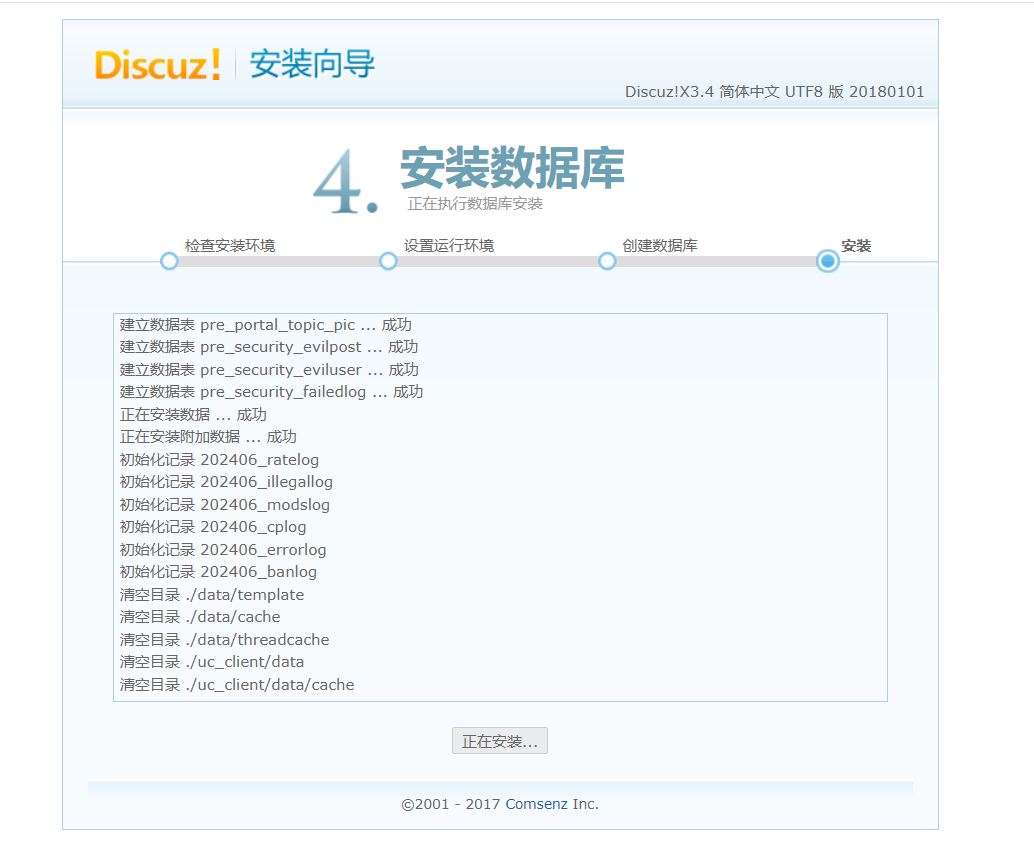
安装论坛
上传压缩包到Nginx服务器的/opt目录下并解压
[root@l1 system]# cd /opt/
[root@l1 opt]# ls
nginx-1.26.0  nginx-1.26.0.tar.gz  rh
[root@l1 opt]# ls
Discuz_X3.4_SC_UTF8.zip  nginx-1.26.0  nginx-1.26.0.tar.gz  rh
[root@l1 opt]# unzip Discuz_X3.4_SC_UTF8.zip
[root@l1 opt]# cd dir_SC_UTF8/
[root@l1 dir_SC_UTF8]# cp -r upload/ /var/www/html/discuz
[root@l1 dir_SC_UTF8]# cd /var/www/html/
[root@l1 html]#
设置属主属组
php服务器
[root@localhost html]# cd /usr/local/php/etc/php-fpm.d/
[root@localhost php-fpm.d]# vim www.conf
[root@localhost php-fpm.d]# 
[root@localhost php-fpm.d]# useradd -M -s /sbin/nologin nginx
[root@localhost php-fpm.d]# cat /etc/passwd | grep nginx:
nginx:x:1002:1002::/home/nginx:/sbin/nologin
[root@localhost php-fpm.d]# systemctl restart php-fpm.service
[root@localhost php-fpm.d]# ps aux | grep php
root      88567  0.2  0.7 216796  7656 ?        Ss   20:00   0:00 php-fpm: master process (/usr/local/php/etc/php-fpm.conf)
nginx     88568  0.0  0.3 218880  3932 ?        S    20:00   0:00 php-fpm: pool www
nginx     88569  0.0  0.3 218880  3932 ?        S    20:00   0:00 php-fpm: pool www
root      88571  0.0  0.0 112824   972 pts/2    S+   20:00   0:00 grep --color=auto php
[root@localhost php-fpm.d]# cd /var/www/html/
[root@localhost html]# chown -R nginx:nginx discuz/
[root@localhost html]# ll
总用量 12
drwxr-xr-x. 13 nginx nginx 4096 6月   2 19:55 discuz
-rw-r--r--.  1 root  root   163 6月   2 19:50 mysql.php
-rw-r--r--.  1 root  root    20 6月   2 19:25 test.php
[root@localhost html]#
Nginx服务器
[root@l1 html]# chown -R nginx:nginx discuz/
[root@l1 html]# ll
总用量 12
drwxr-xr-x. 13 nginx nginx 4096 6月   2 19:55 discuz
-rw-r--r--.  1 root  root   163 6月   2 19:50 mysql.php
-rw-r--r--.  1 root  root    20 6月   2 19:25 test.php
[root@l1 html]#
修改文件
[root@l1 html]# cd /usr/local/nginx/conf/
[root@l1 conf]# vim nginx.conf
[root@l1 conf]#  创建数据库
创建数据库
mysql服务器
[root@l2 system]# mysql -u root -pabc123
mysql: [Warning] Using a password on the command line interface can be insecure.
Welcome to the MySQL monitor.  Commands end with ; or \g.
Your MySQL connection id is 6
Server version: 5.7.44 Source distribution

Copyright (c) 2000, 2023, Oracle and/or its affiliates.

Oracle is a registered trademark of Oracle Corporation and/or its
affiliates. Other names may be trademarks of their respective
owners.

Type 'help;' or '\h' for help. Type '\c' to clear the current input statement.

mysql> create database discuz;
Query OK, 1 row affected (0.00 sec)

mysql>

mysql> show databases;
+--------------------+
| Database           |
+--------------------+
| information_schema |
| discuz             |
| mysql              |
| performance_schema |
| sys                |
+--------------------+
5 rows in set (0.00 sec)

mysql>

mysql>  grant all on discuz. * to 'zy'@'%' identified by 'zy1234';
Query OK, 0 rows affected, 1 warning (0.00 sec)

mysql>

mysql> flush privileges;
Query OK, 0 rows affected (0.00 sec)

mysql>
nginx服务器
[root@l1 conf]# nginx -s reload //刷新