在本篇文章中,我们将带你逐步实现一个完备的小说网站项目,技术栈包括Spring Boot、MongoDB、Vue 2和Nginx。
1. 项目概述
我们将实现一个基本的小说网站,包含以下主要部分:
- 后端API:使用Spring Boot实现,负责处理数据和业务逻辑。
- 数据库:使用MongoDB存储小说数据。
- 前端页面:使用Vue 2实现,负责展示数据和用户交互。
- 反向代理:使用Nginx进行前后端分离。
2. 环境和依赖
2.1 后端 - Spring Boot
Spring Boot 3.xSpring Data MongoDBSpring Web
2.2 数据库 - MongoDB
- 安装MongoDB社区版
2.3 前端 - Vue 2
Vue CLIAxios(用于HTTP请求)
3. 项目结构
在这一步,我们将创建项目的基本目录结构:
novel-website
├── novel(Spring Boot项目)
├── frontend (Vue项目)
└── nginx (Nginx配置)
4. 后端开发
数据准备:可以去 https://blog.csdn.net/iku_n/article/details/139509931 这里有爬虫的代码,我使用的是改版,并且是直接把数据导入到mongodb里面
首先,我们创建Spring Boot项目,并添加相关依赖。
4.1 创建Spring Boot项目
使用Spring Initializr创建项目

注意选择Java和Maven

4.2 引入pom文件
这里直接复制粘贴我的就行 (高手无视即可)
java
<?xml version="1.0" encoding="UTF-8"?>
<project xmlns="http://maven.apache.org/POM/4.0.0" xmlns:xsi="http://www.w3.org/2001/XMLSchema-instance"
         xsi:schemaLocation="http://maven.apache.org/POM/4.0.0 https://maven.apache.org/xsd/maven-4.0.0.xsd">
    <modelVersion>4.0.0</modelVersion>
    <parent>
        <groupId>org.springframework.boot</groupId>
        <artifactId>spring-boot-starter-parent</artifactId>
        <version>3.2.4</version>
        <relativePath/> <!-- lookup parent from repository -->
    </parent>
    <groupId>com.example</groupId>
    <artifactId>springboot</artifactId>
    <version>0.0.1-SNAPSHOT</version>
    <name>springboot</name>
    <description>springboot</description>
    <properties>
        <java.version>17</java.version>
    </properties>
    <dependencies>
        <dependency>
            <groupId>org.projectlombok</groupId>
            <artifactId>lombok</artifactId>
            <optional>true</optional>
        </dependency>
        <dependency>
            <groupId>org.springframework.boot</groupId>
            <artifactId>spring-boot-starter-test</artifactId>
            <scope>test</scope>
        </dependency>
        <dependency>
            <groupId>cn.hutool</groupId>
            <artifactId>hutool-all</artifactId>
            <version>5.7.20</version>
        </dependency>
        <!-- poi依赖 -->
        <dependency>
            <groupId>org.apache.poi</groupId>
            <artifactId>poi-ooxml</artifactId>
            <version>5.2.5</version>
        </dependency>
        <!-- 引入mongodb-->
        <dependency>
            <groupId>org.springframework.boot</groupId>
            <artifactId>spring-boot-starter-data-mongodb</artifactId>
        </dependency>
        <!--swagger-->
        <dependency>
            <groupId>org.springdoc</groupId>
            <artifactId>springdoc-openapi-starter-webmvc-ui</artifactId>
            <version>2.1.0</version>
        </dependency>
        <dependency>
            <groupId>org.springdoc</groupId>
            <artifactId>springdoc-openapi-starter-webmvc-api</artifactId>
            <version>2.1.0</version>
        </dependency>
        <!--web-->
        <dependency>
            <groupId>org.springframework.boot</groupId>
            <artifactId>spring-boot-starter-web</artifactId>
        </dependency>
        <!--json依赖-->
        <dependency>
            <groupId>com.alibaba</groupId>
            <artifactId>fastjson</artifactId>
            <version>1.2.76</version>
        </dependency>
    </dependencies>

    <build>
        <plugins>
            <plugin>
                <groupId>org.springframework.boot</groupId>
                <artifactId>spring-boot-maven-plugin</artifactId>
                <configuration>
                    <excludes>
                        <exclude>
                            <groupId>org.projectlombok</groupId>
                            <artifactId>lombok</artifactId>
                        </exclude>
                    </excludes>
                </configuration>
            </plugin>
        </plugins>
    </build>

</project>
4.3 写yml文件
先在这个位置创建一个yml文件

java
server:
  port: 9099
spring:
  data:
    mongodb:
      host: localhost
      port: 27017
      database: novel_database
4.4 编写实体类、仓库和服务
首先在Java下面创建一个com.sqm.model的文件包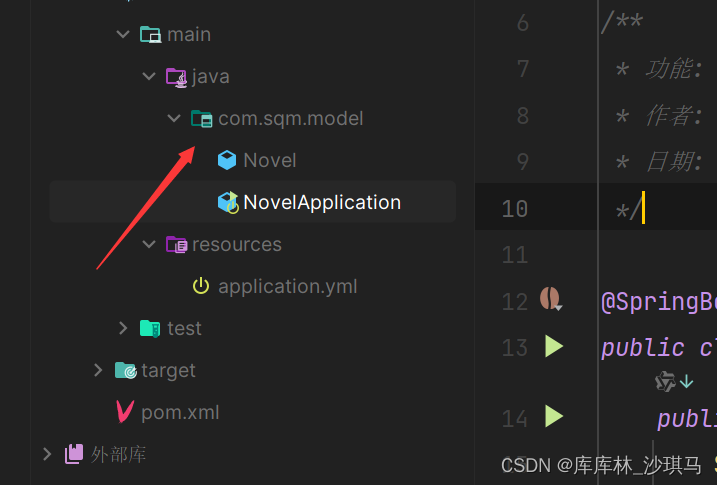
构建启动类
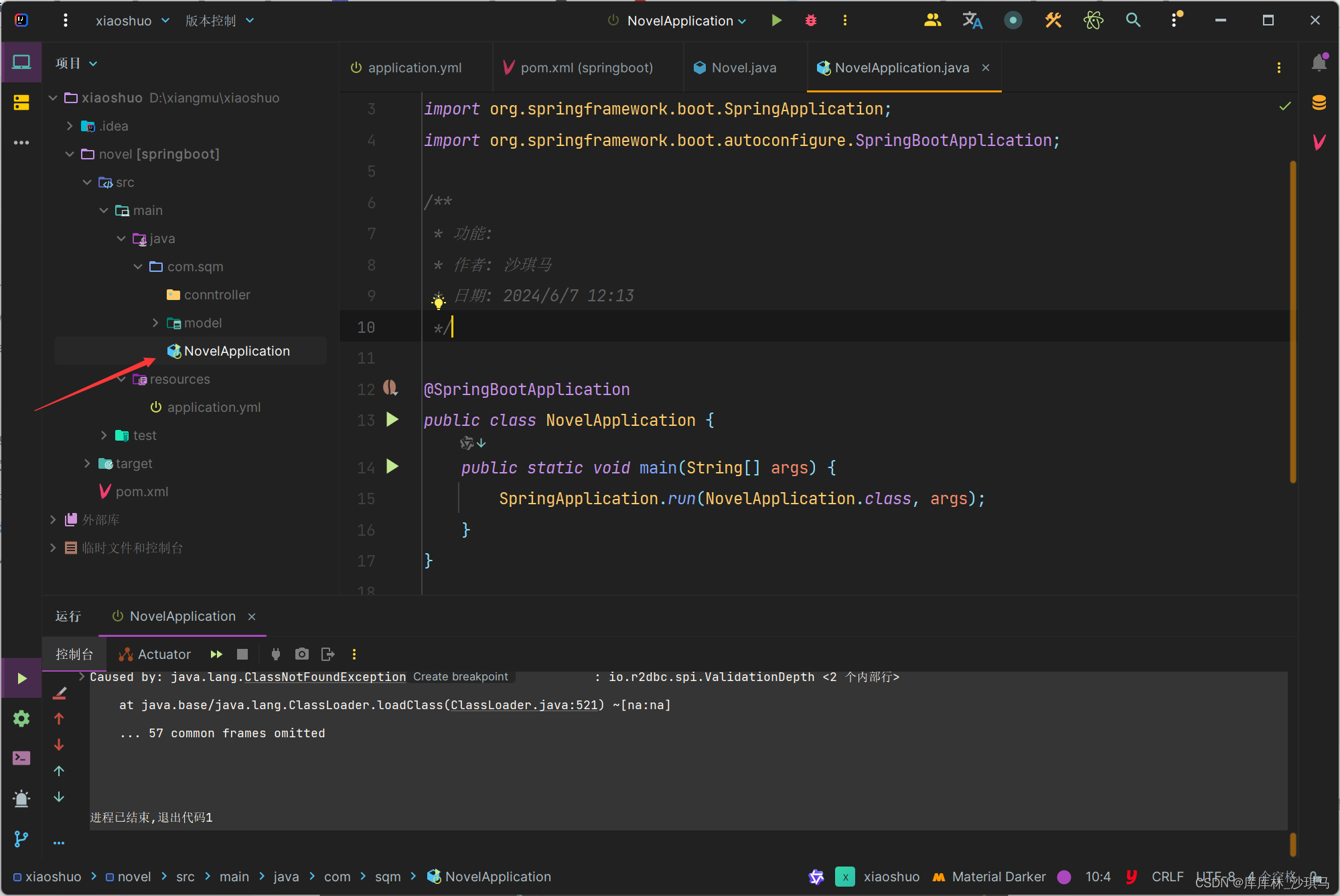
启动类: NovelApplication
java
package com.sqm;

import org.springframework.boot.SpringApplication;
import org.springframework.boot.autoconfigure.SpringBootApplication;

/**
 * 功能: 启动类
 * 作者: 沙琪马
 * 日期: 2024/6/7 12:13
 */

@SpringBootApplication
public class NovelApplication {
    public static void main(String[] args) {
        SpringApplication.run(NovelApplication.class, args);
    }
}
创建一个小说实体类:
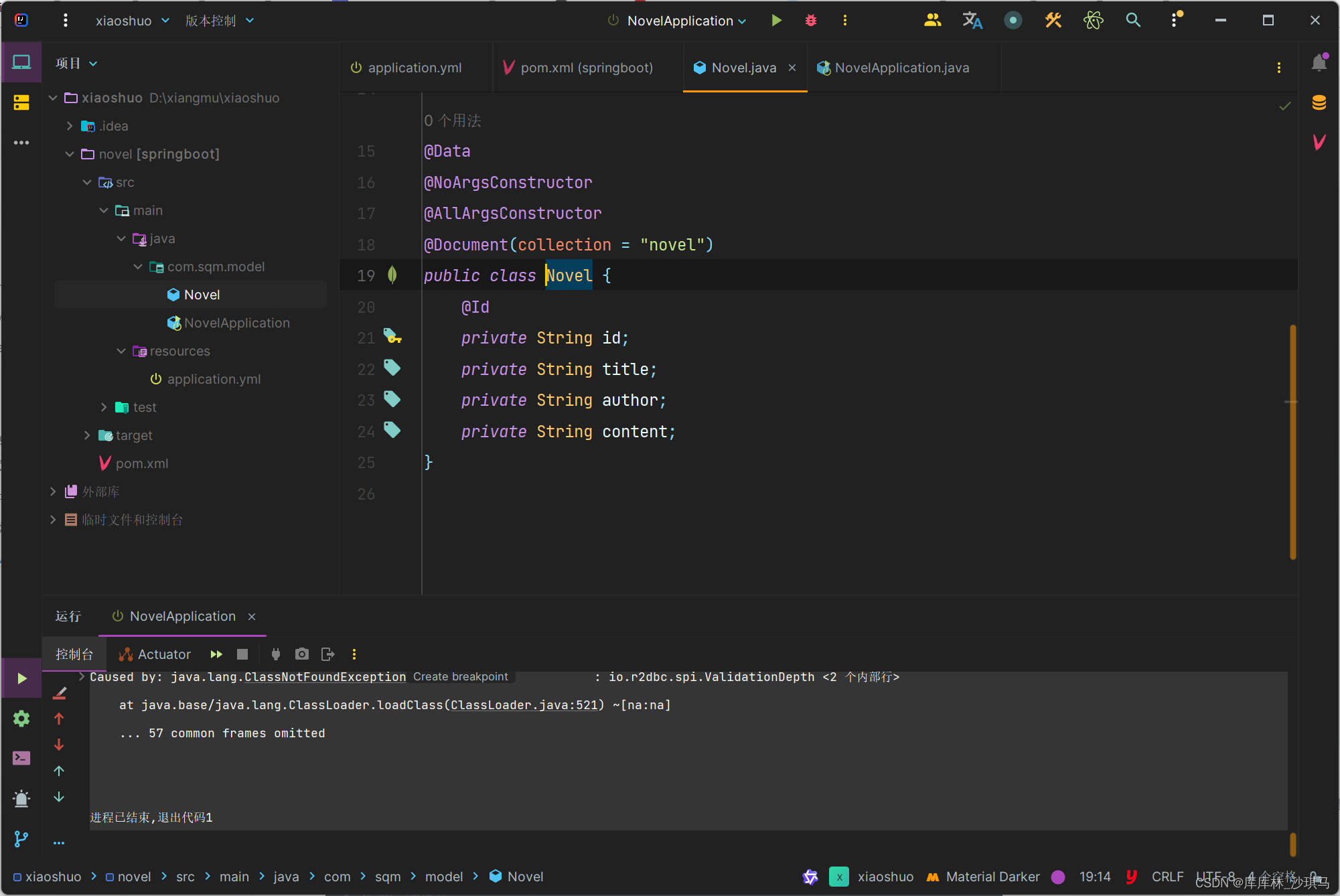
实体类: Novel
java
package com.sqm.model;

import lombok.AllArgsConstructor;
import lombok.Data;
import lombok.NoArgsConstructor;
import org.springframework.data.annotation.Id;
import org.springframework.data.mongodb.core.mapping.Document;
import org.springframework.data.mongodb.core.mapping.Field;

import java.util.List;
import java.util.Map;

/**
 * 功能: 小说模型
 * 作者: 沙琪马
 * 日期: 2024/6/7 12:10
 */

@Data
@NoArgsConstructor
@AllArgsConstructor
@Document(collection = "novels")
public class Novel {
    @Id
    private String id;
    private String title;
    private String type; // 小说类型
    private String author;
    private String updateTime;
    @Field(name = "jianjie")
    private String intro;
    private String imgUrl;
    @Field(name = "zhangjie")
    private List<Map<String, String>> chapter;
}
创建一个小说服务类

服务类:NovelService
java
package com.sqm.service;

import com.sqm.model.Novel;
import jakarta.annotation.Resource;
import lombok.extern.slf4j.Slf4j;
import org.springframework.data.mongodb.core.MongoTemplate;
import org.springframework.stereotype.Service;

import java.util.List;

/**
 * 功能:
 * 作者: 沙琪马
 * 日期: 2024/6/7 12:35
 */
@Service
@Slf4j
public class NovelService {
     @Resource
    private MongoTemplate mongoTemplate;

    public List<Novel> getNovels() {
        // 1.生成七个随机数,随机获取7本书
        Aggregation aggregation = Aggregation.newAggregation(
                Aggregation.sample(7)
        );
        return mongoTemplate.aggregate(aggregation, "novels", Novel.class).getMappedResults();

    }

    public Page<Novel> getNovelsByType(String type, int page, int size) {
        // 1.构建查询条件
        Query query = new Query(new Criteria("type").is(type));
        long total = mongoTemplate.count(query, Novel.class);

        // Apply pagination
        Pageable pageable = PageRequest.of(page, size);
        query.with(pageable);

        // 2.返回条件
        List<Novel> novels = mongoTemplate.find(query, Novel.class);
        return new PageImpl<>(novels, pageable, total);
    }
}
4.5 创建控制器
创建一个控制器类来处理HTTP请求:

控制类: NovelController
java
package com.sqm.conntroller;

import com.sqm.model.Novel;
import com.sqm.service.NovelService;
import jakarta.annotation.Resource;
import lombok.extern.slf4j.Slf4j;
import org.springframework.beans.factory.annotation.Autowired;
import org.springframework.web.bind.annotation.GetMapping;
import org.springframework.web.bind.annotation.RequestMapping;
import org.springframework.web.bind.annotation.RestController;

import java.util.List;

/**
 * 功能:
 * 作者: 沙琪马
 * 日期: 2024/6/7 12:40
 */

@RestController
@RequestMapping("novels")
@Slf4j
public class NovelController {
    @Resource
    private NovelService novelService;

    @GetMapping
    public List<Novel> getNovels() {
        return novelService.getNovels();
    }

    @GetMapping("/first")
    public Page<Novel>  getNovelsByType(@RequestParam("type")String type,
                                       @RequestParam("page")int page,
                                       @RequestParam("size")int size) {
        return novelService.getNovelsByType(type, page, size);
    }
}
5. 前端开发
使用Vue CLI创建前端项目:
vue create frontend
注意:别跑错文件夹了,项目概述有前端的路径
按上下箭头,选择选最下面那个,回车是选择
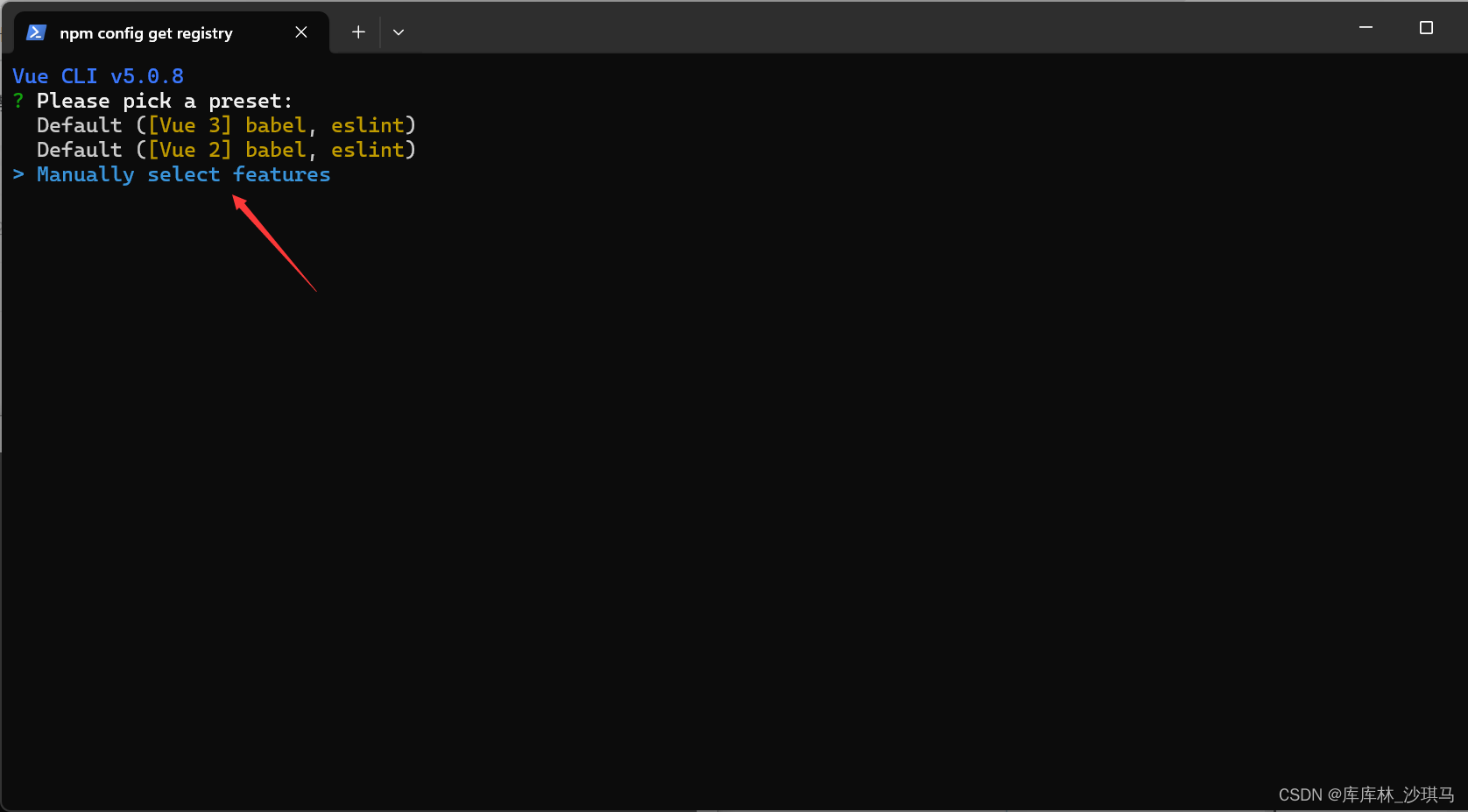
然后选择下面这两个就足够了, 注意:空格是选择!!!

选2.x,千万不要选3.x,这两个区别非常大
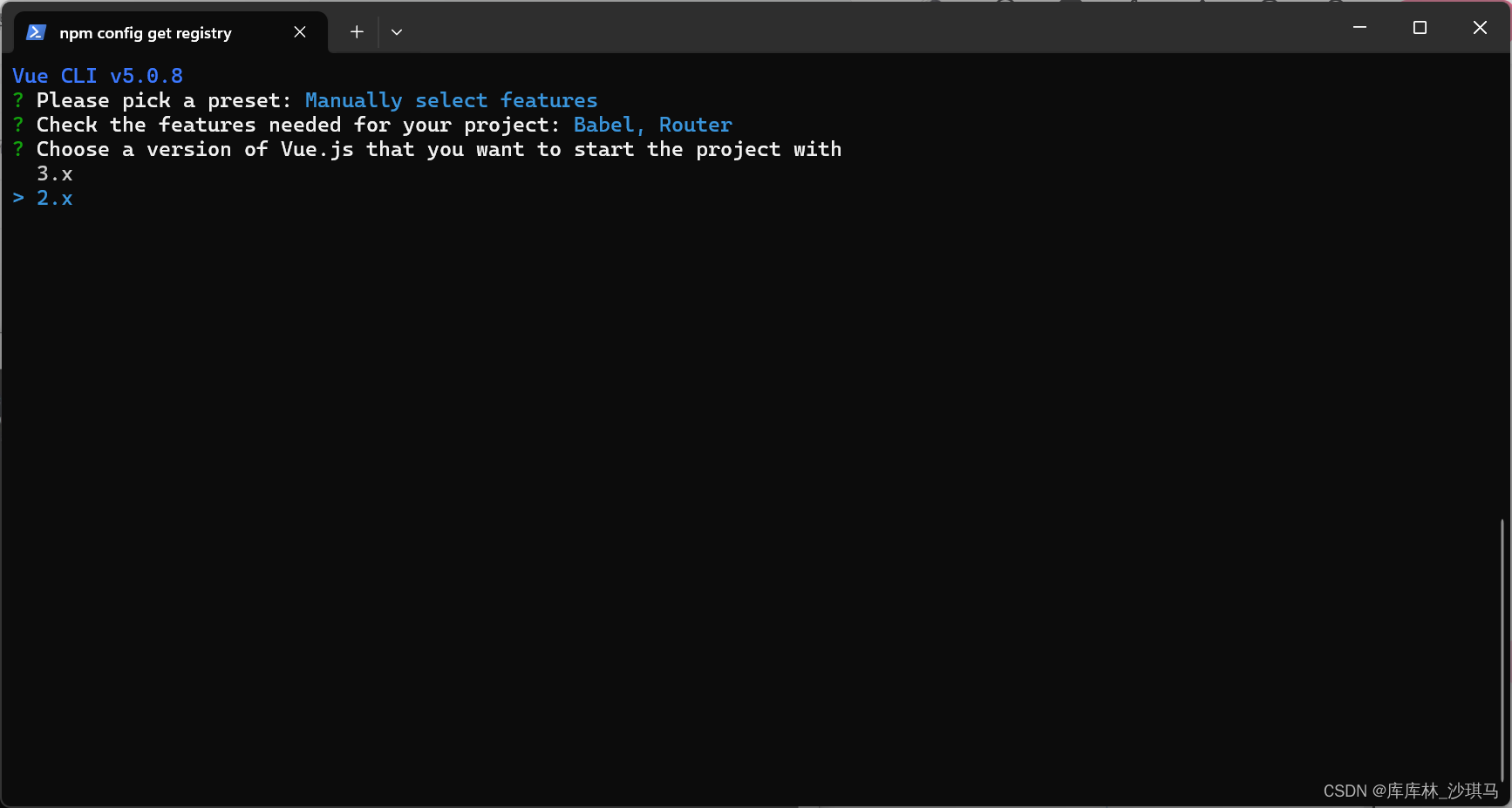
其他选项如下:

创建完成后
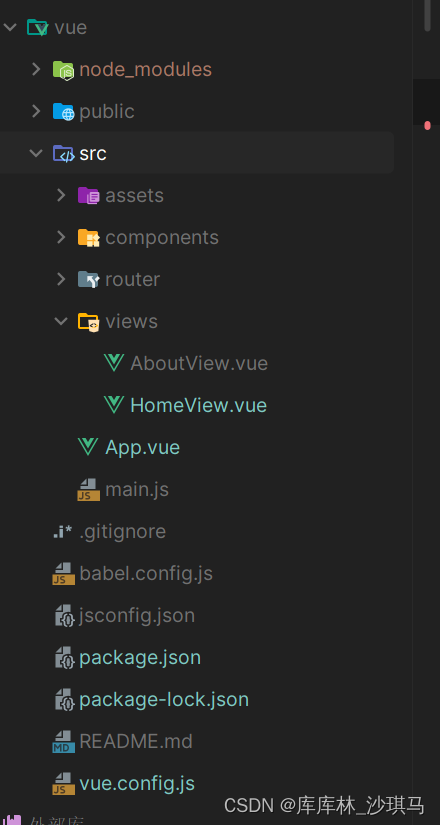
5.1 安装依赖
安装axios用于HTTP请求:
cd vue
npm install axios
然后去 axios配置文件-CSDN博客 拷贝request.js
5.2 创建Vue组件
在src目录下创建一个组件用于显示小说列表。
先整理一下目录

然后安装element ui
npm i element-ui -S
然后去main.js, 别迷路了
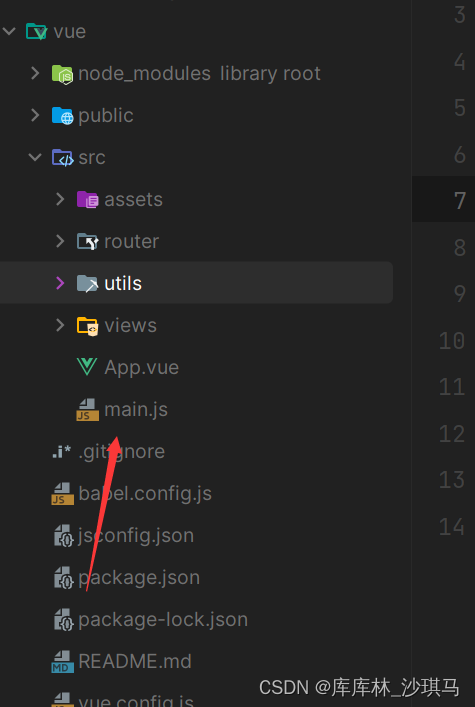
main.js
javascript
import Vue from 'vue'
import App from './App.vue'

import ElementUI from 'element-ui';
import 'element-ui/lib/theme-chalk/index.css';
import request from '@/utils/request'

Vue.config.productionTip = false
Vue.use(ElementUI, {size:'small'});

Vue.prototype.$request=request

new Vue({
  render: h => h(App),
}).$mount('#app')
然后改造App.vue
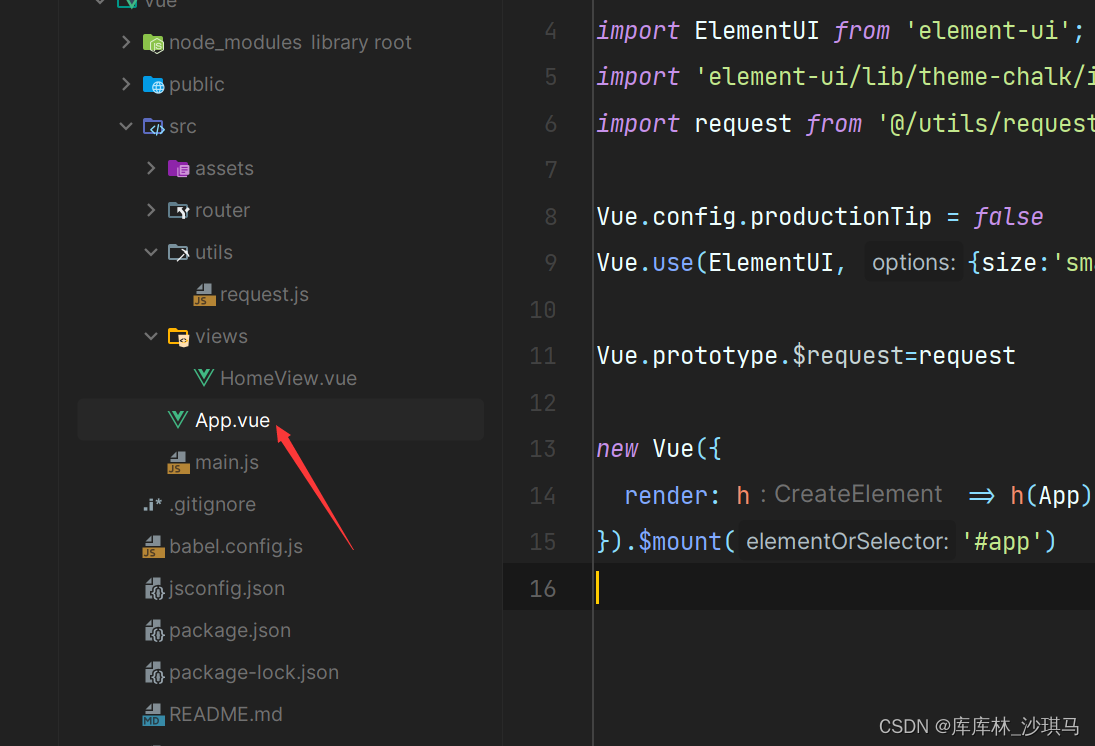
App.vue
javascript
<template>
    <div id="app">
        <router-view/>
    </div>
</template>
5.3 开始写页面
先启动vue试试,记得是在vue的目录下
npm run serve
然后在components创建 CommonPage.vue文件

**通用组件:**CommonPage
html
<template>
    <div class="card-container">
        <el-card class="centered-card">
            <el-table :data="tableData" stripe :header-cell-style="{backgroundColor: 'aliceblue'}"
                      @selection-change="handleSelectionChange">
                <el-table-column label="书名" prop="title" align="center"></el-table-column>
                <el-table-column label="作者" prop="author" align="center"></el-table-column>
                <el-table-column label="更新时间" prop="updateTime" align="center"></el-table-column>
            </el-table>
            <div class="block" style="margin: 10px 0">
                <el-pagination @size-change="handleSizeChange" @current-change="handleCurrentChange"
                               :current-page="pageNum" :page-sizes="[5, 10, 15, 20]" :page-size="pageSize"
                               layout="total, sizes, prev, pager, next, jumper" :total="total">
                </el-pagination>
            </div>
        </el-card>
    </div>
</template>

<script>
export default {
    props: {
        type: {
            type: String,
            required: true
        },
        fetchUrl: {
            type: String,
            required: true
        }
    },
    data() {
        return {
            tableData: [],
            pageNum: 1,
            pageSize: 10,
            total: 0,
        }
    },
    created() {
        this.load();
    },
    watch: {
        type() {
            this.load();
        },
        fetchUrl() {
            this.load();
        }
    },
    methods: {
        load() {
            this.$request.get(this.fetchUrl, {
                params: {
                    type: this.type,
                    page: this.pageNum,
                    size: this.pageSize
                }
            }).then(res => {
                this.tableData = res.content;
                this.total = res.totalElements;
            }).catch(error => {
                console.error('API request error:', error);
                this.tableData = []; // 或根据需求初始化数据
                this.total = 0;
            });
        },
        handleSelectionChange(selection) {
            console.log('Selection changed:', selection);
        },
        handleCurrentChange(pageNum) {
            this.pageNum = pageNum;
            this.load();
        },
        handleSizeChange(pageSize) {
            this.pageSize = pageSize;
            this.load();
        }
    }
}
</script>

<style scoped>
.card-container {
    display: flex;
    justify-content: center;
    text-align: center;
}

.centered-card {
    width: 50%;
    margin-top: 5%;
}
</style>
然后在views目录下
创建HomeView.vue和manager目录
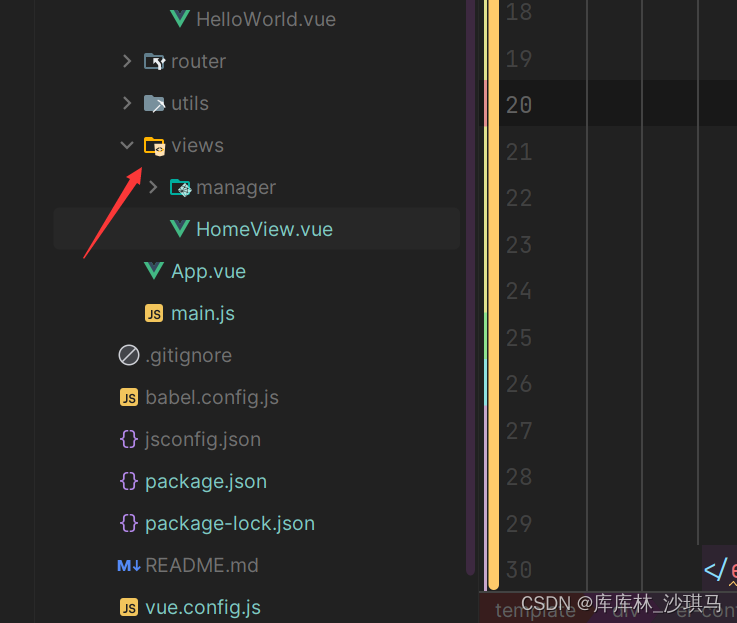
父组件:HomeView
html
<template>
    <div>
        <el-container>
            <el-header class="nav-bar">
                <div class="header-search">
                    <!-- Your search box and login scripts here -->
                    <div class="search">
                        <form method="get" target="_blank" action="/modules/article/search.php">
                            <el-input style="width: 20%;margin-right: 1%;" placeholder="输入少字也别输入错字"
                                      type="text"></el-input>
                            <el-button type="primary" icon="el-icon-search"></el-button>
                        </form>
                    </div>
                </div>
                <div style="display: flex; justify-content: center; align-items: center">
                    <el-tabs v-model="activeName" @tab-click="handleClick" class="nav_cont">
                        <el-tab-pane label="首页" name="homePage"></el-tab-pane>
                        <el-tab-pane label="玄幻小说" name="first"></el-tab-pane>
                        <el-tab-pane label="修真小说" name="second"></el-tab-pane>
                        <el-tab-pane label="都市小说" name="third"></el-tab-pane>
                        <el-tab-pane label="历史小说" name="fourth"></el-tab-pane>
                        <el-tab-pane label="网游小说" name="wangyou"></el-tab-pane>
                        <el-tab-pane label="科幻小说" name="scienceFiction"></el-tab-pane>
                    </el-tabs>
                </div>
            </el-header>
            <el-main>
                <router-view></router-view>
            </el-main>
        </el-container>
    </div>
</template>

<script>
export default {
    name: 'HomeView',
    data() {
        return {
            activeName: this.$route.name
        };
    },
    watch: {
        $route(to) {
            this.activeName = to.name;
        }
    },
    methods: {
        handleClick(tab) {
            if (tab.name !== this.$route.name) {
                this.$router.push({ name: tab.name });
            }
        }
    },
    mounted() {
        this.activeName = this.$route.name;
    }
}
</script>

<style scoped>
.el-header {
    background-color: #B3C0D1;
    color: #333;
    text-align: center;
    line-height: 60px;
}

.nav-bar {
    background-color: #333;
}

::v-deep .el-tabs__item {
    color: red !important; /* 修改标签页文字颜色 */
}

::v-deep .el-tabs__item.is-active {
    color: blue !important; /* 修改活动标签页文字颜色 */
}
</style>
子组件:HomePage(首页)
html
<template>
    <div class="warpper">
        <div class="cont">
            <div class="left_cont">
                <div class="ls_tit">
                    <h3>站长推荐</h3>
                    <div class="clear"></div>
                </div>
               <el-card style="display: flex;justify-items: center;align-items: center">
                   <div class="ls_box" style="width: 70%">
                       <div class="shu_box1" v-for="novel in novels" :key="novel.title">
                           <p class="p_img">
                               <a :href="novel.link" :title="novel.title">
                                   <img :src="novel.imgUrl" :alt="novel.title" style="width: 110px;height: 130px">
                               </a>
                           </p>
                           <p class="line20"><a :href="novel.link" :title="novel.title">{{ novel.title }}</a></p>
                           <p class="line20">作者:{{ novel.author }}</p>
                           <p class="line20">{{ novel.updateTime }}</p>
                       </div>
                   </div>
               </el-card>
            </div>
        </div>
    </div>
</template>

<script>
export default {
    data() {
        return {
            novels: [
                /* Example of novels array */
                {
                    title: '神印王座II皓月当空',
                    link: 'http://www.biqule.net/book/59265/',
                    imgUrl: 'http://www.biqule.net/files/article/image/59/59263/59263s.jpg',
                    author: '唐家三少',
                    update: '3-9 16:33'
                },
                // Add more novels here...
            ]
        }
    },
    created() {
        this.getNovel()
    },
    methods: {
        getNovel() {
            this.$request.get('/novels').then(res => {
                this.novels = res;
            })
        }
    }
}
</script>

<style scoped>
/* Header styles */
.header {
    display: flex;
    justify-content: space-between;
    align-items: center;
    padding: 10px 0;
    background-color: #f8f8f8;
}

.logo {
    font-size: 24px;
    font-weight: bold;
}

.header-search .search,
.header-right .topajax {
    display: flex;
    align-items: center;
}

.clear {
    clear: both;
}

/* Content styles */
.cont {
    display: flex;
    background-color: #f4f4f4;
    padding: 20px;
}

.left_cont {
    flex: 1;
}

.ls_tit h3 {
    font-size: 20px;
    margin-bottom: 15px;
}

.ls_box {
    display: flex;
    flex-wrap: wrap;
    gap: 10px;
}

.shu_box1 {
    flex: 1 1 180px;
    background-color: #fff;
    padding: 10px;
    box-shadow: 0 0 10px rgba(0, 0, 0, 0.1);
    border-radius: 5px;
}

.p_img {
    text-align: center;
    margin-bottom: 10px;
}

.p_img img {
    max-width: 100%;
    height: auto;
}

.line20 {
    line-height: 20px;
    margin: 0;
}

/* Footer styles */
.footer {
    background-color: #333;
    color: #fff;
    text-align: center;
    padding: 20px 0;
    margin-top: 20px;
}
</style>
其他组件:
这些组件变化不大,我这里给出两个,其他的自己补充ok不?
html
<template>
    <CommonPage fetchUrl="/novels/first" type="科幻小说" />
</template>

<script>
import CommonPage from '@/components/CommonPage.vue';

export default {
    name: 'ScienceFictionTypeNovel',
    components: {
        CommonPage
    }
}
</script>
html
<template>
    <CommonPage fetchUrl="/novels/first" type="网游小说" />
</template>

<script>
import CommonPage from '@/components/CommonPage.vue';

export default {
    name: 'WangyouTypeNovel',
    components: {
        CommonPage
    }
}
</script>
路由:index
javascript
import Vue from 'vue'
import VueRouter from 'vue-router'
import HomeView from '../views/HomeView.vue'

Vue.use(VueRouter)

const routes = [
  {
    path: '/',
    name: 'home',
    component: () => import(/* webpackChunkName: "about" */ '../views/HomeView.vue'),
    redirect: '/homePage',
    children: [
        {
            path: '/homePage',
            name: 'homePage',
            component: () => import(/* webpackChunkName: "about" */ '../views/manager/HomePage.vue')
        },
        {
            path: '/first',
            name: 'first',
            component: () => import(/* webpackChunkName: "about" */ '../views/manager/FirstTypeNovel.vue')
        },
        {
            path: '/second',
            name: 'second',
            component: () => import(/* webpackChunkName: "about" */ '../views/manager/SecondTypeNovel.vue')
        },
        {
            path: '/third',
            name: 'third',
            component: () => import(/* webpackChunkName: "about" */ '../views/manager/ThirdTypeNovel.vue')
        },{
            path: '/fourth',
            name: 'fourth',
            component: () => import(/* webpackChunkName: "about" */ '../views/manager/FourthTypeNovel.vue')
        },{
            path: '/wangyou',
            name: 'wangyou',
            component: () => import(/* webpackChunkName: "about" */ '../views/manager/WangyouTypeNovel.vue')
        },{
            path: '/scienceFiction',
            name: 'scienceFiction',
            component: () => import(/* webpackChunkName: "about" */ '../views/manager/ScienceFictionTypeNovel.vue')
        },
    ]
  }
]

const router = new VueRouter({
  mode: 'history',
  base: process.env.BASE_URL,
  routes
})

export default router
6,展示
因为时间真的不够了,就这样草草的结束吧,突然意思到我搜索忘写了哈哈哈哈,就交给大家了

7,总结
你看看有什么?这什么都没有怎么总结?没有总结散会