需求
传统导出,一般都是通过Workbook > Sheet > Row > Cell 获取详细Cell 设置值,比较麻烦,偶然遇到alibaba easyexcel 直接通过注解设置哪些需要导出 哪些忽略,发现特别好用。
pom依赖
        <dependency>
            <groupId>com.alibaba</groupId>
            <artifactId>easyexcel</artifactId>
            <version>3.1.1</version>
        </dependency>
完整pom.xml
<?xml version="1.0" encoding="UTF-8"?>
<project xmlns="http://maven.apache.org/POM/4.0.0"
         xmlns:xsi="http://www.w3.org/2001/XMLSchema-instance"
         xsi:schemaLocation="http://maven.apache.org/POM/4.0.0 http://maven.apache.org/xsd/maven-4.0.0.xsd">
    <modelVersion>4.0.0</modelVersion>
    <parent>
        <groupId>org.demo</groupId>
        <artifactId>tool-box-parent</artifactId>
        <version>1.0-SNAPSHOT</version>
    </parent>

    <groupId>org.example</groupId>
    <artifactId>tool-box-export</artifactId>

    <properties>
        <maven.compiler.source>17</maven.compiler.source>
        <maven.compiler.target>17</maven.compiler.target>
        <project.build.sourceEncoding>UTF-8</project.build.sourceEncoding>
    </properties>

    <dependencies>
        <dependency>
            <groupId>org.demo</groupId>
            <artifactId>tool-box-api</artifactId>
            <version>1.0-SNAPSHOT</version>
        </dependency>
        <dependency>
            <groupId>jakarta.servlet</groupId>
            <artifactId>jakarta.servlet-api</artifactId>
            <version>5.0.0</version> <!-- 使用适合您项目的最新稳定版本 -->
            <scope>provided</scope> <!-- 通常设置为provided,因为Servlet容器(如Tomcat)提供了实现 -->
        </dependency>
        <dependency>
            <groupId>com.alibaba</groupId>
            <artifactId>easyexcel</artifactId>
            <version>3.1.1</version>
        </dependency>
        <dependency>
            <groupId>org.projectlombok</groupId>
            <artifactId>lombok</artifactId>
            <version>1.18.28</version>
            <scope>provided</scope>
        </dependency>
    </dependencies>
</project>
Sheet1DataVo
package org.example.export.vo;

import com.alibaba.excel.annotation.ExcelIgnore;
import com.alibaba.excel.annotation.ExcelProperty;
import lombok.Data;

import java.util.Date;

/**
 * 时间:2024/6/24
 * 作者:jinyu
 * 描述:
 */
@Data

public class Sheet1DataVo {
    @ExcelIgnore
    private Long id;

    @ExcelProperty("名字2")
    private String name;

    @ExcelProperty("年龄2")

    private Integer age;
    @ExcelProperty("时间2")
    private Date createTime;

    public Sheet1DataVo(Long id, String name, Integer age, Date createTime) {
        this.id = id;
        this.name = name;
        this.age = age;
        this.createTime = createTime;
    }
}
Sheet2DataVo
package org.example.export.vo;

import com.alibaba.excel.annotation.ExcelIgnore;
import com.alibaba.excel.annotation.ExcelProperty;
import lombok.Data;

import java.util.Date;

/**
 * 时间:2024/6/24
 * 作者:jinyu
 * 描述:
 */

@Data
public class Sheet2DataVo {
    @ExcelIgnore
    private Long id;

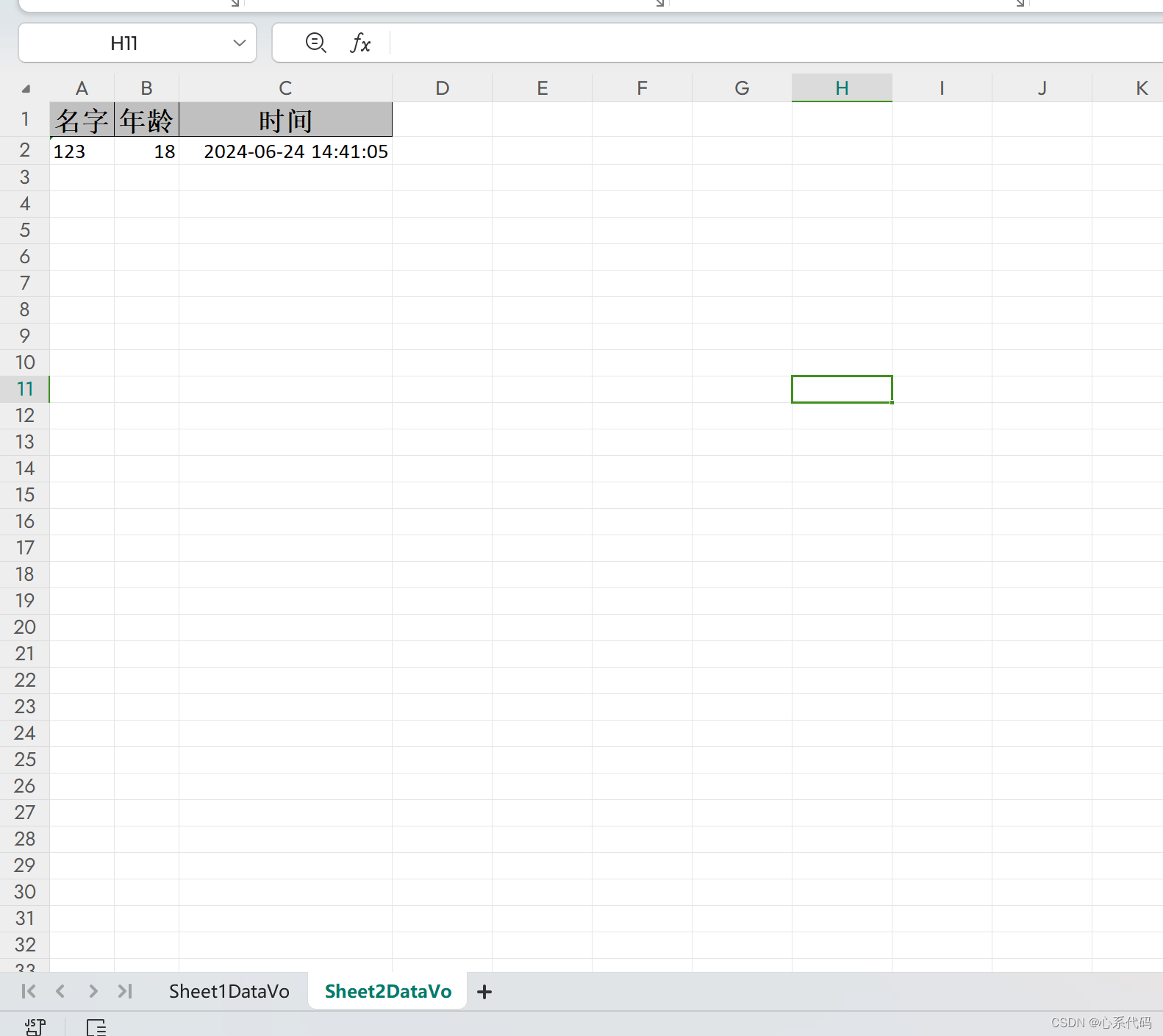
    @ExcelProperty("名字")
    private String name;

    @ExcelProperty("年龄")

    private Integer age;
    @ExcelProperty("时间")
    private Date createTime;

    public Sheet2DataVo(Long id, String name, Integer age, Date createTime) {
        this.id = id;
        this.name = name;
        this.age = age;
        this.createTime = createTime;
    }
}
导出具体方法
package org.example.export.controller;

import com.alibaba.excel.EasyExcel;
import com.alibaba.excel.ExcelWriter;
import com.alibaba.excel.write.metadata.WriteSheet;
import io.swagger.v3.oas.annotations.tags.Tag;
import jakarta.servlet.http.HttpServletRequest;
import jakarta.servlet.http.HttpServletResponse;
import lombok.extern.slf4j.Slf4j;
import org.example.export.vo.Sheet1DataVo;
import org.example.export.vo.Sheet2DataVo;
import org.springframework.web.bind.annotation.GetMapping;
import org.springframework.web.bind.annotation.RequestParam;
import org.springframework.web.bind.annotation.RestController;
import java.io.IOException;
import java.io.UnsupportedEncodingException;
import java.net.URLEncoder;
import java.util.ArrayList;
import java.util.Date;
import java.util.List;

/**
 * 时间:2024/6/24
 * 作者:jinyu
 * 描述:
 */

@RestController
@Tag(name = "导出模板", description = "导出模板")
 @Slf4j
public class ExportController {


    @GetMapping("/exportDemo")
    public void exportDemo(@RequestParam("name") String name, HttpServletResponse response, HttpServletRequest request)  {

        log.info("name:{}",name);
        List<Sheet1DataVo> sheet1DataVos = new ArrayList<>();
        Sheet1DataVo sheet1DataVo = new Sheet1DataVo(1l,name,18,new Date());
        sheet1DataVos.add(sheet1DataVo);

        List<Sheet2DataVo> sheet2DataVos = new ArrayList<>();
        Sheet2DataVo sheet1DataVo1 = new Sheet2DataVo(1l,name,18,new Date());
        sheet2DataVos.add(sheet1DataVo1);


        response.setContentType("application/vnd.openxmlformats-officedocument.spreadsheetml.sheet");
        response.setCharacterEncoding("utf-8");
        // 这里URLEncoder.encode可以防止中文乱码 当然和easyexcel没有关系
        String fileName = null;
        try {
            fileName = URLEncoder.encode("导出测试", "UTF-8").replaceAll("\\+", "%20");
        } catch (UnsupportedEncodingException e) {
            throw new RuntimeException(e);
        }
        response.setHeader("Content-disposition", "attachment;filename*=utf-8''" + fileName + ".xlsx");
        ExcelWriter excelWriter = null;
        try{
            excelWriter = EasyExcel.write(response.getOutputStream()).build();
            //创建一个sheet
            WriteSheet writeSheet = EasyExcel.writerSheet(0, "Sheet1DataVo").head(Sheet1DataVo.class).build();
            excelWriter.write(sheet1DataVos, writeSheet);
            //创建一个新的sheet
            WriteSheet writeSheet1 = EasyExcel.writerSheet(1, "Sheet2DataVo").head(Sheet2DataVo.class).build();
            excelWriter.write(sheet2DataVos, writeSheet1);

        } catch (IOException e) {
            throw new RuntimeException(e);
        } finally {
            if(excelWriter != null){
                excelWriter.finish();
            }
        }
    }
}
运行报错:
spring boot 报错 No primary or single unique constructor found for interface javax.servlet.http.HttpServletRequest
解决办法参考:
https://blog.csdn.net/weixin_41491295/article/details/139105046?ops_request_misc=%257B%2522request%255Fid%2522%253A%2522171921105216800180634339%2522%252C%2522scm%2522%253A%252220140713.130102334.pc%255Fall.%2522%257D&request_id=171921105216800180634339&biz_id=0&utm_medium=distribute.pc_search_result.none-task-blog-2~all~first_rank_ecpm_v1~rank_v31_ecpm-4-139105046-null-null.142^v100^pc_search_result_base3&utm_term=java.lang.IllegalStateException%3A%20No%20primary%20or%20single%20unique%20constructor%20found%20for%20interface%20javax.servlet.http.HttpServletResponse&spm=1018.2226.3001.4187运行
完整代码地址gitee
https://gitee.com/jy_yjy/tool-box.git