vue 中监听生命周期事件
-
- 常见的添加自定义事件的写法
- 希望在子组件挂载时通知父组件
- 在模板上监听组件生命周期
- [vue3 生命周期事件吗?](#vue3 生命周期事件吗?)
-
- [jsx 中如何监听生命周期事件呢?](#jsx 中如何监听生命周期事件呢?)
- [通过 vNode 操作 html](#通过 vNode 操作 html)
- [vue3 父子组件的生命周期的执行顺序是怎样的?](#vue3 父子组件的生命周期的执行顺序是怎样的?)
- 小结
vue2 提供了一些生命周期事件的方式,在组件销毁后触发一个事件,父组件可监听到该事件,然后执行某些操作。
命名为 hook:hookName ,前面的 hook: 是固定写法,比如 hook:mounted 、 hook:beforeDestroy 。
常见的添加自定义事件的写法
js
{
  mounted() {
      this.onResize = () => {
        console.log('onResize')
      }
      window.addEventListener('resize', this.onResize)
    },
    beforeDestroy() {
      window.removeEventListener('resize', this.onResize)
    }
}
这种写法存在两个小问题:
- 添加了额外的变量
onResize,感觉有点多余; - 监听
resize的逻辑分散在不同的生命周期中,不好维护。
使用监听生命周期事件的方式优化:
js
{

  mounted() {
    const onResize = () => {
      console.log('onResize')
    }
    window.addEventListener('resize', onResize)
    // hook:lifeHook $once 只执行一次
    this.$once('hook:beforeDestroy', () => {
      window.removeEventListener('resize', onResize)
    })
  }
}
凡在销毁时执行的操作,都可这样优化。
有人说方式1的问题不大,也没有优化多少,似乎没有多少用。
再看一个场景:
希望在子组件挂载时通知父组件
通常的写法:
js
// SonComponent.vue
{
  mounted() {
    this.$emit('mounted')
  }
}
在父组件中监听子组件触发的事件:
html
<template>
  <div>
    <SonComponent @mounted="onMounted" />
  </div>
</template>

<script>
  export default {
    methods: {
      onMounted() {
        console.log('onMounted')
      }
    }
  }
</script>
问题解决了,但是 SonComponent 是自己写的组件,具有完全的控制权,如果是第三方组件呢?
上面的方法就无招了。
生命周期事件可以解决这个问题:
在模板上监听组件生命周期
html
<template>
  <el-input @hook:mounted="onMounted" @hook:beforeDestroy="onBeforeDestroy" />
</template>
<script>
  export default {
    methods: {
      onMounted() {
        console.log('el-input onMounted')
      },
      onBeforeDestroy() {
        console.log('el-input onBeforeDestroy')
      }
    }
  }
</script>
生命周期事件在监听第三方组件的生命周期时很有用。
vue3 生命周期事件吗?
vue3 提供了 vue:hookName 的写法,比如 vue:mounted 、 vue:unmounted 。
html
<script setup>
  import {
    ref
  } from 'vue'

  const input = ref('')

  function whenMounted(params) {
    console.log('whenMounted')
    console.log(params)
  }

  function whenBeforeUnmount() {
    console.log('whenBeforeUnmount')
  }

  function whenUpdated() {
    console.log('whenUpdated')
  }
</script>

<template>
  <el-input v-model="input" @vue:mounted="whenMounted" @vue:beforeUnmount="whenBeforeUnmount" @vue:updated="whenUpdated" />
</template>
this.$once和this.$on不再支持,可使用第三方库解决。
这些生命周期事件抛出的数据是组件的 vNode 对象,通过它,可获取到el、props、ref等组件的重要属性。
比如,可获取el,然后手动修改它,以达到某种目的。
jsx 中如何监听生命周期事件呢?
vue3 提供了 onVnodeHookName 方法,可以监听组件的生命周期事件。
onVnodeMounted 、 onVnodeBeforeUnmount 、 onVnodeUpdated 等。
jsx
export default function MyButton(props, { slots }) {
  function onVnodeMounted(vnode) {
    console.log('vnode mounted', vnode)
  }
  return (
    <button onVnodeMounted={onVnodeMounted}>
      {{
        default: () => slots.default?.() ?? '按钮',
      }}
    </button>
  )
}
在模板中也是能使用这些方法的,但是不推荐,使用
@vue:hook更直观。
vue:hook和onVnodeXXX在 vue3 的文档中没有找到,说明这些 API 可能不稳定,不要频繁使用它们。
通过 vNode 操作 html
项目中 animate.css 和 element-plus 一起使用,animate 的 [disabled] 样式属性权重太高,导致 element-plus 分页有禁用样式。

可以在分页组件挂载和更新后移除 disabled 属性,使用 onVnodeMounted 和 onVnodeUpdated 事件实现。
jsx
<ElPagination
    onVnodeMounted={removePaginationDisabled}
    onVnodeUpdated={removePaginationDisabled} />
removePaginationDisabled 的参数是一个 vNode 对象,可通过
el属性拿到 html 模板,然后手动修改它。
vue3 父子组件的生命周期的执行顺序是怎样的?
通过两个组件,可以观察到:
html
<!-- Parent.vue -->
<script setup>
  import {
    onBeforeMount,
    onBeforeUnmount,
    onBeforeUpdate,
    onMounted,
    onUnmounted,
    onUpdated,
    ref,
  } from 'vue'

  import MyInput from './MyInput.vue'

  const myInput = ref('')

  function whenBeforeMount() {
    console.log('Son vue:beforeMount')
  }

  function whenMounted() {
    console.log('Son vue:mounted')
  }

  function whenBeforeUpdate() {
    console.log('Son vue:beforeUpdate')
  }

  function whenUpdated(vNode) {
    console.log('Son vue:updated')
    console.log(vNode)
  }

  function whenBeforeUnmount() {
    console.log('Son vue:beforeUnmount')
  }

  function whenUnmounted() {
    console.log('Son vue:unmounted')
  }

  console.log('Parent setup')

  onBeforeMount(() => {
    console.log('Parent onBeforeMount')
  })

  onMounted(() => {
    console.log('Parent onMounted')
  })
  onBeforeUpdate(() => {
    console.log('Parent onBeforeUpdate')
  })
  onUpdated(() => {
    console.log('Parent onUpdated')
  })
  onBeforeUnmount(() => {
    console.log('Parent onBeforeUnmount')
  })
  onUnmounted(() => {
    console.log('Parent onUnmounted')
  })
</script>

<template>
  <div class="init-options">
    <p>this is p tag {{ myInput }}</p>
    <MyInput v-model="myInput" @vue:beforeMount="whenBeforeMount" @vue:mounted="whenMounted" @vue:beforeUpdate="whenBeforeUpdate" @vue:updated="whenUpdated" @vue:beforeUnmount="whenBeforeUnmount" @vue:unmounted="whenUnmounted" />
  </div>
</template>
MyInput.vue 作为子组件:
html
<script setup>
  import {
    onBeforeMount,
    onBeforeUnmount,
    onBeforeUpdate,
    onMounted,
    onUnmounted,
    onUpdated,
    ref,
  } from 'vue'

  console.log('Son setup')
  const props = defineProps({
    modelValue: {
      type: String,
      default: '',
    },
  })

  const emits = defineEmits(['update:modelValue'])

  const input = ref(props.modelValue)

  onBeforeMount(() => {
    console.log('Son onBeforeMount')
  })
  onMounted(() => {
    console.log('Son onMounted')
  })

  onBeforeUpdate(() => {
    console.log('Son onBeforeUpdate')
  })

  onUpdated(() => {
    console.log('Son updated')
  })

  onBeforeUnmount(() => {
    console.log('Son onBeforeUnmount')
  })

  onUnmounted(() => {
    console.log('Son onUnmounted')
  })

  function onInput(e) {
    input.value = e.target.value
    emits('update:modelValue', e.target.value)
  }
</script>

<template>
  <div>
    <input :value="input" @input="onInput" />
    <p>{{ input }}</p>
  </div>
</template>
vue3 的父子生命周期执行顺序是:
组件挂载
bash
parent setup
parent onBeforeMount
parent vue:beforeMount
   son setup
   son onBeforeMount
   son vue:beforeMount
   son onMounted
   son vue:mounted
parent onMounted
# 类似两个圈,或者洋葱模型
# 父组件挂载阶段先进入后挂载
销毁
bash
Parent onBeforeUnmount
   Son vue:beforeUnmount # !生命周期事件先触发
   Son onBeforeUnmount
   Son onUnmounted
   Son vue:unmounted # ! 生命周期事件后触发
Parent onUnmounted
# 也类似洋葱模型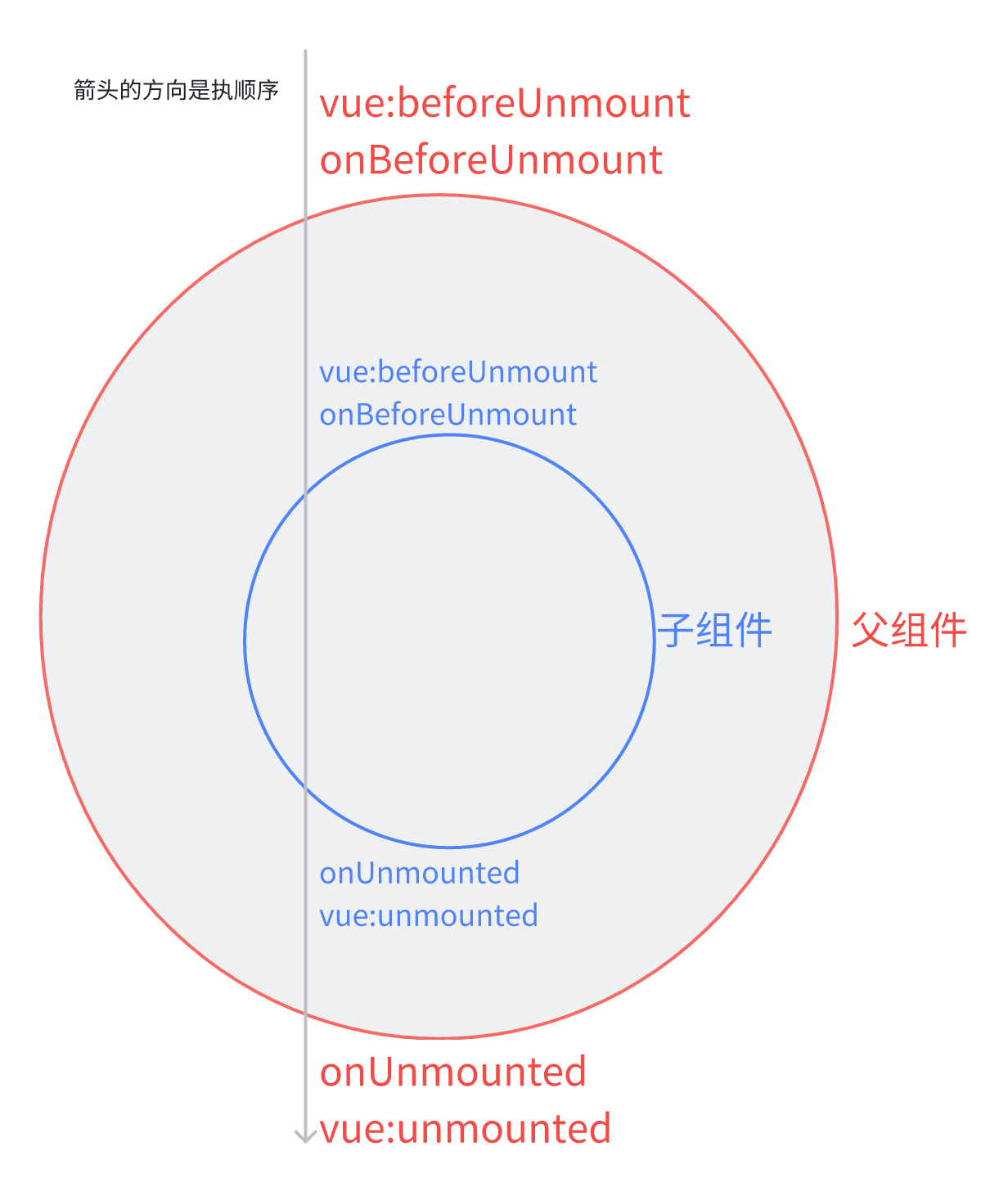
更新
bash
Parent onBeforeUpdate
   Son onBeforeUpdate
   Son vue:beforeUpdate
   Son updated
   Son vue:updated
Parent onUpdated
# 也类似两个圈 父组件先进入更新阶段,后更新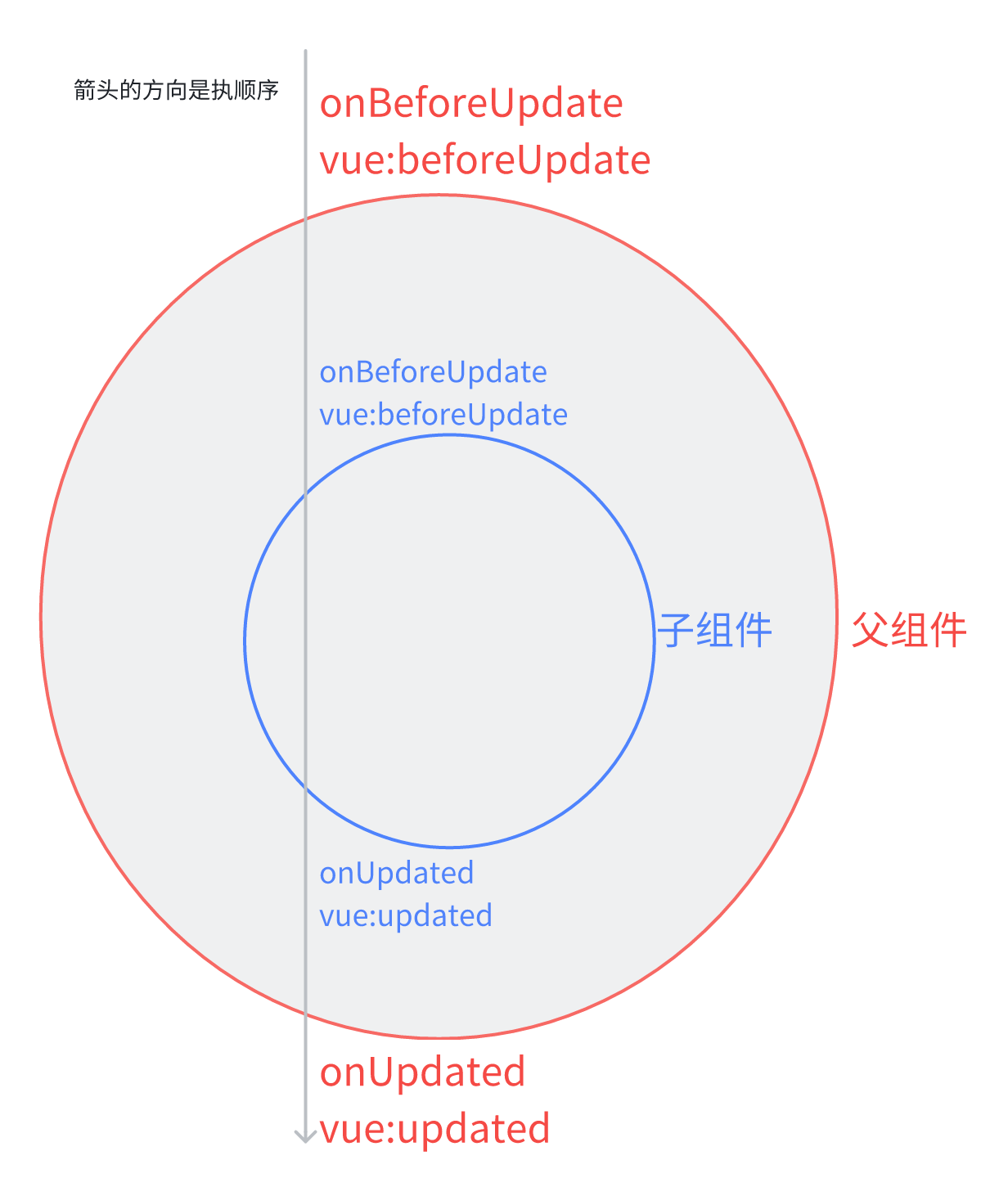
规律:父子组件的生命周期执行顺序类似一个两个圈,setup beforeXXX 在前方,XXXed 在后方,子组件的圈在内部。
生命周期事件在相应的生命周期钩子执行后触发,但是vue:beforeUnmount先于onBeforeUnmount执行,这点特殊。
小结
- vue2 监听生命周期事件的方式:
@hook:hookName。 - vue3 的方式
@vue:hookName或者onVnodeHookName。 - vue3 的父子组件每个阶段的生命周期执行顺序是两个圈,setup onBeforeXXX 在前方,XXXed 在后方,子组件的圈在内部。
vue:hookName在 vue3 的文档中没有找到,说明这些 API 可能不稳定,不要频繁使用它们。