string类与我们再C语言中接触到的字符串数据相似,但是做出了一些重大的提升,封装为类,实现了总多的接口,丰富了其功能,为简化了字符串的使用,那现在我们就开始深入学习string类吧。

1.什么事string类
C语言中的字符串
C语言中,字符串的结尾字符为**'\0',**他是由字符集合组成,为了方便操作,C语言的标准库中,就提供了一些相应的str类型的库函数,但是这些库函数与这些字符是分开的,不太符合面向对象的编程思想,而且底层空间需要用户自己开辟,稍不留神就会出现越界访问。
2.标准库中的string类
2.1string类的了解
这里大家可先草考一下这篇文档来初步了解string类:cplusplus.com/reference/string/string/?kw=string
注意:在使用string类的时候,我们需要包含上#include头文件 和 using namespace std;
2.2 auto和范围for
auto关键字
- 在这里我们来补充一点C++11的语法,一遍我们后续的学习
- 在早期C/C++中的auto含义是:使用auto修饰变量,是具有自动存储器的局部变量,后来这个不重要了。C++11中,标准委员会变废为宝富裕了auto全新的含义,即:auto不在是一个存储类型指示符,而是作为一个标准类型指示符来指示编译器,auto声明的变量必须由编译器在编译时期推到而得。
- 用auto申明指针变量,用auto和auto*没有任何的区别,但是在使用auto来申明引用时 必须加上&!
- 当在同一行申明同一行变量的时候,申明的变量必须为同一类型,否则编译器就会报错,因为在进行编译·=的时候,编译器只会以第一个的变量的类型进行申明,然后推导出其他的变量类型!
- auto不可以做函数的参数,但是可以作为函数的返回值!但是建议谨慎使用!!!
- auto不能用于声明数组的类型!
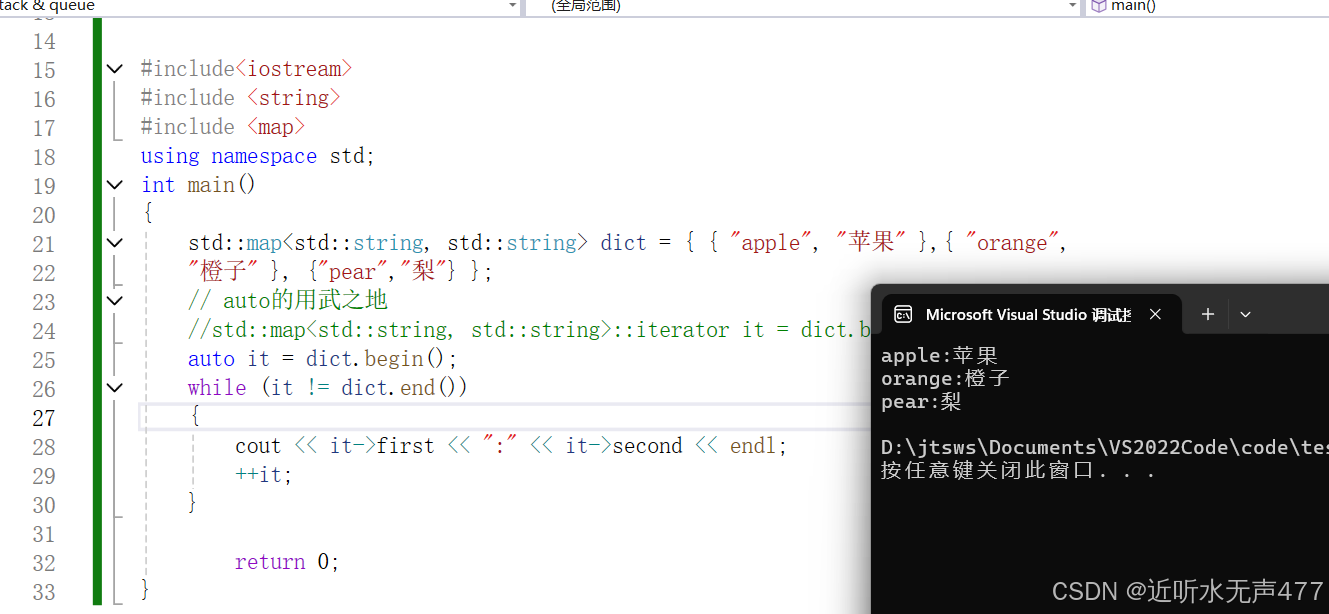
我们接下来就看看auto的用武之地:
cpp
#include<iostream>
#include <string>
#include <map>
using namespace std;
int main()
{
	std::map<std::string, std::string> dict = { { "apple", "苹果" },{ "orange",
	"橙子" }, {"pear","梨"} };
	// auto的用武之地
	//std::map<std::string, std::string>::iterator it = dict.begin();
	auto it = dict.begin();
	while (it != dict.end())
	{
		cout << it->first << ":" << it->second << endl;
		++it;
	}

		return 0;
}
范围for
对于一个有范围的集合而言,由程序员来说明程序循环的范围是多余的,有时候我们还会容易犯错。因此在C++11中,我们就引入了一个概念:基于范围的for循环。for循环后面的括号由冒号:分为两部分:**第一部分是范围内的迭代变量,第二部分是被迭代的范围,**自动迭代,自动取数据,自动判断结束。
- 范围for可以作用在数组和容器对象上进行遍历
- 范围for的底层实现非常的简单,容器的遍历实际上那个替换为迭代器,这个从汇编层就可以清晰地看见!
cpp
#include<iostream>
#include <string>
#include <map>
using namespace std;
int main()
{
	int array[] = { 1, 2, 3, 4, 5 };
	// C++98的遍历
	for (int i = 0; i < sizeof(array) / sizeof(array[0]); ++i)
	{
		array[i] *= 2;
	}
		for (int i = 0; i < sizeof(array) / sizeof(array[0]); ++i)
	{
		cout << array[i] << endl;
	}
		//C++11的遍历
		for (auto& e : array)
			e *= 2;
	for (auto e : array)
		cout << e << " " << endl;
	string str("hello world");
	for (auto ch : str)
	{
		cout << ch << " ";
	}
	cout << endl;
	return 0;
}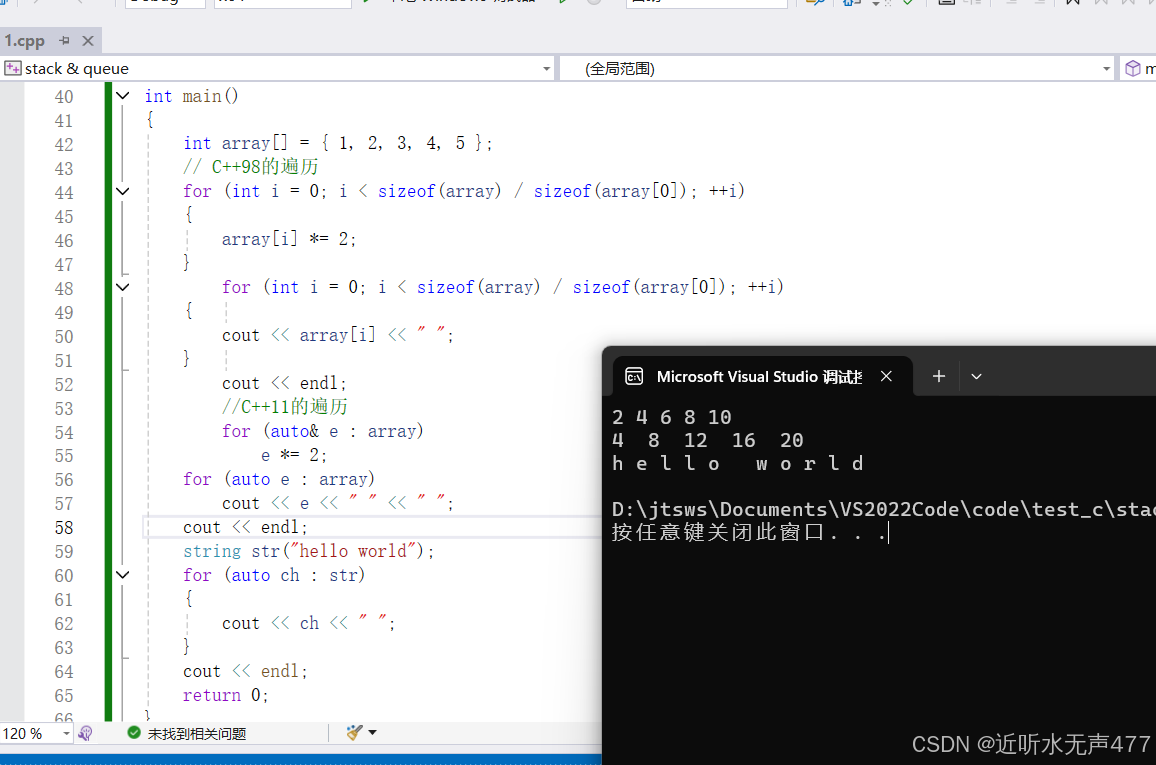
在c++中的发哪位for就能够更加高效的实现数据的遍历!
2.3常用的string接口说明
C++中提供了许多的类接口,这使得我们不必再像学习C语言时那样自己造轮子,我们只需要直接调用,就能够快速地完成我们需要的程序效果,一般我们可以在https://cplusplus.com/网页查询我们需要的接口函数。
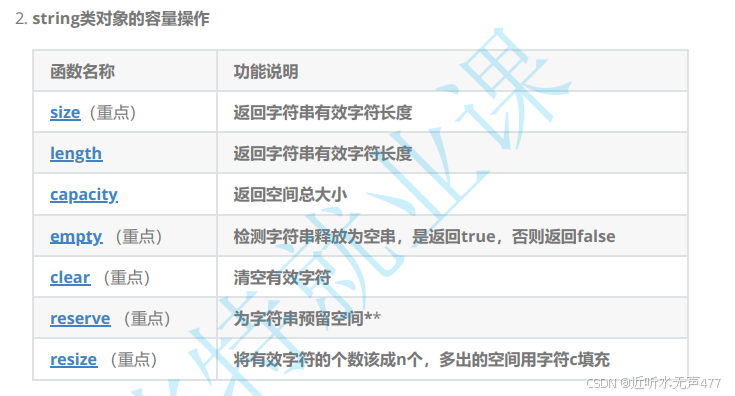
这里我们只需要掌握最常用的几个函数接口,剩下的接口函数,大家在需要的时候直接去查询就好:
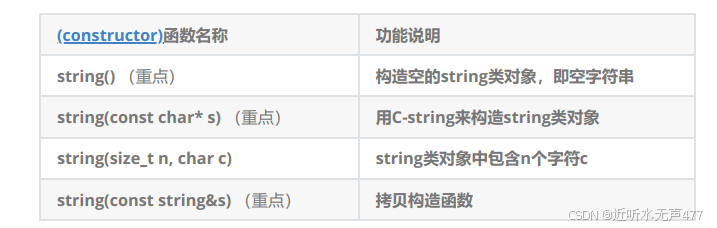
1.string类对象常见的构造
3.string类对象的遍历及访问操作 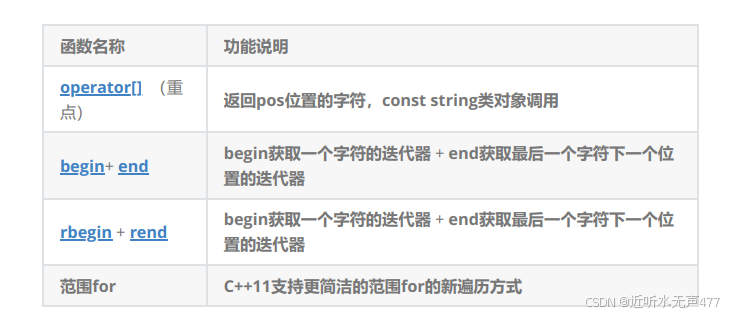
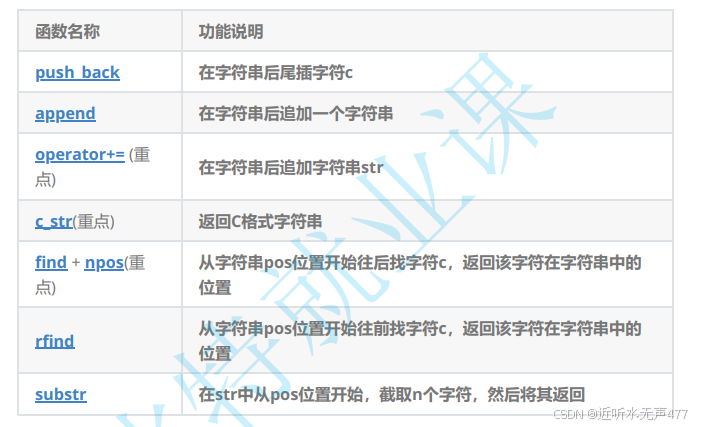
4.string类对象的修改操作
cpp
define _CRT_SECURE_NO_WARNINGS

#include <iostream>
using namespace std;

#include <string>


// 测试string容量相关的接口
// size/clear/resize
void Teststring1()
{
	// 注意:string类对象支持直接用cin和cout进行输入和输出
	string s("hello, bit!!!");
	cout << s.size() << endl;
	cout << s.length() << endl;
	cout << s.capacity() << endl;
	cout << s << endl;

	// 将s中的字符串清空,注意清空时只是将size清0,不改变底层空间的大小
	s.clear();
	cout << s.size() << endl;
	cout << s.capacity() << endl;

	// 将s中有效字符个数增加到10个,多出位置用'a'进行填充
	// "aaaaaaaaaa"
	s.resize(10, 'a');
	cout << s.size() << endl;
	cout << s.capacity() << endl;

	// 将s中有效字符个数增加到15个,多出位置用缺省值'\0'进行填充
	// "aaaaaaaaaa\0\0\0\0\0"
	// 注意此时s中有效字符个数已经增加到15个
	s.resize(15);
	cout << s.size() << endl;
	cout << s.capacity() << endl;
	cout << s << endl;

	// 将s中有效字符个数缩小到5个
	s.resize(5);
	cout << s.size() << endl;
	cout << s.capacity() << endl;
	cout << s << endl;
}

//====================================================================================
void Teststring2()
{
	string s;
	// 测试reserve是否会改变string中有效元素个数
	s.reserve(100);
	cout << s.size() << endl;
	cout << s.capacity() << endl;

	// 测试reserve参数小于string的底层空间大小时,是否会将空间缩小
	s.reserve(50);
	cout << s.size() << endl;
	cout << s.capacity() << endl;
}

// 利用reserve提高插入数据的效率,避免增容带来的开销
//====================================================================================
void TestPushBack()
{
	string s;
	size_t sz = s.capacity();
	cout << "making s grow:\n";
	for (int i = 0; i < 100; ++i)
	{
		s.push_back('c');
		if (sz != s.capacity())
		{
			sz = s.capacity();
			cout << "capacity changed: " << sz << '\n';
		}
	}
}

// 构建vector时,如果提前已经知道string中大概要放多少个元素,可以提前将string中空间设置好
void TestPushBackReserve()
{
	string s;
	s.reserve(100);
	size_t sz = s.capacity();

	cout << "making s grow:\n";
	for (int i = 0; i < 100; ++i)
	{
		s.push_back('c');
		if (sz != s.capacity())
		{
			sz = s.capacity();
			cout << "capacity changed: " << sz << '\n';
		}
	}
}


// string的遍历
// begin()+end()   for+[]  范围for
// 注意:string遍历时使用最多的还是for+下标 或者 范围for(C++11后才支持)
// begin()+end()大多数使用在需要使用STL提供的算法操作string时,比如:采用reverse逆置string
void Teststring3()
{
	string s1("hello Bit");
	const string s2("Hello Bit");
	cout << s1 << " " << s2 << endl;
	cout << s1[0] << " " << s2[0] << endl;

	s1[0] = 'H';
	cout << s1 << endl;

	// s2[0] = 'h';   代码编译失败,因为const类型对象不能修改
}

void Teststring4()
{
	string s("hello Bit");
	// 3种遍历方式:
	// 需要注意的以下三种方式除了遍历string对象,还可以遍历是修改string中的字符,
	// 另外以下三种方式对于string而言,第一种使用最多
	// 1. for+operator[]
	for (size_t i = 0; i < s.size(); ++i)
		cout << s[i] << endl;

	// 2.迭代器
	string::iterator it = s.begin();
	while (it != s.end())
	{
		cout << *it << endl;
		++it;
	}

	// string::reverse_iterator rit = s.rbegin();
	// C++11之后,直接使用auto定义迭代器,让编译器推到迭代器的类型
	auto rit = s.rbegin();
	while (rit != s.rend())
		cout << *rit << endl;

	// 3.范围for
	for (auto ch : s)
		cout << ch << endl;
}


//
// 测试string:
// 1. 插入(拼接)方式:push_back  append  operator+=
// 2. 正向和反向查找:find() + rfind()
// 3. 截取子串:substr()
// 4. 删除:erase
void Teststring5()
{
	string str;
	str.push_back(' ');   // 在str后插入空格
	str.append("hello");  // 在str后追加一个字符"hello"
	str += 'b';           // 在str后追加一个字符'b'
	str += "it";          // 在str后追加一个字符串"it"
	cout << str << endl;
	cout << str.c_str() << endl;   // 以C语言的方式打印字符串

	// 获取file的后缀
	string file("string.cpp");
	size_t pos = file.rfind('.');
	string suffix(file.substr(pos, file.size() - pos));
	cout << suffix << endl;

	// npos是string里面的一个静态成员变量
	// static const size_t npos = -1;

	// 取出url中的域名
	string url("http://www.cplusplus.com/reference/string/string/find/");
	cout << url << endl;
	size_t start = url.find("://");
	if (start == string::npos)
	{
		cout << "invalid url" << endl;
		return;
	}
	start += 3;
	size_t finish = url.find('/', start);
	string address = url.substr(start, finish - start);
	cout << address << endl;

	// 删除url的协议前缀
	pos = url.find("://");
	url.erase(0, pos + 3);
	cout << url << endl;
}

int main()
{
	return 0;
}
3.字符串相关的题目
现在我们就算是真正的结束了string类的介绍,接下来,我们开市接触一下关于string类的相关题目:
3.1仅仅翻转字母
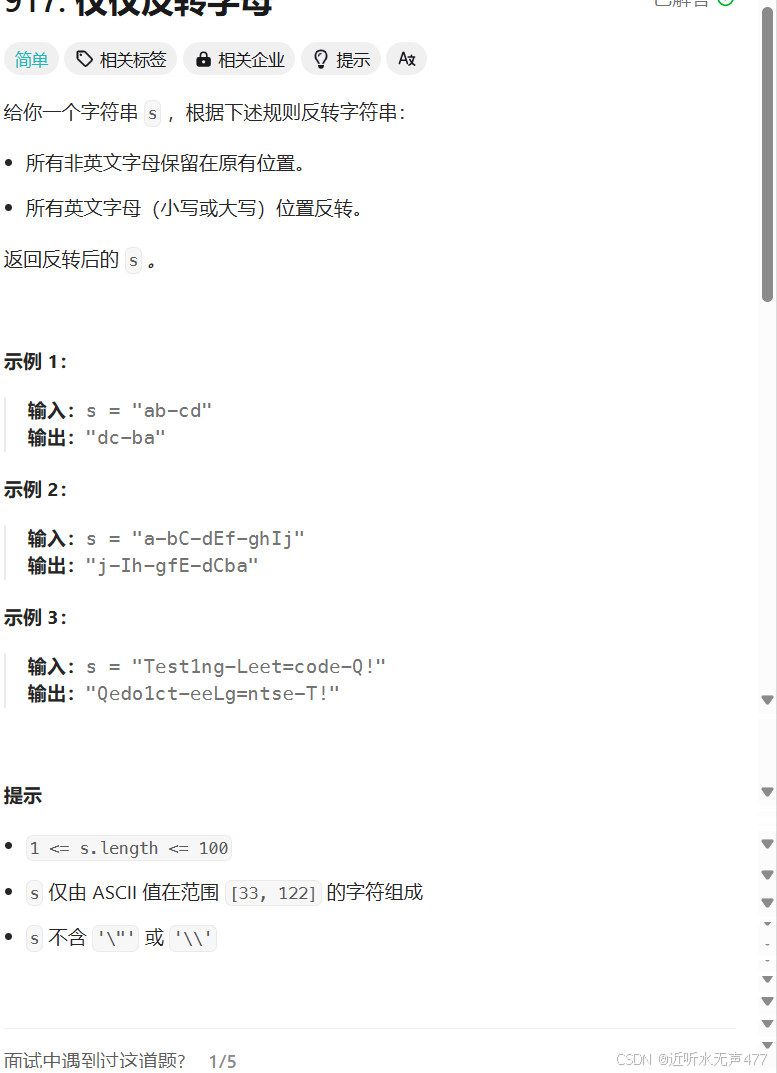
看到这样的题目我们需要怎么办呢?
大家想一想,我们真的需要将所有的的字符串都翻转过来吗?
其实我们并不需要将所有的字符都翻转过来,我们只需要从首尾两处的位置开始遍历字符串,当两端的指针都遍到的字符是是字母时,我们就将他们的位置掉换,这样就可以达到只交换字母的目的:
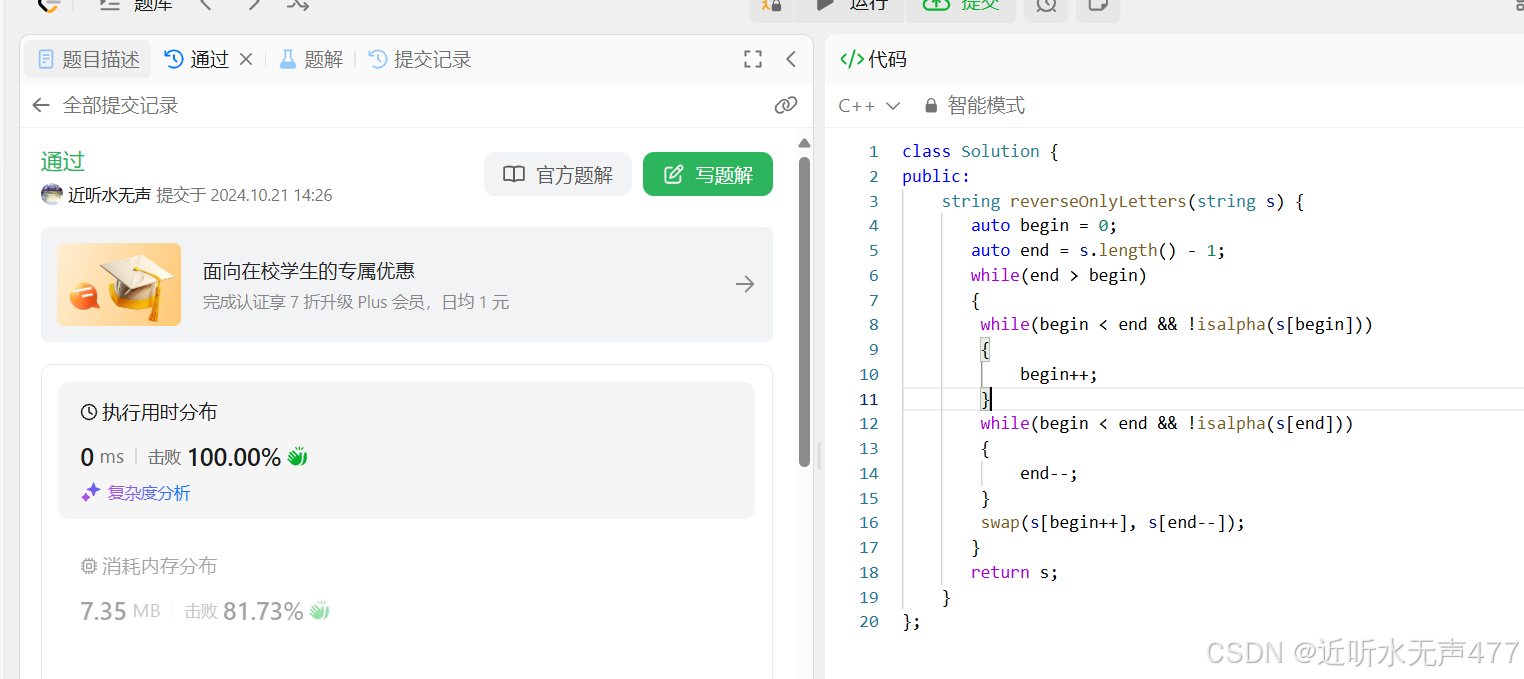
实现的代码如下:
cpp
class Solution {
public:
    string reverseOnlyLetters(string s) {
       auto begin = 0;
       auto end = s.length() - 1;
       while(end > begin)
       {
        while(begin < end && !isalpha(s[begin]))
        {
            begin++;
        }
        while(begin < end && !isalpha(s[end]))
        {
            end--;
        }
        swap(s[begin++], s[end--]);
       }
       return s;
    }
};
3.2 字符串中只出现一次的字母
题目链接:387. 字符串中的第一个唯一字符 - 力扣(LeetCode)
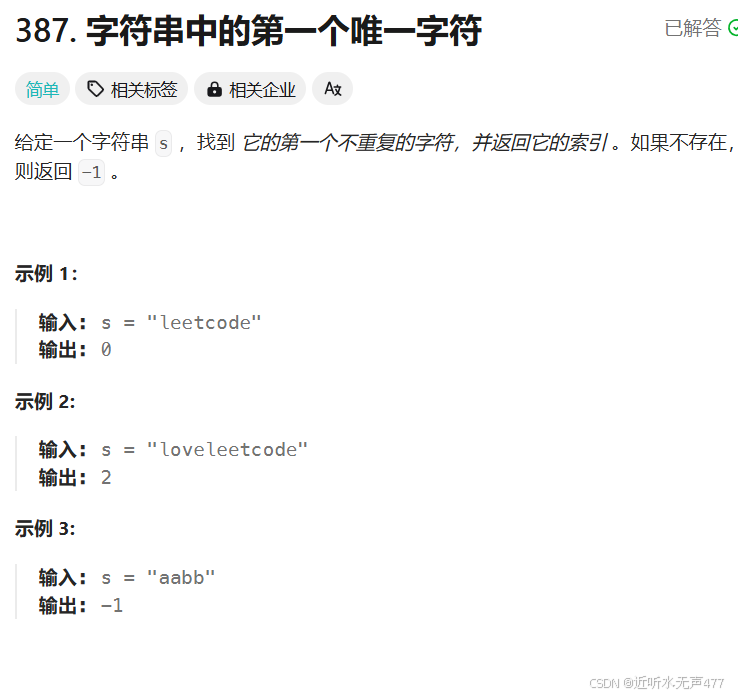
这道题的其实非常的简单,我们只需要模拟简单的哈希表,就可以轻易地实现这道题:
实现代码:
cpp
class Solution {
public:
    int firstUniqChar(string s) {
        int arr[26] = {0};
        for (auto i : s)
        {
            arr[i - 'a']++;
        }
        for (int i = 0; i < s.size(); i++)
        {
            if (arr[s[i] - 'a'] == 1)
                return i;
        }
        return -1;
    }
};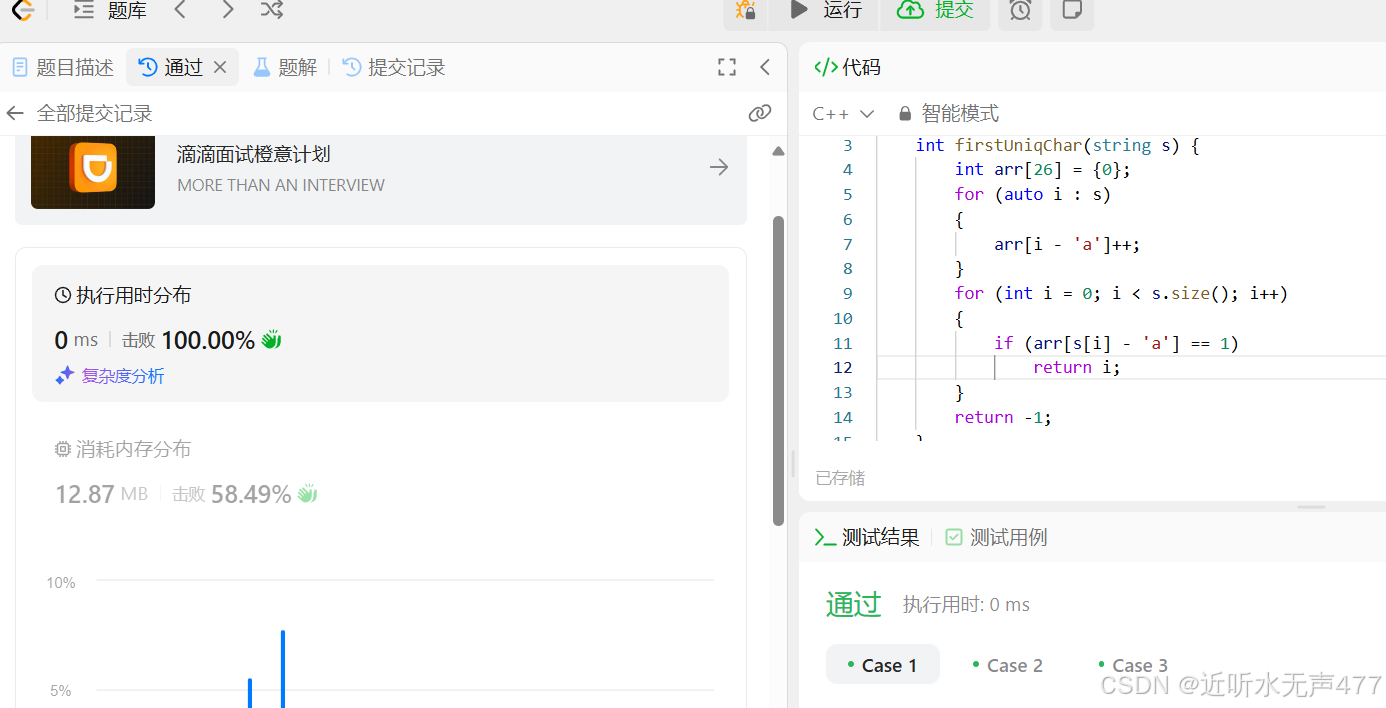
好今天的学习就到这里,咱们下期再见!!