文章目录
转码 与加水印
引入jar包
java
        <dependency>
            <groupId>net.bramp.ffmpeg</groupId>
            <artifactId>ffmpeg</artifactId>
            <version>0.6.2</version>
        </dependency>
代码
java
import lombok.extern.slf4j.Slf4j;
import net.bramp.ffmpeg.FFmpeg;
import net.bramp.ffmpeg.builder.FFmpegBuilder;
import net.bramp.ffmpeg.job.FFmpegJob;
import org.apache.http.client.methods.CloseableHttpResponse;
import org.apache.http.client.methods.HttpGet;
import org.apache.http.impl.client.CloseableHttpClient;

import java.io.*;
import java.nio.file.Files;
import java.nio.file.Path;
import java.util.ArrayList;
import java.util.List;

/**
 * @description 阿里云文件上传
 *
 * @author lilinchun
 * @date 2024/10/17
 */
@Slf4j
public class OssUtil {


    public static void main(String[] args) {
        String videoUrl = "xxx.mp4";
        try {
            convertAndUpload(videoUrl);
        } catch (Exception e) {
            e.printStackTrace();
            System.err.println("转换和上传失败: " + e.getMessage());
        }
    }

    /**
     * 将mp4文件url地址转换并上传到oss中
     * @param url mp4地址
     * @return m3u8文件地址
     */
    public static String convertAndUpload(String url) throws Exception {
        String vodId = null;
        // 截取文件名称
        String fileName = url.substring(url.lastIndexOf('/') + 1);
        int lastDotIndex = fileName.lastIndexOf('.');
        String name = fileName.substring(0, lastDotIndex);
        String fileNameNew = name+"mark"+".mp4";
        // 当前项目的文件路径
        Path tempDir = Files.createTempDirectory("ffmpeg-temp");
        Path inputFilePath = tempDir.resolve(fileName);
        Path inputFilePathWatermark = tempDir.resolve(fileNameNew);
        Path outputM3U8Path = tempDir.resolve(name + ".m3u8");

        // 创建TS文件输出目录
        Path outputTSDir = tempDir.resolve(name + "_ts");
        Files.createDirectories(outputTSDir);
        log.info("临时文件路径:{}", tempDir.toString());
        try {
            downloadFileNew(url, tempDir.toString());
            // 设置水印
            watermarkVoid(inputFilePath,inputFilePathWatermark);
            // 转换生成M3U8和TS文件  指定播放片段为20s
            String ffmpegCommand = String.format(
                    "ffmpeg -i %s -codec: copy -start_number 0 -hls_time 20 -hls_list_size 0 -f hls -hls_segment_filename %s/%s_%%03d.ts %s",
                    inputFilePathWatermark.toAbsolutePath(),
                    outputTSDir.toAbsolutePath(),
                    name,
                    outputM3U8Path.toAbsolutePath()
            );
            // 执行FFmpeg命令转换视频
            Process process = Runtime.getRuntime().exec(ffmpegCommand);
            process.waitFor();


            String indexFile = outputM3U8Path.toString();
            List<String> tsFiles = new ArrayList<>();
            System.out.println("解析文件路径地址:" + outputM3U8Path);
            for (int i = 0; ; i++) {
                Path tsFilePath = outputTSDir.resolve(String.format("%s_%03d.ts", name, i));
                if (!Files.exists(tsFilePath)) {
                    break;
                }
                System.out.println("解析文件路径ts地址:" + tsFilePath);
                tsFiles.add(tsFilePath.toString());
            }
            // 上传阿里云视屏点播服务
            vodId = UploadVodByApi.uploadVideo(indexFile, tsFiles, name + ".m3u8");
            // 清理临时文件
            cleanup(tempDir);
            log.info("临时文件路径:{}", tempDir.toString());
        } catch (IOException e) {
            e.printStackTrace();
            log.error("文件转换失败:{}", e.getMessage());
        }
        return vodId;
    }

    /**
     * 设置视屏水印
     * @param inputFilePath 原始视屏路径
     * @param inputFilePathWatermark  水印视屏路径
     */
    private static void watermarkVoid(Path inputFilePath,Path inputFilePathWatermark){
        log.info("文件名称:{},{}",inputFilePath.toAbsolutePath(),inputFilePathWatermark.toAbsolutePath());
        // 构建FFmpeg命令
        String ffmpegCommandWatermark = String.format(
                "ffmpeg -i \"%s\" -vf \"drawtext=text='nk.benwunet.com':x=mod(n\\,w+tw)-tw:y=10:fontsize=24:fontcolor=white\" -codec:a copy \"%s\"",
                inputFilePath.toAbsolutePath(),
                inputFilePathWatermark.toAbsolutePath()
        );
        log.info("执行加水印的命令:{}",ffmpegCommandWatermark);
        try {
            // 使用ProcessBuilder来启动外部进程
            // 使用ProcessBuilder来启动外部进程
            ProcessBuilder processBuilder = new ProcessBuilder("ffmpeg", "-i", inputFilePath.toAbsolutePath().toString(),
                    "-vf", "drawtext=text='nk.benwunet.com':x=mod(n\\,w+tw)-tw:y=10:fontsize=24:fontcolor=white",
                    "-codec:a", "copy",
                    inputFilePathWatermark.toAbsolutePath().toString());

            // 将错误输出重定向到标准输出
            processBuilder.redirectErrorStream(true);
            Process process = processBuilder.start();
            // 读取输出
            BufferedReader reader = new BufferedReader(new InputStreamReader(process.getInputStream()));
            String line;
            while ((line = reader.readLine()) != null) {
                log.info(line);
            }
            // 等待进程完成
            int exitCode = process.waitFor();
            if (exitCode == 0) {
                log.info("Video watermarking completed successfully.");
            } else {
                log.error("FFmpeg command failed with exit code: " + exitCode);
            }
            // 关闭资源
            reader.close();
        }catch (Exception e){
            log.error("Error occurred while processing the video: ", e);
        }
    }

    /**
     * 下载文件
     * @param urlStr 文件地址
     * @param saveDir 文件路径
     * @throws IOException 异常
     */
    public static void downloadFileNew(String urlStr, String saveDir) throws IOException {
        CloseableHttpClient httpClient = HttpClientSingleton.getInstance();
        HttpGet request = new HttpGet(urlStr);
        try (CloseableHttpResponse response = httpClient.execute(request)) {
            int responseCode = response.getStatusLine().getStatusCode();

            if (responseCode == 200) {
                String fileName = urlStr.substring(urlStr.lastIndexOf('/') + 1);
                String saveFilePath = saveDir + File.separator + fileName;

                try (InputStream inputStream = response.getEntity().getContent();
                     FileOutputStream outputStream = new FileOutputStream(saveFilePath)) {

                    byte[] buffer = new byte[4096];
                    int bytesRead;
                    while ((bytesRead = inputStream.read(buffer)) != -1) {
                        outputStream.write(buffer, 0, bytesRead);
                    }
                }
            } else {
                throw new IOException("No file to download. Server replied HTTP code: " + responseCode);
            }
        }
    }


    /**
     * 清理文件
     * @param dir 文件地址  示例:/tmp/ffmpeg-temp9193762578321295193
     * @throws IOException 异常
     */
    private static void cleanup(Path dir) throws IOException {
        Files.walk(dir)
                // 逆序遍历,先删除子文件
                .sorted((a, b) -> -a.compareTo(b))
                .forEach(path -> {
                    try {
                        Files.delete(path);
                    } catch (IOException e) {
                        e.printStackTrace();
                    }
                });
    }

}
ffmpeg安装
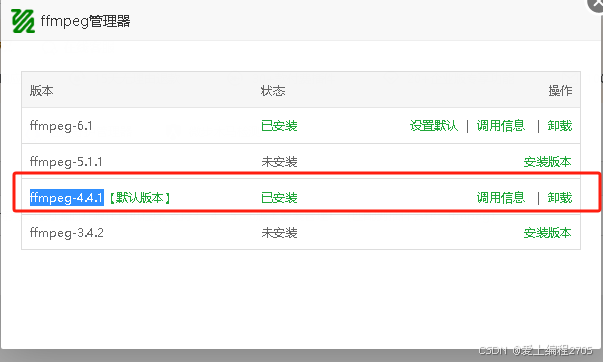
可以安装宝塔的
1、安装管理器

2、安装ffmpeg的版本
3、测试
检查版本
shell
ffmpeg -version
错误
No such filter: 'drawtext'
vost#0:0/libx264 @ 0x7eabd00 Error initializing a simple filtergraph
Error opening output file 01mark.mp4
转码中使用到了drawtext,但是ffmpeg并没有drawtext,所以报错了
解决方法
1、确认FFmpeg版本
确保你安装的FFmpeg版本支持drawtext滤镜。运行以下命令来查看所有可用的滤镜:
shell
ffmpeg -filters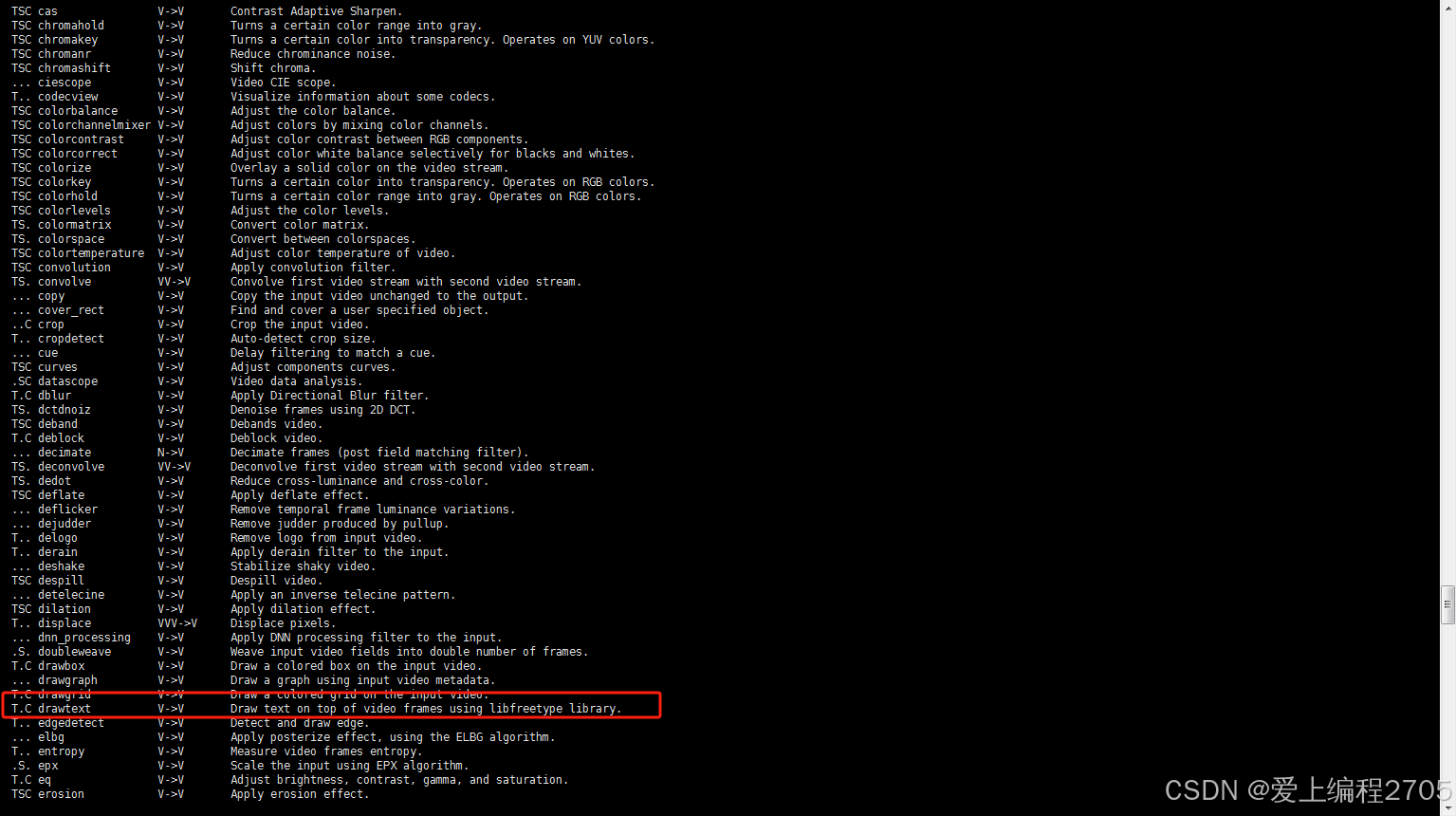
我之前是安装的ffmpeg-6.1 发现没有这个滤镜,之后我安装了ffmpeg-4.4.1 就有了,可以正常使用