参考
vue动态组件<Component>与<KeepAlive>
vue3 router-view keeperalive对于同一路径但路径参数不同
文章目录
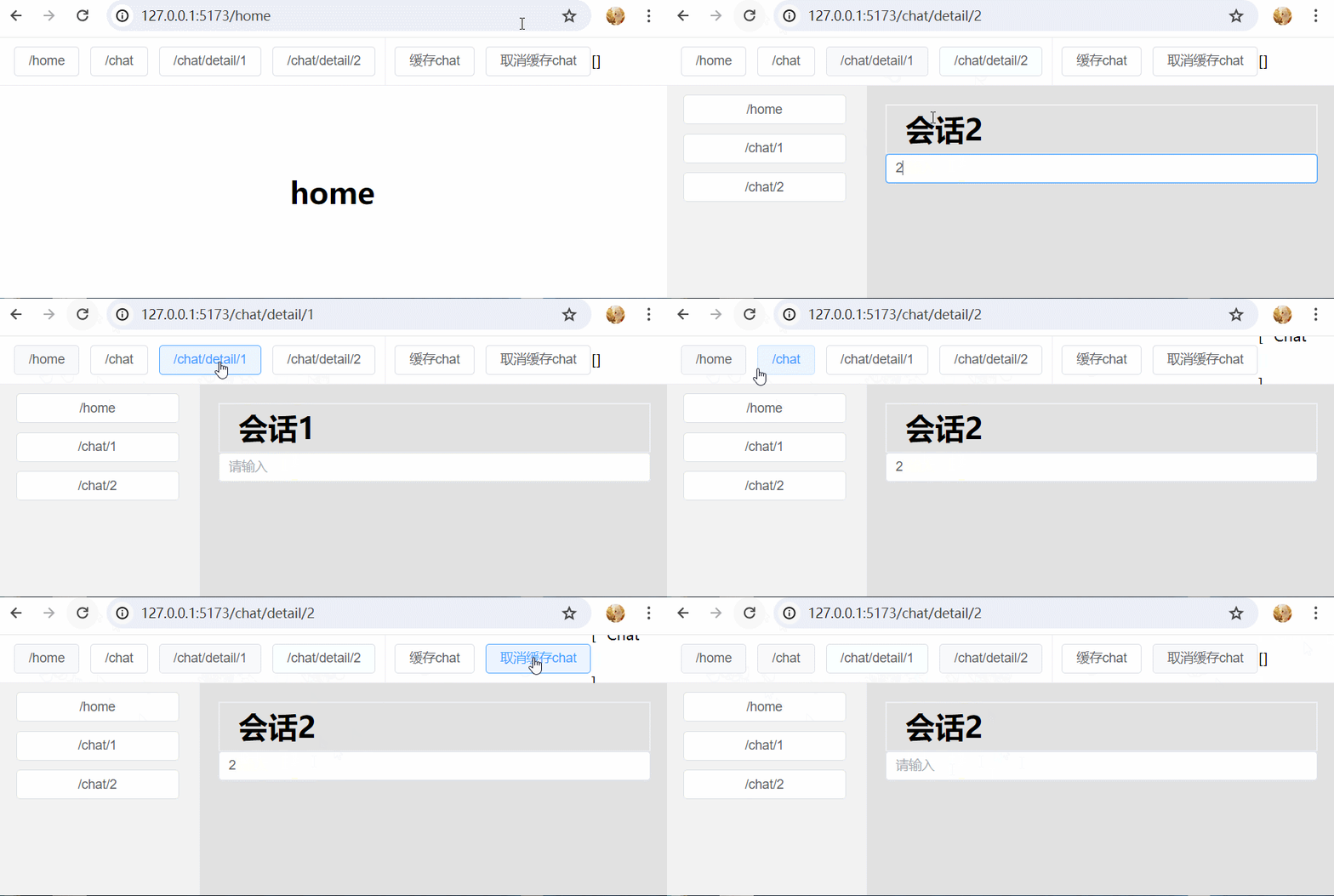
效果
main.js
js
import { createApp } from 'vue'

import './style.css'

import App from './App.vue'
import router from './router'

import ElementPlus from 'element-plus'
import 'element-plus/dist/index.css'

const app = createApp(App)
app.use(router)
app.use(ElementPlus)
app.mount('#app')
router.js
js
import { createWebHistory, createRouter } from "vue-router"

import Home from '@/views/Home.vue'
import Chat from '@/views/Chat.vue'
import ChatDetail from '@/views/ChatDetail.vue'

const routes = [
    {
        path: '/',
        redirect: '/home'
    },
    {
        path: '/home',
        name: 'home',
        component: Home
    },
    {
        path: '/chat',
        name: 'chat',
        component: Chat,
        children: [
            {
                path: 'detail/:id',
                name: 'chatDetail',
                component: ChatDetail
            },
        ]
    },
]
const router = createRouter({
    history: createWebHistory(),
    routes,
})

export default router
App.vue
html
<template>
  <div style="height: 100%;">

    <div class="header">
      <el-button @click="nav('/home')">/home</el-button>
      <el-button @click="nav('/chat')">/chat</el-button>
      <el-button @click="nav('/chat/detail/1')">/chat/detail/1</el-button>
      <el-button @click="nav('/chat/detail/2')">/chat/detail/2</el-button>

      <div style="height:100%;width:1px;background-color:#eee;margin: 10px;"></div>

      <!-- 这里的缓存的意思是: 当从ChatDetail组件切到Home组件时, Chat组件实例里的数据还是否缓存 -->
      <el-button @click="cachedComponents = ['Chat']">缓存chat</el-button>
      <el-button @click="cachedComponents = []">取消缓存chat</el-button>{{cachedComponents}}
    </div>

    <!-- 当在home组件与chat组件切换时, 被切走的组件会被销毁, 切过去的组件会被创建 -->
    <!-- <router-view class="container-wrapper"/> -->

    <!-- home组件和chat组件都仅仅被创建了1次, 当在home组件与chat组件切换时, home组件与chat组件并未被销毁或创建 -->
    <!-- <router-view v-slot="{ Component }">
        <keep-alive>
          <component :is="Component" class="container-wrapper"/>
        </keep-alive>
    </router-view> -->

    <!-- home组件仅被创建了1次并且切走时会被缓存下来不会被销毁, 切过来时不会重新创建;
         而chat组件被切走会被销毁, 切到chat组件时, chat组件会被创建;
         这里的include指的是 组件名称, 而不是路由名称 -->
    <!-- <router-view v-slot="{ Component }">
        <keep-alive :include="['Home']">
          <component :is="Component" class="container-wrapper"/>
        </keep-alive>
    </router-view> -->

    <router-view v-slot="{ Component }">
        <keep-alive :include="cachedComponents">
          <component :is="Component" class="container-wrapper"/>
        </keep-alive>
    </router-view>

  </div>
</template>

<script setup>
  import {ref} from 'vue'
  import { useRouter, useRoute } from 'vue-router';

  const router = useRouter();
  const route = useRoute();

  const cachedComponents = ref([])

  function nav(path) {
      // console.log(path);
      router.push(path);
  }
</script>

<style>
body,html {
  margin:0;
  padding: 0;
  height: 100%;
}
#app {
  height: 100%;
  & .header {
    height: 51px;
    line-height: 51px;
    padding: 0 20px;
    border-bottom: 1px solid #eee;
    display: flex;
    align-items: center;
    justify-content: flex-start;
  }
  & .container-wrapper {
    height: calc(100% - 52px);
  }
}
</style>
Home.vue
html
<template>
    <div class="home">
        <div>
            <h1>home</h1>
        </div>
    </div>
</template>

<script setup>
import {ref, onActivated, onDeactivated ,onUnmounted} from 'vue'

    import {useRouter} from 'vue-router';
    // 获取路由器
    const router = useRouter()

    console.log('【Home组件】创建');

    onUnmounted(()=>{
        console.log('【Home组件】销毁');
    })

</script>

<style lang="scss">
.home {
    width: 100%;
    display: flex;
    align-items: center;
    justify-content: center;
}
</style>
Chat.vue
html
<template>
    <div class="container">
        <div class="left">
            <el-button @click="nav('/home')">/home</el-button>
            <el-button @click="nav('/chat/detail/1')">/chat/1</el-button>
            <el-button @click="nav('/chat/detail/2')">/chat/2</el-button>
        </div>
        <div class="right">

            <!-- <router-view/> -->

            <!-- <router-view v-slot="{ Component }">
                <keep-alive>
                    <component :is="Component"/>
                </keep-alive>
            </router-view> -->

            <!-- 这里给component添加1个key之后, 就可以根据路由路径来缓存组件实例了: 1个路由路径对应1个组件实例 -->
            <router-view v-slot="{ Component }">
                <keep-alive>
                    <component :is="Component" :key="route.path"/>
                </keep-alive>
            </router-view>
        </div>
    </div>
</template>

<script setup>
    import { onUnmounted } from 'vue'
    import { useRouter,useRoute } from 'vue-router'
    const route = useRoute()
    const router = useRouter();
    function nav(path) {
        // console.log(path);
        router.push(path);
    }

    console.log('【Chat组件】创建');

    onUnmounted(()=>{
        console.log('【Chat组件】销毁');
    })
</script>

<style lang="scss" scoped>
.container {
    display: flex;
    .left {
        width: 220px;
        border-right: 1px solid #eee;
        display: flex;
        flex-direction: column;
        align-items: center;
        padding-top: 10px;
        background-color: #f2f2f2;
        .el-button {
            margin-bottom: 10px;
            width: 80%;
        }
    }
    .right {
        flex: 1;
        padding: 20px;
        background-color: #e1e1e1;
    }
}
.el-button+.el-button {
    margin-left: 0;
}
</style>
ChatDetail.vue
html
<template>
    <div class="chat-box">
        <div class="header">
            <h1>会话{{route.params.id}}</h1>
        </div>
        <div class="msg-list">
            <el-input v-model="content" placeholder="请输入"></el-input>
        </div>
    </div>
</template>

<script setup>
import {ref, onActivated, onDeactivated ,onUnmounted} from 'vue'
import {useRoute} from 'vue-router';
const content = ref();
const route = useRoute();

onActivated(()=>{
    console.log('---【ChatDetail组件】激活---');
});
onDeactivated(()=>{
    console.log('---【ChatDetail组件】取消激活---');
});

console.log('---【ChatDetail组件】创建---');

onUnmounted(()=>{
    console.log('---【ChatDetail组件】销毁---');
})

</script>

<style lang="scss" scoped>
    .chat-box {
        display: flex;
        flex-direction: column;
        height: 100%;
        .msg-list {
            flex: 1;
        }
    }
    .header {
        border: 2px solid #eee;
        line-height: 68px;
        height: 68px;
        h1 {
            margin: 0;
        }
    }
</style>