目录
概述
对于三维场景而言,二位的点、线、面,三维的圆、立方体、圆柱等都是比较常见的三维对象,在ArcGIS For JavaScript中我们知道点、线、面可以直接通过Geometry的Point、Polyline和Polygon去绘制,而立方体的几何绘制则需要通过Mesh对象提供的方法去绘制,这怕文章主要讲解Mesh下的几何体绘制。
代码实现
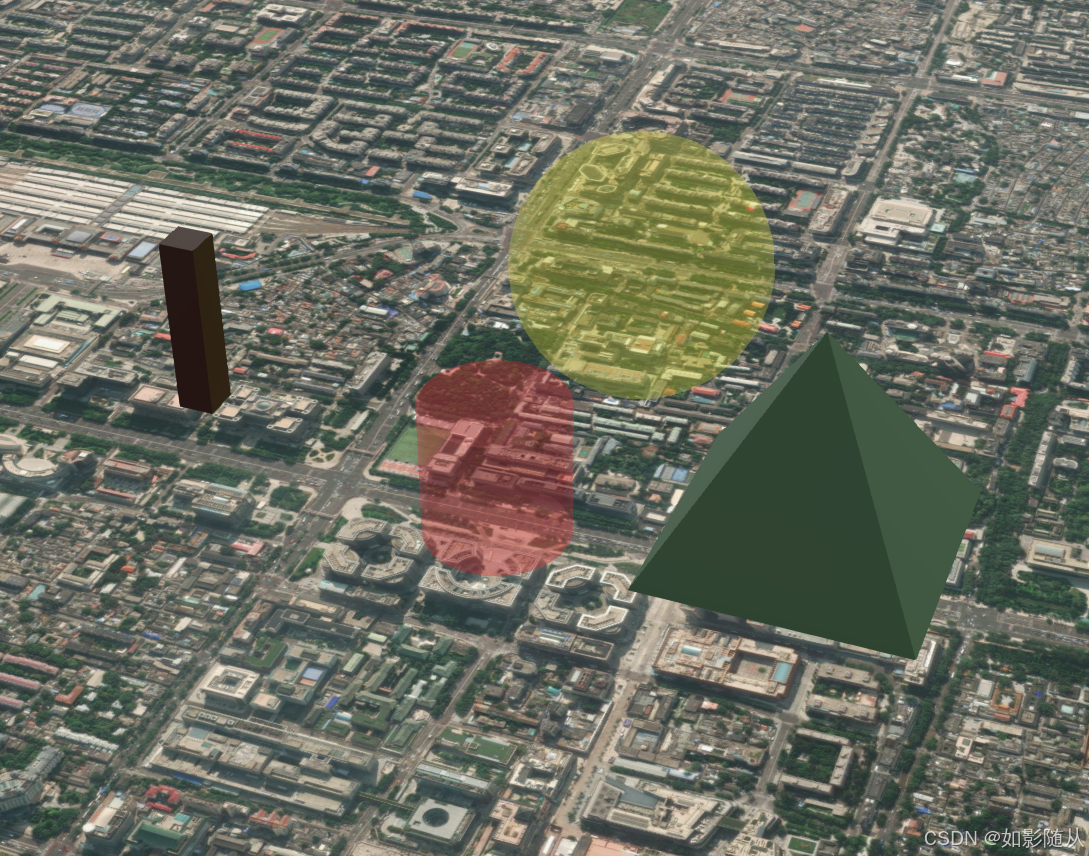
1、Mesh.createBox
Box几何体的绘制:
javascript
function createBox(center, width) {
    // Place of placement
    const point = new Point({
        // x: center[0],
        // y: center[1],
        longitude: center[0],
        latitude: center[1],
        z: center[2],
        spatialReference: SpatialReference.WebMercator
    });
    // Box
    const boxMesh = Mesh.createBox(point, {
        size: { width: width, depth: width, height: width * 5 },
        material: {
            color: [58, 38, 0, 1]
        }
    });
    // Empty symbol
    const emptyMeshSymbol = new MeshSymbol3D({
        symbolLayers: [
            new FillSymbol3DLayer({})
        ]
    });

    const box = new Graphic({
        geometry: boxMesh,
        symbol: emptyMeshSymbol
    });

    view.graphics.add(box);
    return box;
}
结果:

2、createPyramid
金字塔几何的绘制,其绘制相对复杂:
javascript
function createPyramid(center) {
   // Place of placement
    const point = new Point({
        // x: center[0],
        // y: center[1],
        longitude: center[0],
        latitude: center[1],
        z: center[2],
        spatialReference: SpatialReference.WebMercator
    });
    // Pyramid
    function createPyramid(location, { material, size }) {
        const { height, width, depth } = size;
        const halfWidth = width / 2;
        const halfDepth = depth / 2;

        const origin = [location.x + 10, location.y, location.z]; // adding 10 to the placement position to create the pyramid next to the box

        const position = [
            0,
            0,
            height,
            -halfWidth,
            -halfDepth,
            0,
            halfWidth,
            -halfDepth,
            0,
            halfWidth,
            halfDepth,
            0,
            -halfWidth,
            halfDepth,
            0
        ];

        const uv = [0.5, 0, 0, 1, 1, 1, 0, 1, 1, 1];

        const pyramid = new Mesh({
            vertexSpace: new MeshLocalVertexSpace({ origin }),
            vertexAttributes: { position, uv },
            components: [
                { faces: [0, 1, 2], material },
                { faces: [0, 2, 3], material },
                { faces: [0, 3, 4], material },
                { faces: [0, 4, 1], material }
            ],
            spatialReference: location.spatialReference
        });

        return pyramid;
    }

    const pyramidMesh = createPyramid(point, {
        size: { width: 350, depth: 350, height: 300 },
        material: new MeshMaterial({
            color: [60, 87, 49, 1]
        })
    });

    // Empty symbol
    const emptyMeshSymbol = new MeshSymbol3D({
        symbolLayers: [
            new FillSymbol3DLayer({})
        ]
    });

    const pyramid = new Graphic({
        geometry: pyramidMesh,
        symbol: emptyMeshSymbol
    });
    view.graphics.add(pyramid);
    return pyramid;
}
结果:

3、Mesh.createSphere
球体的绘制:
javascript
function createShpere(centerPos, radius) {
    let viewPointHeight = centerPos[2];
     const snowManLocation = new Point({
         longitude: centerPos[0],
         latitude: centerPos[1],
         z: (radius * -1) + centerPos[2],
         spatialReference: SpatialReference.WebMercator,
     });
     point = snowManLocation;
     // const sphere = Mesh.createSphere(snowManLocation, {
     const sphere = Mesh.createSphere(snowManLocation, {

         size: radius * 2,
         material: { color: 'rgba(255,255,0,0.2)' },
         densificationFactor: 1,
         vertexSpace: 'local',
     });
     const symbol = {
         type: 'mesh-3d',
         symbolLayers: [{ type: 'fill' }],
     };
     // const graphic = new Graphic(sphere, symbol);
     const graphic = new Graphic({
         geometry: sphere,
         symbol: symbol
     });
     view.graphics.add(graphic);
     return graphic;
 }
结果:

4、Mesh.createCylinder
圆柱体的绘制:
javascript
function createCylinder(centerPos, radius) {
     let viewPointHeight = centerPos[2];
     const snowManLocation = new Point({
         longitude: centerPos[0],
         latitude: centerPos[1],
         z: (radius * -1) + centerPos[2],
         spatialReference: SpatialReference.WebMercator,
     });
     point = snowManLocation;
     // const sphere = Mesh.createSphere(snowManLocation, {
     const sphere = Mesh.createCylinder(snowManLocation, {

         size: radius * 2,
         material: { color: 'rgba(255,0,0,0.2)' },
         densificationFactor: 1,
         vertexSpace: 'local',
     });
     const symbol = {
         type: 'mesh-3d',
         symbolLayers: [{ type: 'fill' }],
     };
     // const graphic = new Graphic(sphere, symbol);
     const graphic = new Graphic({
         geometry: sphere,
         symbol: symbol
     });
     view.graphics.add(graphic);
     return graphic;
 }
结果:

完整代码
javascript
<!DOCTYPE html>
<html lang="en">

<head>
    <meta charset="UTF-8">
    <meta name="viewport" content="width=device-width, initial-scale=1.0">
    <title>Document</title>
    <link rel="stylesheet" href="https://js.arcgis.com/4.30/esri/themes/light/main.css" />
    <script src="https://js.arcgis.com/4.30/"></script>
    <style>
        html,
        body,
        #viewDiv {
            height: 100%;
            width: 100%;
            margin: 0;
            padding: 0;
        }
    </style>
    <script>
        require([
            'esri/geometry/Point',
            "esri/geometry/SpatialReference",
            "esri/geometry/Mesh",
            "esri/views/SceneView",
            "esri/Map",
            "esri/Graphic",
            "esri/symbols/FillSymbol3DLayer",
            "esri/symbols/MeshSymbol3D",
            "esri/geometry/support/MeshMaterial",
            "esri/geometry/support/MeshLocalVertexSpace",
        ], (Point, SpatialReference, Mesh, SceneView, Map,
            Graphic, FillSymbol3DLayer, MeshSymbol3D, MeshMaterial, MeshLocalVertexSpace) => {

            let map = new Map({
                basemap: 'satellite'
            })
            let center = [116.4074, 39.9042, 300];

            let view = new SceneView({
                container: 'viewDiv',
                map,
                camera: {
                    position: {
                        longitude: center[0],
                        latitude: center[1],
                        z: 1000,
                        spatialReference: {
                            wkid: 4326
                        }
                    }
                }
            })

            let point = null;
            function createShpere(centerPos, radius) {
                let viewPointHeight = centerPos[2];
                const snowManLocation = new Point({
                    longitude: centerPos[0],
                    latitude: centerPos[1],
                    z: (radius * -1) + centerPos[2],
                    spatialReference: SpatialReference.WebMercator,
                });
                point = snowManLocation;
                // const sphere = Mesh.createSphere(snowManLocation, {
                const sphere = Mesh.createSphere(snowManLocation, {

                    size: radius * 2,
                    material: { color: 'rgba(255,255,0,0.2)' },
                    densificationFactor: 1,
                    vertexSpace: 'local',
                });
                const symbol = {
                    type: 'mesh-3d',
                    symbolLayers: [{ type: 'fill' }],
                };
                // const graphic = new Graphic(sphere, symbol);
                const graphic = new Graphic({
                    geometry: sphere,
                    symbol: symbol
                });
                view.graphics.add(graphic);
                return graphic;
            }

            function createCylinder(centerPos, radius) {
                let viewPointHeight = centerPos[2];
                const snowManLocation = new Point({
                    longitude: centerPos[0],
                    latitude: centerPos[1],
                    z: (radius * -1) + centerPos[2],
                    spatialReference: SpatialReference.WebMercator,
                });
                point = snowManLocation;
                // const sphere = Mesh.createSphere(snowManLocation, {
                const sphere = Mesh.createCylinder(snowManLocation, {

                    size: radius * 2,
                    material: { color: 'rgba(255,0,0,0.2)' },
                    densificationFactor: 1,
                    vertexSpace: 'local',
                });
                const symbol = {
                    type: 'mesh-3d',
                    symbolLayers: [{ type: 'fill' }],
                };
                // const graphic = new Graphic(sphere, symbol);
                const graphic = new Graphic({
                    geometry: sphere,
                    symbol: symbol
                });
                view.graphics.add(graphic);
                return graphic;
            }

            function createBox(center, width) {
                // Place of placement
                const point = new Point({
                    // x: center[0],
                    // y: center[1],
                    longitude: center[0],
                    latitude: center[1],
                    z: center[2],
                    spatialReference: SpatialReference.WebMercator
                });
                // Box
                const boxMesh = Mesh.createBox(point, {
                    size: { width: width, depth: width, height: width * 5 },
                    material: {
                        color: [58, 38, 0, 1]
                    }
                });
                // Empty symbol
                const emptyMeshSymbol = new MeshSymbol3D({
                    symbolLayers: [
                        new FillSymbol3DLayer({})
                    ]
                });

                const box = new Graphic({
                    geometry: boxMesh,
                    symbol: emptyMeshSymbol
                });

                view.graphics.add(box);
                return box;
            }

            function createPyramid(center) {

                // Place of placement
                const point = new Point({
                    // x: center[0],
                    // y: center[1],
                    longitude: center[0],
                    latitude: center[1],
                    z: center[2],
                    spatialReference: SpatialReference.WebMercator
                });
                // Pyramid
                function createPyramid(location, { material, size }) {
                    const { height, width, depth } = size;
                    const halfWidth = width / 2;
                    const halfDepth = depth / 2;

                    const origin = [location.x + 10, location.y, location.z]; // adding 10 to the placement position to create the pyramid next to the box

                    const position = [
                        0,
                        0,
                        height,
                        -halfWidth,
                        -halfDepth,
                        0,
                        halfWidth,
                        -halfDepth,
                        0,
                        halfWidth,
                        halfDepth,
                        0,
                        -halfWidth,
                        halfDepth,
                        0
                    ];

                    const uv = [0.5, 0, 0, 1, 1, 1, 0, 1, 1, 1];

                    const pyramid = new Mesh({
                        vertexSpace: new MeshLocalVertexSpace({ origin }),
                        vertexAttributes: { position, uv },
                        components: [
                            { faces: [0, 1, 2], material },
                            { faces: [0, 2, 3], material },
                            { faces: [0, 3, 4], material },
                            { faces: [0, 4, 1], material }
                        ],
                        spatialReference: location.spatialReference
                    });

                    return pyramid;
                }

                const pyramidMesh = createPyramid(point, {
                    size: { width: 350, depth: 350, height: 300 },
                    material: new MeshMaterial({
                        color: [60, 87, 49, 1]
                    })
                });

                // Empty symbol
                const emptyMeshSymbol = new MeshSymbol3D({
                    symbolLayers: [
                        new FillSymbol3DLayer({})
                    ]
                });

                const pyramid = new Graphic({
                    geometry: pyramidMesh,
                    symbol: emptyMeshSymbol
                });
                view.graphics.add(pyramid);
                return pyramid;
            }

            let radius = 200;
            let graphic = createShpere(center, radius);

            let cylinderCenter = center;
            cylinderCenter[1] += 0.005;
            let cylinderRadius = 100;
            createCylinder(cylinderCenter, cylinderRadius);

            let boxCenter = center;
            boxCenter[0] += 0.005;
            createBox(boxCenter, 50);

            let pyramidCenter = center;
            pyramidCenter[0] -= 0.01;
            createPyramid(pyramidCenter);
        })
    </script>
</head>

<body>
    <div id="viewDiv"></div>
</body>

</html>