基于 uni-app 和 Vue3 开发的汉字书写练习应用
前言
本文介绍了如何使用 uni-app + Vue3 + uview-plus 开发一个汉字书写练习应用。该应用支持笔画演示、书写练习、进度保存等功能,可以帮助用户学习汉字书写。
在线演示
演示地址: http://demo.xiyueta.com/case/web20250222/#/pagesa/xiehaizi/index
测试账号: demo
测试密码: 123456
使用效果
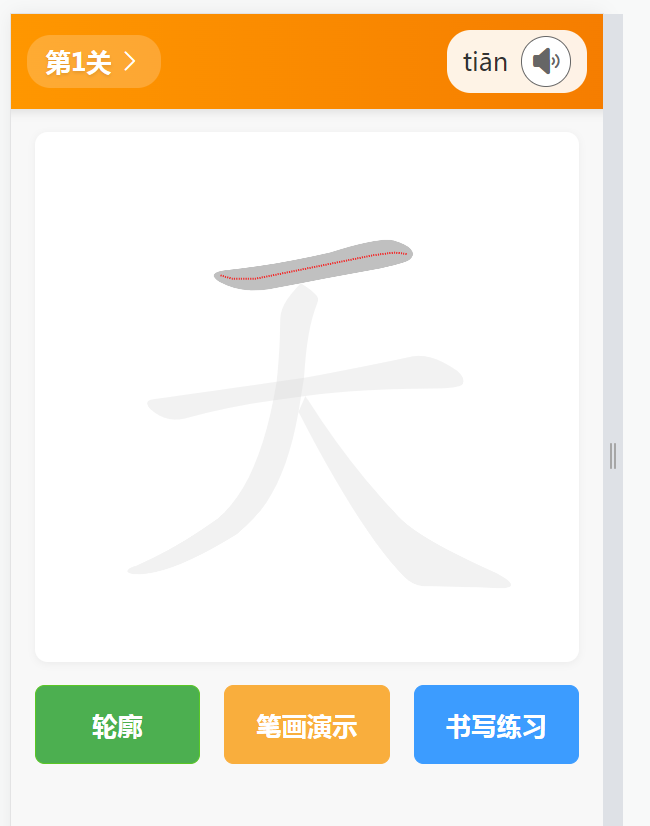
写汉字
技术栈
- uni-app:跨平台开发框架
- Vue3:前端框架
- uview-plus:UI组件库
- Canvas:绘图API
- localStorage:本地存储
功能特点
- 笔画演示:动态展示汉字笔画书写过程
- 书写练习:支持手写输入和笔画匹配
- 关卡系统:支持多个汉字练习,自动保存进度
- 界面美观:采用现代化UI设计,交互流畅
开发过程
1. 项目初始化
首先创建 uni-app 项目并集成 uview-plus:
bash
# 创建项目
vue create -p dcloudio/uni-preset-vue hanzi-practice

# 安装依赖
npm install uview-plus
2. 页面结构设计
页面主要分为三个部分:
- 顶部导航:显示当前关卡和拼音
- 中间画布:用于展示和练习汉字
- 底部按钮:控制功能切换
3. 核心功能实现
3.1 笔画演示功能
使用 Canvas 绘制汉字,通过定时器实现动画效果:
javascript
const startStrokeAnimation = () => {
    let currentStroke = 0
    let currentPoint = 0

    const animateStroke = () => {
        if (!isAnimating.value) return

        if (currentStroke < currentHanziData.strokes.length) {
            const median = currentHanziData.medians[currentStroke]
            if (currentPoint < median.length) {
                drawPartialStroke(currentStroke, currentPoint)
                currentPoint++
                animationTimer = setTimeout(animateStroke, animationSpeed)
            } else {
                // 完成当前笔画,进入下一个
                drawCompleteStroke(currentStroke)
                currentStroke++
                currentPoint = 0
                if (currentStroke < currentHanziData.strokes.length) {
                    animationTimer = setTimeout(animateStroke, 500)
                }
            }
        }
    }

    animateStroke()
}
3.2 书写练习功能
实现手写输入和笔画匹配:
javascript
const checkUserStroke = () => {
    if (tempStroke.length < 2) return

    const currentMedian = currentHanziData.medians[currentStrokeIndex.value]
    const transformedUserStroke = transformUserStroke(tempStroke)
    const isMatch = simpleStrokeMatch(transformedUserStroke, currentMedian)

    if (isMatch) {
        currentStrokeIndex.value++
        if (currentStrokeIndex.value < currentHanziData.strokes.length) {
            drawHanziForPractice()
        } else {
            showCompleteCharacter()
        }
    }
}
3.3 进度保存功能
使用 localStorage 保存练习进度:
javascript
const STORAGE_KEY = 'CURRENT_LEVEL'

const saveCurrentLevel = (level) => {
    try {
        uni.setStorageSync(STORAGE_KEY, level)
    } catch (e) {
        console.error('保存关卡失败:', e)
    }
}

const restoreLevel = () => {
    try {
        const savedLevel = uni.getStorageSync(STORAGE_KEY)
        if (savedLevel) {
            currentLevel.value = parseInt(savedLevel)
            return true
        }
    } catch (e) {
        console.error('恢复关卡失败:', e)
    }
    return false
}
遇到的问题和解决方案
1. Canvas 坐标转换问题
问题:用户手写输入的坐标系与汉字数据的坐标系不一致。
解决方案:实现坐标转换函数:
javascript
const transformUserStroke = (userStroke) => {
    const centerX = canvasWidth.value / 2
    const centerY = canvasHeight.value / 2 - 35
    const size = Math.min(canvasWidth.value, canvasHeight.value) * 0.9

    return userStroke.map(point => ({
        x: ((point.x - centerX) / (size / 1024)) + 512,
        y: 1024 - (((point.y - centerY) / (size / 1024)) + 512)
    }))
}
2. 笔画动画控制问题
问题:动画状态管理复杂,需要处理暂停、继续等状态。
解决方案:使用 Vue3 的 ref 实现响应式状态管理:
javascript
const isAnimating = ref(false)

const toggleStrokeAnimation = () => {
    if (isAnimating.value) {
        clearTimeout(animationTimer)
        animationTimer = null
        isAnimating.value = false
        drawHanzi(currentHanziData)
    } else {
        isAnimating.value = true
        startStrokeAnimation()
    }
}
3. 界面适配问题
问题:不同设备上画布大小和按钮布局需要适配。
解决方案:使用 rpx 单位和 flex 布局:
scss
.hanzi-canvas {
    width: calc(100% - 60rpx);
    height: 60vh;
    margin: 30rpx auto;
}

.bottom-section {
    width: calc(100% - 60rpx);
    margin: 0 auto;

    .control-buttons {
        display: flex;
        justify-content: space-between;
        gap: 30rpx;
    }
}
开发技巧
-
组件化设计:将功能模块拆分为独立组件,提高代码复用性
-
状态管理:使用 Vue3 的 Composition API 管理状态
-
性能优化:
- 使用 requestAnimationFrame 优化动画
- 合理使用 Canvas 缓存
- 防抖处理用户输入
-
用户体验:
- 添加过渡动画
- 提供清晰的视觉反馈
- 保存用户进度
总结
本项目展示了如何使用现代前端技术栈开发一个实用的教育类应用。通过合理的架构设计和性能优化,实现了流畅的用户体验。项目中的许多技术点和解决方案都可以应用到其他同类项目中。
参考资料
作者信息
如果本文章对您有所帮助,欢迎交流和探讨技术问题。
QQ: 313801120
更多文章: www.xiyueta.com
希望能一起成长,共同探索更多开发技巧!