目录
-
- 1、什么是管道
- 2、管道的种类
- 3、数据的读写
- 4、无名管道
-
- [4.1、pipe() 无名管道的创建](#4.1、pipe() 无名管道的创建)
- 4.2、popen()建立管道I/O,操作命令
- 5、命名管道
- 6、典型的FIFO模型
- 7、命名管道与无名管道的区别
1、什么是管道
管道是针对于本地计算机的两个进程之间的通信而设计的通信方法,管道建立后,实际获得两个文件描述符:一个用于读取而另外一个用于写入。
管道是半双工的,数据在同一时刻只能向一个方向流动,需要双方通信时,需要建立起两个管道。
管道有个特点:如果读端和写端有一端没打开,另一端就会阻塞

2、管道的种类
1、匿名管道(无名管道) :(Anonymous Pipe) :无名管道只能用于父子进程或者兄弟进程之间(具有亲缘关系的进程,即同一进程组下)。
2、**命名管道(Named Pipe,FIFO):**命名管道单独构成一种独立的文件系统:管道对于管道两端的进程而言,就是一个文件,但它不是普通的文件,它不属于某种文件系统,而是单独构成一种文件系统。
3、数据的读写
一个进程向管道中写的内容被管道另一端的进程读出。写入的内容每次都添加在管道缓冲区的末尾,并且每次都是从缓冲区的头部读出数据。
3.1、管道通信
是利用FIFO排队模型来指挥进程间的通信。把它当作是连接两个实体的一个单向连接器
3.2、管道的命令实例:
ls -l | wc -l
该命令首先创建两个进程,一个对应于ls --1,另一个对应于wc --l。然后,把第一个进程的标准输出设为第二个进程的标准输入。它的作用是计算当前目录下的文件数量。

4、无名管道
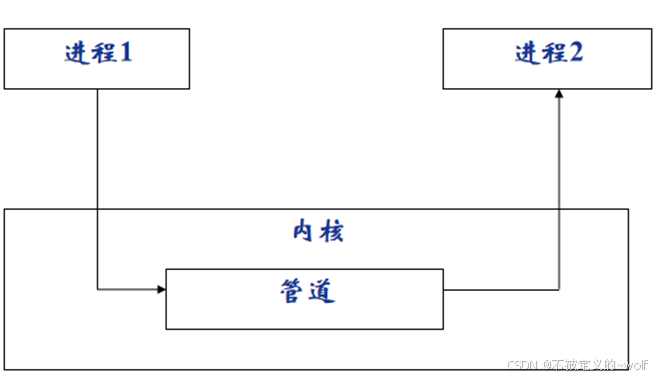
无名管道它具有如下特点:
1、只能用于具有亲缘关系的进程之间的通信,即父子进程、兄弟进程
2、半双工的通信模式,具有固定的读端和写端
3、管道可以看成是一种特殊的文件,对于它的读写可以使用文件IO如read、write函数。
4.1、pipe() 无名管道的创建
头文件
c
#include <unistd.h>
c
int pipe(int pipefd[2]);函数说明:pipe()会建立管道,并将文件描述词由参数pipefd数组返回。pipefd[0]为管道里的读取端,pipefd[1]则为管道的写入端。

示例:简单读写
c
#include <stdio.h>
#include <unistd.h>
#include <string.h>

int main()
{
    int fds[2] = {0};

    if(pipe(fds) < 0)
    {
        perror("pipe error");
        return -1;
    }
    // fds[0]:读端  fds[1]: 写端
    printf("fds[0] = %d fds[1] = %d\n",fds[0], fds[1]);

    //写内容
    char *str = "hello";
    write(fds[1],str,strlen(str));

    //读内容
    char buf[128] = "";
    read(fds[0],buf,sizeof(buf) -1);
    printf("buf = %s\n",buf);

    close(fds[0]);
    close(fds[1]);
}
c
#include <stdio.h>
#include <unistd.h>
#include <string.h>

int main()
{
    int fds[2] = {0};

    if (pipe(fds) < 0)
    {
        perror("pipe error");
        return -1;
    }

    // fds[0]:读端  fds[1]: 写端
    printf("fds[0] = %d fds[1] = %d\n", fds[0], fds[1]);

    // 写内容
    char *str = "hello";
    write(fds[1], str, strlen(str));
    char *str2 = " world";
    write(fds[1], str2, strlen(str2));


    close(fds[1]);
    // 读内容
    char buf[6] = "";

    while (1)
    {
        int len = read(fds[0], buf, sizeof(buf) - 1);
        if (len == 0)
            break;
        printf("buf = %s\n", buf);
        memset(buf, 0, sizeof(buf));
    }
    close(fds[0]);

}
示例:加入进程
c
#include <stdio.h>
#include <sys/types.h>
#include <unistd.h>
#include <sys/wait.h>
#include <string.h>

int main()
{

    int fds[2] = {0};
    if(pipe(fds) < 0)
    {
        perror("pipe error");
        return -1;
    }


    pid_t pid = fork();
    if (pid < 0)
    {
        perror("fork error");
        return -1;
    }
    else if(pid == 0)
    {
        char *str = "hello";
        int len = write(fds[1],str,strlen(str));
        printf("child process write len = %d\n",len);
    }
    else if(pid > 0)
    {
        wait(NULL);
        char buf[128] = "";
        read(fds[0],buf,sizeof(buf) -1);
        printf("buf = %s\n",buf);
    }

    close(fds[0]);
    close(fds[1]);

}
示例:通过 管道(pipe) 实现 父子进程之间的双向通信
c
#include <stdio.h>
#include <sys/types.h>
#include <unistd.h>
#include <sys/wait.h>
#include <string.h>

int main()
{

    int fds1[2] = {0};
    if(pipe(fds1) < 0)
    {
        perror("pipe error");
        return -1;
    }

    int fds2[2] = {0};
    if(pipe(fds2) < 0)
    {
        perror("pipe error");
        return -1;
    }


    pid_t pid = fork();
    if (pid < 0)
    {
        perror("fork error");
        return -1;
    }
    else if(pid == 0)
    {
        char *str = "hello";
        int len = write(fds1[1],str,strlen(str));
        printf("child process write len = %d\n",len);

        char buf[128] = "";
        read(fds2[0],buf,sizeof(buf) -1);
        printf("child buf = %s\n",buf);
    }
    else if(pid > 0)
    {
        char buf[128] = "";
        read(fds1[0],buf,sizeof(buf) -1);
        printf("buf = %s\n",buf);

        char *str = " world";
        int len = write(fds2[1],str,strlen(str));
        printf("parent write len = %d\n",len);
        wait(NULL);
    }

    close(fds1[0]);
    close(fds1[1]);
    close(fds2[0]);
    close(fds2[1]);

}
4.2、popen()建立管道I/O,操作命令
头文件
c
#include<stdio.h>函数定义
c
FILE *popen(const char *command, const char *type);参数
command:要执行的外部命令,例如 "ls -l" 或 "grep hello"。
type:
- "r":以只读模式打开管道,读取命令的输出。
- "w":以只写模式打开管道,向命令发送输入。
返回值:
- 成功:返回一个 FILE 指针,可以像操作文件一样操作管道。
- 失败:返回 NULL,并设置 errno。
注意事项:
在编写具SUID/SGID权限的程序时请尽量避免使用popen(),popen()会继承环境变量,通过环境变量可能会造成系统安全的问题。
popen 执行的命令是通过 shell 解析的,因此需要小心命令注入攻击。
关闭管道
函数定义
c
int pclose(FILE *stream);stream:popen 返回的 FILE 指针。
返回值:
- 成功:返回命令的退出状态。
- 失败:返回 -1,并设置 errno。
示例
c
#include <stdio.h>
#include <string.h>
#include <stdlib.h>

int main()
{
    FILE *fp = popen("ls -l","r");  //打开ls -l 命令,获取文件指针

    if(NULL  == fp)
    {
        perror("popen error");
        return -1;
    }

    char buf[1280] = {0};
    fread(buf,sizeof(buf) - 1,1,fp);  //读取文件指针指向文件的内容
    printf("buf = %s\n",buf);

    pclose(fp);

    fp = popen("wc","w");   //以写的方式打开wc
    fwrite(buf,strlen(buf),1,fp);   //把从ls里面读取的内容写到wc里面
    pclose(fp);

    system("ls -l | wc");
}

管道左边是读取ls -l的内容、右边是写入内容给wc -l统计
5、命名管道
5.1、为什么要有命名管道
无名管道只能用于具有亲缘关系的进程之间,这就限制了无名管道的使用范围
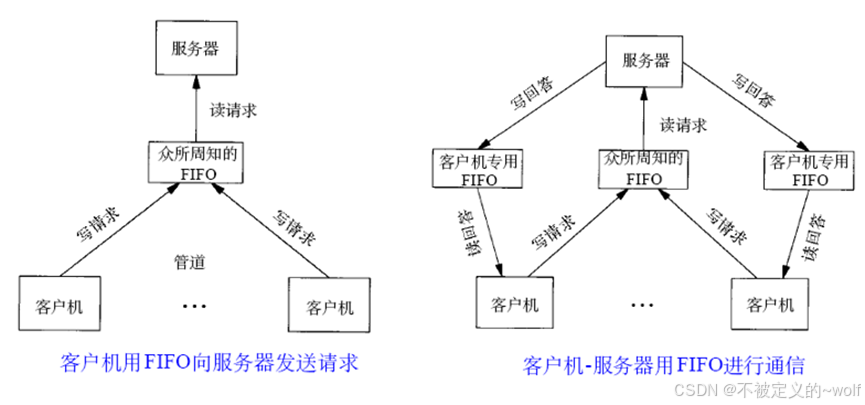
有名管道可以使互不相关的两个进程互相通信。有名管道可以通过路径名来指出,并且在文件系统中可见
进程通过文件IO来操作有名管道
有名管道遵循先进先出规则
不支持如lseek() 操作
5.2、mkfifo()建立命名管道
头文件
c
#include <sys/types.h>
#include <sys/stat.h>
函数定义
c
int mkfifo(const char *pathname, mode_t mode);参数
pathname:命名管道的文件路径,例如 "/tmp/myfifo"。
mode:管道的权限模式,通常使用八进制表示,例如 0666。
返回值:
- 成功:返回 0。
- 失败:返回 -1,并设置 errno。
mkfifo()会依参数pathname建立特殊的FIFO文件,该文件必须不存在
参数mode为该文件的权限,因此mode值也会影响到FIFO文件的权限。
当使用open()来打开FIFO文件时O_NONBLOCK旗标会有影响
c
int open( const char * pathname, int flags);1、当使用O_NONBLOCK(非阻塞模式) 旗标时,打开FIFO 文件来读取的操作会立刻返回,但是若还没有其他进程打开FIFO 文件来读取,则写入的操作会返回ENXIO 错误代码。必须保证在写时,一定有进程可以接收(读)
2、没有使用O_NONBLOCK 旗标时,打开FIFO 来读取的操作会等待其他进程打开FIFO文件来写入才正常返回。反之亦是如此
3、O_RDONLY或O_WRONLY可与O_NONBLOCK组合使用
- O_RDONLY 调用open()主进程会处于等待状态,直到其它进程打开相同的FIFO进行写入后才返回
- O_RDONLY|O_NONBLOCK 调用open()后运行读操作并立即返回主进程
- O_WRONLY 调用open()主进程会处于等待状态,直到其它进程打开相同的FIFO进行读取后才返回
- O_WRONLY|O_NONBLOCK 调用open()后运行写操作并立即返回主进程
返回值
- 若成功则返回0,否则返回-1,错误原因存于errno中。
EACCESS 参数pathname所指定的目录路径无可执行的权限
EEXIST 参数pathname所指定的文件已存在。
ENAMETOOLONG 参数pathname的路径名称太长。
ENOENT 参数pathname包含的目录不存在
ENOSPC文件系统的剩余空间不足
ENOTDIR 参数pathname路径中的目录存在但却非真正的目录。
EROFS参数pathname指定的文件存在于只读文件系统内。
注意:命名管道的使用必须在linux文件夹中使用,不能在winxp映射到linux文件夹中。
管道文件读多少,就清空多少。
c
#include <stdio.h>
#include <sys/types.h>
#include <sys/stat.h>
#include <unistd.h>
#include <fcntl.h>
#include <string.h>

int main()
{
    //建立管道文件前,检查要创建的文件是否存在
    char *filename  = "fifo";
    if(access(filename,F_OK) != 0)
    {
        if(mkfifo(filename,0666) < 0)
        {
            perror("mkfifo error");
            return -1;
        }
    }

    //用open 打开管道文件
    int fd = open(filename,O_RDWR);
    if(fd < 0)
    {
        perror("open error");
        return -1;
    }

    char *str = "hello";
    write(fd,str,strlen(str));

    char buf[128] = "";
    read(fd,buf,sizeof(buf)-1);
    printf("buf = %s\n",buf);
    close(fd);

    unlink(filename);
}
5.3、命名管道实现进程间的双向通信
5.3.1、读端
c
#include <stdio.h>
#include <sys/types.h>
#include <sys/stat.h>
#include <unistd.h>
#include <fcntl.h>
#include <string.h>

int main()
{
    //建立管道文件前,检查要创建的文件是否存在
    char *filename  = "fifo";
    if(access(filename,F_OK) != 0)
    {
        if(mkfifo(filename,0666) < 0)
        {
            perror("mkfifo error");
            return -1;
        }
    }

    //用open 打开管道文件
    int fd = open(filename,O_RDWR);
    if(fd < 0)
    {
        perror("open error");
        return -1;
    }

    char buf[128] = "";
    read(fd,buf,sizeof(buf)-1);
    printf("buf = %s\n",buf);

    char *str = " world";
    write(fd,str,strlen(str));
    printf("write success\n");

    close(fd);
}
5.3.2、写端
c
#include <stdio.h>
#include <sys/types.h>
#include <sys/stat.h>
#include <unistd.h>
#include <fcntl.h>
#include <string.h>

int main()
{
    //建立管道文件前,检查要创建的文件是否存在
    char *filename  = "fifo";
    if(access(filename,F_OK) != 0)
    {
        if(mkfifo(filename,0666) < 0)
        {
            perror("mkfifo error");
            return -1;
        }
    }

    //用open 打开管道文件
    int fd = open(filename,O_RDWR);
    if(fd < 0)
    {
        perror("open error");
        return -1;
    }

    char *str = "hello";
    write(fd,str,strlen(str));
    printf("write success\n");


    char buf[128] = "";
    read(fd,buf,sizeof(buf)-1);
    printf("read buf = %s\n",buf);

    close(fd);

    unlink(filename);
}
5.4、练习1
父子进程,父进程向子进程发送一个整数数组,子进程接收到后计算数组元素之和,再把结果发送给父进程,父进程输出结果
c
//父子进程,父进程向子进程发送一个整数数组,子进程接收到后计算数组元素之和
//再把结果发送给父进程,父进程输出结果
#include <stdio.h>
#include <sys/types.h>
#include <unistd.h>
#include <sys/wait.h>
#include <string.h>

int main()
{
    int fds1[2] = {0};
    if(pipe(fds1) < 0)
    {
        perror("pipe error");
        return -1;
    }

    int fds2[2] = {0};
    if(pipe(fds2) < 0)
    {
        perror("pipe error");
        return -1;
    }

    pid_t pid = fork();
    if (pid < 0)
    {
        perror("fork error");
        return -1;
    }
    else if(pid == 0)
    {

        int a[5] = {0};
        read(fds2[0],a,sizeof(a));
        int sum = 0;
        for (int i = 0; i < 5; i++)
        {
            sum += a[i];
        }

        int buf = sum;
        int len = write(fds1[1],&buf,sizeof(buf));
    }
    else if(pid > 0)
    {
        int a[5] = {1,2,3,4,5};
        int len = write(fds2[1],a,sizeof(a));

        int sum = 0;
        read(fds1[0],&sum,sizeof(sum));
        printf("sum = %d\n",sum);

        wait(NULL);
    }

    close(fds1[0]);
    close(fds1[1]);
    close(fds2[0]);
    close(fds2[1]);
}
5.5、练习2
用无名管道实现简易版文件复制程序
1.父进程打开一个源文件,将文件内容通过管道发送给子进程
2:子进程接收文件内容后写入另一个文件里
c
//用无名管道实现简易版文件复制程序
//1.父进程打开一个源文件,将文件内容通过管道发送给子进程
//2:子进程接收文件内容后写入另一个文件里

#include <stdio.h>
#include <sys/types.h>
#include <unistd.h>
#include <sys/wait.h>
#include <string.h>
#include <fcntl.h>

int main()
{
    const char *path = "hello.txt";
    const char *path2 = "hello2.txt";

    int fds[2] = {0};
    if(pipe(fds) < 0)
    {
        perror("pipe error");
        return -1;
    }

    pid_t pid = fork();
    if (pid < 0)
    {
        perror("fork error");
        return -1;
    }
    else if(pid == 0)
    {
        char buf[9] = "";
        read(fds[0],buf,sizeof(buf)-1);

        int fd = open(path2,O_WRONLY | O_CREAT | O_TRUNC,0664);

        write(fd,buf,strlen(buf));
    }
    else if(pid > 0)
    {

        int fd = open(path,O_RDONLY);

        char buf[9] = "";
        read(fd,buf,sizeof(buf)-1);

        write(fds[1],buf,strlen(buf));

        wait(NULL);
    }
}
6、典型的FIFO模型
7、命名管道与无名管道的区别
PIPE(无名管道)与FIFO(命名管道)的区别:
1.PIPE只能在亲缘进程之间传送数据,FIFO可在不相关的进程间传送数据
2.PIPE管道的消息在进程消失之后随之消失,但是FIFO管道的文件本身是永久的,它存在于真实的磁盘文件中,它并不会因为进程的消失而消失
3.FIFO管道支持同时多个读取端与写入端,多个进程可以写入或读取同一个FIFO文件