1、引入jwt依赖
XML
<!--jwt的依赖-->
<dependency>
    <groupId>com.auth0</groupId>
    <artifactId>java-jwt</artifactId>
    <version>3.18.3</version>
</dependency>
2、创建TokenUtils工具类
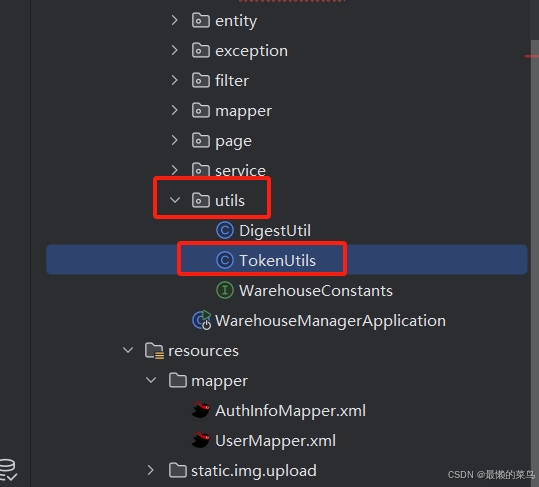
java
package com.pn.utils;

import com.auth0.jwt.JWT;
import com.auth0.jwt.algorithms.Algorithm;
import com.auth0.jwt.exceptions.JWTDecodeException;
import com.auth0.jwt.interfaces.DecodedJWT;
import com.pn.entity.CurrentUser;
import com.pn.entity.User;    //实体类
import com.pn.exception.BusinessException;
import org.springframework.beans.factory.annotation.Autowired;
import org.springframework.beans.factory.annotation.Qualifier;
import org.springframework.beans.factory.annotation.Value;
import org.springframework.data.redis.core.ReactiveRedisTemplate;
import org.springframework.stereotype.Component;
import org.springframework.util.StringUtils;

import java.time.Duration;
import java.util.Date;

/**
 * token工具类
 */
@Component
public class TokenUtils {

    //注入redis模板
    @Autowired
    private StringRedisTemplate stringRedisTemplate;

     Redis  0库
   // @Autowired
   // @Qualifier("reactiveRedisTemplateDb0")
   // private ReactiveRedisTemplate<String, Object> redis;

    //注入配置文件中的warehouse.expire-time属性 -- token的过期时间
    @Value("${warehouse.expire-time}")
    private Long expireTime;

    /**
     * 常量:
     */
    //token中存放用户id对应的名字
    private static final String CLAIM_NAME_USERID = "CLAIM_NAME_USERID";
    //token中存放用户名对应的名字
    private static final String CLAIM_NAME_USERCODE = "CLAIM_NAME_USERCODE";
    //token中存放用户真实姓名对应的名字
    private static final String CLAIM_NAME_USERNAME = "CLAIM_NAME_USERNAME";

    // 真正的生成的jwt token的方法
    private String sign(User user) {
        String token = JWT.create()
                .withClaim(CLAIM_NAME_USERID, user.getUserId())
                .withClaim(CLAIM_NAME_USERCODE, user.getUserCode())
                .withClaim(CLAIM_NAME_USERNAME, user.getUserName())
                .withIssuedAt(new Date())//发行时间
                .withExpiresAt(new Date(System.currentTimeMillis() + (expireTime * 1000L)))//有效时间
                .sign(Algorithm.HMAC256(user.getUserPwd()));//指定签名
        return token;
    }

    /**
     * 方法一,jwt生成的 token存Redis,用Redis判断是否存在
     * 将当前用户信息以用户密码为密钥生成token的方法
     */
    public String loginSign(User user){
        //生成token
        String token = sign(user);
        //将token保存到redis中,并设置token在redis中的过期时间
        //stringRedisTemplate.opsForValue().set(token, token, Duration.ofSeconds(28800)).subscribe();
        stringRedisTemplate.opsForValue().set(token, token, expireTime);
        return token;
    }

    /**
     * 方法二,解析前端jwt生成的token进行校验
     * 创建CurrentUser实体类接收
     * 从客户端归还的token中获取用户信息的方法
     */
    public CurrentUser getCurrentUser(String token) {
        if(StringUtils.isEmpty(token)){
            throw new BusinessException("令牌为空,请登录!");
        }
        //对token进行解码,获取解码后的token
        DecodedJWT decodedJWT = null;
        try {
            decodedJWT = JWT.decode(token);
        } catch (JWTDecodeException e) {
            throw new BusinessException("令牌格式错误,请登录!");
        }
        //从解码后的token中获取用户信息并封装到CurrentUser对象中返回
        int userId = decodedJWT.getClaim(CLAIM_NAME_USERID).asInt();//用户账号id
        String userCode = decodedJWT.getClaim(CLAIM_NAME_USERCODE).asString();//用户账号
        String userName = decodedJWT.getClaim(CLAIM_NAME_USERNAME).asString();//用户姓名
        if(StringUtils.isEmpty(userCode) || StringUtils.isEmpty(userName)){
            throw new BusinessException("令牌缺失用户信息,请登录!");
        }
        return new CurrentUser(userId, userCode, userName);
    }

}
3、使用
java
//  注入token对象
    @Autowired
    private TokenUtils tokenUtils;

    @RequestMapping("/login")
    public String login(@RequestBody LoginUser loginUser) {

        // 生成token
        String token = tokenUtils.loginSign("传入实体类");
        System.out.println(token);
        return token ;

    }