
划分VLAN
SW3
bash
[sw3]vlan batch 2 3 20 30
[sw3]interface GigabitEthernet 0/0/1
[sw3-GigabitEthernet0/0/1]port link-type access
[sw3-GigabitEthernet0/0/1]port default vlan 2
[sw3-GigabitEthernet0/0/1]int g0/0/2
[sw3-GigabitEthernet0/0/2]port link-type access
[sw3-GigabitEthernet0/0/2]port default vlan 3
[sw3-GigabitEthernet0/0/2]int g0/0/3
[sw3-GigabitEthernet0/0/3]port link-type trunk
[sw3-GigabitEthernet0/0/3]port trunk allow-pass vlan 2 3 20 30
[sw3-GigabitEthernet0/0/3]int g0/0/4
[sw3-GigabitEthernet0/0/4]port link-type trunk
[sw3-GigabitEthernet0/0/4]port trunk allow-pass vlan 2 3 20 30
SW4
bash
[sw4]vlan batch 2 3 20 30
[sw4]int g0/0/1
[sw4-GigabitEthernet0/0/1]po li a
[sw4-GigabitEthernet0/0/1]po de v 20
[sw4-GigabitEthernet0/0/1]int g0/0/2
[sw4-GigabitEthernet0/0/2]po li a
[sw4-GigabitEthernet0/0/2]po de v 30
[sw4-GigabitEthernet0/0/2]int g0/0/3
[sw4-GigabitEthernet0/0/3]po li t
[sw4-GigabitEthernet0/0/3]po t all v 2 3 20 30
[sw4-GigabitEthernet0/0/3]int g0/0/4
[sw4-GigabitEthernet0/0/4]po li t
[sw4-GigabitEthernet0/0/4]po t all v 2 3 20 30
SW1
bash
[sw1]vlan batch 2 3 20 30
[sw1]interface Eth-Trunk 0
[sw1-Eth-Trunk0]trunkport GigabitEthernet 0/0/1 to 0/0/2
[sw1-Eth-Trunk0]po li t
[sw1-Eth-Trunk0]po t all v 2 3 20 30
[sw1-Eth-Trunk0]q
[sw1]int g0/0/3
[sw1-GigabitEthernet0/0/3]po li t
[sw1-GigabitEthernet0/0/3]po t all v 2 3 20 30
[sw1-GigabitEthernet0/0/3]int g0/0/4
[sw1-GigabitEthernet0/0/4]po li t
[sw1-GigabitEthernet0/0/4]po t all v 2 3 20 30

SW2
bash
[sw2]vlan batch 2 3 20 30
[sw2]interface Eth-Trunk 0
[sw2-Eth-Trunk0]trunkport GigabitEthernet 0/0/1 to 0/0/2
[sw2-Eth-Trunk0]po li t
[sw2-Eth-Trunk0]po t all v 2 3 20 30
[sw2-Eth-Trunk0]int g0/0/3
[sw2-GigabitEthernet0/0/3]po li t
[sw2-GigabitEthernet0/0/3]po t all v 2 3 20 30
[sw2-GigabitEthernet0/0/3]int g0/0/4
[sw2-GigabitEthernet0/0/4]po li t
[sw2-GigabitEthernet0/0/4]po t all v 2 3 20 30
SW1和SW2不单独放通,需要进行链路聚合
生成树协议
SW3
bash
[sw3]stp enable
[sw3]stp mode mstp
[sw3]stp region-configuration
[sw3-mst-region] region-name aa
[sw3-mst-region] revision-level 100
[sw3-mst-region] instance 1 vlan 2 to 3
[sw3-mst-region] instance 2 vlan 20 30
[sw3-mst-region] active region-configuration
SW4
bash
[sw4]stp enable
[sw4]stp mode mstp
[sw4]stp region-configuration
[sw4-mst-region] region-name aa
[sw4-mst-region] revision-level 100
[sw4-mst-region] instance 1 vlan 2 to 3
[sw4-mst-region] instance 2 vlan 20 30
[sw4-mst-region] active region-configuration
SW1
bash
[sw1]stp enable
[sw1]stp mode mstp
[sw1]stp region-configuration
[sw1-mst-region] region-name aa
[sw1-mst-region] revision-level 100
[sw1-mst-region] instance 1 vlan 2 to 3
[sw1-mst-region] instance 2 vlan 20 30
[sw1-mst-region] active region-configuration
SW2
bash
[sw2]stp enable
[sw2]stp mode mstp
[sw2]stp region-configuration
[sw2-mst-region] region-name aa
[sw2-mst-region] revision-level 100
[sw2-mst-region] instance 1 vlan 2 to 3
[sw2-mst-region] instance 2 vlan 20 30
[sw2-mst-region] active region-configuration
让四台交换机认知到MSTP里的内容
但是认知不一定正确
主根设置
SW1
bash
[sw1]stp instance 1 root primary
[sw1]stp instance 2 root secondary
SW2
bash
[sw2]stp instance 1 root secondary
[sw2]stp instance 2 root primary
通过改优先级让SW1成为实例1的主根,SW2成为实例2的主根
根保护
SW1
bash
[sw1-GigabitEthernet0/0/3]stp root-protectionSW1添加根保护功能,防止新添加设备抢占SW1根的位置
开启边端口功能
SW3
bash
[sw3]int g0/0/1
[sw3-GigabitEthernet0/0/1]stp edged-port enable
[sw3-GigabitEthernet0/0/1]int g0/0/2
[sw3-GigabitEthernet0/0/2]stp edged-port enable
SW4
bash
[sw4]int g0/0/1
[sw4-GigabitEthernet0/0/1]stp edged-port enable
[sw4-GigabitEthernet0/0/1]int g0/0/2
[sw4-GigabitEthernet0/0/2]stp edged-port enable
配置VRRP
SW1
bash
[sw1]int Vlanif 2
[sw1-Vlanif2]ip add 10.0.2.1 24
[sw1-Vlanif2]vrrp vrid  1 virtual-ip 10.0.2.254
[sw1-Vlanif2]vrrp vrid 1 priority 120
[sw1-Vlanif2]vrrp vrid 1 preempt-mode timer delay 20
[sw1-Vlanif2]vrrp vrid 1 track interface GigabitEthernet 0/0/5 reduced 30
[sw1-Vlanif2]q
[sw1]int Vlanif 3
[sw1-Vlanif3]ip add 10.0.3.1 24
[sw1-Vlanif3]vrrp vrid 1 virtual-ip 10.0.3.254
[sw1-Vlanif3]vrrp vrid 1 priority 120
[sw1-Vlanif3]vrrp vrid 1 preempt-mode timer delay 20
[sw1-Vlanif3]vrrp vrid 1 track interface GigabitEthernet 0/0/5 reduced 30

bash
[sw1]int Vlanif 20
[sw1-Vlanif20]ip add 10.0.20.1 24
[sw1-Vlanif20]vrrp vrid 1 virtual-ip 10.0.20.254
[sw1-Vlanif20]q
[sw1]int Vlanif 30
[sw1-Vlanif30]ip add 10.0.30.1 24
[sw1-Vlanif30]vrrp vrid 1 virtual-ip 10.0.30.254
SW2
bash
[sw2]int Vlanif 2
[sw2-Vlanif2]ip ad 10.0.2.2 24
[sw2-Vlanif2]vrrp vrid 1 virtual-ip 10.0.2.254
[sw2-Vlanif2]q
[sw2]int Vlanif 3
[sw2-Vlanif3]ip ad 10.0.3.2 24
[sw2-Vlanif3]vrrp vrid 1 virtual-ip 10.0.3.254
[sw2-Vlanif3]q
[sw2]int Vlanif 20
[sw2-Vlanif20]ip ad 10.0.20.2 24
[sw2-Vlanif20]vrrp vrid 1 virtual-ip 10.0.20.254
[sw2-Vlanif20]vrrp vrid 1 priority 120
[sw2-Vlanif20]vrrp vrid 1 preempt-mode timer delay 20
[sw2-Vlanif20]vrrp vrid 1 track in GigabitEthernet 0/0/5 reduced 30
[sw2-Vlanif20]q
[sw2]int Vlanif 30
[sw2-Vlanif30]ip ad 10.0.30.2 24
[sw2-Vlanif30]vrrp vrid 1 virtual-ip 10.0.30.254
[sw2-Vlanif30]vrrp vrid 1 priority 120
[sw2-Vlanif30]vrrp vrid 1 preempt-mode timer delay 20
[sw2-Vlanif30]vrrp vrid 1 track in GigabitEthernet 0/0/5 reduced 30

查VRRP


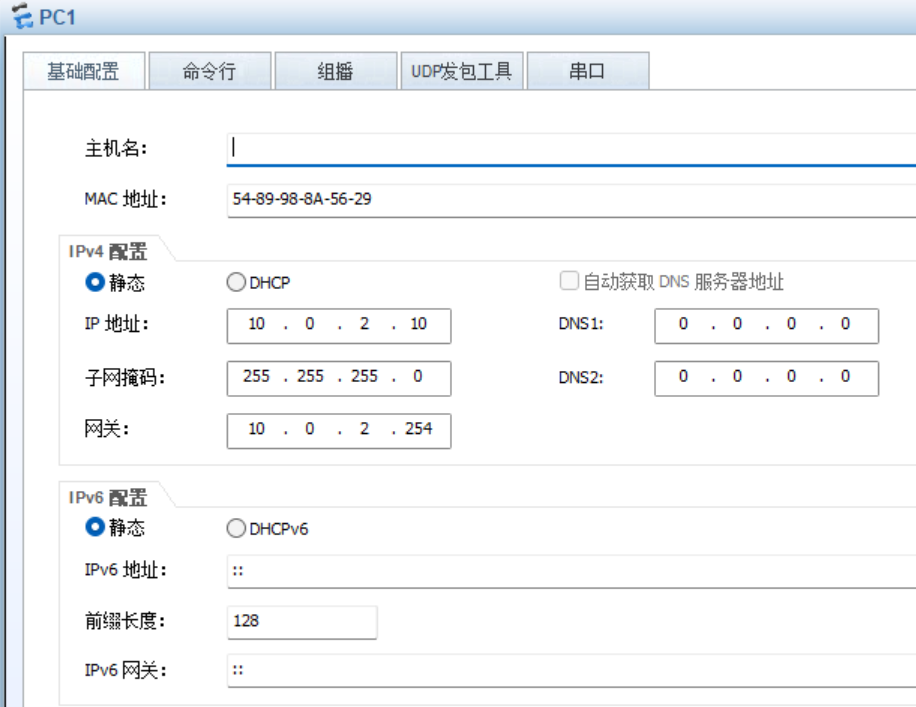
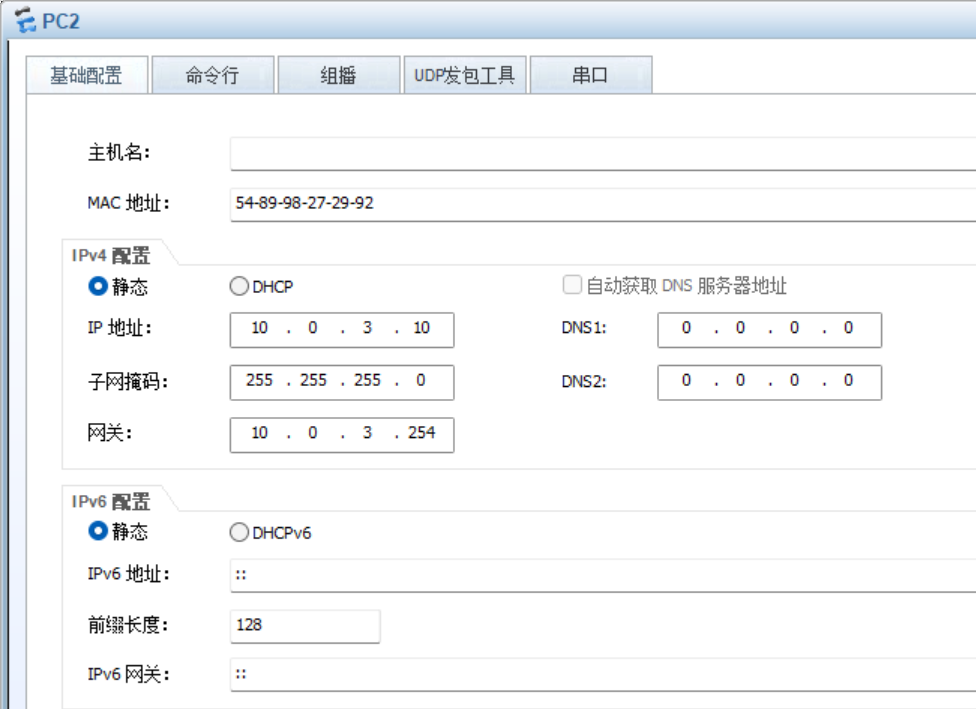
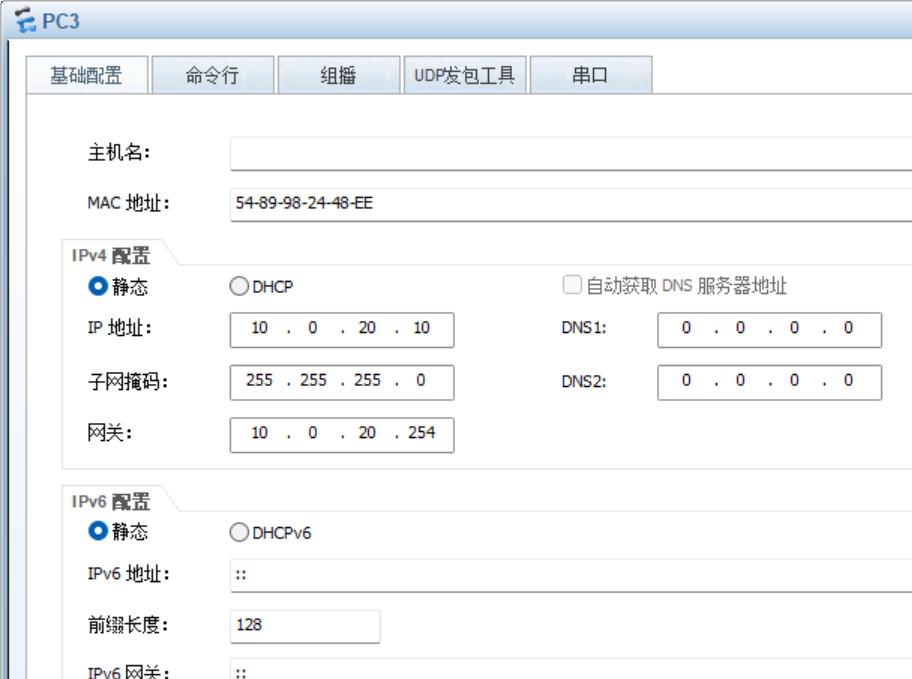
静态IP配置PC地址


三层配置
SW1
bash
[sw1]vlan 11
[sw1-vlan11]int g0/0/5
[sw1-GigabitEthernet0/0/5]port link-type access
[sw1-GigabitEthernet0/0/5]port default vlan 11
[sw1-GigabitEthernet0/0/5]q
[sw1]int Vlanif 11
[sw1-Vlanif11]ip ad 10.0.0.2 30
SW2
bash
[sw2]vlan 12
[sw2-vlan12]int g0/0/5
[sw2-GigabitEthernet0/0/5]port link-type access
[sw2-GigabitEthernet0/0/5]port default vlan 12
[sw2-GigabitEthernet0/0/5]q
[sw2]int Vlanif 12
[sw2-Vlanif12]ip ad 10.0.0.6 30
AR1
bash
[AR1]int g0/0/1
[AR1-GigabitEthernet0/0/1]ip ad 10.0.0.1 30
[AR1-GigabitEthernet0/0/1]int g0/0/2
[AR1-GigabitEthernet0/0/2]ip ad 10.0.0.5 30

OSPF动态路由协议
SW1
bash
[sw1]ospf 1
[sw1-ospf-1]area  0
[sw1-ospf-1-area-0.0.0.0]network 10.0.2.1 0.0.0.0
[sw1-ospf-1-area-0.0.0.0]network 10.0.3.1 0.0.0.0
[sw1-ospf-1-area-0.0.0.0]network 10.0.0.2 0.0.0.0
[sw1-ospf-1-area-0.0.0.0]network 10.0.20.1 0.0.0.0
[sw1-ospf-1-area-0.0.0.0]network 10.0.30.1 0.0.0.0
SW2
bash
[sw2]ospf 1
[sw2-ospf-1]area  0
[sw2-ospf-1-area-0.0.0.0]network 10.0.2.2 0.0.0.0
[sw2-ospf-1-area-0.0.0.0]network 10.0.3.2 0.0.0.0
[sw2-ospf-1-area-0.0.0.0]network 10.0.0.6 0.0.0.0
[sw2-ospf-1-area-0.0.0.0]network 10.0.20.2 0.0.0.0
[sw2-ospf-1-area-0.0.0.0]network 10.0.30.2 0.0.0.0
AR1
bash
[AR1]ospf 1
[AR1-ospf-1]area 0
[AR1-ospf-1-area-0.0.0.0]network 10.0.0.1 0.0.0.0
[AR1-ospf-1-area-0.0.0.0]network 10.0.0.5 0.0.0.0
静默接口
SW1
bash
[sw1-ospf-1]silent-interface Vlanif 2
[sw1-ospf-1]silent-interface Vlanif 3
[sw1-ospf-1]silent-interface Vlanif 20
[sw1-ospf-1]silent-interface Vlanif 30
SW2
bash
[sw2-ospf-1]silent-interface Vlanif 2
[sw2-ospf-1]silent-interface Vlanif 3
[sw2-ospf-1]silent-interface Vlanif 20
[sw2-ospf-1]silent-interface Vlanif 30
SW1和SW2之间的链路配置
SW1
bash
[sw1]vlan 13
[sw1-vlan13]q
[sw1]int e 0
[sw1-Eth-Trunk0]port trunk allow-pass vlan 13
[sw1]int Vlanif 13
[sw1-Vlanif13]ip add 10.0.0.9 30
[sw1-Vlanif13]q
[sw1]ospf 1
[sw1-ospf-1]area 0
[sw1-ospf-1-area-0.0.0.0]network 10.0.0.9 0.0.0.0
SW2
bash
[sw1]vlan 13
[sw1-vlan13]q
[sw1]int e 0
[sw1-Eth-Trunk0]port trunk allow-pass vlan 13
[sw1]int Vlanif 13
[sw1-Vlanif13]ip add 10.0.0.9 30
[sw1-Vlanif13]q
[sw1]ospf 1
[sw1-ospf-1]area 0
[sw1-ospf-1-area-0.0.0.0]network 10.0.0.9 0.0.0.0
PC连通外网
AR1
bash
[AR1]int g0/0/0
[AR1-GigabitEthernet0/0/0]ip ad 202.1.1.1 30
[AR1]ip route-static 0.0.0.0 0 202.1.1.2
[AR1-ospf-1]default-route-advertise
ISP
bash
[ISP]int G0/0/0
[ISP-GigabitEthernet0/0/0]ip ad 202.1.1.2 30
[ISP-LoopBack0]q
[ISP]int l0
[ISP-LoopBack0]ip ad 100.100.100.100 24
AR1缺省
bash
[AR1]ip route-static 0.0.0.0 0 202.1.1.2
[AR1]ospf 1
[AR1-ospf-1]default-route-advertise
[AR1-ospf-1]q
[AR1]acl 2000
[AR1-acl-basic-2000]rule permit source 10.0.0.0 0.0.255.255
[AR1-GigabitEthernet0/0/0]nat outbound 2000
实现全网可达
