React-Native开发鸿蒙NEXT-环境配置问题(续)
这两周由于找了个逼班上,在忙着基于最新版本的RN做各种开发前的调研准备工作。上次谈了下鸿蒙RN在M1芯片下的开发环境(实际上是鸿蒙RN与最新版本的普通RN之间的共存引发的一番折腾)。
今天发现竟然还有高手------似乎找到了一个根源性的问题。
调研也做了一周多了,就想着正好测试下release,别到时候开发了半天打包挂了。ios下release没有问题,app顺利安装跑了起来。但Andorid版本Release直接报错了。
bash
192:PaaGooFit qianyun$ react-native run-android(node:95130) Warning: Accessing non-existent property 'padLevels' of module exports inside circular dependency(Use
node --trace-warnings ... to show where the warning was created)info A dev server is already running for this project on port 8081.info Installing the app...
Configure project :react-native-reanimatedAndroid gradle plugin: 8.8.0Gradle: 8.12
Configure project :shopify_react-native-skiareact-native-skia: node_modules/ found at: /Users/qianyun/workspace/PaaGoo/gitee/paa-goo-mobile/PaaGooFit/node_modulesreact-native-skia: RN Version: 78 / 0.78.2react-native-skia: isSourceBuild: falsereact-native-skia: PrebuiltDir: /Users/qianyun/workspace/PaaGoo/gitee/paa-goo-mobile/PaaGooFit/node_modules/@shopify/react-native-skia/android/build/react-native-0*/jnireact-native-skia: buildType: debugreact-native-skia: buildDir: /Users/qianyun/workspace/PaaGoo/gitee/paa-goo-mobile/PaaGooFit/node_modules/@shopify/react-native-skia/android/buildreact-native-skia: node_modules: /Users/qianyun/workspace/PaaGoo/gitee/paa-goo-mobile/PaaGooFit/node_modulesreact-native-skia: Enable Prefab: truereact-native-skia: aar state post 70, do nothing
Task :react-native-async-storage_async-storage:compileDebugJavaWithJavac FAILED
[Incubating] Problems report is available at: file:///Users/qianyun/workspace/PaaGoo/gitee/paa-goo-mobile/PaaGooFit/android/build/reports/problems/problems-report.html
Deprecated Gradle features were used in this build, making it incompatible with Gradle 9.0.
You can use '--warning-mode all' to show the individual deprecation warnings and determine if they come from your own scripts or plugins.
For more on this, please refer to https://docs.gradle.org/8.12/userguide/command_line_interface.html#sec:command_line_warnings in the Gradle documentation.122 actionable tasks: 1 executed, 121 up-to-date
info 💡 Tip: Make sure that you have set up your development environment correctly, by running npx react-native doctor. To read more about doctor command visit: https://github.com/react-native-community/cli/blob/main/packages/cli-doctor/README.md#doctor
FAILURE: Build failed with an exception.
What went wrong:Execution failed for task ':react-native-async-storage_async-storage:compileDebugJavaWithJavac'.
Could not resolve all files for configuration ':react-native-async-storage_async-storage:androidJdkImage'.Failed to transform core-for-system-modules.jar to match attributes {artifactType=_internal_android_jdk_image, org.gradle.libraryelements=jar, org.gradle.usage=java-runtime}.> Execution failed for JdkImageTransform: /Users/qianyun/Library/Android/sdk/platforms/android-35/core-for-system-modules.jar.> jlink executable /Applications/DevEco-Studio.app/Contents/jbr/Contents/Home/bin/jlink does not exist.
Try:
Run with --stacktrace option to get the stack trace.Run with --info or --debug option to get more log output.Run with --scan to get full insights.Get more help at https://help.gradle.org.
BUILD FAILED in 1serror Failed to install the app. Command failed with exit code 1: ./gradlew app:installDebug -PreactNativeDevServerPort=8081 FAILURE: Build failed with an exception. * What went wrong:Execution failed for task ':react-native-async-storage_async-storage:compileDebugJavaWithJavac'.
Could not resolve all files for configuration ':react-native-async-storage_async-storage:androidJdkImage'. > Failed to transform core-for-system-modules.jar to match attributes {artifactType=_internal_android_jdk_image, org.gradle.libraryelements=jar, org.gradle.usage=java-runtime}. > Execution failed for JdkImageTransform: /Users/qianyun/Library/Android/sdk/platforms/android-35/core-for-system-modules.jar. > jlink executable /Applications/DevEco-Studio.app/Contents/jbr/Contents/Home/bin/jlink does not exist. * Try:Run with --stacktrace option to get the stack trace.Run with --info or --debug option to get more log output.Run with --scan to get full insights.Get more help at https://help.gradle.org. BUILD FAILED in 1s.
这里主要注意这句
bash
Could not resolve all files for configuration ':react-native-async-storage_async-storage:androidJdkImage'.Failed to transform core-for-system-modules.jar to match attributes {artifactType=_internal_android_jdk_image, org.gradle.libraryelements=jar, org.gradle.usage=java-runtime}.> Execution failed for JdkImageTransform: /Users/qianyun/Library/Android/sdk/platforms/android-35/core-for-system-modules.jar.> jlink executable /Applications/DevEco-Studio.app/Contents/jbr/Contents/Home/bin/jlink does not existJLink 是 JDK 自带的一个工具,用于创建和操纵自包含的运行时镜像。报错直接指向了JDK。自然立即就想到了mac下配置文件中,JAVA_HOME配置的是DevEco-Studio自带的JDK版本
javascript
export JAVA_HOME=/Applications/DevEco-Studio.app/Contents/jbr/Contents/Home而在AS中,是指定了jdk版本的,用的是azul的JDK,这点在上一篇讲环境噩梦的时候提到过。当时也是因为如果选择用JAVA_HOME指向的DevEco-Sutido自带JDK版本编译报错。
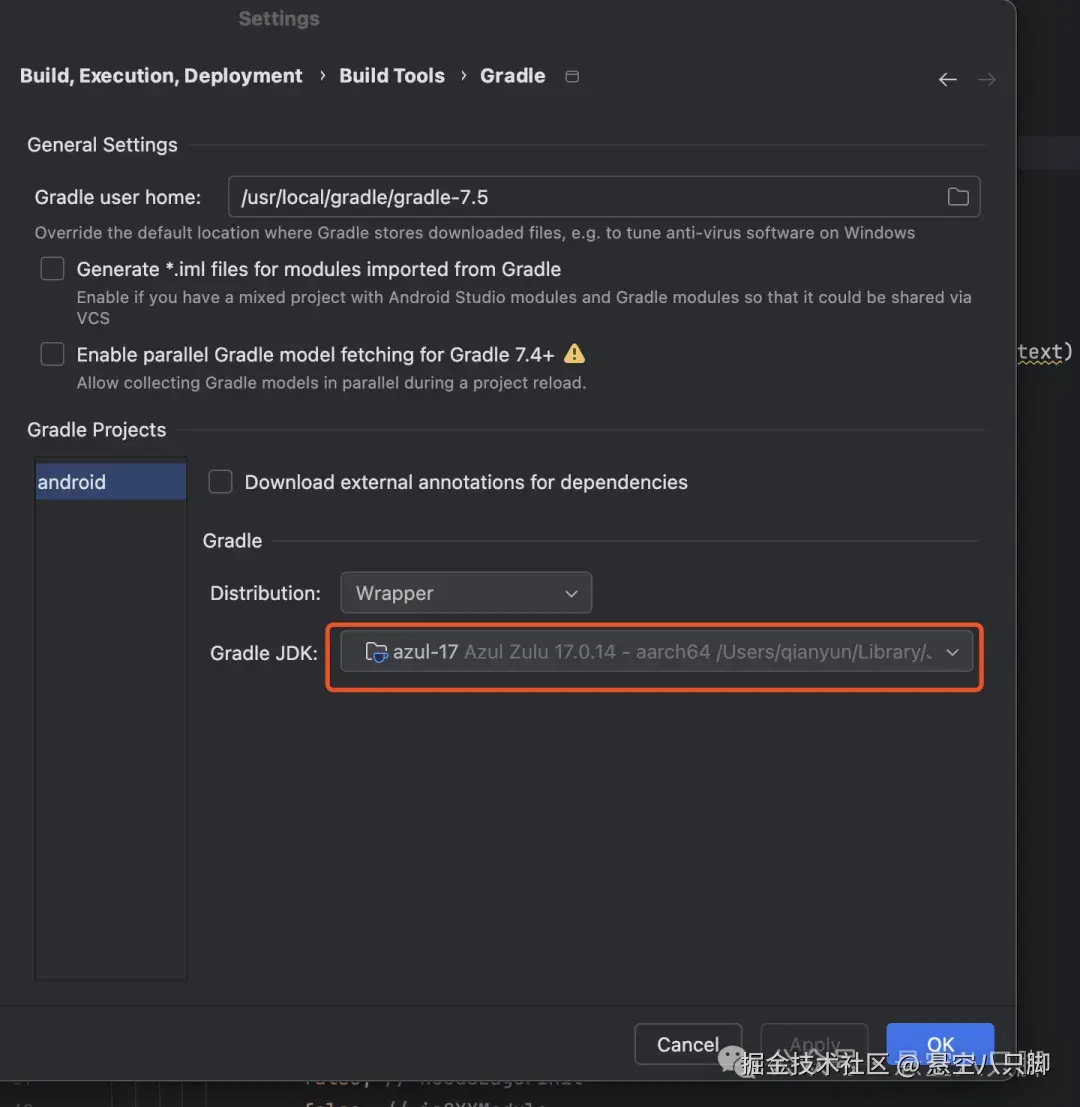 release的时候,可能不像debug是一样读取的ide里的jdk,是通过环境变量来获取的。导致报错了。直接尝试修改JAVA_HOME
bash
export JAVA_HOME=/Users/qianyun/Library/Java/JavaVirtualMachines/azul-17.0.14/Contents/Home效果立竿见影,可以release了。同样测试了下使用azul JDK17.0.14版本,在鸿蒙RN环境下也是可以debug运行的。
大概这搞了一周的环境问题可以盖棺定论了吧。我这边测试下来的建议是至少在debug阶段不要使用DevEco-Studio自带的JDK版本,以便能够让开发环境同时支持鸿蒙RN和普通RN。至于是否影响鸿蒙RN的Release,有待进一步验证。但这个问题不大,大不了记得release 鸿蒙RN的时候把JAVA_HOME改下就行了。
目前已经可以在一个环境下开发鸿蒙RN与普通RN,是时候把之前的鸿蒙RN项目的android端和ios端干起来了。想必又会遇到挺多事的吧,毕竟这两周基于最新版的RN开发andoird/ios已经感觉到一些与鸿蒙RN开发不一致的地方(主要集中在turboModule上),长路漫漫啊。