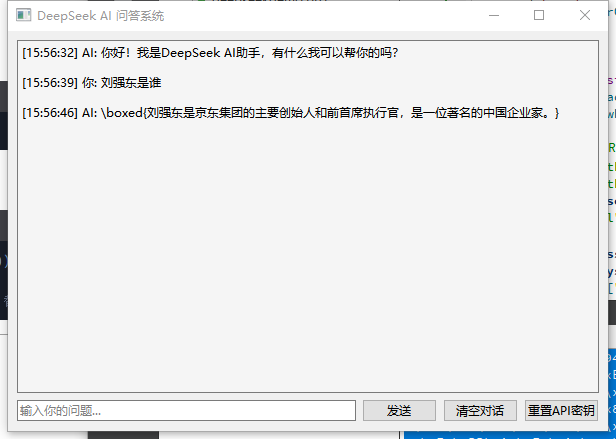
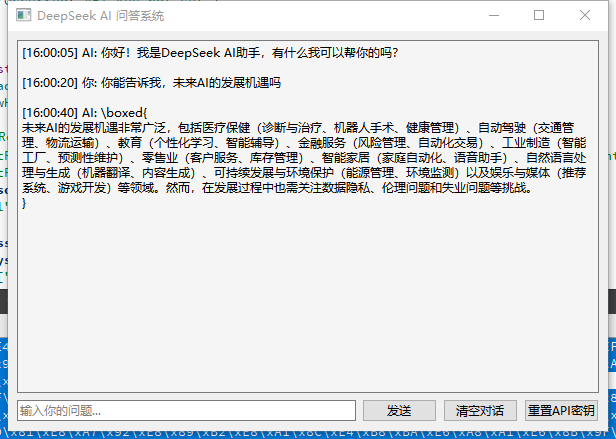
如果你不想花钱调用deepseek,试试下面的方法。
1: 访问
2: 搜索 DeepSeek-R1 (free)
要使用这个免费模型,你需要:
(1)注册 OpenRouter 账户并获取 API 密钥
- 访问 https://openrouter.ai 注册账户
- 在账户设置中获取 API 密钥
(2)运行程序并输入你的 OpenRouter API 密钥
- 程序会提示你输入 API 密钥
- 密钥会被安全地保存在本地设置中
(3)开始使用免费模型进行对话
- 在输入框中输入你的问题
- 点击"发送"按钮或按回车键发送消息
第一次登录要先注册,注册后就可以生成自己的apikey
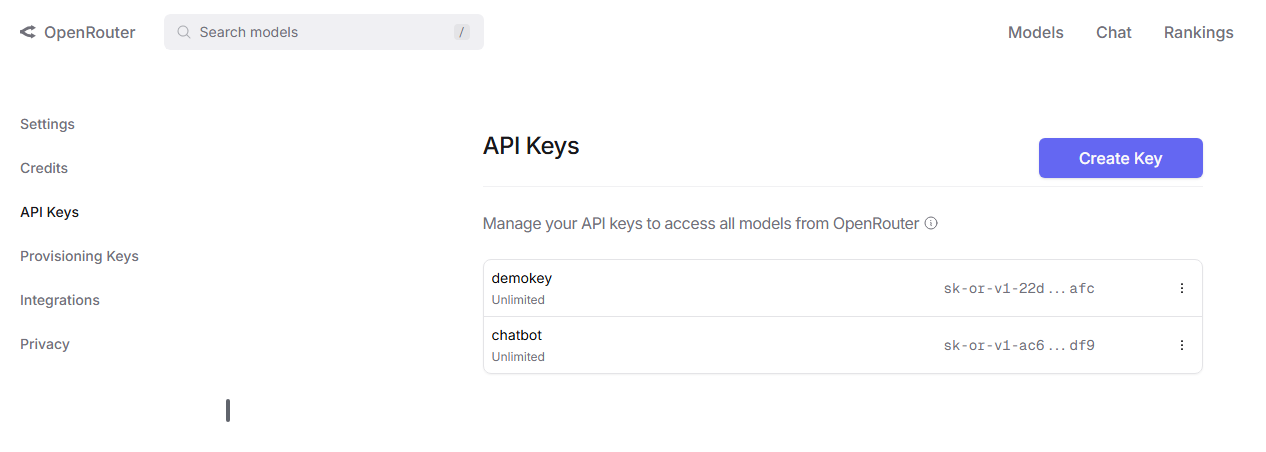
创建好后,接下来就是代码如何实现:
我用QT创建了一个简单的交互页面,主要含有三个按钮:
- 发送
- 清空
- 密钥重置
密钥重置主要用于更改密钥,点击密钥重置会弹出一个小窗口进行填写密钥,填写完毕后,窗口会打印出密钥已更新。
1、pro配置
cpp
QMAKE_PROJECT_DEPTH = 0
QT       += core gui network

greaterThan(QT_MAJOR_VERSION, 4): QT += widgets

CONFIG += c++11

SOURCES += \
    main.cpp \
    mainwindow.cpp \
    deepseek_client.cpp

HEADERS += \
    mainwindow.h \
    deepseek_client.h

# Default rules for deployment.
qnx: target.path = /tmp/$${TARGET}/bin
else: unix:!android: target.path = /opt/$${TARGET}/bin
!isEmpty(target.path): INSTALL_ROOT *= 0
2、mainwindow.h
cpp
#ifndef MAINWINDOW_H
#define MAINWINDOW_H

#include <QMainWindow>
#include <QPushButton>
#include <QLabel>
#include <QLineEdit>
#include <QTextEdit>
#include <QVBoxLayout>
#include <QScrollArea>
#include "deepseek_client.h"

class MainWindow : public QMainWindow
{
    Q_OBJECT

public:
    MainWindow(QWidget *parent = nullptr);
    ~MainWindow();

private slots:
    void handleSendMessage();
    void handleClearChat();
    void handleAIResponse(const QString &response);
    void handleAIError(const QString &error);
    void handleResetApiKey();

private:
    void appendMessage(const QString &message, bool isUser);
    void setupDeepSeek();
    void resetApiKey();

    QWidget *centralWidget;
    QVBoxLayout *mainLayout;
    QTextEdit *chatDisplay;
    QLineEdit *inputField;
    QPushButton *sendButton;
    QPushButton *resetApiKeyButton;
    QPushButton *clearButton;
    QScrollArea *scrollArea;
    DeepSeekClient *deepseekClient;
};

#endif // MAINWINDOW_H
3、deepseek_client.h
cpp
#ifndef DEEPSEEK_CLIENT_H
#define DEEPSEEK_CLIENT_H

#include <QObject>
#include <QNetworkAccessManager>
#include <QNetworkReply>
#include <QJsonDocument>
#include <QJsonObject>
#include <QJsonArray>

class DeepSeekClient : public QObject
{
    Q_OBJECT

public:
    explicit DeepSeekClient(QObject *parent = nullptr);
    void setApiKey(const QString &apiKey);
    void sendMessage(const QString &message);

signals:
    void responseReceived(const QString &response);
    void errorOccurred(const QString &error);

private:
    QNetworkAccessManager *networkManager;
    QString apiKey;
    QString apiEndpoint;
};

#endif // DEEPSEEK_CLIENT_H
4、mainwindow.cpp
cpp
#include "mainwindow.h"
#include <QVBoxLayout>
#include <QWidget>
#include <QDateTime>
#include <QScrollBar>
#include <QMessageBox>
#include <QSettings>
#include <QInputDialog>

MainWindow::MainWindow(QWidget *parent)
    : QMainWindow(parent)
{
    // 创建中心部件
    centralWidget = new QWidget(this);
    setCentralWidget(centralWidget);

    // 创建主布局
    mainLayout = new QVBoxLayout(centralWidget);

    // 创建聊天显示区域
    chatDisplay = new QTextEdit(this);
    chatDisplay->setReadOnly(true);
    chatDisplay->setStyleSheet("QTextEdit { background-color: #f5f5f5; }");
    mainLayout->addWidget(chatDisplay);

    // 创建输入区域
    QHBoxLayout *inputLayout = new QHBoxLayout();

    inputField = new QLineEdit(this);
    inputField->setPlaceholderText("输入你的问题...");
    inputLayout->addWidget(inputField);

    sendButton = new QPushButton("发送", this);
    inputLayout->addWidget(sendButton);

    clearButton = new QPushButton("清空对话", this);
    inputLayout->addWidget(clearButton);

    resetApiKeyButton = new QPushButton("重置API密钥", this);
    inputLayout->addWidget(resetApiKeyButton);

    mainLayout->addLayout(inputLayout);

    // 连接信号和槽
    connect(sendButton, &QPushButton::clicked, this, &MainWindow::handleSendMessage);
    connect(clearButton, &QPushButton::clicked, this, &MainWindow::handleClearChat);
    connect(resetApiKeyButton, &QPushButton::clicked, this, &MainWindow::handleResetApiKey);
    connect(inputField, &QLineEdit::returnPressed, this, &MainWindow::handleSendMessage);

    // 设置窗口标题和大小
    setWindowTitle("DeepSeek AI 问答系统");
    resize(600, 400);

    // 初始化DeepSeek客户端
    setupDeepSeek();

    // 添加欢迎消息
    appendMessage("你好!我是DeepSeek AI助手,有什么我可以帮你的吗?", false);
}

MainWindow::~MainWindow()
{
    delete deepseekClient;
}

void MainWindow::setupDeepSeek()
{
    deepseekClient = new DeepSeekClient(this);

    // 从设置中读取API密钥
    QSettings settings("YourCompany", "DeepSeekChat");
    QString apiKey = settings.value("apiKey").toString();

    if (apiKey.isEmpty()) {
        // 如果没有保存的API密钥,弹出对话框请求输入
        bool ok;
        apiKey = QInputDialog::getText(this, "DeepSeek API密钥",
                                     "请输入你的DeepSeek API密钥:", QLineEdit::Password,
                                     "", &ok);

        if (ok && !apiKey.isEmpty()) {
            settings.setValue("apiKey", apiKey);
        }
    }

    deepseekClient->setApiKey(apiKey);

    // 连接信号
    connect(deepseekClient, &DeepSeekClient::responseReceived,
            this, &MainWindow::handleAIResponse);
    connect(deepseekClient, &DeepSeekClient::errorOccurred,
            this, &MainWindow::handleAIError);
}
void MainWindow::resetApiKey()
{
    QSettings settings("YourCompany", "DeepSeekChat");
    settings.remove("apiKey"); // 删除旧的API密钥

    bool ok;
    QString apiKey = QInputDialog::getText(this, "DeepSeek API密钥",
                                           "请输入你的DeepSeek API密钥:", QLineEdit::Password,
                                           "", &ok);

    if (ok && !apiKey.isEmpty()) {
        settings.setValue("apiKey", apiKey);
        deepseekClient->setApiKey(apiKey);
        appendMessage("API密钥已更新", false);
    } else {
        appendMessage("API密钥未更新,请稍后重试", false);
    }
}

void MainWindow::handleResetApiKey()
{
    resetApiKey();
}
void MainWindow::handleSendMessage()
{
    QString userInput = inputField->text().trimmed();
    if (userInput.isEmpty()) {
        return;
    }

    // 显示用户消息
    appendMessage(userInput, true);
    inputField->clear();

    // 发送消息到DeepSeek
    deepseekClient->sendMessage(userInput);
}

void MainWindow::handleClearChat()
{
    chatDisplay->clear();
    appendMessage("你好!我是DeepSeek AI助手,有什么我可以帮你的吗?", false);
}

void MainWindow::handleAIResponse(const QString &response)
{
    appendMessage(response, false);
}

void MainWindow::handleAIError(const QString &error)
{
    QMessageBox::warning(this, "错误", "AI响应出错: " + error);
}

void MainWindow::appendMessage(const QString &message, bool isUser)
{
    QString timestamp = QDateTime::currentDateTime().toString("hh:mm:ss");
    QString formattedMessage = QString("[%1] %2: %3\n")
        .arg(timestamp)
        .arg(isUser ? "你" : "AI")
        .arg(message);

    chatDisplay->append(formattedMessage);

    // 滚动到底部
    QScrollBar *scrollbar = chatDisplay->verticalScrollBar();
    scrollbar->setValue(scrollbar->maximum());
}
5、deepseek_client.cpp
cpp
#include "deepseek_client.h"
#include <QNetworkRequest>
#include <QJsonDocument>
#include <QJsonObject>
#include <QJsonArray>
#include <QDebug>
#include <QTimer>
DeepSeekClient::DeepSeekClient(QObject *parent)
    : QObject(parent)
    , networkManager(new QNetworkAccessManager(this))
    , apiEndpoint("https://openrouter.ai/api/v1/chat/completions")
{
    // 设置SSL配置
    QSslConfiguration sslConfig = QSslConfiguration::defaultConfiguration();
    sslConfig.setPeerVerifyMode(QSslSocket::VerifyNone);
    QSslConfiguration::setDefaultConfiguration(sslConfig);
}

void DeepSeekClient::setApiKey(const QString &apiKey)
{
    this->apiKey = apiKey;
}

void DeepSeekClient::sendMessage(const QString &message)
{
    if (apiKey.isEmpty()) {
        emit errorOccurred("API key not set");
        return;
    }

    QNetworkRequest request(apiEndpoint);
    request.setHeader(QNetworkRequest::ContentTypeHeader, "application/json");
    request.setRawHeader("Authorization", QString("Bearer %1").arg(apiKey).toUtf8());

    QJsonObject jsonObj;
    jsonObj["model"] = "deepseek/deepseek-r1-zero:free"; // 使用OpenRouter上的免费模型

    QJsonArray messagesArray;
    QJsonObject systemMessage;
    systemMessage["role"] = "system";
    systemMessage["content"] = "你是一个友好的AI助手,会用简洁专业的语言回答问题。";
    messagesArray.append(systemMessage);

    QJsonObject userMessage;
    userMessage["role"] = "user";
    userMessage["content"] = message;
    messagesArray.append(userMessage);

    jsonObj["messages"] = messagesArray;
    jsonObj["temperature"] = 0.7;
    jsonObj["max_tokens"] = 1000;

    QJsonDocument doc(jsonObj);
    QByteArray data = doc.toJson();

    qDebug() << "Sending request to OpenRouter:" << apiEndpoint;
    qDebug() << "Request data:" << data;

    QNetworkReply *reply = networkManager->post(request, data);

    connect(reply, &QNetworkReply::finished, [=]() {
        if (reply->error() == QNetworkReply::NoError) {
            QByteArray responseData = reply->readAll();
            qDebug() << "Response received:" << responseData;

            QJsonDocument responseDoc = QJsonDocument::fromJson(responseData);
            QJsonObject responseObj = responseDoc.object();

            if (responseObj.contains("choices") && responseObj["choices"].isArray()) {
                QJsonArray choices = responseObj["choices"].toArray();
                if (!choices.isEmpty()) {
                    QJsonObject choice = choices[0].toObject();
                    if (choice.contains("message")) {
                        QJsonObject messageObj = choice["message"].toObject();
                        QString content = messageObj["content"].toString();
                        emit responseReceived(content);
                    }
                }
            } else {
                QString errorMsg = "Invalid response format: " + QString(responseData);
                qDebug() << errorMsg;
                emit errorOccurred(errorMsg);
            }
        } else {
            QString errorMsg = QString("Network error: %1\nStatus code: %2\nResponse: %3")
            .arg(reply->errorString())
                .arg(reply->attribute(QNetworkRequest::HttpStatusCodeAttribute).toInt())
                .arg(QString(reply->readAll()));
            qDebug() << errorMsg;
            emit errorOccurred(errorMsg);
        }
        reply->deleteLater();
    });

    // 添加超时处理
    QTimer::singleShot(30000, [=]() {
        if (reply && reply->isRunning()) {
            reply->abort();
            emit errorOccurred("Request timed out after 30 seconds");
        }
    });
}
运行结果: