文章目录
- [1. 每日基操](#1. 每日基操)
- [2. 模拟故障](#2. 模拟故障)
-
- [2.1 **xx column window is too narrow 窗口只有xx列太窄了 无法完全显示**](#2.1 xx column window is too narrow 窗口只有xx列太窄了 无法完全显示)
- [2.2 **Unexpected EOF in archive**](#2.2 Unexpected EOF in archive)
- [2.3 **You have mail in /var/spool/mail/root**](#2.3 You have mail in /var/spool/mail/root)
- [2.4 **permission denied 权限拒绝**](#2.4 permission denied 权限拒绝)
- [2.5 **W10: Warning: Changing a readonly file**](#2.5 W10: Warning: Changing a readonly file)
- [3. 习题](#3. 习题)
1. 每日基操
创建一个空文件,批量创建多个空文件。
创建一个目录,创建多个目录,创建多层目录。
编辑文件内容vim快捷键。
移动到第一行,最后一行,某一行。
复制,删除,粘贴操作。
在文件中查找内容,显示文件行号。
查看文件内容,对文件内容进行过滤。
显示目录内容,显示目录本身属性。
可以通过ls判断出目标是文件,目录还是软链接。
可以通过ls查看文件或目录的属性信息。
删除文件,删除目录。
对文件或目录进行重命名。
shell
[root@oldboy99-Kylin ~/oldboy]# touch a.txt
[root@oldboy99-Kylin ~/oldboy]# touch test{1..5}.txt
[root@oldboy99-Kylin ~/oldboy]# ls
02-【awk练习文件】access-服务的访问日志-v3.zip  awk.txt              sort2.txt  test2.txt  test5.txt
access.log                                      secure-20161219      sort.txt   test3.txt  uniq.txt
a.txt                                           secure-20161219.zip  test1.txt  test4.txt
[root@oldboy99-Kylin ~/oldboy]# mkdir d
[root@oldboy99-Kylin ~/oldboy]# mkdir d{1..5}
[root@oldboy99-Kylin ~/oldboy]# ls
02-【awk练习文件】access-服务的访问日志-v3.zip  d   d4                   sort2.txt  test3.txt
access.log                                      d1  d5                   sort.txt   test4.txt
a.txt                                           d2  secure-20161219      test1.txt  test5.txt
awk.txt                                         d3  secure-20161219.zip  test2.txt  uniq.txt
[root@oldboy99-Kylin ~/oldboy]# mkdir -p d/d1/d2/d3
[root@oldboy99-Kylin ~/oldboy]# tree d
d
└── d1
    └── d2
        └── d3

3 directories, 0 files
[root@oldboy99-Kylin ~/oldboy]# vim test
test1.txt  test2.txt  test3.txt  test4.txt  test5.txt
[root@oldboy99-Kylin ~/oldboy]# vim a.txt
[root@oldboy99-Kylin ~/oldboy]# grep '新闻' -n a.txt
5:近日有新闻称,在从外地返回杭州的列车上,有网友拍下了这样的一幕:一车厢的人都在写作业。据了解,有些孩子在出发前就准备充分,带着所有的作业来到车上。
8:新闻素材
10:新闻素材
11:新闻素材
12:新闻素材
13:新闻素材
14:新闻素材
15:新闻素材
16:新闻素材
17:新闻素材
18:新闻素材
[root@oldboy99-Kylin ~/oldboy]# ls
02-【awk练习文件】access-服务的访问日志-v3.zip  d   d4                   sort2.txt  test3.txt
access.log                                      d1  d5                   sort.txt   test4.txt
a.txt                                           d2  secure-20161219      test1.txt  test5.txt
awk.txt                                         d3  secure-20161219.zip  test2.txt  uniq.txt
[root@oldboy99-Kylin ~/oldboy]# ll ~/oldboy/
总用量 113168
-rw-r--r-- 1 root root  3765999  4月 30 10:48 02-【awk练习文件】access-服务的访问日志-v3.zip
-rw-r--r-- 1 root root 58817074  9月 21  2017 access.log
-rw-r--r-- 1 root root     1312  5月  5 17:54 a.txt
-rw-r--r-- 1 root root      137  4月 30 10:19 awk.txt
drwxr-xr-x 3 root root       16  5月  5 17:50 d
drwxr-xr-x 2 root root        6  5月  5 17:50 d1
drwxr-xr-x 2 root root        6  5月  5 17:50 d2
drwxr-xr-x 2 root root        6  5月  5 17:50 d3
drwxr-xr-x 2 root root        6  5月  5 17:50 d4
drwxr-xr-x 2 root root        6  5月  5 17:50 d5
-rw-r--r-- 1 root root 51053780  2月 15  2017 secure-20161219
-rw-r--r-- 1 root root  2218287  4月 30 10:48 secure-20161219.zip
-rw-r--r-- 1 root root       46  4月 30 14:13 sort2.txt
-rw-r--r-- 1 root root       41  4月 30 14:02 sort.txt
-rw-r--r-- 1 root root        0  5月  5 17:49 test1.txt
-rw-r--r-- 1 root root        0  5月  5 17:49 test2.txt
-rw-r--r-- 1 root root        0  5月  5 17:49 test3.txt
-rw-r--r-- 1 root root        0  5月  5 17:49 test4.txt
-rw-r--r-- 1 root root        0  5月  5 17:49 test5.txt
-rw-r--r-- 1 root root      209  4月 30 14:41 uniq.txt
[root@oldboy99-Kylin ~/oldboy]# ll ~/oldboy/ -d
drwxr-xr-x 8 root root 4096  5月  5 17:54 /root/oldboy/
[root@oldboy99-Kylin ~/oldboy]# ls
02-【awk练习文件】access-服务的访问日志-v3.zip  d   d4                   sort2.txt  test3.txt
access.log                                      d1  d5                   sort.txt   test4.txt
a.txt                                           d2  secure-20161219      test1.txt  test5.txt
awk.txt                                         d3  secure-20161219.zip  test2.txt  uniq.txt
[root@oldboy99-Kylin ~/oldboy]# rm -rf d*
[root@oldboy99-Kylin ~/oldboy]# rm -f test*
[root@oldboy99-Kylin ~/oldboy]# ls
02-【awk练习文件】access-服务的访问日志-v3.zip  a.txt    secure-20161219      sort2.txt  uniq.txt
access.log                                      awk.txt  secure-20161219.zip  sort.txt
[root@oldboy99-Kylin ~/oldboy]# mv a.txt test.txt
[root@oldboy99-Kylin ~/oldboy]# mkdir abc
[root@oldboy99-Kylin ~/oldboy]# ls
02-【awk练习文件】access-服务的访问日志-v3.zip  access.log  secure-20161219      sort2.txt  test.txt
abc                                             awk.txt     secure-20161219.zip  sort.txt   uniq.txt
[root@oldboy99-Kylin ~/oldboy]# mv abc/ ddd
[root@oldboy99-Kylin ~/oldboy]# ls
02-【awk练习文件】access-服务的访问日志-v3.zip  awk.txt  secure-20161219      sort2.txt  test.txt
access.log                                      ddd      secure-20161219.zip  sort.txt   uniq.txt
2. 模拟故障
2.1 xx column window is too narrow 窗口只有xx列太窄了 无法完全显示
shell
[root@oldboyedu60-lnb ~]# w
w: 39 column window is too narrow
2.2 Unexpected EOF in archive
shell
[root@web02 tools]# tar xf nginx-1.16.0.tar.gz

gzip: stdin: unexpected end of file
tar: Unexpected EOF in archive
tar: Unexpected EOF in archive
tar: Error is not recoverable: exiting now- 使用解压命令时报错,压缩包可能损坏
2.3 You have mail in /var/spool/mail/root
- 定时任务异常
- 其他问题,查看文件内容分析
2.4 permission denied 权限拒绝
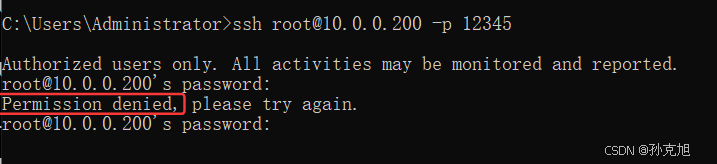
- 远程登录时异常,可能是密码、端口错误或主机防火墙拦截
- 可能是服务程序或命令在访问某个文件或目录时,无权限访问
- 可以查看secure 文件:
/var/log/secure
2.5 W10: Warning: Changing a readonly file

- 使用vim查看无可写权限的文件时,进入编辑模式会提示该警告
- root用户可以使用'!'强制保存并退出
3. 习题
shell
#### 1.4.3.4	用vi命令编辑text.txt,如何跳转到末行,首行,行首、行末,如何在光标下一行插入
,如何复制5行,删除10行,查找oldboylidao的字符,把oldboylidao替换为oldboyedu.com
G gg 0 $ o 5yy 10dd :/oldboylidao :%s/oldboylidao/oldboyedu.com/g
#### 1.5.1.14	下面哪个命令可以看出linux的cpu核数 (A )
lscpu				sar				top				dmidecode

#### 1.5.1.19	如何查看网络接口的IP地址(A)
ifconfig  /etc/hosts		ipconfig    ip

#### 1.5.1.22	当登录Linux时,一个具有唯一进程的ID号的shell将被调用,这个ID是什么(C  )
NID			PID			UID			CID

#### 1.5.1.23	按下(A  )键能终止当前运行的命令
Ctrl -c			Ctrl -F			Ctrl -B			Ctrl -D

#### 1.5.3.31	不重启nginx主机如何修改其主机名为lidao996?
hostnamectl set -hostname lidao996

#### 1.11.1.18	关闭Linux系统(不重新启动)可使用命令(B )

A:Ctrl+Alt+Del
B:halt
C:shutdown -r now
D:reboot

#### 1.11.1.21	终止一共前台进程可能用到的命令和操作   B
Kill			ctrl+c			shut down			halt


#### 1.11.1.26	以下哪些方式/命令不可以查看某ip是否可达? D
telnet 			ping			tracert			top

#### 1.11.1.28	下面哪个命令不是用来查看网络故障?   C
telnet			ping			init			netstat

#### 1.11.2.1	测试网络中主机的连通性用什么命令
ping
#### 1.11.4.5	某日志路径是/data/logs/a.txt,如何跟踪该日志,以查看当时的运行状态?
tail -f /data/logs/a.txx
#### 1.11.4.14	查着占用内存最多的进程
top M
ps aux |sort -rnk4 |head