大纲
1.关于Nacos配置中心的几个问题
2.Nacos如何整合SpringBoot读取远程配置
3.Nacos加载读取远程配置数据的源码分析
4.客户端如何感知远程配置数据的变更
5.集群架构下节点间如何同步配置数据
1.关于Nacos配置中心的几个问题
**问题一:**SpringBoot项目启动时如何加载Nacos服务端存储的配置数据?
**问题二:**Nacos配置中心有很多类型的配置数据,它们之间的优先级是怎样的?
**问题三:**在Nacos后台修改配置数据后,客户端是如何实现感知的?
**问题四:**Nacos服务端的配置数据如何存储,集群间会如何同步数据?
2.Nacos如何整合SpringBoot读取远程配置
(1)通过PropertySourceLocator将Nacos配置中心整合到SpringBoot
(2)SpringBoot启动时如何执行到PropertySourceLocator扩展接口
(3)SpringBoot如何自动装配NacosPropertySourceLocator实现类
(4)NacosPropertySourceLocator如何加载Nacos服务端的配置数据
(1)通过PropertySourceLocator将Nacos配置中心整合到SpringBoot
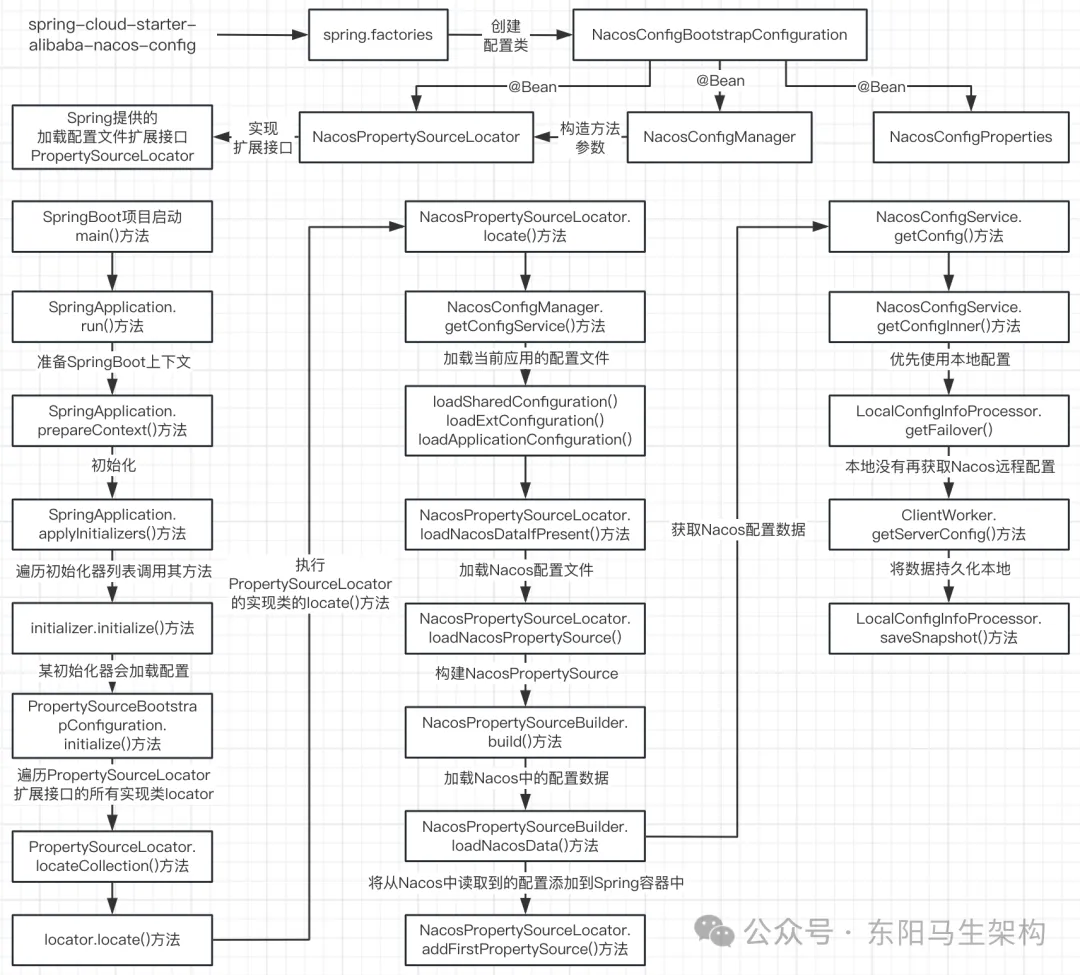
在SpringBoot的启动过程中,会有一个准备上下文的动作,这个准备上下文动作会加载配置数据。
SpringBoot有一个用来收集配置数据的扩展接口PropertySourceLocator,nacos-config正是利用该接口将Nacos配置中心整合到SpringBoot中。
(2)SpringBoot启动时如何执行到PropertySourceLocator扩展接口
SpringBoot项目启动时都会使用main()方法。在执行SpringApplication的run()方法的过程中,会调用SpringApplication的prepareContext()方法来准备上下文,然后调用SpringApplication的applyInitializers()方法来初始化应用。
由于SpringBoot会有很多个初始化器,所以在SpringApplication的applyInitializers()方法中,会先通过SpringApplication的getInitializers()方法获取初始化器列表,然后循环遍历调用初始化器ApplicationContextInitializer的initialize()方法。
在这些初始化器列表initializers中,会有一个名为PropertySourceBootstrapConfiguration的初始化器,所以会调用到PropertySourceBootstrapConfiguration的initialize()方法。
在PropertySourceBootstrapConfiguration的initialize()方法中,SpringBoot会获取PropertySourceLocator扩展接口的所有实现类,然后遍历调用PropertySourceLocator实现类的locateCollection()方法。
在调用PropertySourceLocator实现类的locateCollection()方法时,会先调用PropertySourceLocator扩展接口的locateCollection()方法,从而才会触发调用PropertySourceLocator实现类实现的locate()方法,比如调用NacosPropertySourceLocator的locate()方法。
@SpringBootApplication
public class StockServiceApplication {
    public static void main(String[] args) {
        SpringApplication.run(StockServiceApplication.class, args);
    }
}

public class SpringApplication {
    private List<ApplicationContextInitializer<?>> initializers;
    ...

    public static ConfigurableApplicationContext run(Class<?> primarySource, String... args) {
        return run(new Class<?>[] { primarySource }, args);
    }

    public static ConfigurableApplicationContext run(Class<?>[] primarySources, String[] args) {
        return new SpringApplication(primarySources).run(args);
    }

    //Run the Spring application, creating and refreshing a new
    public ConfigurableApplicationContext run(String... args) {
        StopWatch stopWatch = new StopWatch();
        stopWatch.start();
        ConfigurableApplicationContext context = null;
        Collection<SpringBootExceptionReporter> exceptionReporters = new ArrayList<>();
        configureHeadlessProperty();
        SpringApplicationRunListeners listeners = getRunListeners(args);
        listeners.starting();

        try {
            ApplicationArguments applicationArguments = new DefaultApplicationArguments(args);
            ConfigurableEnvironment environment = prepareEnvironment(listeners, applicationArguments);
            configureIgnoreBeanInfo(environment);
            Banner printedBanner = printBanner(environment);
            context = createApplicationContext();
            exceptionReporters = getSpringFactoriesInstances(SpringBootExceptionReporter.class, new Class[] { ConfigurableApplicationContext.class }, context);
            //准备上下文
            prepareContext(context, environment, listeners, applicationArguments, printedBanner);
            refreshContext(context);
            afterRefresh(context, applicationArguments);
            stopWatch.stop();
            if (this.logStartupInfo) {
                new StartupInfoLogger(this.mainApplicationClass).logStarted(getApplicationLog(), stopWatch);
            }
            listeners.started(context);
            callRunners(context, applicationArguments);
        } catch (Throwable ex) {
            handleRunFailure(context, ex, exceptionReporters, listeners);
            throw new IllegalStateException(ex);
        }

        try {
            listeners.running(context);
        } catch (Throwable ex) {
            handleRunFailure(context, ex, exceptionReporters, null);
            throw new IllegalStateException(ex);
        }
        return context;
    }

    private void prepareContext(ConfigurableApplicationContext context, ConfigurableEnvironment environment, SpringApplicationRunListeners listeners, ApplicationArguments applicationArguments, Banner printedBanner) {
        context.setEnvironment(environment);
        postProcessApplicationContext(context);
        //初始化应用
        applyInitializers(context);
        listeners.contextPrepared(context);
        if (this.logStartupInfo) {
            logStartupInfo(context.getParent() == null);
            logStartupProfileInfo(context);
        }

        //Add boot specific singleton beans
        ConfigurableListableBeanFactory beanFactory = context.getBeanFactory();
        beanFactory.registerSingleton("springApplicationArguments", applicationArguments);
        if (printedBanner != null) {
            beanFactory.registerSingleton("springBootBanner", printedBanner);
        }
        if (beanFactory instanceof DefaultListableBeanFactory) {
            ((DefaultListableBeanFactory) beanFactory).setAllowBeanDefinitionOverriding(this.allowBeanDefinitionOverriding);
        }
        if (this.lazyInitialization) {
            context.addBeanFactoryPostProcessor(new LazyInitializationBeanFactoryPostProcessor());
        }

        //Load the sources
        Set<Object> sources = getAllSources();
        Assert.notEmpty(sources, "Sources must not be empty");
        load(context, sources.toArray(new Object[0]));
        listeners.contextLoaded(context);
    }

    //Apply any {@link ApplicationContextInitializer}s to the context before it is refreshed.
    @SuppressWarnings({ "rawtypes", "unchecked" })
    protected void applyInitializers(ConfigurableApplicationContext context) {
        //getInitializers()方法会获取初始化器列表,然后循环调用初始化器的initialize()方法
        for (ApplicationContextInitializer initializer : getInitializers()) {
            Class<?> requiredType = GenericTypeResolver.resolveTypeArgument(initializer.getClass(), ApplicationContextInitializer.class);
            Assert.isInstanceOf(requiredType, context, "Unable to call initializer.");
            initializer.initialize(context);
        }
    }

    public Set<ApplicationContextInitializer<?>> getInitializers() {
        return asUnmodifiableOrderedSet(this.initializers);
    }
    ...
}

@Configuration(proxyBeanMethods = false)
@EnableConfigurationProperties(PropertySourceBootstrapProperties.class)
public class PropertySourceBootstrapConfiguration implements ApplicationContextInitializer<ConfigurableApplicationContext>, Ordered {
    @Autowired(required = false)
    private List<PropertySourceLocator> propertySourceLocators = new ArrayList<>();
    ...

    @Override
    public void initialize(ConfigurableApplicationContext applicationContext) {
        List<PropertySource<?>> composite = new ArrayList<>();
        AnnotationAwareOrderComparator.sort(this.propertySourceLocators);
        boolean empty = true;
        ConfigurableEnvironment environment = applicationContext.getEnvironment();

        //遍历PropertySourceLocator扩展接口的所有实现类this.propertySourceLocators
        for (PropertySourceLocator locator : this.propertySourceLocators) {
            Collection<PropertySource<?>> source = locator.locateCollection(environment);
            if (source == null || source.size() == 0) {
                continue;
            }
            List<PropertySource<?>> sourceList = new ArrayList<>();
            for (PropertySource<?> p : source) {
                if (p instanceof EnumerablePropertySource) {
                    EnumerablePropertySource<?> enumerable = (EnumerablePropertySource<?>) p;
                    sourceList.add(new BootstrapPropertySource<>(enumerable));
                } else {
                    sourceList.add(new SimpleBootstrapPropertySource(p));
                }
            }
            logger.info("Located property source: " + sourceList);
            composite.addAll(sourceList);
            empty = false;
        }

        if (!empty) {
            MutablePropertySources propertySources = environment.getPropertySources();
            String logConfig = environment.resolvePlaceholders("${logging.config:}");
            LogFile logFile = LogFile.get(environment);
            for (PropertySource<?> p : environment.getPropertySources()) {
                if (p.getName().startsWith(BOOTSTRAP_PROPERTY_SOURCE_NAME)) {
                    propertySources.remove(p.getName());
                }
            }
            insertPropertySources(propertySources, composite);
            reinitializeLoggingSystem(environment, logConfig, logFile);
            setLogLevels(applicationContext, environment);
            handleIncludedProfiles(environment);
        }
    }
    ...
}

public interface PropertySourceLocator {
    PropertySource<?> locate(Environment environment);

    default Collection<PropertySource<?>> locateCollection(Environment environment) {
        return locateCollection(this, environment);
    }

    static Collection<PropertySource<?>> locateCollection(PropertySourceLocator locator, Environment environment) {
        //比如调用NacosPropertySourceLocator.locate()方法
        PropertySource<?> propertySource = locator.locate(environment);
        if (propertySource == null) {
            return Collections.emptyList();
        }
        if (CompositePropertySource.class.isInstance(propertySource)) {
            Collection<PropertySource<?>> sources = ((CompositePropertySource) propertySource).getPropertySources();
            List<PropertySource<?>> filteredSources = new ArrayList<>();
            for (PropertySource<?> p : sources) {
                if (p != null) {
                    filteredSources.add(p);
                }
            }
            return filteredSources;
        } else {
            return Arrays.asList(propertySource);
        }
    }
}
(3)SpringBoot如何自动装配NacosPropertySourceLocator实现类
在nacos-config的spring.factories文件中,可以看到一个自动装配的配置类NacosConfigBootstrapConfiguration。
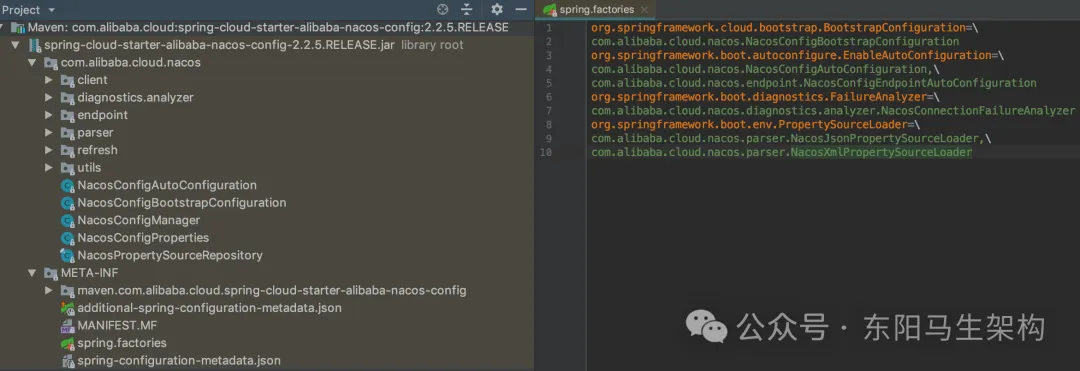
NacosConfigBootstrapConfiguration类会创建三个Bean对象。
第一个是NacosPropertySourceLocator。这样SpringBoot就能扫描到NacosPropertySourceLocator这个Bean,然后将NacosPropertySourceLocator整合到SpringBoot的启动流程中。在SpringBoot启动时,就会调用NacosPropertySourceLocator的locate()方法。
第二个是NacosConfigManager。由于NacosConfigManager的构造方法会创建ConfigService对象,所以在NacosPropertySourceLocator的locate()方法中,可以通过NacosConfigManager的getConfigService()方法获取ConfigService对象。
ConfigService是一个接口,定义了获取配置、发布配置、移除配置等方法。ConfigService只有一个实现类NacosConfigService,Nacos配置中心源码的核心其实就是这个NacosConfigService对象。
@Configuration(proxyBeanMethods = false)
@ConditionalOnProperty(name = "spring.cloud.nacos.config.enabled", matchIfMissing = true)
public class NacosConfigBootstrapConfiguration {
    @Bean
    public NacosPropertySourceLocator nacosPropertySourceLocator(NacosConfigManager nacosConfigManager) {
        return new NacosPropertySourceLocator(nacosConfigManager);
    }

    @Bean
    @ConditionalOnMissingBean
    public NacosConfigManager nacosConfigManager(NacosConfigProperties nacosConfigProperties) {
        return new NacosConfigManager(nacosConfigProperties);
    }

    @Bean
    @ConditionalOnMissingBean
    public NacosConfigProperties nacosConfigProperties() {
        return new NacosConfigProperties();
    }
}

@Order(0)
public class NacosPropertySourceLocator implements PropertySourceLocator {
    private NacosPropertySourceBuilder nacosPropertySourceBuilder;
    private NacosConfigProperties nacosConfigProperties;
    private NacosConfigManager nacosConfigManager;

    public NacosPropertySourceLocator(NacosConfigManager nacosConfigManager) {
        this.nacosConfigManager = nacosConfigManager;
        this.nacosConfigProperties = nacosConfigManager.getNacosConfigProperties();
    }
    ...

    @Override
    public PropertySource<?> locate(Environment env) {
        nacosConfigProperties.setEnvironment(env);
        ConfigService configService = nacosConfigManager.getConfigService();

        if (null == configService) {
            log.warn("no instance of config service found, can't load config from nacos");
            return null;
        }
        long timeout = nacosConfigProperties.getTimeout();
        nacosPropertySourceBuilder = new NacosPropertySourceBuilder(configService, timeout);
        String name = nacosConfigProperties.getName();
        String dataIdPrefix = nacosConfigProperties.getPrefix();
        if (StringUtils.isEmpty(dataIdPrefix)) {
            dataIdPrefix = name;
        }
        if (StringUtils.isEmpty(dataIdPrefix)) {
            dataIdPrefix = env.getProperty("spring.application.name");
        }
        CompositePropertySource composite = new CompositePropertySource(NACOS_PROPERTY_SOURCE_NAME);
        loadSharedConfiguration(composite);
        loadExtConfiguration(composite);
        loadApplicationConfiguration(composite, dataIdPrefix, nacosConfigProperties, env);
        return composite;
    }
    ...
}

public class NacosConfigManager {
    private static ConfigService service = null;
    private NacosConfigProperties nacosConfigProperties;

    public NacosConfigManager(NacosConfigProperties nacosConfigProperties) {
        this.nacosConfigProperties = nacosConfigProperties;
        //创建ConfigService对象,其实就是创建NacosConfigService对象
        createConfigService(nacosConfigProperties);
    }

    //使用双重检查创建单例
    static ConfigService createConfigService(NacosConfigProperties nacosConfigProperties) {
        if (Objects.isNull(service)) {
            synchronized (NacosConfigManager.class) {
                try {
                    if (Objects.isNull(service)) {
                        //通过反射创建ConfigService对象,即NacosConfigService对象,然后给service属性赋值
                        service = NacosFactory.createConfigService(nacosConfigProperties.assembleConfigServiceProperties());
                    }
                } catch (NacosException e) {
                    log.error(e.getMessage());
                    throw new NacosConnectionFailureException(nacosConfigProperties.getServerAddr(), e.getMessage(), e);
                }
            }
        }
        return service;
    }

    public ConfigService getConfigService() {
        if (Objects.isNull(service)) {
            createConfigService(this.nacosConfigProperties);
        }
        return service;
    }

    public NacosConfigProperties getNacosConfigProperties() {
        return nacosConfigProperties;
    }
}

public interface ConfigService {
    ...
    String getConfig(String dataId, String group, long timeoutMs) throws NacosException;
    boolean publishConfig(String dataId, String group, String content) throws NacosException;
    boolean removeConfig(String dataId, String group) throws NacosException;
    ...
}

public class NacosConfigService implements ConfigService {
    ...
    ...
}
(4)NacosPropertySourceLocator如何加载Nacos服务端的配置数据
在NacosPropertySourceLocator的locate()方法中,一共会加载三个不同类型的配置数据:共享的、额外的、自身应用的,加载这些配置数据时最终都会调用loadNacosDataIfPresent()方法。
执行NacosPropertySourceLocator的loadNacosDataIfPresent()方法时,会通过NacosPropertySourceBuilder创建NacosPropertySource对象。
在构建NacosPropertySource对象的过程中,会调用NacosPropertySourceBuilder的loadNacosData()方法加载配置。
而执行NacosPropertySourceBuilder的loadNacosData()方法时,最终会调用NacosConfigService的getConfig()方法来加载Nacos配置,即调用NacosConfigService的getConfigInner()方法来加载Nacos配置。
在执行NacosConfigService的getConfigInner()方法时,首先会先获取一下本地是否有对应的配置数据,如果有则优先使用本地的。本地数据是在从Nacos配置中心获取到数据后,持久化到本地的数据快照。如果本地没有,才会去发起HTTP请求获取远程Nacos服务端的配置数据。也就是调用ClientWorker的getServerConfig()方法来获取远程配置数据。获取到Nacos配置中心的数据后,会马上将数据持久化到本地。
@Order(0)
public class NacosPropertySourceLocator implements PropertySourceLocator {
    private NacosPropertySourceBuilder nacosPropertySourceBuilder;
    private NacosConfigProperties nacosConfigProperties;
    private NacosConfigManager nacosConfigManager;

    public NacosPropertySourceLocator(NacosConfigManager nacosConfigManager) {
        this.nacosConfigManager = nacosConfigManager;
        this.nacosConfigProperties = nacosConfigManager.getNacosConfigProperties();
    }
    ...

    @Override
    public PropertySource<?> locate(Environment env) {
        nacosConfigProperties.setEnvironment(env);
        //获取NacosConfigService对象
        ConfigService configService = nacosConfigManager.getConfigService();

        if (null == configService) {
            log.warn("no instance of config service found, can't load config from nacos");
            return null;
        }
        //获取yml配置信息
        long timeout = nacosConfigProperties.getTimeout();
        //传入NacosConfigService对象创建NacosPropertySourceBuilder构造器
        nacosPropertySourceBuilder = new NacosPropertySourceBuilder(configService, timeout);
        String name = nacosConfigProperties.getName();
        String dataIdPrefix = nacosConfigProperties.getPrefix();
        if (StringUtils.isEmpty(dataIdPrefix)) {
            dataIdPrefix = name;
        }
        if (StringUtils.isEmpty(dataIdPrefix)) {
            dataIdPrefix = env.getProperty("spring.application.name");
        }
        CompositePropertySource composite = new CompositePropertySource(NACOS_PROPERTY_SOURCE_NAME);
        //加载共享的配置数据,对应的配置是:spring.cloud.nacos.shared-configs
        loadSharedConfiguration(composite);
        //加载额外的配置数据,对应的配置是:spring.cloud.nacos.extension-configs
        loadExtConfiguration(composite);
        //加载自身应用的配置数据
        loadApplicationConfiguration(composite, dataIdPrefix, nacosConfigProperties, env);
        return composite;
    }

    private void loadSharedConfiguration(CompositePropertySource compositePropertySource) {
        List<NacosConfigProperties.Config> sharedConfigs = nacosConfigProperties.getSharedConfigs();
        if (!CollectionUtils.isEmpty(sharedConfigs)) {
            checkConfiguration(sharedConfigs, "shared-configs");
            loadNacosConfiguration(compositePropertySource, sharedConfigs);
        }
    }

    private void loadExtConfiguration(CompositePropertySource compositePropertySource) {
        List<NacosConfigProperties.Config> extConfigs = nacosConfigProperties.getExtensionConfigs();
        if (!CollectionUtils.isEmpty(extConfigs)) {
            checkConfiguration(extConfigs, "extension-configs");
            loadNacosConfiguration(compositePropertySource, extConfigs);
        }
    }

    private void loadNacosConfiguration(final CompositePropertySource composite, List<NacosConfigProperties.Config> configs) {
        for (NacosConfigProperties.Config config : configs) {
            loadNacosDataIfPresent(composite, config.getDataId(), config.getGroup(), NacosDataParserHandler.getInstance().getFileExtension(config.getDataId()), config.isRefresh());
        }
    }

    private void loadApplicationConfiguration(CompositePropertySource compositePropertySource, String dataIdPrefix, NacosConfigProperties properties, Environment environment) {
        String fileExtension = properties.getFileExtension();
        String nacosGroup = properties.getGroup();
        //load directly once by default
        loadNacosDataIfPresent(compositePropertySource, dataIdPrefix, nacosGroup, fileExtension, true);
        //load with suffix, which have a higher priority than the default
        loadNacosDataIfPresent(compositePropertySource, dataIdPrefix + DOT + fileExtension, nacosGroup, fileExtension, true);
        //Loaded with profile, which have a higher priority than the suffix
        for (String profile : environment.getActiveProfiles()) {
            String dataId = dataIdPrefix + SEP1 + profile + DOT + fileExtension;
            loadNacosDataIfPresent(compositePropertySource, dataId, nacosGroup, fileExtension, true);
        }
    }

    //加载三个不同类型的配置数据最终都会调用到loadNacosDataIfPresent()方法
    private void loadNacosDataIfPresent(final CompositePropertySource composite, final String dataId, final String group, String fileExtension, boolean isRefreshable) {
        ...
        //加载Nacos中的配置数据
        NacosPropertySource propertySource = this.loadNacosPropertySource(dataId, group, fileExtension, isRefreshable);
        //把从Nacos中读取到的配置添加到Spring容器中
        this.addFirstPropertySource(composite, propertySource, false);
    }

    private NacosPropertySource loadNacosPropertySource(final String dataId, final String group, String fileExtension, boolean isRefreshable) {
        ...
        //创建NacosPropertySourceBuilder构造器时已传入NacosConfigService对象
        return nacosPropertySourceBuilder.build(dataId, group, fileExtension, isRefreshable);
    }
    ...
}

public class NacosPropertySourceBuilder {
    private ConfigService configService;
    private long timeout;

    public NacosPropertySourceBuilder(ConfigService configService, long timeout) {
        //创建NacosPropertySourceBuilder构造器时已传入NacosConfigService对象
        this.configService = configService;
        this.timeout = timeout;
    }

    NacosPropertySource build(String dataId, String group, String fileExtension, boolean isRefreshable) {
        //加载Nacos中的配置数据
        List<PropertySource<?>> propertySources = loadNacosData(dataId, group, fileExtension);
        NacosPropertySource nacosPropertySource = new NacosPropertySource(propertySources, group, dataId, new Date(), isRefreshable);
        NacosPropertySourceRepository.collectNacosPropertySource(nacosPropertySource);
        return nacosPropertySource;
    }

    private List<PropertySource<?>> loadNacosData(String dataId, String group, String fileExtension) {
        String data = null;
        try {
            //调用NacosConfigService.getConfig()方法
            data = configService.getConfig(dataId, group, timeout);
            ...
            return NacosDataParserHandler.getInstance().parseNacosData(dataId, data, fileExtension);
        } catch (NacosException e) {
            ...
        }
        return Collections.emptyList();
    }
}

public class NacosConfigService implements ConfigService {
    private final ClientWorker worker;
    ...

    @Override
    public String getConfig(String dataId, String group, long timeoutMs) throws NacosException {
        return getConfigInner(namespace, dataId, group, timeoutMs);
    }

    private String getConfigInner(String tenant, String dataId, String group, long timeoutMs) throws NacosException {
        group = null2defaultGroup(group);
        ParamUtils.checkKeyParam(dataId, group);
        ConfigResponse cr = new ConfigResponse();

        cr.setDataId(dataId);
        cr.setTenant(tenant);
        cr.setGroup(group);

        //优先使用本地配置
        String content = LocalConfigInfoProcessor.getFailover(agent.getName(), dataId, group, tenant);
        if (content != null) {
            LOGGER.warn("[{}] [get-config] get failover ok, dataId={}, group={}, tenant={}, config={}", agent.getName(), dataId, group, tenant, ContentUtils.truncateContent(content));
            cr.setContent(content);
            configFilterChainManager.doFilter(null, cr);
            content = cr.getContent();
            return content;
        }

        //如果本地配置没有,才会调用远程Nacos服务端的配置
        try {
            //通过ClientWorker.getServerConfig()方法来读取远程配置数据
            String[] ct = worker.getServerConfig(dataId, group, tenant, timeoutMs);
            cr.setContent(ct[0]);
            configFilterChainManager.doFilter(null, cr);
            content = cr.getContent();
            return content;
        } catch (NacosException ioe) {
            if (NacosException.NO_RIGHT == ioe.getErrCode()) {
                throw ioe;
            }
            LOGGER.warn("[{}] [get-config] get from server error, dataId={}, group={}, tenant={}, msg={}", agent.getName(), dataId, group, tenant, ioe.toString());
        }
        LOGGER.warn("[{}] [get-config] get snapshot ok, dataId={}, group={}, tenant={}, config={}", agent.getName(), dataId, group, tenant, ContentUtils.truncateContent(content));
        content = LocalConfigInfoProcessor.getSnapshot(agent.getName(), dataId, group, tenant);
        cr.setContent(content);
        configFilterChainManager.doFilter(null, cr);
        content = cr.getContent();
        return content;
    }
    ...
}

public class ClientWorker implements Closeable {
    ...
    public String[] getServerConfig(String dataId, String group, String tenant, long readTimeout) throws NacosException {
        String[] ct = new String[2];
        if (StringUtils.isBlank(group)) {
            group = Constants.DEFAULT_GROUP;
        }

        HttpRestResult<String> result = null;
        try {
            //组装参数
            Map<String, String> params = new HashMap<String, String>(3);
            if (StringUtils.isBlank(tenant)) {
                params.put("dataId", dataId);
                params.put("group", group);
            } else {
                params.put("dataId", dataId);
                params.put("group", group);
                params.put("tenant", tenant);
            }
            //发起服务调用HTTP请求,请求地址是:/v1/cs/configs
            result = agent.httpGet(Constants.CONFIG_CONTROLLER_PATH, null, params, agent.getEncode(), readTimeout);
        } catch (Exception ex) {
            String message = String.format("[%s] [sub-server] get server config exception, dataId=%s, group=%s, tenant=%s", agent.getName(), dataId, group, tenant);
            LOGGER.error(message, ex);
            throw new NacosException(NacosException.SERVER_ERROR, ex);
        }

        switch (result.getCode()) {
            //如果请求成功
            case HttpURLConnection.HTTP_OK:
                //将数据持久化到本地
                LocalConfigInfoProcessor.saveSnapshot(agent.getName(), dataId, group, tenant, result.getData());
                ct[0] = result.getData();
                if (result.getHeader().getValue(CONFIG_TYPE) != null) {
                    ct[1] = result.getHeader().getValue(CONFIG_TYPE);
                } else {
                    ct[1] = ConfigType.TEXT.getType();
                }
                return ct;
            ...
        }
    }
    ...
}
(5)总结
Nacos是按如下方式整合SpringBoot去读取远程配置数据的:在SpringBoot项目启动的过程中,有一个步骤是准备上下文,该步骤中就会去加载配置文件,加载配置文件时就会调用Nacos提供的获取配置数据的HTTP接口,最终完成从Nacos服务端拉获取置数据的整个流程,并且在获取到配置数据后会将数据持久化到本地。
3.Nacos加载读取远程配置数据的源码分析
(1)配置文件的类型与使用介绍
(2)远程配置文件的加载顺序源码
(3)远程配置文件的读取源码分析
(4)总结
(1)配置文件的类型与使用介绍
SpringBoot在启动过程中,会调用Nacos实现的加载配置文件扩展接口PropertySourceLocator,从而实现加载Nacos配置中心的远程配置文件。
在Nacos实现的扩展接口PropertySourceLocator中,便会加载好几个不同类型的配置文件,这些配置文件会存在优先级关系:自身应用的配置文件 > 额外的配置文件 > 共享的配置文件。
一.读取自身应用的配置文件
**第一种情况:**如下的项目yaml配置是最简单的配置,只需指定Nacos配置中心的地址。在读取Nacos配置中心文件时,是通过微服务名称去加载的,所以只需要在Nacos后台创建一个stock-service配置文件就可以读取到。
spring:
    application:
        name: stock-service
    cloud:
        nacos:
            # 配置中心
            config:
                server-addr: http://124.223.102.236:8848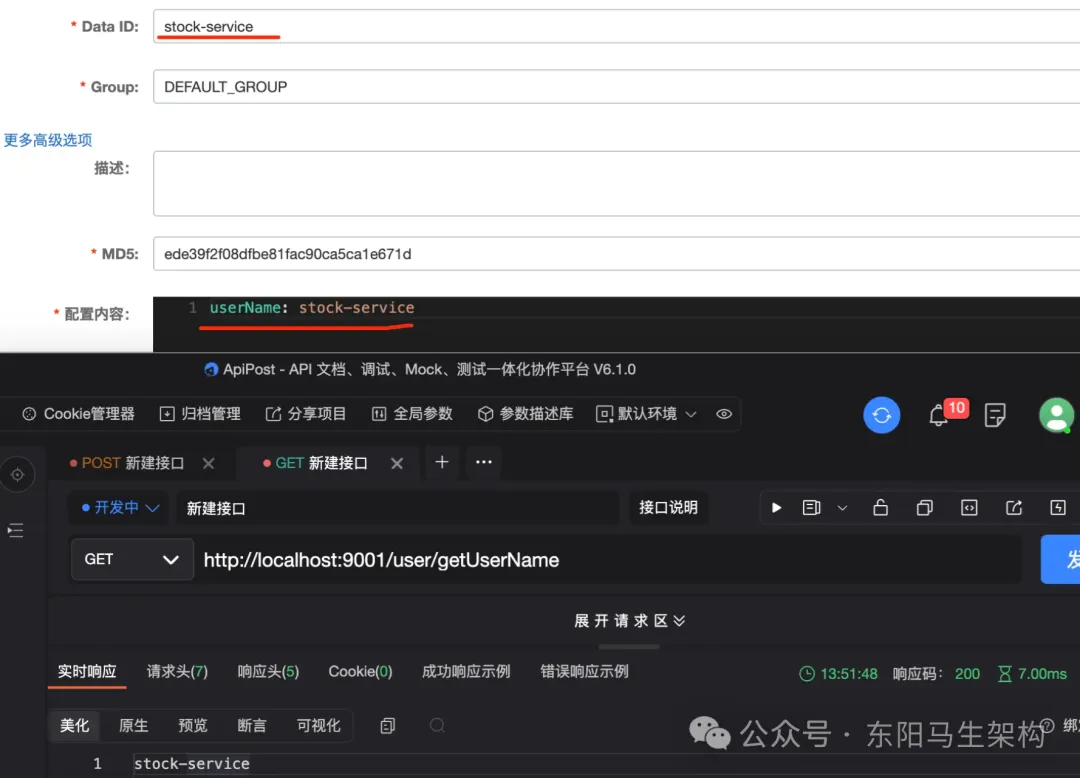
**第二种情况:**但项目中一般会指定配置文件的类型,所以可以在如下项目yaml配置中把配置文件类型加上。在项目yaml配置中加上配置文件类型后,会使用使用带后缀的配置文件。并且会覆盖之前的配置,说明带文件后缀的配置文件的优先级更高。
spring:
    application:
        name: stock-service
    cloud:
        nacos:
            # 配置中心
            config:
                server-addr: http://124.223.102.236:8848
            # 配置文件类型
            file-extension: yaml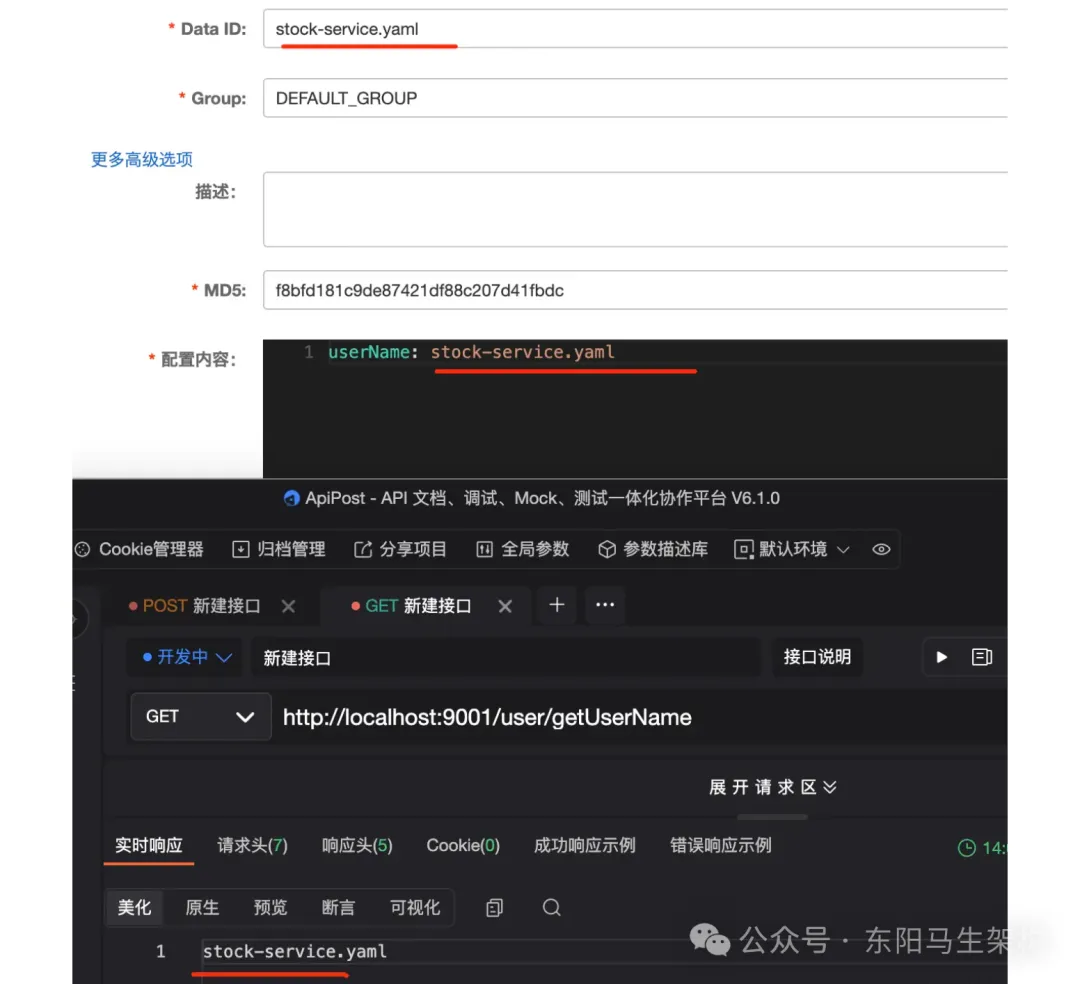
**第三种情况:**当然公司配置文件一般也会区分环境的。测试环境有测试环境的配置文件,生产环境有生产环境的配置文件。在如下的项目yaml配置中指定使用区分了环境的配置文件,这时带有环境变量的配置文件,比前面两个配置文件优先级更高。
spring:
    application:
        name: stock-service
    profiles:
        # 测试环境
        active: test
    cloud:
        nacos:
            # 配置中心
            config:
                server-addr: http://124.223.102.236:8848
            # 配置文件类型
            file-extension: yaml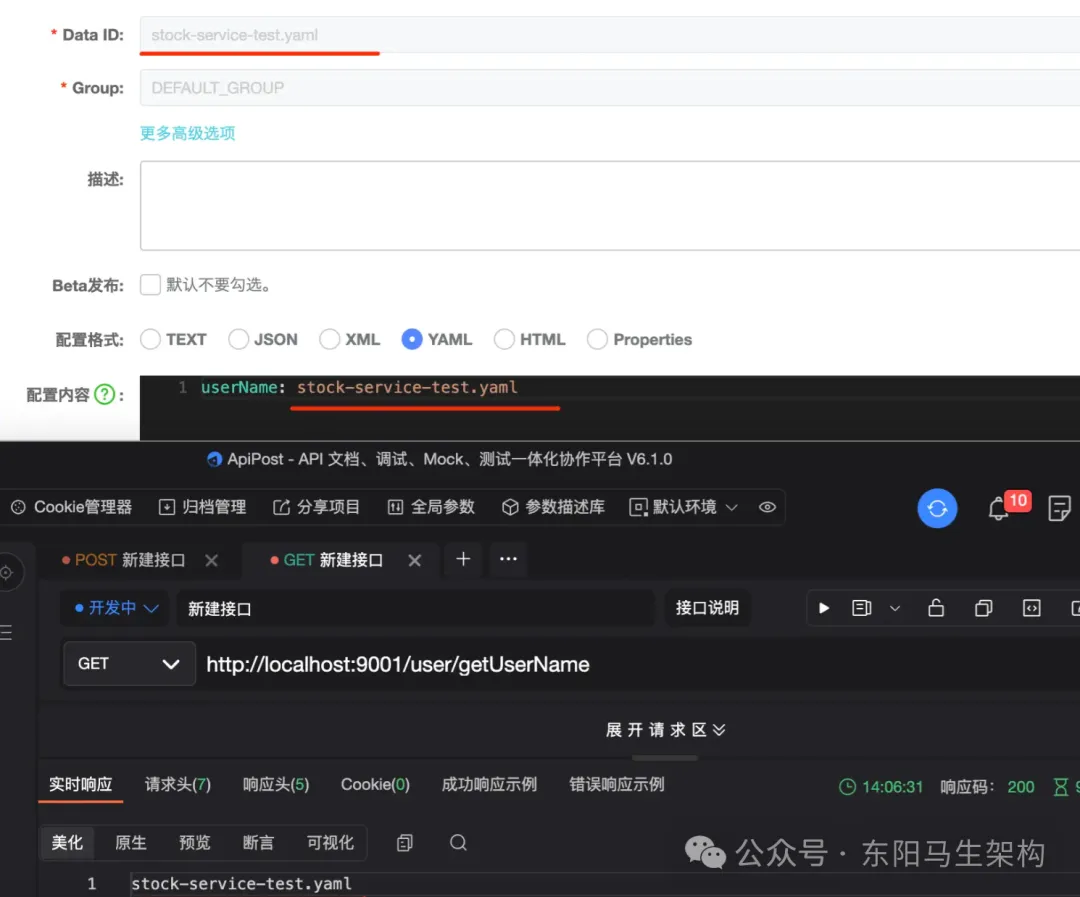
**总结:**读取自身应用的配置文件,如上三种情况,会存在优先级关系。通过微服务名称简单去获取stock-service配置文件的优先级最低,指定配置文件类型去获取stock-service配置文件的优先级比前者高,指定项目环境去获取stock-service配置文件的优先级是最高。
二.读取共享的配置文件
实际中会存在多个业务系统都共用同一数据库、Redis等中间件,这时不宜把每个中间件信息都配置到每个业务系统中,而是应该统一集中管理。比如在一个共享配置文件中配置,各业务系统使用共享配置文件即可。
项目yaml配置指定读取Nacos的共享配置文件如下:在spring.cloud.nacos.config配置下可以指定shared-configs配置。shared-configs配置是一个数组类型,表示可以配置多个共享配置文件,所以可以通过shared-configs配置将一些中间件配置管理起来。但要注意共享配置文件里的配置不要和自身应用配置文件里的配置重复,因为自身应用配置文件比共享配置文件的优先级高。
当然除了自身应用配置文件、共享配置文件外,还有一种额外的配置文件。如果一些配置不适合放在前两种配置文件,可以放到额外的配置文件中。
spring:
    application:
        name: stock-service
    profiles:
        # 测试环境
        active: test
    cloud:
        nacos:
            # 配置中心
            config:
                server-addr: http://124.223.102.236:8848
                # 配置文件类型
                file-extension: yaml
                # 共享配置文件
                shared-configs:
                    dataId: common-mysql.yaml
                    group: DEFAULT_GROUP
                    # 中间件配置一般不需要刷新
                    refresh: false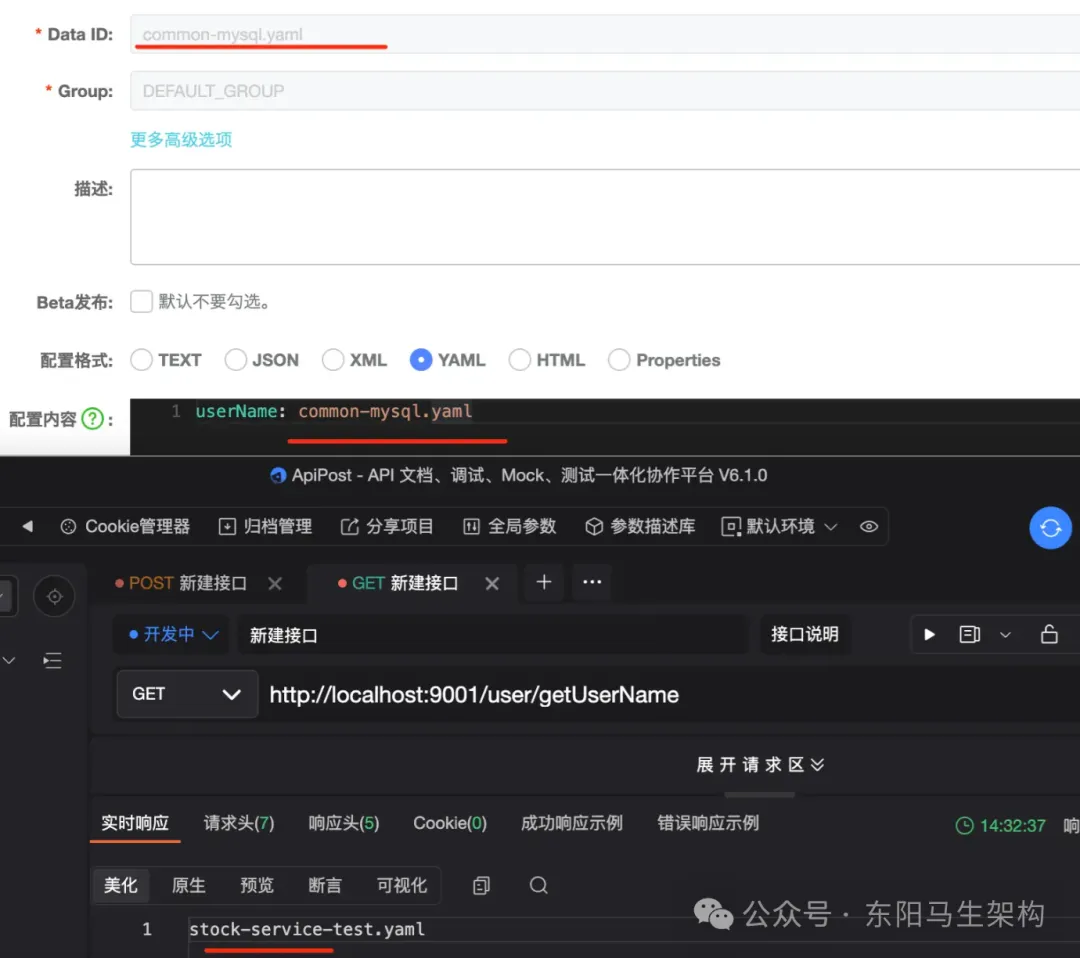
(2)远程配置文件的加载顺序源码
在NacosPropertySourceLocator的locate()方法中,最先加载的配置文件,相同配置项会被后面加载的配置文件给覆盖掉。因为这些配置文件本身就是kv形式存储,所以共享配置文件优先级最低。自身应用配置文件 > 额外配置文件 > 共享配置文件。
在NacosPropertySourceLocator的loadApplicationConfiguration()方法中,加载自身应用的配置文件的优先级为:"微服务名"的配置文件 < "微服务名.后缀名"的配置文件 < "微服务-环境变量名.后缀名"的配置文件。同样对于相同配置项,先加载的会被后加载的替换掉。
但不管获取的是哪一种类型的配置文件,最终都调用NacosPropertySourceLocator的loadNacosDataIfPresent()方法。在这个方法里最终会通过HTTP方式去获取Nacos服务端的配置文件数据,请求的HTTP地址是"/v1/cs/configs",获得数据后会马上持久化到本地。
@Order(0)
public class NacosPropertySourceLocator implements PropertySourceLocator {
    ...
    @Override
    public PropertySource<?> locate(Environment env) {
        nacosConfigProperties.setEnvironment(env);
        //获取NacosConfigService对象
        ConfigService configService = nacosConfigManager.getConfigService();

        if (null == configService) {
            log.warn("no instance of config service found, can't load config from nacos");
            return null;
        }
        //获取yml配置信息
        long timeout = nacosConfigProperties.getTimeout();
        //传入NacosConfigService对象创建NacosPropertySourceBuilder构造器
        nacosPropertySourceBuilder = new NacosPropertySourceBuilder(configService, timeout);
        String name = nacosConfigProperties.getName();
        String dataIdPrefix = nacosConfigProperties.getPrefix();
        if (StringUtils.isEmpty(dataIdPrefix)) {
            dataIdPrefix = name;
        }
        if (StringUtils.isEmpty(dataIdPrefix)) {
            dataIdPrefix = env.getProperty("spring.application.name");
        }
        CompositePropertySource composite = new CompositePropertySource(NACOS_PROPERTY_SOURCE_NAME);
        //1.加载共享的配置数据,对应的配置是:spring.cloud.nacos.shared-configs
        loadSharedConfiguration(composite);
        //2.加载额外的配置数据,对应的配置是:spring.cloud.nacos.extension-configs
        loadExtConfiguration(composite);
        //3.加载自身应用的配置数据
        loadApplicationConfiguration(composite, dataIdPrefix, nacosConfigProperties, env);
        return composite;
    }

    private void loadApplicationConfiguration(CompositePropertySource compositePropertySource, String dataIdPrefix, NacosConfigProperties properties, Environment environment) {
        String fileExtension = properties.getFileExtension();
        String nacosGroup = properties.getGroup();
        //1.加载"微服务名"的配置文件
        loadNacosDataIfPresent(compositePropertySource, dataIdPrefix, nacosGroup, fileExtension, true);
        //2.加载"微服务名.后缀名"的配置文件
        loadNacosDataIfPresent(compositePropertySource, dataIdPrefix + DOT + fileExtension, nacosGroup, fileExtension, true);
        //3.加载"微服务-环境变量名.后缀名"的配置文件,因为环境变量可以配置多个,所以这里是循环
        for (String profile : environment.getActiveProfiles()) {
            String dataId = dataIdPrefix + SEP1 + profile + DOT + fileExtension;
            loadNacosDataIfPresent(compositePropertySource, dataId, nacosGroup, fileExtension, true);
        }
    }

    private void loadExtConfiguration(CompositePropertySource compositePropertySource) {
        List<NacosConfigProperties.Config> extConfigs = nacosConfigProperties.getExtensionConfigs();
        if (!CollectionUtils.isEmpty(extConfigs)) {
            checkConfiguration(extConfigs, "extension-configs");
            loadNacosConfiguration(compositePropertySource, extConfigs);
        }
    }

    private void loadNacosConfiguration(final CompositePropertySource composite, List<NacosConfigProperties.Config> configs) {
        for (NacosConfigProperties.Config config : configs) {
            loadNacosDataIfPresent(composite, config.getDataId(), config.getGroup(), NacosDataParserHandler.getInstance().getFileExtension(config.getDataId()), config.isRefresh());
        }
    }
    ...
}
(3)远程配置文件的读取源码
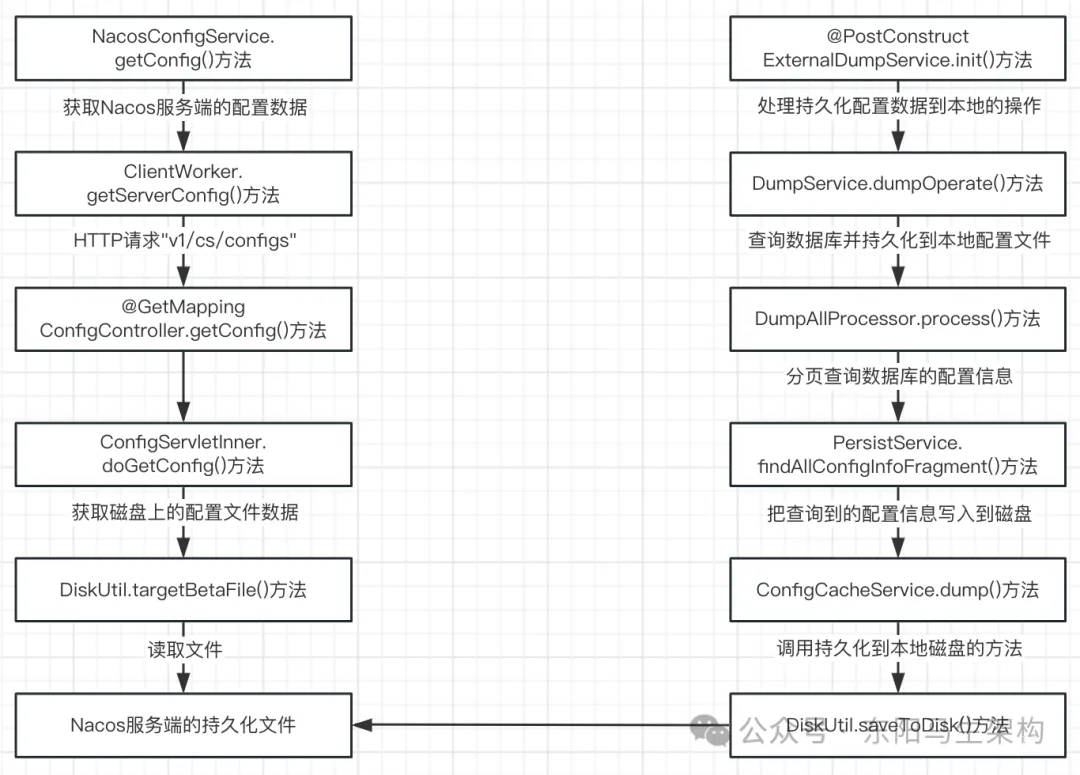
Nacos服务端处理HTTP请求"/v1/cs/configs"的入口是:ConfigController的getConfig()方法。
执行ConfigController的getConfig()方法时,会调用ConfigServletInner的doGetConfig()方法,而该方法的核心代码就是通过DiskUtil的targetBetaFile()方法获取磁盘上的文件数据。
所以Nacos客户端发送HTTP请求来获取配置文件数据时,Nacos服务端并不是去数据库中获取对应的配置文件数据,而是直接读取本地磁盘文件的配置文件数据然后返回给客户端。那么Nacos服务端是什么时候将配置文件数据持久化到本地磁盘文件的?
其实在执行ExternalDumpService的init()方法进行初始化Bean实例时,会调用DumpService的dumpOperate()方法,然后会调用DumpService的dumpConfigInfo()方法,接着会调用DumpAllProcessor的process()方法查询数据库。
DumpAllProcessor的process()方法会做两件事:一是通过分页查询数据库中的config_info表数据,二是将查询到的数据持久化到本地磁盘文件中。
@RestController
@RequestMapping(Constants.CONFIG_CONTROLLER_PATH)
public class ConfigController {
    private final ConfigServletInner inner;
    ...
    //Get configure board infomation fail.
    @GetMapping
    @Secured(action = ActionTypes.READ, parser = ConfigResourceParser.class)
    public void getConfig(HttpServletRequest request, HttpServletResponse response,
            @RequestParam("dataId") String dataId, @RequestParam("group") String group,
            @RequestParam(value = "tenant", required = false, defaultValue = StringUtils.EMPTY) String tenant,
            @RequestParam(value = "tag", required = false) String tag)
            throws IOException, ServletException, NacosException {
        //check tenant
        ParamUtils.checkTenant(tenant);
        tenant = NamespaceUtil.processNamespaceParameter(tenant);
        //check params
        ParamUtils.checkParam(dataId, group, "datumId", "content");
        ParamUtils.checkParam(tag);

        final String clientIp = RequestUtil.getRemoteIp(request);
        inner.doGetConfig(request, response, dataId, group, tenant, tag, clientIp);
    }
    ...
}

@Service
public class ConfigServletInner {
    ...
    public String doGetConfig(HttpServletRequest request, HttpServletResponse response, String dataId, String group,
            String tenant, String tag, String clientIp)  throws IOException, ServletException {
        ...
        File file = null;
        //核心代码:获取磁盘上的文件数据
        file = DiskUtil.targetBetaFile(dataId, group, tenant);
        ...
    }
    ...
}

@Conditional(ConditionOnExternalStorage.class)
@Component
public class ExternalDumpService extends DumpService {
    ...
    @PostConstruct
    @Override
    protected void init() throws Throwable {
        dumpOperate(processor, dumpAllProcessor, dumpAllBetaProcessor, dumpAllTagProcessor);
    }
    ...
}

//Dump data service.
public abstract class DumpService {
    protected DumpProcessor processor;
    protected DumpAllProcessor dumpAllProcessor;
    protected DumpAllBetaProcessor dumpAllBetaProcessor;
    protected DumpAllTagProcessor dumpAllTagProcessor;
    protected final PersistService persistService;
    protected final ServerMemberManager memberManager;
    ...
    protected void dumpOperate(DumpProcessor processor, DumpAllProcessor dumpAllProcessor, DumpAllBetaProcessor dumpAllBetaProcessor, DumpAllTagProcessor dumpAllTagProcessor) throws NacosException {
        ...
        //持久化配置文件到磁盘
        dumpConfigInfo(dumpAllProcessor);
        ...
    }

    private void dumpConfigInfo(DumpAllProcessor dumpAllProcessor) throws IOException {
        ...
        //查询数据库配置
        dumpAllProcessor.process(new DumpAllTask());
        ...
    }
    ...
}

public class DumpAllProcessor implements NacosTaskProcessor {
    static final int PAGE_SIZE = 1000;
    final DumpService dumpService;
    final PersistService persistService;

    public DumpAllProcessor(DumpService dumpService) {
        this.dumpService = dumpService;
        this.persistService = dumpService.getPersistService();
    }

    @Override
    public boolean process(NacosTask task) {
        //查询最大ID
        long currentMaxId = persistService.findConfigMaxId();
        long lastMaxId = 0;
        while (lastMaxId < currentMaxId) {
            //分页查询配置信息
            Page<ConfigInfoWrapper> page = persistService.findAllConfigInfoFragment(lastMaxId, PAGE_SIZE);
            if (page != null && page.getPageItems() != null && !page.getPageItems().isEmpty()) {
                for (ConfigInfoWrapper cf : page.getPageItems()) {
                    long id = cf.getId();
                    lastMaxId = id > lastMaxId ? id : lastMaxId;
                    if (cf.getDataId().equals(AggrWhitelist.AGGRIDS_METADATA)) {
                        AggrWhitelist.load(cf.getContent());
                    }
                    if (cf.getDataId().equals(ClientIpWhiteList.CLIENT_IP_WHITELIST_METADATA)) {
                        ClientIpWhiteList.load(cf.getContent());
                    }
                    if (cf.getDataId().equals(SwitchService.SWITCH_META_DATAID)) {
                        SwitchService.load(cf.getContent());
                    }
                    //把查询到的配置信息写入到磁盘
                    boolean result = ConfigCacheService.dump(cf.getDataId(), cf.getGroup(), cf.getTenant(), cf.getContent(), cf.getLastModified(), cf.getType());
                    final String content = cf.getContent();
                    final String md5 = MD5Utils.md5Hex(content, Constants.ENCODE);
                    LogUtil.DUMP_LOG.info("[dump-all-ok] {}, {}, length={}, md5={}", GroupKey2.getKey(cf.getDataId(), cf.getGroup()), cf.getLastModified(), content.length(), md5);
                }
                DEFAULT_LOG.info("[all-dump] {} / {}", lastMaxId, currentMaxId);
            } else {
                lastMaxId += PAGE_SIZE;
            }
        }
        return true;
    }
}

public class ConfigCacheService {
    ...
    //Save config file and update md5 value in cache.
    public static boolean dump(String dataId, String group, String tenant, String content, long lastModifiedTs, String type) {
        String groupKey = GroupKey2.getKey(dataId, group, tenant);
        CacheItem ci = makeSure(groupKey);
        ci.setType(type);
        final int lockResult = tryWriteLock(groupKey);
        assert (lockResult != 0);

        if (lockResult < 0) {
            DUMP_LOG.warn("[dump-error] write lock failed. {}", groupKey);
            return false;
        }

        try {
            final String md5 = MD5Utils.md5Hex(content, Constants.ENCODE);
            if (md5.equals(ConfigCacheService.getContentMd5(groupKey))) {
                DUMP_LOG.warn("[dump-ignore] ignore to save cache file. groupKey={}, md5={}, lastModifiedOld={}, " + "lastModifiedNew={}", groupKey, md5, ConfigCacheService.getLastModifiedTs(groupKey), lastModifiedTs);
            } else if (!PropertyUtil.isDirectRead()) {
                //调用持久化到本地磁盘的方法
                DiskUtil.saveToDisk(dataId, group, tenant, content);
            }
            updateMd5(groupKey, md5, lastModifiedTs);
            return true;
        } catch (IOException ioe) {
            DUMP_LOG.error("[dump-exception] save disk error. " + groupKey + ", " + ioe.toString(), ioe);
            if (ioe.getMessage() != null) {
                String errMsg = ioe.getMessage();
                if (NO_SPACE_CN.equals(errMsg) || NO_SPACE_EN.equals(errMsg) || errMsg.contains(DISK_QUATA_CN) || errMsg.contains(DISK_QUATA_EN)) {
                    //Protect from disk full.
                    FATAL_LOG.error("磁盘满自杀退出", ioe);
                    System.exit(0);
                }
            }
            return false;
        } finally {
            releaseWriteLock(groupKey);
        }
    }
    ...
}
(4)总结
**一.不同类型配置文件的优先级:**自身应用配置文件 > 额外配置文件 > 共享配置文件。
二.自身应用配置文件的优先级:"微服务名"的配置文件 < "微服务名.后缀名"的配置文件 < "微服务-环境变量名.后缀名"的配置文件。
三.Nacos客户端向服务端获取配置数据的流程
客户端向服务端查询配置数据时,服务端会直接获取其本地磁盘文件中的配置进行返回。
服务端本地磁盘文件上的配置数据,是在服务端启动时查询数据库数据,然后持久化到本地磁盘上的。
所以如果直接手动修改数据库中的配置信息,客户端是不生效的,因为客户端向服务端获取配置信息时并不是读取数据库的。