swift
import Foundation
import VideoToolbox

class KFVideoDecoderInputPacket {
    var sampleBuffer: CMSampleBuffer?
}

class KFVideoDecoder {
    // MARK: - 常量
    private let kDecoderRetrySessionMaxCount = 5
    private let kDecoderDecodeFrameFailedMaxCount = 20

    // MARK: - 回调
    var pixelBufferOutputCallBack: ((CVPixelBuffer, CMTime) -> Void)?
    var errorCallBack: ((Error) -> Void)?

    // MARK: - 属性
    private var decoderSession: VTDecompressionSession? // 视频解码器实例
    private let decoderQueue: DispatchQueue
    private let semaphore: DispatchSemaphore
    private var retrySessionCount: Int = 0 // 解码器重试次数
    private var decodeFrameFailedCount: Int = 0 // 解码失败次数
    private var gopList: [KFVideoDecoderInputPacket] = []
    private var inputCount: Int = 0 // 输入帧数
    var outputCount: Int = 0 // 输出帧数

    // MARK: - 生命周期
    init() {
        decoderQueue = DispatchQueue(label: "com.KeyFrameKit.videoDecoder", qos: .default)
        semaphore = DispatchSemaphore(value: 1)
        gopList = []
    }

    deinit {
        semaphore.wait()
        releaseDecompressionSession()
        clearCompressQueue()
        semaphore.signal()
    }

    // MARK: - 公共方法
    func decodeSampleBuffer(_ sampleBuffer: CMSampleBuffer) {
        guard CMSampleBufferIsValid(sampleBuffer),
              retrySessionCount < kDecoderRetrySessionMaxCount,
              decodeFrameFailedCount < kDecoderDecodeFrameFailedMaxCount else {
            return
        }

        // 为异步操作保留样本缓冲区
        let unmanagedSampleBuffer = Unmanaged.passRetained(sampleBuffer)

        decoderQueue.async { [weak self] in
            guard let self = self else {
                unmanagedSampleBuffer.release()
                return
            }

            self.semaphore.wait()

            // 1、如果还未创建解码器实例,则创建解码器
            var setupStatus = noErr
            if self.decoderSession == nil {
                if let formatDescription = CMSampleBufferGetFormatDescription(sampleBuffer) {
                    setupStatus = self.setupDecompressionSession(videoDescription: formatDescription)
                    self.retrySessionCount = (setupStatus == noErr) ? 0 : (self.retrySessionCount + 1)

                    if setupStatus != noErr {
                        self.releaseDecompressionSession()
                    }
                }
            }

            if self.decoderSession == nil {
                unmanagedSampleBuffer.release()
                self.semaphore.signal()

                if self.retrySessionCount >= self.kDecoderRetrySessionMaxCount, let errorCallback = self.errorCallBack {
                    DispatchQueue.main.async {
                        let error = NSError(domain: String(describing: KFVideoDecoder.self), code: Int(setupStatus), userInfo: nil)
                        errorCallback(error)
                    }
                }
                return
            }

            // 2、对 sampleBuffer 进行解码
            var flags = VTDecodeFrameFlags._EnableAsynchronousDecompression
            var flagsOut = VTDecodeInfoFlags()

            var decodeStatus = VTDecompressionSessionDecodeFrame(
                self.decoderSession!,
                sampleBuffer: sampleBuffer,
                flags: flags,
                frameRefcon: nil,
                infoFlagsOut: &flagsOut
            )

            if decodeStatus == kVTInvalidSessionErr {
                // 解码当前帧失败,进行重建解码器重试
                self.releaseDecompressionSession()

                if let formatDescription = CMSampleBufferGetFormatDescription(sampleBuffer) {
                    setupStatus = self.setupDecompressionSession(videoDescription: formatDescription)
                    self.retrySessionCount = (setupStatus == noErr) ? 0 : (self.retrySessionCount + 1)

                    if setupStatus == noErr {
                        // 重建解码器成功后,要从当前 GOP 开始的 I 帧解码
                        flags = ._DoNotOutputFrame
                        for packet in self.gopList {
                            if let packetBuffer = packet.sampleBuffer {
                                _ = VTDecompressionSessionDecodeFrame(
                                    self.decoderSession!,
                                    sampleBuffer: packetBuffer,
                                    flags: flags,
                                    frameRefcon: nil,
                                    infoFlagsOut: &flagsOut
                                )
                            }
                        }

                        // 解码当前帧
                        flags = ._EnableAsynchronousDecompression
                        decodeStatus = VTDecompressionSessionDecodeFrame(
                            self.decoderSession!,
                            sampleBuffer: sampleBuffer,
                            flags: flags,
                            frameRefcon: nil,
                            infoFlagsOut: &flagsOut
                        )
                    } else {
                        // 重建解码器失败
                        self.releaseDecompressionSession()
                    }
                }
            } else if decodeStatus != noErr {
                print("KFVideoDecoder 解码错误: \(decodeStatus)")
            }

            // 统计解码入帧数
            self.inputCount += 1

            // 遇到新的 I 帧后,清空上一个 GOP 序列缓存
            if self.isKeyFrame(sampleBuffer: sampleBuffer) {
                self.clearCompressQueue()
            }

            // 存储当前帧到 GOP 列表
            let packet = KFVideoDecoderInputPacket()
            packet.sampleBuffer = unmanagedSampleBuffer.takeRetainedValue()
            self.gopList.append(packet)

            // 记录解码失败次数
            self.decodeFrameFailedCount = (decodeStatus == noErr) ? 0 : (self.decodeFrameFailedCount + 1)

            self.semaphore.signal()

            // 解码失败次数超过上限,报错
            if self.decodeFrameFailedCount >= self.kDecoderDecodeFrameFailedMaxCount, let errorCallback = self.errorCallBack {
                DispatchQueue.main.async {
                    let error = NSError(domain: String(describing: KFVideoDecoder.self), code: Int(decodeStatus), userInfo: nil)
                    errorCallback(error)
                }
            }
        }
    }

    func flush() {
        decoderQueue.async { [weak self] in
            guard let self = self else { return }
            self.semaphore.wait()
            self.flushInternal()
            self.semaphore.signal()
        }
    }

    func flush(completionHandler: @escaping () -> Void) {
        decoderQueue.async { [weak self] in
            guard let self = self else {
                completionHandler()
                return
            }
            self.semaphore.wait()
            self.flushInternal()
            self.semaphore.signal()
            completionHandler()
        }
    }

    // MARK: - 私有方法
    private func setupDecompressionSession(videoDescription: CMFormatDescription) -> OSStatus {
        if decoderSession != nil {
            return noErr
        }

        // 1、设置颜色格式
        let attrs: [String: Any] = [kCVPixelBufferPixelFormatTypeKey as String: kCVPixelFormatType_420YpCbCr8BiPlanarFullRange]

        // 2、设置解码回调
        var outputCallbackRecord = VTDecompressionOutputCallbackRecord()
        outputCallbackRecord.decompressionOutputCallback = decompressionOutputCallback
        outputCallbackRecord.decompressionOutputRefCon = Unmanaged.passUnretained(self).toOpaque()

        // 3、创建解码器实例
        var session: VTDecompressionSession?
        let status = VTDecompressionSessionCreate(
            allocator: kCFAllocatorDefault,
            formatDescription: videoDescription,
            decoderSpecification: nil,
            imageBufferAttributes: attrs as CFDictionary,
            outputCallback: &outputCallbackRecord,
            decompressionSessionOut: &session
        )

        if status == noErr {
            decoderSession = session
        }

        return status
    }

    private func releaseDecompressionSession() {
        if let session = decoderSession {
            VTDecompressionSessionWaitForAsynchronousFrames(session)
            VTDecompressionSessionInvalidate(session)
            decoderSession = nil
        }
    }

    private func flushInternal() {
        if let session = decoderSession {
            VTDecompressionSessionFinishDelayedFrames(session)
            VTDecompressionSessionWaitForAsynchronousFrames(session)
        }
    }

    private func clearCompressQueue() {
        gopList.removeAll()
    }

    private func isKeyFrame(sampleBuffer: CMSampleBuffer) -> Bool {
        guard let attachments = CMSampleBufferGetSampleAttachmentsArray(sampleBuffer, createIfNecessary: true) as? [[CFString: Any]],
              let attachment = attachments.first else {
            return false
        }

        return !attachment.keys.contains(kCMSampleAttachmentKey_NotSync)
    }
}

// MARK: - 回调函数
private func decompressionOutputCallback(decompressionOutputRefCon: UnsafeMutableRawPointer?,
                                        sourceFrameRefCon: UnsafeMutableRawPointer?,
                                        status: OSStatus,
                                        infoFlags: VTDecodeInfoFlags,
                                        imageBuffer: CVImageBuffer?,
                                        presentationTimeStamp: CMTime,
                                        presentationDuration: CMTime)
{
    guard status == noErr else { return }

    if infoFlags.contains(.frameDropped) {
        print("KFVideoDecoder 丢弃帧")
        return
    }

    let decoderOptional = decompressionOutputRefCon.map { Unmanaged<KFVideoDecoder>.fromOpaque($0).takeUnretainedValue() }
    guard let decoder = decoderOptional,
          let pixelBuffer = imageBuffer else {
        return
    }

    if let callback = decoder.pixelBufferOutputCallBack {
        callback(pixelBuffer, presentationTimeStamp)
        decoder.outputCount += 1
    }
}-
初始化阶段:
KFVideoDecoderViewController在viewDidLoad中初始化解封装器和解码器- 设置UI界面,添加"Start"按钮
-
启动解封装:
- 用户点击"Start"按钮触发
start()方法 - 调用
demuxer.startReading,开始读取MP4文件
- 用户点击"Start"按钮触发
-
解封装和解码:
- 解封装成功后,在
fetchAndDecodeDemuxedData方法中:- 循环从
demuxer获取视频和音频Sample Buffer - 将视频Sample Buffer传递给
decoder.decodeSampleBuffer进行解码 - 解码器内部使用VideoToolbox的
VTDecompressionSessionDecodeFrame进行硬件解码
- 循环从
- 解封装成功后,在
-
解码回调处理:
- 解码成功后,通过回调函数
decompressionOutputCallback传递解码后的像素缓冲区 - 回调触发
pixelBufferOutputCallBack,由KFVideoDecoderViewController处理解码后的帧 - 解码帧被保存到YUV文件中
- 解码成功后,通过回调函数
-
解码结束:
- 当
demuxer.demuxerStatus为.completed时,表示解封装完成 - 调用
decoder.flush()确保所有帧都被处理 - 将剩余YUV数据写入文件
- 当
六、关键技术点
- GOP管理
视频解码需要关键帧作为解码起点。项目中通过gopList存储当前GOP的所有帧,当解码会话失效需要重建时,可以从GOP的I帧开始重新提交解码,避免画面丢失。 - 线程安全
使用专用队列和信号量确保解码操作的线程安全:
decoderQueue:确保所有解码操作在同一线程序列执行
semaphore:确保关键资源操作的互斥访问 - 异步解码
VideoToolbox的解码是异步进行的,通过回调函数机制返回结果:
提交解码任务时设置_EnableAsynchronousDecompression标志开启异步
解码完成后由VideoToolbox调用我们的回调函数
回调函数中处理解码结果并传递给上层应用 - 错误处理和恢复机制
解码器实现了健壮的错误处理和恢复机制:
解码会话失效自动重建
基于GOP的解码恢复策略
失败次数限制和错误上报
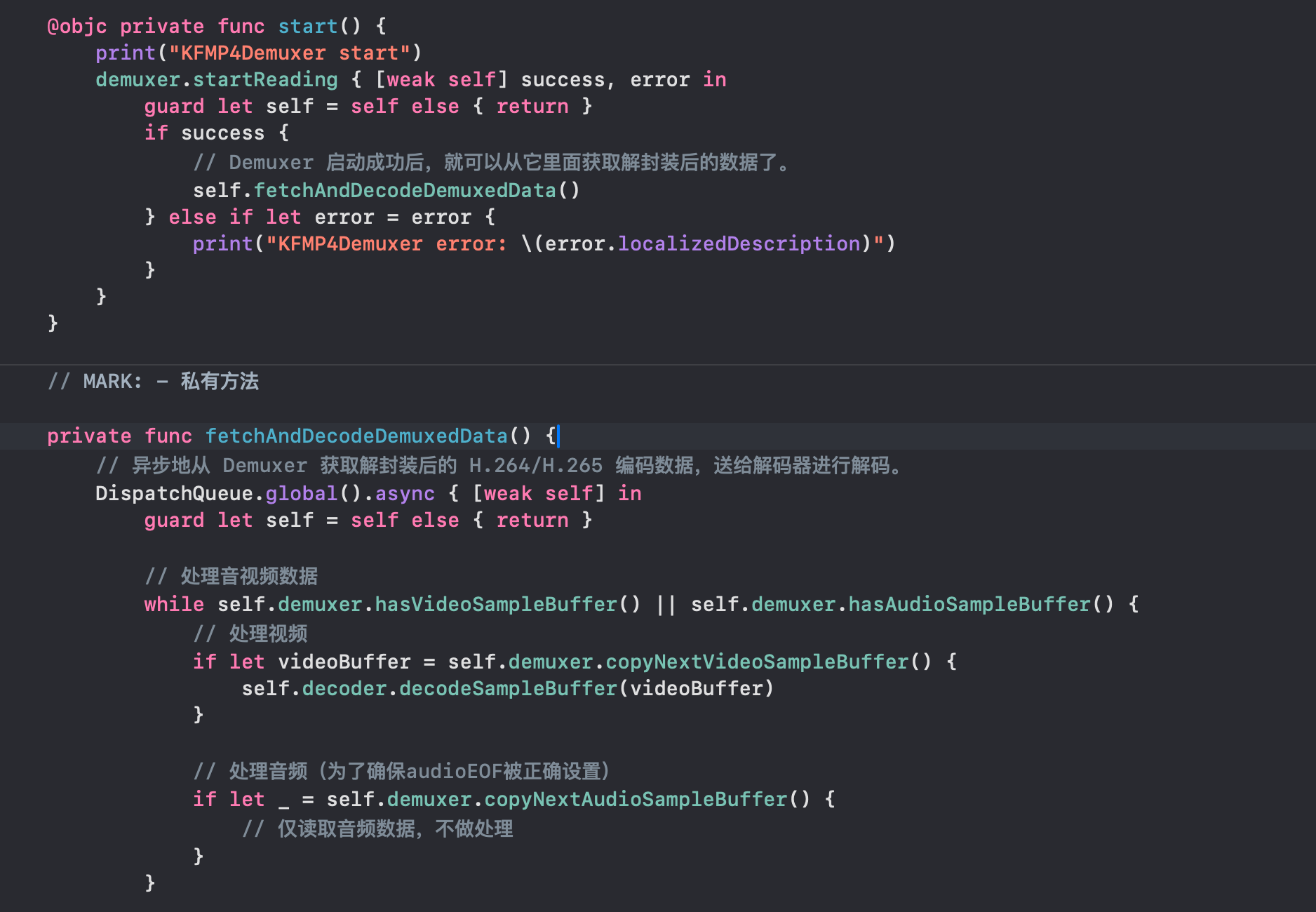
需要注意的是,因为是把mp4文件解封装为h264,按照理论来说应该只用处理视频轨道,但是解封装内部的判断为,如果是一个mp4的音视频混合文件,那么视频和音频轨道需要都处理,不然解封装器的状态不能正确结束。
swift
        while let reader = demuxReader, reader.status == .reading && (shouldContinueLoadingAudio || shouldContinueLoadingVideo) {
            loadCount += 1
            if loadCount > 100 {
                break  // 防止无限循环
            }

            // 加载音频数据
            if shouldContinueLoadingAudio {
                audioQueueSemaphore.wait()
                let audioCount = CMSimpleQueueGetCount(audioQueue)
                audioQueueSemaphore.signal()

                if audioCount < KFMP4DemuxerQueueMaxCount, let audioOutput = readerAudioOutput {
                    // 从音频输出源读取音频数据
                    if let next = audioOutput.copyNextSampleBuffer() {
                        if CMSampleBufferGetDataBuffer(next) == nil {
                            // 移除了CFRelease调用
                        } else {
                            // 将数据从音频输出源 readerAudioOutput 拷贝到缓冲队列 audioQueue 中
                            lastAudioCopyNextTime = CMSampleBufferGetPresentationTimeStamp(next)
                            audioQueueSemaphore.wait()
                            let unmanagedSample = Unmanaged.passRetained(next)
                            CMSimpleQueueEnqueue(audioQueue, element: unmanagedSample.toOpaque())
                            let newAudioCount = CMSimpleQueueGetCount(audioQueue)
                            audioQueueSemaphore.signal()
                        }
                    } else {
                        audioEOF = reader.status == .reading || reader.status == .completed
                        shouldContinueLoadingAudio = false
                    }
                } else {
                    shouldContinueLoadingAudio = false
                }
            }

            // 加载视频数据
            if shouldContinueLoadingVideo {
                videoQueueSemaphore.wait()
                let videoCount = CMSimpleQueueGetCount(videoQueue)
                videoQueueSemaphore.signal()

                if videoCount < KFMP4DemuxerQueueMaxCount, let videoOutput = readerVideoOutput {
                    // 从视频输出源读取视频数据
                    if let next = videoOutput.copyNextSampleBuffer() {
                        if CMSampleBufferGetDataBuffer(next) == nil {
                            // 移除了CFRelease调用
                        } else {
                            // 将数据从视频输出源 readerVideoOutput 拷贝到缓冲队列 videoQueue 中
                            lastVideoCopyNextTime = CMSampleBufferGetDecodeTimeStamp(next)
                            videoQueueSemaphore.wait()
                            let unmanagedSample = Unmanaged.passRetained(next)
                            CMSimpleQueueEnqueue(videoQueue, element: unmanagedSample.toOpaque())
                            let newVideoCount = CMSimpleQueueGetCount(videoQueue)
                            videoQueueSemaphore.signal()
                        }
                    } else {
                        videoEOF = reader.status == .reading || reader.status == .completed
                        shouldContinueLoadingVideo = false

                        // 添加日志,记录视频EOF的设置
                        print("视频EOF标记设置为: \(videoEOF), reader状态: \(reader.status.rawValue)")

                        // 如果视频EOF且没有更多数据,设置demuxer状态为完成
                        if videoEOF && !hasAudioTrack {
                            print("视频处理完成,设置demuxer状态为completed")
                            demuxerStatus = .completed
                        }
                    }
                } else {
                    shouldContinueLoadingVideo = false
                }
            }
        }

        // 在函数末尾添加,检查解码是否完成
        if (audioEOF || !hasAudioTrack) && (videoEOF || !hasVideoTrack) {
            if demuxerStatus == .running {
                print("音频和视频均已处理完毕,设置解封装状态为completed")
                demuxerStatus = .completed
            }
        }
我们可以看到,当存在音频和视频轨道的时候,两个EOF必须都变为1,解封装器的状态才会进行改变。