1,目的。
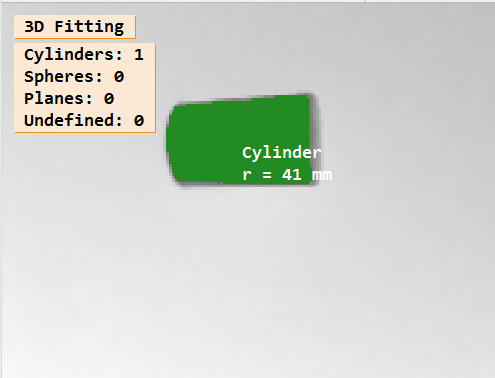
测量水杯的半径
如图所示:
2,原理。
对 3D 点云对象 进行圆柱体拟合,获取拟合后的半径。
3,注意事项。
- 在Halcon中使用
fit_primitives_object_model_3d进行圆柱体拟合时,输出的primitive_parameter包含以下7个参数:-
参数构成
- 轴线方向向量
3个数值:
(a, b, c)描述圆柱体轴线的空间方向,满足归一化条件
a² + b² + c² = 1. - 轴线上基准点坐标
3个数值:
(x0, y0, z0)表示轴线上的一个参考点,通常靠近点云的重心
. - 圆柱半径
1个数值:
R单位为点云的原始坐标系单位(如毫米)
-
数学验证
圆柱表面点需满足方程:
( x − x p ) 2 + ( y − y p ) 2 + ( z − z p ) 2 − ( x − x p ) a + ( y − y p ) b + ( z − z p ) c 2 = R \sqrt{(x-x_p)^2+(y-y_p)^2+(z-z_p)^2-(x-x_p)a+(y-y_p)b+(z-z_p)c^2}=R (x−xp)2+(y−yp)2+(z−zp)2−(x−xp)a+(y−yp)b+(z−zp)c2 =R其中
(x_p, y_p, z_p)为轴线上任意一点
-
-
在Halcon中使用
fit_primitives_object_model_3d对三维点云进行球体拟合时,输出的primitive_parameter包含以下4个关键参数:-
参数构成
球心坐标
包含3个数值:
(x, y, z)表示拟合球体的中心点在三维空间中的位置
球体半径
单个数值:
R单位为点云的原始坐标系单位(如毫米或米)
-
参数验证方法
数学验证 :球面点需满足方程 ( x − x 0 ) 2 + ( y − y 0 ) 2 + ( z − z 0 ) 2 = R 2 (x-x_0)^2+(y-y_0)^2+(z-z_0)^2=R^2 (x−x0)2+(y−y0)2+(z−z0)2=R2
其中
(x_0, y_0, z_0)为球心坐标 -
与其他几何体的区别
- 圆柱体:输出7个参数(轴线方向、基准点、半径)68
- 平面:输出4个参数(法向量、偏移量)
-
4,代码。
halcon
*参考案例库:fit_primitives_object_model_3d.hdev
* ***********************************************************************
* 将输入的 2.5D 图像拟合成圆柱体,并计算显示拟合后的圆柱体半径
* 2.5D 图像:在常规二维图像基础上叠加**高度或深度数据**,形成半三维表达(如灰度值隐含高度信息或直接存储深度通道)*
* ***********************************************************************
dev_update_off ()
dev_close_window ()
* Input: 2.5D image
* tif图像:是HALCON支持的高精度图像格式,专门用于存储包含复杂信息的图像数据,如3D深度图、工业相机采集的点云数据等*
* 一般由结构光相机,3D扫描仪提供
read_image (XYZ, '3d_machine_vision/segmentation/3d_primitives_xyz_02.tif')
dev_open_window_fit_image (XYZ, 0, 0, -1, -1, WindowHandle)
set_display_font (WindowHandle, 16, 'mono', 'true', 'false')
* Access to (x-, y-, z-)coordinates
access_channel (XYZ, X, 1)
access_channel (XYZ, Y, 2)
* 提取第三通道作为深度
access_channel (XYZ, Z, 3)
* Segment cylinder manually
threshold (Z, Region, 0.0, 0.83)
reduce_domain (X, Region, XTmp)
dev_display (Z)
dev_set_draw ('margin')
dev_set_line_width (2)
dev_set_color ('green')
dev_display (Region)
disp_message (WindowHandle, 'Segment cylinder with a simple threshold', 'window', 12, 12, 'black', 'true')
disp_continue_message (WindowHandle, 'black', 'true')
stop ()
*
xyz_to_object_model_3d (XTmp, Y, Z, ObjectModel3DID)
* 指定 3D 对象的原始类型,拟合算法,输出类型
ParFitting := ['primitive_type','fitting_algorithm','output_xyz_mapping']
ValFitting := ['cylinder','least_squares_huber','true']
* 对 原始对象进行 3D 拟合
fit_primitives_object_model_3d (ObjectModel3DID, ParFitting, ValFitting, ObjectModel3DOutID)
* Clear the object model that is no longer used
clear_object_model_3d (ObjectModel3DID)
* Display the result of the fitting
dev_display (Z)
dev_set_draw ('fill')
dev_display_fitting_results (RegionCylinder, RegionSphere, RegionPlane, RegionNone, ObjectModel3DOutID, WindowHandle, [])
dev_update_on ()
clear_object_model_3d (ObjectModel3DOutID)本地函数: dev_display_fitting_results
* This procedure displays the results of a fitting operation.
* Additionally to the primitive regions, the radius of
* cylinders and spheres is displayed.
* The colors can be specified with the parameter Colors
* in the following manner:
* Color[0] is used for objects which could not be fitted
* Color[1] is used for cylinders:用于圆柱体
* Color[2] is used for spheres:用于球体
* Color[3] is used for planes:用于平面
*
if (Colors == [])
    Colors := ['dim gray','forest green','red','slate blue']
endif
NumNone := 0
* 圆柱体数量
NumCylinders := 0
* 球体数量
NumSpheres := 0
* 平面数量
NumPlanes := 0
for Index := 0 to |ObjectModel3DOutID| - 1 by 1
    object_model_3d_to_xyz (XTmp, YTmp, ZTmp, ObjectModel3DOutID[Index], 'from_xyz_map', [], [])
    get_domain (XTmp, DomainTmp)
    * 是否存在原始数据
    get_object_model_3d_params (ObjectModel3DOutID[Index], 'has_primitive_data', ParamValue)
    if (ParamValue == 'true')
        get_object_model_3d_params (ObjectModel3DOutID[Index], 'primitive_parameter', GenParamValuesP)
        get_object_model_3d_params (ObjectModel3DOutID[Index], 'primitive_type', ParamValue)
        if (ParamValue == 'cylinder')
            if (NumCylinders == 0)
                *-1:表示复制从索引开始剩余的所有对象,注意这里是浅复制
                copy_obj (DomainTmp, RegionCylinder, 1, -1)
                * 从拟合的原始数据中获取拟合的圆柱体半径值
                RadiusCylinder := GenParamValuesP[6]
            else
                concat_obj (RegionCylinder, DomainTmp, RegionCylinder)
                RadiusCylinder := [RadiusCylinder,GenParamValuesP[6]]
            endif
            NumCylinders := NumCylinders + 1
        elseif (ParamValue == 'sphere')
            * 球体情况
            if (NumSpheres == 0)
                copy_obj (DomainTmp, RegionSphere, 1, -1)
                RadiusSphere := GenParamValuesP[3]
            else
                concat_obj (RegionSphere, DomainTmp, RegionSphere)
                RadiusSphere := [RadiusSphere,GenParamValuesP[3]]
            endif
            NumSpheres := NumSpheres + 1
        else
            * 平面情况
            if (NumPlanes == 0)
                copy_obj (DomainTmp, RegionPlane, 1, -1)
            else
                concat_obj (RegionPlane, DomainTmp, RegionPlane)
            endif
            NumPlanes := NumPlanes + 1
        endif
    else
        if (NumNone == 0)
            copy_obj (DomainTmp, RegionNone, 1, -1)
        else
            concat_obj (RegionNone, DomainTmp, RegionNone)
        endif
        NumNone := NumNone + 1
    endif
endfor
*
NumColors := |Colors|
if (NumNone > 0)
    dev_set_color (Colors[0 % NumColors])
    dev_display (RegionNone)
endif
if (NumCylinders > 0)
    dev_set_color (Colors[1 % NumColors])
    dev_display (RegionCylinder)
endif
if (NumSpheres > 0)
    dev_set_color (Colors[2 % NumColors])
    dev_display (RegionSphere)
endif
if (NumPlanes > 0)
    dev_set_color (Colors[3 % NumColors])
    dev_display (RegionPlane)
endif
disp_message (WindowHandle, '3D Fitting', 'window', -1, -1, 'black', 'true')
Message := 'Cylinders: ' + NumCylinders
Message[1] := 'Spheres: ' + NumSpheres
Message[2] := 'Planes: ' + NumPlanes
Message[3] := 'Undefined: ' + NumNone
disp_message (WindowHandle, Message, 'window', 40, 12, 'black', 'true')
if (NumCylinders > 0)
    * Display radius for each cylinder
    area_center (RegionCylinder, Area, Row, Column)
    for Index := 0 to NumCylinders - 1 by 1
        Radius := int(RadiusCylinder[Index] * 1000)
        disp_message (WindowHandle, 'Cylinder\nr = ' + Radius + ' mm', 'image', Row[Index], Column[Index], 'white', 'false')
    endfor
endif
if (NumSpheres > 0)
    * Display radius for each cylinder sphere
    area_center (RegionSphere, Area, Row, Column)
    for Index := 0 to NumSpheres - 1 by 1
        Radius := int(RadiusSphere[Index] * 1000)
        disp_message (WindowHandle, 'Sphere\nr = ' + Radius + ' mm', 'image', Row[Index], Column[Index], 'white', 'false')
    endfor
endif
return ()