背景
想像一下有这么一个场景,一个系统有超多角色、角色下有多个菜单、菜单下有多个按钮权限,这种子父级关系查询每次向数据库查询相当耗时,那么我们是否可以将这种更新频次不高,而查询耗时的数据且不直接影响业务的数据放进缓存中去,相关查询直接去缓存里去查,减少对数据库的压力,那么Redis是一个不错的选择。
当然Spring Boot 不采用Redis也可以实现缓存,但是作为开发要想项目中的解耦性,所以针对Redis做个尝试教程供大家讨论。
准备
安装Redis,看我之前的教程《Ubuntu 系统、Docker配置、Docker的常用软件配置(下)》
基本测试
1.创建Spring Boot 项目
pom 文件
html
<?xml version="1.0" encoding="UTF-8"?>
<project xmlns="http://maven.apache.org/POM/4.0.0" xmlns:xsi="http://www.w3.org/2001/XMLSchema-instance"
         xsi:schemaLocation="http://maven.apache.org/POM/4.0.0 https://maven.apache.org/xsd/maven-4.0.0.xsd">
    <modelVersion>4.0.0</modelVersion>
    <parent>
        <groupId>org.springframework.boot</groupId>
        <artifactId>spring-boot-starter-parent</artifactId>
        <version>3.5.0</version>
        <relativePath/> <!-- lookup parent from repository -->
    </parent>
    <groupId>com.example</groupId>
    <artifactId>demo</artifactId>
    <version>0.0.1-SNAPSHOT</version>
    <name>demo</name>
    <description>demo</description>
    <url/>
    <licenses>
        <license/>
    </licenses>
    <developers>
        <developer/>
    </developers>
    <scm>
        <connection/>
        <developerConnection/>
        <tag/>
        <url/>
    </scm>
    <properties>
        <java.version>17</java.version>
    </properties>
    <dependencies>
        <dependency>
            <groupId>org.springframework.boot</groupId>
            <artifactId>spring-boot-starter-web</artifactId>
        </dependency>
        <dependency>
            <groupId>org.springframework.boot</groupId>
            <artifactId>spring-boot-starter-data-redis</artifactId>
        </dependency>
        <dependency>
            <groupId>org.projectlombok</groupId>
            <artifactId>lombok</artifactId>
            <optional>true</optional>
        </dependency>
        <dependency>
            <groupId>org.springframework.boot</groupId>
            <artifactId>spring-boot-starter-test</artifactId>
            <scope>test</scope>
        </dependency>
    </dependencies>

    <build>
        <plugins>
            <plugin>
                <groupId>org.apache.maven.plugins</groupId>
                <artifactId>maven-compiler-plugin</artifactId>
                <configuration>
                    <annotationProcessorPaths>
                        <path>
                            <groupId>org.projectlombok</groupId>
                            <artifactId>lombok</artifactId>
                        </path>
                    </annotationProcessorPaths>
                </configuration>
            </plugin>
            <plugin>
                <groupId>org.springframework.boot</groupId>
                <artifactId>spring-boot-maven-plugin</artifactId>
                <configuration>
                    <excludes>
                        <exclude>
                            <groupId>org.projectlombok</groupId>
                            <artifactId>lombok</artifactId>
                        </exclude>
                    </excludes>
                </configuration>
            </plugin>
        </plugins>
    </build>

</project>
项目配置文件
bash
spring:
  data:
    redis:
      host: 127.0.0.1
      port: 6379
      password: 24568096@qq.com
      connect-timeout: 5s
      timeout: 5s
  mvc:
    pathmatch:
      matching-strategy: ant_path_matcher
server:
  port: 9999
2.Redis配置类
java
import org.springframework.context.annotation.Bean;
import org.springframework.context.annotation.Configuration;
import org.springframework.data.redis.connection.RedisConnectionFactory;
import org.springframework.data.redis.core.RedisTemplate;
import org.springframework.data.redis.serializer.Jackson2JsonRedisSerializer;
import org.springframework.data.redis.serializer.StringRedisSerializer;

@Configuration
public class RedisConfig {
    @Bean
    public RedisTemplate<String, Object> redisTemplate(RedisConnectionFactory factory) {
        RedisTemplate<String, Object> template = new RedisTemplate<>();
        template.setConnectionFactory(factory);

        // 设置键(key)的序列化器为 StringRedisSerializer,确保键以直观的字符串形式存储
        template.setKeySerializer(new StringRedisSerializer());

        // 设置值(value)的序列化器为 StringRedisSerializer,确保值也以字符串形式存储
        template.setValueSerializer(new StringRedisSerializer());

        // 初始化模板配置
        template.afterPropertiesSet();

        return template;
    }
}
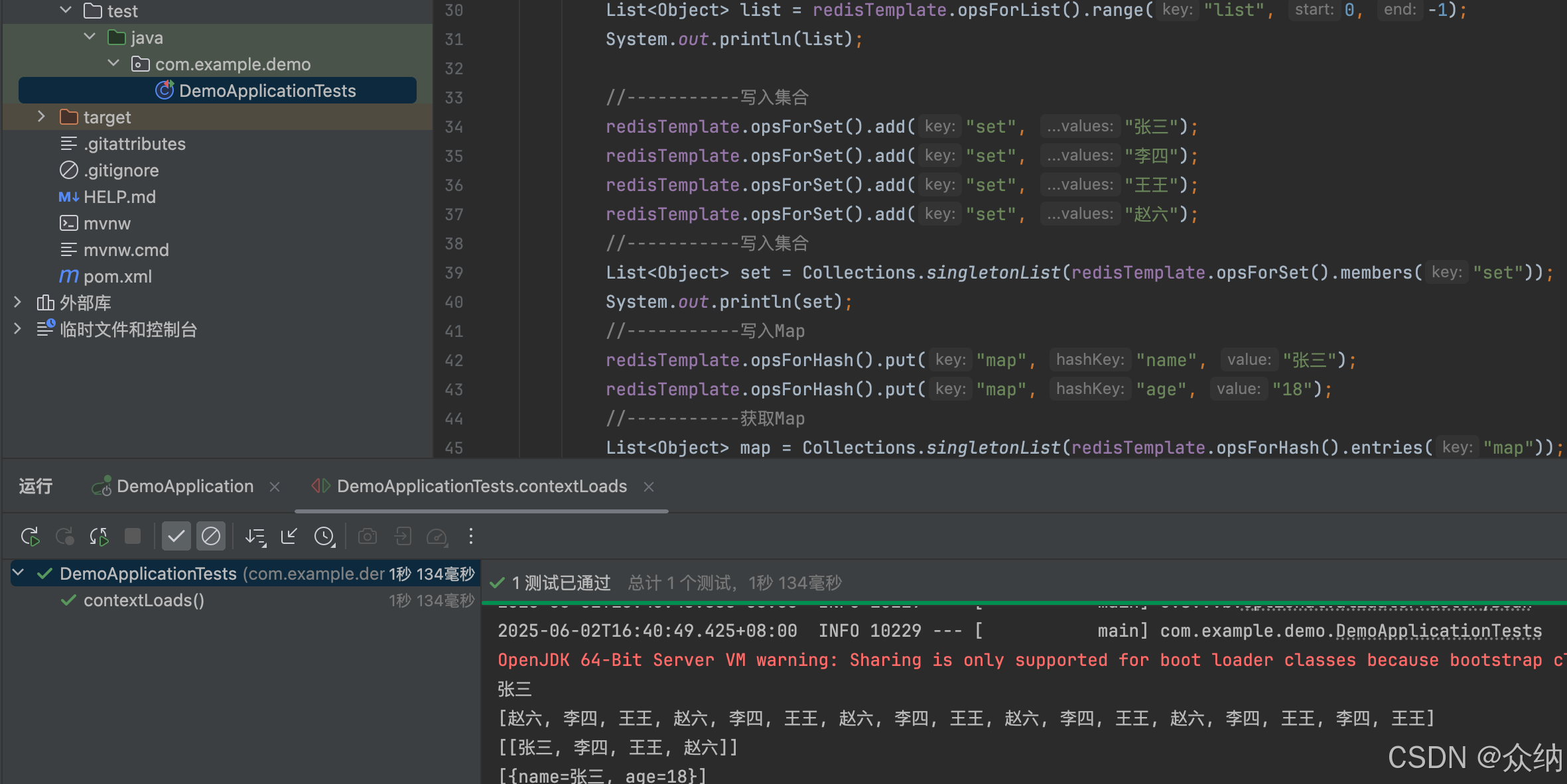
3.测试
java
import org.junit.jupiter.api.Test;
import org.springframework.beans.factory.annotation.Autowired;
import org.springframework.boot.test.context.SpringBootTest;
import org.springframework.data.redis.core.RedisTemplate;
import org.springframework.data.redis.core.types.RedisClientInfo;

import java.util.Collections;
import java.util.List;

@SpringBootTest
class DemoApplicationTests {
    @Autowired
    private RedisTemplate<String, Object> redisTemplate;
    @Autowired
    private RedisService redisService;
    @Test
    void contextLoads() {
        redisTemplate.opsForValue().set("name", "张三");
        String  name = (String) redisTemplate.opsForValue().get("name");
        System.out.println(name);
        //----------写入List
        redisTemplate.opsForList().leftPush("list", "王王");
        redisTemplate.opsForList().leftPush("list", "李四");
        redisTemplate.opsForList().leftPush("list", "赵六");
        //  获取list
        List<Object> list = redisTemplate.opsForList().range("list", 0, -1);
        System.out.println(list);

        //-----------写入集合
        redisTemplate.opsForSet().add("set", "张三");
        redisTemplate.opsForSet().add("set", "李四");
        redisTemplate.opsForSet().add("set", "王王");
        redisTemplate.opsForSet().add("set", "赵六");
        //-----------写入集合
        List<Object> set = Collections.singletonList(redisTemplate.opsForSet().members("set"));
        System.out.println(set);
        //-----------写入Map
        redisTemplate.opsForHash().put("map", "name", "张三");
        redisTemplate.opsForHash().put("map", "age", "18");
        //-----------获取Map
        List<Object> map = Collections.singletonList(redisTemplate.opsForHash().entries("map"));
        System.out.println(map);
    }

    @Test
    void testRedisService() {
        redisService.getStuById(1);
    }

}
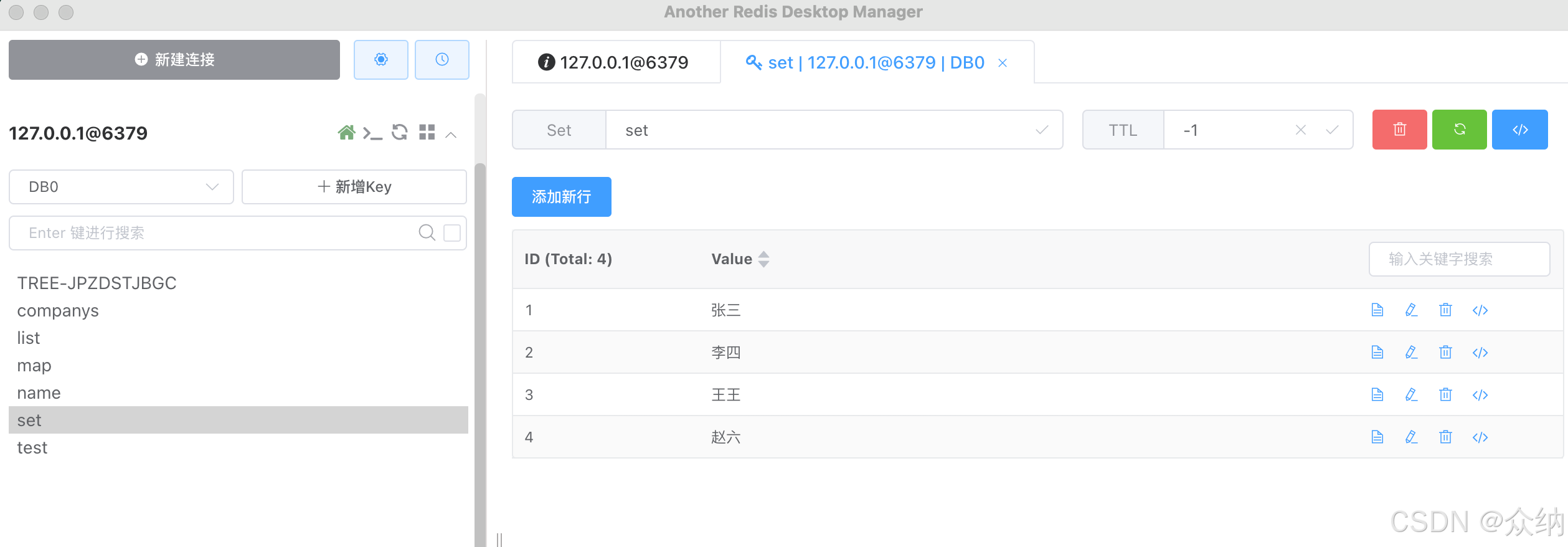
效果